My First Critical Report
The password reset endpoint accepted a client-supplied response indicating success, allowing an attacker to reset any user's password by knowing their mobile number. The attacker could take over any account by intercepting the OTP verification response and modifying it to show success.
 Published on medium.com
Some time ago, i wanted to write my first write-up about bug bounties, but the lack of time (work and family) i never found the moment, but the other day talking with @saamux encouraged me to do it. So let’s go !!!
The full write-up lives on its author's site
It belongs to its author, so we link to it rather than copy it. The other two tabs are our own rewrites, checked against it.
Context
This is a story about a private HackerOne program. The researcher had been browsing one of the program's endpoints, redacted.com, when the URL changed to m.redacted.com, a mobile version of the site that he had not seen before. The mobile endpoint offered account registration, which required a Chinese mobile phone number and an OTP sent by SMS. The password reset feature is the one that mattered: you enter a mobile number, the server sends a 6-digit OTP, and if the OTP is correct you can set a new password.
Setup
The work was done by hand in a browser with Burp capturing traffic. No special tooling beyond Burp, a browser and some SMS-receiving services is described. The precondition for everything that follows was a registered account on m.redacted.com, and registration required a Chinese mobile number, because there was no option to register with an email address.
Finding it
Surfing the mobile site with Burp in the loop, the researcher noticed that there were no tokens to protect against CSRF, which he took as a good sign that the endpoint was worth digging into. He also noticed that certain functions were vulnerable to CSRF, but he wanted something more critical on this endpoint, so he turned to the forgot-password functionality.
Exploitation
Step 1: getting an account
Registration needed a Chinese mobile number to receive an OTP. The researcher tried several websites that hand out numbers from any country for receiving SMS. Many did not work, most did not operate in China, and the ones that did give a Chinese number received only calls, not SMS.

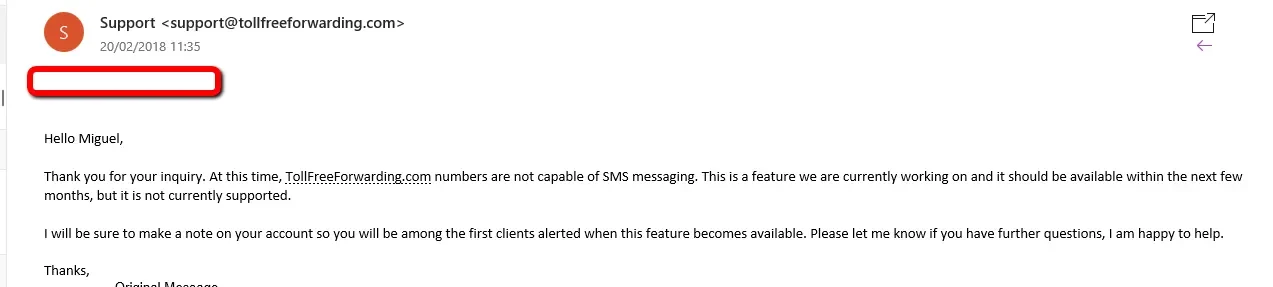
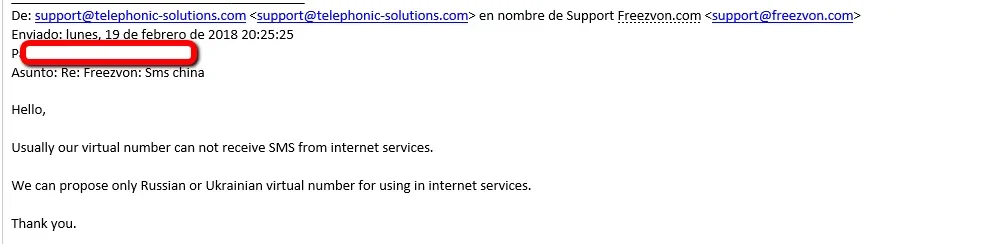
He also tried brute-forcing the OTP to register without a real number, but he did not know the OTP length (normally 4 or 6 digits) and the endpoint did not let him test more than 5 OTPs.
Eventually he found a paid service that gave him a Chinese number able to receive the OTP. The service required you to select which service the number was for, so the OTP would arrive, but the company being tested was not on that list.
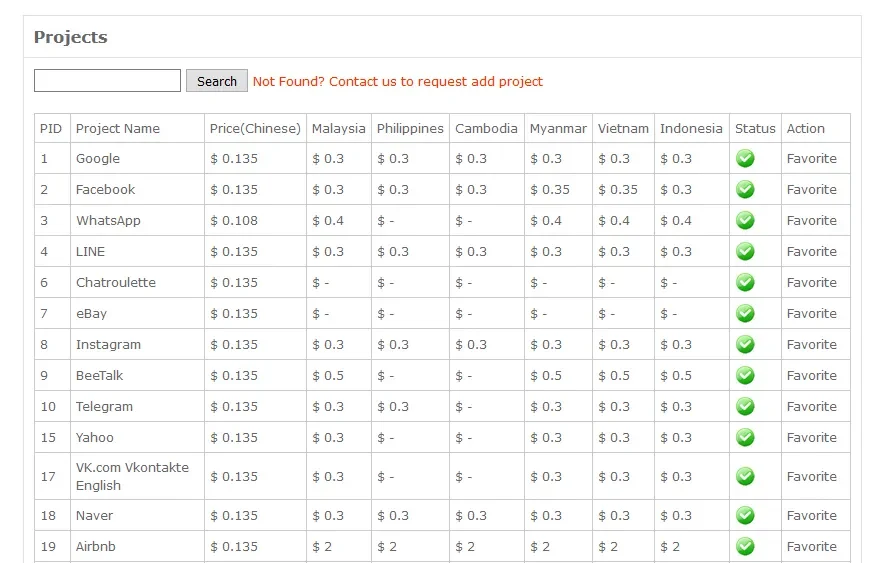
He emailed the program to explain the problem. Days passed with no answer, and then one morning he received an email saying the company had been added.
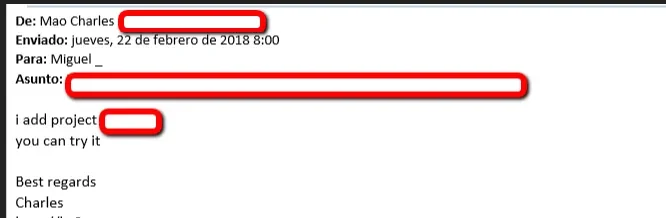
With that, he registered on the site, received the OTP (6 digits) and had an account on m.redacted.com.
Step 2: probing the reset flow
The forgot-password flow takes a mobile number, sends a 6-digit OTP, and lets you change the password if the OTP is correct. The researcher compared the server's response for a correct OTP and an incorrect one. An incorrect OTP produced this message from the server:
\u9a8c\u8bc1\u7801\u65e0\u6548
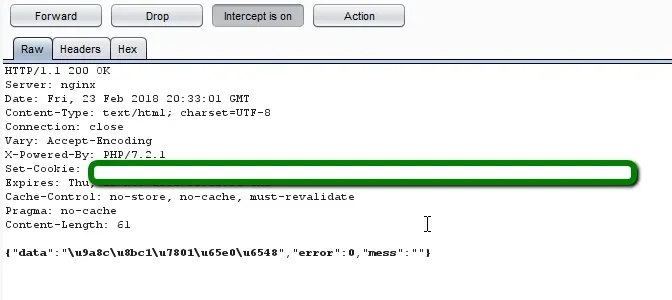
He did not recognise the string, researched it, found that it was Unicode entities, and decoded it with an online tool.
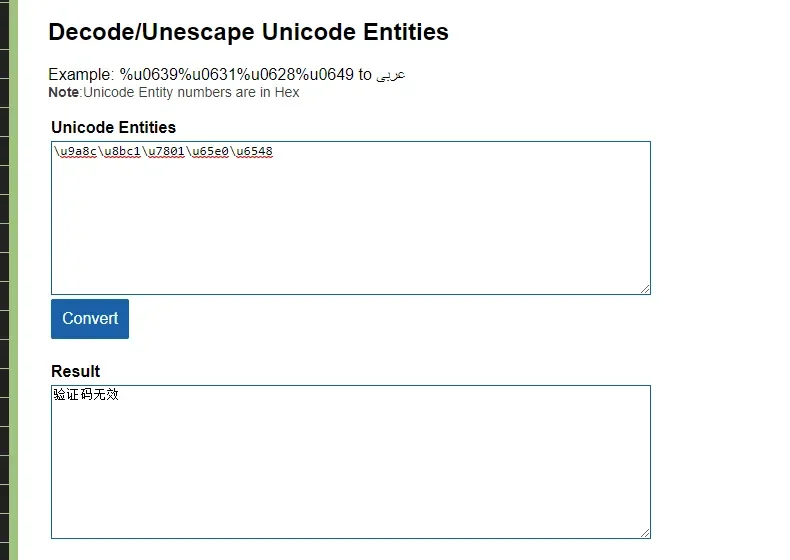
He then put the result through Google Translate, since he does not speak Chinese.
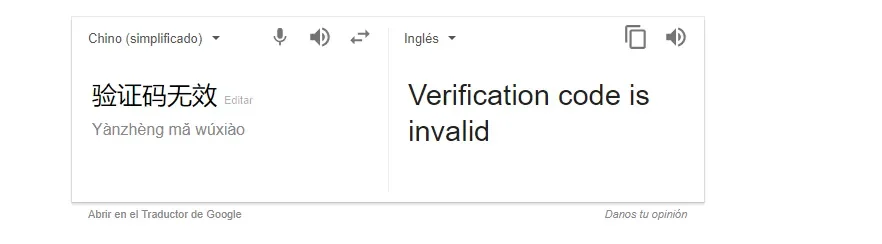
Nothing special or weird there. The interesting question was what happens when the correct OTP is introduced.
Step 3: tampering with the failed response
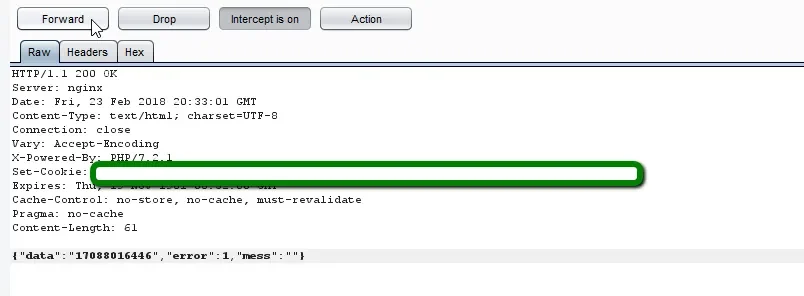
His Chinese mobile number was 17088016446. He ran the password reset again, this time sending the pin 111111, which was not correct, and intercepted the request from the server. When the server sent the request that is failed, he deleted the request and inserted the following data:
{"data":"17088016446","error":1,"mess":""}
With that, he was able to reset the password.
Step 4: doing it to any number
At this point he only needed to know the mobile number to change that user's password. Using the reset functionality and inserting a mobile number, the website told him whether that number existed in the database or not. After that he sent any OTP, intercepted the request from the server, deleted the request and inserted the following data:
{"data":"mobilenumber","error":1,"mess":""}
That gave him a full account takeover.

He reported it immediately, and the program fixed it and rewarded him over the weekend.
Root cause
The failed response could be rewritten to a success value, and the password change then went through. The response the server sends back carries the outcome in the error field, and the client appears to act on that field rather than on a server-side session state. By intercepting the failed response and inserting {"data":"mobilenumber","error":1,"mess":""}, he was able to reset the password. The password reset then succeeded for that number. The report does not show the server-side code, so the exact place where the check was skipped is not stated; .
Impact
Anyone who knew a user's mobile number could take over that account. The reset flow told him whether a given number existed in the database. The researcher describes this as his first full account takeover.
Fix
The program fixed the issue and paid a bounty over the weekend. The report does not describe the change that was made.
Variants to test
- Response rewriting on any OTP or PIN check. Intercept the failed verification response and flip the success field, as here. A positive result is that the client proceeds and the server accepts the next step (password change, login, registration) without a valid code.
- Direct call to the step after verification. Skip the OTP step entirely and send the password-change request yourself. A positive result is a successful password change with no prior valid OTP.
- Account enumeration through the reset form. Submit numbers and compare responses. A positive result is a clear difference between existing and non-existing numbers.
- Brute force limits. Try more than 5 OTP guesses on a number. A positive result is that guesses beyond the limit are still evaluated.
- CSRF on state-changing functions. With no tokens present, as observed here, try cross-site requests against the reset and profile functions. A positive result is that the action completes without a token.
What happened, in plain words
A security researcher found a way to take over any user account on a company's mobile website. The site let people register and reset their password using a Chinese mobile phone number: you typed your number, the site sent you a short code by text message, and if you typed the code back correctly you could set a new password.
The researcher found that by editing the server's failed reply, he could get the password reset to succeed. Using Burp, he intercepted the failed reply, deleted it and inserted {"data":"mobilenumber","error":1,"mess":""}, and the password reset succeeded for any number he knew. That is a full account takeover: someone else's account, under his control.
He reported it, the company fixed it, and he was paid a bounty over the weekend. This article walks through the whole story from the beginning, assuming you have never done security testing before.
Some background first
Before the steps, a few ideas that come up again and again.
- A website is a set of pages your browser loads from a server. Some pages are just text and pictures; others, like a login form, send your input back to the server.
- An endpoint is a specific address on a server that does one job. Think of a large office building: the street address is the website, and each endpoint is a particular desk you can walk up to, such as "registration desk" or "password reset desk". In this story the main endpoint was
m.redacted.com, the mobile version of the site. The researcher had been looking atredacted.comand noticed the address changed tom.redacted.com, which he had not seen before. - An API is the set of desks a program can talk to without a human clicking. When your browser submits a form, it is really sending a small message to one of these desks and getting a small message back, often in a format called JSON, which looks like
{"name":"value"}. JSON is just labelled data: a label in quotes, a colon, then the value. - An OTP (one-time password) is a short code, usually a few digits, that is valid once and for a short time. It is the code you get by text message when a site wants to check that the phone really belongs to you. Here it was 6 digits.
- Burp (Burp Suite) is a program that sits between your browser and the internet and lets you read, pause and edit the messages going each way. Imagine a postal worker who opens every letter you send and every reply you get, and lets you rewrite them before they are delivered. That is what an intercepting proxy does.
- CSRF (Cross-Site Request Forgery) is a trick where a malicious website makes your browser send a request to another site where you are already logged in, without you meaning to. Sites defend against it with a CSRF token: a secret random value that the page includes with each form, so a request coming from somewhere else will not have the right value. A token is like a cloakroom ticket: only the person holding the matching ticket gets the coat back.
- Account takeover means getting control of someone else's account, usually by changing their password or session so you can log in as them.
The setting
This happened on a private program on HackerOne, a platform where companies invite researchers to test their systems and pay for good findings. A private program means only invited researchers can take part.
It was a Friday and the researcher was about to take a nap after a hard day of work. Before that he picked up his phone and started browsing one of the program's endpoints, redacted.com. Suddenly the address changed to m.redacted.com, the mobile version of the site. He had not seen that endpoint before, so he started to look around.
Step 1: getting an account
He surfed the mobile site with Burp capturing the traffic. The first thing he noticed was that there were no tokens to protect against CSRF attacks, which he took as a good sign that the endpoint was worth digging into. In plain terms: the forms did not carry the secret cloakroom ticket described above, so the site was not checking where requests came from. That alone is a weakness, but he wanted something more serious on this endpoint.
His next step was to create an account, and that is where the first problem appeared: registration required a Chinese mobile phone number, and there was no option to register with an email address.
To register you had to enter a Chinese mobile number, and the site would send an OTP by SMS to that number. Only then could you finish registering. So the researcher needed a Chinese phone number that could receive text messages, and he did not have one.
He tried several websites that lend you a phone number from any country so you can receive SMS. Many did not work, most did not operate in China, and the ones that did give a Chinese number received only calls, not text messages. That was the second problem.
He spent some days looking for a service that could do this. He had a feeling he could find something in that endpoint, but he could not verify it without an account.
He also tried a brute-force attack: guessing the OTP over and over to register without a real number. Brute force means trying every possibility in turn, like spinning the dial on a combination lock one number at a time. He did not know the length of the OTP (normally it is 4 or 6 digits), and the endpoint did not let him test more than 5 OTPs, so guessing was not going to work.
Eventually he found a payment page that gave you a Chinese phone number able to receive the OTP. You had to select which service you wanted the number for, so the OTP would arrive, but the company being tested was not on that list.
So he sent the program an email explaining the problem. Days passed with no answer, and then one morning he received an email saying the company had been added.
With that, he registered on the site, received the OTP (6 digits long), and finally had an account on m.redacted.com.
Step 2: looking at the password reset
The first thing he noticed on the site was that certain functions were vulnerable to CSRF, but his idea was to find something more critical on this endpoint. The first thing that came to mind was the forgot-password feature. You enter your mobile number, the server sends you a 6-digit OTP, and if the OTP is correct you can change the password.
So he checked whether there was any difference between sending a correct OTP and an incorrect one. When he sent an incorrect OTP, the server replied with this message:
\u9a8c\u8bc1\u7801\u65e0\u6548
Line by line, this is a single string of text. The parts starting with \u are Unicode entities: a way of writing a character that a plain keyboard cannot type by giving its numeric code. \u9a8c is one character, \u8bc1 is another, and so on. The server was sending a message in Chinese, encoded this way, instead of readable text.
He did not recognise the string, so he researched it, found that it was Unicode entities, and decoded it with an online tool.
Next he put the result through Google Translate, since he does not speak Chinese.
The decoded message said, in effect, that the verification code was invalid. Nothing special or weird there: a wrong code gets a wrong-code message. The interesting question was what happens when the correct OTP is entered.
Step 3: editing the failed reply
His Chinese mobile number was 17088016446. He ran the password reset again, this time sending the pin 111111, which was not the right code, and intercepted the request from the server. When the server sent back the reply saying the check had failed, he deleted that reply and inserted the following data instead:
{"data":"17088016446","error":1,"mess":""}
Line by line:
- The whole line is one JSON object, wrapped in curly braces.
"data":"17088016446"is a label calleddatawhose value is his mobile number, in quotes because it is text."error":1is a label callederrorset to the number 1. In this reply, 1 apparently meant "no error", that is, success."mess":""is a label calledmess(short for message) with an empty value, so no message at all.
With that edited reply in place, he was able to reset the password.
Step 4: doing it to any number
At this point he only needed to know a mobile number to change that user's password. Using the reset feature and entering a mobile number, the website told him whether that number existed in the database or not. The site told him whether that number existed in the database or not.
After that, he sent any OTP, intercepted the reply from the server, deleted it, and inserted the following data:
{"data":"mobilenumber","error":1,"mess":""}
This is the same object as before, with the label data now holding the placeholder mobilenumber where the target's number goes. Same trick, any victim: the reply is replaced with the success value and the password reset succeeds.
That gave him a full account takeover. He had found his first one.
He reported it immediately, and the program fixed it and rewarded him over the weekend.
Why it worked
The failed reply could be rewritten to a success value, and the password change then went through. The server's reply carries the outcome in the error field, and the page appears to act on that field rather than on something the server remembers about the session. By intercepting the failed reply and inserting {"data":"mobilenumber","error":1,"mess":""}, he was able to reset the password. The password reset then succeeded for that number.
The report does not show the server-side code, so the exact place where the check was skipped is not stated.
A useful comparison: a bouncer at a club who asks the queue "did you already show your ID?" and lets anyone in who says yes, without checking the stamp on their hand. The stamp is the server-side record; the reply the browser edits is just the person saying yes.
Who was affected
Anyone who knew a user's mobile number could take over that account. The reset flow told him whether a given number existed in the database. The researcher describes this as his first full account takeover.
The fix
The program fixed the issue and paid a bounty over the weekend. The report does not describe the change that was made.
Things worth trying on a similar feature
If you ever test a login, registration or password reset, these are the checks to run. Each one is a question with a clear "yes, it is broken" answer.
- Rewrite the reply to any OTP or PIN check. Intercept the failed verification reply and flip the success field, as here. It is broken if the page proceeds and the server accepts the next step (password change, login, registration) without a valid code.
- Call the step after verification directly. Skip the OTP step entirely and send the password-change request yourself. It is broken if the password changes with no prior valid OTP.
- Account enumeration through the reset form. Submit numbers and compare the replies. It is broken if there is a clear difference between existing and non-existing numbers.
- Brute-force limits. Try more than 5 OTP guesses on a number. It is broken if guesses beyond the limit are still evaluated.
- CSRF on state-changing functions. With no tokens present, as observed here, try cross-site requests against the reset and profile functions. It is broken if the action completes without a token.
Glossary
- Account takeover: getting control of someone else's account, usually by changing their password or session so you can log in as them.
- API: the set of addresses a program can talk to without a human clicking, exchanging small messages with the server.
- Brute force: trying every possible value in turn until one works, like spinning a combination lock one number at a time.
- Burp (Burp Suite): a program that sits between your browser and the internet and lets you read, pause and edit the messages going each way.
- CSRF (Cross-Site Request Forgery): a trick where a malicious site makes your browser send a request to another site where you are logged in, without you meaning to.
- CSRF token: a secret random value a page includes with each form so that requests coming from elsewhere do not have the right value.
- Endpoint: a specific address on a server that does one job, such as registration or password reset.
- Enumeration: learning which accounts or numbers exist by comparing the replies the server gives.
- JSON: a text format for labelled data, written as
{"label":"value"}. - OTP (one-time password): a short code, valid once and for a short time, often sent by SMS to prove you hold the phone.
- Rate limiting: a server rule that caps how many attempts you can make in a period, such as 5 OTP guesses.
- Session: the server's memory of who you are across several requests, usually kept alive by a cookie or token in your browser.
- Unicode entities: a way of writing characters by their numeric code, such as
\u9a8c, used when a plain keyboard cannot type them.



