My first CSRF to account takeover
The site's forms for saving addresses, placing orders and changing the account email lacked CSRF protection, so a page hosted by an attacker could submit those actions as a logged-in victim. By changing the victim's email to one the attacker controlled, the attacker could take over the account.
 Published on medium.com
Before I start. I want to take a moment to all who helped me learn Web Application Security and Bug Bounty Hunting! :)
The full write-up lives on its author's site
It belongs to its author, so we link to it rather than copy it. The other two tabs are our own rewrites, checked against it.
Context
The target was a private, invite-only programme that the researcher had joined around six months before writing this up. To protect the programme's privacy he calls it "example.com" throughout. The product is a website for ordering public transport: buying tickets and passes, and storing user information such as card details, home address and work address.
The feature that mattered here is the profile and ordering flow. A logged-in user can save address information and place an order, and the application accepts those state-changing actions from a normal browser session.
Setup
- Two accounts were created: one for the attacker and one for the victim. The researcher names them "[redacted]" and "[redacted]".
- Both accounts were filled in with details.
- Burp Suite was used as an intercepting proxy, with Intercept switched on to capture the save request.
- The victim account was logged in using the Chrome browser.
- The CSRF proof of concept was generated with Burp Suite and saved as an HTML page.
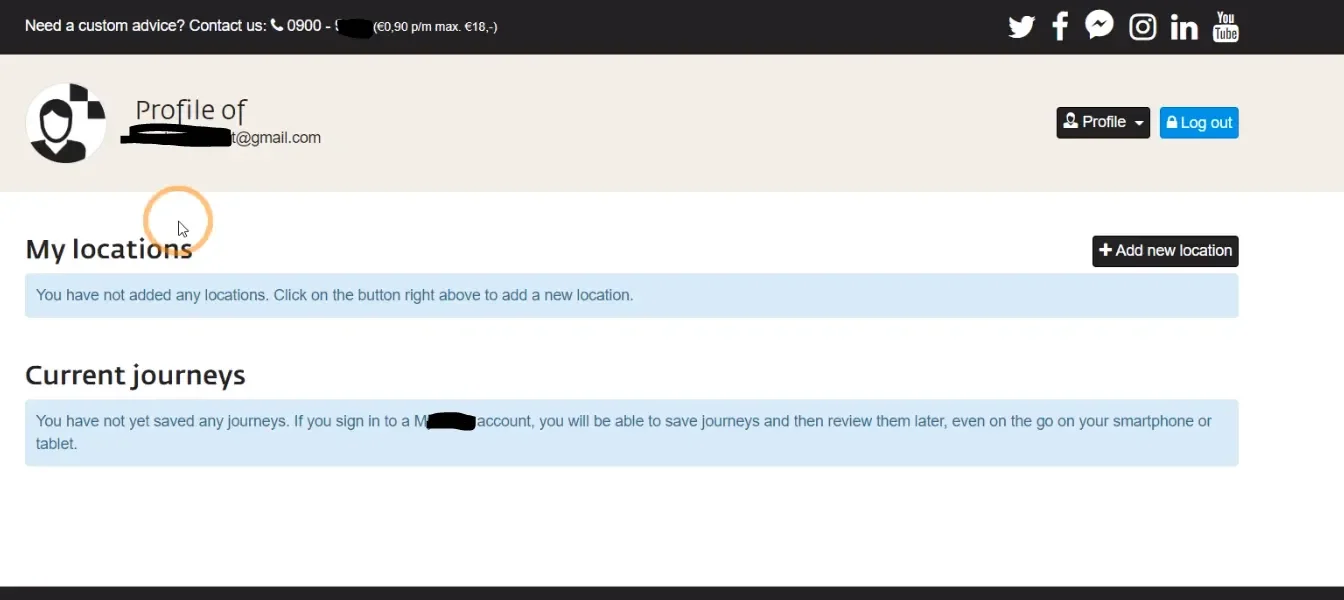
The screenshot shows the attacker account, "[redacted]", used for the test.
Finding it
The researcher tested for CSRF by creating two accounts, one for the attacker and one for the victim. The reasoning was simple: the profile and order actions change server-side state, and if those requests carried no protection that the attacker could not forge, a page hosted elsewhere could trigger them on behalf of a logged-in user.
Exploitation
Step 1: Capture the state-changing request
With Intercept on, the researcher added a work address and made an order from the attacker's account, then clicked the "save" button. The captured request is shown in the report as an image rather than as text.
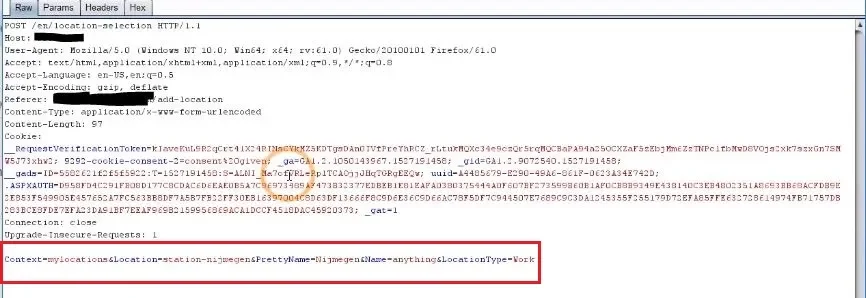
The screenshot shows the Burp request captured when the save button was clicked. The report does not reproduce the request as text, so the exact endpoint, parameters and headers are not available here.
Step 2: Generate the CSRF PoC
Burp Suite's CSRF PoC generator was used on that captured request, and the output was saved as an HTML page. The report does not include the generated HTML.
Step 3: Deliver it to the victim
The HTML page was sent to the victim account, which was logged in through Chrome. The researcher opened the HTML page in a new tab of the same Chrome browser and then refreshed the page where the victim was already logged in.
The result: the victim's work address was changed to "bla....bla....bla" and a new order was made on behalf of the victim. Because no card details had been added to either account, the order was eligible for on-spot payment.
Step 4: Escalate from forged order to account takeover
The researcher reasoned that if an attacker can place an order on behalf of the victim, the same weakness might allow taking over the victim's account. The escalation used the email change on the settings page:
- Go to the settings page of the attacker's account.
- Enter a temporary email address obtained from temp-mail.org.
- Capture the request in Burp without making any changes, by re-saving the same information.
- Save the CSRF PoC from that request and send it to the victim.
- Open the page in the victim's browser.
As soon as the page was opened in the victim's browser, the account email changed from "[redacted]" to the temporary email address. The account email was changed to the temporary address, which the researcher describes as an account takeover.
Root cause
The report does not show the request or the server-side code, so the precise defect is not documented. What the behaviour demonstrates is that the profile save and order actions, and separately the email change on the settings page, accepted a cross-site request that carried the victim's session and performed the change. In other words, the state-changing endpoints lacked a defence that a third-party page cannot forge, such as a per-session or per-request anti-CSRF token validated on the server, or an equivalent check on Origin or Referer. The email change was the step the researcher describes as the account takeover.
Why existing defences did not stop it is not stated in the report. Likely candidates are that no token was issued for these forms, or that the token was present but not validated server-side. The report gives no evidence either way.
Impact
An attacker who can get a logged-in victim to load a crafted page can, under the conditions tested here:
- change the victim's stored work address;
- place an order on the victim's behalf, which in this setup was eligible for on-spot payment because no card details were stored;
- change the victim's account email address to one the attacker controls, which the researcher describes as account takeover.
The victim must be logged in and must open the attacker's page in the same browser. The report does not describe any interaction beyond loading the page.
The programme took almost three months to respond and paid $750 in the following month. The researcher notes that this felt low for an account takeover.
Fix
Based on the behaviour, the fix belongs on the server side of every state-changing endpoint: require and validate an anti-CSRF token tied to the user's session, and reject requests whose Origin or Referer does not match the application. The email change in particular should require the current password or a confirmation step sent to the existing address before the new address takes effect.
Variants to test
- Email change forms. Capture the request that changes the account email and replay it from a page on another origin while logged in. A positive result is the account email changing without any token check.
- Address and profile saves. Do the same for stored address fields. A positive result is the saved value changing in the victim's profile after the page loads.
- Order placement. Replay the order creation request cross-site. A positive result is a new order appearing in the victim's account.
- Token present but unvalidated. If a token appears in the request, remove it or replace it with a value from another session and resend. A positive result is the server accepting the request anyway.
- Method and content-type variations. Try the same action as a simple form POST and as other content types the endpoint accepts. A positive result is any variant that the browser sends cross-origin without a preflight and the server processes.
- Chained recovery. After any successful email change, walk the password reset flow to confirm the takeover is complete end to end.
What happened, in plain words
A security researcher found a way to trick a website into doing things on a logged-in user's behalf without that user's permission. The website was for ordering public transport tickets and passes, and it stored personal details like addresses and card information. The researcher found that if a victim visited a specially crafted page while logged in, the attacker could change the victim's work address, place an order for them, and even change the victim's email address, which he describes as account takeover. The programme paid $750 for the report.
This write-up explains the whole process from scratch, so you can follow along even if you have never done security testing before.
Background and setup
The target was a private, invite-only bug bounty programme that the researcher had joined about six months earlier. To protect the programme's privacy, he calls it "example.com" throughout. The product is a website for ordering public transport: buying tickets and passes, and storing user information such as card details, home address and work address.
The feature that mattered here is the profile and ordering flow. A logged-in user can save address information and place an order, and the application accepts those state-changing actions from a normal browser session.
To test for CSRF, the researcher created two accounts: one for the attacker and one for the victim. He names them "[redacted]" and "[redacted]".
The screenshot shows the attacker account, "[redacted]", used for the test.
He filled in details for both accounts, then started making changes like adding a work address and placing an order from the attacker's account. He used Burp Suite, a tool that lets you intercept and modify web traffic, with Intercept switched on to capture the save request. The victim account was logged in using the Chrome browser. The CSRF proof of concept was generated with Burp Suite and saved as an HTML page.
Finding it
The researcher tested for CSRF by creating two accounts, one for the attacker and one for the victim. The reasoning was simple: the profile and order actions change server-side state, and if those requests carried no protection that an attacker could not forge, a page hosted elsewhere could trigger them on behalf of a logged-in user.
Exploitation
Step 1: Capture the state-changing request
With Intercept on, the researcher added a work address and made an order from the attacker's account, then clicked the "save" button. The captured request is shown in the report as an image rather than as text.
The screenshot shows the Burp request captured when the save button was clicked. The report does not reproduce the request as text, so the exact endpoint, parameters and headers are not available here.
Step 2: Generate the CSRF PoC
Burp Suite's CSRF PoC generator was used on that captured request, and the output was saved as an HTML page. The report does not include the generated HTML.
Step 3: Deliver it to the victim
The HTML page was sent to the victim account, which was logged in through Chrome. The researcher opened the HTML page in a new tab of the same Chrome browser and then refreshed the page where the victim was already logged in.
The result: the victim's work address was changed to "bla....bla....bla" and a new order was made on behalf of the victim. Because no card details had been added to either account, the order was eligible for on-spot payment.
Step 4: Escalate from forged order to account takeover
The researcher reasoned that if an attacker can place an order on behalf of the victim, the same weakness might allow taking over the victim's account. The escalation used the email change on the settings page:
- Go to the settings page of the attacker's account.
- Enter a temporary email address obtained from temp-mail.org.
- Capture the request in Burp without making any changes, by re-saving the same information.
- Save the CSRF PoC from that request and send it to the victim.
- Open the page in the victim's browser.
As soon as the page was opened in the victim's browser, the account email changed from "[redacted]" to the temporary email address. The account email was changed to the temporary address, which the researcher describes as an account takeover.
Root cause
The report does not show the request or the server-side code, so the precise defect is not documented. What the behaviour demonstrates is that the profile save and order actions, and separately the email change on the settings page, accepted a cross-site request that carried the victim's session and performed the change. In other words, the state-changing endpoints lacked a defence that a third-party page cannot forge, such as a per-session or per-request anti-CSRF token validated on the server, or an equivalent check on Origin or Referer. The email change was the step the researcher describes as the account takeover.
Why existing defences did not stop it is not stated in the report. Likely candidates are that no token was issued for these forms, or that the token was present but not validated server-side. The report gives no evidence either way.
Impact
An attacker who can get a logged-in victim to load a crafted page can, under the conditions tested here:
- change the victim's stored work address;
- place an order on the victim's behalf, which in this setup was eligible for on-spot payment because no card details were stored;
- change the victim's account email address to one the attacker controls, which the researcher describes as account takeover.
The victim must be logged in and must open the attacker's page in the same browser. The report does not describe any interaction beyond loading the page.
The programme took almost three months to respond and paid $750 in the following month. The researcher notes that this felt low for an account takeover.
Fix
Based on the behaviour, the fix belongs on the server side of every state-changing endpoint: require and validate an anti-CSRF token tied to the user's session, and reject requests whose Origin or Referer does not match the application. The email change in particular should require the current password or a confirmation step sent to the existing address before the new address takes effect.
Variants to test
- Email change forms. Capture the request that changes the account email and replay it from a page on another origin while logged in. A positive result is the account email changing without any token check.
- Address and profile saves. Do the same for stored address fields. A positive result is the saved value changing in the victim's profile after the page loads.
- Order placement. Replay the order creation request cross-site. A positive result is a new order appearing in the victim's account.
- Token present but unvalidated. If a token appears in the request, remove it or replace it with a value from another session and resend. A positive result is the server accepting the request anyway.
- Method and content-type variations. Try the same action as a simple form POST and as other content types the endpoint accepts. A positive result is any variant that the browser sends cross-origin without a preflight and the server processes.
- Chained recovery. After any successful email change, walk the password reset flow to confirm the takeover is complete end to end.
Glossary
- API: Application Programming Interface; a set of rules that lets different software talk to each other. In a website, the API is the part of the server that receives requests and sends back data.
- Cookie: A small piece of data stored by your browser on behalf of a website. It often holds a session identifier so the site knows who you are between page loads.
- Token: A value (often a random string) used to prove identity or authorise an action. In CSRF defences, an anti-CSRF token is a secret value that the attacker cannot guess.
- CSRF (Cross-Site Request Forgery): An attack that tricks a logged-in user's browser into sending a request to a website where the user is authenticated, without the user's intent. The website thinks the request came from the user because the browser automatically includes credentials like cookies.
- Account takeover: Gaining unauthorised access to someone else's account, often by changing their email or password.
- Burp Suite: A tool used by security testers to intercept, inspect and modify HTTP traffic between a browser and a server.
- Intercept: A feature in Burp Suite that pauses requests so you can view and edit them before they reach the server.
- Proof of Concept (PoC): A demonstration that a vulnerability exists, often a small piece of code or a set of steps that reliably triggers the issue.
- HTML page: A file written in HyperText Markup Language, the standard language for creating web pages. In this context, it is a page that contains a form or script that automatically sends a request when loaded.
- Endpoint: A specific URL or URI where an API or web application receives requests.
- Origin: The combination of protocol, domain and port that identifies where a web page came from. Browsers use it to enforce security policies.
- Referer: An HTTP header that tells the server the URL of the page from which the request was made.
- Anti-CSRF token: A unique, unpredictable value generated by the server and included in forms or requests. The server checks it to ensure the request came from the legitimate site, not an attacker's page.
- Session: A period of interaction between a user and a website, typically identified by a session cookie. The server uses it to remember the user's logged-in state.
- State-changing action: Any action that modifies data on the server, such as saving a profile, placing an order, or changing an email address.
- Preflight: An automatic request that browsers send before certain cross-origin requests to check if the server allows them. Simple requests (like form submissions) do not trigger a preflight.
- Content-type: An HTTP header that indicates the media type of the request body, such as
application/x-www-form-urlencodedorapplication/json. - POST: An HTTP method used to send data to a server to create or update a resource.
- Origin check: A server-side validation that compares the
Originheader of a request with the expected origin to block cross-site requests. - Referer check: A server-side validation that compares the
Refererheader with the expected origin to block cross-site requests. - Temp-mail.org: A service that provides temporary, disposable email addresses.
- Account recovery flow: The process a website uses to help a user regain access to their account, often by sending a password reset link to the registered email address.

