My First CVE: A CSRF Vulnerability in Horilla HRMS (CVE-2026-86066)
The attendance-approval endpoint in Horilla HRMS changed database state when reached by a plain HTTP GET and had no anti-CSRF token check. An attacker could make a logged-in manager's browser open a crafted page and silently approve a pending attendance request in the victim's name.
 Published on medium.com
Csrf
The full write-up lives on its author's site
It belongs to its author, so we link to it rather than copy it. The other two tabs are our own rewrites, checked against it.
Context
Horilla is an open-source Human Resource Management System (HRMS) with modules for employees, attendance, leave, payroll and recruitment, designed to be self-hosted. The bug described here lives in the attendance-approval workflow: a manager reviews an employee's pending attendance request in the Not verified tab and approves it, which validates the record and clears the pending flags.
The affected endpoint is approve_validate_attendance_request. It was assigned CVE-2026-86066, tracked as GHSA-65vj-5p5g-pv5m, classified as CWE-352 (Cross-Site Request Forgery), and fixed in version 2.0.0.
Setup
The proof of concept needs two things: a target attendance record ID and a logged-in manager who can be lured into opening a page. The manager account must hold the attendance.change_attendance permission, which the view enforces through @manager_can_enter("attendance.change_attendance"). The proof of concept calls for intercepting the approval request, for example in Burp, to read the numeric attendance ID. No other tooling, version or configuration is described.
Finding it
The endpoint is decorated with @login_required and @manager_can_enter("attendance.change_attendance"), but nothing else:
@login_required@manager_can_enter("attendance.change_attendance")def approve_validate_attendance_request(request, attendance_id): ...
Two things are notably absent. There is no @require_http_methods(["POST"]), so the endpoint responds to GET, and there is no anti-CSRF token validation. Despite being served over GET, the view mutates persistent state as soon as it is reached: it sets attendance_validated = True, sets is_validate_request_approved = True, clears the pending-request flags, records approved_by = request.user.employee_get, and commits with attendance.save().
The application itself calls the endpoint through a plain hyperlink in individual_view.html:
<a href="{% url 'approve-validate-attendance-request' attendance.id %}">
That confirms a simple GET navigation is all it takes to approve a request. The endpoint trusts the HTTP method to imply safety while using it to mutate data.
Exploitation
Step 1: Identify a pending request
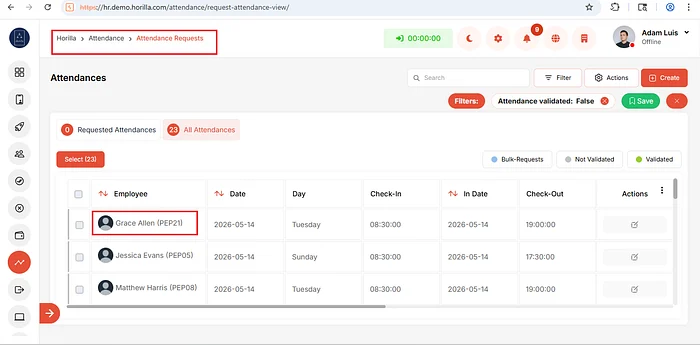
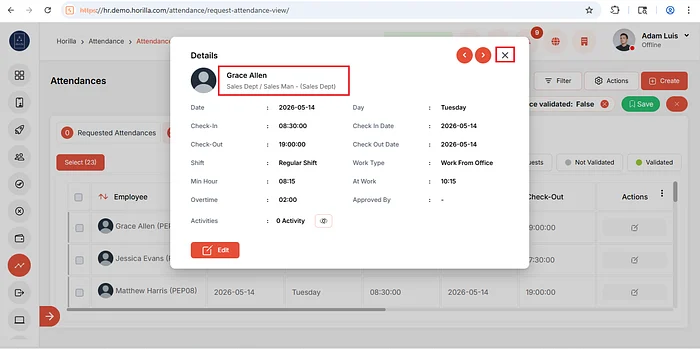
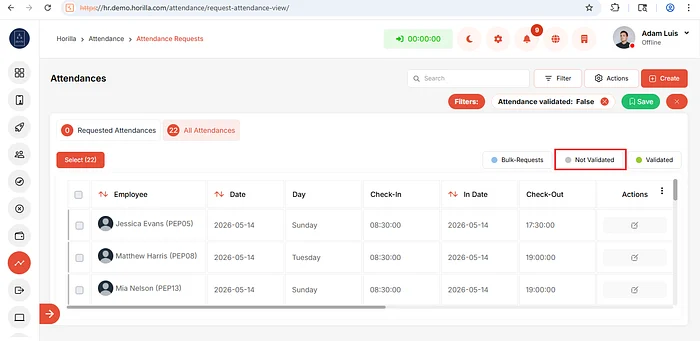
Log in as a manager, open Attendance Requests, go to the Not verified tab, and select an employee's pending request.
Step 2: Capture the record ID
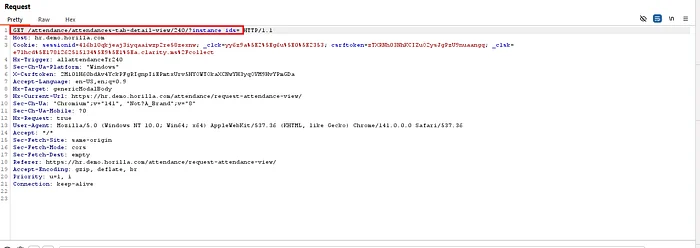
Intercept the request (for example, in Burp) and note the numeric attendance ID used by the approval endpoint.
Step 3: Craft the CSRF payload
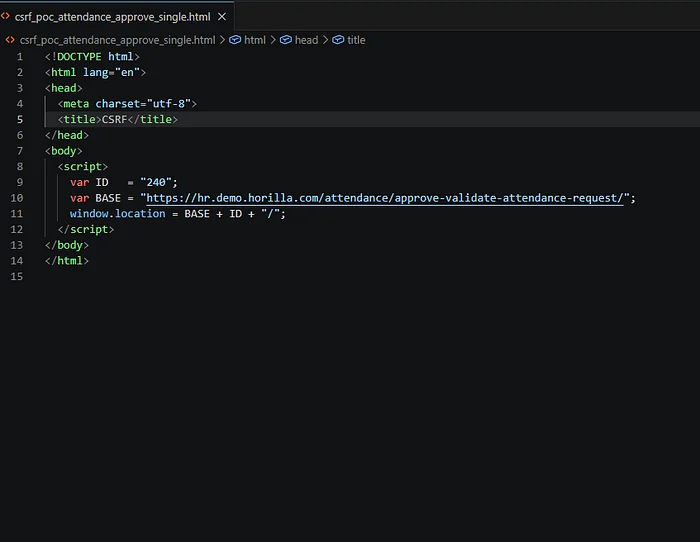
A minimal HTML page that performs a top-level navigation to the endpoint is enough. The report shows the payload only as an image, so the exact markup is not reproduced here.
Step 4: Trigger it
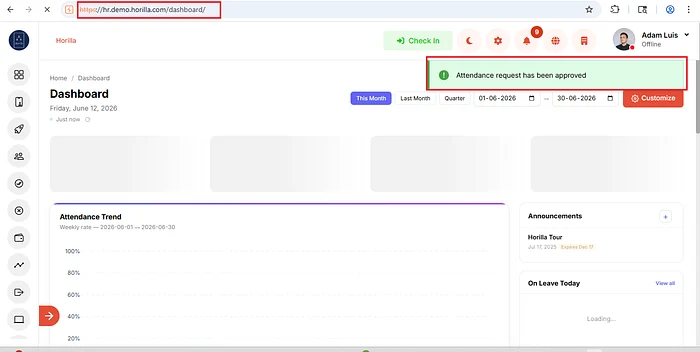
Open the file in a browser where a manager is authenticated. The tab navigates to Horilla, the request is silently approved, and the dashboard surfaces a confirmation that the attendance request was approved.
Step 5: Confirm the result
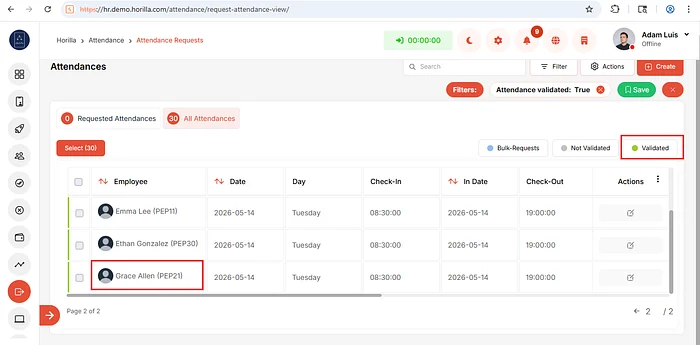
The record disappears from the Not Verified tab and now appears under Verified, approved in the victim's name, with no interaction beyond opening the page.
In a real attack the HTML would be hosted on an attacker-controlled site or delivered through a link, so the victim never sees a file at all, only a page that appears to do nothing.
Root cause
The action is reachable by GET. Because the state change happens on a method treated as safe, Django's CSRF middleware never runs. There is nothing to bypass, because the check does not apply.
No token is required. An attacker does not need to leak or predict any secret; the only ingredient is the target attendance record's ID.
SameSite=Lax does not prevent this. Modern browsers default session cookies to SameSite=Lax, which blocks cookies on many cross-site requests, but makes an exception for top-level navigations using safe methods. A forged GET that navigates the whole tab, for example window.location = ..., is precisely that exception. The session cookie is attached automatically, so the forged request arrives fully authenticated.
The result is a zero-click attack beyond the victim opening the attacker's page. Any malicious site, email link or embedded resource that triggers a top-level navigation to the endpoint will silently approve the request. Because the server sees the victim's session, the approval is committed with the victim's privileges and attributed to them.
Impact
Attendance data does not stay in the attendance module, so the consequences go further than a cosmetic workflow bug.
- Payroll and overtime integrity: attendance and time records feed payroll and overtime calculations. Fraudulent or erroneous attendance can be force-approved without the responsible manager's intent, and at scale simply by luring managers to a link, turning an approval control into a rubber stamp.
- Audit-trail corruption: every forged approval is recorded as
approved_by = <victim>. The person who never intended to approve anything is the one the system blames, undermining the audit trail exactly when it matters most, such as during a payroll dispute or an investigation.
The vulnerability requires a manager-level victim, someone with the attendance.change_attendance permission, but that is a low bar in practice: managers are precisely the people who routinely click links about their team.
Fix
The report states that the vulnerability is fixed in version 2.0.0 and does not describe the patch itself. The report does not describe the patch. The obvious remedy is to stop performing the state change on GET: require POST and validate an anti-CSRF token on that request.
Variants to test
- Other GET endpoints that write state. Look for views that mutate records without
@require_http_methods(["POST"])and without CSRF token validation. A positive result is a GET request that changes data, confirmed by re-reading the record afterwards. - Approval and status-change links. Search templates for hyperlinks pointing at actions such as approve, validate, verify or reject. A positive result is an
<a href>that, when followed, commits the action. - SameSite=Lax bypass via top-level navigation. For any state-changing GET, load a page that sets
window.locationto the target while authenticated. A positive result is the action being applied with the victim's session and attributed to the victim. - Permission-gated actions reachable by link. Check whether actions behind role checks such as
manager_can_entercan be triggered by a manager simply opening a page. A positive result is a privileged state change with no interaction beyond the navigation. - Audit attribution. After a forged request, inspect who is recorded as the approver. A positive result is the victim's identity in the audit trail for an action they never took.
What happened, in plain words
Horilla is a free, open-source Human Resource Management System (HRMS). An HRMS is software a company uses to keep track of its people: who works there, when they clocked in, when they took leave, what they are paid, and who is being hired. Horilla covers all of those areas in separate modules, and a company can install it on its own servers rather than paying a hosted service.
One of those modules handles attendance. Employees have attendance requests, and a manager reviews them. In Horilla the manager opens an Attendance Requests screen, looks at a tab called Not verified, and approves the ones that look right.
Anjana Manoj found a flaw in that approval step. The approval could be triggered by simply making a browser visit to a particular web address, with no button press and no confirmation. If a logged-in manager opened a page controlled by an attacker, that page could quietly make the manager's browser send the approval request. The server would see the manager's login, approve the record, and write the manager's name next to the approval as if they had done it on purpose.
This kind of flaw is called Cross-Site Request Forgery, or CSRF. The bug was given the identifier CVE-2026-86066, tracked publicly as GHSA-65vj-5p5g-pv5m, classified as CWE-352 (the catalogue entry for CSRF), and fixed in Horilla version 2.0.0.
A quick primer on CSRF
To understand the bug you need three ideas: cookies, HTTP methods, and what a browser does automatically.
Cookies. When you log in to a website, the server sends your browser a small piece of data called a session cookie. The browser stores it and attaches it to every later request it sends to that same website. That cookie is how the site recognises you on the next page: it is effectively your proof that you already logged in. You never see it, and you never type it.
HTTP methods. Every request a browser makes has a method, a word that says what kind of action is wanted. GET means "give me this page or this data". POST means "here is some data, do something with it". PUT, PATCH and DELETE are used for updating and removing things. By long convention, GET is supposed to be read-only: asking for a page should never change anything on the server.
The automatic part. Because the browser attaches your cookie to requests aimed at a site, it does so no matter which page told the browser to make the request. If you are logged in to your HR system in one tab and you open a completely unrelated page in another, that unrelated page can cause your browser to send a request to the HR system, and your cookie goes along with it. The HR system cannot tell from the request alone that you did not intend it.
That is the whole basis of CSRF: an attacker's page borrows your logged-in session to perform an action in your name.
The usual defence is a secret anti-CSRF token. The site puts a random value in its pages, and when you submit a form the browser sends that value back. An attacker's page cannot read the value, so it cannot include it, and the server rejects the request. The other half of the defence is that web frameworks only apply this check to the "unsafe" methods: POST, PUT, PATCH and DELETE. A GET request is treated as safe by convention and is never checked.
That convention only holds if GET really is read-only. The moment a GET request changes data on the server, the assumption is wrong and the built-in protection quietly does nothing. That is exactly the gap this vulnerability lived in.
The vulnerability
The affected endpoint is approve_validate_attendance_request. An endpoint is a specific address inside a web application that performs a specific job, like a counter in a building that handles one kind of form. This one handles approving an attendance request.
The code for it, as shown in the report, looks like this:
@login_required@manager_can_enter("attendance.change_attendance")def approve_validate_attendance_request(request, attendance_id): ...
Line by line, in plain words:
@login_requiredis a decorator, a label placed above a function that adds a check before the function runs. This one says: only let the request through if the person is logged in.@manager_can_enter("attendance.change_attendance")is a second check. It says: only let the request through if the person has the permission namedattendance.change_attendance, which in practice means a manager.def approve_validate_attendance_request(request, attendance_id):is the function itself. It receives the incoming request and anattendance_id, a number identifying which attendance record is being dealt with.- The
...stands for the body of the function, the part that does the actual work, which the report describes separately below.
Two things are notably absent from those labels:
- There is no
@require_http_methods(["POST"]), a label that would tell the application to accept only POST requests and refuse GET. Without it, the endpoint responds to GET. - There is no anti-CSRF token validation, so nothing checks that the request came from a page the application itself served.
Despite being reachable with a GET, the function changes stored data the moment it is reached. It:
- sets
attendance_validated = True, marking the record as validated; - sets
is_validate_request_approved = True, marking the approval as given; - clears the pending-request flags, so the record no longer counts as waiting for a decision;
- records
approved_by = request.user.employee_get, which stores the currently logged-in user as the person who approved it; - commits the change with
attendance.save(), which writes it to the database.
A database is the permanent store where an application keeps its records. attendance.save() is the instruction that makes the change permanent rather than just a temporary value in memory.
Even more telling, the application itself calls this endpoint through a plain hyperlink in a template file called individual_view.html:
<a href="{% url 'approve-validate-attendance-request' attendance.id %}">
In plain words:
<a href="...">is an HTML hyperlink, the same kind of link you click on any web page.{% url 'approve-validate-attendance-request' attendance.id %}is template syntax that the server fills in before sending the page. It builds the address of the approval endpoint for the record whose ID isattendance.id.
So the application's own user interface approves a request by having the manager click a link, which makes the browser send a GET. That confirms the whole thing: a simple GET navigation is all it takes to approve an attendance request. The endpoint trusts the HTTP method to imply safety while actually using it to change data.
Root cause analysis
Putting the pieces together, the exploit chain becomes clear. An exploit chain is the sequence of small facts that, joined together, turn a design choice into a working attack.
The action is reachable by GET. Because the change happens on a method treated as safe, Django's CSRF middleware never runs. Django is the web framework Horilla is built on, and middleware is a layer of code that every request passes through before reaching the function; one of those layers is the CSRF check. There is nothing to bypass, because the check simply does not apply to GET.
No token is required. An attacker does not need to steal or guess any secret. The only ingredient is the target attendance record's ID, which is just a number.
SameSite=Lax does not prevent this. SameSite is a setting on cookies that tells the browser when to attach them. Modern browsers default session cookies to SameSite=Lax, which blocks the cookie on many requests that start from another site. But it makes an exception for top-level navigations using safe methods. A top-level navigation is when the whole browser tab moves to a new address, as opposed to a request made quietly in the background. A forged GET that navigates the whole tab, for example window.location = ..., is precisely that exception. window.location is the browser feature that holds the current address of a tab; assigning a new value to it makes the tab go there. The session cookie is attached automatically, so the forged request arrives fully authenticated.
The result is a zero-click attack beyond the victim opening the attacker's page. Zero-click here means the victim does not have to click anything on that page: merely loading it is enough. Any malicious site, email link or embedded resource that triggers a top-level navigation to the endpoint will silently approve the request. Because the server sees the victim's session, the approval is committed with the victim's privileges and attributed to them.
Proof of concept
A proof of concept is a small, controlled demonstration that the bug is real, carried out on your own test system rather than against someone else's. The exploit needs only two things: a target attendance ID and a logged-in manager who can be lured into opening a page. The manager account must hold the attendance.change_attendance permission, which the function enforces through @manager_can_enter("attendance.change_attendance").
Step 1: Identify a pending request
Log in as a manager, open Attendance Requests, go to the Not verified tab, and select an employee's pending request.
Why this step: you need a real record that is waiting for approval, so that later you can see it change from pending to approved. Without a pending record there is nothing for the forged request to act on.
Step 2: Capture the record ID
The report says to intercept the request, for example in Burp, and note the numeric attendance ID used by the approval endpoint.
Burp, short for Burp Suite, is a tool that sits between your browser and the website and lets you look at the requests the browser sends and the responses it gets back. Intercepting means pausing a request so you can read it before it goes on. The reason for this step is that the forged page needs to name a specific record, and the record is identified by a number in the address. The forged page needs to name a specific record, so you read its number from a real approval request.
Step 3: Craft the CSRF payload
A minimal HTML page that performs a top-level navigation to the endpoint is enough. HTML is the language web pages are written in. A payload here simply means the small piece of content that carries out the attack. The report shows this payload only as an image, so the exact markup is not reproduced here.
Why this step: the attacker needs a page that, when opened, sends the manager's browser to the approval address. Because the browser goes there as a normal page visit, it brings the manager's cookie along, and the server treats it as the manager's own action.
Step 4: Trigger it
Open the file in a browser where a manager is authenticated. The tab navigates to Horilla, the request is silently approved, and the dashboard surfaces a confirmation that the attendance request was approved.
Authenticated means logged in. The dashboard is the main overview screen of the application. Why this step: it is the moment of the attack. The victim does nothing except open a page, and the approval happens in the background of that ordinary-looking visit.
Step 5: Confirm the result
The record disappears from the Not Verified tab and now appears under Verified, approved in the victim's name, with no interaction beyond opening the page.
Why this step: it proves the change really happened and, importantly, shows who the system believes did it. The record moving from one tab to the other is the visible evidence, and the name attached to it is the victim's.
In a real attack, this HTML would be hosted on an attacker-controlled site or delivered through a link, so the victim never sees any file at all, only a page that appears to do nothing.
Impact
This is more than a cosmetic workflow bug, because attendance data does not stay in the attendance module. Impact means the real-world harm that follows from the flaw.
Payroll and overtime integrity. Attendance and time records feed payroll and overtime calculations. Payroll is the process of paying staff, and overtime is extra pay for extra hours. Fraudulent or erroneous attendance can be force-approved without the responsible manager's intent, and this can be done at scale simply by luring managers to a link. That turns an approval control into a rubber stamp: the check still exists on paper, but it no longer means anything.
Audit-trail corruption. An audit trail is the record of who did what and when, kept so that actions can be reviewed later. Every forged approval is recorded as approved_by = <victim>. The person who never intended to approve anything is the one the system blames. That undermines the reliability of the audit trail exactly when you would most want to trust it, such as during a payroll dispute or an investigation.
The vulnerability requires a manager-level victim, someone with the attendance.change_attendance permission, but that is a low bar in practice. Managers are precisely the people who routinely click links about their team.
Fix
The report states that the vulnerability is fixed in version 2.0.0 and does not describe the patch itself. The report does not describe the patch. The obvious remedy is to stop performing the state change on GET: require POST and validate an anti-CSRF token on that request. In everyday terms, the approval would only happen when the manager actually submits a form from the application's own page, carrying the secret value that an attacker's page cannot know.
Variants to test
Once you understand one bug of this shape, you can look for its relatives. A variant is the same mistake appearing somewhere else. Each item below names what to look for and what counts as a positive result.
- Other GET endpoints that write state. Look for views that change records without
@require_http_methods(["POST"])and without CSRF token validation. A positive result is a GET request that changes data, confirmed by re-reading the record afterwards. - Approval and status-change links. Search templates for hyperlinks pointing at actions such as approve, validate, verify or reject. A positive result is an
<a href>that, when followed, commits the action. - SameSite=Lax bypass via top-level navigation. For any state-changing GET, load a page that sets
window.locationto the target while authenticated. A positive result is the action being applied with the victim's session and attributed to the victim. - Permission-gated actions reachable by link. Check whether actions behind role checks such as
manager_can_entercan be triggered by a manager simply opening a page. A positive result is a privileged state change with no interaction beyond the navigation. - Audit attribution. After a forged request, inspect who is recorded as the approver. A positive result is the victim's identity in the audit trail for an action they never took.
Glossary
- Anti-CSRF token: a random secret value placed in a page by the application and sent back with a form, so the server can tell a genuine submission from a forged one.
- Attendance request: an employee's submission asking for an attendance record to be reviewed or corrected, which a manager then approves or rejects.
- Audit trail: the record of who performed which action and when, used later for review and investigation.
- Authenticated: logged in, with the server able to recognise who you are.
- Burp (Burp Suite): a tool that sits between a browser and a website so you can inspect and pause the requests and responses.
- Cookie: a small piece of data a website stores in your browser and gets back on later requests, used to recognise you.
- CSRF (Cross-Site Request Forgery): an attack where a page controlled by someone else causes your logged-in browser to perform an action on another site in your name.
- CVE: a public identifier given to a specific, catalogued security vulnerability.
- CWE-352: the catalogue entry that describes the CSRF class of weakness.
- Database: the permanent store where an application keeps its records.
- Decorator: a label placed above a function in Python that adds a check or behaviour before the function runs.
- Django: the web framework Horilla is built on.
- Endpoint: a specific address inside a web application that performs a specific job.
- Exploit chain: the sequence of facts that, joined together, turn a design choice into a working attack.
- GET: an HTTP method meaning "give me this page or data", conventionally read-only.
- GHSA: a GitHub Security Advisory, a public notice about a vulnerability in a project hosted on GitHub.
- Horilla: an open-source Human Resource Management System.
- HRMS (Human Resource Management System): software a company uses to manage employees, attendance, leave, payroll and recruitment.
- HTML: the language web pages are written in.
- HTTP method: the word at the start of a request (GET, POST, PUT, PATCH, DELETE) that says what kind of action is wanted.
- Hyperlink: a clickable link on a web page that takes the browser to another address.
- Intercept: to pause a request in a proxy tool so you can read it before it continues.
- Middleware: a layer of code that every request passes through before reaching the function that handles it.
- Module: a self-contained part of an application covering one area, such as attendance or payroll.
- Open source: software whose source code is published and can be inspected and modified.
- Payload: the small piece of content that carries out an attack.
- Permission: a named right that decides which actions an account is allowed to perform.
- POST: an HTTP method meaning "here is some data, do something with it", used for actions that change things.
- Proof of concept: a small, controlled demonstration that a bug is real.
- SameSite=Lax: a cookie setting that blocks the cookie on many requests started from another site, but allows it on top-level navigations using safe methods.
- Self-hosted: installed and run on a company's own servers rather than on a vendor's service.
- Session cookie: the cookie that proves you are logged in, attached automatically to requests aimed at the site.
- State change: any action that alters stored data, such as approving a record.
- Template: a file containing the page's structure with placeholders that the server fills in before sending it.
- Top-level navigation: when the whole browser tab moves to a new address, as opposed to a request made quietly in the background.
- Variant: the same mistake appearing in a different place.
- Zero-click: an attack that needs no click from the victim beyond opening the page.

