$9240 Bounty in 30 days Hunt Challenge
 Published on blog.voorivex.team
You can read my first write-up about command injection here: Uncovering a Command Injection, $2400 Bounty.
The full write-up lives on its author's site
It belongs to its author, so we link to it rather than copy it. The other two tabs are our own rewrites, checked against it.
Context
This is a retrospective write-up by 0xrz (@omidxrz) covering a 30-day bug bounty challenge that produced $9,240 in bounties, published on 21 October 2023. The report does not name the program or the real target; the researcher refers to assets generically as target.com, admin.target.com, api.target.com, dashboard.target.com and payment.target.com. The findings span several targets and features: sign-up and login flows, a page builder, a collaboration feature, a contact form, a payment/domain-registration flow and a publishing feature with public and unpublished posts.
The article is structured around two phases. The first phase (July and August) was part-time narrow-recon hunting across multiple targets. The second phase (September) was a deliberate single-program 30-day challenge. The technical findings from both phases are described below in the order the original presents them.
Setup
The report does not list tool versions. The stated tooling and preconditions are:
- Burp Suite plus the application itself, used for deep analysis of authentication and payment flows.
- Narrow recon: targets with limited scope, described as
*.target.comor justtarget.com. - For the September challenge, one program chosen on the basis of its bounty and response-time tables.
- Accounts and roles: the researcher registers accounts on the targets. Several findings involve an attacker account and a victim account, and some require the victim to sign up via Google OAuth or to have 2FA (Google Authenticator) enabled. The 2FA bypass via grant access explicitly needs access to the victim's mailbox.
Year one of the researcher's hunting was wide recon (DNS bruteforce, Nuclei runs, infrastructure mapping), earning around $6k. Year two switched to narrow recon, which is the methodology behind everything below.
Finding it
The July and August tally after two months of part-time hunting across multiple targets was:
- Triaged: 6, Duplicate: 8, Informative: 4, N/A: 7, All: 25, Bounty: $350
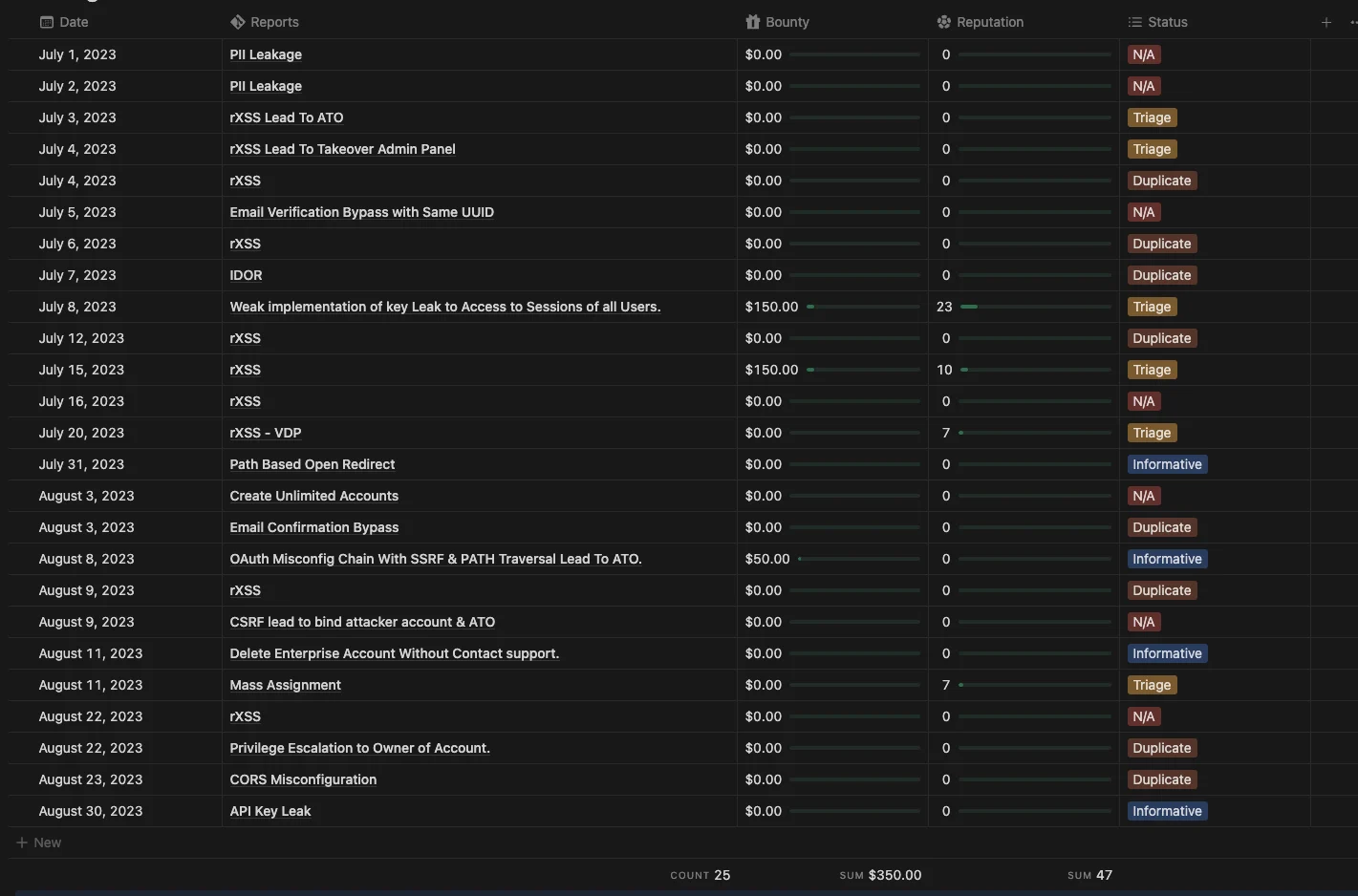
Four findings from that stretch are described.
PII leakage on sign-up
The sign-up flow leaked the user's PII in the response when the submitted email already existed.

PII leakage on the collaboration suggest endpoint
The collaboration "suggest" endpoint returned not just name and email but addresses and phone numbers too.

Reflected XSS on the admin sign-up page
On admin.target.com's sign-up page, fuzzing JavaScript variable names surfaced an appURL parameter reflected inside a script tag. The payload that popped was:
</script><script>alert(origin)</script>
The payload </script><script>alert(origin)</script> popped.

Reflected XSS escalated to admin account takeover
The same XSS was weaponised into an authenticated request flow against admin.target.com.
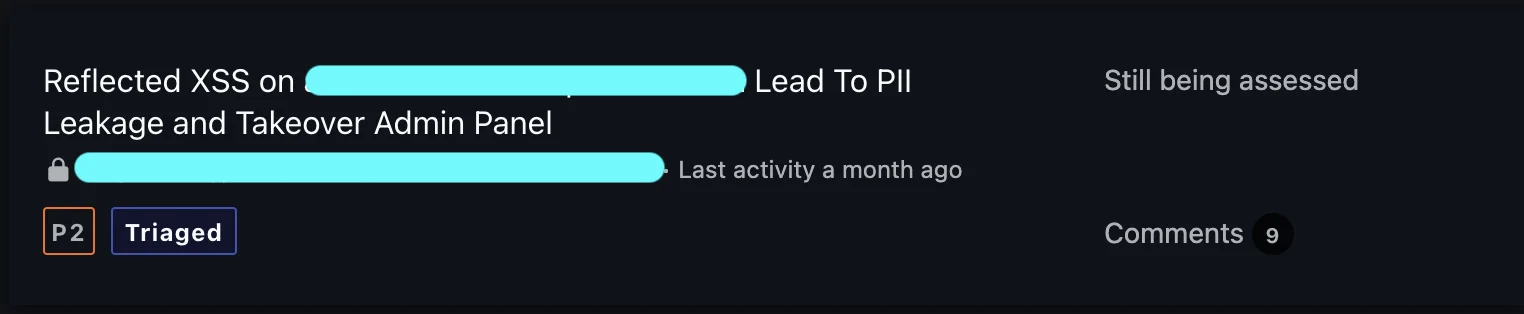
The program later marked three of these findings N/A, claiming the asset was not theirs, and went silent on the remaining triaged ones. After three months without payout the researcher left BugCrowd, moved to HackerOne, and ran into a wall of duplicates and N/A reports.
Self-assessment and debugging the mindset
After two months of effort with nothing to show, the researcher took a few days off and, instead of touching a target, asked:
- Do I know enough for bug hunting?
- Can the platform affect my success? If yes, why hasn't HackerOne fixed it?
- Am I doing okay, or just unlucky?
Resources consulted:
- Grzegorz Niedziela's YouTube playlist on the pentest to bug bounty transition.
- A tweet from Hazem showing his August results from a single program.
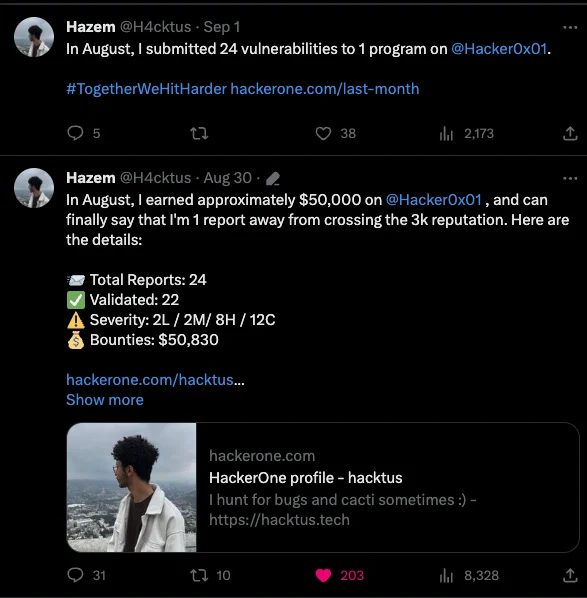
The image shows Hazem's tweet with his August results from a single program.
- A direct message to Justin Gardner, who replied:
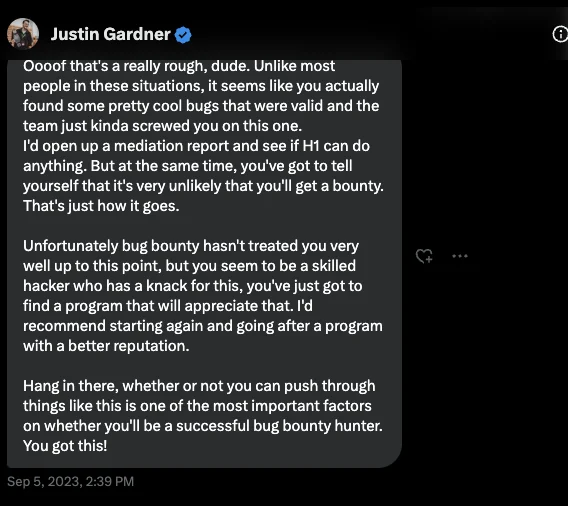
The image shows Justin Gardner's reply.
- A chat with Mohammad Zaheri on goal-setting and avoiding burnout.
The takeaway was: focus on a single program, set a clear goal, begin a specific challenge, accept that knowledge may not be perfect but is sufficient to find things based on previous findings, and recognise that sometimes it is just luck, though you can stack the odds.
Exploitation
The 30-day challenge
The researcher picked one program based on bounty and response-time tables and started a 30-day challenge.

The result was:
- Triaged: 9, Duplicate: 3, Informative: 1, N/A: 1, All: 14, Bounty: $9,240
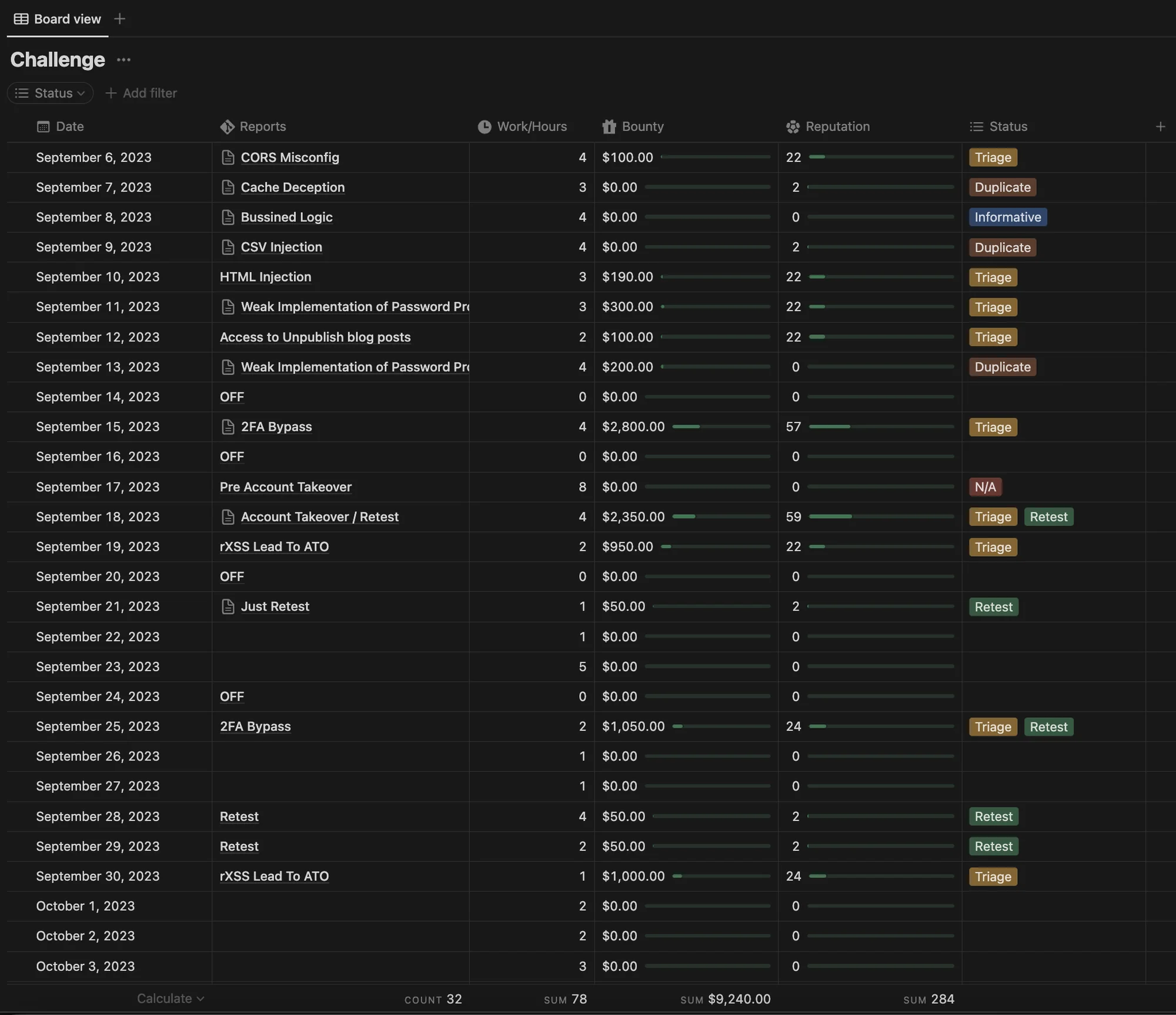
The original then sketches each of the twelve findings. The report does not include the raw requests and responses for most of them; the descriptions below follow the original's level of detail and add no endpoints, parameters or payloads that it does not state.
Step 1: CORS misconfiguration
Hosting let the researcher register an arbitrary subdomain. An API on api.target.com trusted *.arbitrary.targetsite.com for CORS. The report was denied: the program cited Lax cookies plus Firefox protection.
Step 2: Web cache deception
The URL https://dashboard.target.com/my-profile/username/.css was cached.
Step 3: Business logic error on the payment flow
On payment.target.com the "domain already registered" check ran on the response side. Manipulating the response let the researcher invoice an already-taken domain.
Step 4: CSV injection
Contact-form messages exported by the admin as CSV. The payload =4+4 rendered as 8.
Step 5: HTML injection in email
The same contact form rendered the sender name as HTML in the admin's notification email.
Step 6: Weak password-protect function
The page builder offered password protection that ran client-side; the data stayed reachable in the DOM. The researcher reported it as High. The program initially downgraded it, then accepted the argument.
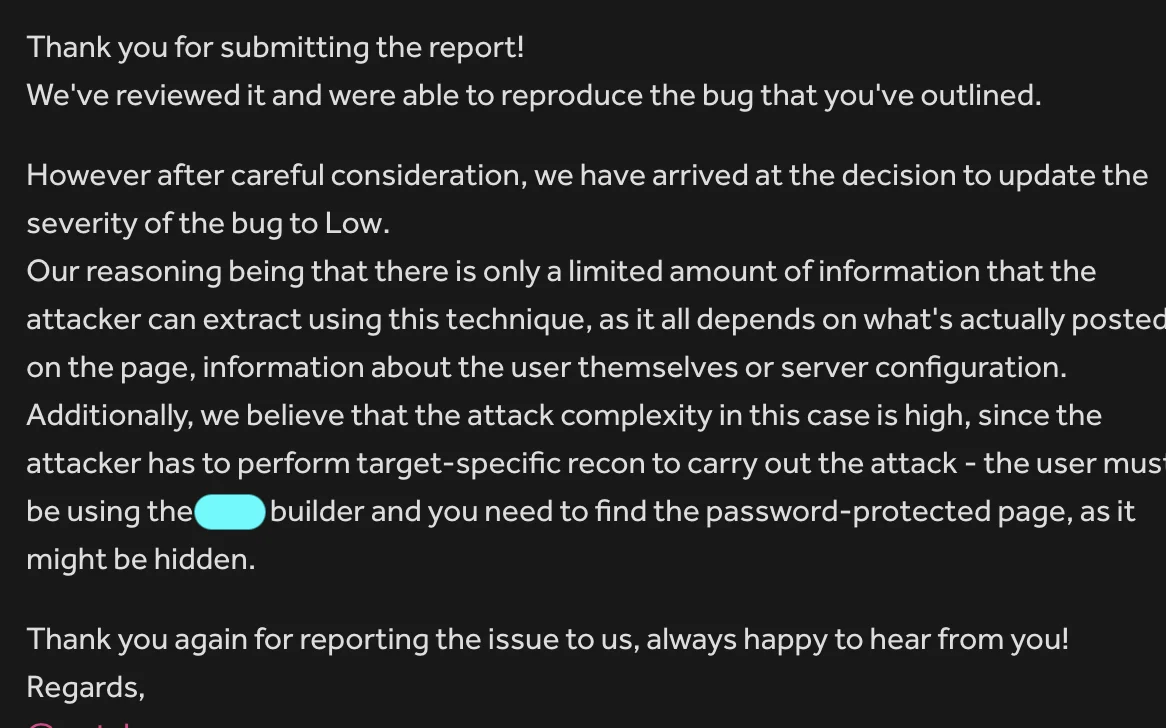
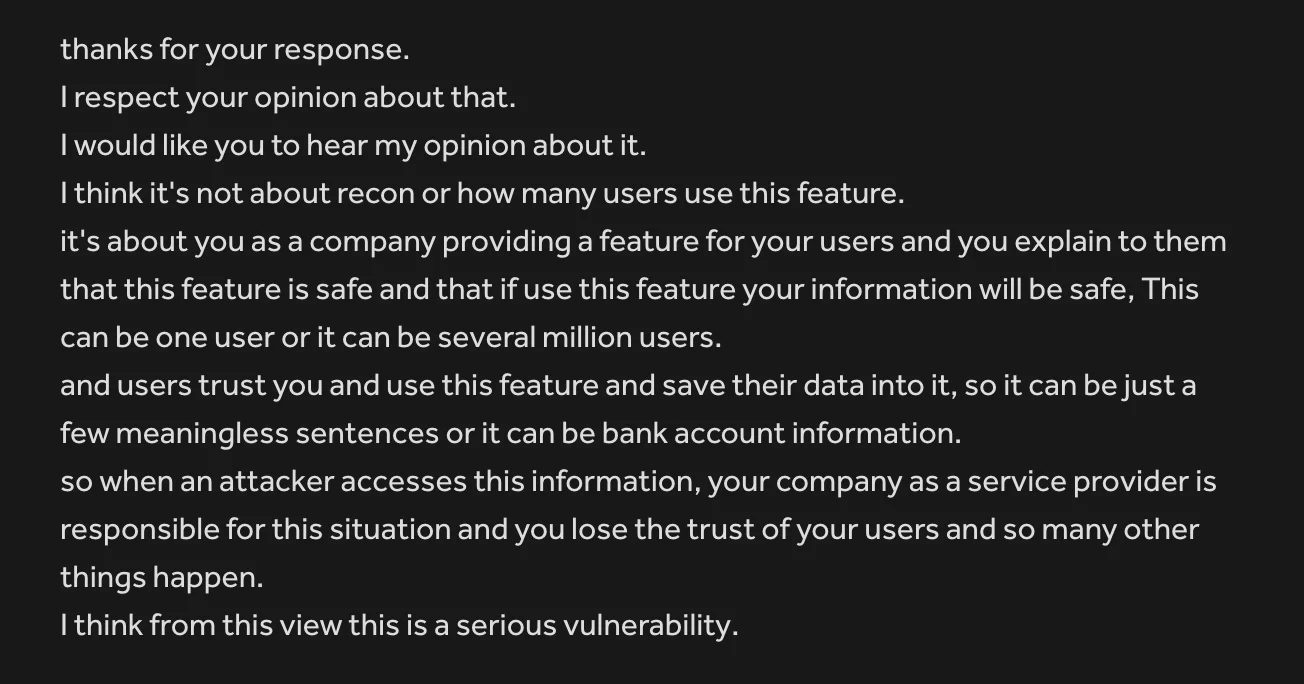
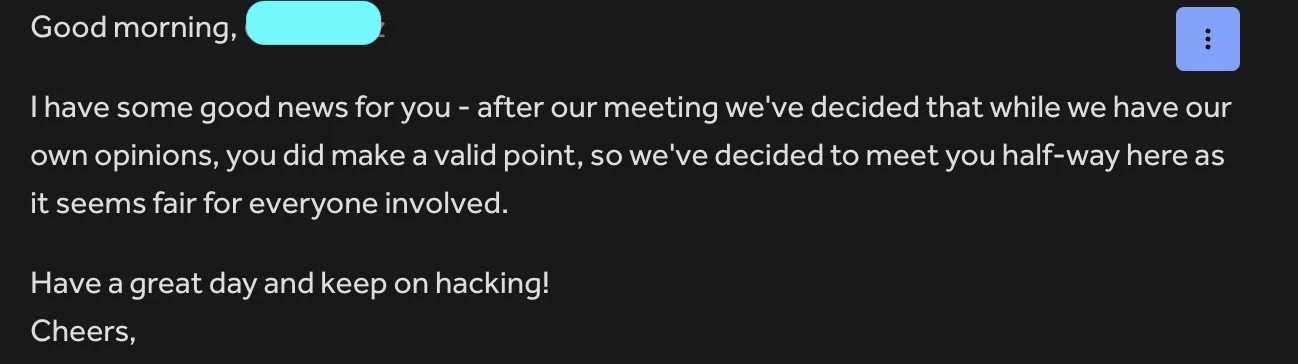
Step 7: Access to unpublished posts
A direct request to a private post URL loaded the content. Addresses were guessable.
Step 8: 2FA bypass via authenticated cookie
The login flow ran through an anonymous session that was upgraded and converted to a JWT at a "converter" page. With 2FA enabled, the upgrade goes through /login/key/<random>. Swapping the 2FA-enabled victim's session ID for an attacker's converted anonymous session and refreshing produced a JWT for the victim.
Step 9: Pre-account takeover
Sign-up did not require email verification. Pre-creating an account for the victim's email address let the researcher wait until the victim signed up via Google OAuth; the previously saved token then gave access.
Step 10: Reflected XSS to account takeover
Re-using parameters from /login/key/<random> on the previous page produced a tag break and a reflected XSS. The exploit code grabbed the JWT.
Step 11: Account takeover via grant access
The "request access" feature emitted an auth token to the granting attacker that survived the victim revoking access.
Step 12: 2FA bypass via grant access
Adding a dot to the email address made the backend treat it as a new user, and the link bypassed the 2FA-prompt flow entirely. Exploitation needs the victim's mailbox, but it bypasses Google Authenticator on already-authenticated accounts.
Root cause
- PII leakage on sign-up and suggest: the responses returned full user records rather than a minimal existence check or a reduced suggestion object. Likely the endpoint reused an internal user object without field-level filtering.
- Reflected XSS: the
appURLparameter was written into a script tag without context-appropriate encoding, so a closing</script>sequence broke out of the script context. - CORS: the allow-list matched on a suffix or wildcard pattern (
*.arbitrary.targetsite.com) rather than an exact origin, so an attacker-controlled subdomain was trusted. The denial reason (Lax cookies plus Firefox protection) suggests the program considered the practical exploitability blocked by cookie attributes and browser behaviour rather than by the CORS policy itself. - Cache deception: the cache keyed on the path including the
.csssuffix, so a dynamic profile page with a static-looking extension was cached and could be served to another user. - Business logic error: the "domain already registered" decision was made on the client side of the response, so manipulating the response changed the outcome.
- CSV injection: exported fields beginning with
=were not escaped or prefixed, so spreadsheet software evaluated them as formulas. - HTML injection in email: the sender name was interpolated into the notification email as HTML without encoding.
- Weak password protect: the protection was enforced client-side only, so the protected content remained in the DOM and reachable.
- Unpublished posts: the private post URL was directly reachable and the addresses were guessable, so access control relied on the URL being unknown rather than on an authorisation check.
- 2FA bypass via cookie: the session upgrade and JWT conversion trusted the session identifier without binding it to the authentication state that completed 2FA, so swapping in an attacker's converted anonymous session produced a JWT for the victim.
- Pre-account takeover: sign-up did not require email verification, so an account could be pre-created for an address the attacker did not control, and the saved token remained valid when the real owner later signed up via Google OAuth.
- XSS to ATO: parameters from
/login/key/<random>were reflected on the previous page without encoding, allowing a tag break and script execution that could read the JWT. - Grant access ATO: the auth token issued to the granting attacker was not invalidated when the victim revoked access.
- 2FA bypass via grant access: the backend normalised the dotted email as a new user, so the grant-access link took a path that skipped the 2FA prompt.
Impact
The original describes the following impacts, with its own hedges:
- Disclosure of user PII (including addresses and phone numbers) through sign-up and collaboration suggest responses.
- Reflected XSS on
admin.target.com, escalated into an authenticated request flow against the admin application, i.e. admin account takeover. - CORS misconfiguration on
api.target.com: reported, but denied because of Lax cookies and Firefox protection, so the practical impact was not accepted by the program. - Cached per-user profile content via cache deception.
- Invoicing an already-registered domain through response manipulation on the payment flow.
- Formula execution in admin CSV exports and HTML injection into admin notification emails.
- Client-side-only password protection on page-builder content, leaving the data reachable in the DOM. Reported as High and eventually accepted at that severity.
- Access to unpublished posts through guessable private URLs.
- 2FA bypass producing a JWT for a 2FA-enabled victim by swapping session IDs.
- Pre-account takeover of a victim who later signs up via Google OAuth.
- Account takeover via reflected XSS that grabs the JWT.
- Account takeover via a grant-access token that survives revocation.
- 2FA bypass via grant access, which needs the victim's mailbox but bypasses Google Authenticator on already-authenticated accounts.
Fix
Based on the described behaviour, the fixes that should be applied are:
- Return minimal existence checks on sign-up and reduce suggest responses to the fields the UI needs.
- Encode
appURLfor the script context, or pass it via a data attribute or JSON-encoded value rather than string interpolation into a script tag. - Match CORS origins exactly rather than by wildcard suffix.
- Key the cache on the full request including dynamic path segments, or exclude per-user pages from caching regardless of extension.
- Enforce the domain-registration check server-side.
- Escape or prefix exported CSV fields that begin with formula characters.
- Encode the sender name before interpolating it into notification emails.
- Enforce page-builder password protection server-side so protected content is not sent to the client.
- Enforce authorisation on private post URLs rather than relying on unguessable addresses.
- Bind the session upgrade and JWT conversion to the authentication state that completed 2FA.
- Require email verification at sign-up and invalidate pre-existing tokens when the real owner signs up.
- Encode parameters reflected from
/login/key/<random>on the previous page. - Invalidate grant-access tokens on revocation.
- Normalise email addresses consistently so a dotted variant is not treated as a new user, and do not let the grant-access path skip the 2FA prompt.
Variants to test
- Sign-up and suggest endpoints: submit an existing email and inspect the response for full user objects. A positive result is any field beyond a boolean or generic message.
- Script-context reflection: fuzz JavaScript variable names on sign-up and login pages and look for parameters reflected inside
<script>blocks. A positive result is a</script>break that executes. - CORS wildcard suffixes: register a subdomain under a domain the target's allow-list might match by suffix and send a cross-origin request. A positive result is
Access-Control-Allow-Originreflecting the attacker origin with credentials. - Cache deception: append static-looking extensions such as
.cssto per-user pages and check whether the response is cached and served to another session. A positive result is another user's data returned from cache. - Client-side business rules: intercept responses for checks such as "already registered" and flip the result. A positive result is the server accepting the manipulated outcome.
- CSV and email injection: submit
=4+4and HTML in contact-form fields, then export as CSV and inspect the admin notification email. A positive result is8in the spreadsheet or rendered HTML in the email. - Client-side password protection: load a protected page and inspect the DOM and network responses. A positive result is the protected content present in the response.
- Private URLs: request unpublished or private content directly and try guessable address patterns. A positive result is content returned without an authorisation check.
- Session swap during 2FA: start an anonymous session, convert it, then swap the session ID with a 2FA-enabled victim's and refresh. A positive result is a JWT issued for the victim.
- Pre-account creation: register an account for an address you do not control, then have the owner sign up via OAuth. A positive result is the saved token still granting access.
- Grant-access tokens: request access, have the victim grant and then revoke, and replay the token. A positive result is the token still working after revocation.
- Dotted email variants: add a dot to an email address during grant access and observe whether the backend treats it as a new user and skips the 2FA prompt. A positive result is a link that bypasses 2FA on an already-authenticated account.
What happened, in plain words
A security researcher who goes by 0xrz (@omidxrz) describes two years of learning to hunt for bugs, then wrote up what happened when he changed his approach. This article is a beginner-friendly retelling of that write-up, which was published on 21 October 2023. The report does not name the company or the real website. The researcher calls the sites target.com, admin.target.com, api.target.com, dashboard.target.com and payment.target.com, which are stand-in names.
The story has two halves. In the first half (July and August) he hunted across many different websites, part time. He found some real problems but earned very little: $350 in total. In the second half (September) he picked one single website and gave it 30 days of focused attention. That month he earned $9,240.
The bugs themselves are the kind of mistakes that appear again and again in web software: a sign-up form that tells you too much about other users, a sign-up page that lets you run your own code in someone else's browser, a login system that can be tricked into skipping the second password step, and so on. None of them require special tools beyond a browser and a program called Burp Suite, which lets you watch and edit the traffic between your browser and a website.
Below, each finding is explained from zero. Where the original shows a piece of code or a URL, it is copied exactly. Where the original does not say something (for example the exact request used), this article says so plainly rather than inventing it.
Background: what the researcher was doing
Before the two phases, the researcher describes two years of learning.
Year one was wide recon. Recon is short for reconnaissance: looking around a target to see what exists before you try to break anything. Wide recon means casting a very broad net: trying lots of possible subdomain names (DNS bruteforce), running an automated scanner called Nuclei that checks for known problems, and mapping out the servers and services a company runs. That year earned around $6k and taught him the wide-recon mindset.
Year two switched to narrow recon. Instead of scanning everything, you pick targets with a small, clearly defined scope, described in the report as *.target.com or just target.com. The asterisk is a wildcard meaning "any subdomain". You then use Burp Suite plus the application itself and deeply analyse the login and payment flows, which are the parts of a site where money and identity are handled and where mistakes hurt most.
A quick word on the terms used throughout:
- A subdomain is a prefix on a domain name. In
admin.target.com,adminis the subdomain andtarget.comis the main domain. Companies often run separate applications on separate subdomains. - Burp Suite is a tool that sits between your browser and a website. Every request your browser sends and every response the site sends back passes through it, and you can read, pause and change them. Think of it as a post office clerk who lets you open every letter before it is delivered.
- An API (application programming interface) is the part of a website that answers requests from software rather than drawing pages for humans. When a page loads your profile, it usually asks an API for the data. APIs often return raw data (names, emails, addresses) in a structured format, which is why they are a favourite place to look for leaks.
- A cookie is a small piece of text a website asks your browser to store and send back with every request. It is how a site remembers that you are logged in. Think of it as a wristband at a festival: show it at the gate and you get in without showing your ticket again.
- A token (often a JWT, JSON Web Token) is similar but usually carried in a header or a URL rather than a cookie. It is a signed string that proves who you are. "Signed" means the server can check it was issued by the server and not forged.
- 2FA (two-factor authentication) means logging in with two things: your password plus a second proof, often a six-digit code from an app such as Google Authenticator. The point is that stealing the password alone is not enough.
- OAuth is the "Sign in with Google" style of login. You never give the site your Google password; Google confirms who you are and hands the site a token.
- PII stands for personally identifiable information: data that identifies a real person, such as a name, email, home address or phone number.
- XSS (cross-site scripting) is when an attacker gets their own code to run inside another user's browser on the target's website. The browser cannot tell the difference between the site's own code and the injected code, so the injected code can do anything the site could do, including reading the user's session.
- ATO (account takeover) means an attacker gains control of someone else's account.
- CORS (cross-origin resource sharing) is a browser rule about which websites are allowed to read responses from which other websites. A misconfiguration means the wrong sites are trusted.
- Web cache deception is tricking a caching server into storing a private page and then serving it to someone else.
- DOM (document object model) is the browser's in-memory model of the page. If data is in the DOM, it has been sent to the browser, even if it is hidden on screen.
- CSV is a plain-text spreadsheet format: rows of values separated by commas. Opening a CSV in Excel or similar runs its contents as a spreadsheet, including formulas.
July and August: many targets, small returns
The tally after two months of part-time hunting across multiple targets was:
- Triaged: 6, Duplicate: 8, Informative: 4, N/A: 7, All: 25, Bounty: $350
Those status words matter, so here is what they mean on a bug bounty platform:
- Triaged means the company has looked at your report and accepted it as a real issue worth investigating.
- Duplicate means someone else reported the same bug first.
- Informative means the company found it interesting but not a security problem worth paying for.
- N/A means not applicable: the company says the thing you reported is out of scope or not a bug at all.
Four findings from that stretch are described in the original.
PII leakage on sign-up
The sign-up flow leaked the user's PII in the response when the submitted email already existed.
What this means in plain words: when you create an account, the site checks whether your email is already registered. A safe site answers with a simple "this email is already in use". This site instead sent back the existing user's personal details in the response. Anyone could type in an email address and receive the existing user's PII in the response. The report does not list the exact fields returned beyond calling them PII.
Why this matters: it turns a harmless form into a lookup service for personal data.
PII leakage on the collaboration suggest endpoint
The collaboration "suggest" endpoint returned not just name and email but addresses and phone numbers too.
A collaboration feature is the part of a product that lets you invite other people to work on something with you, for example sharing a document. To help you pick people, the site offers suggestions. The "suggest" endpoint is the API call behind that suggestion list. An endpoint is simply a specific address on a server that answers a particular kind of request, like a counter in a shop that handles one service.
A safe suggestion list should return only what the picker needs to show, typically a name and maybe an email. This one returned home addresses and phone numbers as well.
Why this matters: the same data-leak problem as the sign-up form, but exposing addresses and phone numbers as well.
Reflected XSS on the admin sign-up page
On admin.target.com's sign-up page, fuzzing JavaScript variable names surfaced an appURL parameter reflected inside a script tag. The payload that popped was:
</script><script>alert(origin)</script>
Let us unpack this slowly, because it is the first real attack in the article.
- Fuzzing means trying lots of variations automatically and watching for anything unusual. Here the researcher was trying many possible names of JavaScript variables (names used inside the page's code) to see which ones the page would echo back.
- A parameter is a named value in a URL, the part after a question mark. In
page?appURL=hello, the parameter isappURLand its value ishello. - Reflected means the site takes what you sent and puts it straight back into the page it returns to you. If it does so without cleaning it up, you can send code instead of text.
- A script tag is the HTML element that tells the browser "run the JavaScript between these tags".
Now the payload, line by line. It is a single line, but it has two halves:
</script>closes the script tag that the page had already opened. The page was writing theappURLvalue inside its own<script>block, so this text ends that block early.<script>alert(origin)</script>opens a brand new script block and putsalert(origin)inside it.alertshows a pop-up box.originis a built-in browser value meaning the site's address (scheme plus host plus port). So the pop-up displays the site's own origin, which proves the code ran in the context of that site.
Reflected XSS escalated to admin account takeover
The same XSS was weaponised into an authenticated request flow against admin.target.com.
"Weaponised" means the researcher went beyond a pop-up and used the XSS to make requests as the logged-in admin. Because the injected code runs inside the admin's browser session, it can send requests that the site treats as coming from the admin.
Why this matters: this is the jump from "a pop-up appeared" to an authenticated request flow against the admin application.
What happened next
The program later marked three of these findings N/A, claiming the asset was not theirs, and went silent on the remaining triaged ones. After three months without payout the researcher left BugCrowd, moved to HackerOne, and ran into a wall of duplicates and N/A reports.
In plain words: the company said some of the sites were not actually theirs, so the bugs did not count, and then stopped replying about the ones it had accepted. Frustrated, the researcher changed platforms, only to find that other hunters had already reported most of what he found.
Self-assessment and debugging the mindset
After two months of effort with nothing to show, the researcher took a few days off and, instead of touching a target, asked himself:
- Do I know enough for bug hunting?
- Can the platform affect my success? If yes, why hasn't HackerOne fixed it?
- Am I doing okay, or just unlucky?
These are not technical questions. They are about whether the problem was skill, the platform, or chance. That is why the section is called "debugging the mindset": he treated his own approach as something to inspect and fix, the way you would inspect a broken program.
Resources consulted:
- Grzegorz Niedziela's YouTube playlist on the pentest to bug bounty transition.
- A tweet from Hazem showing his August results from a single program.
The image shows Hazem's tweet with his August results from a single program.
- A direct message to Justin Gardner, who replied:
The image shows Justin Gardner's reply.
- A chat with Mohammad Zaheri on goal-setting and avoiding burnout.
A pentest (penetration test) is a paid, authorised security assessment of a company's systems. A bug bounty is similar work but open to the public and paid per valid finding. The playlist covers moving from one to the other.
Burnout is the exhaustion that comes from sustained effort without reward. It is a real risk in bug hunting because most attempts fail.
The takeaway was: focus on a single program, set a clear goal, begin a specific challenge, accept that knowledge may not be perfect but is sufficient to find things based on previous findings, and recognise that sometimes it is just luck, though you can stack the odds.
"Stack the odds" means you cannot guarantee a find, but you can improve your chances by choosing one target, learning it deeply, and reusing patterns that worked before.
The 30-day challenge
The researcher picked one program based on bounty and response-time tables and started a 30-day challenge.
A bounty table lists how much a program pays for each kind of bug. A response-time table shows how quickly the program tends to reply. Choosing on both means picking a program that pays well and does not leave you waiting for months, which was exactly the problem in the previous phase.
The result was:
- Triaged: 9, Duplicate: 3, Informative: 1, N/A: 1, All: 14, Bounty: $9,240
Compare this with the two-month tally: fewer reports overall (14 versus 25), but more triaged (9 versus 6) and more money ($9,240 versus $350).
The original then sketches each of the twelve findings.
Step 1: CORS misconfiguration
Hosting let the researcher register an arbitrary subdomain. An API on api.target.com trusted *.arbitrary.targetsite.com for CORS. The report was denied: the program cited Lax cookies plus Firefox protection.
Let us take this apart.
- Hosting here means a service that lets you put a website online. Some such services give every customer a subdomain, and some let you choose the name.
- CORS is a browser rule. By default, a page on one site is not allowed to read responses from another site. That stops a malicious page from quietly fetching your bank data while you are logged in. A site can opt in to sharing by sending a header saying which other origins are allowed. A header is a small piece of metadata attached to a request or response.
- The API trusted
*.arbitrary.targetsite.com. The asterisk is a wildcard, so any subdomain ofarbitrary.targetsite.comwas accepted. Because the researcher could register any subdomain there, he could host a page on a name the API trusted.
The program denied it, citing two reasons:
- Lax cookies: a cookie setting that stops the browser sending the cookie on many cross-site requests, which weakens the attack.
- Firefox protection: the browser itself blocks some of these cross-site reads.
Step 2: Web cache deception
The URL https://dashboard.target.com/my-profile/username/.css was cached. Appending a static-looking path segment to a per-user profile page caused the response to be stored by the cache.
A cache is a server that stores copies of responses so it can serve them faster next time. Think of a photocopier by the door: the first person to ask for a page gets a fresh copy, and the next person gets the photocopy. Caches often decide what to store based on the file extension: .css files are static stylesheets, so they are safe to cache. Pages like /my-profile/username are personal, so they should not be cached.
Step 3: Business logic error on the payment flow
On payment.target.com the "domain already registered" check ran on the response side. Manipulating the response let the researcher invoice an already-taken domain.
The check ran on the response side, and manipulating the response let the researcher invoice an already-taken domain.
Manipulating the response means intercepting the reply in Burp Suite and editing it before the page sees it. If the page trusts the edited reply, the check passes when it should fail.
Why this matters: the researcher could create an invoice for a domain that was already taken.
Step 4: CSV injection
Contact-form messages exported by the admin as CSV. The payload =4+4 rendered as 8 in the exported file.
A contact form is the "send us a message" box on a website. The admin can export all messages as a CSV spreadsheet. The researcher typed =4+4 into a field. When the admin opened the export in a spreadsheet program, the program saw a value starting with = and treated it as a formula, so it calculated 4+4 and displayed 8.
Why this matters: the formula was executed rather than shown as text. The report only demonstrates =4+4 producing 8, which proves the formula was executed rather than shown as text.
Step 5: HTML injection in email
The same contact form rendered the sender name as HTML in the admin's notification email.
HTML injection is like XSS but in a place where scripts may not run, such as an email. The sender name was placed into the notification email as raw HTML instead of plain text.
Step 6: Weak password-protect function
The page builder offered password protection that ran client-side; the data stayed reachable in the DOM. The researcher reported it as High. The program initially downgraded it, then accepted the argument.
A page builder is a tool for assembling web pages without writing code, often used to publish a simple site or a landing page. It offered a "password protect this page" option.
Client-side means the check happens in the visitor's browser. Server-side means it happens on the server before anything is sent. A client-side password check is like a shop that puts the goods in a locked glass case but leaves the key on top: the browser is told to hide the content, but the content itself was already sent. The researcher could open the browser's developer tools and read the data in the DOM.
Severity is how serious a bug is judged to be, usually Low, Medium, High or Critical. The researcher reported it as High. The program first downgraded it, then accepted the argument.
Why this matters: the data stayed reachable in the DOM, so the protection did not hide it.
Step 7: Access to unpublished posts
A direct request to a private post URL loaded the content. Addresses were guessable.
A post here is a blog-style article. Some posts are published and some are not. The unpublished ones had URLs that could be guessed, and requesting the URL directly returned the content.
Why this matters: a direct request to a private post URL loaded the content, and addresses were guessable.
Step 8: 2FA bypass via authenticated cookie
The login flow ran through an anonymous session that was upgraded and converted to a JWT at a "converter" page. With 2FA enabled, the upgrade goes through /login/key/<random>. Swapping the 2FA-enabled victim's session ID for an attacker's converted anonymous session and refreshing produced a JWT for the victim.
This is the most intricate finding, so let us go slowly.
- An anonymous session is a session the site gives you before you log in, so it can remember things like what is in your shopping basket. It has a session ID, a random string stored in a cookie.
- Upgraded means the anonymous session becomes a logged-in session once you authenticate.
- A converter page is a page that turns the session into a JWT, the token that proves who you are.
- With 2FA on, the upgrade goes through
/login/key/<random>.
The attack: the researcher took a 2FA-enabled victim's session ID and replaced it with the session ID of his own converted anonymous session, then refreshed. The server produced a JWT for the victim. In other words, the server trusted the session ID without checking that this particular session had actually completed the 2FA step.
Step 9: Pre-account takeover
Sign-up did not require email verification. Pre-creating an account for the victim's email address let the researcher wait until the victim signed up via Google OAuth; the previously saved token then gave access.
Email verification is the step where the site sends you a link or code to prove the address is yours. Without it, anyone can register any address.
Pre-account takeover works like this:
- The attacker registers an account using the victim's email address, even though the attacker cannot read that mailbox.
- The site does not verify the address, so the account exists.
- The attacker saves the token or session from that account.
- Later, the real owner signs up using Google OAuth. Because the address already exists, the site links the new login to the existing account.
- The attacker's saved token still works, so the attacker now has access to the victim's account.
The victim's email address is not reproduced here.
Step 10: Reflected XSS to account takeover
Re-using parameters from /login/key/<random> on the previous page produced a tag break and a reflected XSS. The exploit code grabbed the JWT.
A tag break is the same trick as in the earlier XSS: sending a </script> or similar so the page's HTML structure breaks and your own markup is treated as code. The parameters from the /login/key/<random> URL were reflected on the page before it, without encoding, so the researcher could inject code. That code read the JWT and sent it to the attacker.
Step 11: Account takeover via grant access
The "request access" feature emitted an auth token to the granting attacker that survived the victim revoking access.
A grant access feature lets the owner of something share it with someone else. The owner "grants" access; the other person "requests" it. When the owner granted access, the site issued an auth token to the requester. When the owner later revoked access, the token should have stopped working. It did not.
Step 12: 2FA bypass via grant access
Adding a dot to the email address made the backend treat it as a new user, and the link bypassed the 2FA-prompt flow entirely. Exploitation needs the victim's mailbox, but it bypasses Google Authenticator on already-authenticated accounts.
In many email systems, [redacted] and [redacted] are the same mailbox: dots in the local part are ignored. But if the site's backend compares addresses as plain text, it sees two different strings. Adding a dot made the backend think this was a brand-new user, and the grant-access link for that "new user" skipped the 2FA prompt.
The report is careful about the limits: the attacker needs access to the victim's mailbox to receive the link, so this is not a full break-in from nothing. But on an account that is already logged in, it bypasses Google Authenticator.
Root cause
- PII leakage on sign-up and suggest: the responses returned full user records rather than a minimal existence check or a reduced suggestion object. Likely the endpoint reused an internal user object without field-level filtering.
- Reflected XSS: the
appURLparameter was written into a script tag without context-appropriate encoding, so a closing</script>sequence broke out of the script context. - CORS: the allow-list matched on a suffix or wildcard pattern (
*.arbitrary.targetsite.com) rather than an exact origin, so an attacker-controlled subdomain was trusted. The denial reason (Lax cookies plus Firefox protection) suggests the program considered the practical exploitability blocked by cookie attributes and browser behaviour rather than by the CORS policy itself. - Cache deception: the cache keyed on the path including the
.csssuffix, so a dynamic profile page with a static-looking extension was cached and could be served to another user. - Business logic error: the "domain already registered" decision was made on the client side of the response, so manipulating the response changed the outcome.
- CSV injection: exported fields beginning with
=were not escaped or prefixed, so spreadsheet software evaluated them as formulas. - HTML injection in email: the sender name was interpolated into the notification email as HTML without encoding.
- Weak password protect: the protection was enforced client-side only, so the protected content remained in the DOM and reachable.
- Unpublished posts: the private post URL was directly reachable and the addresses were guessable, so access control relied on the URL being unknown rather than on an authorisation check.
- 2FA bypass via cookie: the session upgrade and JWT conversion trusted the session identifier without binding it to the authentication state that completed 2FA, so swapping in an attacker's converted anonymous session produced a JWT for the victim.
- Pre-account takeover: sign-up did not require email verification, so an account could be pre-created for an address the attacker did not control, and the saved token remained valid when the real owner later signed up via Google OAuth.
- XSS to ATO: parameters from
/login/key/<random>were reflected on the previous page without encoding, allowing a tag break and script execution that could read the JWT. - Grant access ATO: the auth token issued to the granting attacker was not invalidated when the victim revoked access.
- 2FA bypass via grant access: the backend normalised the dotted email as a new user, so the grant-access link took a path that skipped the 2FA prompt.
A few of those terms deserve a plain definition:
- Encoding (or escaping) means converting characters that have special meaning in a context into a safe form. In HTML,
<becomes<, so the browser shows a less-than sign instead of starting a tag. Without encoding, user input is treated as code. - Interpolation means inserting a value into a template. If you interpolate a name into an HTML email without encoding, the name is treated as markup.
- Normalisation means converting equivalent forms to one standard form. For email addresses, that would include deciding whether dots matter.
- Invalidation means making a token stop working, for example when access is revoked.
- Authorisation is the check that a particular user is allowed to do a particular thing. It is different from authentication, which is proving who you are.
Impact
The original describes the following impacts, with its own hedges:
- Disclosure of user PII (including addresses and phone numbers) through sign-up and collaboration suggest responses.
- Reflected XSS on
admin.target.com, escalated into an authenticated request flow against the admin application, i.e. admin account takeover. - CORS misconfiguration on
api.target.com: reported, but denied because of Lax cookies and Firefox protection, so the practical impact was not accepted by the program. - Cached per-user profile content via cache deception.
- Invoicing an already-registered domain through response manipulation on the payment flow.
- Formula execution in admin CSV exports and HTML injection into admin notification emails.
- Client-side-only password protection on page-builder content, leaving the data reachable in the DOM. Reported as High and eventually accepted at that severity.
- Access to unpublished posts through guessable private URLs.
- 2FA bypass producing a JWT for a 2FA-enabled victim by swapping session IDs.
- Pre-account takeover of a victim who later signs up via Google OAuth.
- Account takeover via reflected XSS that grabs the JWT.
- Account takeover via a grant-access token that survives revocation.
- 2FA bypass via grant access, which needs the victim's mailbox but bypasses Google Authenticator on already-authenticated accounts.
In plain words: the findings include account takeovers and 2FA bypasses, alongside data leaks and client-side password protection. The data leaks and the client-side password protection expose private information. The CSV and HTML injections affect the admin's tools. The CORS finding was denied because of Lax cookies and Firefox protection.
Fix
Based on the described behaviour, the fixes that should be applied are:
- Return minimal existence checks on sign-up and reduce suggest responses to the fields the UI needs.
- Encode
appURLfor the script context, or pass it via a data attribute or JSON-encoded value rather than string interpolation into a script tag. - Match CORS origins exactly rather than by wildcard suffix.
- Key the cache on the full request including dynamic path segments, or exclude per-user pages from caching regardless of extension.
- Enforce the domain-registration check server-side.
- Escape or prefix exported CSV fields that begin with formula characters.
- Encode the sender name before interpolating it into notification emails.
- Enforce page-builder password protection server-side so protected content is not sent to the client.
- Enforce authorisation on private post URLs rather than relying on unguessable addresses.
- Bind the session upgrade and JWT conversion to the authentication state that completed 2FA.
- Require email verification at sign-up and invalidate pre-existing tokens when the real owner signs up.
- Encode parameters reflected from
/login/key/<random>on the previous page. - Invalidate grant-access tokens on revocation.
- Normalise email addresses consistently so a dotted variant is not treated as a new user, and do not let the grant-access path skip the 2FA prompt.
A data attribute is an HTML attribute starting with data- used to attach values to an element for scripts to read. It is safer than pasting a value into a script tag because the browser treats it as data, not code.
Variants to test
- Sign-up and suggest endpoints: submit an existing email and inspect the response for full user objects. A positive result is any field beyond a boolean or generic message.
- Script-context reflection: fuzz JavaScript variable names on sign-up and login pages and look for parameters reflected inside
<script>blocks. A positive result is a</script>break that executes. - CORS wildcard suffixes: register a subdomain under a domain the target's allow-list might match by suffix and send a cross-origin request. A positive result is
Access-Control-Allow-Originreflecting the attacker origin with credentials. - Cache deception: append static-looking extensions such as
.cssto per-user pages and check whether the response is cached and served to another session. A positive result is another user's data returned from cache. - Client-side business rules: intercept responses for checks such as "already registered" and flip the result. A positive result is the server accepting the manipulated outcome.
- CSV and email injection: submit
=4+4and HTML in contact-form fields, then export as CSV and inspect the admin notification email. A positive result is8in the spreadsheet or rendered HTML in the email. - Client-side password protection: load a protected page and inspect the DOM and network responses. A positive result is the protected content present in the response.
- Private URLs: request unpublished or private content directly and try guessable address patterns. A positive result is content returned without an authorisation check.
- Session swap during 2FA: start an anonymous session, convert it, then swap the session ID with a 2FA-enabled victim's and refresh. A positive result is a JWT issued for the victim.
- Pre-account creation: register an account for an address you do not control, then have the owner sign up via OAuth. A positive result is the saved token still granting access.
- Grant-access tokens: request access, have the victim grant and then revoke, and replay the token. A positive result is the token still working after revocation.
- Dotted email variants: add a dot to an email address during grant access and observe whether the backend treats it as a new user and skips the 2FA prompt. A positive result is a link that bypasses 2FA on an already-authenticated account.
A boolean is a value that is either true or false.
Conclusion
Three months of bug bounty taught the researcher that it is not just technical knowledge: mindset and the right kind of community matter just as much. Pick a program, set a goal, debug the mindset when output stalls, and ask people who have been there.
- Depth beats breadth. One target you understand well is worth more than many you skim.
- Read the responses, not just the pages. Most of these bugs were visible in the data the server sent back.
- Check whether a protection is enforced on the server or only in the browser. If it is only in the browser, it is not a protection.
- Treat every identifier (session ID, token, email address) as something an attacker may swap or alter.
- When you stall, change your approach rather than your effort.
Glossary
- 2FA (two-factor authentication): logging in with two proofs, usually a password plus a code from an app such as Google Authenticator.
- Account takeover (ATO): an attacker gaining control of someone else's account.
- Anonymous session: a session the site gives you before you log in, identified by a session ID.
- API (application programming interface): the part of a site that answers requests from software and usually returns raw data.
- Auth token: a string that proves who you are, issued by the server and checked on later requests.
- Authentication: proving who you are.
- Authorisation: checking whether a particular user is allowed to do a particular thing.
- Boolean: a value that is either true or false.
- Bounty table: a program's list of how much it pays for each kind of bug.
- Burp Suite: a tool that sits between your browser and a website so you can read and edit requests and responses.
- Burnout: exhaustion from sustained effort without reward.
- Cache: a server that stores copies of responses to serve them faster later.
- Client-side: happening in the visitor's browser.
- Collaboration feature: the part of a product that lets people share work with each other.
- Contact form: the "send us a message" box on a website.
- Cookie: a small piece of text a site asks your browser to store and send back with requests, often used to remember that you are logged in.
- CORS (cross-origin resource sharing): a browser rule about which websites may read responses from which other websites.
- Credentials (in CORS): permission for the browser to include cookies on a cross-origin request.
- CSV (comma-separated values): a plain-text spreadsheet format.
- CSV injection: putting a spreadsheet formula into a field that is later exported as CSV, so the spreadsheet runs it.
- Data attribute: an HTML attribute starting with
data-used to attach values for scripts to read. - DOM (document object model): the browser's in-memory model of the page; if data is in the DOM, it was sent to the browser.
- Duplicate: a report of a bug someone else already reported.
- Email verification: the step where a site sends a link or code to prove an email address belongs to you.
- Encoding (escaping): converting characters with special meaning into a safe form so they are shown, not executed.
- Endpoint: a specific address on a server that answers a particular kind of request.
- Fuzzing: trying many variations automatically and watching for anything unusual.
- Grant access: a feature that lets an owner share something with someone else.
- Header: a small piece of metadata attached to a request or response.
- HTML injection: inserting HTML into a page or email that treats it as markup rather than text.
- Informative: a report the company finds interesting but not a security problem worth paying for.
- Interpolation: inserting a value into a template, which is unsafe if the value is not encoded.
- Invalidation: making a token stop working, for example when access is revoked.
- JWT (JSON Web Token): a signed string that proves who you are.
- Lax cookie: a cookie setting that stops the browser sending the cookie on many cross-site requests.
- N/A (not applicable): a report the company says is out of scope or not a bug.
- Narrow recon: looking closely at a small, clearly defined target.
- Normalisation: converting equivalent forms to one standard form, such as deciding whether dots in an email address matter.
- OAuth: the "Sign in with Google" style of login, where another provider confirms who you are.
- Page builder: a tool for assembling web pages without writing code.
- Parameter: a named value in a URL, the part after a question mark.
- Pentest (penetration test): a paid, authorised security assessment of a company's systems.
- PII (personally identifiable information): data that identifies a real person, such as a name, email, address or phone number.
- Pre-account takeover: registering an account for someone else's email before they do, then keeping access when they sign up.
- Recon (reconnaissance): looking around a target to see what exists before trying to break anything.
- Reflected: sent back by the site in the page it returns to you.
- Replay: sending a captured request again later to see whether it still works.
- Response-time table: a program's statistics on how quickly it replies to reports.
- Script tag: the HTML element that tells the browser to run the JavaScript between its tags.
- Server-side: happening on the server before anything is sent to the browser.
- Session ID: a random string stored in a cookie that identifies your session.
- Severity: how serious a bug is judged to be, usually Low, Medium, High or Critical.
- Subdomain: a prefix on a domain name, such as
admininadmin.target.com. - Tag break: sending markup such as
</script>so the page's structure breaks and your own markup is treated as code. - Token: a string that proves who you are, usually signed by the server.
- Triaged: a report the company has accepted as a real issue worth investigating.
- Wide recon: casting a very broad net across many possible targets and services.
- Wildcard: an asterisk used to mean "anything here", as in
*.target.com. - XSS (cross-site scripting): getting your own code to run inside another user's browser on the target's website.


