**One Payload, Four Targets: How a 10% Confidence Scanner Hit Unlocked Unauthenticated JavaScript-Context XSS Across an Entire Application Fleet**
A calculator-style web application reflected attacker-controlled query parameter names into an inline script block as ES6 computed property keys, after only HTML-entity encoding. An attacker could craft a single link that executed arbitrary JavaScript in the victim's browser on page load, without authentication.
 Published on medium.com
Xss Attack
The full write-up lives on its author's site
It belongs to its author, so we link to it rather than copy it. The other two tabs are our own rewrites, checked against it.
Context
The target was an organisation's public web estate, and the feature at the centre of the story is a small, unauthenticated utility application that bootstraps its client-side state from the incoming query string. The application emits an inline <script> block containing a JavaScript object literal that carries route information and the parsed query string, and the report notes AngularJS as the client-side framework. The report generalises or redacts organisation names, hostnames, internal product names, tenant identifiers and live exploit URLs, so the examples below use placeholders such as vulnerable-app.example.
The assessment began somewhere else entirely: the organisation's OAuth2 / OpenID Connect authorisation endpoint. That endpoint is public-facing and unauthenticated by design, and it is required by specification to accept a large set of client-supplied parameters (client_id, redirect_uri, scope, state, nonce, code_challenge, code_challenge_method, resource, and others). Many of those parameters are reflected back into the response for display, form pre-filling or debugging, which is why the endpoint was the starting point.
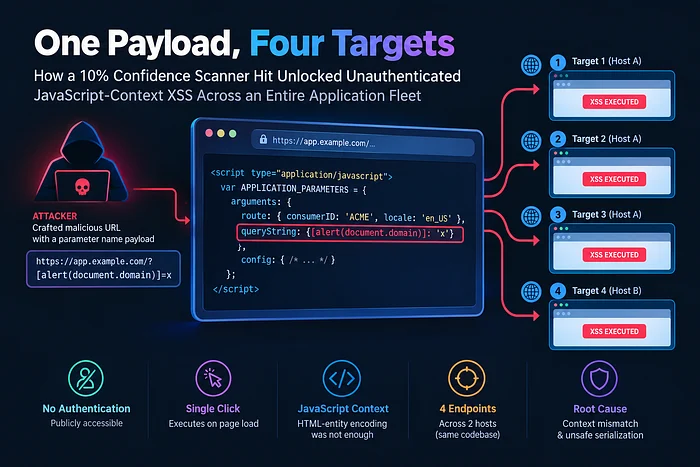
The postmortem describes a reflected XSS that lived not in a parameter value but in the name of the parameter itself, and explains why HTML-entity encoding was never going to stop it.
Setup
No accounts, roles or special tooling are described beyond an automated XSS scanner and a browser (including a headless pipeline for dialog-independent confirmation). The preconditions that matter are properties of the target:
- The authorisation endpoint is public and unauthenticated.
- The utility applications are public, unauthenticated, accept a modest amount of input via the query string, and return a computed result.
- The affected applications have no login wall, no aggressive rate limiting and no obvious WAF presence.
- None of the four affected endpoints returned a Content-Security-Policy header.
The methodology was to construct a fully populated authorisation URL, feed it to the scanner, and let the tool mutate every parameter while watching for reflections that could become executable payloads.
Finding it
The scan was almost entirely negative. For most parameters the tool reported reflections but stated:
[-] No vectors were crafted.
Eight parameters, eight dead ends. The single exception was the client_id parameter. After generating and testing more than 1,500 candidate payloads, the scanner surfaced exactly one result:
[+] Payload: <a/+/onmouseovEr%0a=%0aconfirm()%0dx//v3dm0s[!] Efficiency: 91[!] Confidence: 10
Efficiency (91) is a fuzzy-match score for how closely the reflected output resembles a working payload. Confidence (10 out of 100) is the number that matters, and on the tool's own scale it is about as low as it goes: the scanner was effectively saying it had almost no belief the payload would execute. That class of result is usually noise, a reflection landing where the needed characters are filtered, encoded or neutralised.
Rather than burn more hours forcing a low-confidence lead on a hardened identity provider, or discarding the result and moving to an unrelated area, the author treated the scan as reconnaissance. What it demonstrated, independent of whether any payload fired, was that this organisation's engineering culture reflects raw client-supplied input into dynamically generated page content, and does so broadly. Teams repeat their habits across the applications they ship, and smaller internal-feeling utility tools are exactly where the same bad pattern goes unreviewed.
The next step was therefore systematic subdomain enumeration and source review of the organisation's other applications. Enumeration surfaced a cluster of smaller, purpose-built web applications on their own subdomains: no login walls, no aggressive rate limiting, no obvious WAF. One was a simple calculator-style tool. Viewing its source showed that it bootstrapped its entire client-side state by serialising the raw incoming query string into an inline <script> block as a JavaScript object literal. A simplified version of the emitted structure:
<script type="application/javascript">var APP_CONFIG = { args: { route: { clientId: 'ACME', locale: 'en_US' }, queryString: { someParam: 'someValue' } }, settings: { }};</script>
The queryString block was built dynamically, server-side, from whatever parameters the request carried. Critically, the application reflected not only parameter values but also parameter names into that object. That detail turned the observation into a genuine finding.
Exploitation
Step 1: Minimal HTTP-level reflection
A minimal request demonstrates the raw, unmodified reflection:
GET /app/en/?%5Balert(document.domain)%5D=x HTTP/1.1Host: vulnerable-app.example
URL-decoded, the parameter name is [alert(document.domain)]. The server reflects it directly into the live script block:
var APPLICATION_PARAMETERS = { arguments: { route: { consumerID: 'ACME', locale: 'en_US' }, queryString: {[alert(document.domain)]: 'x'} }, };
Loading this URL in any standards-compliant browser triggers an alert() showing the vulnerable page's own origin, proving that attacker-supplied code executed before the application finished initialising.
Step 2: Headless confirmation by reading document.domain
alert() dialogs are unreliable for automated or headless verification, so execution was independently confirmed with payloads that write a persistent, inspectable marker into the live DOM. Marker A reads document.domain and writes it into the page's <html lang> attribute:
https://vulnerable-app.example/app/en/?%5Bdocument.documentElement.lang%3Ddocument.domain%5D=x
After full page execution the DOM contained:
<html lang="vulnerable-app.example" ng-app="mainApp" ...>
The injected JavaScript executed, read document.domain and wrote the result back into the live DOM, so it ran with the full script privileges of the vulnerable page's own origin.
Step 3: Headless confirmation by full page takeover
Marker B overwrites the entire rendered page with a literal marker string:
https://vulnerable-app.example/app/en/?%5Bdocument.documentElement.innerHTML%3D741923%5D=x
The whole page was replaced with the marker, confirmed visually (a screenshot was retained) and by examining the raw DOM dump. Full DOM write access is therefore demonstrated, not hypothesised.
Step 4: Non-operational public example
To avoid publishing a working exploit against a still-unpatched service, the article gives a structurally identical example on a fictional domain:
GET /app/en/?%5Balert(document.domain)%5D=x HTTP/1.1Host: example-notice-tool.test
In a vulnerable implementation matching the pattern, this produces:
queryString: {[alert(document.domain)]: 'x'}
Step 5: Mapping the blast radius
Reasoning that this is a bootstrap-template bug rather than a one-off typo, the author checked every locale and every deployment of the same application family. The same payload, unmodified, worked identically on four live endpoints across two distinct hosts:
| Target | Result | Notes |
|---|---|---|
| 1. Primary application, default locale | Vulnerable | Initial discovery point |
| 2. Same application, secondary locale A | Vulnerable | Identical payload, zero modification |
| 3. Same application, secondary locale B | Vulnerable | Identical payload, zero modification |
| 4. Second, independently deployed instance on a separate host running the same codebase | Vulnerable | Confirms the bug is shared across the deployment pipeline, not host-specific |
A fifth candidate, a build of the same application on different server infrastructure, was tested as a negative control and was not vulnerable: that build JSON-encodes parameter keys rather than reflecting them raw into an object literal, which neutralises this technique. The negative result confirms the flaw belongs to one specific build pipeline, not the whole platform, and, in the author's reading, rules out the possibility that the fix is already partially deployed everywhere.
The headline point: this is not four independent bugs. It is one bug in one shared piece of bootstrap logic, instantiated four times because that logic was copied unchanged into every deployment built from the same template.
Root cause
The flaw is not a missing escape function. It is a context mismatch: escaping correctly applied to the wrong context. Both parameter values and parameter names passing through the pipeline were HTML-entity escaped:
- Single quotes became
' - Double quotes became
" - Angle brackets became
<and>
That is the right defence for an HTML attribute or text node, and it is not the right defence for content parsed by a JavaScript engine inside a <script> tag. HTML entities are an HTML-parser concept; the JavaScript engine never decodes them. ' inside inline JavaScript is four inert characters and will never become a quote mark to the JS parser.
Entity-escaping blocked the classic break-out-of-a-string-with-a-quote attack but left a different surface open. The characters that matter for this injection were never HTML-significant and so were never on the escaping list:
| Character | Purpose in the attack |
|---|---|
[ ] |
Declare a computed property key |
( ) |
Function calls |
. |
Member access |
= |
Assignment |
All of them pass straight through into live JavaScript source. Supplying a query parameter whose name is [expr] makes the server emit:
queryString: {[expr]: 'x'}
This is standard ES6 computed property syntax. Per the ECMAScript specification (ECMA-262, Object Initializer section), the expression inside the brackets of a computed property key is evaluated when the surrounding object literal is constructed, which happens the instant the inline script runs, on page load, before AngularJS has finished bootstrapping. Whatever an attacker places as the name of a GET parameter is executed as live JavaScript, with no authentication, the moment the victim's browser loads the page.
Execution requires three conditions to hold simultaneously:
- The application reflects the parameter's name (not just its value) into a position in the generated JavaScript where it is not enclosed in quotes, i.e. directly as an object key rather than a quoted string.
- The reflected name is not passed through any script-context-aware encoder (such as
JSON.stringifyover a properly constructed object, or a strict allow-list / character-set filter). Only HTML-entity encoding is applied, which is ineffective here. - The attacker-supplied name takes the syntactic form of a computed-property expression, wrapped in square brackets. A plain identifier such as
foois reflected as an ordinary object key and does not execute; it is specifically the unescaped bracket syntax that creates an evaluated expression.
Where any condition fails, the same input is inert, as the JSON-key-quoting negative control showed.
Impact
Confirmed by direct testing:
- Zero authentication barrier: every affected page returns HTTP 200 with no session, no cookie and no login wall.
- A single click is sufficient: execution happens on page load, before the victim interacts with anything.
- Full DOM read and write access within the vulnerable origin, shown by the
document.domainattribute write and the complete page-content overwrite. - The applications are small public-facing utility tools of the kind organisations link to from emails, internal portals and onboarding documentation, so a crafted link raises comparatively few red flags.
Plausible but not independently tested or confirmed, reported as hypotheses only:
- Access to client-side storage (
localStorage/sessionStorage) in that origin, including any authentication material kept there. Client-side code was observed to reference OAuth-related configuration and storage keys, which is why this is the highest-value follow-up; no such data was read or exfiltrated during testing. - Issuing requests to the application's backend API in an authenticated victim's session context. Not tested.
- Use as a phishing or credential-harvesting vector via DOM rewriting. This follows from the confirmed full-DOM-write capability but was not separately demonstrated against a real victim flow.
The provisional CVSS 3.1 vector, based strictly on confirmed impact, is:
AV:N / AC:L / PR:N / UI:R / S:U / C:L / I:L / A:NBase Score: 5.4 (Medium) — provisional
| Metric | Value | Rationale |
|---|---|---|
| Attack Vector | Network | Exploitable remotely over HTTP(S), confirmed |
| Attack Complexity | Low | A single static, reusable URL; no race conditions or special preconditions observed |
| Privileges Required | None | All confirmed instances are fully unauthenticated |
| User Interaction | Required | Victim must load the crafted URL |
| Scope | Unchanged | No cross-authority impact (backend API access, compromise of a separate security boundary) was demonstrated; Scope: Changed would require exactly that evidence |
| Confidentiality | Low | Confirmed impact is DOM read access within the vulnerable origin; no sensitive data disclosure was demonstrated, so High is not supportable |
| Integrity | Low | Confirmed DOM-write access; no server-side data modification was tested or claimed |
| Availability | None | No denial-of-service impact observed or claimed |
The score is deliberately conservative and would need upward revision on Scope and Confidentiality only if follow-up authorised testing shows script execution can reach session or authentication material, or a distinct backend security authority.
Fix
The report gives recommendations rather than a confirmed patch; it makes no claim about whether the issue has been fixed, accepted or publicly disclosed by the affected organisation.
- Stop reflecting arbitrary query-parameter names entirely. Whitelist the small known set of parameters the application legitimately needs, server-side, and silently drop everything else before constructing the inline bootstrap object. This single change eliminates the vulnerability class.
- Use a JavaScript-safe serializer for script contexts, never HTML-entity encoding alone. Build the parameters object server-side from trusted, sanitised inputs and emit it via a proper encoder (for example
JSON.stringifyon a pre-sanitised object). Additionally escape the characters that remain meaningful inside a<script>context (<,>,&, and the JavaScript line-terminator code points U+2028 and U+2029). Raw attacker-controlled strings should never be interpolated directly as object keys. - If the raw query string must reach the client, constrain parameter names to a strict allow-list pattern such as
^[A-Za-z0-9_]+$and restrict values to an equally tight character set, rejecting or stripping anything outside those sets before template rendering. - Add defence in depth with Content-Security-Policy. None of the four affected endpoints returned any CSP header. A policy such as
script-src 'self' 'nonce-<random>'with the bootstrap script moved to a nonce'd<script>tag provides a meaningful secondary control. CSP is not a substitute for correct serialisation. - Treat this as a single shared-component fix, not four patches. Because the same bootstrap logic is confirmed on two independently deployed hosts, patch the underlying shared template or service once, then sweep the full deployment fleet for the same code path.
- Add regression tests that assert maliciously structured parameter names cannot alter the shape of the generated JavaScript. Submit a parameter name containing
[,],(,)and=, then parse the generated script and confirm no unexpected computed keys or function calls appear. Checking only for an unescaped<script>tag is insufficient.
Variants to test
- Parameter-name reflection into an unquoted object key. Send a parameter whose name is
[alert(document.domain)]and inspect the inline script. A positive result is the name appearing as{[alert(document.domain)]: 'x'}rather than as a quoted key. - Computed-key execution without a dialog. Use
[document.documentElement.lang=document.domain]and check whether<html lang>takes the page's origin as its value. A positive result is the attribute changing on load. - Full DOM write. Use
[document.documentElement.innerHTML=741923]and check whether the rendered page is replaced by the marker. A positive result is the literal marker in the DOM dump. - Plain identifier control. Send a name such as
foo. A negative result (ordinary quoted key, no execution) confirms the bracket syntax is what triggers evaluation. - JSON-key-quoting control. Test a build that serialises parameters as
"name": "value". A negative result confirms the flaw is tied to raw interpolation in a specific build pipeline. - Locale and deployment sweep. Replay the identical payload against every locale and every independently deployed instance of the same application family. A positive result on several hosts points to one shared bootstrap template rather than a one-off bug.
- CSP presence check. Inspect response headers on each candidate. Absence of a CSP header means a successful injection has no secondary mitigation.
A scanner's confidence score is a hint about one specific payload, not a verdict on the hypothesis: a 10/100 result said only that the tool's generic payload set did not fire, and nothing about whether a hand-crafted, context-aware payload might succeed elsewhere. The exploit came from hand-building a payload around the real context, and the negative results were as much part of the evidence as the positive ones.
What happened, in plain words
Imagine you own a small shop and you hire a security guard to walk around at night. The guard's job is to check every door and window. One night he comes back and says: "I found a window that looks a bit loose, but honestly I'm only 10% sure it's a problem." Most people would say "fine, ignore it" and go to bed. This story is about what happens when you don't ignore that 10%.
A security researcher was testing a large organisation's websites. He started with the hardest, most important door: the login system that lets other apps ask "is this person really who they say they are?" That system is called an OAuth2 authorisation endpoint, and we'll explain it properly in a moment. He ran an automated tool against it. The tool is a scanner: a program that fires test inputs at a website and watches what comes back, looking for signs that the site might run code an attacker controls.
The scanner found almost nothing. Eight parameters, eight dead ends. Then it found one tiny thing on a parameter called client_id, and gave it a confidence score of 10 out of 100. In plain terms the scanner was saying: "I saw something that looks a bit like a payload, but I really don't think it will work."
Instead of giving up, the researcher used that result as a clue about how the organisation builds software. If one of their apps echoes raw user input back into its pages, others probably do too. He went looking at the organisation's other, smaller websites, and found a simple calculator-style tool that did something dangerous: it took whatever was in the address bar and pasted it straight into a piece of JavaScript that runs in the visitor's browser.
The trick was not in the value of a parameter, but in its name. By naming a parameter [alert(document.domain)], he could make the browser run that code the moment the page loaded. No login needed. One click. And because the same code had been copied into several deployments, the same trick worked on four separate live addresses across two different servers.
This article walks through the whole story from zero. Every technical term is explained the first time it appears, every request and payload is shown exactly as it was used, and every step is explained line by line. If you can use a browser, you can follow it.
1. Executive summary, for a complete beginner
Before the details, here is the shape of the finding in everyday language.
A vulnerability is a weakness in software that someone can abuse to make it do something the owner did not intend. The class of vulnerability here is Cross-Site Scripting, usually shortened to XSS. XSS means: an attacker manages to get their own JavaScript code to run inside someone else's website, in that website's own identity. JavaScript is the programming language that browsers run; it is what makes pages interactive. If an attacker's JavaScript runs on a bank's page, the browser treats it as the bank's own code, with all the bank's permissions.
This particular XSS is reflected. That means the malicious input is not stored on the server; it travels in the link the victim clicks, bounces off the server, and comes back inside the page. The victim has to click a crafted link, but nothing else.
It is also unauthenticated: the attacker does not need an account, a password or a session. Anyone with a browser can trigger it.
The root cause is a context mismatch. The application did apply an escaping function (a function that neutralises dangerous characters), and it applied it correctly for one kind of place in a web page. But it then put the escaped data into a different kind of place, a <script> block, where that escaping does nothing at all. We'll unpack this slowly.
The result: the same payload, unchanged, worked on four live endpoints across two production hosts. An endpoint is simply a specific address on a server that does a specific job, like a counter in a shop. A host here means a distinct server deployment, identified by a domain name.
What was actually proven by testing:
- Attacker-controlled JavaScript ran in the page's own origin. Origin means the combination of protocol, domain and port that the browser uses to decide what a page is allowed to touch; code running in an origin can read and change that origin's page.
- The code could read and write the page's DOM. The DOM (Document Object Model) is the browser's live, in-memory model of the page: every heading, button, form and attribute. Reading and writing it means the attacker's code can see and change anything on the page.
- The same payload worked on four distinct URLs across two hosts.
What was not proven, and is therefore only a hypothesis (an educated guess that has not been tested):
- Stealing login tokens or session material from the browser's storage.
- Making requests to the site's backend APIs as the logged-in victim.
- Building a convincing fake login page to harvest credentials.
A session cookie is a small piece of data the browser stores after you log in, so the server can recognise you on the next request; a token is similar material used for authentication. Stealing one is often the goal of an XSS attack, but in this case it was not demonstrated.
The researcher gave the finding a provisional CVSS score of 5.4, Medium. CVSS is a standard scoring system for vulnerabilities; 5.4 out of 10 is in the middle. "Provisional" means it is a first estimate based only on what was confirmed, and it would go up if follow-up testing showed more damage was possible.
2. Background: why start at the hardest target
Every assessment has to start somewhere. This one started at the organisation's OAuth2 / OpenID Connect authorisation endpoint.
What is OAuth2? Think of it as the system behind the "Log in with Google" or "Log in with Facebook" buttons you see on many websites. You are on site A, you click "log in with site B", and site B asks you to confirm, then hands site A a token saying "yes, this person is who they claim". OpenID Connect is a layer on top of OAuth2 that also tells site A who you are.
The authorisation endpoint is the page on site B where that confirmation happens. It is a URL that accepts a long list of parameters. A parameter is a named value in a URL, written after a question mark, like ?colour=blue. The name is colour, the value is blue.
Why is this endpoint a good place to test for XSS? The report gives several reasons:
- The OAuth2 specification requires it to accept many parameters supplied by the client application:
client_id,redirect_uri,scope,state,nonce,code_challenge,code_challenge_method,resource, and others. Each of these has a job:client_ididentifies which app is asking,redirect_urisays where to send the user afterwards,scopesays what permissions are requested,stateis an anti-forgery value, and so on. - Many of those parameters are reflected back into the response. Reflected means the server copies the input into the page it sends back, for example to pre-fill a form or to show a debug message.
- The endpoint is public and unauthenticated by design, because it has to work before you have logged in.
- A successful XSS on an identity provider is especially serious, because other sites trust that origin.
The method was simple: build a complete, valid authorisation URL, give it to an automated XSS scanner, and let the scanner change every parameter in turn while watching for reflections that could be turned into executable code.
3. The scanner result that almost got thrown away
The scan was almost entirely negative. For most parameters the tool reported that it saw reflections but could not build anything from them:
[-] No vectors were crafted.
Line by line: [-] is the scanner's way of marking a negative or informational result. No vectors were crafted means the tool could not construct a working attack from what it saw. A vector here means a specific way of delivering an attack, in this case a specific payload string. Eight parameters, eight dead ends.
Then came the one exception, on the client_id parameter. After generating and testing more than 1,500 candidate payloads, the scanner produced exactly one result:
[+] Payload: <a/+/onmouseovEr%0a=%0aconfirm()%0dx//v3dm0s[!] Efficiency: 91[!] Confidence: 10
Line by line, as far as the report explains it:
[+]marks a positive or interesting result.Payload:introduces the actual test string the scanner tried.<a/+/onmouseovEr%0a=%0aconfirm()%0dx//v3dm0sis the payload. It is an attempt to create an HTML link (<a>) with an event handler that fires when the mouse moves over it (onmouseover), callingconfirm(), which is a browser pop-up. The%0asequences are URL-encoded newline characters, and the odd casing (onmouseovEr) is a common trick to slip past filters that look for exact lowercase text. The trailingx//v3dm0sis padding and a marker.Efficiency: 91is a fuzzy-match score: how closely the reflected output resembles the shape of a working payload. High is good.Confidence: 10is the number that actually matters. On the tool's own scale, 10 out of 100 is about as low as it goes. The scanner was saying it had almost no belief the payload would execute.
Why do experienced testers usually ignore this? Because a low-confidence result is normally noise: the input is reflected, but it lands in a place where the characters needed to make it dangerous are filtered, encoded or otherwise neutralised. By every reasonable rule of thumb, this was a result to skip.
Most people would have moved on. The rest of this article is about why that would have been a mistake.
4. The pivot: from one dead end to a pattern
The researcher had three options:
- Keep hammering the low-confidence lead on the hardened identity provider, spending hours on a target that is specifically built to resist this kind of attack.
- Throw the result away and go test something unrelated.
- Treat the scan not as a final answer but as reconnaissance.
Reconnaissance means information gathering before an attack, the way a burglar might walk past a house and note which windows are open. The scan had shown something even without a working payload: this organisation's engineers reflect raw, user-supplied input into dynamically generated page content, and they do it in many places. That is not a fact about one endpoint. It is a fact about how a team writes software. Teams repeat their habits across every application they ship.
A single weak signal on a hardened login endpoint is not much. The same habit on a smaller, less-scrutinised tool elsewhere in the same infrastructure is a much bigger deal. Small internal-feeling utility tools are exactly where the same bad pattern goes unreviewed, unhardened and unnoticed for long periods of time.
So the next step was not more fuzzing of the authorisation endpoint. Fuzzing means firing lots of semi-random inputs at a program to see what breaks. The next step was subdomain enumeration and source review of every other application the organisation ran. Enumerating them means finding out which ones exist.
5. Finding the real target
Enumeration turned up a cluster of smaller, purpose-built web applications on their own subdomains. These were the classic internal utility tools: no login walls, no aggressive rate limiting, no obvious WAF. Just small, functional apps doing one job each.
One of them was a simple calculator-style tool. It was public, unauthenticated, accepted a modest amount of input through the query string, and returned a computed result. The query string is the part of a URL after the ?, made of parameters.
Viewing the page source showed something worth a second look. Page source is the raw HTML the server sends, which you can see in a browser with View Source or the developer tools. The application was bootstrapping its entire client-side state by serialising the raw incoming query string directly into an inline <script> block as a JavaScript object literal.
That sentence is dense, so let's unpack it:
- Bootstrapping means setting up the application's initial state when the page loads.
- Client-side state is the data the browser-side code keeps in memory to know what to display: which language, which route, which parameters.
- Serialising means turning a data structure into a string of text that can be embedded in a page.
- An inline
<script>block is JavaScript written directly inside the HTML page, between<script>and</script>tags, rather than loaded from a separate file. - A JavaScript object literal is a way of writing a collection of named values in JavaScript, using curly braces.
{ name: 'Alice', age: 30 }is an object literal with two properties.
A simplified version of what the server emitted looked like this:
<script type="application/javascript">var APP_CONFIG = { args: { route: { clientId: 'ACME', locale: 'en_US' }, queryString: { someParam: 'someValue' } }, settings: { }};</script>
Line by line:
<script type="application/javascript">opens a block of JavaScript. Everything until</script>is code the browser will run.var APP_CONFIG = {starts a variable calledAPP_CONFIGand assigns it an object. A variable is a named box that holds a value.args: {starts a nested object calledargs, which holds the application's arguments.route: { clientId: 'ACME', locale: 'en_US' },is a nested object describing the route: which client (ACME) and which language (en_US).queryString: { someParam: 'someValue' }is the interesting part: an object built from the URL's query string. Here the parametersomeParamhas the valuesomeValue.settings: {starts an empty settings object.}};closes the objects and the statement.</script>ends the script block.
The queryString block was not static. It was built dynamically, on the server, from whatever parameters the incoming request actually carried. And on closer inspection, the application was reflecting not only parameter values but also parameter names into that object.
That single detail turned the observation from "another reflection" into a genuine finding. Reflecting a value is common and often harmless. Reflecting a name means the attacker controls the identifier itself, and identifiers in JavaScript have special meaning.
6. Root cause: why the escaping failed
This is the most instructive part of the story, because it is not a case of no escaping. It is a case of escaping correctly applied to the wrong context.
Both the parameter values and the parameter names that passed through this pipeline were HTML-entity escaped. HTML entities are codes that represent characters in HTML. The report lists the transformations:
- Single quotes became
' - Double quotes became
" - Angle brackets became
<and>
That is exactly the right defence for an HTML attribute or a text node. If you are writing user input between <p> and </p>, or inside value="...", turning quotes and angle brackets into entities stops the input from breaking out and creating new tags or attributes.
It is not the right defence for content that will be parsed by a JavaScript engine inside a <script> tag. HTML entities are a concept of the HTML parser, the part of the browser that reads HTML. The JavaScript engine that executes code inside a <script> block never decodes them. The four characters ' sitting inside inline JavaScript are simply four inert characters; to the JavaScript parser they will never become a quote mark.
So entity-escaping successfully blocked the classic "break out of a string with a quote" attack. But it left an entirely different attack surface open. The characters that matter for this class of injection were never HTML-significant to begin with, and therefore were never on the escaping list:
| Character | Purpose in the attack |
|---|---|
[ ] |
Declare a computed property key |
( ) |
Function calls |
. |
Member access |
= |
Assignment |
Let's explain each row:
[and]are square brackets. In modern JavaScript (ES6, the 2015 version of the language) they let you compute a property name at runtime. We'll come back to this.(and)are parentheses, used to call a function, likealert(...)..is a dot, used to reach into an object, likedocument.domain.=is an equals sign, used to assign a value to something.
None of these are touched by standard HTML-entity encoding. All of them pass straight through, unmodified, into live JavaScript source.
Supplying a query parameter whose name is [expr] causes the server to emit:
queryString: {[expr]: 'x'}
Line by line:
queryString:is the property name in the outer object.{opens an object literal.[expr]is a computed property key. Instead of a fixed name likesomeParam, the name is whatever the expressionexprevaluates to. The brackets tell JavaScript: "run this expression and use the result as the key".:separates the key from the value.'x'is the value, a string containing the letter x.}closes the object.
This is standard ES6 computed property syntax. According to the ECMAScript specification (ECMA-262, the official document that defines JavaScript, in its Object Initializer section), the expression inside the brackets of a computed property key is evaluated at the moment the surrounding object literal is constructed. That evaluation happens the instant the inline script runs, immediately on page load, before any client-side framework has finished bootstrapping. The framework here was AngularJS, a JavaScript library for building interactive pages; it never got the chance to interfere.
In plain terms: whatever an attacker places as the name of a GET parameter is executed as live JavaScript, with zero authentication required, the moment the victim's browser loads the page. A GET parameter is a parameter sent in the URL of a GET request.
7. When it executes and when it does not
Precision matters. Not every arbitrary parameter name results in code execution. Three conditions must all be true at the same time:
- The application reflects the parameter's name (not merely its value) into a position in the generated JavaScript where it is not enclosed in quotes, that is, directly as an object key rather than as a quoted string. If the name lands inside
'...', it is just text. - The reflected name is not passed through any encoder that understands script context, such as
JSON.stringifyover a properly constructed object, or a strict allow-list or character-set filter. Only HTML-entity encoding is applied, which is ineffective here.JSON.stringifyis a built-in JavaScript function that turns an object into a safe JSON string, correctly quoting keys and values. JSON is a text format for data, like{"name": "value"}. An allow-list is a list of things that are permitted, with everything else rejected. - The attacker-supplied name takes the specific syntactic form of a computed-property expression, wrapped in square brackets. A plain identifier such as
foois reflected as an ordinary object key and does not execute. It is specifically the unescaped bracket syntax that creates an evaluated expression.
Where any of these three conditions fails, the same attacker input becomes inert. This was demonstrated by a fifth, related build of the same application family that was tested as a negative control. A negative control is a test you expect to fail, used to prove that your test is actually measuring what you think it is. That build serialised parameters using proper JSON key-quoting ("name": "value") rather than raw interpolation. Interpolation here means pasting a value directly into a template string. The same payload that succeeded everywhere else produced no execution.
Documenting that negative result was as important as documenting the positive ones: it proves the vulnerability is tied to a specific code path or build pipeline, not to every application the organisation operates. A build pipeline is the automated process that turns source code into a deployed application.
8. Proof of concept: several ways to confirm
A proof of concept (PoC) is a demonstration that a vulnerability is real, usually the smallest possible example that shows the effect. The researcher used several, because each one proves a slightly different thing.
8.1 Minimal HTTP-level reflection
First, the rawest possible demonstration: a single HTTP request. HTTP is the protocol browsers and servers use to talk. A request has a method (GET means "give me this"), a path, and headers, which are extra lines of information.
GET /app/en/?%5Balert(document.domain)%5D=x HTTP/1.1Host: vulnerable-app.example
Line by line:
GETis the HTTP method: fetch this resource./app/en/is the path on the server, here the English version of the app.?starts the query string.%5Balert(document.domain)%5D=xis one parameter. Its name is%5Balert(document.domain)%5Dand its value isx. The%5Band%5Dare URL encoding for[and], because those characters are not allowed raw in a URL. URL encoding replaces special characters with a percent sign and two hex digits.HTTP/1.1is the protocol version.Host: vulnerable-app.exampleis the header that tells the server which site the request is for.vulnerable-app.exampleis a placeholder domain, not a real one.
URL-decoded, the parameter name is [alert(document.domain)]. The server's response reflects it directly into the live script block:
var APPLICATION_PARAMETERS = { arguments: { route: { consumerID: 'ACME', locale: 'en_US' }, queryString: {[alert(document.domain)]: 'x'} }, };
Line by line:
var APPLICATION_PARAMETERS = {starts an object holding the application's parameters.arguments: {opens a nested object.route: { consumerID: 'ACME', locale: 'en_US' },describes the route: clientACME, languageen_US.queryString: {[alert(document.domain)]: 'x'}is the vulnerable line. The parameter name[alert(document.domain)]has been pasted in as a computed property key. When the browser parses this, it evaluatesalert(document.domain): it calls the browser'salertfunction with the page's own domain as the message.},and};close the objects.
Loading this URL in any standards-compliant browser triggers an alert() dialog showing the vulnerable page's own origin. That is proof that attacker-supplied code executed before the application finished initialising. document.domain is a JavaScript property that holds the current page's domain name.
8.2 Headless confirmation by reading document.domain
alert() dialogs are unreliable for automated or headless verification. Headless means a browser running without a visible window, controlled by a script. Pop-ups can be blocked, missed or hard to detect. So execution was independently confirmed with payloads that write a persistent, directly inspectable marker into the live DOM.
Marker A reads document.domain and writes it into the page's <html lang> attribute:
https://vulnerable-app.example/app/en/?%5Bdocument.documentElement.lang%3Ddocument.domain%5D=x
Line by line:
https://vulnerable-app.exampleis the site./app/en/is the path.?starts the query string.%5Bis[.document.documentElementis the<html>element of the page, the outermost element..langis itslangattribute, which normally says what language the page is in, likeen.%3Dis=.document.domainis the page's domain name.%5Dis].=xgives the parameter the valuex.
So the parameter name decodes to [document.documentElement.lang=document.domain]. When the browser builds the object, it evaluates that expression: it sets the page's lang attribute to the page's own domain.
After full page execution the DOM contained:
<html lang="vulnerable-app.example" ng-app="mainApp" ...>
Line by line:
<htmlopens the root element.lang="vulnerable-app.example"is the proof: thelangattribute now holds the domain name, which is not a valid language code. The injected code ran and wrote its result into the live page.ng-app="mainApp"is an AngularJS attribute that names the application module....stands for the rest of the attributes, omitted.
This is conclusive: the injected JavaScript executed, successfully read document.domain, and wrote the result back into the live DOM, meaning it ran with the full script privileges of the vulnerable page's own origin.
8.3 Headless confirmation by full page takeover
Marker B overwrites the entire rendered page with a literal marker string:
https://vulnerable-app.example/app/en/?%5Bdocument.documentElement.innerHTML%3D741923%5D=x
Line by line:
- The URL structure is the same as before.
%5Bis[.document.documentElement.innerHTMLis the entire content inside the<html>element, that is, the whole page.%3Dis=.741923is a literal marker number chosen by the researcher.%5Dis].
So the parameter name decodes to [document.documentElement.innerHTML=741923]. When the browser builds the object, it replaces the entire page content with the text 741923.
The whole page was replaced with the marker, confirmed visually (a screenshot was retained) and by examining the raw DOM dump. Full DOM write access is therefore demonstrated, not hypothesised.
8.4 A non-operational public example
To avoid publishing a working exploit against a still-unpatched service, the article gives a structurally identical example on a fictional domain:
GET /app/en/?%5Balert(document.domain)%5D=x HTTP/1.1Host: example-notice-tool.test
Line by line:
- This is the same request as in 8.1.
- The only difference is the host:
example-notice-tool.testinstead ofvulnerable-app.example. The.testtop-level domain is reserved for testing and documentation.
In a vulnerable implementation matching the pattern, this produces:
queryString: {[alert(document.domain)]: 'x'}
Line by line: the parameter name [alert(document.domain)] is pasted in as a computed key, so the browser evaluates alert(document.domain) when it builds the object.
8.5 Mapping the blast radius
Blast radius means how much is affected. Finding one working instance is where most testers stop. But a root cause does not live in one URL. It lives in a template, a shared service, or a piece of bootstrap boilerplate that gets copied across every deployment that uses it.
Reasoning from "this is a bootstrap-template bug, not a one-off typo", the researcher checked every locale and every deployment of the same application family. The same exact payload, unmodified, worked identically on four separate live endpoints across two distinct hosts:
| Target | Result | Notes |
|---|---|---|
| 1. Primary application, default locale | Vulnerable | Initial discovery point |
| 2. Same application, secondary locale A | Vulnerable | Identical payload, zero modification |
| 3. Same application, secondary locale B | Vulnerable | Identical payload, zero modification |
| 4. Second, independently deployed instance on a separate host running the same codebase | Vulnerable | Confirms the bug is shared across the deployment pipeline, not host-specific |
A fifth candidate, a build of the same application hosted on different server infrastructure, was tested as a negative control and found not vulnerable. That build JSON-encodes parameter keys rather than reflecting them raw into an object literal, which neutralises this exact attack technique. Documenting the negative result mattered as much as the positive ones: it confirms the vulnerability is a property of one specific build pipeline, not a universal platform-wide flaw, and it rules out the possibility that the "fix" is already partially deployed everywhere.
The headline point: this is not four independent bugs. It is one bug, in one shared piece of bootstrap logic, instantiated four times because that logic was copied, unchanged, into every deployment built from the same template.
9. Impact: confirmed versus hypothesised
Unauthenticated, single-click, reflected JavaScript execution on four live public-facing endpoints is not a low-stakes finding. But precision about what has actually been shown versus what remains plausible is essential for credibility. Impact means the damage an attacker could actually cause.
Confirmed by direct testing:
- Zero authentication barrier. Every affected page returns HTTP 200 with no session, no cookie and no login wall of any kind. HTTP 200 is the standard "OK" response code.
- A single click is sufficient. Execution happens on page load, before the victim interacts with anything on the page.
- Full DOM read and write access within the vulnerable origin, demonstrated by both the
document.domainattribute write and the complete page-content overwrite. - The applications are small, public-facing utility tools of the kind organisations commonly link to from emails, internal portals and onboarding documentation. A crafted link therefore raises comparatively few red flags for a typical recipient.
Plausible but not independently tested or confirmed, reported here as hypotheses only:
- Access to client-side storage (
localStorage/sessionStorage) that the application may use in that origin, including any authentication material it might keep there.localStorageandsessionStorageare browser storage areas where a site can keep data between page loads;sessionStorageis cleared when the tab closes,localStoragepersists. Client-side code was observed to reference OAuth-related configuration and storage keys, which is why this is flagged as the highest-value follow-up; no such data was actually read or exfiltrated during testing. Exfiltrated means stolen and sent to the attacker. - Ability to issue requests to the application's backend API in an authenticated victim's session context. This was not tested. An API is an interface a program exposes so other programs can ask it to do things; a backend API is the server-side part that holds the real data and actions. Session context means the server treats the request as coming from the logged-in user.
- Use as a phishing or credential-harvesting vector via DOM rewriting. Phishing is tricking someone into entering their credentials on a fake page. This follows logically from the confirmed full-DOM-write capability but was not separately demonstrated against a real victim flow.
Readers should treat the first list as established fact and the second as reasoned hypothesis pending further authorised testing, not as equivalent claims.
10. CVSS 3.1 assessment (provisional)
CVSS (Common Vulnerability Scoring System) is a standard way to score how severe a vulnerability is, from 0 to 10. Version 3.1 uses a set of metrics, each with a short code. Based strictly on what was directly confirmed, script execution and DOM read/write access, with no demonstrated access to sensitive data, authentication material or backend systems, the defensible provisional vector is:
AV:N / AC:L / PR:N / UI:R / S:U / C:L / I:L / A:NBase Score: 5.4 (Medium) — provisional
Line by line, each code is a metric:
AV:NAttack Vector: Network. The attack is exploitable remotely over HTTP(S).AC:LAttack Complexity: Low. A single static, reusable URL; no race conditions or special preconditions were observed.PR:NPrivileges Required: None. All confirmed instances are fully unauthenticated.UI:RUser Interaction: Required. The victim must load the crafted URL.S:UScope: Unchanged. No cross-authority impact was demonstrated. Scope in CVSS means whether the vulnerable component can affect other security authorities; Changed would mean it can.C:LConfidentiality: Low. The confirmed impact is DOM read access within the vulnerable origin. No sensitive data disclosure was demonstrated, so High is not currently supportable.I:LIntegrity: Low. Confirmed DOM-write access; no server-side data modification was tested or claimed.A:NAvailability: None. No denial-of-service impact was observed or claimed. Denial of service means making a service unavailable.Base Score: 5.4 (Medium)is the combined result.
The report also gives a table of the same metrics with rationale:
| Metric | Value | Rationale |
|---|---|---|
| Attack Vector | Network | Exploitable remotely over HTTP(S), confirmed |
| Attack Complexity | Low | A single static, reusable URL; no race conditions or special preconditions observed |
| Privileges Required | None | All confirmed instances are fully unauthenticated |
| User Interaction | Required | Victim must load the crafted URL |
| Scope | Unchanged | No cross-authority impact (backend API access, compromise of a separate security boundary) was demonstrated; Scope: Changed would require exactly that evidence |
| Confidentiality | Low | Confirmed impact is DOM read access within the vulnerable origin; no sensitive data disclosure was demonstrated, so High is not supportable |
| Integrity | Low | Confirmed DOM-write access; no server-side data modification was tested or claimed |
| Availability | None | No denial-of-service impact observed or claimed |
This score should be treated as provisional. It would need to be revised upward, specifically on Scope and Confidentiality, only if follow-up authorised testing confirms that script execution can actually reach session or authentication material or a distinct backend security authority. Absent that confirmation, scoring the finding as High based solely on the theoretical worst case of a reflected XSS would overstate what has actually been shown.
11. Remediation recommendations
Remediation means fixing the problem. The report gives recommendations rather than a confirmed patch, and makes no claim about whether the issue has been fixed, accepted or publicly disclosed by the affected organisation.
- Stop reflecting arbitrary query-parameter names entirely. Whitelist the small, known set of parameters the application legitimately needs, server-side, and silently drop everything else before constructing the inline bootstrap object. This single change eliminates the vulnerability class. In other words: if the app only needs
langandtheme, then onlylangandthemeget through; anything else is ignored. - Use a JavaScript-safe serialiser for script contexts, never HTML-entity encoding alone. Build the parameters object server-side from trusted, sanitised inputs and emit it via a proper encoder, for example
JSON.stringifyon a pre-sanitised object. Additionally escape the characters that remain meaningful inside a<script>context:<,>,&, and the JavaScript line-terminator code points U+2028 and U+2029. Those two code points are JavaScript line terminators that the report recommends escaping inside a<script>context. Raw, attacker-controlled strings should never be interpolated directly as object keys under any circumstances. - If the raw query string must reach the client for legitimate functional reasons, constrain parameter names to a strict allow-list pattern such as
^[A-Za-z0-9_]+$and restrict values to an equally tight character set, rejecting or stripping anything outside those sets before the string ever reaches template rendering. That pattern is a regular expression: it says the name may only contain letters A to Z, upper and lower case, digits, and underscores, one or more of them, and nothing else. - Add defence in depth with Content-Security-Policy. None of the four affected endpoints currently return any CSP header. A Content-Security-Policy is an HTTP header where a site tells the browser which sources of script, style and other content are allowed. A policy such as
script-src 'self' 'nonce-<random>'and moving the bootstrap script to a nonce'd<script>tag would provide a meaningful secondary control, independent of whether the primary fix is applied immediately everywhere. A nonce is a random one-time value used with CSP so the browser only runs scripts carrying the matching value. CSP is not a substitute for correct serialisation; it is a safety net. - Treat this as a single shared-component fix, not four separate patches. Because the same vulnerable bootstrap logic is confirmed across two independently deployed hosts, the most effective remediation path is to patch the underlying shared template or service once, then sweep the full deployment fleet to confirm no other instance built from the same pipeline carries the identical code path forward.
- Add regression tests that specifically assert maliciously structured parameter names cannot alter the shape of the generated JavaScript. A regression test is an automated test that checks a previously fixed bug stays fixed. A useful test case: submit a parameter name containing
[,],(,)and=, then parse the generated script and confirm that no unexpected computed keys or function calls appear. Checking only that the response does not contain an unescaped<script>tag is insufficient.
12. Lessons for testers and builders
A few takeaways worth carrying into future work, regardless of how this particular engagement ultimately resolves:
- A scanner's confidence score is a hint about one specific payload, not a verdict on the underlying hypothesis. A result scored 10/100 told us only that the tool's own generic payload set did not fire. It said nothing about whether a hand-crafted, context-aware payload might succeed elsewhere.
- Chase the pattern, not the endpoint. The actual vulnerable application had nothing to do with where testing started. What carried over was not a payload at all, it was the observation that this organisation's engineering habits reflect raw input broadly. That is a signal worth hunting across an entire infrastructure footprint, not abandoning after one dead end.
- Escaping must match context, always. HTML-entity escaping defends HTML contexts. It provides no meaningful protection inside a
<script>block, ajavascript:URI, a CSS value, or a JSON-in-attribute context. Each sink needs its own escaping discipline. Mismatches between them remain one of the single most common root causes of real-world XSS. - "No vectors crafted" means "not with this payload set, in this spot", nothing more. The actual exploit came from hand-building a payload shaped specifically around the real context, a JavaScript object literal using computed-property syntax, not from trusting an automated tool's generic library to cover every case.
- Negative results are part of the evidence, not just the positives. Confirming that one related build was not vulnerable, and understanding precisely why, did as much to establish the credibility and precise scope of this finding as any of the successful proofs of concept.
- One root cause can be worth more than one bug report. Recognising that four "findings" were actually one shared defect, replicated by a build pipeline, turns a scattered set of individual issues into a single, clear, high-leverage fix recommendation. That is both more useful to the engineering team on the receiving end and a stronger, more defensible submission.
- Precision about confirmed versus hypothesised impact is part of the technical work. A finding is more credible, not less, when confirmed facts and plausible-but-untested consequences are kept clearly separate.
13. Responsible disclosure note
Responsible disclosure is the practice of telling the affected organisation privately, giving them time to fix the issue, before publishing details. Specific organisation names, exact subdomains, internal identifiers, tenant or client identifiers, live exploit URLs and screenshots have been generalised, redacted or replaced with fictional placeholders throughout this article. The technical demonstration uses non-operational examples rather than working links against any real system. No claim is made about whether the underlying issue has been fixed, accepted or publicly disclosed by the affected organisation at the time of writing. Publication is pending completion of the responsible-disclosure process.
14. Variants to test
If you ever find yourself in a similar situation, these are the checks the report suggests, each with what a positive and a negative result look like:
- Parameter-name reflection into an unquoted object key. Send a parameter whose name is
[alert(document.domain)]and inspect the inline script. A positive result is the name appearing as{[alert(document.domain)]: 'x'}rather than as a quoted key. - Computed-key execution without a dialog. Use
[document.documentElement.lang=document.domain]and check whether<html lang>takes the page's origin as its value. A positive result is the attribute changing on load. - Full DOM write. Use
[document.documentElement.innerHTML=741923]and check whether the rendered page is replaced by the marker. A positive result is the literal marker in the DOM dump. - Plain identifier control. Send a name such as
foo. A negative result, an ordinary quoted key with no execution, confirms the bracket syntax is what triggers evaluation. - JSON-key-quoting control. Test a build that serialises parameters as
"name": "value". A negative result confirms the flaw is tied to raw interpolation in a specific build pipeline. - Locale and deployment sweep. Replay the identical payload against every locale and every independently deployed instance of the same application family. A positive result on several hosts points to one shared bootstrap template rather than a one-off bug.
- CSP presence check. Inspect response headers on each candidate. Absence of a CSP header means a successful injection has no secondary mitigation.
15. References
The report points to these sources for further reading:
- OWASP, Cross Site Scripting Prevention Cheat Sheet
- MITRE, CWE-79: Improper Neutralization of Input During Web Page Generation ('Cross-site Scripting')
- MDN Web Docs, Object initializer, Computed property names
- ECMA International, ECMA-262 ECMAScript Language Specification
- FIRST.org, CVSS v3.1 Specification Document
- OWASP, XSS Filter Evasion Cheat Sheet
Glossary
- Allow-list: a list of things that are explicitly permitted, with everything else rejected.
- AngularJS: a JavaScript library for building interactive web pages, used by the application in this story.
- API: an interface a program exposes so other programs can ask it to do things.
- Backend API: the server-side part of an application that holds the real data and actions.
- Blast radius: how much is affected by a vulnerability.
- Boilerplate: standard code copied from project to project.
- Bootstrapping: setting up an application's initial state when a page loads.
- Build pipeline: the automated process that turns source code into a deployed application.
- Client-side state: the data the browser-side code keeps in memory to know what to display.
- Computed property key: a JavaScript object key whose name is calculated at runtime, written in square brackets.
- Content-Security-Policy (CSP): an HTTP header where a site tells the browser which sources of content are allowed.
- Context mismatch: applying an escaping method that is correct for one place in a page to a different place where it does not work.
- Cookie: a small piece of data the browser stores for a site, often used to recognise a logged-in user.
- Cross-Site Scripting (XSS): a vulnerability where an attacker's JavaScript runs inside someone else's website, in that site's identity.
- CVSS: Common Vulnerability Scoring System, a standard 0 to 10 severity score for vulnerabilities.
- Denial of service: making a service unavailable to its users.
- DOM (Document Object Model): the browser's live, in-memory model of the page, including every element and attribute.
- Endpoint: a specific address on a server that does a specific job.
- ES6: the 2015 version of JavaScript, which introduced computed property keys.
- Exfiltration: stealing data and sending it to the attacker.
- Fuzzing: firing lots of semi-random inputs at a program to see what breaks.
- GET parameter: a parameter sent in the URL, as opposed to one sent in a form submission.
- Headless browser: a browser running without a visible window, controlled by a script.
- Host: a server machine, identified by a domain name.
- HTML: the language web pages are written in.
- HTML entity: a code such as
'that represents a character in HTML. - HTTP: the protocol browsers and servers use to talk.
- Impact: the damage an attacker could actually cause.
- Inline script: JavaScript written directly inside an HTML page between
<script>tags. - Interpolation: pasting a value directly into a template string.
- JavaScript: the programming language browsers run to make pages interactive.
- JSON: a text format for data, like
{"name": "value"}. JSON.stringify: a built-in JavaScript function that turns an object into a safe JSON string.localStorage/sessionStorage: browser storage areas where a site can keep data;sessionStorageis cleared when the tab closes,localStoragepersists.- Locale: a language or regional variant, like
en_US. - Negative control: a test you expect to fail, used to prove your test measures what you think it does.
- Nonce: a random one-time value used with CSP so the browser only runs scripts carrying the matching value.
- OAuth2 / OpenID Connect: the system behind "Log in with Google" style buttons, letting one site confirm your identity through another.
- Object literal: a way of writing a collection of named values in JavaScript using curly braces.
- Origin: the combination of protocol, domain and port that the browser uses to decide what a page is allowed to touch.
- Parameter: a named value in a URL, written after a question mark, like
?colour=blue. - Payload: the actual string an attacker sends to trigger a vulnerability.
- Phishing: tricking someone into entering their credentials on a fake page.
- Proof of concept (PoC): a demonstration that a vulnerability is real.
- Query string: the part of a URL after the
?, made of parameters. - Race condition: a bug that depends on precise timing.
- Reconnaissance: information gathering before an attack.
- Reflected: input that the server copies back into the page it sends.
- Regression test: an automated test that checks a fixed bug stays fixed.
- Regular expression: a pattern that describes which characters a string may contain.
- Remediation: fixing a problem.
- Responsible disclosure: telling an affected organisation privately and giving them time to fix before publishing details.
- Scope (CVSS): whether a vulnerable component can affect other security authorities.
- Serialising: turning a data structure into a string of text that can be embedded in a page.
- Session context: the server treating a request as coming from the logged-in user.
- Sink: a place where data ends up and where it can do damage.
- Subdomain: a prefix on a domain name, like
tools.example.comversuswww.example.com. - Template: a reusable piece of page structure with placeholders.
- Token: a small piece of data the browser stores after login so the server can recognise you.
- URL encoding: replacing special characters in a URL with a percent sign and two hex digits.
- Variable: a named box in a program that holds a value.
- Vector: a specific way of delivering an attack.
- Vulnerability: a weakness in software that someone can abuse to make it do something the owner did not intend.
- WAF (Web Application Firewall): a filter in front of a website that blocks requests that look malicious.




