One Redirect Was Enough: Bypassing a Strict SSRF Filter to Breach the Internal Network
An unauthenticated format-validator endpoint fetched user-supplied URLs and returned the fetched content inside parser error messages, but its SSRF blocklist was only applied to the original URL and not to the destination of an HTTP redirect. An attacker could therefore supply a public URL that redirects to an internal address, causing the server to connect to internal hosts and reveal live hosts and open ports.

infosecwriteups.com
Published on infosecwriteups.com
Bug Bounty
The full write-up lives on its author's site
It belongs to its author, so we link to it rather than copy it. The other two tabs are our own rewrites, checked against it.
Context
The target was a public bug bounty program, and the researcher hides the real domain behind example.com and changes the internal IP addresses. The asset in question was a subdomain hosting a format validator tool. The tool takes a URL pointing at an XML feed, fetches it, and reports whether the feed is valid. The endpoint was:
https://validator.example.com/api/url?url=<your feed url>
Two properties made it interesting. It was completely unauthenticated: no login, no cookie, no API key. And it sat on an admin subdomain, which normally indicates an internal tool that nobody expected outsiders to reach.
The bug is a full-read SSRF. The server makes the request and returns the fetched content to the caller, in this case inside a parser error message.
Setup
No account, role or credential was needed, because the endpoint was unauthenticated. The only tooling the report mentions is Burp Repeater, and one configuration detail matters there: redirect following must be turned off, otherwise Burp follows the redirect itself and it becomes unclear who is doing what. A public redirector, httpbin.org, was used to supply the redirect. The internal addresses used in the examples are altered.
Finding it
Whenever a parameter takes a URL (url, uri, src, feed, image_url, callback, webhook and similar), the first thing to do is confirm that the server actually visits it. The researcher did that with a harmless public host, and the response showed that the server had fetched the page, tried to parse the HTML as XML, failed, and printed the received content inside the error message. That makes it a full-read SSRF rather than a blind one: the error message is the reading window.
Before claiming a bypass, the researcher proved that a filter existed. Asking directly for an internal IP produced a different error, Validating this URL is unsupported., which shows that code was written specifically to stop this. A blocklist test followed, and every classic payload was refused with the same message:
| Payload | What was being tested |
|---|---|
http://[redacted] |
loopback |
http://localhost |
loopback by name |
http://[::1] |
IPv6 loopback |
http://[redacted]/latest/meta-data/ |
cloud metadata |
https://[redacted] |
private range [redacted]/8 |
http://[redacted] |
private range [redacted]/12 |
http://[redacted] |
private range [redacted]/16 |
http://2130706433 |
[redacted] in decimal |
http://0x7f000001 |
[redacted] in hex |
http://017700000001 |
[redacted] in octal |
file:///etc/passwd |
file scheme |
gopher://[redacted]:80 |
gopher scheme |
The blocklist was strong. The insight is that such a filter tells you the developer was thinking about strings, not about what the server does after the check.
Exploitation
Step 1: confirm the server fetches the URL
The request used a public host:
GET /api/url?url=https%3A%2F%2Fexample.com HTTP/1.1Host: validator.example.com
The response came back as a parser error:
{ "feedformat": null, "parsedFeedformat": null, "validationResult": null, "error": "com.example.format.v2.exception.FormatParserException: Error reading Feed XML content. Details: Failed to parse XML at line 1 column 3. - Excerpt near invalid part: '...<!doctype html><html lang=\"en\"><head><title>Example...' - Cause: The markup in the document preceding the root element must be well-formed."}
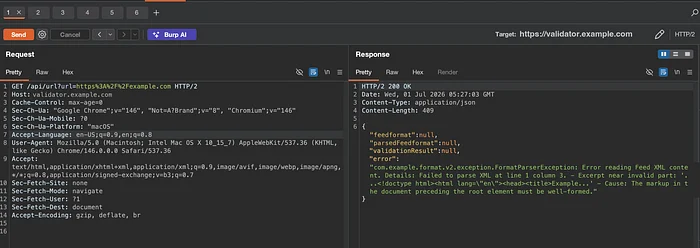
The server fetched example.com, received HTML, tried to parse it as XML, failed, and printed the received content in the Excerpt near invalid part: field. That excerpt is the actual HTML of the page. Detailed errors like this are added to help users debug, but they also return whatever the server fetched.
Step 2: prove the filter exists
A direct request for an internal address:
GET /api/url?url=https%3A%2F%2F10.9.0.30 HTTP/1.1Host: validator.example.com
returned:
{"feedformat":null,"parsedFeedformat":null,"validationResult":null,"error":"Validating this URL is unsupported."}
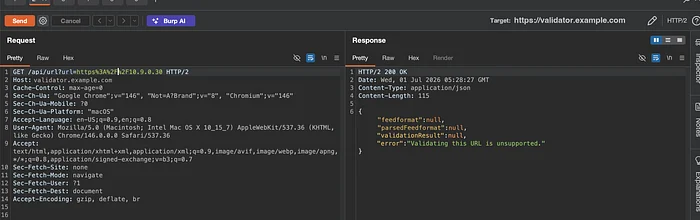
This is a different error from Step 1, so a filter definitely exists. The blocklist table above shows how far it went: loopback, IPv6 loopback, cloud metadata, the three main private ranges, decimal, hex and octal encodings of [redacted], and the file and gopher schemes were all refused.
Step 3: bypass with a redirect
There are two moments in any fetch: the check ("is this URL safe?") and the fetch ("go and get it"). The filter runs at the first moment. HTTP adds a step between them, the redirect, and most HTTP libraries follow redirects automatically without asking anyone. The flow becomes:
1. CHECK -> https:2. FETCH -> server connects to httpbin.org3. 302 -> Location: http:4. FOLLOW -> server connects to [redacted] <-- nobody checked this one
The filter checked the first URL. The connection that matters is the second one, and nobody ran the check again. httpbin.org provides a ready-made redirector:
https://httpbin.org/redirect-to?url=<destination>
Two practical points. First, the payload must be URL encoded: it contains ?url= inside another ?url=, and without encoding the target server reads two separate parameters and the PoC fails for no reason. Second, turn off "Follow redirects" in Burp Repeater.
The final request:
GET /api/url?url=https%3A%2F%2Fhttpbin.org%2Fredirect-to%3Furl%3Dhttp%3A%2F%2F10.9.0.30%3A80 HTTP/1.1Host: validator.example.com
returned:
{"feedformat":null,"parsedFeedformat":null,"validationResult":null,"error":"Remote host terminated the handshake"}
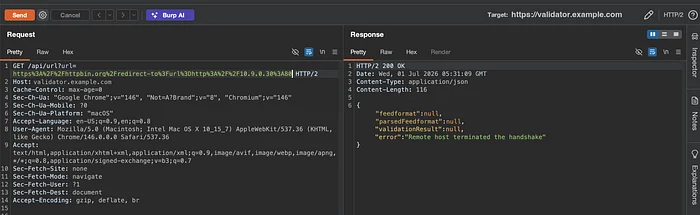
Three things follow from that message. It is not Validating this URL is unsupported., so the filter did not block it. It is not timeout, so it did not simply hang. Remote host terminated the handshake is a TLS error, and a TLS error only happens after a TCP connection has been established. Something replied: there is a live machine on [redacted] inside the private network, and the public tool talked to it.
Step 4: prove the behaviour is real
One strange error is not enough, because a triager can say the redirector was slow or that the error appears for everything. The researcher showed that the response changes according to what is actually running inside the network.
4a, live host, open port. Redirect to https://[redacted]:443:
{"error":"Remote host terminated the handshake"}
It came back fast with a TLS-level error, so port 443 is open on a live internal host.
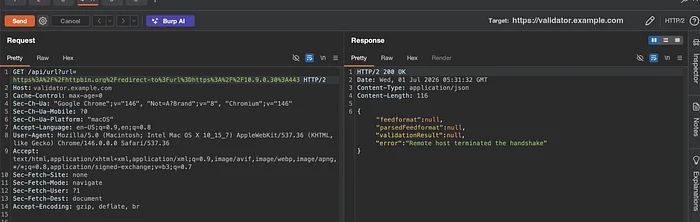
4b, same host, different port. Redirect to http://[redacted]:8080:
{"error":"timeout"}
It took around 10 seconds, so port 8080 is closed or filtered.
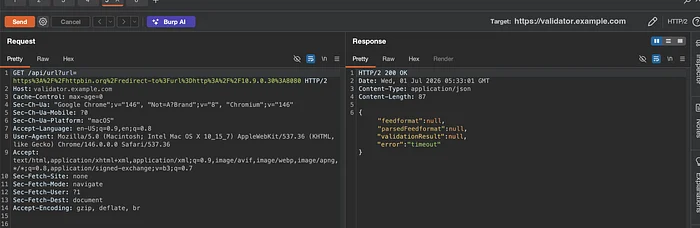
4c, an IP where nothing exists. Redirect to http://[redacted]:
{"error":"timeout"}
Also around 10 seconds, so there is no host on this IP.
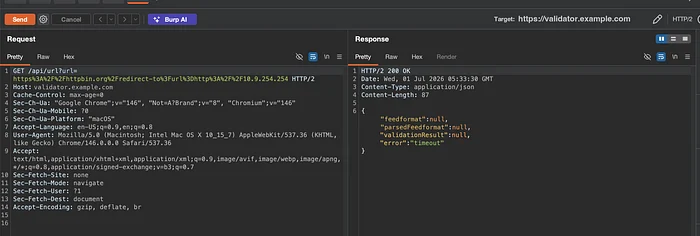
Three targets, three different behaviours. That is a working internal port scanner usable by anyone on the internet without logging in.
Bonus: where the internal IPs came from
The IP was not guessed. Internal hostnames resolved in public DNS and returned private addresses:
$ dig +short internal-app.int.example.com A10.9.1.6510.9.0.3010.9.2.182
On its own this is only an informative finding, since nobody outside can reach a private IP. Once the SSRF existed, it became the target list. Small findings are worth keeping: many good reports are one Low finding plus one more bug.
Root cause
The filter was applied only to the URL supplied by the user, and not again after an HTTP redirect. The application followed redirects automatically, so the destination of the redirect was fetched without any validation. The blocklist was strong, but it was a check on strings at one moment in time, not a check on the address the server finally connected to. The detailed parser error, which echoed the fetched content, turned the SSRF into a full-read one.
Impact
The SSRF protection built to keep the service away from internal infrastructure can be bypassed. Anyone on the internet, without an account, can find live hosts and open ports inside the private network. Because fetched content comes back in the error message, any internal HTTP service the request reaches can be read, including internal dashboards, admin panels and metadata endpoints, which usually have no authentication because they assume nobody outside can reach them. The endpoint also accepted basicAuthUsername and basicAuthPassword parameters, so an attacker can attach credentials to the internal request. In short, it is a working entry point for internal recon and for reading any internal HTTP service that has no authentication of its own.
Fix
The report gives recommendations rather than a record of what the team changed.
- Check every hop, not only the first URL. Apply the same internal IP blocklist to the final destination of each redirect, or disable automatic redirect following, or limit redirects and validate each one again.
- Validate the resolved IP, not the text. Resolve the hostname first and block all non-public ranges. Do not forget
[redacted]/10, the CGNAT range used by Kubernetes pod networking, which the filter was missing. - Pin the IP. Resolve once, validate that IP and connect to the same IP, otherwise DNS rebinding bypasses the check in the same way.
- Do not print fetched content in error messages. Keep the detailed error in server logs and return a simple "validation failed" to the user.
- Use an allowlist for outgoing traffic. A blocklist will always miss something; an allowlist fails safely.
- Put authentication on admin tools. A difficult subdomain name is not a security control.
Variants to test
- Redirect to a private address. Point the parameter at a public redirector whose destination is an internal IP. A positive result is an error that differs from the blocklist message and indicates a connection was made, such as a TLS error or a protocol-level response.
- Redirect to a different port on the same host. Compare a known-open port with a likely-closed one. A fast protocol error versus a timeout of around 10 seconds shows the response depends on the internal state.
- Redirect to an unused internal IP. A timeout here, matching the closed-port behaviour, confirms the timing baseline and rules out a generic error.
What happened, in plain words
A security researcher found a tool on a company's website that would fetch any web address you gave it and tell you whether the page was a valid XML feed. The tool was meant to help people check their own feeds. It was open to anyone, with no login. It also sat on an "admin" subdomain, the kind of address companies use for internal tools they assume outsiders will never find.
The company had thought about the obvious danger. If a tool fetches addresses for you, someone could ask it to fetch addresses inside the company's private network, which outsiders cannot reach directly. So they built a filter that refused the internal addresses the researcher tried. The researcher tried every classic trick and all of them were refused.
Then the researcher used a redirect. A redirect is what happens when a web address answers "not here, go to this other address instead". The filter only looked at the first address. The server then followed the redirect to the internal address without checking it again. The error message the tool sent back showed that a connection to the internal machine had been made. By pointing the redirect at different internal addresses and ports, the researcher could tell which machines were alive and which ports were open, all from the public internet, without an account.
This kind of bug is called SSRF, and this particular one was a "full-read" SSRF, because the tool also showed the researcher what it had fetched.
The tool, and why it was interesting
The target was a public bug bounty program. In a bug bounty program, a company invites outside researchers to look for security problems in its systems and pays for good reports. The researcher hides the real company domain behind example.com and changes the internal IP addresses, so the examples here are not the real ones.
The tool was a format validator. A format validator is a small service that checks whether a file is written correctly. Here it checked XML feeds. An XML feed is a structured text file that websites and apps use to share lists of things, such as news articles or products. You give the validator the address of your feed, it downloads the feed, reads it, and tells you whether it is valid.
The address of the feature was:
https://validator.example.com/api/url?url=<your feed url>
Line by line:
https://is the secure version of the protocol browsers use to talk to websites. Thesstands for secure, meaning the traffic is encrypted.validator.example.comis the name of the server.example.comstands in for the real company domain./api/urlis the path to a specific feature on that server. API stands for Application Programming Interface. In plain terms, it is a way for one program to talk to another over the web, instead of a human clicking buttons in a browser. Here the API is the part of the validator that accepts a URL to check.?url=starts the query string, the part of a web address that carries extra information. Everything after the?is a list of named values. Here the name isurland the value is whatever feed address you want checked.
Two things made this interesting. First, it was completely unauthenticated. Authentication is how a system knows who you are, usually through a login. A cookie is a small piece of data your browser stores and sends back to a site so the site can remember you between page loads, and a token is a string, often secret, that a program presents to prove it is allowed in. This endpoint needed none of that: no login, no cookie, no API key. Anyone who knew the address could use it.
Second, it sat on an admin subdomain. A subdomain is a prefix on a domain name, so validator.example.com is a subdomain of example.com. Companies often put internal tools on names like admin. or internal. and assume that because the name is hard to guess, nobody outside will find them. That assumption is not a security control.
The bug is a full-read SSRF. The server makes the request and returns the fetched content to the caller, in this case inside a parser error message. We will come back to what that means.
What SSRF is
SSRF stands for Server-Side Request Forgery. A server is a computer that runs a website or service and answers requests from other computers. A request is a message one computer sends to another asking for something, such as a web page.
Here is the everyday comparison the researcher uses. You are standing outside a building and you are not allowed to go inside. But there is a delivery boy who works there and goes wherever you tell him to go. So instead of you going inside, you tell the delivery boy, "go to room 401 and bring me whatever is on the table."
The delivery boy is the server. The server sits inside the company's private network. You do not. A private network is a set of computers that can talk to each other but are not directly reachable from the public internet. So if you can control which address the server visits, you are borrowing its position inside the network. That is the forgery in the name: you are forging a request that looks like it came from inside.
There are two types you should know:
- Blind SSRF: the server makes the request but does not show you the response. You only guess from time delays or from a service like Burp Collaborator, which is a tool that gives you a unique address and tells you when something contacts it.
- Full-read SSRF: the server makes the request and shows you the response body. This one is much better for an attacker, because now you can read internal dashboards, admin panels, cloud metadata and so on. Cloud metadata is a special internal address that cloud providers make available to their own machines, and it can contain credentials and configuration.
The bug in this article is the second one.
Bug summary
The target had a subdomain hosting a format validator tool. The idea of the tool is simple: you host an XML feed somewhere, you give the tool your URL, and it tells you if your feed is valid or not.
https://validator.example.com/api/url?url=<your feed url>
Two things made this interesting:
- It was completely unauthenticated. No login, no cookie, no API key.
- It was on an admin subdomain, which normally means it is an internal tool that nobody expected outsiders to reach.
The application was blocking all internal IPs properly. An IP address is the numeric address of a computer on a network, like a postal address for machines. The filter was checked only on the URL that the researcher gave, and it was not checked again after an HTTP redirect. HTTP is the protocol browsers and servers use to exchange web pages and data. A redirect is an HTTP response that says "the thing you want is somewhere else, go there instead". So the researcher gave it a public URL which redirects to an internal IP, and the server happily followed it and connected to the internal host.
Now let us go through the steps.
Step 1: first check if the server is really fetching the URL
Whenever you see a parameter which takes a URL (url, uri, src, feed, image_url, callback, webhook and similar), the first thing to do is confirm that the server is actually visiting that URL. A parameter is a named value in a request, like the url part above. This matters because many features accept a URL but never fetch it, or fetch it only in some situations. Before you can abuse a fetch, you have to see one happen.
So the researcher simply gave it example.com:
GET /api/url?url=https%3A%2F%2Fexample.com HTTP/1.1Host: validator.example.com
Line by line:
GETis the HTTP method used to ask for something. It is the same method your browser uses when you open a page./api/url?url=https%3A%2F%2Fexample.comis the path and query string. The value afterurl=ishttps://example.com, but written in URL encoding. URL encoding replaces characters that have special meaning in a web address with a percent sign and two characters.%3Ais a colon and%2Fis a slash. Sohttps%3A%2F%2Fexample.comdecodes tohttps://example.com. Encoding is needed because the value itself contains characters that would otherwise confuse the server about where the value ends.HTTP/1.1says which version of the HTTP protocol is being used.Host: validator.example.comtells the server which website name the request is for. One server can host many names, so this header picks the right one. A header is a line of extra information attached to a request or response.
And this was the response:
{ "feedformat": null, "parsedFeedformat": null, "validationResult": null, "error": "com.example.format.v2.exception.FormatParserException: Error reading Feed XML content. Details: Failed to parse XML at line 1 column 3. - Excerpt near invalid part: '...<!doctype html><html lang=\"en\"><head><title>Example...' - Cause: The markup in the document preceding the root element must be well-formed."}
Line by line:
- The whole thing is JSON, a common text format for structured data. Curly braces group named values, and each name is followed by a colon and its value.
"feedformat": nullmeans the tool could not work out the feed format.nullmeans "no value"."parsedFeedformat": nullmeans it could not produce a parsed version either. Parsing means reading text and turning it into a structured form the program can work with."validationResult": nullmeans there is no pass or fail result, because the check never got that far."error": ...is the interesting part. It is a long error message from the program's XML parser. The parser tried to read the downloaded page as XML, failed at line 1 column 3, and then printed an excerpt of what it received:<!doctype html><html lang="en"><head><title>Example.... That excerpt is the actual HTML ofexample.com. HTML is the language web pages are written in.
The server went to example.com, received HTML, tried to parse that HTML as XML, failed, and then printed the content it received inside the error message. That Excerpt near invalid part: field is the actual HTML of the page.
So this is not a blind SSRF. The error message itself is the reading window. This is a full-read SSRF, and it happens more often than you think, because developers add these detailed errors to help their users debug, not realising it also returns whatever the server fetched. Debugging means finding out why something failed, and detailed errors are helpful for that, but they should stay in the server's own logs, not go back to the person who made the request.
Step 2: check if there is any protection (the control test)
Before saying "I bypassed the filter", you must first prove that a filter exists. A filter here is a check that refuses certain addresses. This makes your report much stronger, because now the person who reviews it, called a triager, can clearly see that the behaviour is unintended. If you only show that you reached an internal address, the company can reply "that is how it is supposed to work". If you show that a direct attempt is refused and a clever attempt is not, the difference is the bug.
So the researcher directly asked it to fetch an internal IP:
GET /api/url?url=https%3A%2F%2F10.9.0.30 HTTP/1.1Host: validator.example.com
Line by line:
- The method, path and host header work exactly as before.
- The value after
url=ishttps%3A%2F%2F10.9.0.30, which decodes tohttps://[redacted].[redacted]is an address in the[redacted]/8range, one of the blocks of addresses reserved for private networks. These addresses are not reachable from the public internet, which is exactly why a tool that fetches URLs for you must not be allowed to reach them.
Response:
{"feedformat":null,"parsedFeedformat":null,"validationResult":null,"error":"Validating this URL is unsupported."}
Line by line:
- The first three fields are
nullagain, so no validation happened. "error":"Validating this URL is unsupported."is a completely different message from Step 1. "Unsupported" here means "we refuse to check this address". That is the filter speaking.
Blocked. And notice, this is a totally different error from Step 1, so someone has definitely written code to stop this.
Then the researcher spent some time testing how strong this filter is. All of these were blocked with the same message:
| Payload | What was being tested |
|---|---|
http://[redacted] |
loopback |
http://localhost |
loopback by name |
http://[::1] |
IPv6 loopback |
http://[redacted]/latest/meta-data/ |
cloud metadata |
https://[redacted] |
private range [redacted]/8 |
http://[redacted] |
private range [redacted]/12 |
http://[redacted] |
private range [redacted]/16 |
http://2130706433 |
[redacted] in decimal |
http://0x7f000001 |
[redacted] in hex |
http://017700000001 |
[redacted] in octal |
file:///etc/passwd |
file scheme |
gopher://[redacted]:80 |
gopher scheme |
What each row means:
- Loopback is the address a computer uses to talk to itself.
[redacted]is the standard IPv4 loopback address, andlocalhostis its name.[::1]is the same idea in IPv6, the newer, longer form of IP address. Services that only listen on loopback are often internal and unprotected. - Cloud metadata at
[redacted]is a special address that cloud providers expose to their own machines. It can hand out credentials, so it is a favourite SSRF target. - The three private ranges are the address blocks reserved for internal networks:
[redacted]/8,[redacted]/12and[redacted]/16. The/8,/12and/16describe how large each block is. 2130706433,0x7f000001and017700000001are all the same address,[redacted], written in decimal, hexadecimal (base 16, prefixed with0x) and octal (base 8, written with a leading zero). Some software accepts these forms, so a filter that only compares text can be fooled by them.file:///etc/passwduses thefilescheme to read a local file. A scheme is the part before://in a URL that says how to reach the thing, such ashttp,httpsorfile./etc/passwdis a well-known file on Linux systems.gopher://[redacted]:80uses thegopherscheme, an old protocol that can be abused to send crafted data to other services.
Honestly, this is a very good blocklist. A blocklist is a list of things that are forbidden. Every normal payload from every SSRF cheat sheet was dead here. A cheat sheet is a collection of known tricks that people share.
This is the point where most people close the tab and move to another target. Please do not. When a filter blocks all the known payloads, it is telling you that the developer was thinking about strings, not about what the server does after the check. A string is just text. The filter was comparing the text of the URL against a list. It was not thinking about what happens next, once the server starts talking to the address.
Step 3: the bypass using a redirect
Here is the simple idea behind this bug.
When an application takes a URL and fetches it, there are two different moments:
- Check: "is this URL safe?"
- Fetch: "ok, go and get it."
The filter runs at the first moment. But HTTP has a feature that adds extra connections between these two moments: the redirect. And almost every HTTP library follows redirects automatically without asking anyone. A library is a bundle of code a developer uses instead of writing everything from scratch, and the one that makes web requests usually follows redirects by default because that is what browsers do.
So the flow becomes:
1. CHECK -> https:2. FETCH -> server connects to httpbin.org3. 302 -> Location: http:4. FOLLOW -> server connects to [redacted] <-- nobody checked this one
Line by line:
1. CHECK -> https:means the filter looked at the first URL, the public one.2. FETCH -> server connects to httpbin.orgmeans the server made the request to the public redirector. httpbin.org is a free public service that echoes back what you send it and can also issue redirects on demand.3. 302 -> Location: http:means the redirector answered with HTTP status code302, which means "found, but it is somewhere else". TheLocationheader in that response holds the new address, here an internal one.4. FOLLOW -> server connects to [redacted]means the server obeyed the redirect and connected to the internal address. The comment<-- nobody checked this oneis the whole bug: the filter ran only at step 1.
The filter checked the first URL. The connection that actually matters is the second one. And nobody ran the check again.
To test this you need any public URL which redirects wherever you want. You can host your own small script, but for a quick PoC (proof of concept, a minimal demonstration that the bug is real) httpbin.org already has one:
https://httpbin.org/redirect-to?url=<destination>
Line by line:
https://httpbin.orgis the public service./redirect-tois the feature that sends a redirect.?url=<destination>is the parameter that says where to redirect to. You replace<destination>with the address you want the target server to end up at.
Two important things here, please note them:
1. You must URL encode your payload. My payload has ?url= inside another ?url=. If you do not encode it, the target server will read it as two separate parameters and your PoC will fail for no reason. Think of it like putting a letter inside another letter: if you do not seal the inner envelope, the postal service reads its address as part of the outer one.
2. In Burp Repeater, turn OFF "Follow redirects". Burp is a tool for intercepting and editing web traffic, and Repeater is the part of it that lets you send the same request again and again with changes. Otherwise Burp will follow the redirect itself and you will get confused about who is doing what. If Burp follows the redirect, your own computer makes the second request, not the target server, and the test proves nothing.
So the final request:
GET /api/url?url=https%3A%2F%2Fhttpbin.org%2Fredirect-to%3Furl%3Dhttp%3A%2F%2F10.9.0.30%3A80 HTTP/1.1Host: validator.example.com
Line by line:
GETandHTTP/1.1are the same as before.- The value after the first
url=ishttps%3A%2F%2Fhttpbin.org%2Fredirect-to%3Furl%3Dhttp%3A%2F%2F10.9.0.30%3A80. Decoded, that ishttps://httpbin.org/redirect-to?url=http://[redacted]:80. The inner?,=and:are all encoded as%3F,%3Dand%3A, so the target server sees one single value and not two parameters. - The inner destination is
http://[redacted]:80.:80is the port, a number that says which service on a machine to talk to. Port 80 is the standard port for plain HTTP. Host: validator.example.comstill points at the validator.
And the response:
{"feedformat":null,"parsedFeedformat":null,"validationResult":null,"error":"Remote host terminated the handshake"}
Line by line:
"error":"Remote host terminated the handshake"is the key. A handshake is the opening conversation two computers have before they exchange data. In TLS, the encryption layer behind HTTPS, the handshake is where the two sides agree on encryption. "Terminated the handshake" means the other side closed the connection during that opening conversation.
This single error message is the whole bug. Read it carefully:
- It is not
"Validating this URL is unsupported.", so the filter did not block it. - It is not
"timeout", so it did not just hang. A timeout is when a request waits and gets no answer within a set time. "Remote host terminated the handshake"is a TLS error, and a TLS error only happens after a TCP connection is successfully established. TCP is the basic protocol that carries connections across the internet. You cannot get a TLS error without first having a working connection.
Means something replied. There is a live machine on [redacted] inside their private network, and this public internet-facing tool just talked to it for me.
Filter bypassed.
Step 4: proving it is real (open port vs closed port vs no host)
One strange error is not enough. A triager can always say "maybe httpbin was slow" or "maybe this error comes for everything". A triager is the person at the company who reads incoming reports and decides whether they are real and how serious they are. If the same error appears for every address, it proves nothing about the internal network.
So the researcher proved that the response changes according to what is actually running inside their network. The idea is a control: you compare a case you expect to succeed with a case you expect to fail, and check that the answers differ in the way you predicted.
4a: live host, open port
https://httpbin.org/redirect-to?url=https://[redacted]:443
{"error":"Remote host terminated the handshake"}
Came back fast, TLS level error, so port 443 is OPEN on a live internal host. Port 443 is the standard port for HTTPS. The redirect here points at https://[redacted]:443, so the server tries to speak TLS to that port. A fast TLS error means the port accepted the connection and then something went wrong at the encryption stage, which shows the port is open.
4b: same host, different port
https://httpbin.org/redirect-to?url=http://[redacted]:8080
{"error":"timeout"}
Took around 10 seconds, so port 8080 is closed or filtered. Port 8080 is a common alternative port for web services. A timeout means the connection attempt got no answer at all, which is what happens when nothing is listening or a firewall drops the traffic. A firewall is a filter for network traffic.
4c: an IP where nothing exists
https://httpbin.org/redirect-to?url=http://[redacted]
{"error":"timeout"}
Also around 10 seconds, so no host on this IP. This case is the baseline: an address with nothing on it gives the same timeout as a closed port, which is exactly what you would expect.
Three different targets, three different behaviours. This is not luck, this is a working internal port scanner that anyone on the internet can use without logging in. A port scanner is a tool that checks which ports on a machine are open, which tells you which services are running.
Small bonus: how I knew which internal IP to try
I did not guess the IP. Their internal hostnames were resolving in public DNS and returning private addresses:
$ dig +short internal-app.int.example.com A10.9.1.6510.9.0.3010.9.2.182
Line by line:
$is the shell prompt, the symbol a command line shows before you type.digis a command-line tool for asking DNS questions. DNS is the internet's phone book: it turns names likeexample.cominto IP addresses.+shorttellsdigto print only the answer, without the extra detail.internal-app.int.example.comis the hostname being looked up.Aasks for the IPv4 address record for that name.- The output lines
[redacted],[redacted]and[redacted]are the answers: three private addresses. The formatting in the block runs them together, but each is a separate answer.
Alone, this is just an informative finding, because nobody outside can reach a private IP anyway. But the moment I got the SSRF, this small finding became my target list.
So always keep your small findings saved. Many good reports are just one Low finding plus one more bug. A Low finding is a minor issue on its own, but combined with another issue it can become serious.
Impact
Impact is what an attacker could actually do with the bug, and it is what decides how serious the report is.
- The SSRF protection which the team built to keep this service away from internal infrastructure can be bypassed.
- Unauthenticated internal network access: anyone on the internet can find live hosts and open ports inside their private network, without any account.
- Full response read: as shown in Step 1, the fetched content comes back in the error message. So any internal HTTP service that the request reaches can be read, including internal dashboards, admin panels and metadata endpoints. These services usually have no authentication because they assume nobody outside can reach them.
- The endpoint was also accepting
basicAuthUsernameandbasicAuthPasswordparameters, so an attacker can even attach credentials to the internal request. Basic authentication is a simple login method where a username and password are sent with the request.
In short, this is a working entry point for internal recon and for reading any internal HTTP service which does not have its own authentication. Recon, short for reconnaissance, means gathering information about a target before attacking it.
Mitigation
Mitigation means the fixes that stop the bug from working.
- Check every hop, not only the first URL. Apply the same internal IP blocklist on the final destination of each redirect. Best is to disable automatic redirect following, or limit the redirects and validate each one again. A hop is one step in a chain of redirects.
- Validate the resolved IP, not the text. Resolve the hostname first and then block all non-public ranges. Also do not forget
[redacted]/10, the CGNAT range used by Kubernetes pod networking, which their filter was missing. CGNAT is a range of addresses used by some networks for sharing addresses, and Kubernetes is a system for running many small services, which often uses that range internally. - Pin the IP. Resolve once, validate that IP and connect to the same IP, otherwise DNS rebinding will bypass it in the same way. DNS rebinding is a trick where a hostname gives a safe address when checked and a private address a moment later when fetched.
- Do not print the fetched content in error messages. Keep the detailed error in your server logs and return a simple "validation failed" to the user.
- Use an allowlist for outgoing traffic. A blocklist will always miss something. An allowlist is the opposite of a blocklist: only listed things are allowed, and everything else is refused, so it fails safely.
- Put authentication on admin tools. A difficult subdomain name is not a security control.
Glossary
- Allowlist: a list of things that are permitted; everything not on the list is refused.
- API: Application Programming Interface, a way for one program to talk to another over the web.
- Authentication: how a system knows who you are, usually through a login.
- Basic authentication: a simple login method where a username and password are sent with the request.
- Blocklist: a list of things that are forbidden.
- Burp: a tool for intercepting and editing web traffic.
- Burp Collaborator: a service that gives you a unique address and tells you when something contacts it.
- CGNAT: a range of addresses used by some networks for sharing addresses.
- Cloud metadata: a special internal address that cloud providers expose to their own machines, which can contain credentials and configuration.
- Cookie: a small piece of data your browser stores and sends back to a site so the site can remember you between page loads.
- Control: a comparison case you expect to behave differently, used to prove that a result is real.
- Debugging: finding out why something failed.
- DNS: the internet's phone book, turning names into IP addresses.
- DNS rebinding: a trick where a hostname gives a safe address when checked and a private address when fetched.
- Filter: a check that refuses certain addresses or values.
- Firewall: a filter for network traffic.
- Format validator: a service that checks whether a file is written correctly.
- Full-read SSRF: an SSRF where the server shows you the response it fetched.
- Handshake: the opening conversation two computers have before they exchange data.
- Header: a line of extra information attached to a request or response.
- Hexadecimal: base 16, written with a
0xprefix. - Hop: one step in a chain of redirects.
- HTML: the language web pages are written in.
- HTTP: the protocol browsers and servers use to exchange web pages and data.
- httpbin.org: a free public service that echoes back what you send it and can issue redirects on demand.
- Impact: what an attacker could actually do with the bug.
- IP address: the numeric address of a computer on a network.
- IPv6: the newer, longer form of IP address.
- JSON: a common text format for structured data.
- Kubernetes: a system for running many small services, which often uses the CGNAT range internally.
- Library: a bundle of code a developer uses instead of writing everything from scratch.
- Loopback: the address a computer uses to talk to itself.
- Low: a minor finding on its own, which can become serious when combined with another issue.
- Mitigation: the fixes that stop the bug from working.
- Octal: base 8, written with a leading zero.
- Parameter: a named value in a request.
- Parsing: reading text and turning it into a structured form the program can work with.
- PoC: proof of concept, a minimal demonstration that the bug is real.
- Port: a number that says which service on a machine to talk to.
- Port scanner: a tool that checks which ports on a machine are open.
- Private network: a set of computers that can talk to each other but are not directly reachable from the public internet.
- Query string: the part of a web address after the
?that carries extra information. - Recon: reconnaissance, gathering information about a target before attacking it.
- Redirect: an HTTP response that says the thing you want is somewhere else.
- Request: a message one computer sends to another asking for something.
- Scheme: the part before
://in a URL that says how to reach the thing, such ashttp,httpsorfile. - Server: a computer that runs a website or service and answers requests from other computers.
- SSRF: Server-Side Request Forgery, making a server fetch an address you choose so it acts from inside its own network.
- String: just text.
- Subdomain: a prefix on a domain name, such as
validatorinvalidator.example.com. - TCP: the basic protocol that carries connections across the internet.
- Timeout: when a request waits and gets no answer within a set time.
- TLS: the encryption layer behind HTTPS.
- Token: a string, often secret, that a program presents to prove it is allowed in.
- Triager: the person at the company who reads incoming reports and decides whether they are real and how serious they are.
- URL encoding: replacing characters that have special meaning in a web address with a percent sign and two characters.
- XML: a structured text format used for feeds and data exchange.




