Cookie based XSS exolpoitation 2300 bug bounty
A cookie value was reflected unsanitised on a page, allowing JavaScript execution if an attacker could set that cookie. The author chained this with an open redirect and a DOM-based XSS to set the cookie and achieve account takeover, earning $2,300.

For quite a long time I have been hunting for vulnerabilities on the HackerOne platform, allocating a certain amount of time outside the main work to check out my favorites and new programs. Countless times I had to stumble upon a cookie-based XSS vulnerability, which will become the main character of this article.
The full write-up lives on its author's site
It belongs to its author, so we link to it rather than copy it. The other two tabs are our own rewrites, checked against it.
Context
This is a story about cookie-based XSS: a vulnerability where the value of a cookie parameter is reflected on the page. By default such bugs are treated as self-XSS unless the researcher proves they are dangerous, and the article is about how to prove exactly that.
The target was a HackerOne program the author had been hunting on for a while. The affected cookie name is redacted in the text. The feature involved is a page in one of the site's subdirectories that reflects a cookie value into the HTML. The author also found, on the same program, an open redirect with a redirect_uri parameter on a /verification/login/ endpoint, and used it to set the cookie.
Setup
The researcher worked from a VPS, running most of his tools there. The techniques used across the hunt were:
- content discovery tools such as dirb and dirsearch;
- subdomain brute-force with a large dictionary;
- scraping subdomains from SSL certificates;
- a script for content discovery whose results he reviewed later.
The precondition for the whole chain is a page that reflects a cookie value, plus some way to set that cookie in a victim's browser. The report does not give browser, server or application versions.
Finding it
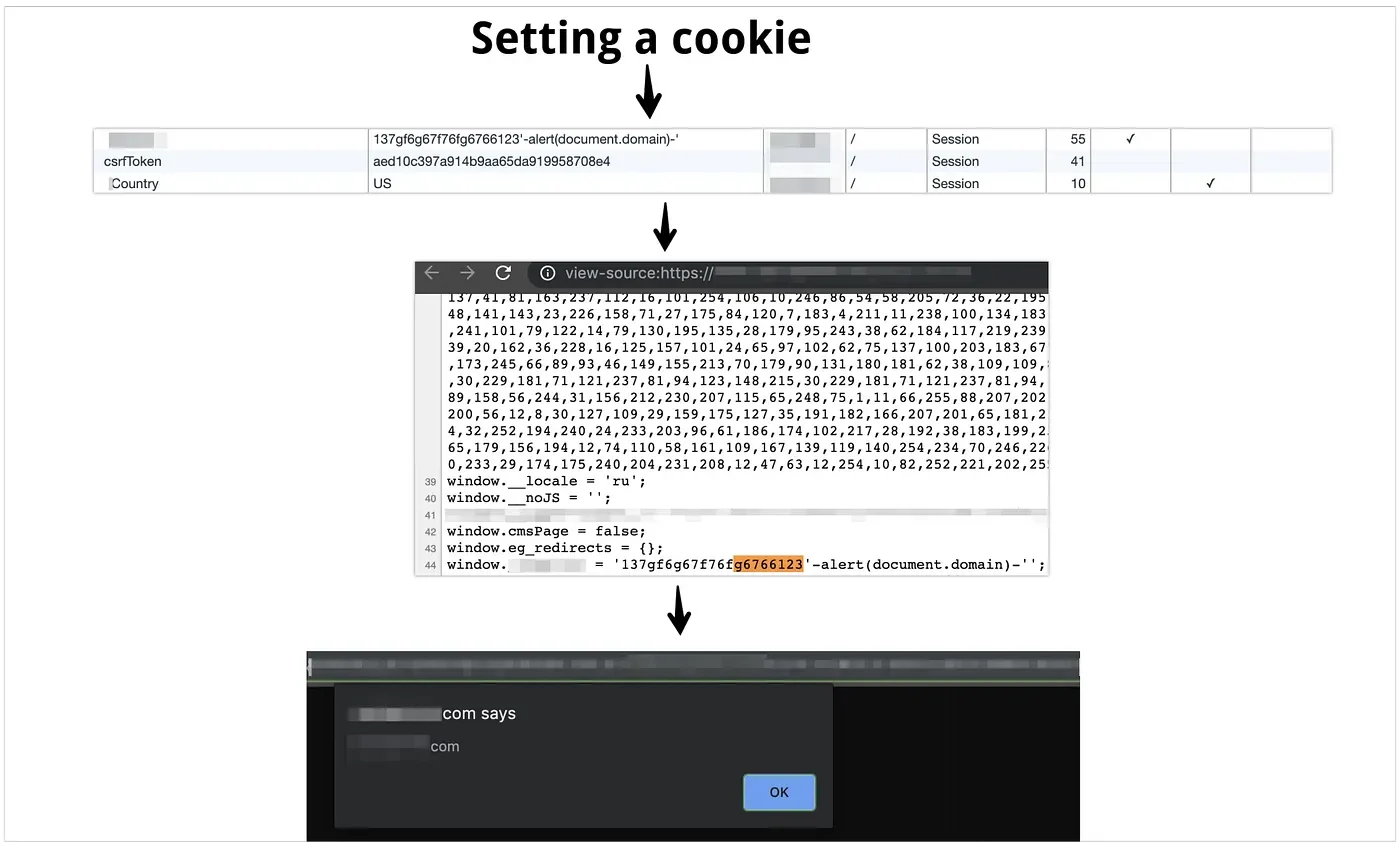
While testing the site, the author noticed that the value of a cookie (name redacted) is reflected in one of the subdirectories of the site. The first thing he checked was how the characters ' " / < > are handled. Only <> were filtered. That means you cannot break out of <script> </script>, but every other character passes through unfiltered.
Without much delay he embedded '-alert(document.domain)-' and JavaScript executed.
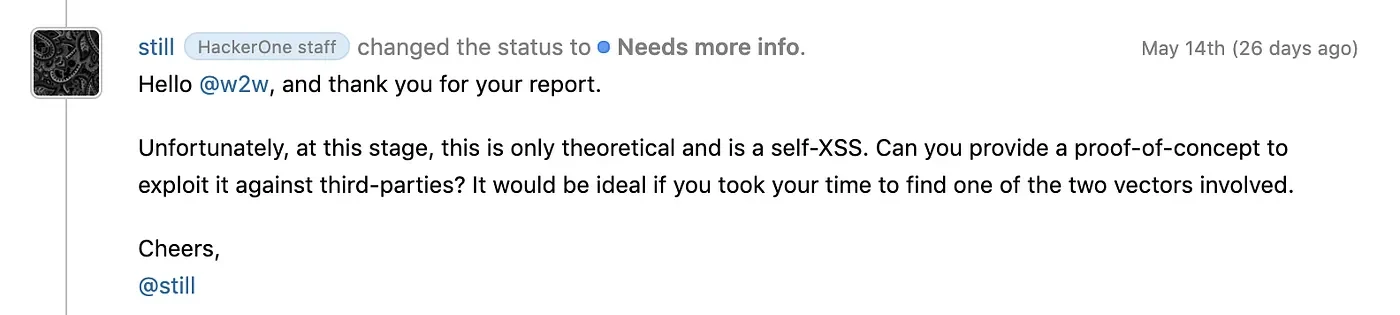
The developers had not set the secure flag on the cookie, so the MITM method described below also works against this page. He sent the report with that impact, and HackerOne staff (the triager) made it clear that this is self-XSS and that he should try harder.
Exploitation
The exploitation is a chain: first find a way to write an arbitrary cookie into the victim's browser on the vulnerable domain, then send the victim to the page that reflects it.
Step 1: understand the ways to set a cookie
The article lists four ways to set a cookie for the cookie-based XSS.
- CRLF injection. When newline characters are not properly checked and blocked, a
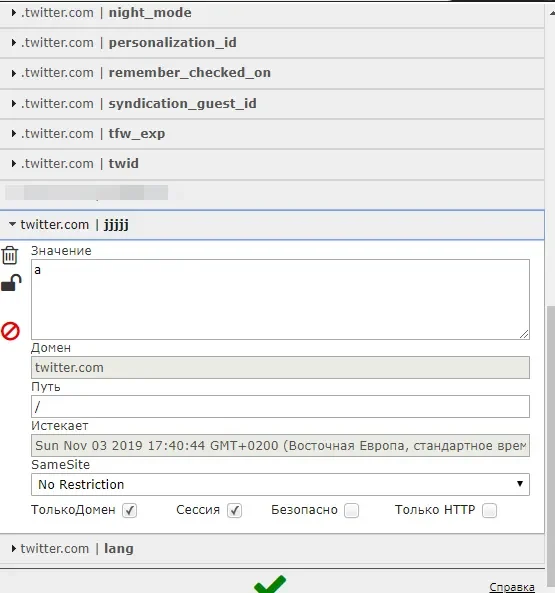
Set-Cookieheader can be injected into the response with the desired name and value. The real-life example given is a CRLF injection on twitter.com in the redirect:
https://twitter.com/login?redirect_after_login=/jjjkkk嘊嘍Set-Cookie:jjjjj=a;domain=twitter.com
- XSS on a subdomain. The XSS must be publicly available and on a wildcard
*.vulnerabledomain.com. Subdomains are often out of scope, so bugs there are either not accepted or marked as not eligible for a bounty. In that case it is still worth investing time in finding XSS to pair with the cookie-based XSS, because with it cookies can be set or removed viadocument.cookie. To increase impact, use an in-site redirect to the subdomain, for example:
https://vulnerabledomain.com/login?redirectUrl=https://jira.vulnerabledomain.com/path
If the victim has an active session the redirect is automatic; if not, authorisation is needed. The cookie is then set from the subdomain with the reflected XSS and can be sent downstream to the cookie-based XSS page, where the exploit can capture the CSRF token and perform a request to change the email address. Two XSS bugs combined can lead to account takeover, provided there are no additional protections such as password confirmation or a code sent to the old mailbox.
- Test files that allow setting cookies. Run a content discovery tool (dirb, dirsearch and so on) and, if the developers forgot to clean up, you may find such files. The author found a test servlet HTML page on which a cookie with an arbitrary name and value could be set. There was no protection on the POST request, so a victim visiting a CSRF exploit (or a GET version of it) would have the cookie set in her browser.
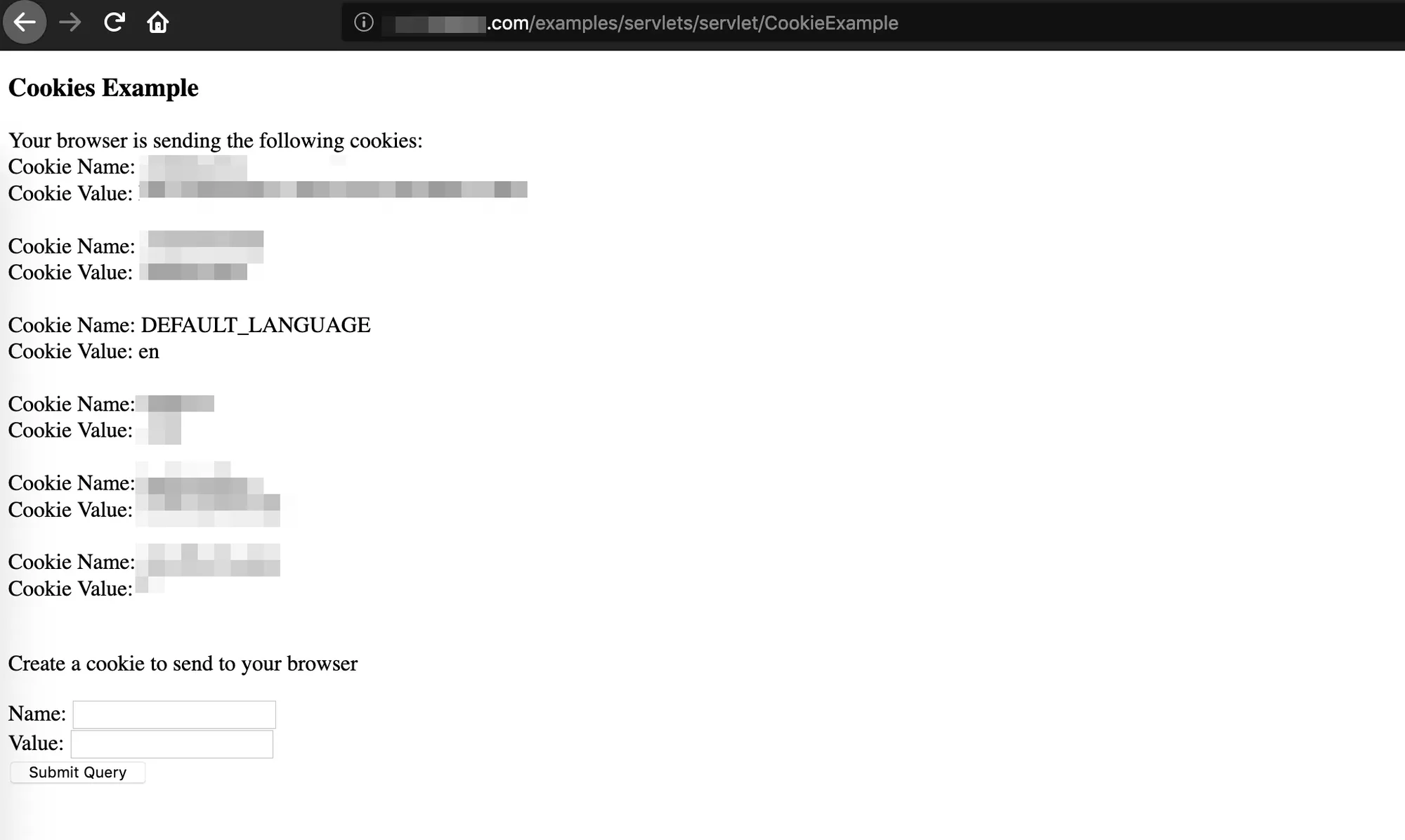
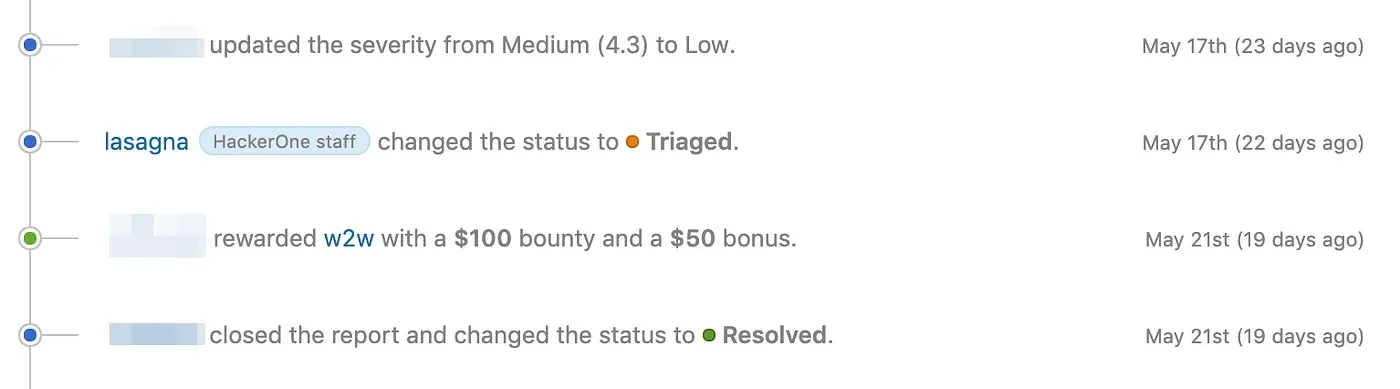
This bug was qualified as an under-alternative to CRLF injection, fixed by removing /examples/, and paid $150 as a low-severity bug. The HackerOne triager set it to medium, but the developers still tended to think it was low severity.
-
Man in the middle (MITM). This only works if the cookie has no secure flag. The victim must be on the attacker's network, or DNS resolution must be influenceable. To check the vulnerability:
-
Host an
index.phpfile with the following content:
<?php if ($_SERVER['HTTP_HOST']=='non-existed-subdomain.vulnerabledomain.com') { setrawcookie("VID",'\'+alert(123123123)+'\'', time()+36000, "/", ".vulnerabledomain.com",0,1); } ?>
- Add the following line to your
/etc/hostsfile:
[redacted] non-existed-subdomain.vulnerabledomain.com
- Visit
non-existed-subdomain.vulnerabledomain.comand then open the page on which the cookie is reflected.
A notable example of MITM exploitation is on e.mail.ru (HackerOne report 312548). There MITM was enough to prove a small level of danger, but the reward did not match that of stored XSS, because only a local exploitation example was shown, not an in-the-wild one. Had the researcher spent time searching for XSS or CRLF injection on *.mail.ru, the reward could have been increased greatly.
Not all HackerOne programs accept cookie-based XSS via MITM. If the scope exclusions say "Self XSS", the exploitation can be considered self-XSS and the report can be changed to informative or n/a.
Step 2: the self-XSS report and the triager's answer
With the reflected cookie value and the missing secure flag, the author sent the report with the MITM impact. The triager replied that it was self-XSS and that he should try harder.

Step 3: hunting for a way to set the cookie
He started surfing the site looking for CRLF injection or XSS to prove the danger. He expanded the subdomain list with brute-force using a large dictionary, scraping from SSL certificates and other tricks. Along the way he found and reported other bugs, turning out-of-scope bugs into in-scope ones where necessary. There were many open redirects and even an improper access control bug for $5000, but the vulnerabilities needed for the chain were not caught. A whole subdomain was taken offline immediately after the report; the author says he may disclose that report on hackerone.com/w2w if the program becomes public.
A week later he went through the results of his content discovery script. It had found the endpoint /verification, which he had not paid much attention to at first, but he had still run a script against it, and the subdirectory /verification/login was found. Visiting the URL showed the page:
/verification/login/?redirect_uri=https://vulnerabledomain.com
This page redirected to the redirect_uri value after login, or immediately if there was a session. Testing the redirect revealed an open redirect protection bypass:
[redacted]
He then tried to escalate the bug to XSS. The payload javascript:alert(1) failed, and so did javascript:alert(1)//. But this payload worked:
javascript://https://vulnerabledomain.com/%250A1alert(1):0
Because of the presence of https://vulnerabledomain, the parameter passed the white-list validation.
Step 4: setting the cookie through the open redirect
With the working javascript: payload he went back to his cookie-based XSS. Using this URL, a cookie was successfully set on *.vulnerabledomain.com:
javascript:https://vulnerabledomain.com/%0A1?document%2ecookie%20%3d%20%27SID%3d137gf6g67f76fg6766123%5c%27-alert%28document%2edomain%29-%5c%27%3b%20expires%3dFri%2c%203%20Aug%202019%2020%3a47%3a11%20UTC%3b%20path%3d%2f%3b%20domain%3d%2evulnerabledomain%2ecom%3b%27%3a0
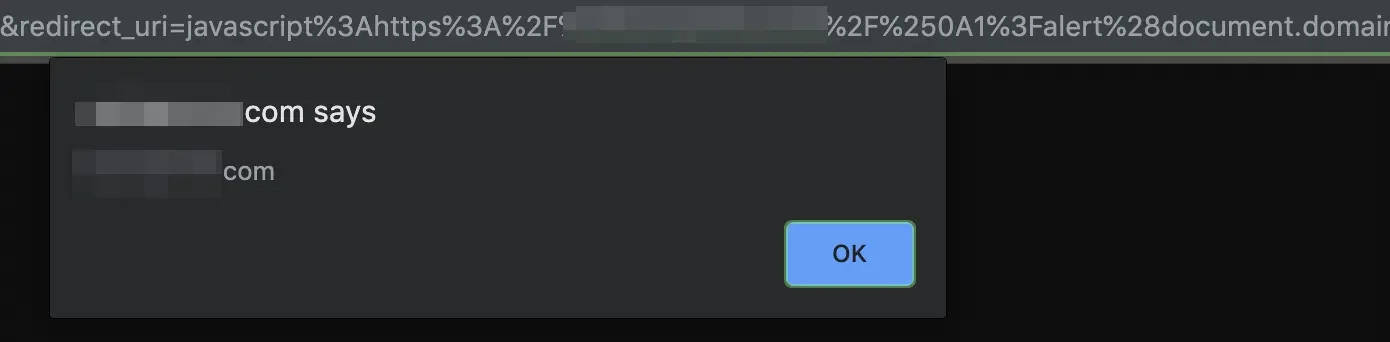
After visiting the page with the cookie, the alert window appeared. He updated the report and waited for an answer.
Step 5: the payout
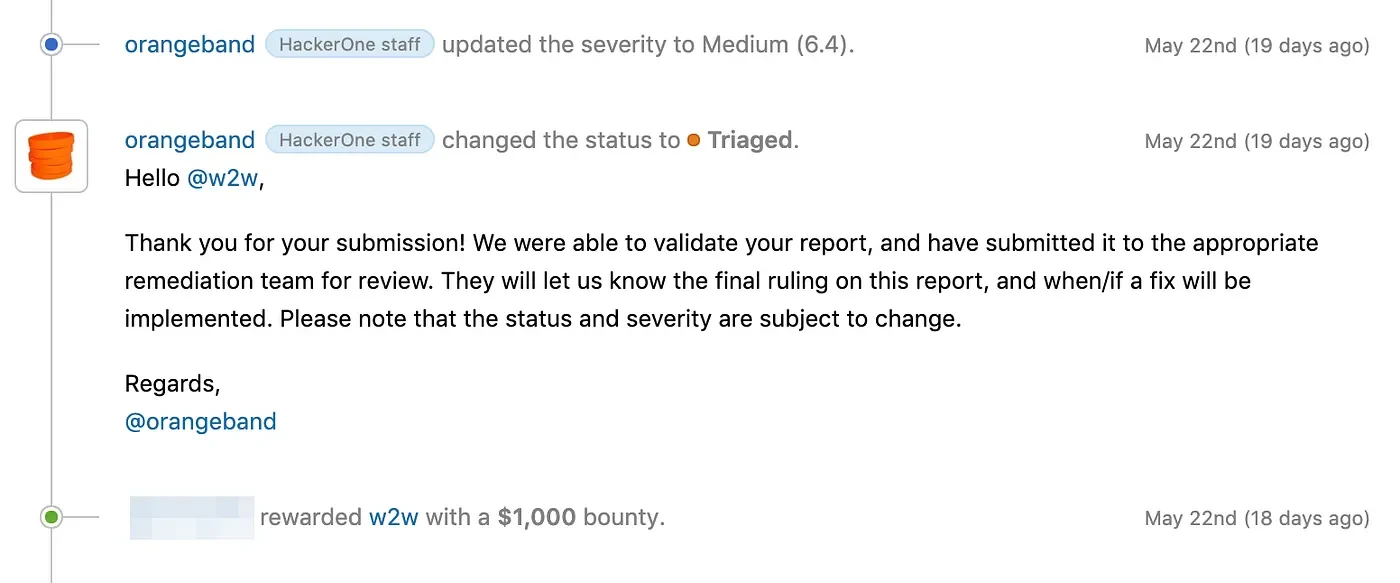
On the same day the triager responded and the bounty was paid. The bounty for the DOM-based XSS, with which he installed the cookie, also came to his account.

Testing results: $1000 + $1000 + $200 (OR) + $100 (OR) = $2300.
Root cause
The page reflects the value of a cookie parameter into the HTML without adequate output encoding. Only the characters <> are filtered, which prevents breaking out of a <script> block but leaves quotes and other characters intact, so a value such as '-alert(document.domain)-' executes. The cookie also lacks the secure flag, which is what makes the MITM variant applicable. The second half of the chain is an open redirect on /verification/login/ whose redirect_uri validation is a white-list that can be bypassed with a javascript: URL containing the trusted domain string.
Impact
An attacker who can set a cookie on the vulnerable domain, through CRLF injection, XSS on a wildcard subdomain, a leftover test file or MITM, can execute JavaScript in the victim's browser when the victim visits the page that reflects the cookie. Combined with a second XSS on a subdomain, the exploit can capture the CSRF token and perform a request to change the email address, leading to account takeover if there are no additional protections such as password confirmation or a code sent to the old mailbox. The MITM variant requires the victim to be on the attacker's network or DNS resolution to be influenceable, and it is only accepted by programs that do not exclude self-XSS.
Fix
The report describes one fix: the test servlet page was fixed by removing /examples/. For the open redirect and the cookie-based XSS itself, the report does not state what was changed.
Variants to test
- CRLF injection in redirects. Try injecting newline characters into redirect parameters and look for an injected
Set-Cookieheader in the response, as in the twitter.com example. - XSS on wildcard subdomains. Look for reflected XSS on
*.target.comand usedocument.cookieto set the cookie for the parent domain, then redirect the victim to the cookie-reflecting page. - Leftover test files. Run dirb or dirsearch against the target and look for pages that set cookies with arbitrary names and values, especially ones accepting POST or GET without protection.
- MITM with a missing secure flag. Host a page that sets the cookie for the target domain, point a non-existent subdomain at it via
/etc/hosts, and check whether the cookie is reflected on the target page. - Open redirect white-list bypass. Try
javascript:payloads that contain the trusted domain string, such asjavascript://https://trusted.com/%250A1alert(1):0, and check whether the redirect executes script. - Redirect parameter with userinfo trick. Try
[redacted]in aredirect_uriparameter and see whether the redirect goes to the attacker's domain.
What happened, in plain words
A security researcher spent a lot of his free time testing websites on HackerOne, a platform where companies invite people to look for bugs in their systems and pay for the useful ones. One kind of bug he kept running into is called cookie-based XSS. This article is about that bug and about how he turned one such finding, which the platform's staff first dismissed as harmless, into a paid reward of $2,300.
To follow the story you only need to know what a browser does. Everything else is explained as it comes up.
The idea behind cookie-based XSS
A cookie is a small piece of text that a website asks your browser to store and send back on every later visit. It is how a site remembers you: that you are logged in, what your preferences are, which session you belong to. Think of it as a cloakroom ticket: the site gives you a number, and when you come back it reads the number to know which coat is yours.
XSS stands for cross-site scripting. It means that an attacker manages to get their own JavaScript (small programs that run inside your browser) to run on a website you trust. When that happens, the attacker's code runs with the same rights as the site's own code: it can read the page, read your cookies and act as you.
Cookie-based XSS is a specific flavour. It happens when a page takes the value of a cookie and prints it into the page without cleaning it first. If an attacker can control what goes into that cookie, they control what ends up in the page, and script can run.
The catch is that normally only you can set cookies in your own browser. So if the only person who can trigger the bug is the person who set the cookie, the bug is called self-XSS: you attack yourself, which is not interesting to a company. The whole article is about how to prove that someone else can set that cookie in a victim's browser, which turns a self-XSS into a real vulnerability.
The target
The author had been testing one particular program on HackerOne for a while. The name of the affected cookie is hidden in the text. What matters is the feature: a page in one of the site's subdirectories that takes a cookie value and puts it into the HTML of the page.
On the same program he also found an open redirect: a feature that sends you to another address, where the address is taken from a parameter in the URL and can be pointed anywhere. He found it on a /verification/login/ endpoint and used it to set the cookie.
How he worked
He ran most of his tools on a VPS, a rented computer in a data centre that stays online all the time, so long scans do not depend on his own laptop being awake. The techniques he used during the hunt were:
- content discovery tools such as dirb and dirsearch. These take a list of common file and folder names and try them one by one against a site, like trying every key on a big bunch to see which doors exist;
- subdomain brute-force with a large dictionary: guessing names like
jira.,mail.ortest.in front of the main domain to find machines the site runs; - scraping subdomains from SSL certificates: every HTTPS certificate lists the names it is valid for, and those lists are public, so they reveal subdomains;
- a script for content discovery whose results he reviewed later.
The report does not give browser, server or application versions.
Finding the bug
While testing the site, he noticed that the value of a cookie (name hidden) was being printed into one of the site's subdirectories. The first thing he did was check how the page treats special characters: ' " / < >. These characters matter because they are the building blocks of HTML and JavaScript. A single quote can close a string, a < can start a tag, and so on.
Only <> were filtered. That means you cannot open a new <script> tag or close the existing </script>, but every other character goes through untouched. In practice that is enough: if the cookie value is placed inside a script that already exists on the page, a quote is all you need to break out of the surrounding text and add your own code.
Without much delay he put '-alert(document.domain)-' into the cookie and JavaScript executed. alert(document.domain) is the classic harmless test: it pops up a box showing the domain of the page, which proves that code of your choosing ran on that site.
The developers had not set the secure flag on the cookie. The secure flag is an instruction to the browser: only ever send this cookie over an encrypted HTTPS connection. Without it, the cookie can travel over plain HTTP, which opens the door to the man-in-the-middle method described below. He sent the report with that impact, and HackerOne staff (the triager, the person who reads incoming reports and decides whether they are valid) made it clear that this was self-XSS and that he should try harder.
Exploitation: the chain
The exploitation is a chain of two links. First, find a way to write an arbitrary cookie into the victim's browser on the vulnerable domain. Second, send the victim to the page that prints that cookie. Neither link alone is enough.
Step 1: the ways to set a cookie
The article lists four ways to set a cookie for the cookie-based XSS.
- CRLF injection. Web responses are made of a header section and a body, separated by special newline characters. CRLF stands for carriage return plus line feed, the pair that marks the end of a line. If a site puts user input into a response header without checking for newlines, an attacker can insert their own newline and then a header of their own. One such header is
Set-Cookie, the instruction that tells the browser to store a cookie. The real-life example given is a CRLF injection on twitter.com in the redirect:
https://twitter.com/login?redirect_after_login=/jjjkkk嘊嘍Set-Cookie:jjjjj=a;domain=twitter.com
This is one URL. The site takes the value of redirect_after_login and uses it in a redirect response. The domain=twitter.com part is what makes the cookie apply to the main site and not just one page.
- XSS on a subdomain. The XSS must be publicly available and sit on a wildcard
*.vulnerabledomain.com, meaning any subdomain of the main domain. Subdomains are often out of scope in bug bounty programs, so bugs there are either not accepted or marked as not eligible for a bounty. Even so, it is worth investing time in finding XSS there, because paired with the cookie-based XSS it becomes valuable: with JavaScript running on a subdomain, cookies can be set or removed throughdocument.cookie, the browser's built-in way for a page to read and write cookies. To increase impact, use an in-site redirect to the subdomain, for example:
https://vulnerabledomain.com/login?redirectUrl=https://jira.vulnerabledomain.com/path
Here the main site's login page takes a redirectUrl parameter and sends the user to it after login. If the victim has an active session the redirect happens automatically; if not, they have to log in first. That cookie can then be sent further downstream to the cookie-based XSS page, where the exploit can capture the CSRF token and perform a request to change the email address. A CSRF token is a secret value that a site puts into forms so that only its own pages can submit them; stealing it lets an attacker forge a request that the site will accept. Two XSS bugs combined can lead to account takeover, provided there are no extra protections such as asking for the password again or sending a code to the old mailbox.
- Test files that allow setting cookies. Run a content discovery tool (dirb, dirsearch and so on) and, if the developers forgot to clean up, you may find such files. The author found a test servlet HTML page on which a cookie with an arbitrary name and value could be set. A servlet is a small program on a Java web server that handles a request. There was no protection on the POST request, so a victim visiting a CSRF exploit (or a GET version of it) would have the cookie set in her browser. POST and GET are the two common ways a browser sends data to a server: GET puts it in the URL, POST puts it in the body of the request. A CSRF exploit is a page on an attacker's site that makes the victim's browser send a request to the target site without the victim noticing.
This bug was qualified as an under-alternative to CRLF injection, fixed by removing /examples/, and paid $150 as a low-severity bug. The HackerOne triager set it to medium, but the developers still tended to think it was low severity.
-
Man in the middle (MITM). This only works if the cookie has no secure flag. The victim must be on the attacker's network, or DNS resolution must be influenceable. DNS is the internet's phone book: it turns a name like
example.cominto the numeric address of a server. If an attacker can influence that lookup, they can make a name point at their own machine. To check the vulnerability: -
Host an
index.phpfile with the following content:
<?php if ($_SERVER['HTTP_HOST']=='non-existed-subdomain.vulnerabledomain.com') { setrawcookie("VID",'\'+alert(123123123)+'\'', time()+36000, "/", ".vulnerabledomain.com",0,1); } ?>
This is a small PHP script, PHP being a language commonly used on web servers. $_SERVER['HTTP_HOST'] is the name the browser asked for. The if checks that the request was for non-existed-subdomain.vulnerabledomain.com, a name that does not really exist. If so, setrawcookie sends a Set-Cookie header for a cookie called VID whose value is '+alert(123123123)+', valid for 36000 seconds (ten hours), for the path / and for the domain .vulnerabledomain.com, which covers the main domain and all its subdomains.
- Add the following line to your
/etc/hostsfile:
[redacted] non-existed-subdomain.vulnerabledomain.com
/etc/hosts is a local file on your computer that overrides DNS: names listed there are resolved to the address you give, before any real lookup happens. [redacted] is your own machine. So this line makes the browser believe the non-existent subdomain lives on your computer, where the PHP script above is waiting.
- Visit
non-existed-subdomain.vulnerabledomain.comand then open the page on which the cookie is reflected.
A notable example of MITM exploitation is on e.mail.ru (HackerOne report 312548). There MITM was enough to prove a small level of danger, but the reward did not match that of stored XSS, because only a local exploitation example was shown, not an in-the-wild one. Stored XSS is the stronger variant where the malicious value is saved on the server and served to every visitor, not just to the person who set it. Had the researcher spent time searching for XSS or CRLF injection on *.mail.ru, the reward could have been increased greatly.
Not all HackerOne programs accept cookie-based XSS via MITM. If the scope exclusions say "Self XSS", the exploitation can be considered self-XSS and the report can be changed to informative or n/a. Scope is the list of what a program allows you to test and what it will pay for; anything outside it is out of scope.
Step 2: the self-XSS report and the triager's answer
With the reflected cookie value and the missing secure flag, the author sent the report with the MITM impact. The triager replied that it was self-XSS and that he should try harder.
Step 3: hunting for a way to set the cookie
He started surfing the site looking for CRLF injection or XSS to prove the danger. He expanded the subdomain list with brute-force using a large dictionary, scraping from SSL certificates and other tricks. Along the way he found and reported other bugs, turning out-of-scope bugs into in-scope ones where necessary. There were many open redirects and even an improper access control bug for $5000, but the vulnerabilities needed for the chain were not caught. Improper access control means a page or action that should require permission can be reached without it. A whole subdomain was taken offline immediately after the report; the author says he may disclose that report on hackerone.com/w2w if the program becomes public.
A week later he went through the results of his content discovery script. It had found the endpoint /verification, which he had not paid much attention to at first, but he had still run a script against it, and the subdirectory /verification/login was found. An endpoint is simply a URL on a site that does something when you request it. Visiting the URL showed the page:
/verification/login/?redirect_uri=https://vulnerabledomain.com
This page redirected to the redirect_uri value after login, or immediately if there was a session. A session is the state of being logged in, kept alive by a cookie. Testing the redirect revealed an open redirect protection bypass:
[redacted]
Testing the redirect revealed an open redirect protection bypass: [redacted].
He then tried to escalate the bug to XSS. The payload javascript:alert(1) failed, and so did javascript:alert(1)//. A javascript: URL is a special kind of link: instead of going to a page, the browser runs the code after the colon. But this payload worked:
javascript://https://vulnerabledomain.com/%250A1alert(1):0
Because of the presence of https://vulnerabledomain, the parameter passed the white-list validation. The payload contains %250A, a double-encoded newline.
Step 4: setting the cookie through the open redirect
With the working javascript: payload he went back to his cookie-based XSS. Using this URL, a cookie was successfully set on *.vulnerabledomain.com:
javascript:https://vulnerabledomain.com/%0A1?document%2ecookie%20%3d%20%27SID%3d137gf6g67f76fg6766123%5c%27-alert%28document%2edomain%29-%5c%27%3b%20expires%3dFri%2c%203%20Aug%202019%2020%3a47%3a11%20UTC%3b%20path%3d%2f%3b%20domain%3d%2evulnerabledomain%2ecom%3b%27%3a0
After visiting the page with the cookie, the alert window appeared. He updated the report and waited for an answer.
Step 5: the payout
On the same day the triager responded and the bounty was paid. The bounty for the DOM-based XSS, with which he installed the cookie, also came to his account. DOM-based XSS is the variant where the vulnerable code is in the page's own JavaScript running in the browser, rather than in the HTML the server sends.
Testing results: $1000 + $1000 + $200 (OR) + $100 (OR) = $2300. The two smaller amounts are marked OR (open redirect).
Why the bug exists
The page prints the value of a cookie parameter into the HTML without adequate output encoding. Output encoding means converting special characters into harmless equivalents before putting them on the page, so that a quote stays a quote and does not become code. Only the characters <> are filtered, which prevents breaking out of a <script> block but leaves quotes and other characters intact, so a value such as '-alert(document.domain)-' executes. The cookie also lacks the secure flag, which is what makes the MITM variant applicable. The second half of the chain is an open redirect on /verification/login/ whose redirect_uri validation is a white-list that can be bypassed with a javascript: URL containing the trusted domain string.
What an attacker could do
An attacker who can set a cookie on the vulnerable domain, through CRLF injection, XSS on a wildcard subdomain, a leftover test file or MITM, can execute JavaScript in the victim's browser when the victim visits the page that reflects the cookie. Combined with a second XSS on a subdomain, the exploit can capture the CSRF token and perform a request to change the email address, leading to account takeover if there are no additional protections such as password confirmation or a code sent to the old mailbox. The MITM variant requires the victim to be on the attacker's network or DNS resolution to be influenceable, and it is only accepted by programs that do not exclude self-XSS.
How it was fixed
The report describes one fix: the test servlet page was fixed by removing /examples/. For the open redirect and the cookie-based XSS itself, the report does not state what was changed.
Things worth trying on your own targets
- CRLF injection in redirects. Try injecting newline characters into redirect parameters and look for an injected
Set-Cookieheader in the response, as in the twitter.com example. - XSS on wildcard subdomains. Look for reflected XSS on
*.target.comand usedocument.cookieto set the cookie for the parent domain, then redirect the victim to the cookie-reflecting page. - Leftover test files. Run dirb or dirsearch against the target and look for pages that set cookies with arbitrary names and values, especially ones accepting POST or GET without protection.
- MITM with a missing secure flag. Host a page that sets the cookie for the target domain, point a non-existent subdomain at it via
/etc/hosts, and check whether the cookie is reflected on the target page. - Open redirect white-list bypass. Try
javascript:payloads that contain the trusted domain string, such asjavascript://https://trusted.com/%250A1alert(1):0, and check whether the redirect executes script. - Redirect parameter with userinfo trick. Try
[redacted]in aredirect_uriparameter and see whether the redirect goes to the attacker's domain.
Glossary
- Bug bounty: a program where a company pays people for reporting security bugs in its systems.
- HackerOne: a platform that hosts bug bounty programs and handles reports and payouts.
- Cookie: a small piece of text a site asks the browser to store and send back on later visits, used to remember who you are.
- XSS (cross-site scripting): getting an attacker's JavaScript to run inside a site the victim trusts.
- Cookie-based XSS: XSS where the malicious value comes from a cookie that the page prints without cleaning it.
- Self-XSS: a bug that only the person who set the malicious value can trigger, so it is not considered a real attack.
- JavaScript: the programming language that runs in web browsers and makes pages interactive.
- HTML: the language that describes the structure of a web page.
- Secure flag: a cookie setting that tells the browser to send the cookie only over encrypted HTTPS connections.
- HTTPS: the encrypted version of HTTP, the protocol browsers use to talk to websites.
- HTTP: the protocol browsers use to request pages and servers use to answer.
- Header: a line of metadata at the start of an HTTP request or response, such as
Set-Cookie. - Set-Cookie: the response header that tells the browser to store a cookie.
- CRLF injection: inserting newline characters into a response so that extra headers, such as
Set-Cookie, can be added. - CRLF: carriage return plus line feed, the character pair that ends a line in HTTP.
- Open redirect: a feature that sends the user to an address taken from a URL parameter, which can be pointed at any site.
- Redirect: a response that tells the browser to go to a different address.
- Parameter: a named value in a URL, after the
?, such asredirect_uri=.... - Endpoint: a URL on a site that performs some action when requested.
- Subdomain: a name in front of the main domain, such as
jira.example.com. - Wildcard subdomain: a setting that makes every possible subdomain of a domain resolve to the same place.
- Scope: the list of targets a bug bounty program allows testing and pays for.
- Out of scope: not on that list.
- Triager: the person at the platform who reads a report and decides whether it is valid and how severe it is.
- Severity: how serious a bug is, usually low, medium, high or critical.
- VPS: a rented computer in a data centre that stays online all the time.
- Content discovery: trying a list of common file and folder names against a site to find pages that exist.
- dirb / dirsearch: tools that automate content discovery.
- Brute-force: trying many possibilities one by one until one works.
- Dictionary: a list of candidate names used in brute-force.
- SSL certificate: the file that proves a site's identity for HTTPS and lists the names it is valid for.
- DNS: the internet's phone book, turning names into server addresses.
- MITM (man in the middle): an attacker positioned between the victim and the site, able to read or change traffic.
/etc/hosts: a local file that overrides DNS for the computer it runs on.- PHP: a programming language commonly used on web servers.
- Servlet: a small program on a Java web server that handles a request.
- GET / POST: the two common ways a browser sends data to a server, in the URL or in the request body.
- CSRF: cross-site request forgery, making a victim's browser send a request to a site without the victim noticing.
- CSRF token: a secret value in a form that proves the request came from the site's own page.
- Account takeover: gaining control of someone else's account.
- Session: the state of being logged in, kept alive by a cookie.
- Stored XSS: XSS where the malicious value is saved on the server and served to every visitor.
- DOM-based XSS: XSS where the vulnerable code is in the page's own JavaScript in the browser.
- Output encoding: converting special characters into harmless equivalents before printing them on a page.
- White-list: a list of allowed values that input must match.
- Payload: the piece of input an attacker sends to trigger a bug.
javascript:URL: a link that runs JavaScript instead of opening a page.- Percent-encoding: writing characters in a URL as
%followed by two hex digits, so they survive transport. - Improper access control: a page or action that should require permission can be reached without it.
document.cookie: the browser feature a page uses to read and write cookies.alert(): a browser function that shows a pop-up box, used as a harmless proof that code ran.