OTP Bypass Through Response Manipulation
The login page's OTP verification relied on a client-side response message, so an attacker could intercept the server's error response and change it to a success message to log in with any phone number without a valid OTP.

agnihackers.medium.com
Published on agnihackers.medium.com
Bug Bounty Writeup
The full write-up lives on its author's site
It belongs to its author, so we link to it rather than copy it. The other two tabs are our own rewrites, checked against it.
Context
This is a beginner's account of an OTP verification bypass found on a site the author refers to only as www.target.com. The feature in question is phone-number based authentication: an account is created with a phone number, an OTP is sent by SMS, and the user types the OTP to verify. The same phone-number login method exists on the login page, where the user enters a phone number and then a six-digit OTP.
Normally the server checks the submitted OTP against the one it issued and answers with a success or error message. The finding rests on the client trusting that message in the response.
Setup
The author does not name the program or the target. The only tools mentioned are a browser, Burp Suite (the Proxy and the Intruder tab) and the phone number of a friend, which is used as the victim's number at the end. No versions are given. The precondition is simply an account creation flow and a login flow that both use SMS OTP.
Finding it
While creating an account, the author entered the correct OTP and inspected the response to the verification request. The response was simple: HTTP status HTTP/1.1 200 with the body success. That made the author wonder whether the OTP check could be bypassed by changing the response.
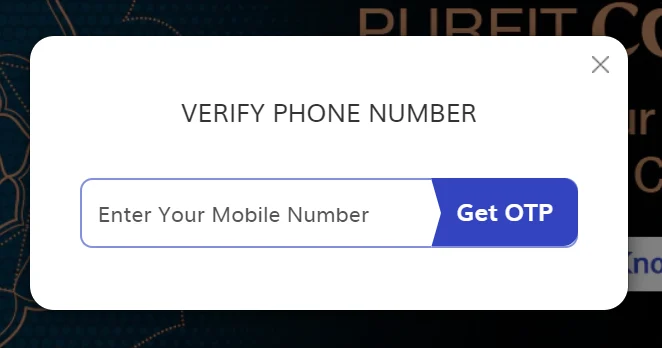
The idea was then applied to the login page, which offers a login with phone number method. The author entered their own phone number there.
Exploitation
Step 1: try brute force, hit the rate limit
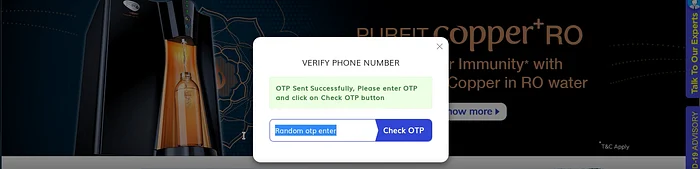
The first attempt was to brute force the OTP with the Burp Intruder tab. That failed because a rate limit protection was in place. The author then entered a random six-digit OTP instead.
Step 2: capture the request
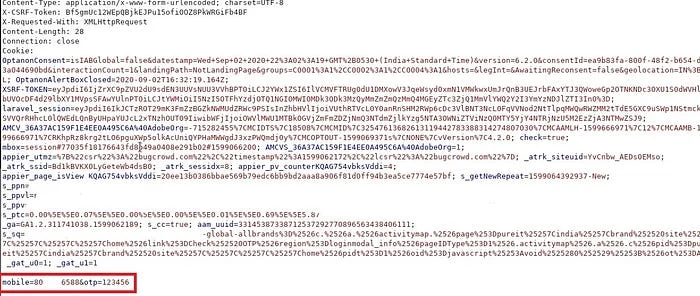
The request carrying the random OTP was captured in Burp Suite.
Step 3: intercept the response
With the request captured, the author right-clicked it and chose Action > Do intercept > Response to this request.
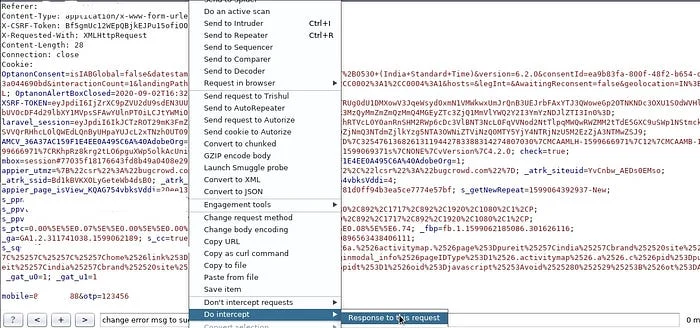
This makes Burp hold the server's reply so it can be edited before the browser sees it. The author then analysed the response.
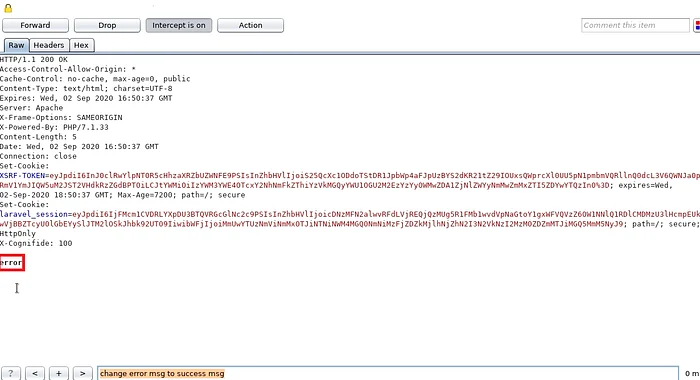
Step 4: change error to success
The error message in the response body was replaced with a success message.
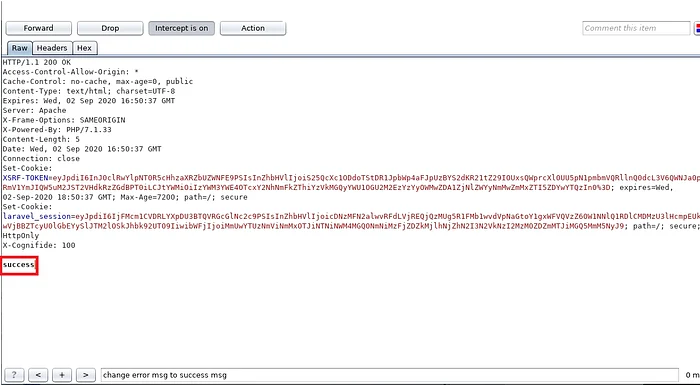
Step 5: forward
The modified response was forwarded to the browser.
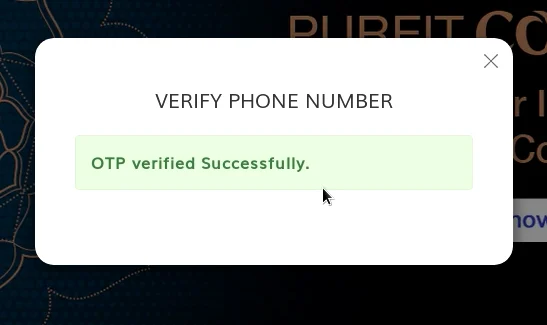
The result, in the author's words, was that the login succeeded: the account was accessed using a friend's mobile number without a valid OTP. The author concludes that an account can be created with any mobile number without verifying the OTP.
Root cause
The client-side flow decides whether the OTP step passed by reading the message in the server's response. Because the response is delivered through the browser, the user can rewrite it in transit with an intercepting proxy, and the front end then treats the step as verified. The server-side OTP check itself is not described in the report; the author states the login succeeded. A rate limit was present on OTP attempts, but the bypass did not require guessing.
Impact
Under the conditions described, an attacker who knows or chooses a phone number can complete the OTP step in the browser without possessing the code, and the author reports being able to log in to an account tied to a friend's number and to create accounts with arbitrary numbers. The report gives no detail on what the account could then do, and no severity or bounty is stated.
Fix
The report records a timeline: reported on 2 September 2020, triaged on 3 September 2020, and fixed on 15 September 2020. It does not say what the fix was. The change that addresses the root cause is to make the server, not the client, the authority on whether the OTP step succeeded: the verification endpoint should mark the session or issue a token server-side, and the subsequent login or account creation should require that server-side state rather than a message in a response body.
Variants to test
- Change the status code as well as the body, for example from an error status to
200, and see whether the front end proceeds. - Replace the error string with the exact success string observed on a legitimate verification, including any JSON fields such as a boolean flag or a token field, and check whether the next request is accepted by the server.
- After a manipulated response, reload the page or open a new session and see whether the authenticated state persists; if it does, the server accepted the bypass, if it does not, only the client was fooled.
- Try the same response edit on the account creation flow as well as the login flow, since the author saw the
successresponse during registration. - Test whether the OTP endpoint returns anything reusable, such as a session cookie or token, that the client stores before the OTP is validated.
What happened, in plain words
A website let people sign up and log in using only a phone number. You type your number, the site sends you a short code by text message (an OTP, or one-time password), and you type that code back into the page to prove the number is yours.
The author of this report found that the page decided whether to let them in from a short message in the server's response. Instead, the page looked at a short message the server sent back, something like "error" or "success", and decided from that message whether to let you in. Because that message travels through your own browser, the author was able to catch it on the way, change "error" to "success", and get logged in without ever knowing the real code. They did this with a friend's phone number.
This is a beginner-friendly walkthrough of that finding. Every tool and idea is explained from scratch, so you only need to know how to use a browser and a computer to follow along.
The background you need first
Before the steps make sense, here are the ideas the report relies on.
A server and a client. When you visit a website, your browser (the client) asks a computer somewhere else (the server) for pages and data. The server does the real work: it stores accounts, checks passwords, and sends text messages. Your browser only displays what the server sends back.
A request and a response. Every time you click a button or submit a form, your browser sends a request to the server. The server answers with a response. Think of it like posting a letter and getting a reply: the request is your letter, the response is the reply that comes back.
An API. An API is the set of addresses and rules a website's pages use to talk to its server behind the scenes. When you type a code into a login box and press a button, the page does not reload; it quietly sends a request to one of these addresses and waits for an answer. You never see this happen, but it is the same request-and-response exchange.
An HTTP status code. Every response starts with a number that summarises what happened. 200 means "OK, everything went fine". Numbers in the 400s usually mean something went wrong with the request. You will see HTTP/1.1 200 in this report, which is simply a successful response.
The response body. After the status code comes the body: the actual content. It might be a web page, or it might be a short piece of text such as success or error. The page's code reads this body and decides what to show you next.
An OTP. A one-time password is a short code, here six digits, that is sent to your phone and is meant to be used once. It proves you control the phone number. The server is supposed to remember which code it sent and compare it with the one you type.
A rate limit. A rate limit is a cap on how many times you can try something in a period of time. Login pages use it so that an attacker cannot simply try every possible code. With six digits there are a million combinations, but a rate limit makes trying them all impractical.
Brute force. Brute forcing means trying many possibilities automatically until one works, for example sending 000000, then 000001, then 000002 and so on. A tool can do this far faster than a person.
Burp Suite. Burp Suite is a program that sits between your browser and the website. All your traffic passes through it, and it lets you look at, pause, and edit requests and responses. It is a standard tool for this kind of testing. The report uses two parts of it: the Proxy, which captures traffic, and the Intruder tab, which automates repeated requests such as brute forcing.
Intercepting a response. Normally the server's reply goes straight to your browser. Burp can be told to hold that reply so you can read and change it before the browser ever sees it. This is the heart of the whole finding.
Response manipulation. This is the technique of editing a server's reply in transit. It only matters when the page trusts the reply's contents to decide something important, such as whether you are logged in.
The setup
The author does not name the program or the real website, and refers to it only as www.target.com. No tool versions are given. The only things used are a browser, Burp Suite, and a friend's phone number, which is used as the victim's number at the end.
The only precondition is a site with two flows that both use SMS codes: creating an account, and logging in. The login page offers a "login with phone number" method: you enter a number, then a six-digit code.
Finding it
While creating an account, the author entered the correct code and then looked at the response to that verification request. The response was simple: the status was HTTP/1.1 200 and the body was success.
That raised the question: if the page only needs to see the word success, what happens if we supply that word ourselves, without the correct code? That is the idea the rest of the report tests.
The author then moved to the login page, which offers the login with phone number method, and entered their own phone number there.
Exploitation
Step 1: try brute force, hit the rate limit
The first idea was to brute force the code using the Burp Intruder tab, sending many guesses automatically. That failed because a rate limit protection was in place. The author then entered a random six-digit code instead, simply to produce a request that would be rejected.
Step 2: capture the request
The request carrying the random code was captured in Burp Suite. Capturing it means Burp holds the request so the author can see exactly what the browser sent, and can later control what comes back.
Step 3: intercept the response
With the request captured, the author right-clicked it and chose Action > Do intercept > Response to this request.
This tells Burp to pause the server's reply so it can be edited before the browser sees it. The author then analysed the response.
Step 4: change error to success
The error message in the response body was replaced with a success message.
Step 5: forward
The modified response was then forwarded to the browser.
The result, in the author's words, was that the login succeeded: the account was accessed using a friend's mobile number without a valid code. The author concludes that an account can be created with any mobile number without verifying the code.
Why it worked
The page decides whether the code step passed by reading the message in the server's response. Because that response passes through the browser, and the browser's traffic can be paused and rewritten with an intercepting proxy, the front end was told the step had succeeded and let the user through.
The report does not describe what the server itself did with the code. The author states the login succeeded. The rate limit blocked brute force, but the bypass did not need guessing: the attacker only changes the reply.
Impact
Under the conditions described, someone who knows or chooses a phone number can complete the code step in the browser without possessing the code. The author reports being able to log in to an account tied to a friend's number and to create accounts with arbitrary numbers. The report gives no detail on what the account could then do, and no severity or bounty is stated.
Fix
The report records a timeline: reported on 2 September 2020, triaged on 3 September 2020, and fixed on 15 September 2020. It does not say what the fix was.
The change that addresses the root cause is to make the server, not the client, the authority on whether the code step succeeded. The verification endpoint should mark the session or issue a token server-side, and the later login or account creation should require that server-side state rather than a message in a response body. In everyday terms: the door should be unlocked by the person holding the key at the front desk, not by a note the visitor writes themselves.
Variants to test
- Change the status code as well as the body, for example from an error status to
200, and see whether the front end proceeds. - Replace the error string with the exact success string observed on a legitimate verification, including any JSON fields such as a boolean flag or a token field, and check whether the next request is accepted by the server.
- After a manipulated response, reload the page or open a new session and see whether the logged-in state persists. If it does, the server accepted the bypass; if it does not, only the client was fooled.
- Try the same response edit on the account creation flow as well as the login flow, since the author saw the
successresponse during registration. - Test whether the code endpoint returns anything reusable, such as a session cookie or token, that the client stores before the code is validated.
Glossary
- API: the set of addresses and rules a website's pages use to talk to its server behind the scenes.
- Body: the content of a response, after the status code, such as a page or a short piece of text.
- Brute force: trying many possibilities automatically until one works.
- Burp Suite: a program that sits between your browser and a website so you can inspect, pause and edit traffic.
- Client: the program on your side, usually the browser, that asks the server for things.
- HTTP status code: the number at the start of a response that summarises the outcome, such as
200for OK. - Intercept: to pause a request or response in transit so it can be read or changed before it continues.
- Intruder: the part of Burp Suite that automates repeated requests, used here for brute forcing.
- OTP: one-time password, a short code sent to your phone and meant to be used once.
- Proxy: a program that traffic passes through, letting you observe and modify it.
- Rate limit: a cap on how many attempts are allowed in a period of time.
- Request: the message your browser sends to the server when you do something on a page.
- Response: the server's reply to a request.
- Response manipulation: editing a server's reply in transit, which matters when the page trusts it for something important.
- Server: the computer that stores accounts and does the real checking behind a website.
- Session: the server's record that a particular browser is logged in, usually tied to a cookie or token.
- Token: a value the server gives the browser to prove it is logged in, which the browser sends back on later requests.



