Payment bypass
The payment confirmation parameter could be left empty, allowing an attacker to place an order without paying. The attacker could also cancel the order and withdraw the money to their bank account.
 Published on pratikyadav0.blogspot.com
10](https://pratikyadav0.blogspot.com/2018/10/hello-everyone-took-some-time-from-my.html)
The full write-up lives on its author's site
It belongs to its author, so we link to it rather than copy it. The other two tabs are our own rewrites, checked against it.
Context
The target was described only as redacted.com, a top e-commerce site in the researcher's country that did not allow public disclosure. The feature in scope was the checkout and payment flow: a shopper selects a product, adds it to the cart, enters address and other details, and is then redirected to the main payment gateway to choose a payment method. The site also had a cancellation feature: cancelling an order returns the money to the site's official wallet, from which it can be withdrawn to a bank account or used for future purchases.
The programme's stated scope was narrow. The researcher had been invited to test the site and was told the team was only interested in bugs that resulted in revenue loss. That framing matters, because the finding is a pure logic flaw in the payment flow rather than a memory-safety or injection class bug.
Setup
No accounts, roles or versions are described beyond a normal shopper account on the e-commerce site. The only tool named is Burp Suite, used as an intercepting proxy with the browser's connection flow routed through it. The precondition for the attack is simply the ability to reach the checkout page and select a payment method, which any customer can do.
The researcher first looked for payment manipulation bugs of the usual kind, but the site had implemented a strong checksum validation of the price parameter, so tampering with the amount was not viable. The search therefore moved to other parts of the payment system.
Finding it
After about an hour of exploring the application, the researcher formed a hypothesis: what happens if the HTTP request carries a wrong or missing payment method? The checkout request is the natural place to test this, because the browser sends the chosen payment method to the server when the user clicks through the gateway selection.
Exploitation
Step 1: Reach the site and build a cart
The researcher visited http://redacted.com, selected a product, and sent the item to the cart.
Step 2: Enter delivery details
Address and other details were entered as a normal customer would.
Step 3: Proceed to the payment gateway
Clicking checkout redirects the shopper to the main payment gateway, where a payment method must be selected. The page at this point offers the usual choice of methods.
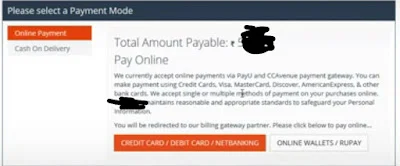
Step 4: Intercept the payment selection request
Burp Suite was started and the browser's connection flow was routed through it. The researcher selected Credit card / Debit Card as the payment mode and intercepted the resulting request. The captured HTTP request is shown below.
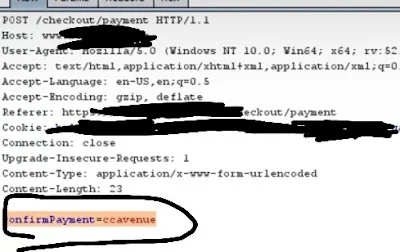
Among the parameters in that request is confirmPayment. The researcher wondered what would happen if the request carried a wrong payment method, then decided to leave confirmPayment empty and see the result.
Step 5: Send the request with an empty confirmPayment
The value of confirmPayment was removed, leaving the parameter empty, and the request was forwarded. The order was placed successfully without any payment being made. The researcher notes that the test was carried out with a product of small value.
Step 6: Turn the free order into withdrawable balance
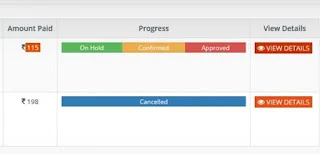
The site's cancellation feature returns the money to the site's official wallet when an order is cancelled. The site's cancellation feature returns money to the site's official wallet, from which it can be withdrawn to a bank account or used for future purchases. The researcher reports that withdrawing money from the site's wallet to a bank account was successful.
Root cause
The report does not show the server-side code. The observed behaviour is that sending confirmPayment with an empty value still placed the order as if paid. When the parameter is sent empty, the order is still marked as paid and fulfilled. The checksum validation on the price parameter did not help here, because the attack does not modify the price at all: it removes the confirmation value instead. The report does not describe the server-side code, so the exact check that failed is not shown; the behaviour is consistent with a missing or truthiness-based validation of confirmPayment.
Impact
An attacker could order products without paying, and could then cancel the order and withdraw the credited amount to a bank account or wallet, or spend it on future purchases. The researcher describes this as a profit on both sides of the transaction. The report notes that the test order was of small value, and the site's own cancellation and withdrawal feature is what turns the free order into cash. The programme's scope was revenue loss, and this finding sits squarely in it.
Fix
It records only that the issue was reported, acknowledged within one hour, and fixed within one day, with a bounty of INR 31000 (listed as 442.73 USD) paid for the research. A correct fix would be to validate confirmPayment server-side against the payment gateway's confirmation for that order, rejecting empty or unrecognised values, and to refuse to credit the wallet on cancellation of an order that was never actually paid.
Variants to test
- Send
confirmPaymentwith an empty value on other checkout flows and watch for an order confirmation page or a success response. A positive result is an order marked as paid with no gateway transaction. - Remove the parameter entirely rather than emptying it, and compare the response. A positive result is the same successful order placement.
- Send unexpected values such as
true,1,nullor a value copied from a previous successful order. A positive result is acceptance of a value the gateway never issued. - Combine the empty confirmation with the cancellation and wallet withdrawal flow. A positive result is a wallet balance that can be withdrawn to a bank account.
- Test the same pattern on other parameters that gate a state change, such as order status or delivery confirmation, looking for the same presence-only check.
What happened, in plain words
A security researcher was invited to look for bugs on a large online shop in his country. The shop's owners said they only cared about bugs that could cost them money. The researcher found one: by changing a single value in the request the browser sends when you pick a payment method, he could place an order without paying anything. The shop's cancellation feature refunds money to a wallet on the site, and the researcher reports that withdrawing wallet money to a bank account was successful. He reported it, the shop fixed it within a day, and he was paid a bounty of INR 31000 (listed as 442.73 USD).
This article walks through the same steps for someone who has never done security testing before. Every tool and idea is explained as it comes up.
The target and the rules
The site is called redacted.com in the write-up because the company did not allow public disclosure. All we know is that it is a top e-commerce site in the researcher's country. An e-commerce site is an online shop: you browse products, put them in a basket (the cart), type your address, and pay.
The feature in scope was the checkout and payment flow. "In scope" means the part of the site the company has authorised people to test. The researcher had been invited to test the site, and the team told him they were only interested in bugs that resulted in revenue loss, meaning bugs that make the company lose money. That matters here, because this finding is not about crashing a server or breaking into a database. It is a logic flaw: the site's own rules for handling an order can be bent so that the shop gives away a product for free.
The site also had a cancellation feature. If you cancel an order, the money goes back to the site's official wallet, a balance held on the site. From that wallet you can withdraw money to your bank account or spend it on future purchases. Keep that feature in mind, because it is what turns a free order into cash.
The tools and the starting idea
No special accounts or software versions are described. The only tool named is Burp Suite. Burp Suite is a program that sits between your browser and the website and lets you read and edit the messages they exchange. Think of it as a post office worker who opens every letter you send, lets you rewrite it, and then sends it on. To use it, you tell your browser to send all its traffic through Burp instead of going straight to the site. That setup is called an intercepting proxy.
Before finding the bug, the researcher tried the obvious trick: changing the price. When you buy something online, your browser sends the order details, including the amount, to the shop's server. A server is the computer that runs the website and makes decisions like "is this order paid?". If you can edit the amount before it reaches the server, you might pay less. The site defended against this with a checksum validation of the price parameter. A checksum is a short code computed from the data; if anyone changes the data, the code no longer matches, and the server rejects it. So the price could not be tampered with, and the researcher looked elsewhere in the payment system.
After about an hour of exploring, he formed a simple question: what happens if the request carries a wrong or missing payment method? The moment you choose a payment method on the gateway page, your browser sends that choice to the server. That message is the natural place to experiment.
Step by step
Step 1: Visit the site and build a cart
The researcher visited http://redacted.com, picked a product he wanted to buy, and sent it to the cart.
Step 2: Enter delivery details
He entered his address and other details, exactly as a normal customer would.
Step 3: Go to the payment gateway
Clicking checkout redirects you to the main payment gateway, the page where you choose how to pay. A payment gateway is the service that actually handles card or wallet payments. At this point the page offers the usual choice of payment methods.
The screenshot shows the payment method selection page, the point where the shopper picks how to pay before the order is confirmed.
Step 4: Catch the request that carries the payment choice
The researcher started Burp Suite and routed his browser's connection through it. He selected Credit card / Debit Card as the payment mode and intercepted the request that the browser sent. Intercepting means Burp pauses the message so you can look at it before it reaches the server. This is the HTTP request as captured.
An HTTP request is the message your browser sends to a server when you do something on a website: open a page, submit a form, click a button. It contains a method (such as GET or POST), a URL, headers (extra information such as what kind of data is being sent), and often a body with the data itself. Parameters are the named values inside that body, like name=value pairs.
Among the parameters in this request is confirmPayment. The name suggests it tells the server that the payment has been confirmed. The researcher's idea was simple: leave this parameter empty and see what the server does.
Step 5: Send the request with an empty confirmPayment
He removed the value from confirmPayment, leaving the parameter empty, and forwarded the request. Forwarding means letting the paused message continue to the server. The order was placed successfully without any payment being made. He notes that he was asked to order a product of small value.
The screenshot shows the order confirmation after the request was forwarded with the empty value: the order went through without a payment.
Step 6: Turn the free order into withdrawable balance
The site refunds cancelled orders to its official wallet, from which money can be withdrawn to a bank account or spent on future purchases. The researcher reports that withdrawing money from the site's wallet to a bank account was successful. In his words, it was a profit on both sides of the transaction.
Why it worked
The report does not show the server-side code. What it shows is that an empty confirmPayment value still resulted in a placed order. When the parameter arrives empty, the order is still marked as paid and fulfilled. The checksum on the price did not help, because the attack never touches the price: it removes the confirmation value instead. The report does not show the server-side code, so the exact check that failed is not visible; the behaviour fits a missing check, or a check that only asks "is this value present?" rather than "is this value valid?".
Impact
Someone could order products without paying, then cancel the order and withdraw the credited amount to a bank account or wallet, or spend it on future purchases. The programme's scope was revenue loss, and this finding sits squarely inside it.
The fix and the outcome
It records only that the issue was reported, acknowledged within one hour, and fixed within one day, with a bounty of INR 31000 (listed as 442.73 USD) paid for the research. A correct fix would be to check confirmPayment on the server against the payment gateway's confirmation for that order, rejecting empty or unrecognised values, and to refuse to credit the wallet when an order that was never actually paid is cancelled.
Other things worth testing
- Send
confirmPaymentwith an empty value on other checkout flows and watch for an order confirmation page or a success response. A positive result is an order marked as paid with no gateway transaction. - Remove the parameter entirely rather than emptying it, and compare the response. A positive result is the same successful order placement.
- Send unexpected values such as
true,1,nullor a value copied from a previous successful order. A positive result is acceptance of a value the gateway never issued. - Combine the empty confirmation with the cancellation and wallet withdrawal flow. A positive result is a wallet balance that can be withdrawn to a bank account.
- Test the same pattern on other parameters that gate a state change, such as order status or delivery confirmation, looking for the same presence-only check.
Glossary
- E-commerce site: an online shop where you browse products, add them to a cart and pay.
- Cart: the basket of products you have chosen but not yet bought.
- Checkout: the part of the shop where you enter delivery details and pay.
- Payment gateway: the service that handles the actual payment, such as a card transaction.
- Wallet: a balance held on the site, which you can spend on future purchases or withdraw.
- In scope: the parts of a system the company has authorised people to test.
- Revenue loss: money the company loses because of a bug.
- Logic flaw: a bug where the system follows its rules but the rules can be bent to do something unintended, rather than a crash or a break-in.
- Burp Suite: a tool that sits between your browser and a website so you can read and edit the messages they exchange.
- Intercepting proxy: a setup where your traffic passes through a tool that can pause and modify it.
- HTTP request: the message your browser sends to a server when you do something on a website.
- Method: the type of request, such as GET or POST.
- URL: the address of a page or resource on the web.
- Headers: extra information attached to a request, such as the type of data being sent.
- Body: the part of a request that carries the actual data, such as form fields.
- Parameter: a named value inside a request, written as
name=value. - Server: the computer that runs the website and makes decisions such as whether an order is paid.
- Checksum: a short code computed from data so that any change to the data can be detected.
- Validation: checking that data is correct and allowed before acting on it.
- Intercept: to pause a message so you can inspect or change it before it is sent on.
- Forward: to let a paused message continue to its destination.
- Bounty: a reward paid by a company for a valid security report.
- Disclosure: making the details of a bug public.