Trying Xss :)(Failed)
The image viewer endpoint accepted a user-supplied URL and fetched it server-side without validation, allowing access to local files and cloud metadata. The attacker could read the server's password file and AWS credentials, potentially leading to remote code execution.
 Published on medium.com
I am Pratik Yadav ,Currently working as Security Engineer in one Crypto Exchange platform:)
The full write-up lives on its author's site
It belongs to its author, so we link to it rather than copy it. The other two tabs are our own rewrites, checked against it.
Context
This is a write-up of a server-side request forgery (SSRF) finding on a private bug bounty program. The researcher, Pratik Yadav, describes the target only as an application he was testing through the program's bug bounty programme; the report does not name the product or the company.
The feature involved is an image viewer endpoint. The application lets a user upload an image, stores it in an AWS bucket, and then serves it back through a URL of the form:
https://example.com/viewimage/?url=
The url parameter holds the location of the stored image, which is loaded from AWS. In normal use the endpoint simply fetches the image the user uploaded and returns it.
Setup
No accounts, roles or special privileges are described. The researcher worked as an ordinary user of the application, crawled it, and performed the normal operations available to a user. The only tool mentioned is Burp Suite, whose HTTP history he used to review every request the application made. No versions are given.
Finding it
After crawling the application and exercising its features manually, the researcher went through the Burp HTTP history looking for a URL redirection vulnerability. He searched the history for parameters named url= and found the image viewer request:
https://example.com/viewimage/?url=
followed by the AWS location of the image he had uploaded. Because the endpoint was clearly fetching content from a location supplied in a parameter, the obvious question was whether it would fetch content from somewhere other than the intended bucket. He decided to try remote file inclusion.
Exploitation
Step 1: Trying XSS (failed)
The first attempt was aimed at cross-site scripting. He placed a known XSS proof-of-concept SVG hosted on a third-party domain into the parameter:
When he visited the crafted URL, the content was not rendered. Instead a simple text file was downloaded, and it contained nothing. The endpoint was fetching the remote resource server-side and returning it as a download rather than rendering it in the browser context, so the XSS attempt did not work.
Step 2: Reading local files (success)
Next he tried URL schemas that would make the server read internal resources and perform actions on its own host: file:///, dict://, ftp://, gopher:// and similar. The crafted URL was:
Again a text file was downloaded.
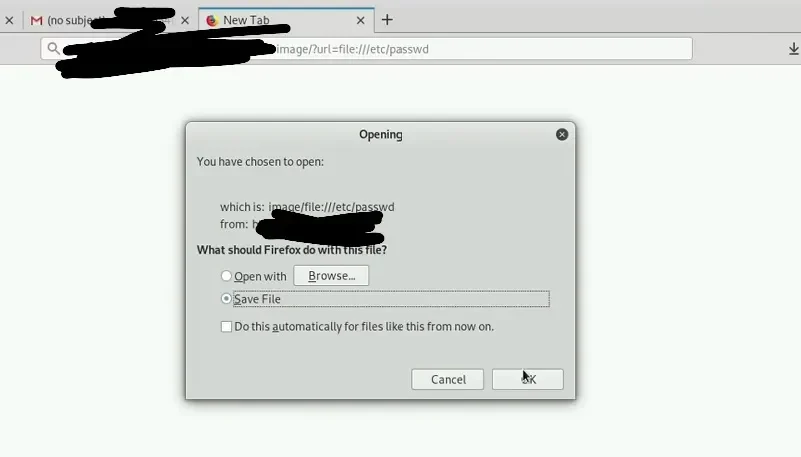
When he opened the downloaded file he found the contents of /etc/passwd.

This confirmed that the server was following the file:// scheme and returning the contents of local files to the user.
Step 3: Reading AWS EC2 metadata
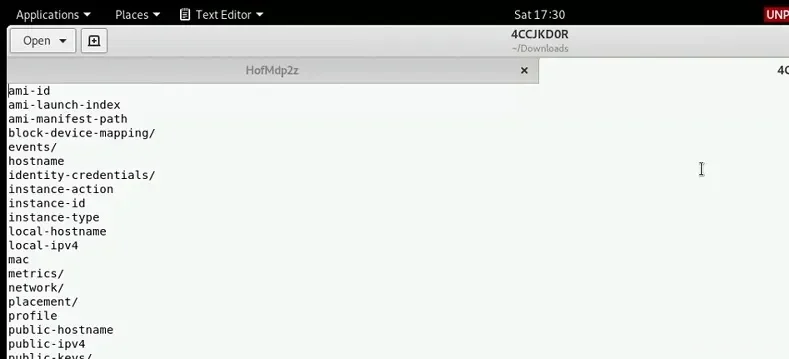
Since the site was loading images from AWS, the researcher moved on to extracting internal AWS metadata. He replaced the url parameter with the instance metadata URI, which on a running EC2 instance exposes all categories of instance metadata:
As expected, a text file was downloaded again, and viewing it showed the metadata listing.
Step 4: Reading IAM credentials
To make the finding more critical, he appended the IAM security credentials path to the metadata address, in order to obtain the AWS access key and secret access key:
http://[redacted]/latest/meta-data/iam/security-credentials/aws-elasticbeanorastalk-ec2-role
This returned the secret access key, token, region and other values. With those details exported through an AWS client, the researcher states he could have obtained access to the AWS account.
In his own summary, the bug allowed him to achieve RCE through an SSRF vulnerability. For the escalation path after obtaining the secret key, he points readers to a public article on exploiting SSRF in AWS Elastic Beanstalk.
Root cause
The url parameter of the image viewer is passed to a server-side fetch without restricting the scheme or the destination. The server accepts file:// and fetches local files, and it accepts arbitrary HTTP destinations including the link-local metadata address [redacted]. Because the response body is returned to the user as a download, whatever the server can reach is disclosed.
The report does not describe any allow-list, scheme check or metadata blocking on the endpoint.
Impact
An ordinary user of the application could read arbitrary local files from the server, including /etc/passwd, and could reach the EC2 instance metadata service. From the metadata service he could retrieve the IAM role credentials (access key, secret key, token and region) associated with the instance. With those credentials, the researcher states he could have gained access to the AWS account, and he characterises the overall impact as RCE via SSRF.
Fix
It states that the vulnerability was reported through the programme's bug bounty channel, that within a day he received a message that the bug was fixed, and that he was rewarded with a four-digit dollar bounty plus a bonus. The programme was reportedly unhappy that he escalated further than needed to demonstrate the issue, and the credentials were revoked.
Variants to test
- Try other schemes on the same parameter:
file:///etc/passwd,dict://,ftp://,gopher://. A positive result is a downloaded file containing local content or an error that reveals internal service behaviour. - Try the cloud metadata address
http://[redacted]/latest/meta-dataand then the IAM credentials path. A positive result is a listing of metadata or credentials in the response.
What happened, in plain words
A security researcher found a bug in a website that let him make the website's own server fetch things it should never have been able to reach. He could read files stored on the server itself, and he could reach a special internal address that cloud servers use to hand out secret keys. With those keys, he states he could have obtained access to the company's AWS account. He reported it, the company fixed it quickly, and he was paid a bounty.
This article walks through exactly what he did, step by step, in the same order, using the same requests. If you have never done security testing before, you will still be able to follow it, because every technical term is explained as it comes up.
The setup: what the researcher was looking at
The researcher, Pratik Yadav, was testing an application through a private bug bounty programme. A bug bounty programme is an arrangement where a company invites outside people to look for security problems in its systems and pays them for reporting what they find. The report does not name the company or the product.
The feature he focused on was an image viewer. Here is how it works in normal use:
- You upload an image to the website.
- The website stores that image in an AWS bucket. AWS (Amazon Web Services) is a cloud platform; a bucket is simply a storage folder in the cloud.
- When you want to see the image again, the website gives your browser a link that looks like this:
https://example.com/viewimage/?url=
After the url= part comes the location of the stored image, which points at the AWS bucket. When your browser requests that link, the website's server goes and fetches the image from the bucket and sends it back to you.
That url= part is called a parameter. A parameter is a piece of information attached to a web address that tells the website what you want. You have seen them before: in https://example.com/search?q=cats, the parameter q has the value cats. Here the parameter is named url and its value is supposed to be the address of an image.
The researcher did not have any special account or privileges. He used the application like any ordinary user, clicked around, and used a tool called Burp Suite. Burp Suite is a program that sits between your browser and the website and records every request your browser makes. Think of it as a tape recorder for web traffic. The researcher used Burp's HTTP history, which is simply the list of all those recorded requests, to look at everything the application had asked for.
Finding the bug
After crawling the application (clicking through all its pages and features like a normal user) and performing the normal operations available to him, the researcher went through the Burp HTTP history. He was specifically looking for a URL redirection vulnerability. A URL redirection vulnerability is a bug where a website can be tricked into sending you to a different address than the one it intended, often to a malicious site. To find candidates, he searched the history for parameters named url=.
That search led him to the image viewer request:
https://example.com/viewimage/?url=
followed by the AWS location of the image he had uploaded. In plain words: the website was taking an address from the user and going to fetch whatever was at that address. The obvious question was: will it fetch from somewhere other than the intended AWS bucket? He decided to try remote file inclusion. Remote file inclusion (RFI) is an attack where you make a server load a file from a location you control, rather than from its own storage.
Exploitation
Step 1: Trying XSS (failed)
The first attempt was aimed at cross-site scripting (XSS). XSS is a bug where an attacker gets their own JavaScript code to run inside another user's browser on the victim website. JavaScript is the programming language that makes web pages interactive. If an attacker can run their code on a site, they can often steal cookies (small pieces of data a website stores in your browser to remember who you are) or perform actions as the victim.
To test for XSS, the researcher placed a known XSS proof-of-concept file into the parameter. A proof-of-concept (PoC) is a simple, harmless file or script used to demonstrate that a bug exists. The file he used was an SVG hosted on a third-party domain. SVG is an image format that can contain script code, which is why it is useful for testing XSS.
Line by line:
https://example.com/viewimage/is the image viewer page.?url=starts the parameter.http://brutelogic.com.br/poc.svgis the address of the test file on someone else's server.
When he visited that crafted URL, the content was not rendered as a web page. Instead, a simple text file was downloaded, and it contained nothing. In other words, the server fetched the remote file and handed it back as a download, rather than letting the browser display it as part of the page. Because the content never ran in the browser, the XSS attempt did not work. This is an important clue: the server itself is doing the fetching, not your browser.
Step 2: Reading local files (success)
Next, the researcher tried URL schemas that would make the server read internal resources and perform actions on its own machine. A URL schema (also called a scheme) is the first part of a web address, before the ://. You already know http:// and https://. Others include:
file:///reads a file from the local disk.dict://talks to a dictionary server.ftp://transfers files.gopher://is an older protocol that can be abused to send arbitrary data to a server.
The crafted URL was:
Line by line:
https://example.com/viewimage/?url=is the same image viewer endpoint.file:///etc/passwdtells the server to read the file/etc/passwdfrom its own disk.
/etc/passwd is a standard file on Linux and Unix systems. Despite the name, it does not usually contain passwords in modern systems; it lists the user accounts that exist on the machine. Reading it is a classic way to prove that a server will read local files for you.
Again, a text file was downloaded.
When he opened the downloaded file, he found the contents of /etc/passwd.
This confirmed that the server was following the file:// scheme and returning the contents of local files to the user. In everyday terms: the website's server was acting like a butler who will fetch anything you ask for, including things from inside the house that guests are never supposed to see.
Step 3: Reading AWS EC2 metadata
Since the site was loading images from AWS, the researcher moved on to extracting internal AWS metadata. Here is the background you need:
- EC2 is Amazon's service for running virtual servers in the cloud. Each virtual server is called an instance.
- Cloud instances need a way to learn things about themselves, such as their own IP address or which permissions they have. AWS provides a special internal web address for this:
http://[redacted]/. This address is called the instance metadata service. [redacted]is a link-local address. Link-local addresses are special addresses that only work inside a local network; they are not reachable from the public internet. The metadata service is therefore meant to be used only by the instance itself.
The researcher replaced the url parameter with the metadata address:
Line by line:
https://example.com/viewimage/?url=is the same endpoint.http://[redacted]/latest/meta-datais the internal address that lists all categories of instance metadata.
As expected, a text file was downloaded again, and viewing it showed the metadata listing.
This is the moment the bug became serious. The server was not only reading its own files; it was also reaching an internal address that is supposed to be private to the cloud instance.
Step 4: Reading IAM credentials
To make the finding more critical, he appended the IAM security credentials path to the metadata address. IAM stands for Identity and Access Management; it is the AWS system that controls who can do what. On an EC2 instance, the instance can be given a role, which is a set of permissions. The metadata service will hand out temporary credentials for that role to anyone who asks from inside the instance.
The address he used was:
http://[redacted]/latest/meta-data/iam/security-credentials/aws-elasticbeanorastalk-ec2-role
Line by line:
http://[redacted]is the metadata service./latest/meta-data/iam/security-credentials/is the path that lists the roles attached to the instance.aws-elasticbeanorastalk-ec2-roleis the name of the role in this case.
This returned the secret access key, token, region and other values. In AWS, an access key and secret access key are like a username and password for programs; a token is an additional temporary piece of proof. With those details exported through an AWS client (a program that talks to AWS), the researcher states he could have obtained access to the AWS account.
In his own summary, the bug allowed him to achieve RCE through an SSRF vulnerability. RCE stands for remote code execution: the ability to run your own commands on someone else's server. SSRF stands for server-side request forgery: a bug where you trick a server into making requests on your behalf. The researcher points readers to a public article on exploiting SSRF in AWS Elastic Beanstalk for the escalation path after obtaining the secret key.
Why it worked
The url parameter of the image viewer is passed to a server-side fetch without restricting the scheme or the destination. In plain words: the website takes whatever address you give it and goes to fetch it, without checking whether the address is an image, whether it is on the allowed AWS bucket, or whether it points somewhere private. The server accepts file:// and fetches local files, and it accepts arbitrary HTTP destinations including the link-local metadata address [redacted]. Because the response body is returned to the user as a download, whatever the server can reach is disclosed.
The report does not describe any allow-list, scheme check or metadata blocking on the endpoint.
Impact
An ordinary user of the application could read arbitrary local files from the server, including /etc/passwd, and could reach the EC2 instance metadata service. From the metadata service he could retrieve the IAM role credentials (access key, secret key, token and region) associated with the instance. With those credentials, the researcher states he could have gained access to the AWS account, and he characterises the overall impact as RCE via SSRF.
Fix
It states that the vulnerability was reported through the programme's bug bounty channel, that within a day he received a message that the bug was fixed, and that he was rewarded with a four-digit dollar bounty plus a bonus. The programme was reportedly unhappy that he escalated further than needed to demonstrate the issue, and the credentials were revoked.
Variants to test
- Try other schemes on the same parameter:
file:///etc/passwd,dict://,ftp://,gopher://. A positive result is a downloaded file containing local content or an error that reveals internal service behaviour. - Try the cloud metadata address
http://[redacted]/latest/meta-dataand then the IAM credentials path. A positive result is a listing of metadata or credentials in the response.
Glossary
- AWS: Amazon Web Services, a cloud platform for storing data and running servers.
- AWS bucket: a storage folder in AWS where files such as images are kept.
- Access key / secret access key: a pair of strings that act like a username and password for programs using AWS.
- Allow-list: a list of things that are explicitly permitted; anything not on the list is blocked.
- Burp Suite: a tool that records and lets you inspect the requests your browser sends to a website.
- Cookie: a small piece of data a website stores in your browser to remember who you are.
- Crawl: to click through a website's pages and features like a normal user, to discover what it does.
- Cross-site scripting (XSS): a bug where an attacker gets their own JavaScript to run in another user's browser on a website.
- dict://: a URL scheme for talking to a dictionary server.
- EC2: Amazon's service for running virtual servers in the cloud.
- file:///: a URL scheme that reads a file from the local disk.
- ftp://: a URL scheme for transferring files.
- gopher://: an older URL scheme that can be abused to send arbitrary data to a server.
- HTTP history: the list of requests recorded by Burp Suite.
- IAM: Identity and Access Management, the AWS system that controls permissions.
- Instance: a virtual server running in the cloud.
- Instance metadata service: an internal web address (
http://[redacted]/) that cloud instances use to learn about themselves and obtain temporary credentials. - JavaScript: the programming language that makes web pages interactive.
- Link-local address: a special network address (such as
[redacted]) that only works inside a local network and is not reachable from the public internet. - Parameter: a piece of information attached to a web address, such as
?url=.... - Proof-of-concept (PoC): a simple, harmless file or script used to demonstrate that a bug exists.
- RCE (remote code execution): the ability to run your own commands on someone else's server.
- Remote file inclusion (RFI): an attack where you make a server load a file from a location you control.
- Role: in AWS, a set of permissions that can be attached to an instance.
- Schema (URL scheme): the first part of a web address, before
://, such ashttp,httpsorfile. - Server-side request forgery (SSRF): a bug where you trick a server into making requests on your behalf, often to internal addresses.
- SVG: an image format that can contain script code.
- Token: a temporary piece of data used to prove identity or permission.
- URL redirection vulnerability: a bug where a website can be tricked into sending you to a different address than intended.