Peeping through a Web-Socket
The WebSocket handshake used a user identifier instead of cookies for authentication, so anyone who knew a victim's identifier could open a connection as that user. The attacker could then receive all messages sent to the victim, including attachment links, without any action from the victim.
 Published on cirius.medium.com
Recently, I had found a bug related to web sockets through which I was able to view all the messages being sent to the victim user.
The full write-up lives on its author's site
It belongs to its author, so we link to it rather than copy it. The other two tabs are our own rewrites, checked against it.
Context
The target was a web application with a chat feature. Messages in that chat were delivered over a WebSocket connection rather than over ordinary HTTP requests. While exploring the application, the researcher found a chat feature that used WebSockets to send and receive messages.
A WebSocket is a two-way, persistent channel between browser and server: once the connection is established, either side can send data at any time. That is why chat applications, and applications that need real-time updates such as stock or crypto market tools, commonly use them.
The attack class here is Cross-site WebSocket Hijacking (CSWH). It is a form of CSRF in which, instead of forging an HTTP request, the attacker causes the server to establish a WebSocket connection on behalf of the victim, using the victim's cookies, and then sends and receives data on the victim's behalf. The researcher points readers to the PortSwigger Academy article on cross-site WebSocket hijacking for the general explanation of the attack.
Setup
The work was done with Burp Suite, which has a dedicated tab for WebSocket traffic showing what flows over a WebSocket connection.
Finding it
While exploring the application, the researcher found the chat feature and looked at the upgrade request that initialises the WebSocket connection. That request stood out because it did not send the user's cookies at all. Instead of identifying the user by session cookie, it carried a unique identifier of the user to establish the connection. The upgrade request was too open: it did not send the user's cookies, and instead sent a unique identifier of the user to establish the connection.
Exploitation
Step 1: obtain the victim's identifier
Finding the identifier was straightforward. From the attacker's own account, send a message to the victim user, intercept the resulting WebSocket request in Burp Suite, and read the victim identifier out of that request. The identifier was extracted from the intercepted WebSocket request generated by messaging the victim.
Step 2: work out the post-connection commands
By analysing the request sent to the WebSocket connection and the response received, the researcher identified a few commands that have to be sent to the server after the connection is established before it starts delivering new messages addressed to the victim from other users. In other words, opening the socket is not enough on its own; the client has to speak a small protocol to subscribe to the message stream.
Step 3: open a socket as the victim
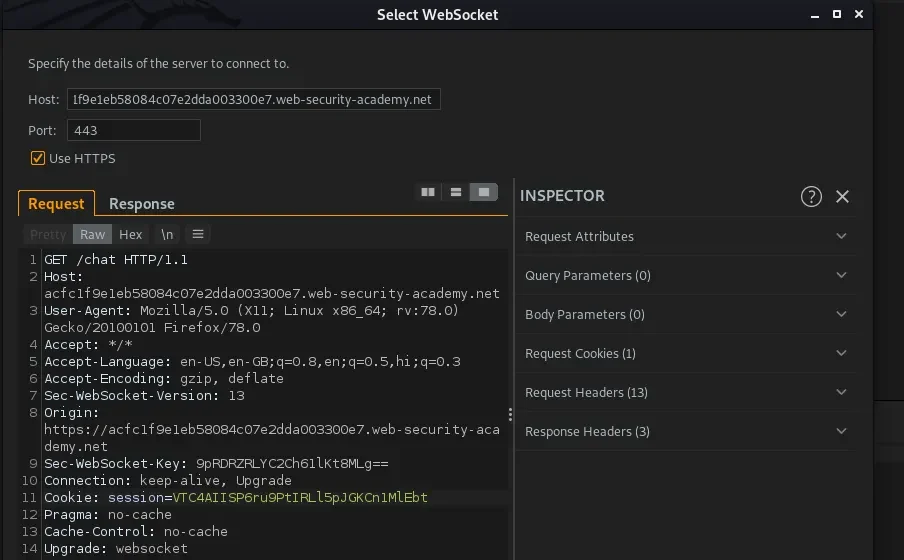
With the identifier in hand, the researcher used Burp Suite Repeater to make a new WebSocket request to the same endpoint, substituting the victim identifier. The request looked similar to the image below.
Step 4: send the subscription commands
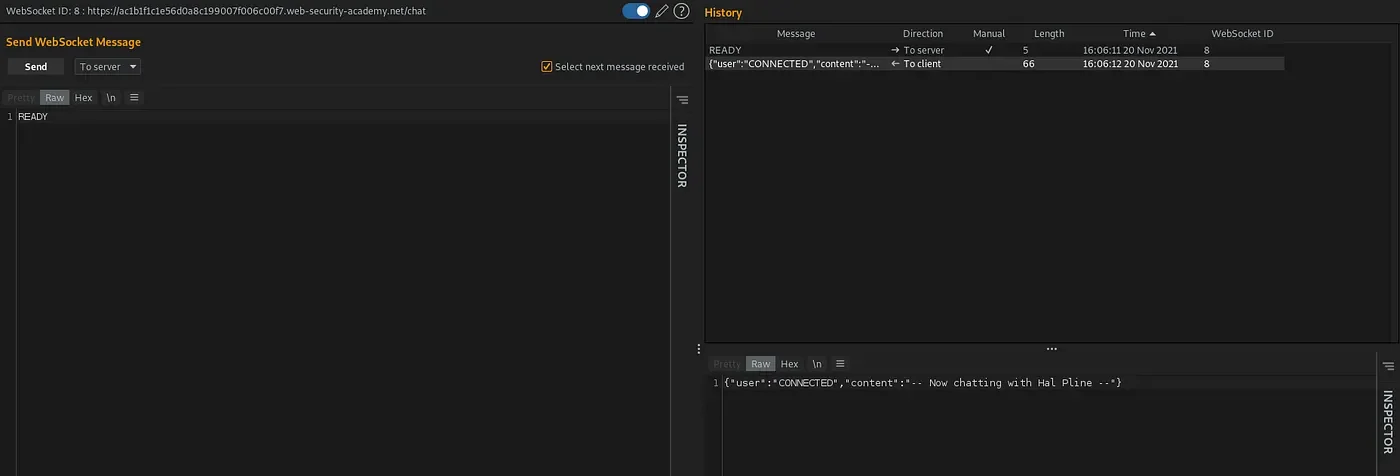
Once the connection was established in the Repeater tab, the researcher was able to send the commands to the server, similar to the "READY" command in the PortSwigger lab.
Step 5: wait and read
After that, the researcher only had to wait for someone to send a message to the user, or send a message from the attacker's own account to the victim. Every message delivered to the victim, including the links to attachments sent along with the message, appeared in the Repeater tab. The server kept sending all of the user's messages because the connection was not designed to expire automatically.
This allowed the researcher to view the messages of all users without any action on the victim's part: establish the WebSocket connections, then wait and watch the messages flow.
Root cause
The upgrade request authenticated the connection with a unique user identifier carried in the request itself, and did not send the user's cookies. Because the identifier is the only thing that binds a socket to a user, anyone who learns a user's identifier can open a socket as that user. The identifier is not hard to obtain: messaging the victim and intercepting the WebSocket request exposes it. The server accepts the subscription commands on that connection and the connection was not meant to expire automatically, so the attacker keeps receiving the victim's messages. The report does not describe any origin check or other defence on the upgrade.
Impact
An attacker who can message a victim and intercept the request can obtain the victim's identifier and read messages sent to that victim, including attachment links. No interaction from the victim is required beyond receiving a message. The researcher states that this allowed viewing the messages of all users. The report does not give a bounty, severity score or the number of affected users.
Fix
The design change implied by the finding is to bind the WebSocket connection to the authenticated session, for example by validating the user's cookies on the upgrade request, and to check the Origin of the upgrade so that a connection cannot be opened from an attacker-controlled context.
Variants to test
- Identifier in the upgrade request. Intercept the WebSocket upgrade and look for a user identifier, token or similar value in the request line, query string or headers instead of a session cookie. A positive result is an upgrade that succeeds when you swap in another user's identifier.
- No cookie on upgrade. Check whether the upgrade request carries the session cookie at all. If it does not, the connection is authorised by something else, and that something is worth extracting.
- Identifier leakage by messaging. Send a message to another account you control and inspect the WebSocket traffic for that account's identifier. A positive result is the victim's identifier appearing in traffic you can generate at will.
- Post-connection subscription commands. After the socket opens, try the commands the client sends to start receiving messages, analogous to the "READY" command. A positive result is the server streaming messages addressed to the other account.
- Connection lifetime. Leave the hijacked socket open and observe whether it expires. A positive result is messages continuing to arrive with no re-authentication.
- Origin handling. Replay the upgrade from a different Origin and see whether the server accepts it. A positive result is acceptance of an upgrade whose Origin does not match the application.
What happened, in plain words
A security researcher found a chat feature in a web application and discovered that the connection carrying the chat messages could be opened on behalf of another user. By learning a single value that identified that user, the researcher could open a connection as that person and watch messages sent to them, including links to attachments, without the victim doing anything.
This article walks through the same finding from the beginning. It explains what a WebSocket is, what a cookie is, what the attack class means, and then follows the researcher's steps in order: finding the feature, spotting the weak upgrade request, extracting the victim's identifier, working out the commands the client sends after connecting, opening a socket as the victim, and reading the messages as they arrive.
Background: what a WebSocket is
Most of the web works on a request-and-response pattern. Your browser asks a server for a page or some data, the server answers, and the conversation is over. This is called HTTP. It is fine for loading a page, but it is awkward for anything that needs to update continuously, such as a chat window where new messages can arrive at any moment.
A WebSocket is a different kind of connection. It is a two-way, persistent channel between the browser and the server. Once the connection is established, either side can send data to the other at any time, without waiting to be asked. That is why chat applications use WebSockets, and why applications that need real-time updates, such as stock or crypto market tools, use them too.
To start a WebSocket, the browser first sends an ordinary HTTP request called an upgrade request. If the server agrees, the connection is switched from HTTP to WebSocket and stays open. Think of it like a phone call: the upgrade request is the dialling and the ringing, and once the other side picks up, both people can talk whenever they like until someone hangs up.
Background: cookies and identifiers
When you log in to a website, the server usually gives your browser a small piece of data called a cookie. Your browser sends that cookie back with every request, and the server uses it to recognise you. The cookie is an ambient credential: it is attached automatically, so you do not have to do anything for the server to know who you are.
A unique identifier is different. It is a value, often a string of characters, that names a particular user or object. Unlike a cookie, it is not automatically attached by the browser; it has to be placed somewhere in the request by whoever is making the request. If a server decides who you are based only on an identifier that travels in the request, then anyone who learns that identifier can pretend to be you.
Background: what Cross-site WebSocket Hijacking means
CSRF, or Cross-Site Request Forgery, is an attack where a malicious site causes your browser to send a request to another site while you are logged in there, so the request carries your cookies and is treated as coming from you.
Cross-site WebSocket Hijacking (CSWH) is the same idea applied to WebSockets. Instead of forging an ordinary HTTP request, the attacker causes the server to establish a WebSocket connection on behalf of the victim, using the victim's cookies, and then sends and receives data on the victim's behalf. The researcher recommends the PortSwigger Academy article on cross-site WebSocket hijacking for the general explanation of the attack.
In this particular case, the weakness was slightly different from the textbook version: the upgrade request did not send cookies at all. It identified the user with a unique identifier carried in the request itself. That still fits the hijacking shape, because whoever holds the identifier can open the connection.
The setup
The work was done with Burp Suite, a tool used by security testers to inspect and modify the traffic between a browser and a server. Burp Suite has a dedicated tab for WebSocket traffic, which shows what flows over a WebSocket connection.
Finding the weak spot
While exploring the application, the researcher found the chat feature and looked at the upgrade request that initialises the WebSocket connection. That request stood out for one reason: it did not send the user's cookies at all. Instead of identifying the user by session cookie, it carried a unique identifier of the user to establish the connection.
This matters because a connection authorised by a value in the request, rather than by an ambient credential such as a cookie, is exactly the shape that makes hijacking interesting. The server identified the user by the identifier carried in the request rather than by a cookie.
Step 1: obtain the victim's identifier
Finding the identifier was straightforward. The researcher used their own account to send a message to the victim user, intercepted the resulting WebSocket request in Burp Suite, and read the victim identifier out of that request.
The identifier was found by sending a message to the victim, intercepting the WebSocket request and extracting it from that request. The identifier was exposed in the WebSocket request generated by messaging the victim.
Step 2: work out the post-connection commands
By analysing the request sent to the WebSocket connection and the response received, the researcher identified a few commands that have to be sent to the server after the connection is established. Only after those commands does the server start delivering new messages addressed to the victim from other users.
In other words, opening the socket is not enough on its own. The client has to speak a small protocol to subscribe to the message stream. Think of it like a radio: turning the radio on is the connection, but you still have to tune to the right station before you hear anything.
Step 3: open a socket as the victim
With the identifier in hand, the researcher used Burp Suite Repeater, a part of the tool that lets you send a request by hand and see the response, to make a new WebSocket request to the same endpoint, substituting the victim identifier. The request looked similar to the image below.
The image shows the Repeater tab with the new WebSocket request, built to the same endpoint but carrying the victim's identifier instead of the researcher's own. The request went to the same endpoint but carried the victim's identifier instead of the researcher's own.
Step 4: send the subscription commands
Once the connection was established in the Repeater tab, the researcher was able to send the commands to the server, similar to the "READY" command in the PortSwigger lab.
The image shows the established connection in Repeater with the commands being sent. The researcher sent the commands to the server after the connection was established. After the commands were sent, messages sent to the victim appeared in the Repeater tab.
Step 5: wait and read
After that, the researcher only had to wait for someone to send a message to the user, or send a message from the attacker's own account to the victim. Every message delivered to the victim, including the links to attachments sent along with the message, appeared in the Repeater tab. The server kept sending all of the user's messages because the connection was not designed to expire automatically.
This allowed the researcher to view the messages of all users without any action on the victim's part: establish the WebSocket connections, then wait and watch the messages flow.
Why it worked
The upgrade request authenticated the connection with a unique user identifier carried in the request itself, and did not send the user's cookies. Because the identifier is the only thing that binds a socket to a user, anyone who learns a user's identifier can open a socket as that user.
The identifier is not hard to obtain: messaging the victim and intercepting the WebSocket request exposes it. The server accepts the subscription commands on that connection and the connection was not meant to expire automatically, so the attacker keeps receiving the victim's messages. The report does not describe any origin check or other defence on the upgrade.
What an attacker could do with it
An attacker who can message a victim and intercept the request can obtain the victim's identifier and read messages sent to that victim, including attachment links. No interaction from the victim is required beyond receiving a message. The researcher states that this allowed viewing the messages of all users. The report does not give a bounty, severity score or the number of affected users.
How it should be fixed
The design change implied by the finding is to bind the WebSocket connection to the authenticated session, for example by validating the user's cookies on the upgrade request, and to check the Origin of the upgrade so that a connection cannot be opened from an attacker-controlled context.
Variants to test
If you are testing a similar application, these are the checks that follow from this finding:
- Identifier in the upgrade request. Intercept the WebSocket upgrade and look for a user identifier, token or similar value in the request line, query string or headers instead of a session cookie. A positive result is an upgrade that succeeds when you swap in another user's identifier.
- No cookie on upgrade. Check whether the upgrade request carries the session cookie at all. If it does not, the connection is authorised by something else, and that something is worth extracting.
- Identifier leakage by messaging. Send a message to another account you control and inspect the WebSocket traffic for that account's identifier. A positive result is the victim's identifier appearing in traffic you can generate at will.
- Post-connection subscription commands. After the socket opens, try the commands the client sends to start receiving messages, analogous to the "READY" command. A positive result is the server streaming messages addressed to the other account.
- Connection lifetime. Leave the hijacked socket open and observe whether it expires. A positive result is messages continuing to arrive with no re-authentication.
- Origin handling. Replay the upgrade from a different Origin and see whether the server accepts it. A positive result is acceptance of an upgrade whose Origin does not match the application.
Glossary
- API: a defined way for one piece of software to talk to another, like a menu of requests a program will accept and the answers it gives back.
- Attachment link: a URL included with a chat message that points to a file the sender attached.
- Burp Suite: a tool used by security testers to intercept, inspect and modify traffic between a browser and a server.
- Burp Suite Repeater: the part of Burp Suite that lets you send a request by hand and see the response, useful for replaying and tweaking requests.
- Cookie: a small piece of data a server gives your browser, which the browser sends back automatically with later requests so the server can recognise you.
- Cross-Site Request Forgery (CSRF): an attack where a malicious site causes your browser to send a request to another site while you are logged in there, so the request carries your cookies and is treated as coming from you.
- Cross-site WebSocket Hijacking (CSWH): a CSRF-style attack against WebSockets, where the attacker causes a WebSocket connection to be established on the victim's behalf and then sends and receives data as the victim.
- Endpoint: the specific address on a server that a request is sent to.
- HTTP: the request-and-response protocol most of the web uses; the browser asks, the server answers, and the exchange ends.
- Identifier: a value that names a particular user or object, which has to be placed in a request by whoever makes it, unlike a cookie.
- Origin: the combination of scheme, host and port that a request comes from; servers can check it to decide whether to accept a connection.
- PortSwigger Academy: a free learning site with explanations and labs on web security topics, including cross-site WebSocket hijacking.
- Session: the period during which a server recognises you as logged in, usually tracked with a cookie.
- Upgrade request: the ordinary HTTP request a browser sends to ask the server to switch the connection to a WebSocket.
- WebSocket: a two-way, persistent connection between browser and server, where either side can send data at any time once the connection is established.