PII-nacles of Discovery: Deep Recon, Fourth-Level Subdomains, and Abusing Exposed .git Repositories
An exposed .git directory on a fourth-level subdomain was accessible despite an initial 403, allowing the attacker to dump the repository and recover deleted commits. This exposed production secrets, source code, and additional live hosts that led to PII disclosure.
 Published on medium.com
During a recent assessment, I made it a point to dig deeper than I usually did when it came to initial reconnaissance with my offensive security efforts. I had a hunch that something interesting was lurking in the shadows with this particular target, so I set off on my journey to sail the recon seas as far as they…
The full write-up lives on its author's site
It belongs to its author, so we link to it rather than copy it. The other two tabs are our own rewrites, checked against it.
Context
This write-up covers a reconnaissance-driven assessment against an IP range and a wildcard domain. The report does not name the organisation or the product. The interesting asset turned out to be a fourth-level subdomain, dev-01.something.target.com, sitting under an initially discovered something.target.com. The feature at the centre of the finding is a Git repository whose /.git directory existed on a fourth-level host: it returned 403 at first, and the files inside it were reachable after forced browsing.
Setup
The researcher worked from an IP range plus a wildcard domain, with no credentials or accounts mentioned. The tool belt listed is Shodan, crt.sh, Security Trails, Amass, AltDNS, OTX AlienVault and Subfinder, in no particular order, with API keys used for the paid services. The researcher also writes small Python scripts to combine tools for quicker output and states a preference for manual reconnaissance over heavy automation. For the Git analysis, GitTools by Sebastian Neef (https://github.com/gehaxelt) was used locally. No versions are given.
Finding it
The work started with the usual sequence: gathering network ranges, reverse DNS queries, fingerprinting the main components, and initial information gathering. Subdomain enumeration and brute forcing followed, but nothing interesting surfaced, and attempts to stray from the main functionality kept landing on 403 responses.
The next step was to brute force the already discovered subdomains to widen the attack surface. The reasoning is that subdomain permutation and recursive DNS brute forcing find names that a plain wordlist misses, because companies tend to reuse naming schemes. If something-1.target.com exists, then dev-1.target.com or something-2.target.com may well exist too. AltDNS automates this by taking a word list and generating permutations against previously discovered subdomains.
That produced a set of fourth-level domains owned by the main target. A fourth-level domain here means a subdomain of a third-level domain: something.target.com is third level, and somethingelse.something.target.com is fourth level. The initially discovered subdomain was:
something.target.com
and the final fourth-level domain reached through permutation was:
dev-01.something.target.com
Because fourth-level domains are often forgotten or misconfigured, the researcher fuzzed them the same way as everything else.
Exploitation
Step 1: Reuse the 403 list against the new hosts
The researcher compiled a list of every directory that had previously returned a 403 and fuzzed the fourth-level domains with it. Several of the fourth-level domains turned out to be accessible; others still returned 403. One result stood out: a request to the /.git directory returned a 403, which showed the path existed but access to it was restricted.
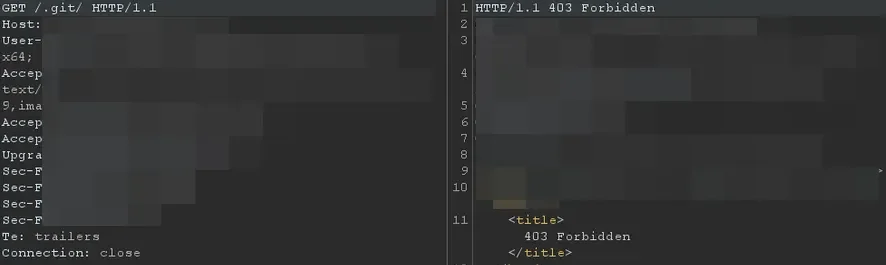
The screenshot shows the 403 response for the /.git request.
Step 2: Forced browsing past the 403
Git repositories normally contain index and config entries, so the researcher manually checked for them. This is forced browsing: requesting directories and files that the server does not reference or expose through the application.
Adding both of these to the initial 403 endpoint requests produced 200 responses, meaning the 403 had been bypassed entirely.
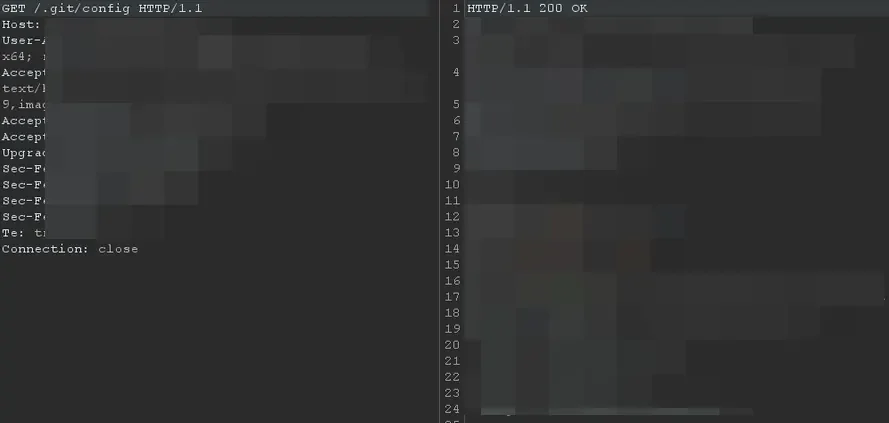
The screenshot shows the 200 response for /.git/config.
The Git config contained information about the repository itself and several other items relating to the target's web services.
Step 3: Dump the repository locally
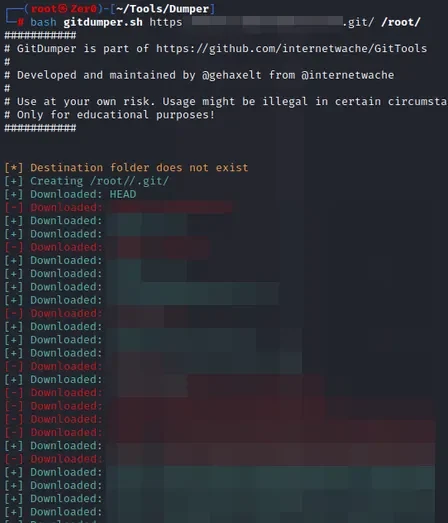
With the /.git directory exposed, the researcher pulled it down for local analysis with GitTools. The report shows the dump command only as an image, so the exact command line is not reproduced here.
A status check followed, again shown only as an image.
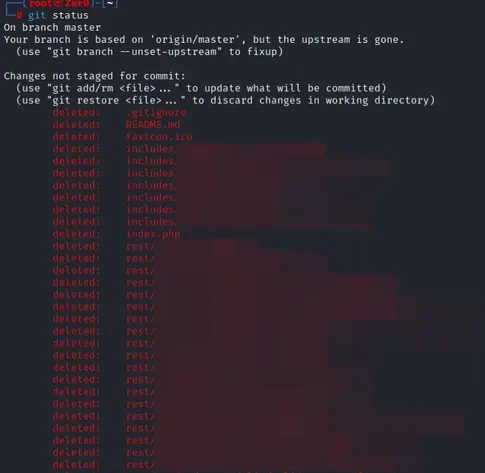
The status check showed that all of the items had been deleted, which on its own would make the dump look worthless.
Step 4: Recover deleted content with Extractor
GitTools' Extractor iterates through all commit objects of a repository and attempts to restore their contents. Running it against the dumped repository recovered the deleted material.
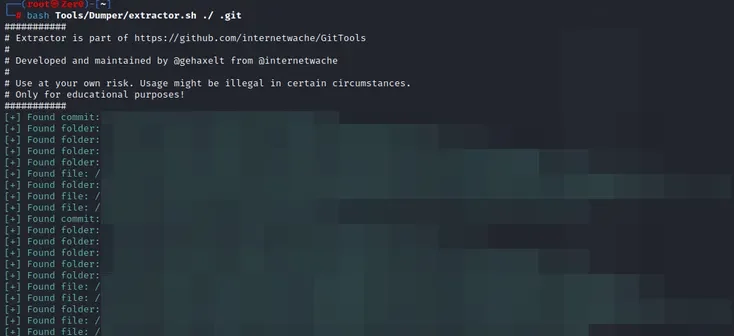
Step 5: Review what came back
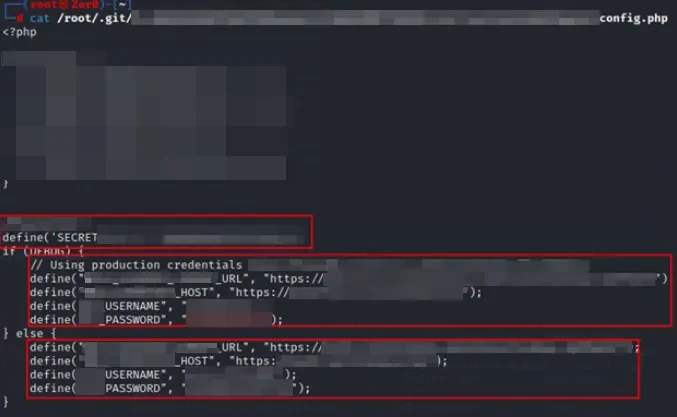
The recovered material was substantial: a large amount of production secrets and source code, plus a few additional live hosts that could be enumerated. Enumerating those hosts ultimately exposed PII related to users.
Root cause
The /.git directory existed on the host and its contents were reachable over HTTP once the specific files were requested. The initial 403 on /.git was not an effective control: requesting the specific files inside it, index and config, returned 200. The 403 on /.git did not cover the files inside it: requesting index and config returned 200. Once /.git was readable, the full repository history was recoverable, and deleting files in the working tree did not remove them from the commit objects.
Impact
The exposure gave access to production secrets and source code, and to details of additional live hosts. Enumerating those hosts exposed PII relating to users. The report describes the finding as Critical and states that the organisation remediated it immediately. The report does not enumerate the secrets, the hosts or the PII, and does not give a bounty figure.
Fix
The organisation tended to the finding immediately; the report does not describe the specific change made.
Variants to test
- Permute known subdomains with AltDNS-style word lists and fuzz the resulting fourth-level names. A positive result is a host that responds differently from the rest, especially one returning 403 on a sensitive path.
- Take every directory that returned 403 during earlier enumeration and replay it against newly found hosts. A positive result is the same path returning 200 on a different host.
- For any
/.gitthat returns 403, request/.git/indexand/.git/configdirectly. A positive result is a 200 instead of the earlier 403. - When a repository dump shows deleted files, run Extractor over all commit objects. A positive result is recovered source, configuration or credentials from history.
- Treat recovered configuration and source as a pivot: look for hostnames and service details, then enumerate those hosts. A positive result is additional live hosts reachable from the original finding.
What happened, in plain words
A security researcher was assessing a company's systems to see what could be broken into. Instead of only checking the obvious front doors, they went looking for the small, forgotten side doors that companies often leave open without realising it.
After a lot of patient digging, they found one: a hidden folder called .git on a web server that returned 403, but whose files could be reached by asking for them directly. That folder is normally private. It is the working notebook that software developers use to keep track of every change they make to their code. Because it was reachable, the researcher could download it, and from it recover things the company thought were gone: secret passwords and keys used in production, the source code of the website, and clues pointing to other computers the company ran. Following those clues led to personal information about real users.
The company treated it as a critical problem and fixed it straight away. This article walks through exactly how the researcher got there, step by step, explaining every idea along the way as if you have never done any of this before.
The starting point: what the researcher was given
The researcher was not handed a single website address. They were given two things:
- An IP range. Every device on the internet has a numeric address, like a postal address made of numbers. A range is a block of those addresses that all belong to the same organisation. Think of it as being told "this whole street belongs to the company".
- A wildcard domain. A domain is the readable name of a website, like
example.com. A wildcard domain means the company owns not justexample.combut every name that ends in.example.com, however many there are. Think of it as owning a whole family of names, not just one.
The report does not name the organisation or the product being tested. Throughout, the real names are replaced with the placeholder target.com and something, so the examples read like something.target.com.
No usernames or passwords for the target are mentioned in the report.
The tools, and why the researcher chose them
Before touching the target, the researcher listed the tools they use for finding things out. In no particular order:
- Shodan: a search engine for internet-connected devices and services, rather than for web pages.
- crt.sh: a public database of certificates. When a company secures a website with HTTPS (the padlock in your browser), a certificate is issued, and those certificates often list the names of the company's other websites.
- Security Trails: a commercial service that keeps historical records about domains and the addresses behind them.
- Amass: a tool that maps out all the names and addresses belonging to an organisation.
- AltDNS: a tool that guesses new names based on names already found (explained in detail below).
- OTX AlienVault: a community feed of threat intelligence, including domain names seen in the wild.
- Subfinder: a tool that collects subdomain names from many public sources at once.
Some of these services cost money and require an API key. An API key is a long secret string that identifies you to a service, a bit like a membership card you show at the door so the service knows who is asking. The researcher says they always use API keys for these services.
The researcher also mentions writing small Python scripts to glue one or two tools together for faster results. Python is a programming language often used for quick automation. Importantly, the researcher says they prefer doing reconnaissance by hand over letting a tool run everything automatically. The reason is judgement: a human notices when something looks slightly odd, where an automated tool just produces a list.
For the later part of the work, analysing the Git repository, the researcher used a free toolkit called GitTools, written by Sebastian Neef and published at https://github.com/gehaxelt. No version numbers are given anywhere in the report.
Step 1: Finding the company's hidden websites
The first phase is called reconnaissance, or recon. It means gathering information about a target before trying anything. Think of it like casing a building: noting the doors, the windows, the delivery entrance, before you ever try a handle.
The researcher's sequence was:
- Gather the relevant network ranges.
- Perform reverse DNS queries. DNS is the internet's phone book: it turns a readable name like
something.target.cominto a numeric address. Reverse DNS goes the other way, from a numeric address back to a name. It is useful because a block of addresses will often reveal names the company never advertised. - Fingerprint the main components. Fingerprinting means working out what software is running: which web server, which framework, which version. It is like recognising a car's make and model from the shape of its headlights.
- Gather initial information about the target.
- Enumerate and brute force subdomains.
A subdomain is a name that sits in front of the main domain. If the company owns target.com, then shop.target.com and mail.target.com are subdomains. Companies use them to separate services: one for the shop, one for email, one for internal tools.
Enumeration means listing things systematically. Brute forcing means trying a long list of guesses automatically. For subdomains, brute forcing means taking a word list (dev, test, admin, staging, and thousands more) and asking the internet's phone book whether each one exists under the target's domain.
At this stage, nothing interesting turned up. Every time the researcher tried to step off the main path, the server answered with a 403.
A 403 is an HTTP status code. HTTP is the language browsers and web servers speak to each other. When you visit a page, the server replies with a three-digit number saying how it went. The common ones:
- 200: OK, here is the page.
- 403: Forbidden. The server understood the request but refuses to serve it.
- 404: Not found. There is nothing at that address.
The difference between 403 and 404 matters enormously later, so hold on to it: 403 means "this exists, but you may not have it". 404 means "there is nothing here".
Step 2: Brute forcing what was already found
The researcher then did something that sounds odd at first: they brute forced the subdomains they had already discovered, to find even more.
The reasoning is that a plain word list only finds names someone thought to put on the list. But companies tend to reuse naming patterns. If something-1.target.com exists, there is a good chance dev-1.target.com or something-2.target.com exists too, because whoever set up the servers followed the same habit.
This technique is called permutation. It means taking the names you already know and generating variations: swapping words, adding numbers, adding common prefixes and suffixes. AltDNS automates this: you give it a list of words and the subdomains you have already found, and it produces permutations for you to test.
Recursive DNS brute forcing is the same idea applied in rounds: find a name, then brute force under that name, then under the names you find there, and so on, going deeper each time.
This paid off. It produced a set of fourth-level domains, all owned by the main target.
What a fourth-level domain is
Domains are counted from the right:
target.comis a second-level domain (the.compart is the top level).something.target.comis a third-level domain: one extra label in front.somethingelse.something.target.comis a fourth-level domain: two extra labels in front.
In this case, the initially discovered subdomain was:
something.target.com
and the fourth-level domain reached through permutation was:
dev-01.something.target.com
The researcher fuzzed these fourth-level domains in the same way as everything else. Fuzzing means sending many requests with slight variations to see which ones get a different response. The reason to bother with fourth-level names is that they are the ones most often forgotten: set up quickly for a project, never cleaned up, never reviewed, and still running years later.
Step 3: Reusing the list of forbidden paths
Here is where the story turns. During the earlier work, the researcher had collected a list of every directory that had returned a 403. Those were paths that existed but were blocked.
Now they took that same list and tried it against the newly found fourth-level domains. The logic: a restriction that was set up on one server may simply not have been copied to another. A path that is locked on the main site might be wide open on a forgotten development machine.
Several of the fourth-level domains turned out to be accessible. Others still returned 403. But one result stood out.
A request to the /.git directory returned a 403. That told the researcher the path existed, but access to it was restricted.
The screenshot shows the browser's response to the /.git request: a 403, meaning the folder is there but blocked.
What .git is, and why it matters
When developers write software, they keep their work in a Git repository. Git is a version control system: it records every change ever made to every file, who made it, when, and why. Think of it as an infinite undo history combined with a detailed diary.
Inside every Git repository there is a hidden folder called .git. The dot at the start means it is normally hidden from casual view. That folder is the diary itself: it holds the full history, the settings, and the record of every version of every file.
That folder is meant to stay on the developer's machine or on a private server. It is never meant to be served to visitors of a website. If it is reachable over the internet, anyone can download the entire history of the project, including files that were deleted later, because Git remembers everything.
Step 4: Getting past the 403
The researcher knew from experience that Git repositories contain two specific entries inside .git:
index: a file that records what is currently staged in the repository.config: a file holding the repository's settings.
So they manually requested those two files. This technique is called forced browsing: asking directly for files and folders that the website never links to and never mentions. A normal visitor only ever sees what the site chooses to show. Forced browsing ignores the menu and tries the kitchen door.
When both of these were added to the original 403 request, the server answered with 200. The restriction had been bypassed completely.
The screenshot shows a 200 response for /.git/config: the settings file inside the supposedly blocked folder is being served.
Why that worked
The block had been applied to the folder path /.git, but not to the files inside it. It is like putting a lock on the front of a filing cabinet while leaving every drawer open: ask for the cabinet and you are refused, ask for a specific drawer and you get it.
The config file contained information about the repository itself, plus several other details relating to the target's web services. Configuration files are valuable precisely because they are written for machines, not visitors: they tend to contain addresses, names and settings that were never meant to be public.
Step 5: Downloading the whole repository
With /.git now readable, the researcher downloaded it for analysis on their own computer, using GitTools. The report shows the download command only as a screenshot, so the exact command line is not reproduced here.
The screenshot shows the command used to dump the Git repository to the local system.
A status check followed, also shown only as a screenshot.
The screenshot shows the status check run against the downloaded repository.
The status check reported that all of the items had been deleted. On its own, that makes the download look worthless: the repository appears to contain nothing.
Step 6: Recovering what was deleted
This is the part that makes Git so useful to developers and so dangerous when exposed. Deleting a file in Git does not erase it. It records a new entry saying "this file was removed", but every earlier version stays in the history. It is like crossing a line out in a diary rather than tearing out the page: the original is still readable underneath.
GitTools includes a component called Extractor. It walks through every recorded change (every commit object) in a repository and tries to restore the contents of each one. Running it against the downloaded repository brought the deleted material back.
The screenshot shows Extractor iterating through the repository's commits to restore their contents.
Step 7: What came back
The recovered material was substantial. It included:
- A large amount of production secrets. A secret in this context is anything that grants access: passwords, API keys, access tokens. "Production" means the live systems real customers use, not a test environment.
- Source code: the actual instructions that make the website work.
- Details of a few additional live hosts. A host is a computer or service reachable on the network. These could then be enumerated in turn.
Enumerating those additional hosts ultimately exposed PII, personally identifiable information: data that can be tied to a specific real person, such as names, addresses, or contact details.
The screenshot shows the material recovered from the repository, including secrets, source code and clues to further hosts.
Why it happened
The /.git folder was present on the web server and its files could be requested over HTTP. That place is called the document root: the folder on the server that the website treats as its public face. Anything inside it can be requested by anyone.
The 403 on /.git was not real protection. It blocked the folder name but not the files inside it, so asking for /.git/index or /.git/config returned 200. That pattern suggests the rule was written against the directory path rather than against everything beneath it.
And once /.git was readable, the entire history was recoverable. Deleting files from the working copy did nothing to remove them from the recorded commits.
How serious it was
The exposure gave access to production secrets and source code, and to details of additional live hosts. Enumerating those hosts exposed PII relating to users. The report describes the finding as Critical and states that the organisation remediated it immediately. The report does not list the secrets, the hosts or the PII, and gives no bounty figure.
The fix
The organisation dealt with the finding immediately. The report does not describe the specific change they made.
Things worth trying on your own targets
These are the same techniques, written as a checklist:
- Permute known subdomains with AltDNS-style word lists and fuzz the resulting fourth-level names. You are looking for a host that behaves differently from the rest, especially one returning 403 on a sensitive path.
- Replay every 403 path you found earlier against newly discovered hosts. You are looking for the same path returning 200 on a different machine.
- For any
/.gitthat returns 403, request/.git/indexand/.git/configdirectly. You are looking for a 200 instead of the earlier 403. - When a repository dump shows deleted files, run Extractor over all commit objects. You are looking for recovered source, configuration or credentials from history.
- Treat recovered configuration and source as a pivot: look for hostnames and service details, then enumerate those hosts. You are looking for additional live hosts reachable from the original finding.
Wrapping up
The researcher's own conclusion is simple: going that extra mile can be the difference between a trivial finding and a gold mine. The lesson is not about exotic tools. It is about patience, about noticing that a 403 means something exists, and about asking for the specific file instead of the folder.
The closing image from the write-up.
Glossary
- 403: an HTTP status code meaning "forbidden": the thing exists but the server refuses to serve it.
- 200: an HTTP status code meaning "OK": the server served the requested content.
- 404: an HTTP status code meaning "not found": there is nothing at that address.
- API key: a long secret string that identifies you to an online service, like a membership card.
- AltDNS: a tool that generates new subdomain name guesses by permuting names already found.
- Amass: a tool that maps out the names and addresses belonging to an organisation.
- Brute forcing: trying a long list of guesses automatically.
- Commit object: a recorded change in a Git repository, holding the state of the files at that moment.
- crt.sh: a public database of HTTPS certificates, which often reveal a company's other website names.
- DNS: the internet's phone book, turning readable names into numeric addresses.
- Document root: the folder on a web server that the website treats as public and serves to visitors.
- Enumeration: listing things systematically, one by one.
- Extractor: a component of GitTools that walks through every commit in a repository and tries to restore its contents.
- Fingerprinting: working out what software and version a server is running from its responses.
- Forced browsing: requesting files and folders directly that the website never links to.
- Fourth-level domain: a name with two extra labels in front of the main domain, such as
somethingelse.something.target.com. - Fuzzing: sending many requests with slight variations to see which get a different response.
- Git: a version control system that records every change ever made to a project's files.
.git: the hidden folder inside a Git repository that holds its full history and settings; it must never be public.- GitTools: a free toolkit by Sebastian Neef for downloading and analysing exposed Git repositories.
- Host: a computer or service reachable on a network.
- HTTP: the language browsers and web servers use to talk to each other.
- IP range: a block of numeric internet addresses belonging to one organisation.
- Permutation: generating variations of names you already know, by swapping words or adding numbers and prefixes.
- PII: personally identifiable information, data that can be tied to a specific real person.
- Production: the live systems that real customers use, as opposed to test environments.
- Python: a programming language often used for quick automation scripts.
- Reconnaissance (recon): gathering information about a target before trying anything.
- Recursive DNS brute forcing: brute forcing subdomains in rounds, going deeper under each name you find.
- Reverse DNS: looking up a numeric address to find the name behind it.
- Secret: anything that grants access, such as a password, API key or access token.
- Security Trails: a commercial service holding historical records about domains and addresses.
- Shodan: a search engine for internet-connected devices and services.
- Source code: the instructions that make a piece of software work.
- Subdomain: a name in front of a main domain, such as
shop.target.comundertarget.com. - Third-level domain: a name with one extra label in front of the main domain, such as
something.target.com. - Wildcard domain: ownership of every possible name ending in a given domain.



