PortSwigger Said Chrome Closed This Bypass. My Testing Says It Didn’t
The author re-tested a documented SameSite Lax bypass in which a freshly issued cookie is still sent on cross-site POST requests for 120 seconds, and found it still works across eight Chrome versions. An attacker could use a cookie-refresh gadget to reset that window and then perform CSRF actions on the victim's behalf.

infosecwriteups.com
Published on infosecwriteups.com
Infosec
The full write-up lives on its author's site
It belongs to its author, so we link to it rather than copy it. The other two tabs are our own rewrites, checked against it.
Context
PortSwigger's Web Security Academy hosts a CSRF module whose final lab is titled SameSite Lax bypass via cookie refresh. The lab depends on a documented browser behaviour: when a site does not set a SameSite attribute on a cookie, Chrome defaults it to Lax, but to avoid breaking single sign-on flows it does not enforce the Lax restrictions for the first 120 seconds after the cookie is issued, even on top-level POST requests. That leaves a two-minute window in which a freshly issued cookie can still be sent cross-site. The grace period applies only to cookies that get Lax by default; it does not apply to cookies explicitly set with SameSite=Lax.
The lab's intended trick was to find a gadget on the target site, something like an OAuth-based SSO login, that causes the victim's existing cookie to be refreshed with a new value, then follow up immediately with the CSRF request while that refreshed cookie is still inside its two-minute window. The theory section that explained this, Bypassing SameSite Lax restrictions with newly issued cookies, sat inside the Bypassing SameSite cookie restrictions topic, itself part of the CSRF topic.
Setup
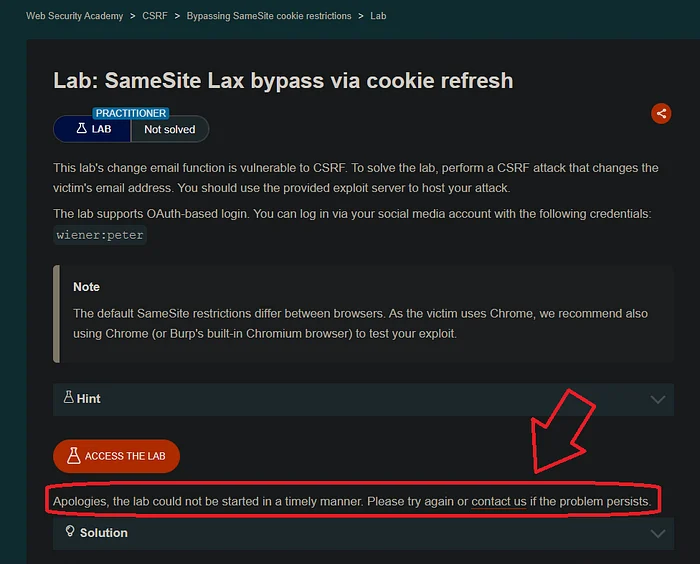
On 11 August 2026 the author was one lab away from finishing the CSRF module. The remaining lab refused to start, returning the same error on every attempt:
Apologies, the lab could not be started in a timely manner. Please try again or contact us if the problem persists.
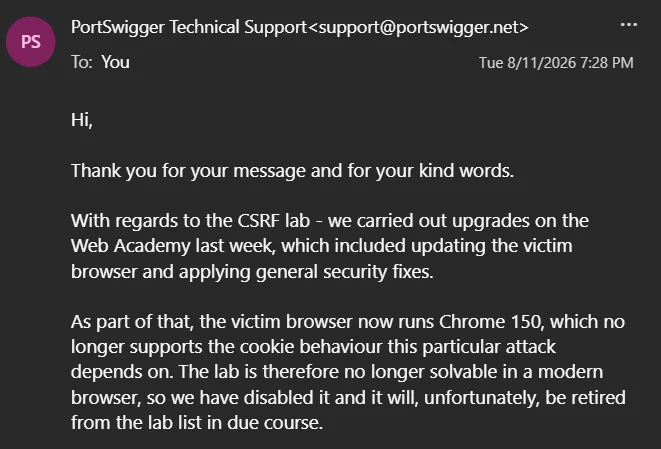
A message to [redacted] produced a reply five hours later: recent updates to the victim's browser, now running Chrome 150, had made the lab unsolvable on modern browsers, so it had been disabled and would be retired.
Within 24 hours the lab had been removed from the platform, dropping the total lab count from 274 to 273, and the theory section Bypassing SameSite Lax restrictions with newly issued cookies had been deleted from the Bypassing SameSite cookie restrictions topic.
Finding it
At the end of August the author went looking for any public record of Chrome removing the two-minute grace window. There was none. The official Chrome 150 release notes were read line by line and contained no mention of any change to cookie behaviour, let alone to this grace window specifically.
One possible explanation was that the window had been a known, temporary quirk of Chrome for years, which would explain why Chrome never called it out in a release note and why no other site mentioned it either. That explanation was still speculation, so the decision was made to test the behaviour directly.
Exploitation
In early September the author built a two-site Python proof of concept, site_a and site_b. site_b holds the cookie and plays the victim site, imagined as a banking website; site_a plays the attacker's site, imagined as a fake ad site firing a CSRF request at the victim's bank account. The scripts are published on GitHub.
Step 1: run both sites
Open two terminal windows and run one script in each, using python or python3 depending on the environment:
python site_a.pypython site_b.py
Keep both terminal windows open, then open http://[redacted]:8000 for site_a and http://localhost:9000 for site_b in Chrome.
Step 2: cross-site POST with no cookie (Scenario 1)
The victim first visits site_a at http://[redacted]:8000:
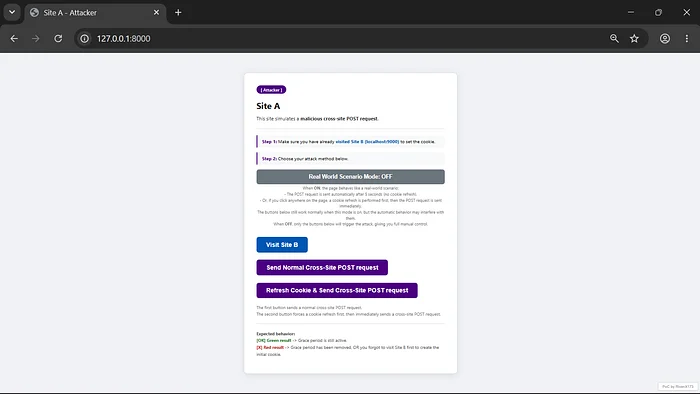
Clicking the purple Send Normal Cross-Site POST request button, which simulates a cross-site POST request, results in failure: no cookie is sent, simply because the victim is not logged in to site_b and no cookie exists.
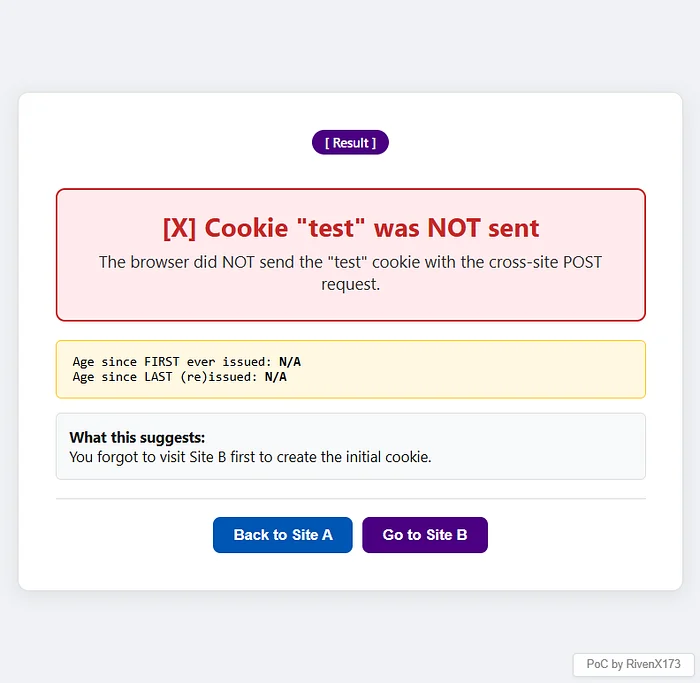
site_b's terminal shows:
Received cross-site POST request from Site A Cookie header received : None Does it contain 'test='? : No Age since FIRST ever issued : N/A Age since LAST (re)issued : N/A
Clicking Refresh Cookie & Send Cross-Site POST request gives the same result, since a cookie value that does not exist cannot be refreshed.
Step 3: cross-site POST within 120 seconds of login (Scenario 2)
The victim first visits site_b at http://localhost:9000:
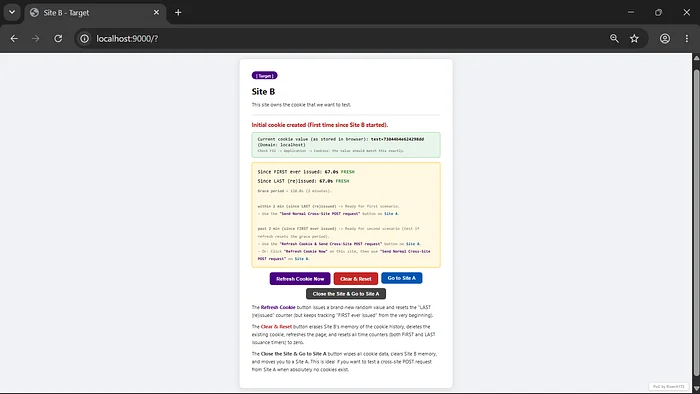
The page shows two timers: Since FIRST ever issued:, which tracks the time since the very first cookie was created and is not affected by later refreshes, and Since LAST (re)issued, which tracks the time since the most recent refresh of the cookie's value. The cookie can be inspected under F12 -> Application -> Cookies, listed under the name test with its value.
The victim then visits site_a and clicks Send Normal Cross-Site POST request. The cookie is delivered successfully along with the request.
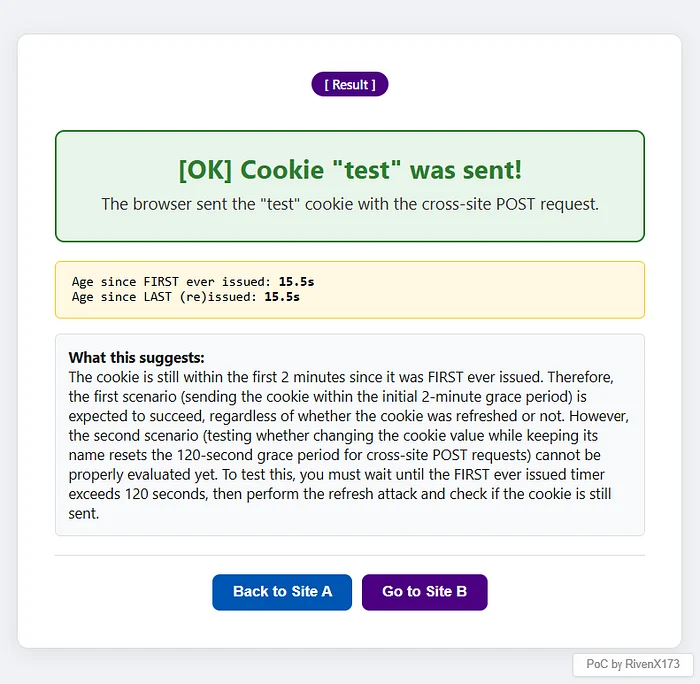
site_b's terminal shows:
Received cross-site POST request from Site A Cookie header received : test=80e48c4274680018 Does it contain 'test='? : Yes Age since FIRST ever issued : 15.5s Age since LAST (re)issued : 15.5s
Step 4: cross-site POST after 120 seconds (Scenario 3)
If the victim clicks Send Normal Cross-Site POST request on site_a after more than 120 seconds have passed since the cookie was created, delivery fails and the cookie is not sent with the request.
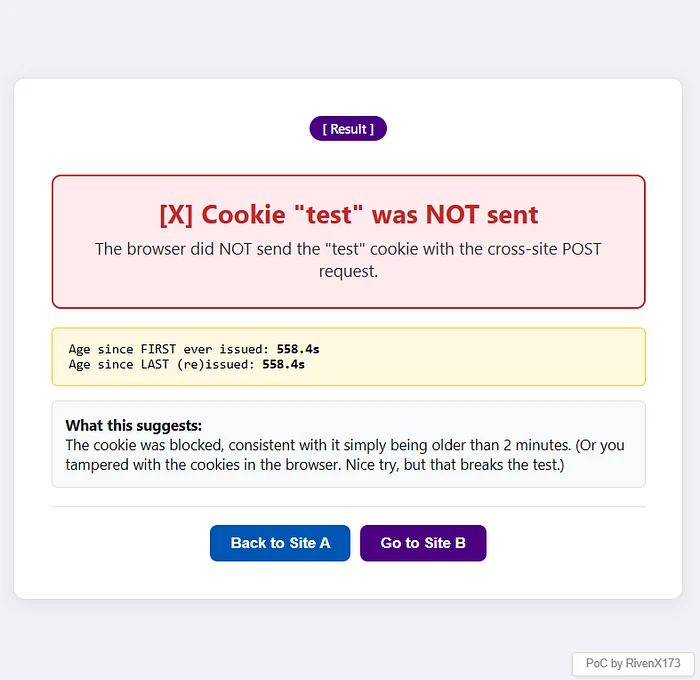
site_b's terminal shows:
Received cross-site POST request from Site A Cookie header received : None Does it contain 'test='? : No Age since FIRST ever issued : 558.4s Age since LAST (re)issued : 558.4s
Step 5: refresh an old cookie, then send (Scenario 4)
If the victim clicks Refresh Cookie & Send Cross-Site POST request on site_a after more than 120 seconds have passed since the cookie was originally created, a small pop-up window appears in the bottom-right corner. The cookie is then refreshed and sent successfully with the request. Refreshing the cookie's value resets the 120-second grace window entirely, regardless of when the cookie was originally created. The Since FIRST ever issued: timer does not reset when the value is refreshed.
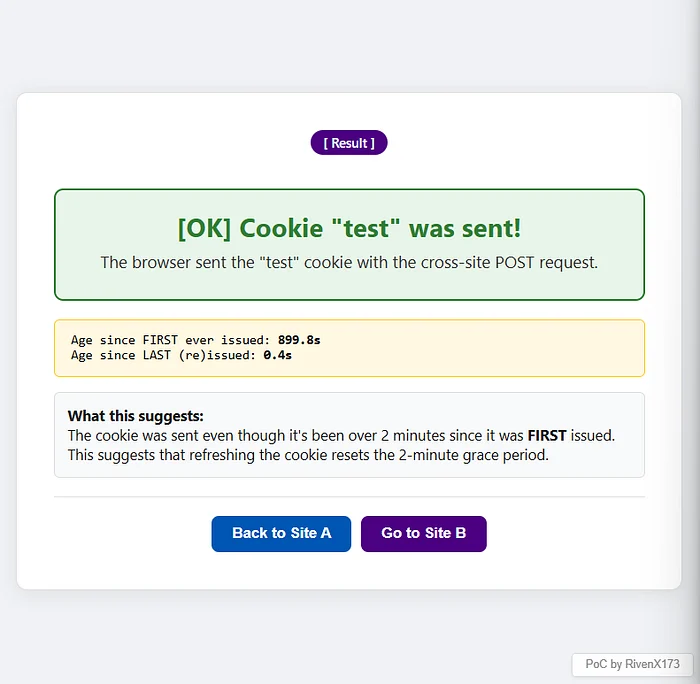
site_b's terminal shows:
[SET] Cookie 'test' (re)issued Cookie value : d9b9caba320fc725 Time since FIRST ever issued : 899.4s Time since LAST (re)issued : 0.0s Set-Cookie header sent? : YesReceived cross-site POST request from Site A Cookie header received : test=d9b9caba320fc725 Does it contain 'test='? : Yes Age since FIRST ever issued : 899.8s Age since LAST (re)issued : 0.4s
Step 6: victim refreshes their own cookie first (Scenario 5)
The victim visits site_b, clicks Refresh Cookie Now, then goes to site_a and clicks Send Normal Cross-Site POST request. The result is identical to Scenario 4, with no difference at all. The author notes this scenario is not realistic, since a victim has no reason to refresh their own cookie, and was included only to check whether self-refresh and attacker-forced refresh behave differently.
Step 7: Real World Scenario Mode
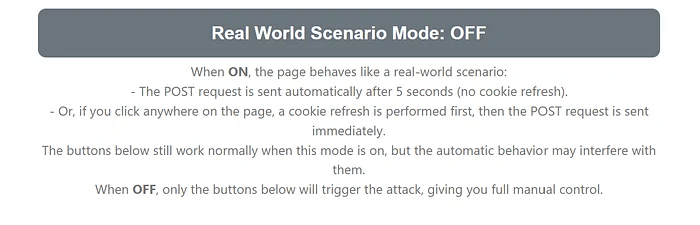
The five scenarios above do not resemble real CSRF attacks, because in practice there are no buttons for the victim to click. A Real World Scenario Mode toggle simulates this, set to OFF the first time the scripts run.
Turning it on switches it straight to green:
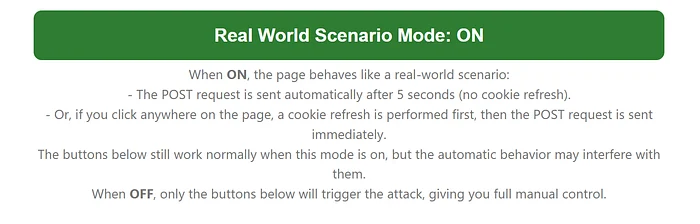
Once on, after just 5 seconds it automatically performs the same action as Send Normal Cross-Site POST request, sending a cross-site POST request with whatever cookie currently exists. If the victim clicks anywhere on the site_a page before those 5 seconds run out, it instead performs the same action as Refresh Cookie & Send Cross-Site POST request: a pop-up appears to refresh the cookie, followed immediately by a cross-site POST request carrying the newly refreshed cookie. The author notes that a real attacker would pick one behaviour or the other, not combine them; they were combined here to give a single feature that simulates a realistic attack flow end to end.
Step 8: edge cases the scripts handle
The scripts also handle edge cases that have not occurred in Chrome, for example a cookie not being sent even though fewer than 120 seconds have passed since its creation:
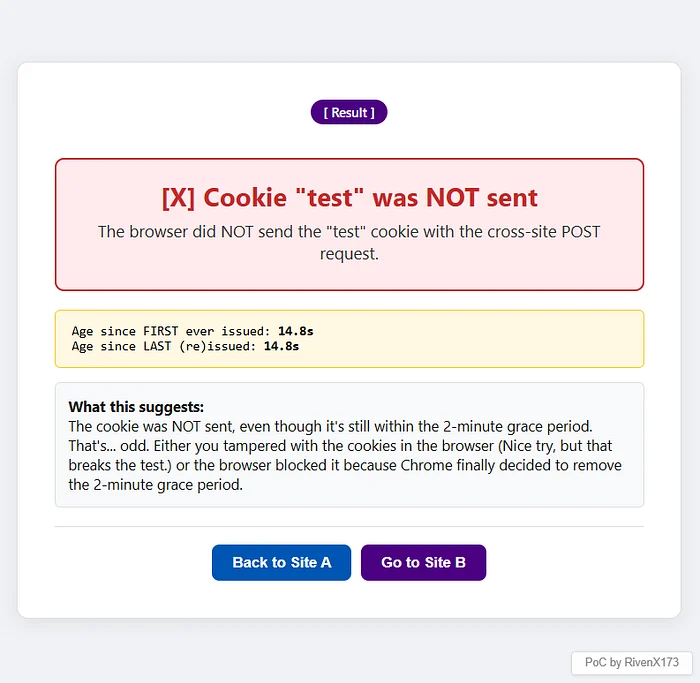
site_b's terminal would show:
Received cross-site POST request from Site A Cookie header received : None Does it contain 'test='? : No Age since FIRST ever issued : 14.8s Age since LAST (re)issued : 14.8s
Or a cookie not being sent after a refresh, where the Since FIRST ever issued counter has already passed 120 seconds, which would mean the window does not reset on refresh:
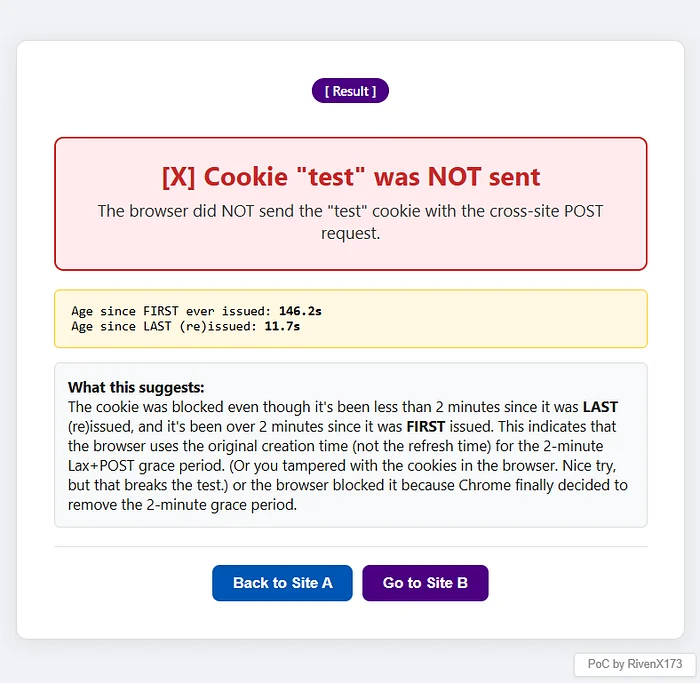
site_b's terminal would show:
Received cross-site POST request from Site A Cookie header received : None Does it contain 'test='? : No Age since FIRST ever issued : 146.2s Age since LAST (re)issued : 11.7s
Neither scenario has actually occurred, so they are not expected to appear unless someone deliberately tampers with the cookies in the browser by editing or deleting them manually.
Step 9: versions tested
The scripts were run across 8 Chrome versions with the same result every time: 141.0.7340.0 / 142.0.7444.60 / 144.0.7559.133 / 149.0.7827.201 / 150.0.7871.47 / 152.0.7977.83 / 154.0.8037.98 / 155.0.8059.40. The scripts do not hardcode or check for any specific version; they test the browser's live behaviour at the time they are run.
Root cause
The behaviour under test is Chrome's default-Lax grace period: a cookie without an explicit SameSite attribute is treated as Lax, but the Lax restrictions are not enforced for the first 120 seconds after issuance, including on top-level POST requests. The author's testing indicates this window is still present in every Chrome version tested, and that refreshing the cookie's value restarts the window even when the original cookie is far older than 120 seconds. The Since FIRST ever issued timer does not reset, so the reset is tied to the value being reissued, not to the cookie's first creation.
Why the existing defence does not stop the attack: Lax is supposed to block CSRF via cross-site POST, but the grace period exempts freshly issued cookies from that check. A gadget that reissues the cookie value, such as an OAuth-based SSO login, moves the victim's cookie back inside the window, and the follow-up cross-site POST is then sent with the cookie. The author found no public record of Chrome removing this behaviour, and the Chrome 150 release notes contain no mention of a change to cookie behaviour.
Impact
Under the conditions tested, an attacker who can cause a victim's default-Lax cookie to be reissued, and who can then trigger a cross-site top-level POST within 120 seconds, can have that request carry the victim's cookie. On a site without CSRF tokens or other anti-CSRF protections, this allows actions on the victim's behalf, such as changing an email address or transferring funds. The attack requires a gadget on the target site that refreshes the cookie value, and it requires the cookie to have been issued without an explicit SameSite attribute. The author's testing was done against a local proof of concept, not against a live target.
Fix
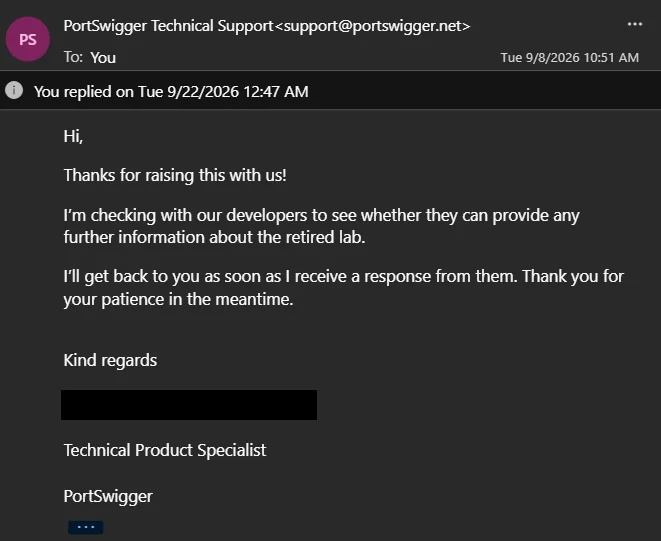
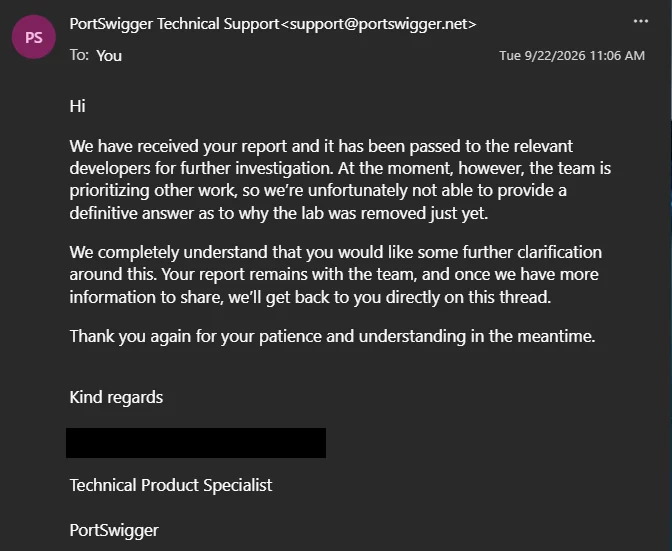
No fix is described in the report. PortSwigger disabled and then removed the lab and the theory section; the author does not say this was wrong, only that removing the explanation of a bypass that testing shows is still active is a separate question they cannot answer. The author contacted PortSwigger again on 6 September to share the findings, received a reply on 8 September confirming the request had been passed to the developers, sent a follow-up on 22 September, and received a reply the same day saying the request had been forwarded to the development team but that no specific date could be given for a response.
- Other default-
Laxcookies on real sites. Find a cookie set without an explicitSameSiteattribute and a gadget that reissues its value (SSO login, session rotation, preference save). A positive result is a cross-site top-levelPOSTarriving with the cookie inside 120 seconds of the reissue, visible in the server log as aCookieheader containing the cookie name. - Explicitly set
SameSite=Laxcookies. Repeat the same flow against a cookie set withSameSite=Lax. A positive result would be the cookie being sent cross-site on aPOST; the documented behaviour says it should not be, so a send here would contradict the model. - Refresh timing. Reissue the cookie when it is far older than 120 seconds, then send the
POSTimmediately. A positive result is the request carrying the new value while the first-issued age is well past 120 seconds, which confirms the window resets on value refresh rather than on first issuance. - Browser version sweep. Run the same flow on whatever Chrome versions are available. A positive result is consistent cookie delivery across versions, which would show the behaviour is not tied to a single build.
- Origin handling. Serve the two sites from different hostnames via the OS
hostsfile as well as fromlocalhostand[redacted]. A positive result is identical behaviour in both setups, ruling out same-origin effects.
Caveats and limitations
- The scripts do not hardcode or check for any specific Chrome version; they test live behaviour.
- Chrome treats
http://localhost:9000andhttp://[redacted]:8000as different origins, so the test is not affected. As a precaution the author also edited the OShostsfile and ran each script onsite-a.comandsite-b.com; there was no difference in the results. - The cookie-refresh step relies on a pop-up window, and browsers normally block pop-ups triggered without user interaction. In the regular scenarios the pop-up only fires when the victim clicks Refresh Cookie & Send Cross-Site POST request, and in Real World Scenario Mode only when the victim clicks anywhere on the
site_apage, so there is always a genuine click behind it. - Occasionally something breaks when navigating between
site_bandsite_ausing the buttons. It is rare and the author does not know the cause. - The scripts contain detailed notes explaining every result, along with buttons to make navigation and testing smoother.
- To restart from scratch, do not restart the browser and terminals, as stale cookies can linger and affect the new test. Use the Close the Site & Go to Site A or Clear & Reset buttons instead, which properly clear the relevant data.
- Do not manually edit or delete cookies inside the browser on
site_b; the scripts were not built for that and will produce incorrect results.
Timeline
- Aug 11, 2026: Discovered the lab was not working.
- Aug 11, 2026: Sent the first message to PortSwigger.
- Aug 11, 2026: Received a reply from PortSwigger.
- Aug 12, 2026: PortSwigger removed the lab and the theory section titled Bypassing SameSite Lax restrictions with newly issued cookies.
- Sep 01 to Sep 05, 2026: Built the initial scripts and tested them across multiple Chrome versions.
- Sep 06, 2026: Reached out to PortSwigger again.
- Sep 08, 2026: Received a reply confirming the request had been forwarded to the development team.
- Sep 22, 2026: Sent a follow-up to PortSwigger.
- Sep 22, 2026: Received a reply stating no specific date could be given for a response.
- Oct 01 to Oct 09, 2026: Refined the scripts and expanded testing across additional newer Chrome versions.
The author invites anyone who finds a meaningful issue in the scripts that leads to inaccurate results to report it in the comments or on GitHub, backed by practical evidence rather than stylistic suggestions, and notes they are not a developer and are fairly new to the field.
What happened, in plain words
Imagine you are learning to pick locks, and the school hands you a practice padlock with a known weakness. One day the school takes the padlock away and says the manufacturer fixed the weakness. You would probably believe them. This article is about someone who did believe it, then went back and checked, and found the weakness was still there.
The school here is PortSwigger's Web Security Academy, a free site where people learn how to find and fix security bugs in websites. It is organised into topics, and each topic has hands-on "labs": small fake websites you attack in your browser to practise. The author was working through the topic on CSRF (explained below) and had one lab left. That lab would not start. PortSwigger's support team said a recent update to Chrome, the browser used to run the lab, had broken it, so they disabled it and then deleted it, along with the page of theory that explained the trick behind it.
Weeks later the author looked for any public record of Chrome actually removing the behaviour the lab depended on, and found none. So they wrote two small programs to test it themselves, ran them against eight versions of Chrome, and the trick worked every time.
This is a beginner's walkthrough of that whole story: what the vulnerability is, why the browser behaves the way it does, how the test was built, what each result means, and what the author did next. Nothing here is a live attack on a real company. It is a local experiment on the author's own machine.
The setup: a lab that would not start
On 11 August 2026 the author was one lab away from finishing the CSRF module. The remaining lab is titled SameSite Lax bypass via cookie refresh. Every attempt to launch it returned the same error:
Apologies, the lab could not be started in a timely manner. Please try again or contact us if the problem persists.
The author emailed support at [redacted] Five hours later a reply arrived: recent updates to the victim's browser, which was now running Chrome 150, had made the lab unsolvable on modern browsers, so it had been disabled and would be retired.
Within 24 hours the lab was gone from the platform. The total lab count dropped from 274 to 273. The theory section that explained the trick, Bypassing SameSite Lax restrictions with newly issued cookies, was also deleted from inside the Bypassing SameSite cookie restrictions topic, which itself sits inside the CSRF topic.
The author admits they accepted this at first. Their reasoning was simple: PortSwigger built the labs and knows the vulnerabilities, so if they say Chrome fixed it, it must be true. That is a very human response, and worth noticing, because the rest of the article is about what happens when you stop accepting an explanation and go looking for evidence.
Going looking for the evidence
At the end of August the author went searching for any public record that Chrome had removed the behaviour the lab relied on. There was nothing. No blog post, no changelog entry, no discussion anywhere.
So they went to the most direct source available: the official Chrome 150 release notes. These are the notes Google publishes for each new version of Chrome, listing what changed. The author read them line by line. There was no mention of any change to how cookies behave, let alone to the specific two-minute window the lab depended on.
One innocent explanation was still possible: the two-minute window had been a known, temporary quirk of Chrome for years. If it had always been there and everyone knew about it, Chrome might never have felt the need to announce it, and no other site would have written about it either. That is a reasonable theory, but a theory is not evidence. So the author decided to test the behaviour directly.
Background: what CSRF actually is
Before the experiment makes sense, you need three ideas: what a cookie is, what CSRF is, and what the SameSite setting does.
A cookie is a small piece of text that a website asks your browser to store and send back on every later request to that same site. Think of it like a wristband at a festival: the gate staff give you one when you show your ticket, and after that you just show the wristband to get back in. The website uses cookies to remember who you are, so you do not have to type your password on every page. The most important cookie is usually the session cookie, which is effectively proof that you are logged in.
CSRF (Cross-Site Request Forgery) is a trick where an attacker's website makes your browser send a request to another website, using your logged-in wristband, without you meaning to. Here is the everyday comparison: imagine you are logged in to your bank in one tab. In another tab you open a random page. That page contains a hidden form that automatically submits a request to the bank saying "please change my email address to [redacted]". Because your browser attaches your bank cookie to any request going to the bank, the bank sees a request that looks exactly like you made it. If the bank has no extra check, the change goes through.
The key point is that the attacker never sees your cookie. They do not need to. They just need your browser to send it for them. That is why this class of bug is about the browser's behaviour, not about stealing passwords.
The defence: the SameSite cookie attribute. Modern browsers let a site label each cookie with a SameSite setting, which controls whether the cookie is allowed to travel on requests that start from a different website. The most common value is Lax, and it is also Chrome's default when a site does not set the attribute at all. Under Lax, the browser sends the cookie on cross-site requests only if both of these are true:
- The request uses the GET method.
- The request results from a top-level navigation by the user, such as clicking on a link.
In plain words: a Lax cookie will go along when you click a link to the site, but it will not go along on a background form submission from another site. Since most CSRF attacks need a cross-site POST (a form submission), Lax is supposed to block them.
The exception that the whole story hangs on. There is a documented carve-out. If a site does not set SameSite at all, Chrome treats the cookie as Lax, but to avoid breaking single sign-on (SSO) flows, it does not enforce the Lax restrictions for the first 120 seconds after the cookie is issued. That means for two minutes after a cookie is created, it can still be sent on a cross-site POST. This grace period applies only to cookies that get Lax by default; it does not apply to cookies explicitly set with SameSite=Lax.
The exception exists to avoid breaking single sign-on (SSO) flows, which is how the report describes it.
The problem is that the slack is also a window of opportunity. If an attacker can make your cookie be issued fresh, and then fire a cross-site POST within those 120 seconds, the cookie goes along and the attack works.
The gadget. You cannot realistically wait for a victim to log in and then race them within two minutes. So the documented trick was to find something on the target site that causes the victim's existing cookie to be refreshed with a new value, then follow up immediately with the CSRF request while that refreshed cookie is still inside its two-minute window. The classic example is an OAuth-based SSO login: the flow ends with the site issuing a new session cookie, which restarts the clock. Security people call such a feature a "gadget": an innocent piece of functionality that can be abused as a step in an attack.
That is exactly the section PortSwigger deleted, and it is what the entire lab, and this experiment, are built on. If you want to see the deleted section for yourself, the author points to an archived copy from 12 May 2026 on the Wayback Machine, and notes that any archived copy of the topic after 12 August 2026 no longer contains it. An archived copy of the deleted lab itself from 14 May 2026 is also linked in the original article.
Building the proof of concept
A proof of concept (often shortened to PoC) is a small, deliberately simple demonstration that a bug is real. It is not a polished tool; it exists to answer one question: does this actually work?
In early September the author built a two-site Python proof of concept, made of two files, site_a and site_b. Python is a programming language that is easy to read and comes with a built-in web server, which makes it a good choice for a quick experiment.
The roles are:
site_bholds the cookie and plays the victim site. Think of it as a banking website.site_aplays the attacker's site. Think of it as one of those fake ad sites, trying to fire a CSRF request at the victim's bank account.
Both scripts are published on GitHub, so you can run them yourself.
At first both files were simple, just a few dozen lines of Python. Something unexpected happened: the attack succeeded on the first try. The cookie was sent within the first 120 seconds of its creation, in a POST request resulting from a top-level navigation. That result was surprising enough that the author paused. Up to that moment they genuinely did not believe it was real, and assumed they must have made a mistake. So they developed the scripts further, adding scenarios, timers and edge cases, to make the results as reliable as possible.
How the scripts work
You need two terminal windows. A terminal is the text window on your computer where you type commands instead of clicking. Run one script in each, using python or python3 depending on your environment:
python site_a.pypython site_b.py
That block is two commands, one for each terminal window. The two commands appear on one line here because of how the text was pasted; in practice you type the first in one window, press Enter, then type the second in the other window. Keep both terminal windows open, because closing one stops that site.
Then, in Chrome, open:
http://[redacted]:8000forsite_ahttp://localhost:9000forsite_b
A quick word on those addresses. [redacted] and localhost both mean "this computer", and :8000 and :9000 are port numbers, like different doors on the same building. Two programs can run side by side on the same machine as long as they listen on different ports. Chrome treats http://localhost:9000 and http://[redacted]:8000 as entirely different origins, which is exactly what the experiment needs: two separate websites that can talk to each other only through the browser.
Scenario 1: no cookie at all
The first question: what happens if the attacker tricks the victim into sending a cross-site POST request while they are not logged in at all, so no cookie exists yet?
The victim first visits site_a at http://[redacted]:8000:
The page has plenty of detail on it, but the button that matters is the purple Send Normal Cross-Site POST request. Clicking it simulates an attacker trying to send a cross-site POST request. The result is failure: no cookie is sent. That is simply because the victim is not logged in to site_b, so no cookie exists in the first place.
site_b's terminal shows:
Received cross-site POST request from Site A Cookie header received : None Does it contain 'test='? : No Age since FIRST ever issued : N/A Age since LAST (re)issued : N/A
Line by line:
Received cross-site POST request from Site Ameans the victim site got the request. The attack reached the door.Cookie header received : Nonemeans the request arrived with no cookie attached. TheCookieheader is the part of an HTTP request where the browser puts the cookies; here it is empty.Does it contain 'test='? : Nois a simple check for the cookie the experiment uses, which is namedtest.Age since FIRST ever issued : N/AandAge since LAST (re)issued : N/Aare the two timers, both not applicable because no cookie was ever created.
Clicking Refresh Cookie & Send Cross-Site POST request gives the same result, since you cannot refresh a cookie value that does not exist yet. This scenario is the baseline: it shows the test is honest, because when there is nothing to steal, nothing is sent.
Scenario 2: within 120 seconds of logging in
The second question: what happens if the attacker sends the cross-site POST right after the victim has logged in, meaning less than 120 seconds have passed since the cookie was created?
The victim first visits site_b at http://localhost:9000:
The page shows two separate timers:
Since FIRST ever issued:tracks the time since the very first cookie was ever created. It is not affected by later refreshes.Since LAST (re)issuedtracks the time since the most recent refresh of the cookie's value.
Keeping these two apart is the heart of the experiment. The browser's 120-second rule is about when the cookie was issued, so the author needed to know both numbers to tell which one the browser is actually counting.
You can also check F12 -> Application -> Cookies to find the cookie listed under the name test, along with its value. F12 opens the browser's developer tools, a panel built into Chrome for inspecting what a page is doing; the Application tab is where cookies are listed.
The victim then visits site_a and clicks Send Normal Cross-Site POST request. This time the cookie is delivered successfully along with the request.
site_b's terminal shows:
Received cross-site POST request from Site A Cookie header received : test=80e48c4274680018 Does it contain 'test='? : Yes Age since FIRST ever issued : 15.5s Age since LAST (re)issued : 15.5s
Line by line:
Cookie header received : test=80e48c4274680018means the request arrived carrying the cookie. The value is a random-looking string.Does it contain 'test='? : Yesconfirms the expected cookie was present.Age since FIRST ever issued : 15.5sandAge since LAST (re)issued : 15.5sshow the cookie is about 15 seconds old. Both timers agree because the cookie has never been refreshed.
This is the documented exception in action. A cross-site POST should not carry a Lax cookie, yet here it does, because the cookie is still inside its 120-second grace window.
Scenario 3: after 120 seconds
The third question: what happens if the attacker sends the cross-site POST more than 120 seconds after the cookie was created?
If the victim clicks Send Normal Cross-Site POST request on site_a after more than 120 seconds have passed since the cookie was created, delivery fails and the cookie is not sent with the request.
site_b's terminal shows:
Received cross-site POST request from Site A Cookie header received : None Does it contain 'test='? : No Age since FIRST ever issued : 558.4s Age since LAST (re)issued : 558.4s
Line by line:
Cookie header received : Nonemeans no cookie arrived this time.Does it contain 'test='? : Noconfirms it.Age since FIRST ever issued : 558.4sandAge since LAST (re)issued : 558.4sshow the cookie is now about nine minutes old, well past the two-minute window.
This is the defence working as designed. Once the grace period is over, Lax kicks in and the cross-site POST goes out bare. Scenarios 2 and 3 together prove the window is real: same request, same sites, only the age of the cookie differs, and the outcome flips.
Scenario 4: refresh an old cookie, then send
The fourth question is the important one: what happens if the attacker tricks the victim into refreshing a cookie that is older than 120 seconds, then immediately sends a cross-site POST with it?
If the victim clicks Refresh Cookie & Send Cross-Site POST request on site_a after more than 120 seconds have passed since the cookie was originally created, a small pop-up window appears in the bottom-right corner. Right after that, the cookie gets refreshed and sent successfully with the request.
site_b's terminal shows:
[SET] Cookie 'test' (re)issued Cookie value : d9b9caba320fc725 Time since FIRST ever issued : 899.4s Time since LAST (re)issued : 0.0s Set-Cookie header sent? : YesReceived cross-site POST request from Site A Cookie header received : test=d9b9caba320fc725 Does it contain 'test='? : Yes Age since FIRST ever issued : 899.8s Age since LAST (re)issued : 0.4s
Line by line:
[SET] Cookie 'test' (re)issuedmarks the moment the victim site handed out a new cookie value. TheSet-Cookieheader is how a server tells the browser to store a cookie;Set-Cookie header sent? : Yesconfirms it was sent.Cookie value : d9b9caba320fc725is the new random value, different from the earlier one.Time since FIRST ever issued : 899.4sshows the cookie was first created about fifteen minutes ago.Time since LAST (re)issued : 0.0sshows the value was just reissued a moment ago.- The second half,
Received cross-site POST request from Site A, is the follow-up request.Cookie header received : test=d9b9caba320fc725shows the new value travelled with it, andAge since LAST (re)issued : 0.4sshows it arrived less than half a second after the refresh.
The conclusion is the key finding: refreshing the cookie's value resets the 120-second grace window entirely, regardless of when the cookie was originally created. You will also notice that the Since FIRST ever issued: timer does not reset when the cookie value is refreshed. So in this test the window appears to count from the last time the value was handed out, not from the first creation. That is precisely what makes the attack practical: an attacker does not need a fresh login, only a feature that reissues the cookie.
Scenario 5: the victim refreshes their own cookie
The fifth question: what if the victim refreshes their own cookie, one that is older than 120 seconds, before the attacker even tricks them into sending the cross-site POST?
To run this, the victim first visits site_b and clicks Refresh Cookie Now, then goes to site_a and clicks Send Normal Cross-Site POST request. The result is identical to Scenario 4, with no difference at all.
The author notes this scenario is not realistic, since a victim has no reason to refresh their own cookie. It was included only out of curiosity, to check whether the victim refreshing it themselves and the attacker forcing a refresh behave differently. They do not. That is a useful negative result: it shows the reset is a property of the cookie being reissued, not of who triggered it.
A more realistic scenario
By now you have probably noticed that the five scenarios do not really resemble real CSRF attacks, because in practice there are no buttons for the victim to click. A real victim just browses, and the attack has to happen without their cooperation.
So the author added a Real World Scenario Mode toggle, which is set to OFF the first time you run the scripts.
Turning it on switches it straight to green:
The idea is simple. Once the toggle is on, after just 5 seconds the page automatically performs the exact same action as the Send Normal Cross-Site POST request button, sending a cross-site POST with whatever cookie currently exists.
On top of that, if you click anywhere on the site_a page before those 5 seconds run out, it instead performs the exact same action as the Refresh Cookie & Send Cross-Site POST request button: a pop-up appears to refresh the cookie, followed immediately by a cross-site POST carrying the newly refreshed cookie.
The author is careful to point out that a real attacker would not combine both behaviours like this. They would pick one or the other: either send a plain request, or force a cookie refresh first. The two were combined here only to give a single feature that can simulate a realistic attack flow end to end.
Edge cases the scripts handle
The scripts were also built to handle edge cases that have not actually occurred yet in Chrome. An edge case is a situation at the boundary of what you expect, the kind of thing that rarely happens but that you want your test to notice if it does.
The first: a cookie not being sent with the request even though fewer than 120 seconds have passed since its creation.
site_b's terminal would show:
Received cross-site POST request from Site A Cookie header received : None Does it contain 'test='? : No Age since FIRST ever issued : 14.8s Age since LAST (re)issued : 14.8s
Line by line: the request arrived, but Cookie header received : None means no cookie came with it, even though both timers show the cookie is only about 15 seconds old. If this ever happened for real, it would mean the grace window had stopped working.
The second: a cookie not being sent after a refresh, where the Since FIRST ever issued counter has already passed 120 seconds. That would mean the 120-second window does not reset when the cookie value is refreshed.
site_b's terminal would show:
Received cross-site POST request from Site A Cookie header received : None Does it contain 'test='? : No Age since FIRST ever issued : 146.2s Age since LAST (re)issued : 11.7s
Line by line: no cookie arrived, the first-issued age is about two and a half minutes, and the last-reissued age is about twelve seconds. If this were real, it would mean the browser counts from first creation, not from the refresh, and the whole attack would fall apart.
Neither of these two scenarios has actually occurred, so they are not expected to show up unless someone deliberately tampers with the cookies in the browser by editing or deleting them manually.
Versions tested
The scripts were run across 8 different versions of Chrome, with the same result every time: 141.0.7340.0 / 142.0.7444.60 / 144.0.7559.133 / 149.0.7827.201 / 150.0.7871.47 / 152.0.7977.83 / 154.0.8037.98 / 155.0.8059.40.
That list matters because of the original claim. PortSwigger said Chrome 150 had broken the lab, yet the scripts gave the same result on every version tested, including 150.0.7871.47. The scripts do not hardcode or check for any specific version; they simply test the browser's live behaviour at the time you run them. So you can run them against whatever version of Chrome you currently have installed and see for yourself.
Why the defence does not stop the attack
Putting it all together: Lax is supposed to block CSRF via cross-site POST, but the grace period exempts freshly issued cookies from that check. A gadget that reissues the cookie value, such as an OAuth-based SSO login, moves the victim's cookie back inside the window, and the follow-up cross-site POST is then sent with the cookie.
The author found no public record of Chrome removing this behaviour, and the Chrome 150 release notes contain no mention of a change to cookie behaviour. Their testing shows the window is still present in every Chrome version tested, and that refreshing the cookie's value restarts the window even when the original cookie is far older than 120 seconds. The Since FIRST ever issued timer does not reset, so the reset is tied to the value being reissued, not to the cookie's first creation.
What an attacker could do with this
Under the conditions tested, an attacker who can cause a victim's default-Lax cookie to be reissued, and who can then trigger a cross-site top-level POST within 120 seconds, can have that request carry the victim's cookie. On a site without CSRF tokens or other anti-CSRF protections, this allows actions on the victim's behalf, such as changing an email address or transferring funds.
A CSRF token is a random value that a site puts inside its forms and checks on submission, so a request forged from another site cannot include the right value.
The attack has two requirements: a gadget on the target site that refreshes the cookie value, and a cookie that was issued without an explicit SameSite attribute. The author's testing was done against a local proof of concept, not against a live target.
What PortSwigger said
No fix is described in the report. PortSwigger disabled and then removed the lab and the theory section. The author does not say this was wrong: disabling a specific lab is PortSwigger's call to make, even if the vulnerability still exists, and they surely have their reasons. But removing the breakdown of a browser-behaviour bypass that testing shows is still active, across 8 Chrome versions, is a separate question the author cannot answer.
Once the experiment was finished, the author reached out to PortSwigger again on 6 September to share what they had found. They genuinely wanted to know why the lab and the theory section were removed, because maybe something in their own testing had compromised the accuracy of the results. All possibilities were on the table.
They got a reply on 8 September confirming that the request had been passed on to the developers.
Two weeks went by with no further response, so the author sent a follow-up on 22 September and got one last reply the same day. PortSwigger said they had indeed forwarded the request to the development team, but could not currently give a specific date for when they would get back.
The author says they will edit the write-up if any update arrives.
Things to keep in mind about the test
- The scripts do not hardcode or check for any specific Chrome version; they test live behaviour.
- Chrome treats
http://localhost:9000andhttp://[redacted]:8000as different origins, so the test is not affected by that. As a precaution the author also edited the OShostsfile and ran each script onsite-a.comandsite-b.cominstead. Thehostsfile is a small text file on your computer that maps names to addresses before the internet is consulted, a way of faking a domain locally. There was no difference in the results. - The cookie-refresh step relies on a pop-up window, and browsers normally block pop-ups triggered without user interaction. In the regular scenarios the pop-up only fires when the victim clicks Refresh Cookie & Send Cross-Site POST request, and in Real World Scenario Mode only when the victim clicks anywhere on the
site_apage. Either way there is always a genuine click behind it, so the browser never has a reason to block it. - Occasionally something breaks when navigating between
site_bandsite_ausing the buttons. It is rare, and the author does not know the cause, so they were not able to fix it. - The scripts contain detailed notes explaining every result, along with buttons to make navigation and testing smoother. Feel free to explore them while running the PoC.
- To restart from scratch, do not restart the browser and terminals, as stale cookies can linger and affect the new test. Use the Close the Site & Go to Site A or Clear & Reset buttons instead, which properly clear the relevant data.
- Do not manually edit or delete cookies inside the browser on
site_b; the scripts were not built for that and will produce incorrect results.
If you want to take this further, these are the directions the author suggests. Each one describes what a positive result would look like, so you know what you are looking for.
- Other default-
Laxcookies on real sites. Find a cookie set without an explicitSameSiteattribute and a gadget that reissues its value, such as an SSO login, session rotation or preference save. A positive result is a cross-site top-levelPOSTarriving with the cookie inside 120 seconds of the reissue, visible in the server log as aCookieheader containing the cookie name. - Explicitly set
SameSite=Laxcookies. Repeat the same flow against a cookie set withSameSite=Lax. A positive result would be the cookie being sent cross-site on aPOST; the documented behaviour says it should not be, so a send here would contradict the model. - Refresh timing. Reissue the cookie when it is far older than 120 seconds, then send the
POSTimmediately. A positive result is the request carrying the new value while the first-issued age is well past 120 seconds, which confirms the window resets on value refresh rather than on first issuance. - Browser version sweep. Run the same flow on whatever Chrome versions are available. A positive result is consistent cookie delivery across versions, which would show the behaviour is not tied to a single build.
- Origin handling. Serve the two sites from different hostnames via the OS
hostsfile as well as fromlocalhostand[redacted]. A positive result is identical behaviour in both setups, ruling out same-origin effects.
Timeline
- Aug 11, 2026: Discovered the lab was not working.
- Aug 11, 2026: Sent the first message to PortSwigger.
- Aug 11, 2026: Received a reply from PortSwigger.
- Aug 12, 2026: PortSwigger removed the lab and the theory section titled Bypassing SameSite Lax restrictions with newly issued cookies.
- Sep 01 to Sep 05, 2026: Built the initial scripts and tested them across multiple Chrome versions.
- Sep 06, 2026: Reached out to PortSwigger again.
- Sep 08, 2026: Received a reply confirming the request had been forwarded to the development team.
- Sep 22, 2026: Sent a follow-up to PortSwigger.
- Sep 22, 2026: Received a reply stating no specific date could be given for a response.
- Oct 01 to Oct 09, 2026: Refined the scripts and expanded testing across additional newer Chrome versions.
The takeaway
The author is clear that they are not a developer and are still fairly new to this field, so mistakes are entirely possible, and this whole write-up could turn out to be based on something they simply missed. They invite anyone who finds a meaningful issue in the scripts that leads to inaccurate results to report it in the comments or on GitHub, as long as it is backed by practical evidence and is not just a stylistic suggestion about the script itself.
But the lesson they draw is simpler than any of that: whenever something nags at your curiosity, go verify the explanation yourself, even when there is already something that looks like proof sitting in front of you. Rerun it yourself. As they put it, "it happens because it happens" never satisfies them.
Glossary
- API: a defined way for one piece of software to talk to another, like a menu of requests a service accepts and responses it gives.
- Attribute (cookie attribute): a setting attached to a cookie, such as
SameSite, that tells the browser how to handle it. - Chrome: Google's web browser, the one used to run the labs and the experiment.
- Cookie: a small piece of text a website asks your browser to store and send back on later requests to that site, used to remember who you are.
- Cookie refresh / reissue: the site handing out a new value for an existing cookie, restarting the clock on when it was last issued.
- Cross-site request: a request sent from one website to a different website, which is what CSRF relies on.
- CSRF (Cross-Site Request Forgery): a trick where an attacker's site makes your browser send a request to another site using your logged-in cookie, without your intent.
- CSRF token: a random value a site puts in its forms and checks on submission, so a forged request from another site cannot pass.
- Edge case: a situation at the boundary of what you expect, rare but worth testing for.
- GET: an HTTP method used for ordinary page requests, such as following a link.
- Gadget: an innocent feature on a site that an attacker can abuse as a step in an attack, such as an SSO login that reissues a cookie.
hostsfile: a small text file on your computer that maps names to addresses before the internet is consulted, useful for faking a domain locally.- HTTP header: a labelled line of extra information sent with a request or response, such as
CookieorSet-Cookie. - Lab: a small fake website provided by a training platform so you can practise an attack safely.
Lax: aSameSitevalue that lets a cookie travel on cross-site requests only for GET requests that come from a top-level navigation, and is Chrome's default when noSameSiteattribute is set.- OAuth / SSO: single sign-on, a login flow where you log in at one site and are bounced through redirects to end up logged in elsewhere; the flow often reissues cookies.
- Origin: the combination of scheme, host and port that identifies a website to the browser;
http://localhost:9000andhttp://[redacted]:8000are different origins. - Port: a numbered door on a computer that a program listens on, so several programs can run side by side.
- POST: an HTTP method used to submit data, such as a form; most CSRF attacks need one.
- Proof of concept (PoC): a small, deliberately simple demonstration that a bug is real.
- Python: a programming language that is easy to read and comes with a built-in web server.
SameSite: a cookie attribute that controls whether the cookie may travel on cross-site requests.- Session cookie: the cookie that proves you are logged in; if it travels with a forged request, the site treats the request as yours.
Set-Cookie: the HTTP header a server uses to tell the browser to store a cookie.- Terminal: the text window on your computer where you type commands instead of clicking.
- Top-level navigation: the browser moving the whole page to a new address, such as when you click a link, as opposed to a background request.
- Wayback Machine: an archive service that keeps old copies of web pages, useful for seeing content that has since been deleted.
- Web Security Academy: PortSwigger's free training site with topics, theory sections and hands-on labs.

