PostMessage Xss vulnerability on private program
A page listened for postMessage events without checking the sender's origin and inserted attacker-supplied values into an iframe's src, name and id attributes without sanitisation. An attacker could send a crafted message to execute JavaScript in the victim's browser on the vulnerable site.

medium.com
Published on medium.com
Bug Bounty
The full write-up lives on its author's site
It belongs to its author, so we link to it rather than copy it. The other two tabs are our own rewrites, checked against it.
Context
This write-up describes a DOM-based cross-site scripting issue found through a postMessage handler on a website belonging to a private bug bounty program. The report does not name the program or the product. The payloads use redacted.com in place of the real host, and the two pages that matter are bootstrap.php and download.php.
The feature at the centre of the finding is a message event listener that receives data from window.postMessage and uses it to build an iframe in the page. postMessage itself is the standard mechanism for cross-origin communication between window objects, for example between a page and a pop-up it opened, or between a page and an iframe embedded in it. When such a handler takes data from another origin and inserts it into the DOM without filtering, the result is a DOM-based XSS, which the author calls postMessage XSS.
Setup
The research was done against a private program's website. The only tooling described is:
- postMessage-tracker, a Google Chrome extension that notifies you when a postMessage interaction is detected.
- dirsearch, used to look for other pages on the host.
- Arjun, used to look for hidden parameters.
No accounts, roles or versions are mentioned.
Finding it
While researching the site, the author received a notification from postMessage-tracker.
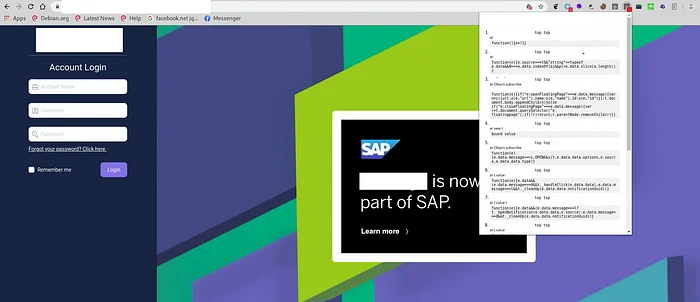
That prompted a search through all the postMessages the extension had flagged. One of them stood out:
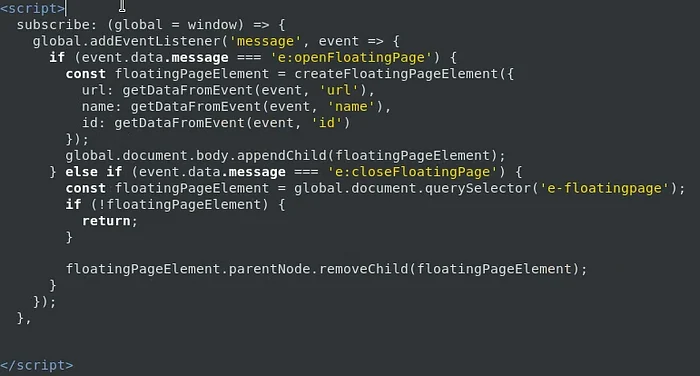
In that script a message event listener is registered and waits for a postMessage without any verification of the origin host. There are also some if conditions, but the author notes they are normal to pass because they depend only on the message that the attacker host sends.
Two functions in the handler matter:
getDataFromEventcreateFloatingPageElement
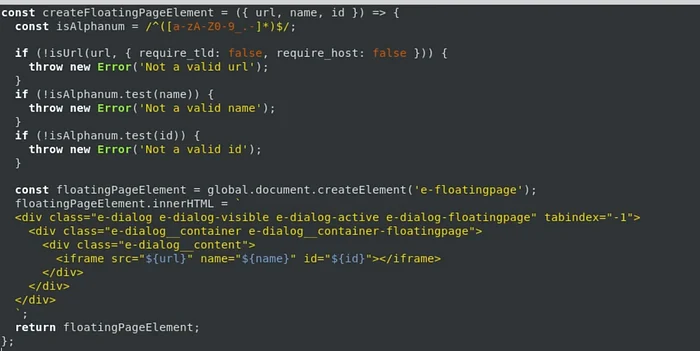

getDataFromEvent extracts the data from the received message. The author points out that the variable in the addEventListener is called event, which is what gets passed to this function.
createFloatingPageElement creates an iframe inside the DOM. That iframe has three controlled attributes, src, name and id, and all three values are taken from the postMessage sent by the attacker host. There is no sanitising of the three values in the JavaScript. The main part of the function is:
<iframe src="${url}" name="${name}" id="${id}"></iframe>
The three variables ($url, $name, $id) are the parameters of createFloatingPageElement, and their values come from the message data fetched by getDataFromEvent.
Exploitation
Step 1: Inject an inline event handler through the iframe attributes
With the code understood, the only route to exploitation is to add an inline event listener inside the iframe, such as onclick, onload or onerror. The target shape is:
<iframe src="url" onload="document.cookie" name="name" id="id"></iframe>
So the payload has to be delivered through the parameters of the postMessage. The first attempt was:
<script>function SendMessage() { var IframeElement = document.getElementById('VulnerableSiteIframe'); var message = {"message":"e:openFloatingPage","data":{ "id":"1234gghq", "name":"tayba", "url":"https://www.framable.com\"+onload=alert()"}}; IframeElement.contentWindow.postMessage(message, '*');};<iframe id="VulnerableSiteIframe" height="400" width="1024" src="https://redacted.com/bootstrap.php" onload="SendMessage()"></iframe></script>
The script builds a message object whose data carries the id, name and url values, and posts it with a wildcard target origin ('*') into the framed page. The url value contains an escaped double quote followed by onload=alert(), intended to break out of src and add an inline handler. The outer iframe loads bootstrap.php and calls SendMessage() on load.
This attempt failed: bootstrap.php sends an X-Frame-Options header in sameorigin mode, so the page could not be framed and the XSS could not be triggered there.
Step 2: Look for another page
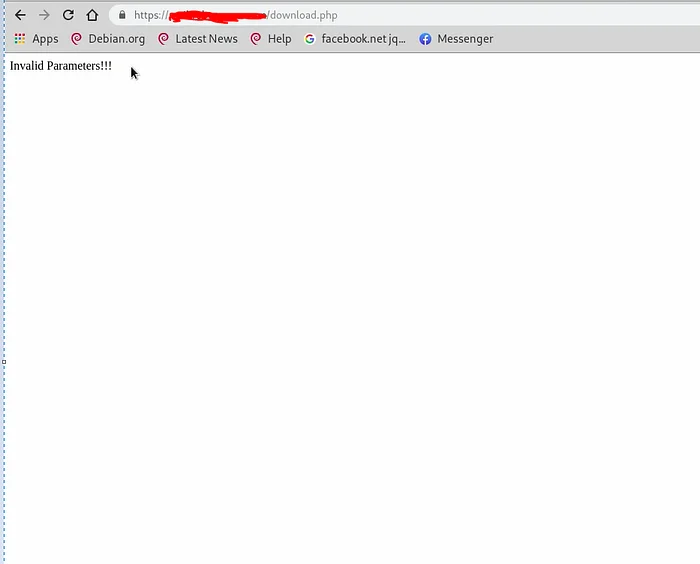
dirsearch was used to find other pages. Most of them redirected to bootstrap.php. One page did not: download.php. Accessing it directly returned an error:
invalid parameters !!!
Step 3: Find the hidden parameter
Reading that error suggested hidden parameters, so Arjun was run against the page. It found one parameter that produced a normal error page which also contained the same postMessage problem, and this time without any X-Frame-Options header.
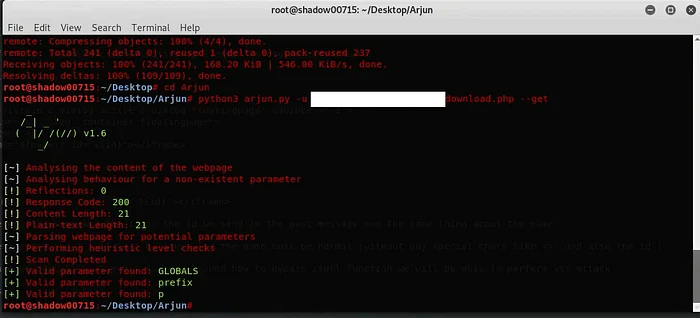
The parameter is p.
Step 4: Confirm the page can be framed
Requesting download.php with a random value for p produced a page that triggered the same postMessage-tracker notification as the first figure.
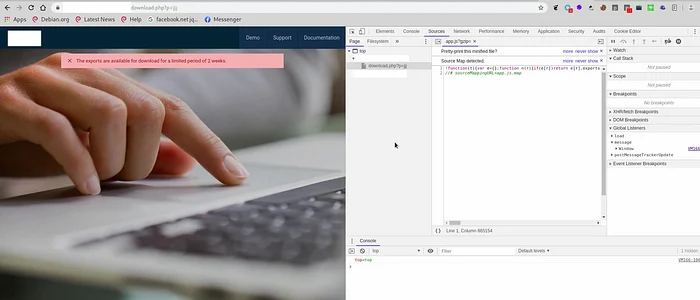
The page could also be framed:
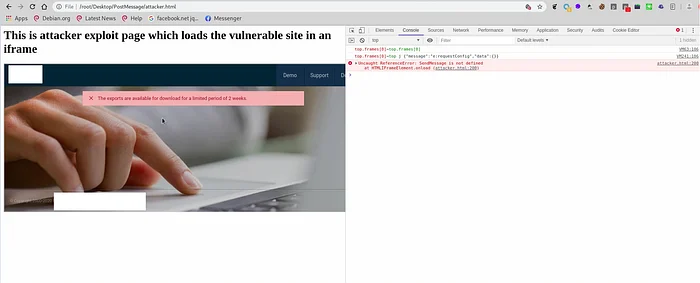
Step 5: Deliver the payload
With framing possible, the payload was sent again, this time against download.php?p=jjjj:
<script>function SendMessage() { var IframeElement = document.getElementById('VulnerableSiteIframe'); var message = {"message":"e:openFloatingPage","data":{ "id":"1234gghq", "name":"tayba", "url":"https://www.anything.com\"+onload=alert(document.cookie)"}}; IframeElement.contentWindow.postMessage(message, '*');};<iframe id="VulnerableSiteIframe" height="400" width="1024" src="https://redacted.com/download.php?p=jjjj" onload="SendMessage()"></iframe></script>
The structure is the same as before, but the url value now appends onload=alert(document.cookie). The url has to contain a real URL because of the isUrl check visible in the createFloatingPageElement figure, which verifies that the value looks like https://anyurl.com/anythingyouwant.
After sending the payload, the XSS fired:
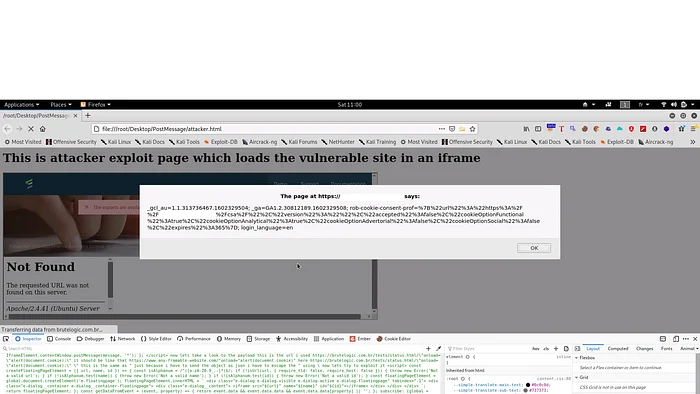
The report says the XSS popup is visible in the screenshot.
Root cause
The message event listener accepts messages from any origin: there is no check of event.origin. The data from the message is passed through getDataFromEvent and then interpolated directly into the src, name and id attributes of an iframe built by createFloatingPageElement, with no sanitising of the three values. Because the values are placed inside attribute context, a double quote in the url value breaks out of src and lets the attacker add an inline event handler such as onload to the generated iframe, which executes in the origin of the vulnerable page.
The url value has to contain a real URL because of the isUrl check. The X-Frame-Options: sameorigin header on bootstrap.php blocked framing of that page, but download.php did not send the header, so the same handler could be reached there.
Impact
An attacker who can get a victim to load a page they control can frame the vulnerable download.php page, post a crafted message into it, and run JavaScript in the origin of redacted.com. In the demonstrated payload the script reads document.cookie, so anything stored in cookies that is reachable from JavaScript, such as a session identifier without the HttpOnly flag, could be taken. The report does not state which cookies the target sets or what an attacker could do with them beyond the popup shown.
The attack requires the victim to visit the attacker's page and the vulnerable page to be frameable, which was true for download.php and false for bootstrap.php.
Fix
Based on the root cause, the handler should verify event.origin against an allowlist before processing any message, and the values taken from the message should be sanitised or validated before being placed into the iframe attributes, rather than interpolated as raw strings. A sensible fix would be to apply the X-Frame-Options header that bootstrap.php already sends to pages such as download.php as well.
Variants to test
- Search for
messagelisteners with postMessage-tracker on other targets and check whetherevent.originis validated. A positive result is a listener that acts on messages sent from a page you control. - Look for message data that ends up in HTML attributes,
innerHTML,evalorlocation. A positive result is a value you control appearing unescaped in the DOM. - Run dirsearch and Arjun on pages that return parameter errors, as was done here. A positive result is a hidden parameter that returns a page with the same handler and no framing protection.
- Check
X-Frame-Optionsand CSPframe-ancestorson every page that hosts the handler. A positive result is a page that can be framed from an attacker origin. - Try breaking out of each of the three attributes (
src,name,id) with a quote and an inline handler. A positive result is a handler that executes in the target origin.
What happened, in plain words
A security researcher was looking at a website that belonged to a private bug bounty program. A bug bounty program is a deal between an organisation and independent researchers: the organisation says "if you find a security problem in our systems and report it responsibly, we may reward you", and the researcher agrees to follow the program's rules. This particular program is private, which means you can only take part if you are invited, and the report does not name the organisation or the product.
The researcher found a way to make the website run JavaScript code that the researcher wrote, inside the website's own pages. That class of problem is called cross-site scripting, usually shortened to XSS. In everyday terms: imagine a noticeboard where visitors are allowed to pin notes. If the noticeboard also lets a visitor pin a note that says "whoever reads this, go and fetch the keys from the back office and hand them to me", and the staff actually do it, then the noticeboard has become a way to steal from the office. XSS is the same idea on a web page: the page takes something an outsider supplied and treats it as if it were part of the page's own instructions.
The specific flavour here is called postMessage XSS, and it is a DOM-based XSS. The DOM (Document Object Model) is the browser's in-memory model of the page: every heading, paragraph, image and iframe is an object in that model, and JavaScript can read and change those objects. A DOM-based XSS is one where the dangerous change happens entirely inside the browser, in that model, without the server ever seeing the malicious value. The report does not name the program or the product, and the payloads use redacted.com in place of the real host. Two pages on that host matter: bootstrap.php and download.php.
The two ideas you need first
postMessage
Browsers are built on a rule called the same-origin policy. An origin is the combination of protocol, host and port, so https://example.com and https://other.example are different origins, and a page from one origin is normally not allowed to read data from a page of another origin. That rule is what stops a random website from reading your webmail. But sometimes two pages from different origins genuinely need to talk to each other, for example a page and a pop-up it opened, or a page and an iframe embedded inside it. An iframe is a rectangular window inside a page that loads another page, like a picture frame hanging on a wall with a different picture inside it.
The browser provides one standard way for those pages to talk: window.postMessage(). One page calls postMessage on the other window and hands it a message plus a target origin; the receiving page listens for a message event and gets the data. The important detail is that the receiving page is supposed to check who sent the message. The browser tells the receiver the sender's origin in a property called event.origin, and the receiver should compare that against a list of origins it trusts before doing anything with the data. If it does not check, then any website in the world can send it messages.
postMessage XSS
The report defines it directly: it is a DOM-based XSS that happens when postMessage is not implemented properly, meaning without origin verification, and untrusted data received from another host is added to the DOM without any filtration. In plain words: the page listens for messages from anyone, takes the contents, and pastes them into the page without cleaning them first. If the pasted content can include instructions the browser will execute, the sender has just run code on the receiving page.
The tools used
The report mentions only three tools, and no accounts, roles or software versions.
- postMessage-tracker, a Google Chrome extension. An extension is a small add-on installed in the browser that can watch what pages do. This one notifies you when a postMessage interaction is detected, so it is like a motion sensor for one specific kind of browser activity.
- dirsearch, a tool that guesses file and directory names on a website and reports which ones exist. Think of it as trying every door number on a corridor to see which ones open.
- Arjun, a tool that looks for hidden parameters. A parameter is a named value appended to a URL, like
?p=jjjj; the page reads it and changes what it shows. Many pages accept parameters that are not linked from anywhere, and Arjun tries common names to find them.
Finding it
While researching the site, the researcher got a notification from postMessage-tracker.
The screenshot shows that notification. It was the starting signal: something on this site uses postMessage, so it is worth reading the code that handles it. The researcher then went through all the postMessages the extension had flagged, looking for one that might be exploitable. One stood out.
In that script a message event listener is registered. An event listener is a function you attach to something, saying "when this happens, run this code"; here it says "when a message arrives, run this code". The listener waits for a postMessage without any verification of the origin host, which is the flaw described above. There are also some if conditions in the handler, but the researcher notes they are normal to pass, because they depend only on the message that the attacker host sends. In other words, the checks are about the shape of the message, not about who sent it, so an attacker simply sends a message with the right shape.
Two functions inside the handler matter:
getDataFromEventcreateFloatingPageElement
getDataFromEvent extracts the data from the received message. The researcher points out that the variable in the addEventListener is called event, which is what gets passed to this function. So the function's job is: take the event object the browser handed over, pull the attacker's data out of it, and return it.
createFloatingPageElement creates an iframe inside the DOM. That iframe has three attributes that are controlled by the message: src, name and id. An attribute is a setting written inside an HTML tag, like the address on an envelope; src is the address of the page the iframe should load, name is a label for the frame, and id is a unique identifier for it in the page. All three values are taken from the postMessage sent by the attacker host, and there is no sanitising of the three values in the JavaScript. Sanitising means cleaning input so that any characters with special meaning are neutralised before use. The main part of the function is:
<iframe src="${url}" name="${name}" id="${id}"></iframe>
This is a template. The ${...} placeholders are slots where values get inserted. So the browser ends up building an iframe tag whose src is whatever url contains, whose name is whatever name contains, and whose id is whatever id contains. The three variables ($url, $name, $id) are the parameters of createFloatingPageElement, and their values come from the message data fetched by getDataFromEvent. Nothing between the message arriving and the tag being built checks or escapes those values.
Exploitation
Step 1: Inject an inline event handler through the iframe attributes
With the code understood, the only route to exploitation is to add an inline event listener inside the iframe, such as onclick, onload or onerror. An inline event handler is an attribute like onload="..." whose value is JavaScript that the browser runs when the event happens; onload fires when the element finishes loading. The target shape is:
<iframe src="url" onload="document.cookie" name="name" id="id"></iframe>
Read that as: an iframe whose address is url, which, as soon as it loads, runs the JavaScript document.cookie. A cookie is a small piece of data a website asks the browser to store and send back on later requests; it is commonly used to remember who you are, so a session cookie is effectively a temporary key to your logged-in session. document.cookie is the JavaScript way to read the cookies that are not marked HttpOnly (a flag that hides a cookie from JavaScript). So the shape above is intended to run document.cookie inside the vulnerable page.
To get that shape, the payload has to be delivered through the parameters of the postMessage. The first attempt was:
<script>function SendMessage() { var IframeElement = document.getElementById('VulnerableSiteIframe'); var message = {"message":"e:openFloatingPage","data":{ "id":"1234gghq", "name":"tayba", "url":"https://www.framable.com\"+onload=alert()"}}; IframeElement.contentWindow.postMessage(message, '*');};<iframe id="VulnerableSiteIframe" height="400" width="1024" src="https://redacted.com/bootstrap.php" onload="SendMessage()"></iframe></script>
Line by line, in plain words:
<script>opens a block of JavaScript that the attacker's page will run.function SendMessage() {defines a function namedSendMessage, so the code inside can be triggered later.var IframeElement = document.getElementById('VulnerableSiteIframe');finds the iframe on the attacker's page whoseidisVulnerableSiteIframeand stores a handle to it.document.getElementByIdis the browser's lookup by identifier.var message = {"message":"e:openFloatingPage","data":{ ... }};builds the message object. It has amessagefield with the valuee:openFloatingPage, which is the command name the vulnerable handler expects, and adatafield carryingid,nameandurl."id":"1234gghq",sets the iframe'sidattribute to1234gghq."name":"tayba",sets the iframe'snameattribute totayba."url":"https://www.framable.com\"+onload=alert()"is the interesting one. The value starts as a normal-looking URL, then contains an escaped double quote\", then+onload=alert(). The value is meant to break out of thesrcattribute and addonload=alert()as a new attribute, though this first attempt was blocked by framing.alert()is a JavaScript function that shows a popup box; it is the classic harmless proof that code ran.IframeElement.contentWindow.postMessage(message, '*');sends the message into the framed page.contentWindowis the window object of the page inside the iframe, and'*'as the target origin means "deliver this to whatever origin is in there", which is allowed but sloppy.};closes the function.<iframe id="VulnerableSiteIframe" height="400" width="1024" src="https://redacted.com/bootstrap.php" onload="SendMessage()"></iframe>is the attacker's own iframe, loading the vulnerable pagebootstrap.php. Itsonload="SendMessage()"means: as soon as this iframe has loaded, call the function above, which posts the malicious message into it.</script>closes the script block.
This attempt failed. bootstrap.php sends an X-Frame-Options header in sameorigin mode. A response header is a line of metadata the server sends alongside the page; X-Frame-Options tells the browser whether the page is allowed to be shown inside an iframe. sameorigin means only pages from the same origin may frame it. Since the attacker's page is a different origin, the browser refused to display bootstrap.php inside the attacker's iframe, so the message was never delivered and the XSS could not be triggered there.
Step 2: Look for another page
dirsearch was used to find other pages on the host. Most of them redirected to bootstrap.php. A redirect is the server telling the browser "the page you want is over there, go and load that instead". One page did not redirect: download.php. Accessing it directly returned an error:
invalid parameters !!!
That error is useful information. It means the page expects some input it did not receive, which suggests there is a parameter it reads. A page that complains about missing parameters is a page worth poking at.
Step 3: Find the hidden parameter
Reading that error suggested hidden parameters, so Arjun was run against the page. It found one parameter that produced a normal error page which also contained the same postMessage problem, and this time without any X-Frame-Options header.
The parameter is p. Two things came out of this step: the page accepts a parameter named p, and the page it returns has the same vulnerable message handler but no framing protection. That second point is what makes exploitation possible, because the attacker can now put the page inside an iframe on their own site.
Step 4: Confirm the page can be framed
Requesting download.php with a random value for p produced a page that triggered the same postMessage-tracker notification as the first figure.
That confirms the handler is present on this page too. The page could also be framed:
The screenshot shows the page displayed inside a frame, which is exactly what bootstrap.php refused to allow.
Step 5: Deliver the payload
With framing possible, the payload was sent again, this time against download.php?p=jjjj:
<script>function SendMessage() { var IframeElement = document.getElementById('VulnerableSiteIframe'); var message = {"message":"e:openFloatingPage","data":{ "id":"1234gghq", "name":"tayba", "url":"https://www.anything.com\"+onload=alert(document.cookie)"}}; IframeElement.contentWindow.postMessage(message, '*');};<iframe id="VulnerableSiteIframe" height="400" width="1024" src="https://redacted.com/download.php?p=jjjj" onload="SendMessage()"></iframe></script>
The structure is the same as before, so only the differences matter:
- The
urlvalue is nowhttps://www.anything.com\"+onload=alert(document.cookie). The escaped quote still closes thesrcattribute, and the injected handler is nowonload=alert(document.cookie), which pops up the victim's cookies instead of an empty alert. - The outer iframe now loads
https://redacted.com/download.php?p=jjjj, the page that can be framed, with a random valuejjjjfor the parameterp.
The url has to contain a real URL because of the isUrl check visible in the createFloatingPageElement figure, which verifies that the value looks like https://anyurl.com/anythingyouwant. The report only says the url must contain a real URL because of the isUrl check. It does not stop the quote and the handler that follow, because the check only looks at the beginning of the string.
After sending the payload, the XSS fired:
The report says the XSS popup is visible in the screenshot.
Why it worked
The message event listener accepts messages from any origin: there is no check of event.origin. The data from the message is passed through getDataFromEvent and then interpolated directly into the src, name and id attributes of an iframe built by createFloatingPageElement, with no sanitising of the three values. Because the values are placed inside attribute context, a double quote in the url value breaks out of src and lets the attacker add an inline event handler such as onload to the generated iframe, which executes in the origin of the vulnerable page. Running in the vulnerable page's origin is the key: the browser treats that code as coming from redacted.com, so it can read what redacted.com can read.
The url value has to contain a real URL because of the isUrl check. The X-Frame-Options: sameorigin header on bootstrap.php blocked framing of that page, but download.php did not send the header, so the same handler could be reached there.
What an attacker could do with it
An attacker who can get a victim to load a page they control can frame the vulnerable download.php page, post a crafted message into it, and run JavaScript in the origin of redacted.com. In the demonstrated payload the script reads document.cookie, so anything stored in cookies that is reachable from JavaScript, such as a session identifier without the HttpOnly flag, could be taken. A session identifier is the value that proves to the server which logged-in user you are; if someone else gets it, they can often act as you until it expires.
The attack requires the victim to visit the attacker's page and the vulnerable page to be frameable, which was true for download.php and false for bootstrap.php.
How to fix it
Based on the root cause, the handler should verify event.origin against an allowlist before processing any message, and the values taken from the message should be sanitised or validated before being placed into the iframe attributes, rather than interpolated as raw strings. An allowlist is a list of the only values that are accepted; anything not on the list is rejected. A sensible fix would be to apply the X-Frame-Options header that bootstrap.php already sends to pages such as download.php as well.
Things to try on other targets
- Search for
messagelisteners with postMessage-tracker on other targets and check whetherevent.originis validated. A positive result is a listener that acts on messages sent from a page you control. - Look for message data that ends up in HTML attributes,
innerHTML,evalorlocation.innerHTMLis the property that sets a chunk of HTML inside an element,evalruns a string as code, andlocationis the current address of the page. A positive result is a value you control appearing unescaped in the DOM. - Run dirsearch and Arjun on pages that return parameter errors, as was done here. A positive result is a hidden parameter that returns a page with the same handler and no framing protection.
- Check
X-Frame-Optionsand CSPframe-ancestorson every page that hosts the handler. CSP is Content Security Policy, a set of rules a site sends to the browser about what it may load and run;frame-ancestorsis the CSP directive that says which pages may frame it. A positive result is a page that can be framed from an attacker origin. - Try breaking out of each of the three attributes (
src,name,id) with a quote and an inline handler. A positive result is a handler that executes in the target origin.
Glossary
- Attribute: a setting written inside an HTML tag, such as
srcorid. - Allowlist: a list of the only values that are accepted; anything else is rejected.
- Arjun: a tool that looks for hidden URL parameters.
- Bug bounty program: an arrangement where an organisation invites researchers to find and report security problems, often for a reward.
- Cookie: a small piece of data a website asks the browser to store and send back on later requests, often used to remember a logged-in session.
- CSP (Content Security Policy): rules a site sends to the browser about what it may load and run.
- dirsearch: a tool that guesses file and directory names on a website and reports which exist.
- DOM (Document Object Model): the browser's in-memory model of the page, which JavaScript can read and change.
- DOM-based XSS: an XSS where the dangerous change happens entirely in the browser's model of the page, without the server seeing the malicious value.
- Event listener: a function attached to something that runs when a particular event happens.
- frame-ancestors: the CSP directive that says which pages may frame a page.
- getDataFromEvent: the function in the vulnerable handler that extracts the attacker's data from the received message.
- createFloatingPageElement: the function in the vulnerable handler that builds an iframe from the message data.
- HttpOnly: a cookie flag that hides the cookie from JavaScript.
- iframe: a rectangular window inside a page that loads another page.
- Inline event handler: an attribute such as
onload="..."whose value is JavaScript the browser runs when the event happens. - innerHTML: the property that sets a chunk of HTML inside an element.
- isUrl: the check in the vulnerable code that verifies a value looks like a URL.
- Origin: the combination of protocol, host and port, such as
https://example.com. - Parameter: a named value appended to a URL, like
?p=jjjj, which the page reads. - postMessage: the browser's standard mechanism for cross-origin communication between window objects.
- postMessage XSS: a DOM-based XSS caused by a postMessage handler that does not verify the sender and inserts untrusted data into the DOM without filtering.
- postMessage-tracker: a Google Chrome extension that notifies you when a postMessage interaction is detected.
- Redirect: the server telling the browser to load a different page instead.
- Response header: a line of metadata the server sends alongside a page.
- Same-origin policy: the browser rule that a page from one origin cannot normally read data from another origin.
- Sanitising: cleaning input so characters with special meaning are neutralised before use.
- Session identifier: the value that proves to the server which logged-in user you are.
- X-Frame-Options: a response header that says whether a page may be shown inside an iframe;
sameoriginmeans only pages from the same origin may frame it. - XSS (cross-site scripting): a class of vulnerability where a page runs code supplied by an outsider as if it were its own.



