Pwning the portal: from database dump to session hijacking
An SVN repository was publicly accessible, exposing source code and database credentials. Attackers could exploit blind SQL injection to dump the database, including plaintext passwords, and use reflected XSS combined with CSRF to hijack sessions.

I find that doing bug hunting and responsible disclosure is a nice practical way to “learn by doing” for beginners and for practicing your recon and exploit skills while helping companies stay secure. This is a responsible disclosure write-up about a series of vulnerabilities that lead to information disclosure…
The full write-up lives on its author's site
It belongs to its author, so we link to it rather than copy it. The other two tabs are our own rewrites, checked against it.
Context
This is a responsible disclosure write-up about a chain of vulnerabilities found on a corporate portal belonging to a target company that had authorised public bug hunting against its systems. The chain led to information disclosure, a database dump and account takeover, among other things. The target details are redacted in the write-up, and the company was notified through its responsible disclosure policy.
The host in question was a portal for the target company's employees. It had a login page plus additional functionality: password change and a "forgot password" flow. Registration existed, but because it is a corporate portal, an account had to be "requested" by providing company data.
Setup
The researcher did not spend much time on the reconnaissance phase and instead leaned on tools and services already part of their automation:
- Querying certificates based on the target organisation's name on crt.sh.
- A reverse WHOIS lookup using reversewhois.io.
- Project Discovery's subfinder.
After gathering subdomains and filtering the ones responsive to HTTP, the next step was fuzzing all hosts for quick wins with a custom wordlist of known vulnerability identifiers and of leaks and exposures developers might have misconfigured.
Finding it
One host stood out because an SVN repository was publicly available.
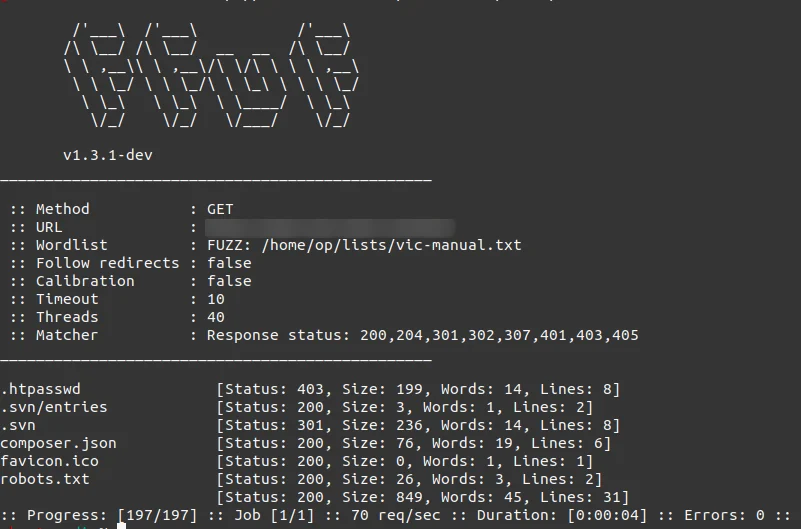
The image is captioned as the SVN repository detection.
An SVN repository serves the same purpose as a Git repository: both are version control systems, with the difference that SVN is centralised while Git is distributed. A repository can contain source code, sensitive information, or anything the developers used to build the web application, without any constraint on public access.
Exploitation
Step 1: extract the repository and grep for secrets
Extracting an SVN repository is straightforward with a tool such as svn-extractor. Downloading and exploring the repository showed that it contained the source code for the portal, covering both the authenticated and unauthenticated parts of the application.
Before anything else, the researcher used grep to catch sensitive words such as password, admin and apiKey. That produced the first win: database credentials.
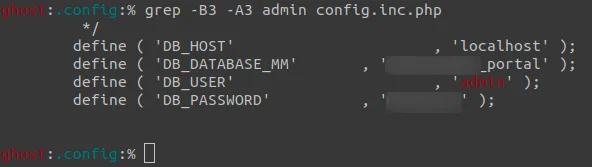
The image is captioned as the database credentials.
Step 2: blackbox testing
Even though the source code was available, the researcher first tested their skills against the target with zero knowledge of the source. The blackbox approach produced multiple issues:
- Two endpoints vulnerable to blind SQLi, one on a GET request and one on a POST request.
- Two reflected XSS, both in POST requests.
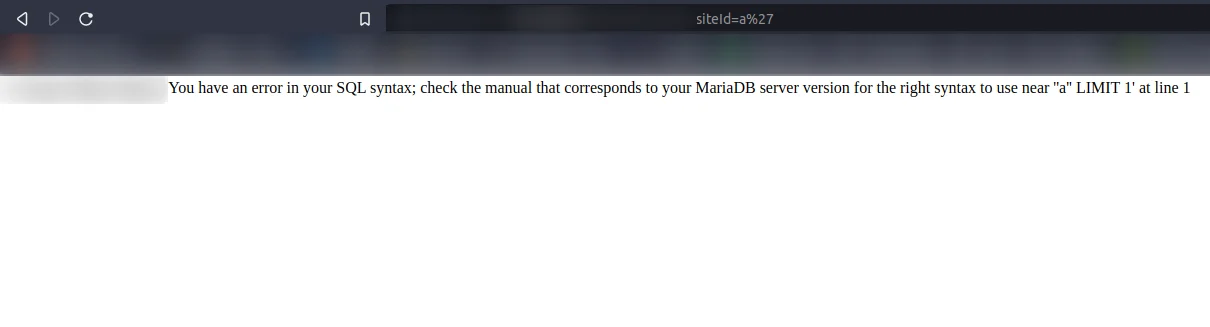
The image is captioned as the SQLi detection.
Step 3: confirm and exploit the blind SQLi
The blind SQLi on the GET endpoint could be exploited with a time-based blind SQLi payload. The end result of the payload was:

The image is captioned as the SQLi confirmation with the time-based payload.
With sqlmap, the researcher extracted database information: database names, users and their privileges, table and column names, their entries, and a sample of the users' entries with the following columns:
userId,userType,userEmail,userGroup,userPhone,userActive,userClosed,userDelete,userAddress,userCompany,userLastname,userPassword,userUsername,userCloseDate,userCloseUser,userFirstname,userLastLogin,userCreateDate,userCreateUser,userDeleteDate,userDeleteUser,userDepartment,userPrivileges,userDomainLogin,userPasswordOrg,userTransFactor,userLoginAttempts,userPrivilegesHSO,userActivationHash,userClosedBySystem,userHsoPubForAuthor,userPasswordHistory,userPrivilegesHSOPrio,userPasswordLastChange,userPasswordOrgUnCrypt
The last column, userPasswordOrgUnCrypt, contains plaintext passwords of users. This is not a legacy application: it is still used by employees, as shown by the recent dates in the userLastLogin column.
Step 4: turn the POST-based XSS into CSRF
Both XSS are POST-based, so they can only be triggered by a POST request, which means the victim has to be tricked into making that request. That limitation can be bypassed by combining the XSS with a CSRF issue, since the application lacks CSRF protection. By sending a link from a malicious host under the researcher's control, the victim can be forced into making a POST request carrying the malicious payload:
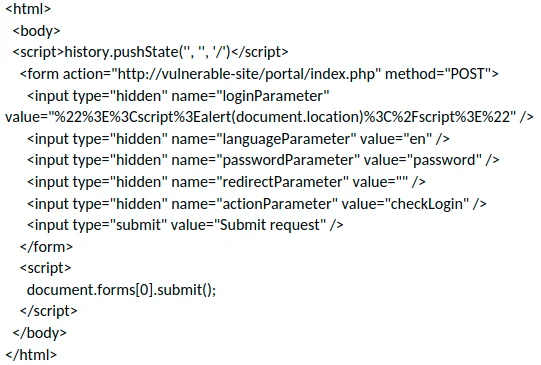
The image is the proof of concept of the POST-based XSS turned into a CSRF.
Step 5: review the code for more issues
Having found such issues on the unauthenticated side, the researcher expected more on the authenticated side and turned to the source code. After analysing some code, the pattern the developers used to build SQL statements and to reflect user input became clear. grep is again a quick way to find possible SQLi and XSS issues. The queries
grep -iorE "^.*SELECT.*WHERE.*" ./*
and
grep -nrE ".* echo \( isset \( .+_(POST|GET)" ./*
returned strings in the code matching the regex patterns.
Results of grep -iorE "^.*SELECT.*WHERE.*" ./*:
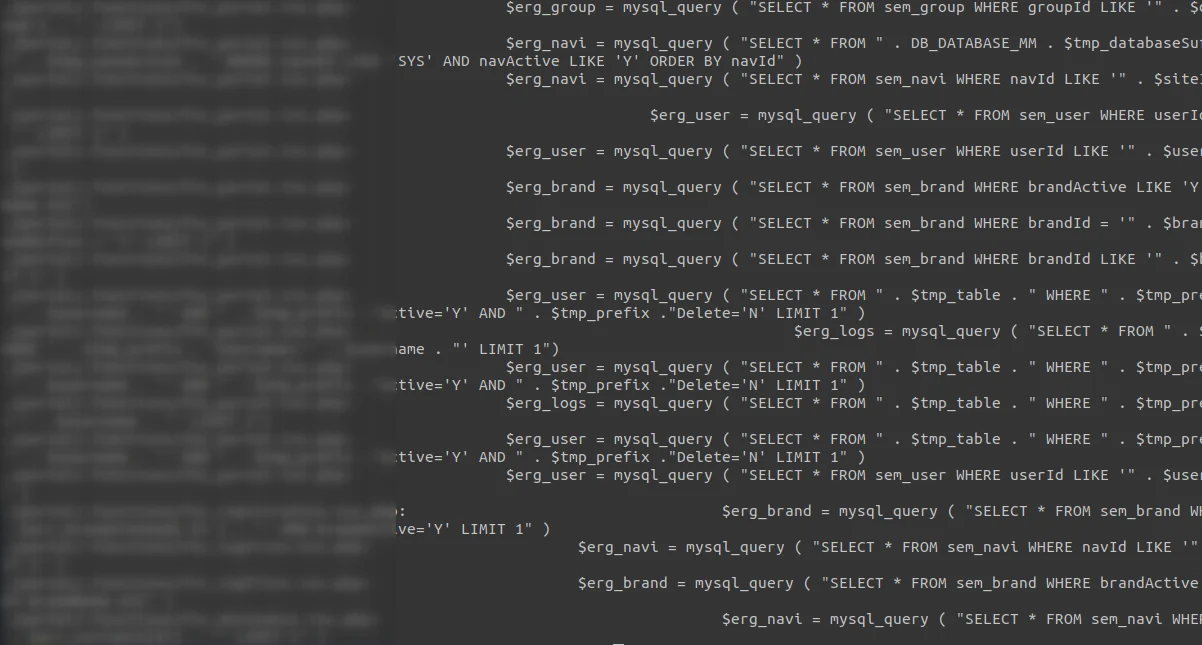
The image is captioned as the possible SQLis.
Multiple lines show user input being passed into the query without any filtering. This can later be confirmed by analysing which variable is assigned based on user input in the code.
Results of grep -nrE ".* echo \( isset \( .+_(POST|GET)" ./*:
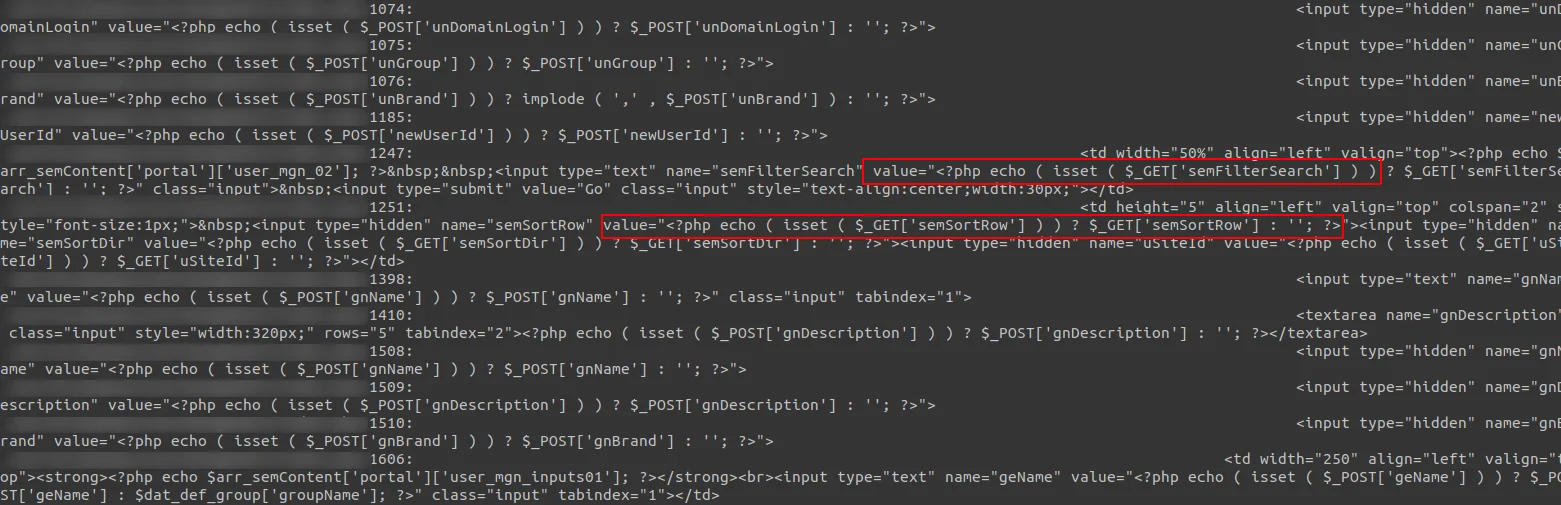
The image is captioned as the possible XSS.
Here too, the values of HTTP parameters are reflected un-sanitised, leading to XSS.
This way the researcher uncovered authenticated SQLi as well as authenticated POST- and GET-based reflected XSS, which could make session hijacking possible because the victim can hold a valid session.
Step 6: the forgot password flow
Code review also showed that the "Forgot Password" functionality sends the username and password to the user in an email in plaintext. That violates best practice and can also indicate that the password is stored in plaintext in the database rather than with a secure hashing algorithm.
Root cause
Several distinct mistakes combine here:
- The SVN repository was publicly reachable, exposing the full source of the portal, including database credentials.
- SQL statements were built by passing user input into the query without filtering, as seen in the
SELECT ... WHERElines returned by the first grep. - HTTP parameter values were echoed back un-sanitised, as seen in the
echo ( isset ( ..._(POST|GET)lines returned by the second grep, producing reflected XSS. - The application lacked CSRF protection, which is what allows the POST-based XSS to be delivered to a victim.
- Passwords appeared in plaintext in the
userPasswordOrgUnCryptcolumn, and the forgot password email sent them in plaintext.
Impact
Concretely, the blind SQLi allowed extraction of database names, users and privileges, table and column names, entries, and user records including plaintext passwords. The XSS, combined with the missing CSRF protection, could make session hijacking possible because the victim can hold a valid session. The forgot password flow disclosed credentials by email in plaintext.
Fix
The write-up does not describe the fixes applied by the target. The issues it identifies point to what should change: remove public access to the SVN repository and rotate any credentials it exposed, parameterise the SQL queries instead of concatenating user input, sanitise or encode reflected input, add CSRF protection to state-changing requests, and stop storing and emailing passwords in plaintext in favour of a secure hashing algorithm.
Variants to test
- Fuzz hosts for exposed version control metadata such as SVN repositories, then extract them with a tool like svn-extractor and grep the result for
password,admin,apiKeyand similar words. A positive result is a downloadable repository containing source or credentials. - Send time-based blind SQLi payloads to GET and POST endpoints. A positive result is a measurable delay matching the payload.
- Test POST endpoints that reflect input for XSS, then check whether the same request can be issued cross-site without a token. A positive result is script execution triggered from a page on a host you control.
- Run the two grep patterns against any source you obtain and inspect the matching lines. A positive result is user input concatenated into a
SELECT ... WHEREquery or echoed from$_POST/$_GETwithout sanitisation. - Walk the forgot password flow and inspect the email. A positive result is a plaintext password in the message, which also suggests plaintext storage.
What happened, in plain words
A security researcher was allowed to look for weaknesses in a company's systems, because that company had authorised public bug hunting. Bug hunting, or bug bounty, means that an organisation invites people to test its systems and report problems instead of attacking it. The researcher found a chain of problems on a corporate portal, which is a website used by the company's own employees. The chain led to information disclosure (private data becoming visible to someone who should not see it), a database dump (a copy of the contents of the database), and account takeover (someone else being able to log in as a real user), among other things.
The write-up keeps the target details hidden and removes anything that could identify the company. The company was told about the problems through its responsible disclosure policy, which is the agreed way to report a security issue privately so it can be fixed.
The portal itself had a login page, a way to change your password, and a "forgot password" flow. People could register, but because it is a corporate portal, an account had to be "requested" by providing company data. In other words, you could not simply sign up as an outsider.
Before going further, a few ideas that come up again and again in this story:
- A server is the computer that holds a website and answers requests from browsers.
- A host is one machine or one website name on the internet. A company often has many hosts: one for the main site, one for email, one for an internal portal, and so on.
- A subdomain is a name that sits under the company's main name, like
portal.example.comunderexample.com. Each subdomain can be a different host with different software. - A repository is a storage place for a project's files, usually the source code, with a history of every change. Think of it as the shared folder where developers keep every version of their work.
- Source code is the text that programmers write, which the server runs to produce the website you see in your browser.
- A database is where a website keeps its data: user accounts, orders, messages. Think of a very large, very organised spreadsheet that the website can search and update.
- Credentials are the username and password (or similar secret) used to log in to something, such as a database.
Setup: how the researcher looked for targets
The researcher did not spend much time on the reconnaissance phase. Reconnaissance means gathering information about the target before attacking anything: which hosts exist, which ones answer, what software they run. Instead of doing it by hand, the researcher leaned on tools and services already part of their automation. Automation here means scripts that run these checks for you, so you do not have to type each one.
The three sources used were:
- Querying certificates based on the target organisation's name on crt.sh. A certificate is the digital document a website uses to prove its identity and to encrypt traffic (the padlock in your browser). Certificate records are public, and they list the names a company has registered, which often reveals subdomains.
- A reverse WHOIS lookup using reversewhois.io. WHOIS is the public record of who registered a domain name. A reverse lookup goes the other way: you start from a name or an organisation and find all the domains registered by it.
- Project Discovery's subfinder. This is a tool that collects subdomains from many public sources at once.
After gathering subdomains and filtering the ones that answered over HTTP, the next step was fuzzing all hosts for quick wins. HTTP is the language browsers and servers use to exchange pages and data. Fuzzing means sending many different requests automatically, with a list of guesses, and watching for interesting answers. The list used here was a custom wordlist: a text file of known vulnerability identifiers, plus names of files and folders that developers might have misconfigured and left exposed. A wordlist is simply a list of words and paths that a tool tries one after another.
Finding it: an open repository
One host stood out because an SVN repository was publicly available. SVN stands for Subversion, and it is a version control system: software that keeps track of every change made to a set of files. Git is the better-known alternative. Both do the same job, with one difference: SVN is centralised, meaning there is one central server that holds the project, while Git is distributed, meaning every developer has a full copy. A repository can contain source code, sensitive information, or anything the developers used to build the web application, and here nothing constrained public access to it.
The image is captioned as the SVN repository detection.
Exploitation
Step 1: extract the repository and grep for secrets
Extracting an SVN repository is straightforward with a tool such as svn-extractor. Extracting means downloading the files the repository holds so you can read them on your own machine. Downloading and exploring the repository showed that it contained the source code for the portal, covering both the authenticated and unauthenticated parts of the application. Authenticated means the pages you see after logging in; unauthenticated means the pages anyone can reach, such as the login form itself.
Before anything else, the researcher used grep to catch sensitive words such as password, admin and apiKey. grep is a command-line tool that searches text files for a pattern and prints the matching lines. Think of it as the search box of a text editor, but applied to thousands of files at once. An API key is a secret string that lets software talk to another service, a bit like a password for programs.
That produced the first win: database credentials. In other words, the source code contained the username and password the portal uses to connect to its own database.
The image is captioned as the database credentials.
Step 2: blackbox testing
Even though the source code was available, the researcher first tested their skills against the target with zero knowledge of the source. This is called blackbox testing: you interact with the website only through your browser or through requests, as an ordinary outsider would, without reading the code. The opposite, whitebox testing, means you have the code and can read it. Doing the blackbox pass first is a way to practise, and it also shows what an attacker who never finds the repository could still do.
The blackbox approach produced multiple issues:
- Two endpoints vulnerable to blind SQLi, one on a GET request and one on a POST request.
- Two reflected XSS, both in POST requests.
Some terms before we go on:
- An endpoint is a specific address on a website that does a specific job, such as the address that handles the login form. Think of the website as a building and endpoints as the different counters you can walk up to.
- GET and POST are two ways a browser can send a request. GET asks for something and puts the details in the address bar (the URL). POST sends data in the body of the request, hidden from the address bar, and is typically used for forms that change something, like logging in.
- SQL is the language used to talk to most databases. A website builds SQL statements and sends them to the database to read or write data.
- SQL injection (SQLi) happens when user input is placed into a SQL statement in a way that lets the user change the meaning of that statement. Imagine a form that asks for your name and the website pastes your answer directly into a sentence it gives the database. If you write something clever instead of a name, you can make the database do something else.
- Blind SQLi is SQL injection where the website does not show you the database's answer directly. You cannot see the data, so you ask yes/no questions and infer the answers from how the site behaves.
- XSS (cross-site scripting) happens when a website takes something a user typed and puts it into a page without cleaning it, so that text is treated as code by the browser. An attacker can then make the browser run their script in the context of the victim's session.
- Reflected XSS is the kind where the malicious input is sent in a request and immediately echoed back in the response page, rather than being stored on the server.
The image is captioned as the SQLi detection.
Step 3: confirm and exploit the blind SQLi
The blind SQLi on the GET endpoint could be exploited with a time-based blind SQLi payload. A payload is the piece of input you send to trigger the behaviour you want. Time-based means you do not read data directly; instead you ask the database to wait a few seconds if a condition is true. If the page takes noticeably longer to answer, you know the condition was true. It is like asking a friend "blink if the answer is yes" and watching for the blink.
The end result of the payload was:
The image is captioned as the SQLi confirmation with the time-based payload.
With sqlmap, the researcher extracted database information. sqlmap is a well-known tool that automates SQL injection: you point it at an endpoint, and it works out how to ask the database questions and pull data out. What came out was database names, users and their privileges, table and column names, their entries, and a sample of the users' entries with the following columns:
userId,userType,userEmail,userGroup,userPhone,userActive,userClosed,userDelete,userAddress,userCompany,userLastname,userPassword,userUsername,userCloseDate,userCloseUser,userFirstname,userLastLogin,userCreateDate,userCreateUser,userDeleteDate,userDeleteUser,userDepartment,userPrivileges,userDomainLogin,userPasswordOrg,userTransFactor,userLoginAttempts,userPrivilegesHSO,userActivationHash,userClosedBySystem,userHsoPubForAuthor,userPasswordHistory,userPrivilegesHSOPrio,userPasswordLastChange,userPasswordOrgUnCrypt
This is a list of column names from the users table. A table is one sheet inside the database, and a column is one field on that sheet. Reading the list from left to right, it holds identifiers, contact details, company and department information, login details, privilege levels, password history, and several password-related fields. The last column, userPasswordOrgUnCrypt, contains plaintext passwords of users. Plaintext means not scrambled in any way: anyone who reads the column sees the actual password. This is not a legacy application, meaning it is not an old system kept around out of habit. It is still used by employees, as shown by the recent dates in the userLastLogin column, which records when each user last logged in.
Step 4: turn the POST-based XSS into CSRF
Both XSS are POST-based, so they can only be triggered by a POST request. That is a limitation: a victim has to be tricked into making that request, because a normal link in an email or on a page is a GET request. You cannot simply send someone a URL and have the browser POST for you.
That limitation can be bypassed by combining the XSS with a CSRF issue, since the application lacks CSRF protection. CSRF stands for cross-site request forgery. It means another website makes the victim's browser send a request to the target site without the victim intending it. The browser automatically attaches the victim's cookies, so the target site believes the request came from the logged-in user. A cookie is a small piece of data the browser stores for a site and sends back with every request; it is how a site remembers that you are logged in. CSRF protection is a countermeasure, usually a secret token that the real site's pages include in forms and that another site cannot guess.
By sending a link from a malicious host under the researcher's control, the victim can be forced into making a POST request carrying the malicious payload. The malicious host is a page the researcher set up; when the victim opens it, that page quietly submits a form to the portal.
The image is captioned as the proof of concept of the POST-based XSS turned into a CSRF.
Step 5: review the code for more issues
Having found such issues on the unauthenticated side, the researcher expected more on the authenticated side and turned to the source code. This is code review: reading the code to spot patterns that lead to bugs. After analysing some code, the pattern the developers used to build SQL statements and to reflect user input became clear. grep is again a quick way to find possible SQLi and XSS issues, because you can search for the shape of the dangerous code instead of reading every file.
The queries
grep -iorE "^.*SELECT.*WHERE.*" ./*
and
grep -nrE ".* echo \( isset \( .+_(POST|GET)" ./*
returned strings in the code matching the regex patterns. A regex, or regular expression, is a pattern language for describing text: instead of searching for one exact word, you describe a shape, such as "a line that contains SELECT and later WHERE".
Taking the first command apart:
grepis the search tool.-imakes the search ignore upper and lower case, soselectandSELECTboth match.-oprints only the matching part of each line, not the whole line.-rsearches recursively, meaning it goes into every subfolder.-Eenables extended regex syntax, so the pattern can use the special characters below."^.*SELECT.*WHERE.*"is the pattern.^means the start of a line,.means any character,*means zero or more of the previous thing, so.*means "any run of characters". The pattern therefore describes a line that starts, has anything, thenSELECT, then anything, thenWHERE, then anything. In SQL,SELECT ... WHEREis the shape of a query that reads rows matching a condition, which is exactly where user input tends to be inserted../*tells grep to search the files in the current folder.
Taking the second command apart:
-nprints the line number of each match, so you can jump to it in an editor.- The other flags mean the same as before.
".* echo \( isset \( .+_(POST|GET)"is the pattern.echois the PHP instruction that prints text into the page.issetchecks whether a variable exists.\(is a literal opening bracket, escaped with a backslash so the regex treats it as a bracket and not as grouping syntax..+means one or more characters._(POST|GET)means either_POSTor_GET, which are the PHP names for the arrays that hold values submitted by forms and values in the URL. In plain words, the pattern looks for code that prints a value taken straight from a form or from the URL.
Results of grep -iorE "^.*SELECT.*WHERE.*" ./*:
The image is captioned as the possible SQLis.
Multiple lines show user input being passed into the query without any filtering. This can later be confirmed by analysing which variable is assigned based on user input in the code. In other words, the grep gives you candidates; you then read the surrounding lines to see whether the value really comes from the user.
Results of grep -nrE ".* echo \( isset \( .+_(POST|GET)" ./*:
The image is captioned as the possible XSS.
Here too, the values of HTTP parameters are reflected un-sanitised, leading to XSS. A parameter is a named value sent with a request, such as the field of a form or a piece of the URL. Sanitising means cleaning input so that dangerous characters lose their special meaning; encoding means turning them into harmless text that the browser displays rather than executes.
This way the researcher uncovered authenticated SQLi as well as authenticated POST- and GET-based reflected XSS, which could make session hijacking possible because the victim can hold a valid session. A session is the period during which a site remembers you as logged in, and session hijacking means stealing or abusing that logged-in state to act as the victim.
Step 6: the forgot password flow
Code review also showed that the "Forgot Password" functionality sends the username and password to the user in an email in plaintext. That violates best practice and can also indicate that the password is stored in plaintext in the database rather than with a secure hashing algorithm. Hashing is a one-way scrambling: the site stores a fingerprint of the password, and when you log in it fingerprints what you typed and compares the two. A good hash cannot be turned back into the password, so a stolen database does not hand out passwords directly. Sending the password by email in plaintext defeats that, and it also means anyone who reads the mailbox, or the email as it travels, learns the password.
Root cause
Several distinct mistakes combine here:
- The SVN repository was publicly reachable, exposing the full source of the portal, including database credentials.
- SQL statements were built by passing user input into the query without filtering, as seen in the
SELECT ... WHERElines returned by the first grep. - HTTP parameter values were echoed back un-sanitised, as seen in the
echo ( isset ( ..._(POST|GET)lines returned by the second grep, producing reflected XSS. - The application lacked CSRF protection, which is what allows the POST-based XSS to be delivered to a victim.
- Passwords appeared in plaintext in the
userPasswordOrgUnCryptcolumn, and the forgot password email sent them in plaintext.
Impact
The chain led to information disclosure, a database dump and account takeover, among other things. Concretely, the blind SQLi allowed extraction of database names, users and privileges, table and column names, entries, and user records including plaintext passwords. The XSS, combined with the missing CSRF protection, could make session hijacking possible because the victim can hold a valid session. The forgot password flow disclosed credentials by email in plaintext.
Fix
The write-up does not describe the fixes applied by the target. The issues it identifies point to what should change: remove public access to the SVN repository and rotate any credentials it exposed, parameterise the SQL queries instead of concatenating user input, sanitise or encode reflected input, add CSRF protection to state-changing requests, and stop storing and emailing passwords in plaintext in favour of a secure hashing algorithm. Rotating credentials means replacing them with new ones, because the old ones must be assumed to be known.
Variants to test
- Fuzz hosts for exposed version control metadata such as SVN repositories, then extract them with a tool like svn-extractor and grep the result for
password,admin,apiKeyand similar words. A positive result is a downloadable repository containing source or credentials. - Send time-based blind SQLi payloads to GET and POST endpoints. A positive result is a measurable delay matching the payload.
- Test POST endpoints that reflect input for XSS, then check whether the same request can be issued cross-site without a token. A positive result is script execution triggered from a page on a host you control.
- Run the two grep patterns against any source you obtain and inspect the matching lines. A positive result is user input concatenated into a
SELECT ... WHEREquery or echoed from$_POST/$_GETwithout sanitisation. - Walk the forgot password flow and inspect the email. A positive result is a plaintext password in the message, which also suggests plaintext storage.
Glossary
- Account takeover: gaining control of another person's account, usually by obtaining their credentials or their logged-in session.
- API key: a secret string that lets one piece of software authenticate to another service, like a password for programs.
- Authenticated: the part of a website you can only reach after logging in.
- Blackbox testing: testing a system from the outside, without reading its source code.
- Blind SQL injection: SQL injection where you cannot see the database's answers directly and must infer them from the site's behaviour.
- Bug bounty / bug hunting: a programme in which an organisation invites people to test its systems and report security problems.
- Certificate: a digital document a website uses to prove its identity and encrypt traffic.
- Code review: reading source code to find security problems or understand how it works.
- Column: one field in a database table, such as the email field of a users table.
- Cookie: a small piece of data a browser stores for a website and sends back with each request, often used to remember that you are logged in.
- Credentials: a username and password, or similar secret, used to log in to something.
- CSRF (cross-site request forgery): tricking a victim's browser into sending a request to a site where they are logged in, without their intent.
- CSRF protection: a countermeasure, usually a secret token in forms, that stops other sites from forging requests.
- Database: the organised store where a website keeps its data.
- Database dump: a copy of the contents of a database.
- Endpoint: a specific address on a website that performs a specific job.
- Encoding: turning characters into a harmless representation so a browser displays them instead of executing them.
- Extracting (a repository): downloading the files a repository holds so you can read them locally.
- Fuzzing: automatically sending many varied requests from a list of guesses and watching for interesting responses.
- GET: an HTTP request method that asks for something and carries details in the URL.
- Git: a distributed version control system.
- grep: a command-line tool that searches text for a pattern and prints matching lines.
- Hashing: one-way scrambling of a value such as a password, so the original cannot be recovered from the stored result.
- Host: one machine or website name on the internet.
- HTTP: the language browsers and servers use to exchange pages and data.
- Information disclosure: private data becoming visible to someone who should not see it.
- Parameter: a named value sent with a request, such as a form field or part of a URL.
- Payload: the piece of input crafted to trigger a vulnerability.
- Plaintext: data that is not scrambled in any way.
- POST: an HTTP request method that sends data in the request body, typically for forms that change something.
- Privileges: the permissions an account has, such as what it is allowed to read or change.
- Reconnaissance: gathering information about a target before attacking it.
- Reflected XSS: cross-site scripting where the malicious input is echoed straight back in the response page.
- Regex (regular expression): a pattern language for describing text to search for.
- Repository: a storage place for a project's files and their history, usually source code.
- Responsible disclosure: reporting a security problem privately to the organisation so it can be fixed before details are made public.
- Reverse WHOIS: a lookup that starts from a name or organisation and finds the domains registered by it.
- Sanitising: cleaning input so dangerous characters lose their special meaning.
- Server: the computer that holds a website and answers requests from browsers.
- Session: the period during which a site remembers you as logged in.
- Session hijacking: stealing or abusing a victim's logged-in state to act as them.
- Source code: the text programmers write that the server runs to produce a website.
- SQL: the language used to talk to most databases.
- SQL injection (SQLi): putting user input into a SQL statement so the user can change its meaning.
- sqlmap: a tool that automates SQL injection and data extraction.
- Subdomain: a name under a company's main domain, such as
portal.example.com. - SVN (Subversion): a centralised version control system.
- Table: one sheet of data inside a database.
- Time-based: a blind technique where you infer answers from how long the server takes to respond.
- Unauthenticated: the part of a website anyone can reach without logging in.
- Version control system: software that records every change to a set of files.
- Whitebox testing: testing a system with knowledge of its source code.
- WHOIS: the public record of who registered a domain name.
- Wordlist: a list of words and paths a tool tries one after another.
- XSS (cross-site scripting): putting user input into a page so the browser treats it as code and runs it.