Gaining access through error-based SQLi using WebSockets
An error-based SQL injection in the 'forgot password' functionality of a portal using WebSockets allowed an attacker to extract the database version, table names, and user credentials by causing conversion errors that revealed data in error messages.

In the previous Pwning the portal blog post, we extracted the source code of a corporate login portal through a misconfigured SVN repository and identified possible SQLis and XSS'. We used a basic SQLi payload to exploit a vulnerable login functionality, which resulted in us exfiltrating the whole portal's database…
The full write-up lives on its author's site
It belongs to its author, so we link to it rather than copy it. The other two tabs are our own rewrites, checked against it.
Context
This assessment targets a corporate login portal that uses WebSockets for its login and "forgot password" functionality. The portal presents the usual layout: one input field for the username, one for the password, and a "forgot password" feature. The previous post in the series, Pwning the portal, covered a different portal where a misconfigured SVN repository leaked source code and a basic SQLi in the login form led to full database exfiltration. Here the target is different and the injection is error-based rather than the basic kind.
Before the exploitation itself, the post spends a moment on the technology, because the whole evasion trick depends on it. WebSockets uses the ws:// protocol and realises a TCP/IP channel between server and client for real-time, bidirectional communication. The client first sends an HTTP request to upgrade the connection, and the server answers with a 101 status code, meaning the connection is upgraded. From then on the two parties share a channel that carries information in textual form. WebSockets is asynchronous, since either party can send a message at any time without needing a request to respond to, and stateful, unlike HTTP. It can also use SSL through the wss:// protocol.
Setup
The report does not describe the tooling used. The precondition that matters is the client-side validation model: the application opens a WebSocket connection and sends the username field value automatically, before the user even presses enter. The application is configured to reject any value containing dangerous characters, for example a single quote, and to reload the page when it does. The payloads use @@version, information_schema and sys.columns/sys.tables, which are consistent with Microsoft SQL Server.
Finding it
The first step was not brute force, which the authors describe as the last resort in their methodology. They typed simple SQLi characters into the username field to see how the application reacts. The application rejected the input immediately, before <enter> was pressed, because the open WebSocket connection had already sent the field value. The rejection came with a page reload.
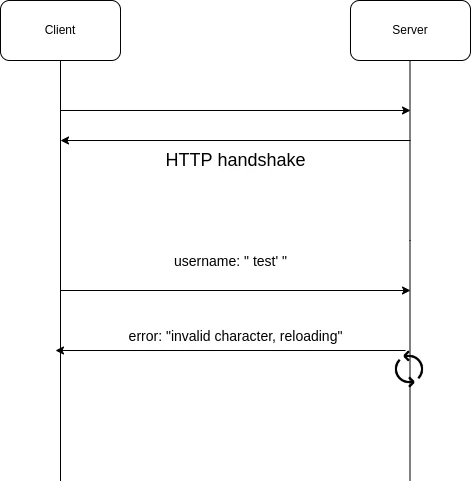
After tweaking requests and responses, they found that dropping the server's error response prevented the reload, and the username stayed in the field as it was.
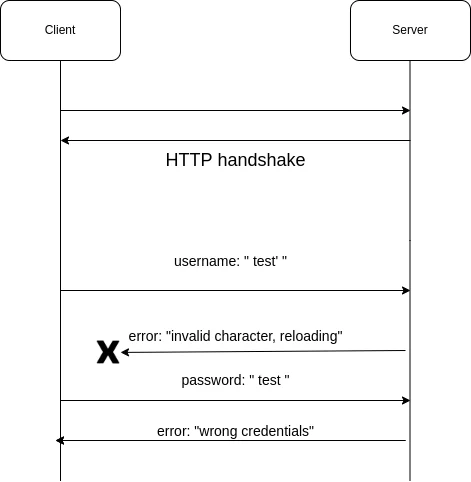
With that evasion in hand, the portal could be tested for SQLi, XSS and other injection techniques without the client wiping the input on every dangerous character.
The login form
The login functionality itself held up. The backend query sanitised user input properly and every attempt to inject SQL commands failed.
The "forgot password" functionality
The forgot password feature behaved differently. Entering a username containing an SQLi payload, for example a single quote, and invoking the function produced an SQL error. Because this is error-based SQLi, the output is read through the error the backend returns, so the error has to be an "insightful" one. After trial and error, the DBMS and its version came back with this payload:
' and 1=convert(int,(select @@version))--
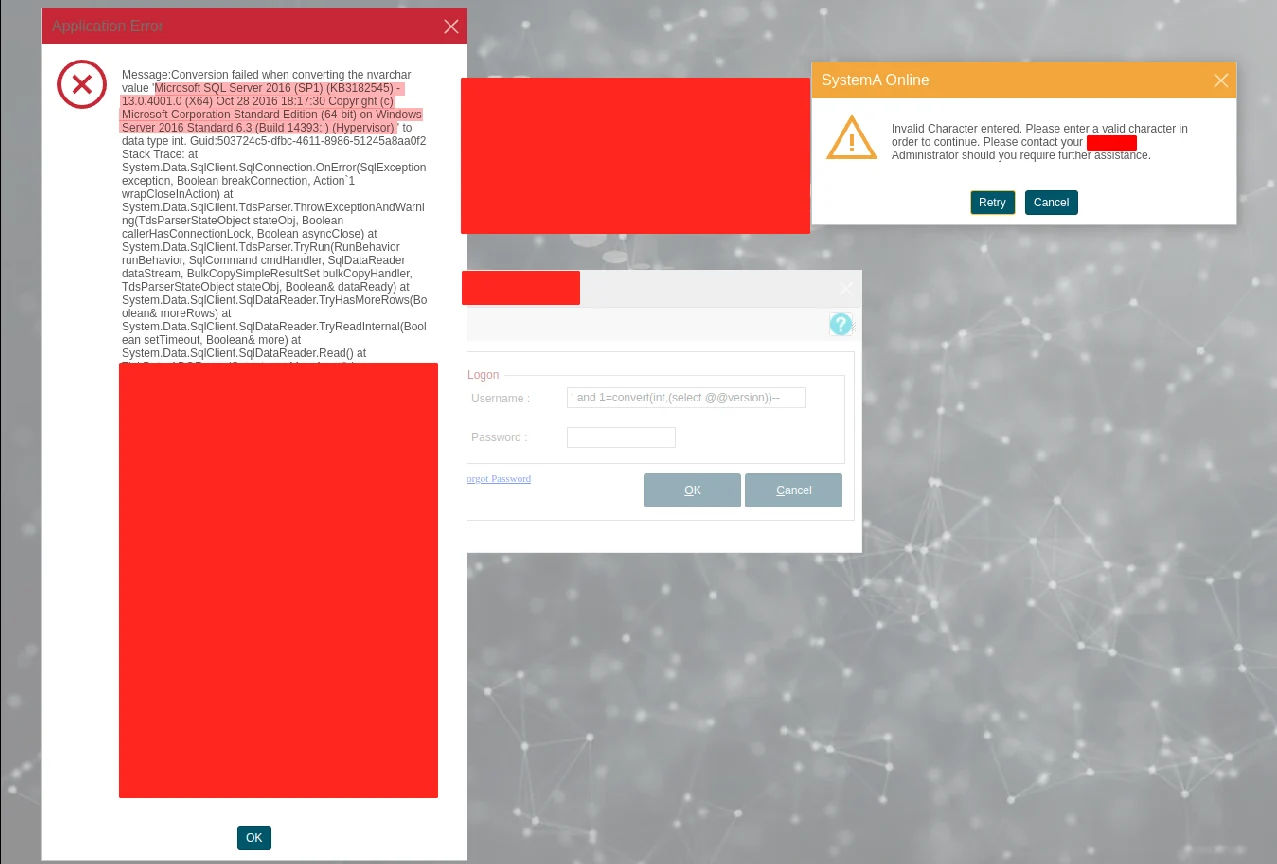
The payload instructs the database to convert the version string to an integer. That conversion cannot succeed, and the database reports what it could not convert, which is the version itself.

Exploitation
One limit shaped everything that follows: this error-based SQLi can return only one value per error message. The authors also looked for additional blind SQLi resources to save time and found a useful article on exploiting error-based SQL injections and bypassing restrictions.
Step 1: enumerate table names
The first payload returns the top table name from the database:
' and 1=convert(int,(select top 1 table_name from information_schema.tables))--
To move to the next table, the discovered name is excluded:
' and 1=convert(int,(select top 1 table_name from information_schema.tables where table_name not in ('first_table_name')))--
and for the third:
' and 1=convert(int,(select top 1 table_name from information_schema.tables where table_name not in ('first_table_name, second_table_name')))--
Each payload converts a string to an integer, so the error message carries the value back.
Step 2: enumerate columns
Once a table is known, its top column comes from:
' and 1=convert(int,(select top 1 column_name from information_schema.columns where table_name='the_discovered_table_name'))--
Step 3: reverse the search towards credentials
Exfiltrating the whole database this way would take days, and the engagement had time constraints, so the authors went after the most valuable part: user credentials. The database was extensive, and the table-by-table approach above could not locate the User table. They reversed the search: instead of walking the columns of each discovered table, they looked for tables that contain specific columns such as Password and/or Username. The payload they settled on was:
' and 1=convert(int,(select top 1 tables.name AS TableName from sys.columns JOIN sys.tables ON sys.columns.object_id = tables.object_id where sys.columns.name LIKE '%assword%')))--
This finds the first table with a column named Password, Passwords, password or passwords. The same payload with %sername% in place of %assword% was used as well. Both results pointed to a simple-looking table called Users.
Step 4: pull the credentials
To get the first username:
' and 1=convert(int,(select top 1 UserName FROM Users ORDER BY UserName))--
and to retrieve that user's password:
' and 1=convert(int,(select top 1 Password FROM Users WHERE UserName='username_found' ORDER BY UserName))--
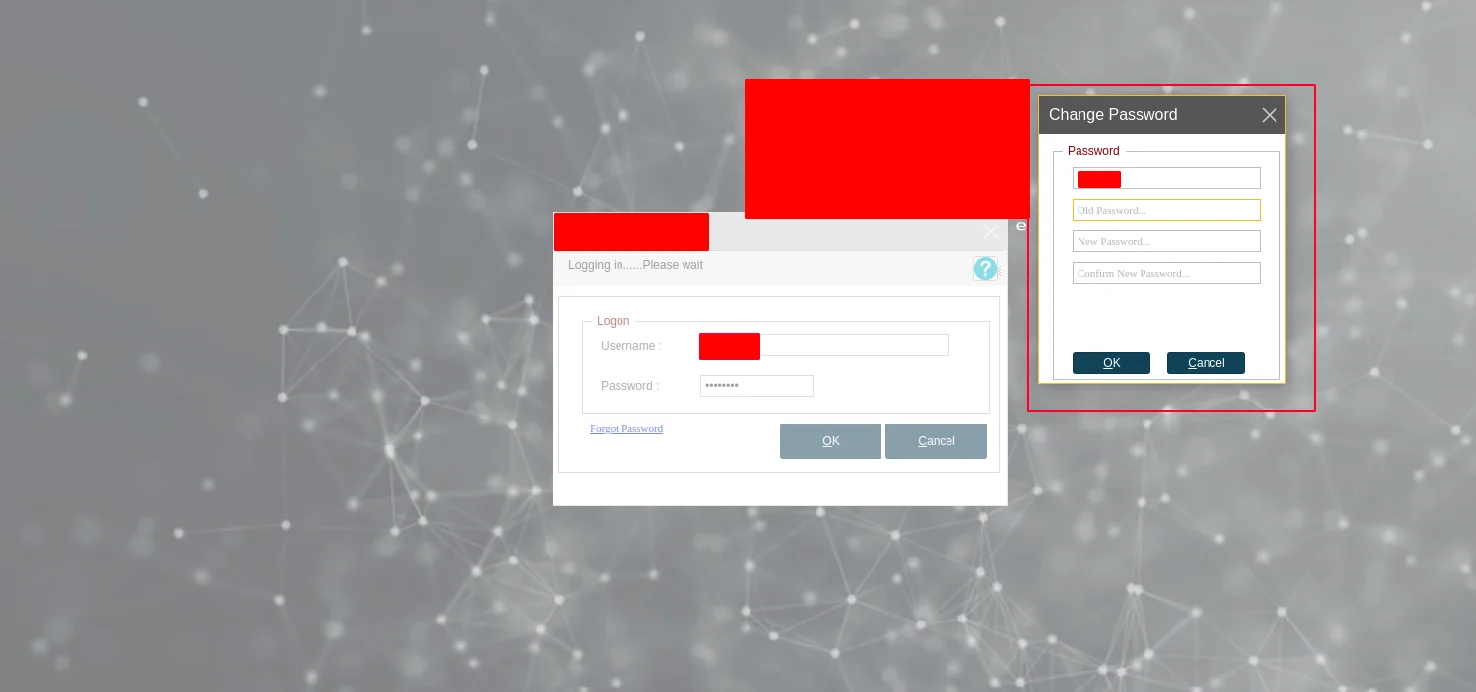
Further credentials follow the same pattern as the earlier enumeration payloads: append where UserName not in ('username_found') to the end of the username extraction payload.
Root cause
The forgot password functionality returned an SQL error when the username contained a single quote, unlike the login form. The login form, by contrast, sanitises its input properly, which is why the same characters that produced an error in the reset flow did nothing there. The rejection of dangerous characters could be bypassed by dropping the server's error response so the page did not reload. The error-based channel then turned every failed conversion into an output channel, one value per error.
Impact
The result is exfiltration of user credentials from the portal's database: usernames and their passwords, read one value at a time through error messages. The report does not state how the passwords were stored or whether they were cracked, nor how many accounts were affected. The technique is limited by the one-value-per-error constraint, which is why the authors narrowed the target to credentials rather than dumping the whole database.
Fix
The evident fix is to parameterise the query behind the forgot password feature and to stop relying on character rejection for anything security relevant. Error messages from the database should not be returned to the user.
Variants to test
- Send a single quote in any field that triggers a server-side lookup, such as a password reset or username availability check, and watch for a database error in the response. A positive result is a raw DBMS error rather than a generic message.
- Where the client validates input over a WebSocket before submission, intercept the frame and drop the error response to see whether the page reloads and clears the field. A positive result is the payload staying in the field.
- On SQL Server, try
' and 1=convert(int,(select @@version))--to confirm error-based output. A positive result is the version string inside the conversion error. - When the table name is unknown, search
sys.columnsjoined tosys.tableswith aLIKE '%assword%'filter to locate credential tables directly. A positive result is a table name in the error. - When only one value per error is possible, iterate with
top 1andnot in (...)to walk usernames, and use the discovered username in theWHEREclause to fetch the matching password.
What happened, in plain words
A company had a login page on its website. You typed a username, a password, and there was a "forgot password" link. Behind the page sat a database, the place where the site keeps its records, including the list of users and their passwords.
The people testing the site found that the "forgot password" feature took whatever you typed into the username box and pasted it straight into a database question (a query) without cleaning it first. That let them sneak extra database instructions into the box. The database then answered with error messages, and those error messages contained the very data the testers were after: the names of the database's tables, the names of its columns, and finally the usernames and passwords of the site's users.
There was a second trick. The page watched the username box as you typed and sent each value to the server over a live connection called a WebSocket. If the value contained a dangerous character such as a single quote, the server refused it and the page reloaded, wiping the box. The testers found that if they blocked the server's refusal message from reaching the page, the page did not reload and the value stayed put. That let them keep their malicious input in the box long enough to use it.
The login form itself was safe. Only the "forgot password" feature was vulnerable. This kind of attack is called error-based SQL injection: you deliberately cause the database to make a mistake, and the mistake's message tells you what you want to know.
Background: what a database and a query are
A database is an organised store of information. Think of it as a very large set of spreadsheets. Each spreadsheet is called a table. Each table has columns (the headings, such as UserName and Password) and rows (the individual records, one per user).
A website talks to its database using a language called SQL (Structured Query Language). A query is a sentence in that language, for example "give me the password of the user whose name is Alice". The website builds that sentence and sends it to the database, and the database sends back an answer.
When a website builds a query by gluing together fixed text and whatever a visitor typed, the visitor can sometimes type text that the database treats as part of the sentence rather than as a value. That is the whole idea behind SQL injection (SQLi): you slip your own SQL into a place where the site expected only a name or a password.
Background: what WebSockets are
Normally, when your browser wants something from a website, it asks and the server answers, then the conversation ends. That is HTTP. A WebSocket is different: the browser asks the server to keep the line open, the server agrees, and from then on either side can send a message at any moment without waiting to be asked. It is like the difference between sending letters (HTTP) and keeping a phone call open (WebSockets).
The report explains the mechanics. WebSockets uses the ws:// protocol and realises a TCP/IP channel between server and client for real-time, bidirectional communication. The client first sends an HTTP request to upgrade the connection, and the server answers with a 101 status code, meaning the connection is upgraded. From then on the two parties share a channel that carries information in textual form. WebSockets is asynchronous, since either party can send a message at any time without needing a request to respond to, and stateful, unlike HTTP. It can also use SSL through the wss:// protocol.
In plain words: the browser sends a normal web request that says "please switch this connection to WebSocket mode". The server replies with the status code 101, which is the agreed signal that the switch has happened. After that, both sides can push text messages to each other freely. "Asynchronous" means nobody has to wait their turn. "Stateful" means the connection remembers the conversation, unlike ordinary web requests, which are each independent. The wss:// variant is the encrypted version, the same relationship that https:// has to http://.
The setup: what the portal looked like
The portal had the usual layout: one input field for the username, one for the password, and a "forgot password" feature. The report does not describe the tooling used.
The important precondition is how the page checked input. The application opened a WebSocket connection and sent the username field value automatically, before the user even pressed enter. The application was configured to reject any value containing dangerous characters, for example a single quote, and to reload the page when it did.
A single quote matters because in SQL it marks the beginning or end of a piece of text. If a site pastes your input between two quotes, typing your own quote can end the text early and let you start writing SQL of your own. So blocking quotes is a sensible-looking defence. The problem was that the defence could be bypassed by dropping the server's error response.
The payloads use @@version, information_schema and sys.columns/sys.tables, which are consistent with Microsoft SQL Server.
Finding it: getting past the input filter
The first step was not brute force, which the authors describe as the last resort in their methodology. Brute force means guessing passwords over and over; it is noisy and slow, so they tried something smarter first. They typed simple SQLi characters into the username field to see how the application reacts. The application rejected the input immediately, before <enter> was pressed, because the open WebSocket connection had already sent the field value. The rejection came with a page reload.
So every time a quote went into the box, the page noticed, the server said no, and the page refreshed, clearing the box. That makes testing painful: you cannot even finish typing a payload.
After tweaking requests and responses, they found that dropping the server's error response prevented the reload, and the username stayed in the field as it was.
In other words, the page's reaction depended on receiving the server's refusal. If the refusal never arrived, the page never learned it should reload, so the text stayed. This is a general lesson: a check that runs in the browser can usually be sidestepped, because the browser belongs to the visitor, not the site owner.
With that evasion in hand, the portal could be tested for SQLi, XSS and other injection techniques without the client wiping the input on every dangerous character. XSS (cross-site scripting) is a different attack where you get your own code to run in someone else's browser; it is mentioned here only as another thing worth testing once the input stayed put.
The login form
The login functionality itself held up. The backend query sanitised user input properly and every attempt to inject SQL commands failed. "Sanitised" means the site treated what you typed as data only, never as part of the SQL sentence, so quotes and keywords had no special meaning.
The "forgot password" functionality
The forgot password feature behaved differently. Entering a username containing an SQLi payload, for example a single quote, and invoking the function produced an SQL error. Because this is error-based SQLi, the output is read through the error the backend returns, so the error has to be an "insightful" one. An unhelpful error says only "something went wrong"; an insightful one repeats back part of what the database was doing, and that is the leak.
After trial and error, the DBMS and its version came back with this payload:
' and 1=convert(int,(select @@version))--
Line by line:
'closes the text value the site had started, so everything after it is read as SQL rather than as a username.andjoins a new condition onto whatever the original query was checking.1=convert(int,(select @@version))asks the database to take the result ofselect @@versionand turn it into a whole number (int).@@versionis SQL Server's built-in way of asking "what version of the database are you?".--starts a comment in SQL, so anything the site appended after your input is ignored.
The payload instructs the database to convert the version string to an integer. That conversion cannot succeed, and the database reports what it could not convert, which is the version itself.
That is the heart of the technique. The database is trying to be helpful by explaining the failure, and its explanation contains the secret. You are not reading data out of a normal answer; you are reading it out of a complaint.
Exploitation
One limit shaped everything that follows: this error-based SQLi can return only one value per error message. Each error carries a single piece of text, so the testers had to ask one question at a time. The authors also looked for additional blind SQLi resources to save time and found a useful article on exploiting error-based SQL injections and bypassing restrictions. "Blind" SQLi is the name for attacks where you get no data back directly and have to infer it from the site's behaviour; the article was useful background for squeezing information out of limited feedback.
Step 1: enumerate table names
First you need to know what tables exist. The first payload returns the top table name from the database:
' and 1=convert(int,(select top 1 table_name from information_schema.tables))--
Line by line:
'breaks out of the text value, as before.and 1=convert(int, ...)forces the same failed conversion, so the answer comes back as an error.select top 1 table_name from information_schema.tablesasks for one table name.information_schemais a built-in catalogue that every SQL Server database keeps about itself, listing its tables and columns.top 1means "just the first one".--comments out the rest of the original query.
To move to the next table, the discovered name is excluded:
' and 1=convert(int,(select top 1 table_name from information_schema.tables where table_name not in ('first_table_name')))--
Line by line:
- Everything is the same as before, except the
whereclause. where table_name not in ('first_table_name')says "ignore the table I already found".first_table_nameis a placeholder for the name that came back in the previous error.- With the first name excluded,
top 1now returns the second table.
And for the third:
' and 1=convert(int,(select top 1 table_name from information_schema.tables where table_name not in ('first_table_name, second_table_name')))--
Line by line:
- The same idea, now excluding two names so that
top 1returns the third. - Note that the two names sit inside a single pair of quotes, separated by a comma and a space, exactly as written in the report.
Each payload converts a string to an integer, so the error message carries the value back. You repeat this, adding each new name to the exclusion list, and the database walks you through its tables one complaint at a time.
Step 2: enumerate columns
Once a table is known, its top column comes from:
' and 1=convert(int,(select top 1 column_name from information_schema.columns where table_name='the_discovered_table_name'))--
Line by line:
information_schema.columnsis the catalogue of columns rather than tables.where table_name='the_discovered_table_name'restricts the question to the table you just learned about; the placeholder stands for that name.top 1 column_namereturns the first column of that table, again delivered inside a conversion error.
Step 3: reverse the search towards credentials
Exfiltrating the whole database this way would take days, and the engagement had time constraints, so the authors went after the most valuable part: user credentials. The database was extensive, and the table-by-table approach above could not locate the User table. They reversed the search: instead of walking the columns of each discovered table, they looked for tables that contain specific columns such as Password and/or Username. The payload they settled on was:
' and 1=convert(int,(select top 1 tables.name AS TableName from sys.columns JOIN sys.tables ON sys.columns.object_id = tables.object_id where sys.columns.name LIKE '%assword%')))--
Line by line:
sys.columnsandsys.tablesare SQL Server's own internal lists of every column and every table.JOIN ... ON sys.columns.object_id = tables.object_idpairs each column with the table it belongs to, because both records carry the same internal identifier (object_id).tables.name AS TableNamepicks out the table's name and labels itTableName.where sys.columns.name LIKE '%assword%'keeps only columns whose name contains the lettersassword. The%signs are wildcards meaning "anything before" and "anything after", so this matches Password, Passwords, password and passwords.top 1returns just the first match, and the conversion error hands it back.
This finds the first table with a column named Password, Passwords, password or passwords. The same payload with %sername% in place of %assword% was used as well. Both results pointed to a simple-looking table called Users.
Why reverse the search? Because you do not need to know every table to find the users. You only need to find the table that has a column called something like Password, and the catalogue can answer that directly. It is the difference between opening every drawer in a house and asking which drawer contains the cutlery.
Step 4: pull the credentials
To get the first username:
' and 1=convert(int,(select top 1 UserName FROM Users ORDER BY UserName))--
Line by line:
select top 1 UserName FROM Usersasks for one username from theUserstable.ORDER BY UserNamesorts the table alphabetically first, so "top 1" is predictable: you always get the alphabetically first name, and you can walk the list in order.- The conversion error carries the name back to you.
And to retrieve that user's password:
' and 1=convert(int,(select top 1 Password FROM Users WHERE UserName='username_found' ORDER BY UserName))--
Line by line:
WHERE UserName='username_found'narrows the question to the single account you just discovered; the placeholder stands for that name.select top 1 Passwordreturns that account's password, again inside the error message.
Further credentials follow the same pattern as the earlier enumeration payloads: append where UserName not in ('username_found') to the end of the username extraction payload. That excludes the name you already have, so the next error gives you the next name, and you repeat until you have what you need.
Why it worked
The forgot password functionality returned an SQL error when the username contained a single quote, unlike the login form. The login form, by contrast, sanitises its input properly, which is why the same characters that produced an error in the reset flow did nothing there.
The rejection of dangerous characters could be bypassed by dropping the server's error response so the page did not reload. The error-based channel then turned every failed conversion into an output channel, one value per error.
What the attacker got
The result is exfiltration of user credentials from the portal's database: usernames and their passwords, read one value at a time through error messages. The report does not state how the passwords were stored or whether they were cracked, nor how many accounts were affected. The technique is limited by the one-value-per-error constraint, which is why the authors narrowed the target to credentials rather than dumping the whole database.
How to fix it
The evident fix is to parameterise the query behind the forgot password feature and to stop relying on character rejection for anything security relevant. Error messages from the database should not be returned to the user.
"Parameterise" means the site sends the typed value separately from the SQL sentence, so the database always treats it as data and never as instructions, no matter what characters it contains. And a visitor should see a plain "something went wrong", never the database's own complaint, because that complaint is exactly what this attack feeds on.
Things worth trying on other sites
- Send a single quote in any field that triggers a server-side lookup, such as a password reset or username availability check, and watch for a database error in the response. A positive result is a raw DBMS error rather than a generic message.
- Where the client validates input over a WebSocket before submission, intercept the frame and drop the error response to see whether the page reloads and clears the field. A positive result is the payload staying in the field.
- On SQL Server, try
' and 1=convert(int,(select @@version))--to confirm error-based output. A positive result is the version string inside the conversion error. - When the table name is unknown, search
sys.columnsjoined tosys.tableswith aLIKE '%assword%'filter to locate credential tables directly. A positive result is a table name in the error. - When only one value per error is possible, iterate with
top 1andnot in (...)to walk usernames, and use the discovered username in theWHEREclause to fetch the matching password.
Glossary
- Database: an organised store of information, made of tables of rows and columns.
- Table: one set of records in a database, like a single spreadsheet, with named columns and one row per record.
- Column: a heading in a table, such as
UserNameorPassword. - Row: one record in a table, for example one user's details.
- SQL: the language websites use to ask their database questions and give it instructions.
- Query: a sentence in SQL, such as "give me the password for this username".
- Error-based SQL injection: a form of SQLi where the attacker reads data out of the database's error messages rather than out of a normal answer.
- Blind SQL injection: SQLi where no data comes back directly and the attacker has to infer it from the site's behaviour.
- Sanitise: to treat what a visitor typed strictly as data, so characters like quotes have no special meaning.
- Parameterise: to send user input to the database separately from the SQL sentence, so it can never become part of the instructions.
- WebSocket: a connection between browser and server that stays open so both sides can send messages at any time.
ws://: the protocol prefix for an unencrypted WebSocket connection.wss://: the protocol prefix for an encrypted WebSocket connection, the equivalent ofhttps://for ordinary web traffic.- HTTP: the ordinary request-and-answer protocol of the web, where each request is independent.
- Status code 101: the HTTP reply meaning the server has switched the connection to another protocol, here WebSockets.
- Asynchronous: not taking turns; either side may send a message whenever it likes.
- Stateful: the connection remembers the ongoing conversation, unlike independent HTTP requests.
- TCP/IP channel: the underlying network connection that carries the messages.
- Frame: a single WebSocket message; intercepting frames means capturing and editing those messages.
- Client-side validation: a check performed in the browser rather than on the server, which a visitor can usually bypass.
- Brute force: guessing passwords repeatedly; slow and noisy, hence a last resort.
- XSS (cross-site scripting): an attack that gets an attacker's code to run inside another person's browser.
- DBMS: database management system, the software that runs the database; here Microsoft SQL Server.
@@version: SQL Server's built-in expression that returns the database's version.convert(int, ...): a SQL Server function that turns a value into a whole number; it fails loudly when the value is text, and the failure message contains the text.information_schema: a built-in catalogue in the database that lists its own tables and columns.sys.columns/sys.tables: SQL Server's internal lists of every column and every table, including which column belongs to which table.object_id: the internal identifier SQL Server gives each object, used here to pair columns with their tables.JOIN: a SQL operation that combines rows from two lists based on a matching value.LIKE '%assword%': a SQL pattern match where%stands for any characters, so this matches Password, Passwords, password and passwords.top 1: a SQL Server instruction to return only the first result.ORDER BY: a SQL instruction to sort results, here alphabetically by username, so "first" is predictable.WHERE: a SQL clause that filters which rows are considered.not in (...): a SQL filter that excludes the listed values, used to skip names already found.--: the SQL comment marker; everything after it is ignored, which neutralises whatever the site appended to your input.- Exfiltration: getting data out of a system without permission.
- Credentials: a username and its matching password.
- Payload: the piece of text an attacker types in to carry out an attack.
- Placeholder: a stand-in name in an example, such as
first_table_name, replaced with the real value when used.