RCE In a Single Way
A deliberately vulnerable demo app exposes a ping endpoint that passes the user-supplied IP address straight into a shell command. An attacker can append shell metacharacters to run arbitrary commands on the server.

Think of your application like a waiter in a restaurant. A user places an order (input), and the application sends that order to the kitchen (the system).
The full write-up lives on its author's site
It belongs to its author, so we link to it rather than copy it. The other two tabs are our own rewrites, checked against it.
Context
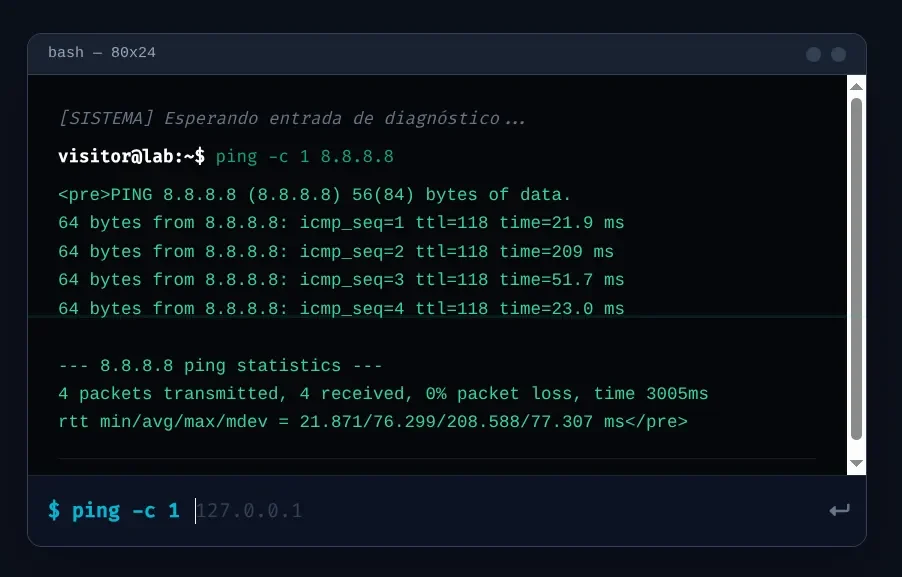
This is a learning write-up about remote code execution, built around a deliberately vulnerable application that the author distributes as a repository. The example application is a small Python web app whose app.py exposes a single endpoint, ping, which takes an IP address from the query string and runs the system ping command against it. The feature is meant to do one thing: ping an address four times and return the output to the browser.
The author frames RCE with a restaurant analogy: the user places an order (the input), the application passes it to the kitchen (the system), and if the waiter follows the order blindly, the user ends up controlling the kitchen. In technical terms, RCE is the result of a vulnerability that lets an attacker write and execute commands on a target system from a remote location, without prior authentication or direct access to the machine. It happens when user input is not properly sanitised or validated, allowing malicious commands to be injected. The author classifies it as an injection vulnerability and places it under OWASP Top 10 A05:2025 Injection.
The write-up also lists the common routes to RCE:
- Command Injection: injecting OS-level commands, for example
ls;in an input that reaches asystem()call. - Code Injection: injecting language-specific code, for example through
eval()in PHP or Python. - Insecure Deserialisation: abusing how data is converted into objects to trigger execution.
- SSTI (Server-Side Template Injection): injecting code into web templates such as Jinja2 or Twig.
- Out-of-bounds write: using buffer overflows to overwrite memory with malicious instructions.
Setup
The environment is the author's own repository, in the machine-rce folder. The application is started with Docker Compose from the command line:
docker compose up - build
The endpoint is reached directly from the browser, with no login step described. The interface is intuitive enough to test without calling the API directly through curl or Postman. The author does mention PayloadsAllTheThings as a source of payloads for this kind of test.
Finding it
The starting point is the source. In app.py the application exposes the ping endpoint, which internally executes:
ping -c 4 IP
The problem is how the IP value is handled: it is accepted without any validation or sanitisation. That allows an attacker to bypass the intended restriction and inject additional commands, which can lead to unauthorised access to system information or further exploitation.
The vulnerable handler is shown in full:
@app.route('/ping')def ping(): ip = request.args.get('ip') if not ip: return "Falta el parámetro ip", 400 try: result = subprocess.getoutput(f"ping -c 4 {ip}") #just executing without checking the ip value? return f"<pre>{result}</pre>" except Exception as e: return f"Error: {str(e)}", 500
The ip parameter is read straight from the query string, the only check is that it is present, and the value is interpolated into a shell string passed to subprocess.getoutput. The author's inline comment marks the exact spot: the value is executed without being checked.
If the endpoint were not already known, the author notes that API requests can be inspected in the browser's Network tab, which shows how the application behaves and helps identify patterns. In this case the interface is intuitive enough that the assessment can be done without curl or Postman.
Exploitation
Step 1: inject a second command
The payload is simply appended to the IP input:
Because the input is concatenated into a shell command, the semicolon terminates the ping invocation and the shell runs whatever follows as a separate command. The author notes that in some scenarios encoding techniques such as URL encoding may be needed to get past basic string parsing or filtering.
Step 2: identify the operating system
When the underlying OS is unknown, the author runs basic commands that exist on both Linux and Windows. whoami reveals the user the application is running as, which gives context about the target environment.
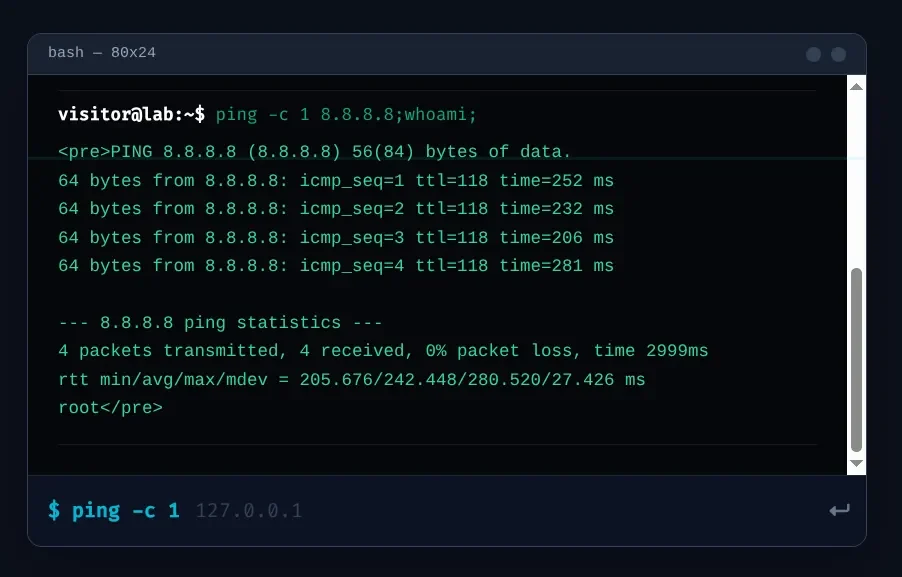
The result identifies the target as a Linux machine. The author then assumes the application is running with elevated privileges, which significantly increases the potential impact, and moves on to standard enumeration commands to gather more information about the system and its configuration.
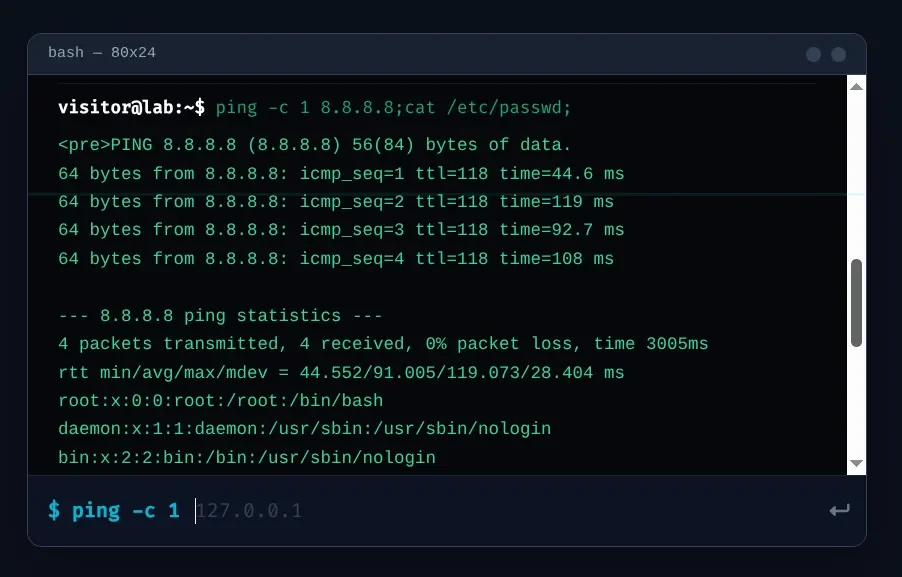
Step 3: confirm the request is not blocked
The application answers with HTTP status 200, meaning the request was processed successfully. That indicates the attack is not being detected or blocked, and underlines the absence of input validation, sanitisation or security controls that would mitigate such malicious input.

Step 4: what comes next
From here the author describes going deeper into enumeration, potentially downloading files from an attacker-controlled server or establishing a reverse shell back to the attacker's machine. All of it can be done remotely, without any direct interaction through a local CLI or terminal on the target system.
Root cause
The mistake is in the handler: user input is interpolated into a string that is handed to a shell. subprocess.getoutput(f"ping -c 4 {ip}") runs the composed string through the shell, so shell metacharacters in ip are interpreted as syntax rather than data. The only guard is a presence check (if not ip), which does nothing about content. There is no allow-list, no format validation, and no separation between the command and its argument, so nothing in the application stops the injected command from running. The 200 response in step 3 indicates the payload was not detected or blocked.
Impact
The author's framing is that a successful RCE lets an attacker run unauthorised code on servers, computers and network devices from a remote location, and that it is particularly dangerous because it can give complete control over the compromised system without physical access and, in many scenarios, without any form of authentication. The concrete consequences listed are stealing sensitive data, installing malware, creating backdoors for persistent access, and using the compromised host as a launchpad for attacks against other systems in the network.
In this specific case the impact depends on the privileges of the account running the application. The author assumes elevated privileges, which significantly increases the potential impact, and notes that the enumeration and follow-on actions (file download, reverse shell) are all reachable remotely. The write-up does not report a bounty, a CVSS score or a severity rating.
Fix
The recommendation is strict input validation and sanitisation: all user-supplied data must be validated to conform to expected formats and must not contain malicious content. The author provides a hardened version of the handler:
import [redacted]('/ping')def ping():    ip = request.args.get('ip')    # Strict validation    if not ip or not isinstance(ip, str):        return "IP inválida", 400    try:        # Validate is a valid IP address        ipaddress.ip_address(ip)    except ValueError:        return "IP inválida", 400    # Use a list and NEVER concatenate strings    try:        result = subprocess.check_output(            ["ping", "-c", "4", ip],            stderr=subprocess.STDOUT,            timeout=10,          # Timeout            text=True        )        return f"<pre>{result}</pre>"    except subprocess.CalledProcessError as e:        return f"Error: {e.output}", 500    except subprocess.TimeoutExpired:
        return "Timeout", 500
Three changes carry the fix. ipaddress.ip_address(ip) rejects anything that is not a literal IP address, so shell metacharacters never reach the command. The command is passed as a list to subprocess.check_output, so no shell parses the argument, and the author's comment is explicit: never concatenate strings. A ten-second timeout bounds the execution. The author presents this as the mitigation for the example application.
RCE vs Command Injection
The author closes with a distinction that often causes confusion: RCE is not a single vulnerability type, it is the result.
- Command Injection: a vulnerability where an attacker can add and execute system commands (Bash, PowerShell) through an application.
- Code Injection: a vulnerability where an attacker can insert and run code (Python, PHP, JavaScript) inside the application itself.
- Remote Code Execution (RCE): the result of exploiting a vulnerability that allows an attacker to run code on a system remotely. It is not the vulnerability itself but the impact, and it can come from different issues, not just code injection.
Variants to test
- Other shell metacharacters. Besides
;, try|,&&,||, backticks and$(). A positive result is output from the second command appearing alongside or instead of the ping output. - Encoding bypasses. If a filter strips plain metacharacters, send URL-encoded equivalents. A positive result is the same command execution with the filter apparently satisfied.
- OS fingerprinting on unknown targets. Run
whoamiand equivalent commands for both Linux and Windows. A positive result names the account and tells you which platform you are on. - Privilege check. If
whoamireturns a privileged account, enumerate the system and its configuration with standard commands. A positive result is readable system information that a low-privilege account should not reach. - Outbound connectivity. Attempt to download a file from a server you control, or establish a reverse shell. A positive result is an inbound connection or a retrieved file.
- Response behaviour. Watch the HTTP status of injected requests. A 200 with command output in the body shows the payload was processed rather than blocked.
For further reading the author points to the OWASP A05:2025 Injection page, Cloudflare's explanation of RCE, and the OWASP Code Injection page.
What happened, in plain words
This is a learning exercise about one of the most serious kinds of security bug: remote code execution, usually shortened to RCE. The author built a small practice web application, published it as a repository, and then attacked it to show how the bug works. Nothing here is a real target: the application is deliberately broken so that the lesson can be seen end to end.
The application is a tiny Python web app. In its main file, app.py, it offers one feature: you give it an IP address, and it pings that address four times and shows you the reply. Ping is a standard network tool that sends a small message to a machine and waits for an answer, a bit like knocking on a door to see whether anyone is home. The feature is meant to do exactly that and nothing else.
The problem is that the application takes whatever you type as the IP address and pastes it straight into a command that the operating system runs. It never checks whether what you typed is actually an IP address. So if you type an IP address followed by a few special characters and then a second command, the operating system runs both. That second command is yours, and it runs on the server.
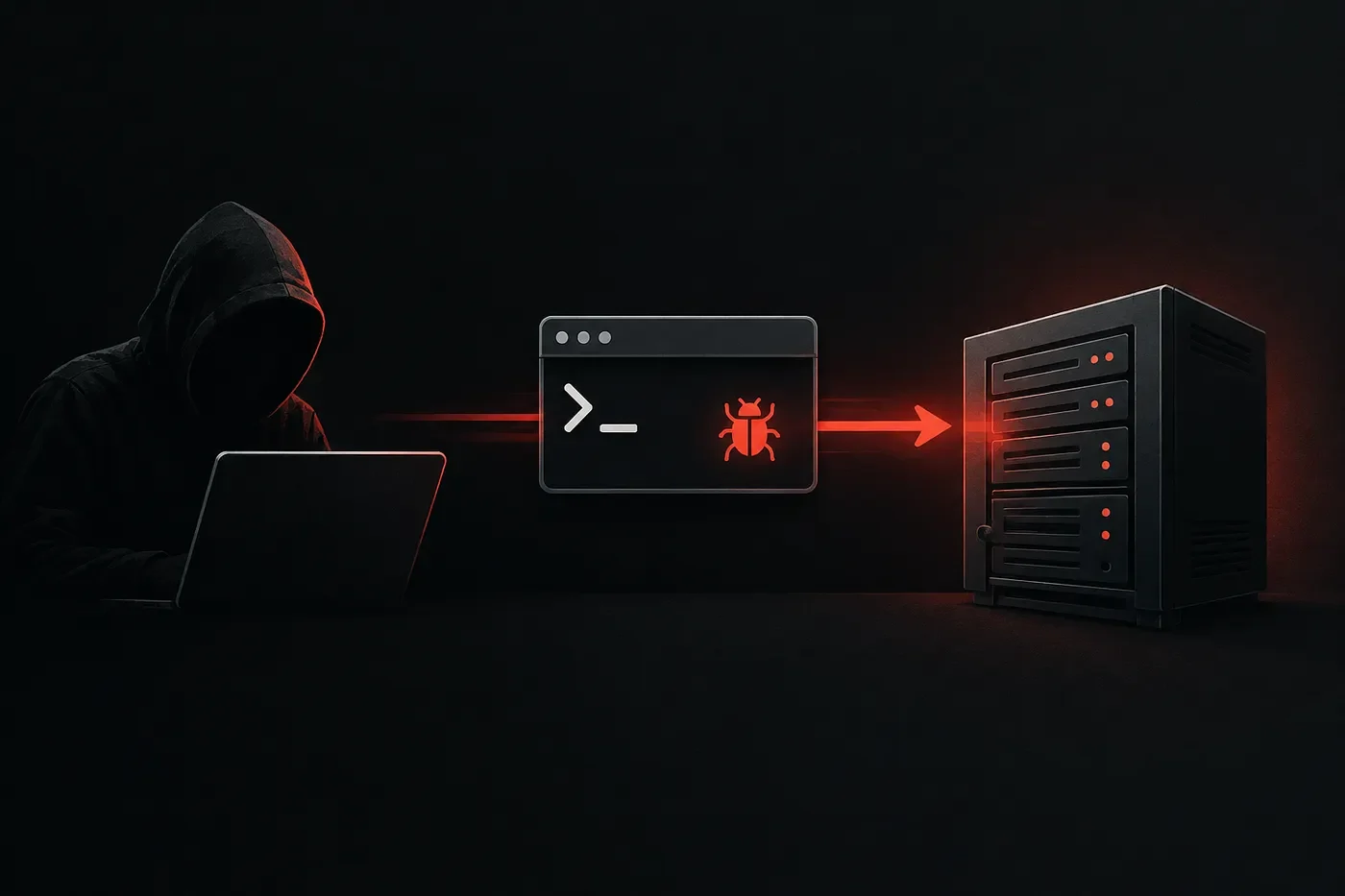
The author explains this with a restaurant comparison. Think of the application as a waiter. You place an order (your input), and the waiter carries it to the kitchen (the system). A good waiter checks the order. A careless waiter takes an order that says "pizza, and also go into the kitchen and turn off the lights and get the secret recipe for the sauce" and simply passes it on. The kitchen then does all of it. That is what happens in an RCE: the application trusts your input too much and ends up doing more than it was supposed to.
In technical terms, RCE is the result of a vulnerability that lets an attacker write and execute commands on a target system from a remote location, without needing to log in first and without direct access to the machine. It happens when user input is not properly sanitised or validated, which lets malicious commands be injected. Sanitising means cleaning input so that dangerous characters lose their meaning; validating means checking that input matches the shape you expect, such as a real IP address. RCE is a type of injection vulnerability, and the author places it in the OWASP Top 10 under A05:2025 Injection. The OWASP Top 10 is a well-known list of the ten most important categories of web application security risk, maintained by a non-profit community project.
Why is this so serious? Because it lets an attacker run unauthorised code on servers, computers and network devices from far away. It is especially dangerous because it can give complete control over the compromised system without physical access and, in many scenarios, without any form of authentication. Authentication is simply proving who you are, usually with a username and password. The consequences the author lists are: stealing sensitive data, installing malware, creating backdoors for persistent access (a backdoor is a hidden way back in that survives a fix or a password change), and using the compromised machine as a launchpad to attack other systems inside the same network.
The author also lists the common routes to RCE:
- Command Injection: injecting operating-system level commands, for example
ls;in an input that reaches asystem()call.lsis the Linux command that lists files in a folder. - Code Injection: injecting code written in the application's own language, for example through
eval()in PHP or Python.eval()is a function that takes a piece of text and runs it as code. - Insecure Deserialisation: abusing the way data is converted back into objects to trigger execution. Serialisation is turning an object into a stream of bytes so it can be stored or sent; deserialisation is turning it back.
- SSTI (Server-Side Template Injection): injecting code into web templates such as Jinja2 or Twig. A template is a page with blanks that get filled in with data before it is sent to the browser.
- Out-of-bounds write: using buffer overflows to overwrite memory with malicious instructions. A buffer is a fixed-size area of memory; writing past its end can corrupt whatever sits next to it.
Setting up the practice machine
The environment is the author's own repository, in the machine-rce folder. You download the repository and go into that folder. The application is then started with Docker Compose from the command line:
docker compose up - build
Line by line, in plain words:
dockeris the program that runs containers. A container is a packaged, self-contained mini-computer that holds the application and everything it needs, so it behaves the same on your machine as on anyone else's.composeis the part of Docker that reads a configuration file describing one or more containers and starts them together.upmeans "start the containers described in the file".- buildis passed through to the build step, so the container image is built from the files in the folder rather than pulled ready-made from the internet.
You do not need to install Python, a database or anything else by hand: the container brings its own. This matters for a beginner because it means you can follow along without setting up a development environment.
The endpoint is reached directly from the browser, with no login step described. The interface is intuitive enough to test without calling the API directly through curl or Postman. curl is a command-line tool for sending web requests, and Postman is a desktop program for the same job with a graphical interface. An API is the part of a web application that accepts requests and returns data, usually in a machine-readable form; when you use a website, your browser is constantly talking to its API behind the scenes. An endpoint is one specific address inside that API, for example the one that handles pings.
The author also mentions PayloadsAllTheThings as a source of ready-made payloads for this kind of test. A payload is the piece of input an attacker sends to trigger the bug.
Finding the problem in the code
The starting point is the source code. In app.py the application exposes the ping endpoint, which internally executes:
ping -c 4 IP
Line by line:
pingis the operating system command that sends test messages to a machine.-c 4tells it to send four of them and then stop. Without a count, ping on Linux keeps going until you interrupt it.IPis a placeholder for whatever address the user supplied. In the real code, this is where the user's text gets pasted in.
The problem is how the IP value is handled: it is accepted without any validation or sanitisation. That allows an attacker to bypass the intended restriction and inject additional commands, which can lead to unauthorised access to system information or further exploitation.
The vulnerable handler is shown in full:
@app.route('/ping')def ping(): ip = request.args.get('ip') if not ip: return "Falta el parámetro ip", 400 try: result = subprocess.getoutput(f"ping -c 4 {ip}") #just executing without checking the ip value? return f"<pre>{result}</pre>" except Exception as e: return f"Error: {str(e)}", 500
Line by line, in plain words:
@app.route('/ping')registers a web address. When a browser asks the application for/ping, this function runs. The@line is called a decorator; it attaches behaviour to the function below it.def ping():starts the function that handles that address.ip = request.args.get('ip')reads the value of theipparameter from the query string. The query string is the part of a URL after the question mark, for example?ip=[redacted].request.argsis the collection of those parameters.if not ip:checks only that something was supplied. If the parameter is missing, the next line returns an error.return "Falta el parámetro ip", 400sends back the Spanish message "the ip parameter is missing" together with HTTP status 400, which means "bad request". An HTTP status is a three-digit number the server sends with every response to say how it went; 200 means success, 400 means the request was malformed, 500 means the server itself failed.try:begins a block where errors are caught instead of crashing the application.result = subprocess.getoutput(f"ping -c 4 {ip}")is the heart of the bug.subprocessis a Python module that runs other programs.getoutputruns a command through the operating system's shell and returns whatever it printed. Thef"..."syntax is an f-string, which builds a string and inserts the value ofipinto it. So the textping -c 4and the user's text are glued together into one command line. The author's inline comment marks the exact spot: the value is executed without being checked.return f"<pre>{result}</pre>"wraps the command's output in<pre>tags, which tell the browser to display it in a fixed-width font exactly as it came, and sends it back.except Exception as e:catches any error.return f"Error: {str(e)}", 500returns the error text with status 500.
The key idea is the difference between data and code. The application intends ip to be data, a harmless address. But because the value is glued into a command line that the shell then reads, any special characters in it are treated as instructions. A shell is the program that reads typed commands and runs them; it has its own grammar, and characters like ; are punctuation in that grammar.
If the endpoint were not already known, the author notes that API requests can be inspected in the browser's Network tab. The Network tab is a panel in the browser's developer tools that lists every request the page makes and every response it gets back. It shows how the application behaves and helps identify patterns. In this case the interface is intuitive enough that the assessment can be done without curl or Postman.
Exploitation
Step 1: inject a second command
The payload is simply appended to the IP input:
Line by line:
;is the shell's separator between commands. It means "finish the previous command, then run the next one".cmdis a placeholder for whatever command you want to run.- the final
;closes the sequence.
Because the input is concatenated into a shell command, the semicolon terminates the ping invocation and the shell runs whatever follows as a separate command. The author notes that in some scenarios encoding techniques such as URL encoding may be needed to get past basic string parsing or filtering. URL encoding replaces characters with a percent sign and a code, for example a space becomes %20, so that a filter looking for the literal character does not see it.
Step 2: identify the operating system
When the underlying operating system is unknown, the author runs basic commands that exist on both Linux and Windows. whoami reveals the user the application is running as, which gives context about the target environment. Knowing the account matters because it tells you how much damage is possible: an ordinary account can read some files, an administrator account can do almost anything.
The result identifies the target as a Linux machine. The author then assumes the application is running with elevated privileges, which significantly increases the potential impact, and moves on to standard enumeration commands to gather more information about the system and its configuration. Enumeration means systematically listing what is on a system: users, files, network settings, installed software. Elevated privileges means the account has more rights than a normal user, for example root on Linux or Administrator on Windows.
Step 3: confirm the request is not blocked
The application answers with HTTP status 200, meaning the request was processed successfully. That indicates the attack is not being detected or blocked, and underlines the absence of input validation, sanitisation or security controls that would mitigate such malicious input. In other words, the payload was processed rather than blocked.
Step 4: what comes next
From here the author describes going deeper into enumeration, potentially downloading files from an attacker-controlled server or establishing a reverse shell back to the attacker's machine. A reverse shell is a connection the target opens outwards to the attacker, which then gives the attacker an interactive command prompt on the target. It is called reverse because the target initiates the connection, which often slips past firewalls that block incoming connections. All of it can be done remotely, without any direct interaction through a local CLI or terminal on the target system. A CLI is a command-line interface, a text-only way of controlling a computer, as opposed to clicking around a desktop.
Why it works
The mistake is in the handler: user input is interpolated into a string that is handed to a shell. subprocess.getoutput(f"ping -c 4 {ip}") runs the composed string through the shell, so shell metacharacters in ip are interpreted as syntax rather than data. Metacharacters are characters that have a special meaning to the shell, such as ;, |, &, backticks and $(). The only guard is a presence check (if not ip), which does nothing about content. There is no allow-list, no format validation, and no separation between the command and its argument, so nothing in the application stops the injected command from running. An allow-list is a list of things that are permitted, as opposed to a block-list, a list of things that are forbidden; allow-lists are safer because you cannot forget a forbidden item you never thought of. The 200 response in step 3 shows that no other control, at the application or in front of it, detected or blocked the payload either.
What an attacker could do
The author's framing is that a successful RCE lets an attacker run unauthorised code on servers, computers and network devices from a remote location, and that it is particularly dangerous because it can give complete control over the compromised system without physical access and, in many scenarios, without any form of authentication. The concrete consequences listed are stealing sensitive data, installing malware, creating backdoors for persistent access, and using the compromised host as a launchpad for attacks against other systems in the network.
In this specific case the impact depends on the privileges of the account running the application. The author assumes elevated privileges, which significantly increases the potential impact, and notes that the enumeration and follow-on actions (file download, reverse shell) are all reachable remotely. The write-up does not report a bounty, a CVSS score or a severity rating. CVSS is a standard scoring system for rating how severe a vulnerability is.
How to fix it
The recommendation is strict input validation and sanitisation: all user-supplied data must be validated to conform to expected formats and must not contain malicious content. The author provides a hardened version of the handler:
import [redacted]('/ping')def ping():    ip = request.args.get('ip')    # Strict validation    if not ip or not isinstance(ip, str):        return "IP inválida", 400    try:        # Validate is a valid IP address        ipaddress.ip_address(ip)    except ValueError:        return "IP inválida", 400    # Use a list and NEVER concatenate strings    try:        result = subprocess.check_output(            ["ping", "-c", "4", ip],            stderr=subprocess.STDOUT,            timeout=10,          # Timeout            text=True        )        return f"<pre>{result}</pre>"    except subprocess.CalledProcessError as e:        return f"Error: {e.output}", 500    except subprocess.TimeoutExpired:
        return "Timeout", 500
Line by line, in plain words:
import ipaddressloads a Python module whose whole job is to understand IP addresses. It knows the rules for what a valid address looks like.@app.route('/ping')anddef ping():are the same as before: this function handles the/pingaddress.ip = request.args.get('ip')reads the user's value from the query string, as before.# Strict validationis a comment, ignored by Python, marking the section that checks the input.if not ip or not isinstance(ip, str):rejects the request if the value is missing or is not text.isinstance(ip, str)asks "is this a string?", a string being a piece of text.return "IP inválida", 400sends back the Spanish message "invalid IP" with status 400.try:starts the block where the address is checked.ipaddress.ip_address(ip)tries to read the value as an IP address. If it is not one, it raises aValueError.except ValueError:catches that error.return "IP inválida", 400rejects the request. This is the crucial change: anything that is not a literal IP address, including every shell metacharacter, never gets any further.# Use a list and NEVER concatenate stringsis the author's explicit instruction for the next part.try:starts the block where the command is run.result = subprocess.check_output(begins the call that runs the command and captures its output.["ping", "-c", "4", ip],passes the command as a list of separate items: the program name, then each argument. Because it is a list and not one long string, no shell is involved, so nothing inipcan be read as shell syntax. This is the second crucial change.stderr=subprocess.STDOUT,sends error output into the same stream as normal output, so both are captured together.timeout=10,stops the command after ten seconds, so a slow or hanging ping cannot tie up the server.text=Trueasks for the output as text rather than raw bytes.)closes the call.return f"<pre>{result}</pre>"sends the output back to the browser in a fixed-width block, as before.except subprocess.CalledProcessError as e:catches the case where the command ran but reported failure.return f"Error: {e.output}", 500returns that error output with status 500.except subprocess.TimeoutExpired:catches the case where the ten seconds ran out.return "Timeout", 500returns a timeout message with status 500.
Three changes carry the fix. ipaddress.ip_address(ip) rejects anything that is not a literal IP address, so shell metacharacters never reach the command. The command is passed as a list to subprocess.check_output, so no shell parses the argument, and the author's comment is explicit: never concatenate strings. A ten-second timeout bounds the execution. The author presents this as the mitigation for the example application.
RCE is not the same as command injection
The author closes with a distinction that often causes confusion: RCE is not a single vulnerability type, it is the result.
- Command Injection: a vulnerability where an attacker can add and execute system commands (Bash, PowerShell) through an application. Bash is the common shell on Linux and macOS; PowerShell is the equivalent on Windows.
- Code Injection: a vulnerability where an attacker can insert and run code (Python, PHP, JavaScript) inside the application itself.
- Remote Code Execution (RCE): the result of exploiting a vulnerability that allows an attacker to run code on a system remotely. It is not the vulnerability itself but the impact, and it can come from different issues, not just code injection.
The way to remember it: command injection and code injection are holes in the wall; RCE is what an attacker does once they are through one.
Other things worth trying
- Other shell metacharacters. Besides
;, try|,&&,||, backticks and$(). A positive result is output from the second command appearing alongside or instead of the ping output. - Encoding bypasses. If a filter strips plain metacharacters, send URL-encoded equivalents. A positive result is the same command execution with the filter apparently satisfied.
- OS fingerprinting on unknown targets. Run
whoamiand equivalent commands for both Linux and Windows. A positive result names the account and tells you which platform you are on. Fingerprinting means working out what software or system you are facing from its behaviour. - Privilege check. If
whoamireturns a privileged account, enumerate the system and its configuration with standard commands. A positive result is readable system information that a low-privilege account should not reach. - Outbound connectivity. Attempt to download a file from a server you control, or establish a reverse shell. A positive result is an inbound connection or a retrieved file.
- Response behaviour. Watch the HTTP status of injected requests. A 200 with command output in the body shows the payload was processed rather than blocked.
For further reading the author points to the OWASP A05:2025 Injection page, Cloudflare's explanation of RCE, and the OWASP Code Injection page.
Glossary
- API: the part of a web application that receives requests and returns data, usually in a machine-readable form.
- Authentication: proving who you are, typically with a username and password.
- Backdoor: a hidden way back into a system that survives a fix or a password change.
- Bash: the common command-line shell on Linux and macOS.
- Buffer: a fixed-size area of memory; writing past its end can corrupt what sits next to it.
- CLI: command-line interface, a text-only way of controlling a computer.
- Command Injection: a vulnerability where an attacker can add and run operating-system commands through an application.
- Container: a packaged, self-contained mini-computer holding an application and its dependencies.
- Code Injection: a vulnerability where an attacker can insert and run code in the application's own language.
- CVSS: a standard scoring system for rating the severity of a vulnerability.
- Decorator: in Python, a line starting with
@that attaches extra behaviour to the function below it. - Deserialisation: turning a stream of bytes back into an object; the reverse of serialisation.
- Endpoint: one specific address inside an API that handles a particular kind of request.
- Enumeration: systematically listing what exists on a system, such as users, files and settings.
- Elevated privileges: an account with more rights than a normal user, such as root or Administrator.
- f-string: a Python string that inserts the values of variables into the text.
- Fingerprinting: working out what software or system you are facing from its behaviour.
- HTTP status: a three-digit number sent with every web response; 200 means success, 400 means a bad request, 500 means a server error.
- Insecure Deserialisation: abusing the way data is turned back into objects to trigger code execution.
- Metacharacters: characters with a special meaning to the shell, such as
;,|,&, backticks and$(). - Network tab: a panel in browser developer tools listing every request and response a page makes.
- Out-of-bounds write: writing past the end of a buffer, overwriting neighbouring memory.
- OWASP Top 10: a well-known list of the ten most important categories of web application security risk.
- Payload: the piece of input an attacker sends to trigger a bug.
- Ping: a standard network tool that sends a small message to a machine and waits for an answer.
- PowerShell: the command-line shell on Windows.
- Query string: the part of a URL after the question mark, carrying parameters such as
?ip=[redacted]. - RCE (Remote Code Execution): the result of a vulnerability that lets an attacker run code on a system remotely; it is an impact, not a vulnerability type.
- Reverse shell: a connection the target opens outwards to the attacker, giving the attacker an interactive command prompt on the target.
- Sanitisation: cleaning input so dangerous characters lose their meaning.
- Serialisation: turning an object into a stream of bytes so it can be stored or sent.
- Shell: the program that reads typed commands and runs them.
- SSTI (Server-Side Template Injection): injecting code into a web template such as Jinja2 or Twig.
- String: a piece of text.
- Template: a page with blanks that get filled in with data before it is sent to the browser.
- URL encoding: replacing characters with a percent sign and a code, such as
%20for a space. - Validation: checking that input matches the shape you expect, such as a real IP address.
- Allow-list: a list of things that are permitted, as opposed to a block-list of things that are forbidden.



