SameSite=Strict Bypass via Client-Side Redirect — Write-up
The change-email endpoint lacked a CSRF token and relied only on a SameSite=Strict session cookie for protection. A client-side redirect gadget on a comment confirmation page took an unvalidated postId parameter and used it to build a redirect target, letting an attacker make the victim's browser perform a same-site request that changed the account email.
 Published on medium.com
This lab had a change-email endpoint with no CSRF token, but the session cookie was protected with SameSite=Strict. This write-up shows how I bypassed that protection using a client-side redirect gadget found elsewhere on the site.
The full write-up lives on its author's site
It belongs to its author, so we link to it rather than copy it. The other two tabs are our own rewrites, checked against it.
Context
The target is a lab environment built around a blog application. The feature under examination is the account email change: an authenticated user can submit a new address to POST /my-account/change-email, and the application updates the account. The lab's goal, as framed in the write-up, is account takeover via CSRF.
The interesting part is that the endpoint itself has no anti-CSRF protection, but the session cookie is issued with SameSite=Strict. The write-up walks through how a client-side redirect gadget elsewhere on the same site turns an otherwise blocked cross-site request into one the browser treats as same-site.
Setup
The write-up does not describe the tooling, accounts or roles used beyond the lab itself. The relevant preconditions are visible from the steps:
- An authenticated victim with a session cookie marked
SameSite=Strict. - A blog feature that accepts comments and sends the commenter to a confirmation page.
- An Exploit Server, used to host the page that starts the attack.
- A collaborator-style address (
[redacted]) used as the attacker-controlled email.
Finding it
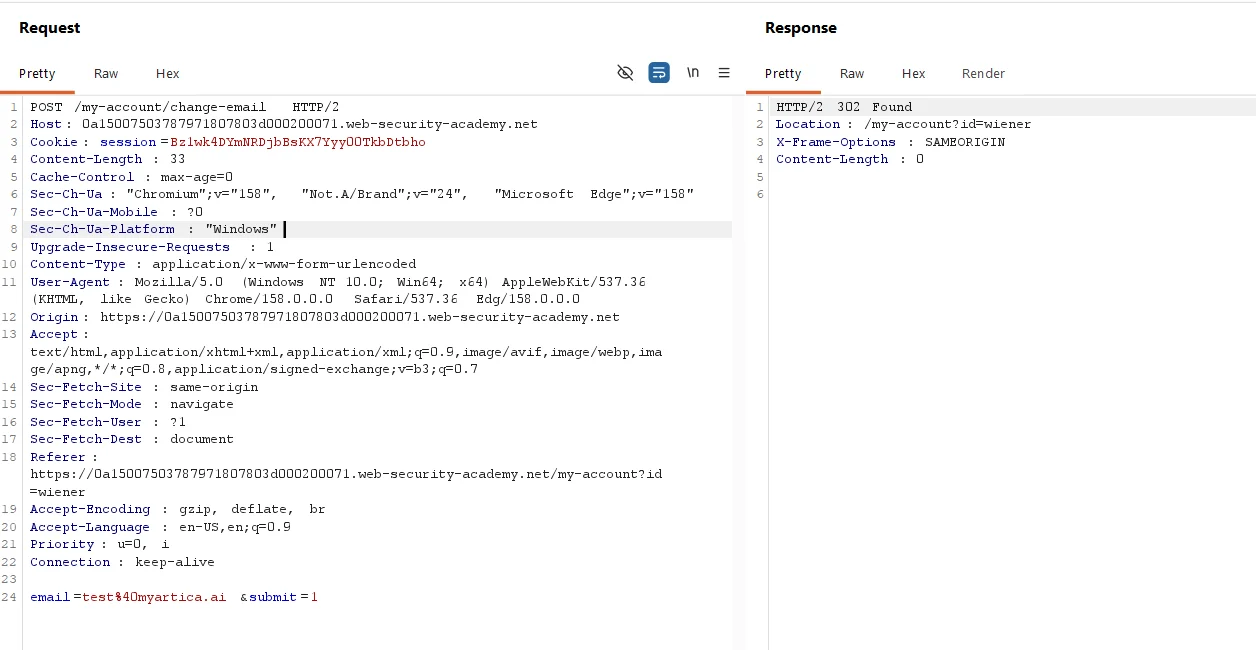
The researcher first inspected the request that changes the account email:
POST /my-account/change-email
email=[redacted]&submit=1
There is no CSRF token anywhere in the body, which on its own would be a straightforward CSRF vulnerability.
Checking the POST /login response showed the cookie attributes:
Set-Cookie: session=...; Secure; HttpOnly; SameSite=Strict
Strict means the browser will not attach the cookie to any request that originates from a cross-site navigation, so a normal CSRF form hosted on an attacker's site will not work. That is the blocker the rest of the write-up works around.
Exploitation
Step 1: Looking for a gadget
Because Strict is evaluated per navigation, a redirect triggered by JavaScript from inside the target site's own page counts as same-site. The researcher therefore needed a page on the target that performs a client-side redirect, not a server-side 3xx.
Posting a comment on a blog post led to:
/post/comment/confirmation?postId=x
which auto-redirects back to the blog post after about 3 seconds. The page source contained this script:
redirectOnConfirmation = (blogPath) => {
    setTimeout(() => {
        const url = new URL(window.location);
        const postId = url.searchParams.get("postId");
        window.location = blogPath + '/' + postId;
    }, 3000);
}
The key issue is that postId is taken straight from the URL with no validation and concatenated directly into the redirect URL.
Step 2: First attempt and why it failed
The first idea was to open the target endpoint directly:
/post/my-account/change-email
This did not work, because the request never went through the confirmation page, so the vulnerable script never ran. The attack had to go through /post/comment/confirmation?postId=... and let that page's script perform the redirect.
Step 3: Exploiting with path traversal
Since postId is not validated, ../ escapes the /post/ path:
postId=../my-account/change-email
The script builds:
/post/../my-account/change-email
which the browser normalises to:
/my-account/change-email
The researcher initially assumed ../../ would be needed, but testing showed a single ../ was enough, because blogPath is just /post, not the full confirmation path.
Step 4: Adding the real parameters
Opening change-email with no parameters returned:
Missing parameter: 'submit'
This confirmed the traversal worked and that email and submit also had to be passed. They need to be URL-encoded so they do not break the postId parameter itself:
| Character | Encoded |
|---|---|
? |
%3f |
= |
%3d |
& |
%26 |
The final payload URL:
https://LAB-ID.web-security-academy.net/post/comment/confirmation?postId=../my-account/change-email%3femail%[redacted]%26submit%3d1
Step 5: Building the exploit page
On the Exploit Server:
<script>
document.location = "https://LAB-ID.web-security-academy.net/post/comment/confirmation?postId=../my-account/change-email%3femail%[redacted]%26submit%3d1";
</script>
Step 6: Result
- The victim opens the exploit link, causing a cross-site navigation to the confirmation page. No cookie is sent, which is fine because this page needs no authentication.
- After 3 seconds, the page's own script redirects to
/my-account/change-email. - Because this redirect originates from a document already loaded on the target site, the browser treats it as same-site, so the
Strictcookie is sent. - The victim's email is changed to the attacker's address.
Root cause
The change-email endpoint has no CSRF token, so the only defence against cross-site requests is the SameSite=Strict cookie attribute. That attribute is evaluated per navigation, and a client-side redirect performed by a document already loaded from the target site is treated as same-site. The confirmation page takes postId from the query string without validation and concatenates it into window.location, which allows path traversal out of /post/ and into any path on the origin, including the state-changing endpoint. The combination of an unvalidated redirect target and a same-origin client-side redirect defeats the cookie attribute.
Impact
An attacker who can get a logged-in victim to open a crafted link can change that victim's account email to an address the attacker controls. The write-up frames this as account takeover via CSRF. The attack requires the victim to be authenticated and to visit the attacker's page; the confirmation page itself needs no authentication, so the first navigation succeeds without the cookie.
Fix
The write-up does not describe a fix applied to the lab. Its takeaways point to what should be done:
SameSite=Strictalone is not enough; CSRF tokens are still needed as an independent layer.- Any page that performs a client-side redirect using unvalidated URL parameters can become a gadget for bypassing SameSite protections.
- Values taken from the URL should be validated or sanitised before being used to build redirect targets.
Variants to test
- Look for pages that read a parameter and assign it to
window.locationorlocation.href. A positive result is a value containing../or an encoded query string that lands on a different path on the same origin. - Look for client-side redirects that run on a timer, as here. A positive result is a page that loads without authentication and navigates after a short delay.
- Try a single
../before assuming more are needed: the base path in the script may be shorter than the full page path. - Encode
?,=and&as%3f,%3dand%26when the payload has to travel inside another query parameter. A positive result is the target endpoint receiving the parameters intact. - Test state-changing endpoints that lack CSRF tokens while the session cookie is
SameSite=StrictorLax. A positive result is a same-origin client-side redirect gadget that reaches the endpoint.
Hunting notes
This kind of bug hides in client-side redirect logic: confirmation pages, "continue" pages, login return URLs handled in JavaScript, and any code that reads a query parameter and assigns it to window.location. During recon, the signals are pages that redirect after a delay, parameters reflected into a redirect target, and endpoints that change state without a CSRF token. The outcome is the victim's email being changed to the attacker-controlled address.
Takeaways
- Any page performing a client-side redirect using unvalidated URL parameters can become a gadget for bypassing SameSite protections.
- Always validate or sanitise values taken from the URL before using them to build redirect targets.
What happened, in plain words
A website had a page that lets a logged-in user change the email address on their account. That page had no protection against a trick called CSRF, which we will explain in a moment. The site did have one defence: a setting on the user's login cookie that stops the browser from sending it when the user arrives from a different website. The researcher found a way around that defence, using a completely different page on the same site that redirects visitors with a small piece of JavaScript. By putting a crafted value into that page's address, the researcher made the redirect land on the email-change page, with the new email address already filled in. Because the redirect came from the site itself, the browser treated it as the site's own business and sent the login cookie along. The victim's email address was changed to one the attacker controlled.

The pieces you need to know first
Before walking through the steps, here are the ideas the whole attack rests on. None of them require any special software to understand.
A cookie is a small piece of text that a website asks your browser to store and to send back on every later request to that site. It is how a site remembers that you are logged in. Think of it as a wristband you get at an event: you show it at the door and you are let in without showing your ticket again.
A session cookie is the specific cookie that proves who you are. If someone else gets hold of it, they can act as you. That is why sites mark it Secure (only sent over encrypted connections) and HttpOnly (not readable by JavaScript in the page).
SameSite is an extra instruction you can put on a cookie. It tells the browser when it is allowed to attach that cookie to a request. There are three common values:
SameSite=Strict: only send the cookie when the request comes from the same site. If you click a link on another website that takes you to this one, the cookie is not sent on that first request.SameSite=Lax: send the cookie on same-site requests, and also on top-level navigations (clicking a link) to the site, but not on background requests such as form posts or image loads from other sites.SameSite=None: send it everywhere, which is why it must then also be markedSecure.
CSRF stands for Cross-Site Request Forgery. It is a trick where an attacker's website makes your browser send a request to a site you are logged into, without you meaning to. Because your browser automatically attaches your cookie, the target site thinks the request came from you. A simple example: a page on evil.example contains a form that posts to bank.example/transfer. You visit the evil page while logged into the bank, the form submits itself, and the bank moves money because your cookie came along. You never clicked anything on the bank's site.
A CSRF token is the usual defence. The site puts a random, unpredictable value into the form (and into your session). When the form is submitted, the server checks that the value matches. An attacker's page cannot guess that value, so a forged request is rejected. It is like a cloakroom ticket that is torn in half: the attendant only hands over your coat if the two halves match.
An endpoint is simply a specific address on a website that does a specific job. POST /my-account/change-email is an endpoint: the path /my-account/change-email plus the instruction POST (which means "here is some data, please act on it").
A request body is the data sent along with a POST request. In a form, it is the fields you filled in, encoded as name=value pairs joined by &.
A redirect is when a server or a page tells your browser "not here, go to this other address instead". There are two kinds:
- A server-side redirect is an HTTP response with a status code like
301or302and aLocationheader. The server itself says where to go. - A client-side redirect is done by JavaScript running in the page, for example by setting
window.location. The browser has already loaded the page, and then the page's own code sends you elsewhere.
That distinction matters enormously here, and the write-up turns on it.
Path traversal is using ../ in a path to climb up a level. In a file system, folder/../other means "go into folder, then back up, then into other", which is the same as other. Browsers apply the same normalisation to URLs: /post/../my-account becomes /my-account before the request is sent.
URL encoding is how special characters are written when they need to travel inside another value. ? becomes %3f, = becomes %3d, and & becomes %26. Without this, the browser would treat those characters as separators and split your value apart.
A gadget, in this context, is any existing feature on the target site that the attacker can reuse for their own purpose. It does not have to be a bug on its own. A page that redirects based on a URL parameter is a perfect gadget: harmless in normal use, dangerous when fed the right value.
An Exploit Server is a service (in this lab, provided by the training platform) where you host a page that the victim will visit. It is just a web server you control, holding an HTML file.
Context: what the target is
The target is a lab environment built around a blog application. A lab, in security training, is a deliberately vulnerable copy of a website, isolated so you can practise on it safely. The feature under examination is the account email change: a logged-in user can submit a new address to POST /my-account/change-email, and the application updates the account. The lab's goal, as framed in the write-up, is account takeover via CSRF. Account takeover means getting control of someone else's account; here, the attacker changes the victim's email address to one they control.
The interesting part is that the endpoint itself has no anti-CSRF protection, but the session cookie is issued with SameSite=Strict. The write-up walks through how a client-side redirect gadget elsewhere on the same site turns an otherwise blocked cross-site request into one the browser treats as same-site.
Setup: what you need before starting
The write-up does not describe the tooling, accounts or roles used beyond the lab itself. The relevant preconditions are visible from the steps:
- An authenticated victim with a session cookie marked
SameSite=Strict. "Authenticated" just means logged in. - A blog feature that accepts comments and sends the commenter to a confirmation page.
- An Exploit Server, used to host the page that starts the attack.
- A collaborator-style address (
[redacted]) used as the attacker-controlled email.
Finding it: the unprotected form
The researcher first inspected the request that changes the account email:
POST /my-account/change-email
email=[redacted]&submit=1
Line by line:
POST /my-account/change-emailis the instruction and the address.POSTmeans "I am sending data for you to act on"./my-account/change-emailis the path on the site.email=[redacted]is the new email address being submitted.submit=1is the value of the submit button. Browsers include the button's name and value in the form data when it is clicked, and the server here expects it.
There is no CSRF token anywhere in the body, which on its own would be a straightforward CSRF vulnerability. In other words, if the cookie were not protected, an attacker could simply host a form on their own site that posts these two fields, and any logged-in visitor who loaded that page would have their email changed.
The blocker: SameSite=Strict
Checking the POST /login response showed the cookie attributes:
Set-Cookie: session=...; Secure; HttpOnly; SameSite=Strict
Line by line:
Set-Cookie:is the response header a server uses to give the browser a cookie.session=...is the cookie's name and value. The value is the session identifier, which is what proves who you are; it is shortened here.Securemeans the browser will only send this cookie over HTTPS, the encrypted version of HTTP.HttpOnlymeans JavaScript running in the page cannot read the cookie. This protects against a different class of attack where an attacker injects script into the page.SameSite=Strictmeans the browser will not attach the cookie to any request that originates from a cross-site navigation, so a normal CSRF form hosted on an attacker's site will not work. That is the blocker the rest of the write-up works around.
To picture it: Strict is like a doorman who refuses to accept your wristband if you walked in from the street next door. He only accepts it if you were already inside the building.
Exploitation
Step 1: Looking for a gadget
Because Strict is evaluated per navigation, a redirect triggered by JavaScript from inside the target site's own page counts as same-site. The researcher therefore needed a page on the target that performs a client-side redirect, not a server-side 3xx. A 3xx response from the server would be a fresh navigation from the attacker's site, and the cookie would be withheld. A JavaScript redirect, by contrast, happens inside a page that the browser has already loaded from the target, so the browser considers the destination to be the same site.
Posting a comment on a blog post led to:
/post/comment/confirmation?postId=x
Line by line:
/post/comment/confirmationis the page that confirms your comment was posted.?starts the query string, the part of a URL that carries parameters.postId=xis one parameter namedpostIdwith the valuex. Herexis just a placeholder for whatever post number you commented on.
This page auto-redirects back to the blog post after about 3 seconds. The page source contained this script:
redirectOnConfirmation = (blogPath) => {
    setTimeout(() => {
        const url = new URL(window.location);
        const postId = url.searchParams.get("postId");
        window.location = blogPath + '/' + postId;
    }, 3000);
}
Line by line:
redirectOnConfirmation = (blogPath) => {defines a function namedredirectOnConfirmationthat takes one argument,blogPath, which is the base path to return to.setTimeout(() => {schedules the code inside the braces to run after a delay.const url = new URL(window.location);takes the current page's address (window.location) and wraps it in aURLobject so its parts can be read easily.const postId = url.searchParams.get("postId");reads thepostIdparameter out of the query string. Whatever the visitor put in the address bar ends up in this variable.window.location = blogPath + '/' + postId;builds a new address by gluingblogPath, a slash, andpostIdtogether, then sends the browser there.}, 3000);sets the delay to 3000 milliseconds, which is 3 seconds.
The key issue is that postId is taken straight from the URL with no validation and concatenated directly into the redirect URL. The page trusts a value that the visitor fully controls. That is the gadget.
Step 2: First attempt and why it failed
The first idea was to open the target endpoint directly:
/post/my-account/change-email
This did not work, because the request never went through the confirmation page, so the vulnerable script never ran. The attack had to go through /post/comment/confirmation?postId=... and let that page's script perform the redirect. The lesson is that the gadget is not optional: it is the whole mechanism. Without the confirmation page loading first, there is no same-site redirect and no cookie.
Step 3: Exploiting with path traversal
Since postId is not validated, ../ escapes the /post/ path:
postId=../my-account/change-email
The script builds:
/post/../my-account/change-email
which the browser normalises to:
/my-account/change-email
Line by line:
postId=../my-account/change-emailis the value placed in the parameter. The../means "go up one level"./post/../my-account/change-emailis what the script produces: the base path/post, a slash, then the value./my-account/change-emailis what the browser actually requests, because it resolves the..before sending anything.
The researcher initially assumed ../../ would be needed, but testing showed a single ../ was enough, because blogPath is just /post, not the full confirmation path. This is a useful habit: count the levels in the actual code rather than guessing.
Step 4: Adding the real parameters
Opening change-email with no parameters returned:
Missing parameter: 'submit'
This confirmed the traversal worked and that email and submit also had to be passed. The error message is a gift: it tells you the endpoint is reachable and which field it wants next. They need to be URL-encoded so they do not break the postId parameter itself:
| Character | Encoded |
|---|---|
? |
%3f |
= |
%3d |
& |
%26 |
Why this matters: the outer URL already uses ? to start its query string and & to separate parameters. If you wrote a second ? and more & characters inside the postId value, the browser would split them off as separate parameters of the confirmation page, and the value would be cut short. Encoding them hides them from the outer parser, so they arrive intact at the inner endpoint after the redirect.
The final payload URL:
https://LAB-ID.web-security-academy.net/post/comment/confirmation?postId=../my-account/change-email%3femail%[redacted]%26submit%3d1
Line by line:
https://LAB-ID.web-security-academy.netis the lab's address.LAB-IDstands in for the unique identifier the platform gives each lab instance./post/comment/confirmationis the gadget page.?postId=starts the outer query string and names the parameter the gadget reads.../my-account/change-emailis the traversal, climbing out of/post/and into the account area.%3fis an encoded?, which will become the start of the inner query string once the redirect happens.email%[redacted]is an encodedemail=[redacted], the new address the attacker wants.%26is an encoded&, separating the two inner parameters.submit%3d1is an encodedsubmit=1, the field the endpoint demanded.
Step 5: Building the exploit page
On the Exploit Server:
<script>
document.location = "https://LAB-ID.web-security-academy.net/post/comment/confirmation?postId=../my-account/change-email%3femail%[redacted]%26submit%3d1";
</script>
Line by line:
<script>opens a block of JavaScript that the victim's browser will run as soon as the page loads.document.location = "..."tells the browser to navigate to the given address immediately. There is no delay here; the delay comes later, from the confirmation page's own script.- The address is the payload URL from the previous step, unchanged.
</script>closes the block.
This page is what the attacker sends to the victim, for example as a link. The victim only has to open it.
Step 6: Result
- The victim opens the exploit link, causing a cross-site navigation to the confirmation page. No cookie is sent, which is fine because this page needs no authentication. The confirmation page needs no authentication.
- After 3 seconds, the page's own script redirects to
/my-account/change-email. The browser has already loaded a document from the target site, so this navigation is same-site. - Because this redirect originates from a document already loaded on the target site, the browser treats it as same-site, so the
Strictcookie is sent. The doorman sees you were already inside the building. - The victim's email is changed to the attacker's address. The endpoint receives
emailandsubmitexactly as a normal form would send them, and it has no CSRF token to check, so it accepts the request.
Root cause
The change-email endpoint has no CSRF token, so the only defence against cross-site requests is the SameSite=Strict cookie attribute. That attribute is evaluated per navigation, and a client-side redirect performed by a document already loaded from the target site is treated as same-site. The confirmation page takes postId from the query string without validation and concatenates it into window.location, which allows path traversal out of /post/ and into any path on the origin, including the state-changing endpoint. The combination of an unvalidated redirect target and a same-origin client-side redirect defeats the cookie attribute.
In plain terms: two weak spots that look harmless separately become serious together. The missing token means the form will accept anyone's request. The redirect gadget means the browser will happily deliver that request with the cookie attached.
Impact
An attacker who can get a logged-in victim to open a crafted link can change that victim's account email to an address the attacker controls. The write-up frames this as account takeover via CSRF. The attack requires the victim to be authenticated and to visit the attacker's page; the confirmation page itself needs no authentication, so the first navigation succeeds without the cookie.
The write-up does not go into that follow-on step; it stops at the email change, which is the lab's proof of impact.
Fix
The write-up does not describe a fix applied to the lab. Its takeaways point to what should be done:
SameSite=Strictalone is not enough; CSRF tokens are still needed as an independent layer. Think of it as two locks on the same door: if one is picked, the other still holds.- Any page that performs a client-side redirect using unvalidated URL parameters can become a gadget for bypassing SameSite protections.
- Values taken from the URL should be validated or sanitised before being used to build redirect targets.
Variants to test
If you want to look for this pattern yourself, these are the places to start:
- Look for pages that read a parameter and assign it to
window.locationorlocation.href. A positive result is a value containing../or an encoded query string that lands on a different path on the same origin. - Look for client-side redirects that run on a timer, as here. A positive result is a page that loads without authentication and navigates after a short delay.
- Try a single
../before assuming more are needed: the base path in the script may be shorter than the full page path. - Encode
?,=and&as%3f,%3dand%26when the payload has to travel inside another query parameter. A positive result is the target endpoint receiving the parameters intact. - Test state-changing endpoints that lack CSRF tokens while the session cookie is
SameSite=StrictorLax. A positive result is a same-origin client-side redirect gadget that reaches the endpoint.
Hunting notes
This kind of bug hides in client-side redirect logic: confirmation pages, "continue" pages, login return URLs handled in JavaScript, and any code that reads a query parameter and assigns it to window.location. During recon, the signals are pages that redirect after a delay, parameters reflected into a redirect target, and endpoints that change state without a CSRF token. Recon here means the early exploration phase, where you browse the site and read its pages rather than attack anything. The researcher demonstrated impact by showing the email actually changed to the attacker-controlled address, which is the concrete outcome the lab is built to prove.
Takeaways
- Any page performing a client-side redirect using unvalidated URL parameters can become a gadget for bypassing SameSite protections.
- Always validate or sanitise values taken from the URL before using them to build redirect targets.
Glossary
- Account takeover: gaining control of another person's account, often by changing its email or password.
- Authenticated: logged in, with a valid session.
- Client-side redirect: a redirect performed by JavaScript in a page that has already loaded, rather than by the server's response.
- Cookie: a small piece of text a site stores in your browser and receives back on later requests, used to remember you.
- CSRF (Cross-Site Request Forgery): tricking a logged-in user's browser into sending a request to another site without their intent.
- CSRF token: a random value embedded in a form and checked by the server, so forged requests from other sites are rejected.
- Endpoint: a specific address on a site that performs a specific action.
- Exploit Server: a server you control that hosts the page the victim visits to start the attack.
- Gadget: an existing feature on a site that an attacker reuses to achieve something it was not designed for.
- HttpOnly: a cookie flag that stops JavaScript in the page from reading the cookie.
- Lab: a deliberately vulnerable practice environment.
- Path traversal: using
../to climb out of one path and into another. - Query string: the part of a URL after
?, carrying parameters asname=valuepairs. - Recon: the exploratory phase of looking around a target before attacking.
- Redirect: an instruction to the browser to go to a different address.
- Request body: the data sent with a
POSTrequest, such as form fields. - SameSite: a cookie attribute controlling whether the cookie is sent on cross-site requests; values include
Strict,LaxandNone. - Secure: a cookie flag that restricts the cookie to HTTPS connections.
- Server-side redirect: a redirect issued by the server as an HTTP response with a 3xx status and a
Locationheader. - Session cookie: the cookie that identifies a logged-in user.
- URL encoding: writing special characters as
%codes so they can travel inside another value. window.location: the browser property holding the current page's address; assigning to it navigates the browser.

