Technical Details
The search history features of Google, Facebook, LinkedIn and YouTube do not verify the origin of a search request, so a malicious page can silently add attacker-chosen keywords to a logged-in user's search history. The companies involved treated this as an acceptable risk.

medium.com
Published on medium.com
Popular social networks are affected by a “by-design” security vulnerability that allows unauthorized parties to control their search history. Unauthorized parties are capable of inserting their own chosen keywords in the search history of Google, Facebook, LinkedIn, and Youtube.
The full write-up lives on its author's site
It belongs to its author, so we link to it rather than copy it. The other two tabs are our own rewrites, checked against it.
Context
This is a blog post by Mazin Ahmed and Khaled Farah about a "by-design" security issue affecting the search features of Google, Facebook, LinkedIn and YouTube. Each of these services stores a history of the keywords a user has searched for, by default, in order to improve the user experience of its apps. The search engines, as the authors describe them, do not verify the origin of a search. Because there are no CSRF (Cross-Site Forgery) checks, an unauthorised party can insert chosen keywords into the search history of a user who simply visits a crafted page.
The authors reported the issue to the affected companies, and possibly others did too. It was marked as an "acceptable risk" by the affected companies. The authors agree that it is a low risk issue, but argue that the trivial exploitation makes a fix worthwhile, and they published the article to open a public discussion.
Setup
The post does not describe any accounts, roles, tools or versions. The only precondition it states is that the victim visits a crafted page controlled by the attacker. No authentication detail, browser version or server version is given.
Finding it
The observation behind the report is that the search implementations of Google, Facebook, LinkedIn and YouTube do not verify the search origin of the user. The search origin of the user is not verified, so a search triggered from a third-party page is not distinguished from one made on the service. Since there is no CSRF check on that path, an attacker or spammer can drive the search engine history of the affected apps by getting users to load a crafted page.
The authors describe the bug as relatively simple to explain and to exploit. They do not present the underlying request or endpoint in the post; the demonstration is a browser-based proof of concept.
Exploitation
Step 1: Host the proof of concept
The authors published a live demo of the proof of concept at the following URL:
https://raw.githack.com/mazen160/public/master/Proof-of-Concepts/Search%20Engine%20Abuse%20in%20Popular%20Social%20Networks/poc.html
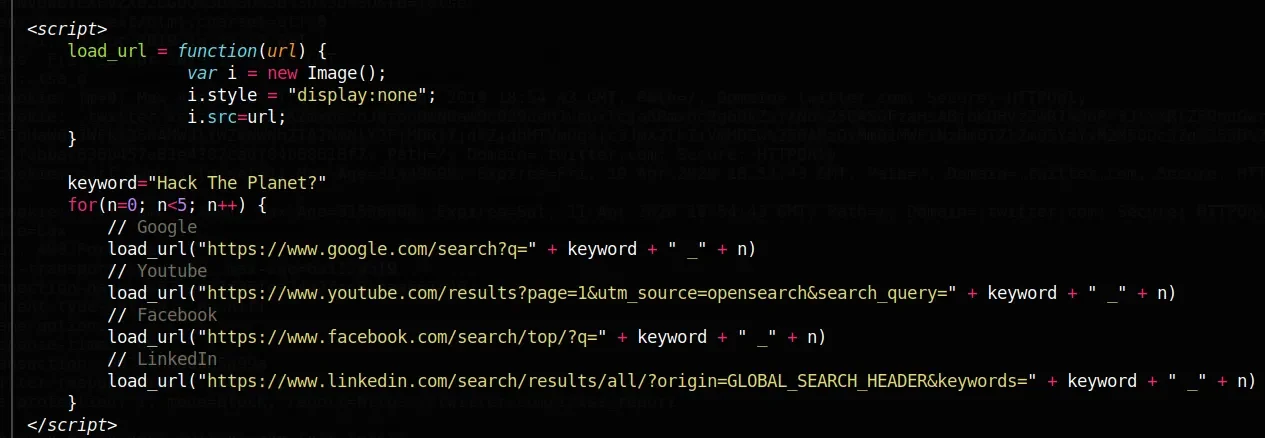
Step 2: Get the victim to load the page
The malicious website loads normally in the browser, as shown below.
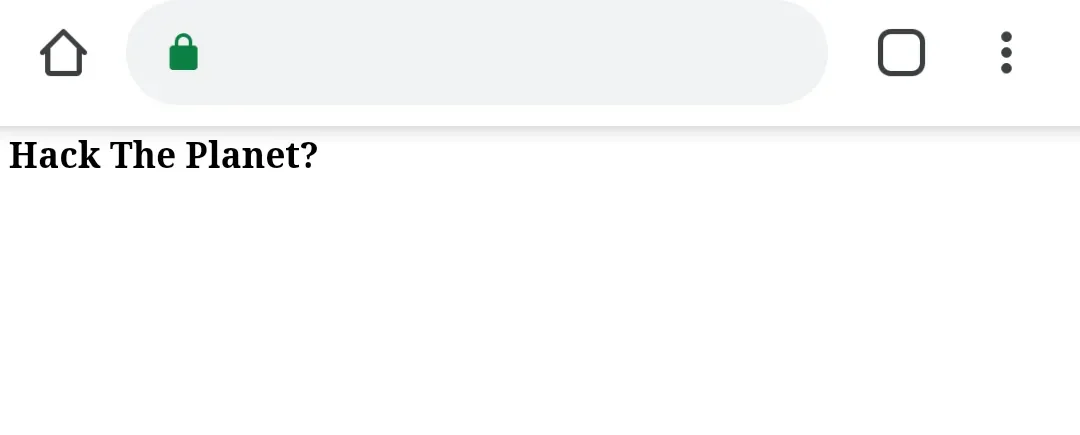
Loading the PoC in the browser
Step 3: The searches land in the victim's history
Once the page is loaded, the searches it triggers appear in the search history of each affected service. The authors show the result for each one.
Google:

The PoC is poisoning Google Search history
Facebook:
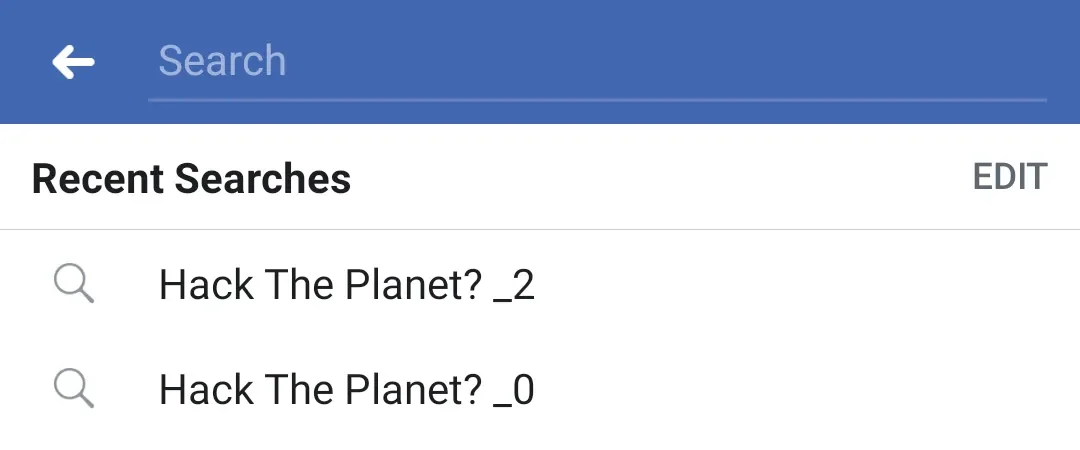
The PoC is poisoning Facebook Search history
YouTube:

The PoC is poisoning YouTube Search history
LinkedIn:
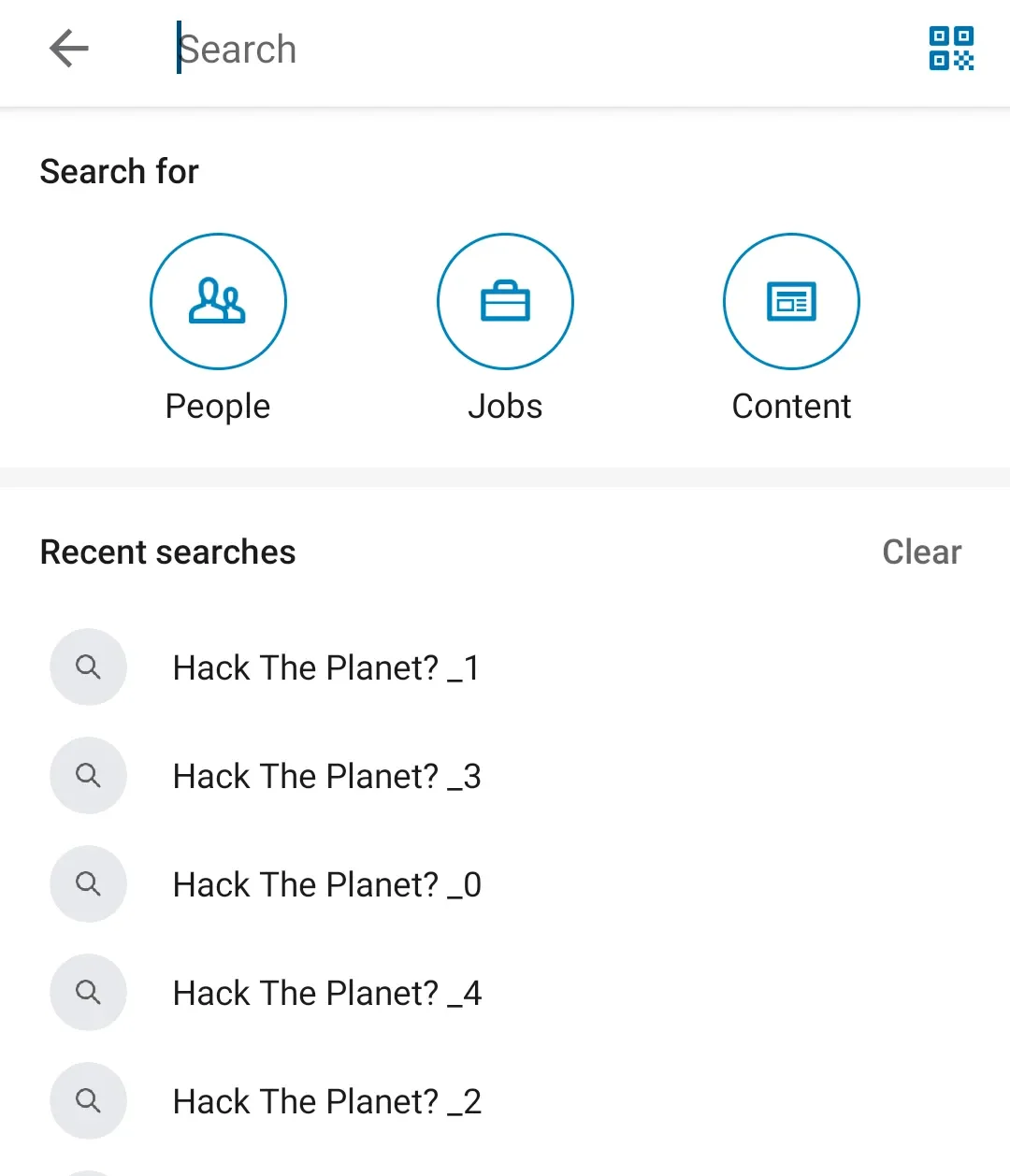
The PoC is poisoning LinkedIn Search history
The post does not include the requests the page makes, the parameters it sends or the responses it receives. The demonstration is limited to the effect visible in each service's search history.
Root cause
The search engines store keyword history by default, and their implementation does not verify the search origin of the user. With no CSRF checks on the search path, a request originating from an attacker-controlled page is accepted and recorded like any other search. The implementation does not verify the search origin of the user, and there are no CSRF checks on the search path.
Impact
An unauthorised party can insert their own chosen keywords into the search history of Google, Facebook, LinkedIn and YouTube users. The authors frame the actors as attackers and spammers, and the effect as control over the search history of the affected apps. They explicitly rate the issue as low risk, while noting that it has a direct impact on users and that the trivial exploitation is what makes it worth fixing. The attack works by having users visit a crafted page.
Fix
The authors discuss the trade-off between security and usability: implementing CSRF checks correctly on the affected endpoint would affect the usability of the apps. They propose two mitigations:
- A custom fix that validates the
Refererheader on the Search API endpoint. - Mitigating the attack with the same-site cookie flag.
The post does not say that either fix was implemented; the issue was marked as an acceptable risk by the affected companies.
Variants to test
- Apply the same reasoning to other services that keep a per-user search or activity history and accept searches from third-party pages. A positive result is a keyword chosen by you appearing in the victim's history after they load your page.
- Check whether the search endpoint validates the
Refererheader. A positive result is a cross-origin request that is still accepted and recorded when the header is absent or points to your site. - Check whether the relevant cookies carry the same-site flag. A positive result is a cross-site request that is accepted with the session cookie attached.
- Test other services that keep a per-user search history and accept searches from third-party pages. A positive result is an entry you control appearing in the victim's account without any click.
What happened, in plain words
Four very popular websites, Google, Facebook, YouTube and LinkedIn, all have a search box. When you search for something, they remember what you typed. That list of past searches is your search history, and it is kept so that the next time you search, the site can suggest things and make your life easier.
The authors of this post, Mazin Ahmed and Khaled Farah, found that this memory can be written to by a page you do not control. If you open a page that someone else made, that page can quietly add words of its own choosing to your search history on those four sites. The page loads normally, and the searches it triggers appear in your search history.
The authors reported this to the companies. The companies marked it as an "acceptable risk". The authors agree it is low risk, but they think it is so easy to do that it should still be fixed. They wrote the post to get a public discussion going.
A quick word on the name of the problem. The authors call it a CSRF issue, short for Cross-Site Forgery. The idea is simple: your browser is already logged in to a site, and another site you visit can make your browser send a request to the first site. The first site sees a request coming from your browser and treats it as if you meant it. A useful comparison is a signed form: if a company accepts any form that arrives in its post tray without checking who sent it, anyone can post a form in your name.
The vulnerability
Each of the four services keeps a keyword history by default. That is the feature being abused: the site remembers what you searched for, and the authors found that it will remember searches that did not come from the site itself.
The authors describe the search implementation as not verifying the search origin of the user. In plain terms, the site does not check where the search came from. The site does not check where the search came from. Because there are no CSRF checks on that path, an attacker or a spammer can control the search history of the affected apps by getting users to visit a crafted page.
A few terms from that paragraph, from zero:
- A server is the computer that runs the website. Your browser asks it for pages and data.
- An endpoint is one specific address on that server that does one specific job, like a counter in a shop. One counter takes orders, another handles refunds. The search endpoint is the counter that handles searches.
- An API is the set of rules for talking to those counters. When a page sends a search to a site, it is talking to the site's API.
- A cookie is a small piece of data the site stores in your browser so it can recognise you on the next request. It is like a wristband at an event: you show it and you are let back in without proving who you are again.
- The Referer header is a line your browser attaches to a request saying which page the request came from. It is like a return address on an envelope. If the site checked it, it could see that the search came from somewhere else.
The authors call the bug relatively simple to explain and to exploit. They do not show the underlying request or endpoint in the post. The demonstration is a proof of concept that runs in the browser.
Proof of concept
The authors published a live demo of the proof of concept at this address:
https://raw.githack.com/mazen160/public/master/Proof-of-Concepts/Search%20Engine%20Abuse%20in%20Popular%20Social%20Networks/poc.html
The attack works by having users visit a crafted page.
The page loads normally in the browser, as shown below. Nothing about how it looks tells you what it is doing.
Loading the PoC in the browser
This is the important part for a beginner: the page does not look malicious. The malicious website loads normally in the browser. That is why the authors describe the exploitation as trivial: the victim only has to visit a page.
What the searches do
Once the page is loaded, the searches it triggers appear in the search history of each affected service. The authors show the result for each one.
The PoC is poisoning Google Search history
The PoC is poisoning Facebook Search history
YouTube
The PoC is poisoning YouTube Search history
The PoC is poisoning LinkedIn Search history
The post does not include the requests the page makes, the parameters it sends or the responses it receives. The demonstration is limited to the effect visible in each service's search history. In other words, the authors show the result, not the plumbing.
Why it works
The root cause has two parts, and both are needed for the attack to work.
- The search engines store keyword history by default. The feature exists to enhance the user experience and is stored by default.
- The implementation does not verify the search origin of the user. With no CSRF checks on the search path, a request that comes from an attacker-controlled page is accepted and recorded like any other search.
The implementation does not verify the search origin of the user, and there are no CSRF checks on the search path. Origin validation means checking where a request came from before acting on it. Without it, the server has no way to tell your own search from one triggered by another page.
Impact
An unauthorised party can insert their own chosen keywords into the search history of Google, Facebook, LinkedIn and YouTube users. The authors describe the actors as attackers and spammers, and the effect as control over the search history of the affected apps.
They explicitly rate the issue as low risk. At the same time they note that it has a direct impact on users, and that the trivial exploitation is what makes it worth fixing.
Why does a polluted search history matter? The authors do not spell out consequences beyond control of the history. What they do say is that the impact is direct on users, and that the ease of the attack is the reason to care.
The fix
The authors discuss the trade-off between security and usability. Implementing CSRF checks correctly on the affected endpoint would affect the usability of the apps. That is the tension: a check that is too strict can break legitimate searches, and a check that is too loose lets the attack through.
They propose two mitigations:
- A custom fix that validates the
Refererheader on the Search API endpoint. In plain words, the server looks at the return address on the request and only accepts searches that came from its own pages. - Mitigating the attack with the same-site cookie flag. A cookie flag is a setting attached to a cookie. The same-site flag tells the browser to send that cookie only when the request comes from the same site, so a request from another page arrives without the wristband and is not treated as yours.
The post does not say that either fix was implemented. The companies marked the issue as an acceptable risk.
Other places to look
The same reasoning can be applied elsewhere.
- Other services that keep a per-user search or activity history and accept searches from third-party pages. A positive result is a keyword chosen by you appearing in the victim's history after they load your page.
- Whether the search endpoint validates the
Refererheader. A positive result is a cross-origin request that is still accepted and recorded when the header is absent or points to your site. Cross-origin means the request comes from a different site than the one being talked to. - Whether the relevant cookies carry the same-site flag. A positive result is a cross-site request that is accepted with the session cookie attached. A session cookie is the cookie that keeps you logged in.
- Other services that keep a per-user search history and accept searches from third-party pages. A positive result is an entry you control appearing in the victim's account without any click.
Glossary
- API: the set of rules and addresses a website exposes so that pages and programs can ask it to do things, such as run a search.
- Browser: the program you use to open web pages, for example Chrome, Firefox or Safari.
- Cookie: a small piece of data a site stores in your browser so it can recognise you on later requests.
- Cross-origin: coming from a different site than the one the request is sent to.
- CSRF (Cross-Site Forgery): an attack where a page you visit makes your browser send a request to another site, which treats it as if you meant it.
- Endpoint: one specific address on a server that performs one specific job, such as handling searches.
- Header: an extra line of information attached to a web request or response, such as the return address of the request.
- Keyword history: the list of words a user has searched for, stored by the site.
- Origin: the site a request came from.
- Proof of concept (PoC): a small demonstration that shows an issue is real, without needing to be a full attack tool.
- Referer header: the header that tells the server which page a request came from.
- Same-site cookie flag: a setting on a cookie that tells the browser to send it only for requests coming from the same site.
- Search engine: the part of a site that takes your keywords and returns matching results.
- Server: the computer that runs a website and answers requests from browsers.
- Session cookie: the cookie that keeps you logged in to a site.
- Spammer: someone who pushes unwanted content or links at users.
- Usability: how easy and convenient a site is to use for normal people.

