Search Has Escaped
The search results page took the query string from the URL and inserted it into the page as HTML, so a crafted link could run JavaScript in the victim's browser. An attacker could send such a link to another user and execute code in the application's origin, allowing them to make authenticated requests, read responses, alter the page and capture information entered after the payload runs.
 Published on leonardo-cavalcantee.medium.com
Pentesting
The full write-up lives on its author's site
It belongs to its author, so we link to it rather than copy it. The other two tabs are our own rewrites, checked against it.
Context
The target here is a search feature in a web application, specifically the screen that is shown when a search returns no results. Normally, search lives in the address bar: the user types a query, the application reads it from the URL, and the results page either shows matching documents or reports that nothing matched. In this case, when nothing matched, the application repeated the query back to the user so they would know exactly what had failed them.
That echo of the query is the whole subject of this write-up. The application took the value from the URL and placed it into the page as HTML rather than as text, which turned the results screen into a DOM XSS sink.
Setup
No accounts, roles, tools or versions are described. The finding is a client-side issue that can be reproduced by loading a crafted URL in a browser; the only precondition is that the application renders the no-results message by reading the query from location.search.
Finding it
The code that builds the no-results message reads the query parameter from the URL and interpolates it into a template string that is assigned to innerHTML: It reads the query parameter from the URL and interpolates it into a template string that is assigned to innerHTML:
const q = new URLSearchParams(location.search).get('q') ?? '';message.innerHTML = `No results for <strong>${q}</strong>`;
Two things make this look wrong. First, the value comes from location.search, which is fully attacker-controlled through the URL. Second, it is written with innerHTML, which parses its input as HTML. The <strong> element around the value does not change that: it is a means of making letters thick, not a sanitiser, and it does not stop the interpolated string from being parsed as markup.
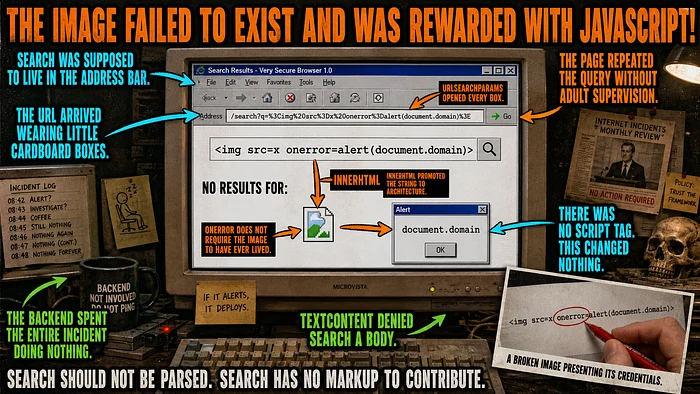
Exploitation
Step 1: send a query containing an HTML payload
The researcher sent the following URL:
/search?q=%3Cimg%20src%3Dx%20onerror%3Dalert(document.domain)%3E
The strange symbols are percent-encoding, which allows characters that would otherwise be awkward inside a URL to travel through it. URLSearchParams decodes them when the page reads the q parameter. What comes out of the decoding is this string:
<img src=x onerror=alert(document.domain)>
Step 2: the browser parses the decoded string as HTML
Because the decoded string is assigned to innerHTML, the browser does not treat it as text. It creates an img element whose src is x. There is no image at x, which is expected because x is not a place, so the image fails to load. The failure fires the onerror handler, and the handler runs alert(document.domain).
Search now causes JavaScript to execute. The alert is only a signal that the finding has occurred; the important part is that script from the URL runs in the page.
Root cause
The defect is not that the query contains an image, an event handler or the word alert. The defect is that a string controlled by the URL is handed to an HTML parser when the page only wanted to display text. The value is exposed through a browser source (location.search), crosses the page's JavaScript, and reaches an HTML-parsing sink (innerHTML). This is DOM XSS: the backend does not need to store the value or render it, and may play no part in the incident at all.
The <strong> wrapper provides no protection, and neither does the absence of a <script> tag in the payload. Event handlers execute JavaScript too, so filtering for <script> would not have stopped this.
Impact
If the crafted link is sent to another user and they open it, the attacker's code runs in the application's origin and in that user's session. From there the attacker can make authenticated requests, read responses exposed to the frontend, alter the page, and capture information entered after the payload runs. The impact depends on a victim opening the crafted link.
Fix
The query should not be parsed as HTML. The report gives a corrected version that builds the message with DOM APIs and places the query in a text node:
const q = new URLSearchParams(location.search).get('q') ?? '';const strong = document.createElement('strong');strong.textContent = q;message.replaceChildren('No results for ', strong);
With textContent, the angle brackets remain angle brackets: the image element is never created and its event handler never runs. The page still says there are no results. The report presents this corrected code without saying whether it was applied.
Variants to test
- Other DOM sinks fed from
location.search. Look forinnerHTML,outerHTML,insertAdjacentHTMLordocument.writereceiving values read from the URL. A positive result is a payload such as the one above executing when the crafted URL is opened. - Other URL sources. The same pattern can appear with
location.hash,location.pathnameor values read fromdocument.referrer. A positive result is script execution from a value the attacker can set in a link. - Event-handler payloads without
<script>. Try handlers such asonerrororonloadon elements that fail or load immediately. A positive result is execution on a target that filters<script>but not event handlers. - Encoding variations. Percent-encode the payload as in the report, and try other encodings the application may decode before the sink. A positive result is the decoded payload reaching the HTML parser and executing.
- Reflected server-side equivalents. Where the query is echoed by the server into the response, test the same payload in the
qparameter. A positive result is the payload appearing unescaped in the HTML response and executing in the browser.
What happened, in plain words
A website had a search box. When you searched for something and the site found nothing, it showed a message like "No results for ..." and put whatever you had typed back into the page, so you could see what had failed.
The problem was how it put your words back. Instead of treating them as plain text, the page treated them as instructions for building the page. That means anyone who could get you to click a specially crafted link could make the site run code of their choosing in your browser, as if the site itself had written it.
This kind of bug is called DOM XSS. "DOM" is the browser's in-memory model of the page, and "XSS" stands for cross-site scripting. The short version: a value that comes from the URL ends up being interpreted as code by the browser. The server never has to store anything or even be involved.
The setup
The target is a search feature in a web application, and specifically the screen shown when a search returns no results. Normally search lives in the address bar: you type a query, the application reads it from the URL, and the results page either shows matching documents or says nothing matched. Here, when nothing matched, the application repeated the query back to you so you would know exactly what had failed.
That echo of the query is the whole subject of this write-up. The application took the value from the URL and placed it into the page as HTML rather than as text, which turned the results screen into a DOM XSS sink. A "sink" is simply a place in the code where data ends up being used in a way that can be dangerous, in this case where a string is handed to the browser's HTML parser.
No accounts, roles, tools or versions are described. The finding is a client-side issue: it can be reproduced by loading a crafted URL in a browser. The issue is reproduced by loading a crafted URL in a browser.
Finding it
The code that builds the no-results message reads the query parameter from the URL and inserts it into a template string that is assigned to innerHTML: It reads the query parameter from the URL and inserts it into a template string that is assigned to innerHTML:
const q = new URLSearchParams(location.search).get('q') ?? '';message.innerHTML = `No results for <strong>${q}</strong>`;
Line by line, in plain words:
const q = ...creates a variable calledq, which is just a named box for holding a value.new URLSearchParams(location.search)takes the part of the address bar after the question mark (the query string) and turns it into a list of name and value pairs.location.searchis the browser's way of exposing that part of the URL to JavaScript..get('q')asks that list for the value stored under the nameq. If the URL is/search?q=hello, this returnshello.?? ''means: if the result is null or undefined, use an empty string instead. This avoids errors when there is noqparameter at all.message.innerHTML = ...takes the element calledmessageand replaces its contents with the string on the right.innerHTMLis the dangerous part: the browser reads that string as HTML, not as text, and builds elements from it.- The backtick string
`No results for <strong>${q}</strong>`is a template string. The${q}part is replaced with whatever is inq. The<strong>tags make the text bold.
Two things make this look wrong. First, the value comes from location.search, which is fully controlled by whoever writes the URL. Second, it is written with innerHTML, which parses its input as HTML. The <strong> element around the value does not change that: it is a way of making letters thick, not a sanitiser, and it does not stop the inserted string from being parsed as markup.
Exploitation
Step 1: send a query containing an HTML payload
The researcher sent the following URL:
/search?q=%3Cimg%20src%3Dx%20onerror%3Dalert(document.domain)%3E
What each part means:
/searchis the page being visited.?q=starts the query string and names the parameterq, which is the search term.- The strange symbols are percent-encoding. A URL can only carry a limited set of characters safely, so awkward characters are written as a percent sign followed by two hexadecimal digits.
%3Cis<,%20is a space,%3Dis=, and%3Eis>. This lets characters that would otherwise be awkward inside a URL travel through it.
URLSearchParams decodes them when the page reads the q parameter. What comes out of the decoding is this string:
<img src=x onerror=alert(document.domain)>
This is a piece of HTML: an image element whose source is x, with an onerror attribute. onerror is an event handler, a piece of JavaScript that the browser runs when something goes wrong, in this case when the image fails to load.
Step 2: the browser parses the decoded string as HTML
Because the decoded string is assigned to innerHTML, the browser does not treat it as text. It creates an img element whose src is x. There is no image at x, which is expected because x is not a place, so the image fails to load. The failure fires the onerror handler, and the handler runs alert(document.domain).
alert shows a pop-up box. document.domain is the address of the site the page belongs to. So the pop-up proves that code from the URL ran inside the page, in the site's own context.
Search now causes JavaScript to execute. The alert is only a signal that the finding has occurred; the important part is that script from the URL runs in the page.
Root cause
The defect is not that the query contains an image, an event handler or the word alert. The defect is that a string controlled by the URL is handed to an HTML parser when the page only wanted to display text. The value is exposed through a browser source (location.search), crosses the page's JavaScript, and reaches an HTML-parsing sink (innerHTML). This is DOM XSS: the backend does not need to store the value or render it, and may play no part in the incident at all.
The <strong> wrapper provides no protection, and neither does the absence of a <script> tag in the payload. Event handlers execute JavaScript too, so filtering for <script> would not have stopped this.
Impact
If the crafted link is sent to another user and they open it, the attacker's code runs in the application's origin and in that user's session. "Origin" means the site's identity as far as the browser is concerned: the combination of protocol, host and port. "Session" means the logged-in state the site keeps for that user, usually tied to a cookie, which is a small piece of data the browser stores and sends back to the site on each request.
From there the attacker can make authenticated requests, read responses exposed to the frontend, alter the page, and capture information entered after the payload runs. The impact depends on a victim opening the crafted link.
Fix
The query should not be parsed as HTML. The report gives a corrected version that builds the message with DOM APIs and places the query in a text node:
const q = new URLSearchParams(location.search).get('q') ?? '';const strong = document.createElement('strong');strong.textContent = q;message.replaceChildren('No results for ', strong);
Line by line:
- The first line is unchanged: read the
qvalue from the URL, defaulting to an empty string. document.createElement('strong')asks the browser to make a new, empty bold element. Nothing is inserted into the page yet.strong.textContent = qputs the query inside that element as text.textContentmeans "this is text, not markup", so angle brackets stay as angle brackets.message.replaceChildren('No results for ', strong)clears the message element and puts two things into it: the plain text "No results for " and the bold element.replaceChildrenworks with real elements and text, not with HTML strings.
With textContent, the angle brackets remain angle brackets: the image element is never created and its event handler never runs. The page still says there are no results. The report presents this corrected code without saying whether it was applied.
Variants to test
- Other DOM sinks fed from
location.search. Look forinnerHTML,outerHTML,insertAdjacentHTMLordocument.writereceiving values read from the URL. A positive result is a payload such as the one above executing when the crafted URL is opened. - Other URL sources. The same pattern can appear with
location.hash,location.pathnameor values read fromdocument.referrer. A positive result is script execution from a value the attacker can set in a link. - Event-handler payloads without
<script>. Try handlers such asonerrororonloadon elements that fail or load immediately. A positive result is execution on a target that filters<script>but not event handlers. - Encoding variations. Percent-encode the payload as in the report, and try other encodings the application may decode before the sink. A positive result is the decoded payload reaching the HTML parser and executing.
- Reflected server-side equivalents. Where the query is echoed by the server into the response, test the same payload in the
qparameter. A positive result is the payload appearing unescaped in the HTML response and executing in the browser.
Glossary
- DOM: the browser's in-memory model of a page, a tree of elements that JavaScript can read and change.
- XSS (cross-site scripting): a bug where an attacker's input is treated as code by a browser, letting it run as part of the site.
- DOM XSS: XSS where the dangerous handling happens entirely in the browser's JavaScript, without the server storing or rendering the value.
- Sink: a place in code where data is used in a way that can be dangerous, such as handing a string to an HTML parser.
- Source: a place in code where attacker-controlled data enters, such as the URL.
location.search: the part of the address bar after the question mark, available to JavaScript.URLSearchParams: a browser tool for reading and decoding the name and value pairs in a query string.- Query string: the part of a URL after
?, made of name and value pairs such asq=hello. - Parameter: one named value in a query string, here
q. - Percent-encoding: writing awkward characters in a URL as a percent sign plus two hexadecimal digits, for example
%3Cfor<. innerHTML: a property that replaces an element's contents by parsing a string as HTML.textContent: a property that sets an element's contents as plain text, so markup characters stay literal.- HTML parser: the part of the browser that reads HTML and builds elements from it.
- Element: one piece of a page, such as an image or a bold word.
- Attribute: a setting on an element, such as
srcoronerror. - Event handler: JavaScript attached to an element that runs when something happens, such as an image failing to load.
onerror: an event handler that runs when an element, such as an image, fails to load.alert: a browser function that shows a pop-up box, often used to prove that code ran.document.domain: the address of the site the current page belongs to.- Origin: a site's identity to the browser, made of protocol, host and port.
- Session: the logged-in state a site keeps for a user, usually tied to a cookie.
- Cookie: a small piece of data the browser stores for a site and sends back with requests.
- Authenticated request: a request made with the user's session, so the site treats it as coming from that logged-in user.
- Frontend: the part of an application that runs in the browser.
- Backend: the part of an application that runs on the server.
- Sanitiser: a tool that cleans input so it cannot be interpreted as code; the
<strong>tag is not one. - Template string: a JavaScript string written with backticks that can contain
${...}placeholders. document.write: a JavaScript function that writes a string into the page as HTML.location.hash: the part of a URL after#, available to JavaScript.location.pathname: the path part of a URL, such as/search.document.referrer: the address of the page that linked to the current one.- Reflected XSS: XSS where the server echoes the attacker's input straight back into the response.



