Apostrophe Has Abolished the Password
The login form concatenated user input directly into a SQL query, so an attacker could supply a username containing a quote and comment markers to remove the password check and log in as any named account. The author demonstrated this against the administrator account using an incorrect password.
 Published on leonardo-cavalcantee.medium.com
Pentesting
The full write-up lives on its author's site
It belongs to its author, so we link to it rather than copy it. The other two tabs are our own rewrites, checked against it.
Context
The target here is a login form: a page with a username field, a password field, and a button. The password field behaves like a password field. It has a label, a rectangle, and it turns typed characters into little black circles. By every available appearance it is a password input.
It is not, however, part of the login decision. The form believes it is asking two questions, who are you and what is your password, but the database does not receive questions. It receives one statement, and the statement is assembled by string concatenation. That gap between the two questions the interface promises and the single statement the database evaluates is the whole of the bug.
Setup
No accounts, tools or versions are described in the write-up. The only precondition that matters is visible in the source: the login query is built by interpolating the submitted username and password directly into SQL text, and the password is compared inside the database with crypt().
Finding it
The researcher's starting observation was simply that the password field was present and looked entirely normal, yet did not participate in the login. The login handler looked like this:
const sql = `SELECT id, role FROM users WHERE username = '${username}' AND password_hash = crypt('${password}', password_hash)`;const { rows: [user] } = await db.query(sql);
Both username and password are placed inside single quotes in the query text with no binding. The form presents two separate boxes because people like boxes, but the query has no obligation to respect that arrangement: it only sees quotes, operators, names and comments.
Exploitation
Step 1: break out of the username literal
The username submitted was:
administrator'--
The password submitted was deliberately wrong. The first apostrophe starts life as a character inside a username field; after concatenation the SQL parser gives it a different job, closing the string literal that wraps the username. The two hyphens turn the remainder of the line into a comment, which removes the password condition from the statement the database evaluates.
The query that resulted was:
SELECT id, role FROM users WHERE username = 'administrator'
Step 2: observe the result
The database evaluated the remaining statement, found the administrator row and returned it. The application saw a user and established a session. No knowledge of the password was demonstrated at any point. The password was neither correct nor incorrect: it had been removed from the space in which correctness can be decided. The condition still exists in the application source, but it is no longer part of the statement the database runs.
Root cause
The application joins a user-controlled value directly to SQL syntax, so the database cannot preserve the distinction the interface promised between a value and the grammar around it. The apostrophe is part of a name in the form and legislation in the query; its meaning comes from where it is placed, not from what it is.
Impact
In this login, the consequence is authentication bypass as the named account, administrator. The researcher is explicit about the boundary of the finding: in a different query, and with sufficient database privileges, the same failure of separation could expose or modify data, but this login has already done enough.
Fix
The query was rewritten so that the statement supplies the grammar and the values are bound into positions already designated as values:
const { rows: [user] } = await db.query(
  `SELECT id, role
   FROM users
   WHERE username = $1
     AND password_hash = crypt($2, password_hash)`,
  [username, password],
);
Here $1 and $2 are parameters. An apostrophe inside username cannot close a string, because there is no string literal in the query text for it to close. The database still does not meet the username as it is in itself; it receives a value under the category $1, and that is sufficient.
After the change, the same payload was submitted again:
administrator'--
This time the password was checked, and it was wrong.
The write-up also rejects the tempting non-fix of forbidding apostrophes. A blacklist may stop this exact string while leaving other operators, encodings, contexts and database syntax available, and it prevents several innocent people from spelling their names.
Variants to test
What happened, in plain words
A website had a login page. It had two boxes: one for a username, one for a password. The password box looked completely normal. It had a label, a rectangle, and when you typed into it the characters turned into little black circles, exactly as a password box should.
But that password box was not actually part of the decision about whether you were allowed in. The site was building a single instruction for its database by gluing together whatever you typed, and the way it glued things together meant a person could type a special character into the username box and quietly delete the password check from that instruction. The password was still on the screen. It was just no longer part of the question the database was asked.
The researcher typed a username ending in an apostrophe and two hyphens, typed a deliberately wrong password, and got logged in as administrator anyway. This is called SQL injection. The rest of this article walks through exactly how that works, starting from zero.
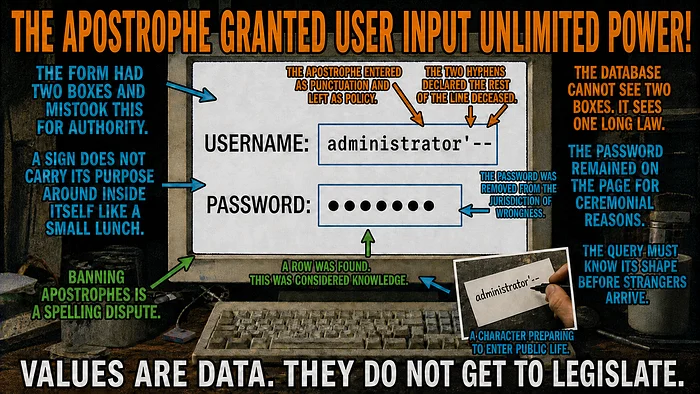
The pieces involved, explained from scratch
Before the trick makes sense, you need to know what the moving parts are.
A database is a program that stores information in tables, a bit like a very strict spreadsheet. A website's user list usually lives in one: one row per person, with columns for things like an ID number, a username, a role (admin, normal user, and so on) and a stored password check value.
SQL is the language you use to talk to that database. You write a sentence, called a query, and the database reads it and answers. A typical sentence means "give me the row whose username is this, and whose password matches that". SQL has its own grammar, just like English: it has keywords, it has quoted text, and it has punctuation with special meanings.
A login form is the page with the two boxes. When you press the button, your browser sends what you typed to the website's server, the computer that runs the site.
The server-side code is the program on that computer that receives your two values and decides what to do. In this case it builds a SQL sentence and hands it to the database.
String concatenation means joining pieces of text end to end, like gluing words into one long strip. If you glue hello and world you get helloworld. The danger is that the database cannot tell which parts of the glued strip came from the programmer and which parts came from you.
A session is how a website remembers that you are logged in. After a successful login the server gives your browser a small piece of identifying data, and your browser sends it back with every later request so the site knows who you are. If the site decides you are a valid user, it starts a session for you. That is the moment of "being logged in".
SQL injection is the name of the bug where your input is treated as part of the SQL grammar instead of as plain data. You are supposed to be supplying a value, a name, a word. Instead the database reads part of what you typed as an instruction.
The setup
The write-up does not describe any particular accounts, tools or software versions. The only thing that matters is visible in the site's source code: the login query is built by dropping the submitted username and password straight into the SQL text, and the password is compared inside the database using a function called crypt().
crypt() is a database function that takes a password and a stored value and checks whether they correspond. You do not need to know its internals. What matters is where it sits: inside the SQL sentence, wrapped around the password you typed.
Finding it
The researcher's starting observation was simple and worth copying as a habit: the password field was there, it looked entirely normal, and yet it did not seem to take part in the login at all. That mismatch between what the page appears to promise and what the code actually does is often where a bug lives.
The login handler looked like this:
const sql = `SELECT id, role FROM users WHERE username = '${username}' AND password_hash = crypt('${password}', password_hash)`;const { rows: [user] } = await db.query(sql);
Line by line, in plain words:
const sql = ...creates a variable calledsqland stores a piece of text in it. That text is the SQL sentence the database will be asked to run.SELECT id, role FROM usersmeans "from the table calledusers, give me back theidcolumn and therolecolumn". Those are the two things the site needs to know about you: which row you are, and what you are allowed to do.WHERE username = '${username}'is the filter.WHEREmeans "only rows matching this condition". The${username}part is a placeholder that gets replaced with whatever you typed into the username box. Notice the single quotes around it: those quotes are SQL's way of saying "the text between them is a literal value, not an instruction".AND password_hash = crypt('${password}', password_hash)adds a second condition: the stored password check must match the password you typed. Again your input is dropped inside single quotes.const { rows: [user] } = await db.query(sql);sends the finished sentence to the database and waits for the answer.db.queryis the function that talks to the database. The result is unpacked so thatuserholds the first matching row, if there is one.
The critical detail is that both username and password are placed inside single quotes in the query text with no binding. "Binding" is the safe alternative, explained later. Here there is none: your text becomes part of the sentence itself.
The form shows two separate boxes because people like boxes. The query has no obligation to respect that arrangement. It only sees quotes, operators, names and comments.
Exploitation
Step 1: break out of the username literal
The username submitted was:
administrator'--
The password submitted was deliberately wrong. The researcher is open about this: it was a very bad password.
Why this payload? Read it in three pieces.
administratoris the account name the attacker wants to be logged in as.'is a single apostrophe. In the form it is just a character in a name. But once it is glued into the SQL sentence, it lands right where the closing quote of the username literal sits. The database reads it as "the quoted text ends here". That is the break-out: the attacker has escaped the value and is now writing grammar.--is two hyphens. In SQL, that marks the rest of the line as a comment, meaning "ignore everything after this". So the password condition, which comes after, is thrown away.
The query that resulted was:
SELECT id, role FROM users WHERE username = 'administrator'
Line by line:
SELECT id, role FROM usersis unchanged: fetch the ID and role from the users table.WHERE username = 'administrator'is the only condition left. TheAND password_hash = crypt(...)part is gone, because the two hyphens commented it out.- There is no password check anywhere in the sentence the database actually runs.
A useful way to picture it: the apostrophe is a character in a name when it sits in the form, and it is legislation when it sits in the query. Its meaning comes from where it is placed, not from what it is. A sign does not carry its purpose around inside itself; its purpose is what it does in the language where it is placed.
Step 2: observe the result
The database evaluated the remaining statement, found the administrator row and returned it. The application saw a user and established a session. No knowledge of the password was demonstrated at any point.
The password was neither correct nor incorrect. It had been removed from the space in which correctness can be decided. The condition still exists in the application source, which is a kind of afterlife, but it is no longer part of the statement the database runs.
That is the whole bypass: the page arranged its grammar so that knowledge of the password was no longer required.
Root cause
The application joins a user-controlled value directly to SQL syntax, so the database cannot preserve the distinction the interface promised between a value and the grammar around it.
Impact
In this login, the consequence is authentication bypass as the named account, administrator. "Authentication bypass" means getting past the login check without the credentials it was meant to require.
The researcher is explicit about the boundary of the finding: in a different query, and with sufficient database privileges, the same failure of separation could expose or modify data. "Expose" means reading data you should not see; "modify" means changing or deleting it. But this login has already done enough.
Fix
The query was rewritten so that the statement supplies the grammar and the values are bound into positions already designated as values:
const { rows: [user] } = await db.query(
  `SELECT id, role
   FROM users
   WHERE username = $1
     AND password_hash = crypt($2, password_hash)`,
  [username, password],
);
Line by line:
db.query(is called with two things this time, not one: the SQL text, and a separate list of values.- The SQL text contains
$1and$2. These are placeholders, called parameters. They mark positions where values will go, but the values themselves are not written into the sentence. WHERE username = $1means "match the username against the first supplied value".AND password_hash = crypt($2, password_hash)means "and check the stored password against the second supplied value".[username, password]is the list of values, in order. The first goes to$1, the second to$2.
Why this works: the SQL statement supplies the grammar, and the values are bound into positions already designated as values. An apostrophe inside username can be ugly, dramatic or personally disappointing, but it cannot close the string, because there is no string literal in the query text for it to close. The database still does not meet the username as it is in itself; it receives a value under the category $1, and that is sufficient. Databases should not be encouraged to seek deeper forms of knowledge.
After the change, the same payload was submitted again:
administrator'--
This time the password was checked, and it was wrong.
Why forbidding apostrophes is not the fix
There is a tempting response: just block apostrophes. The write-up rejects it. A blacklist, a list of forbidden strings, may stop this exact string while leaving other operators, encodings, contexts and database syntax available. It also prevents several innocent people from spelling their names, which is a strange sacrifice to offer the database.
The deeper point is that the people who do this have confused the first visible tool with the power using it. The apostrophe is not the vulnerability. The vulnerability is that input is glued into grammar. Fix the gluing, not the character.
Variants to test
If you ever find yourself looking at a login form like this, these are the neighbouring things worth trying. Each one is described with what a positive result looks like, so you know when you have found something.
Glossary
- Authentication bypass: getting past a login check without supplying the credentials it was meant to require.
- Binding: placing a value into a query through a designated placeholder so the database treats it purely as data, never as grammar.
- Blacklist: a list of strings or patterns that an application refuses to accept.
- Block comment: a comment that starts with
/*and ends with*/, ignoring everything between. - Boolean-based bypass: a SQL injection technique that makes a condition in the query evaluate as true, so a row is returned without the correct credentials.
- Concatenation: joining pieces of text end to end into one string.
crypt(): a database function that checks a supplied password against a stored password value.- Database: a program that stores data in tables and answers queries about it.
- Database driver: the software library an application uses to send queries to a database.
- Error-based confirmation: deliberately causing a database error to prove that input is being concatenated into a query.
- Grammar (of SQL): the rules that decide what counts as an instruction, a keyword, a quoted value or a comment in a query.
- Literal: text written directly in a query and wrapped in quotes, so the database reads it as a value rather than an instruction.
- Login form: the page with username and password boxes that sends your input to a server.
- Parameter: a placeholder such as
$1or$2in a query, filled in separately with a value. - Parameterised query: a query written with placeholders so that values are bound in rather than glued into the SQL text.
- Payload: the specific input an attacker sends to trigger a vulnerability.
- Privileges: the permissions a database account has, such as reading or changing certain data.
- Query: a sentence in SQL sent to a database to fetch or change data.
- Second-order injection: a payload that is stored first and only causes harm when it is later used in another query.
- Session: the state a website keeps to remember that you are logged in, usually tied to a small piece of identifying data your browser sends back.
- SQL: the language used to talk to a database.
- SQL injection: a bug where user input is treated as part of the SQL grammar instead of as plain data.
- Stacked query: sending more than one SQL statement in a single call, where the driver allows it.
- String literal: a piece of text enclosed in quotes inside a query.
- UNION SELECT: a SQL construct that appends the results of a second query to the first, often used to change what the application receives.
WHEREclause: the part of a query that filters which rows are returned.




