SecStory: How I Found Multiple P1 Vulnerabilities without Recon
The registration OTP was not regenerated for each request, so an attacker could request an OTP for a victim's email and then use the same OTP to register an account with that email. This allowed account registration using the victim's email, potentially leading to impersonation.

Hello everyone. Nowadays, there are numerous bug hunting stories on the internet.
The full write-up lives on its author's site
It belongs to its author, so we link to it rather than copy it. The other two tabs are our own rewrites, checked against it.
Context
One of the largest platforms in Indonesia runs a Responsible Disclosure program on its site. The program lists 16 rules: 15 rules plus one additional one. The platform was founded in 1999, and its history includes clashes with hackers, notably the "Brontok" virus attack in 2006 and its prominence in cyber warfare in 2008. The author's view is that this history made a P1 on the site a challenging target, since the organisation had likely learned from past incidents.
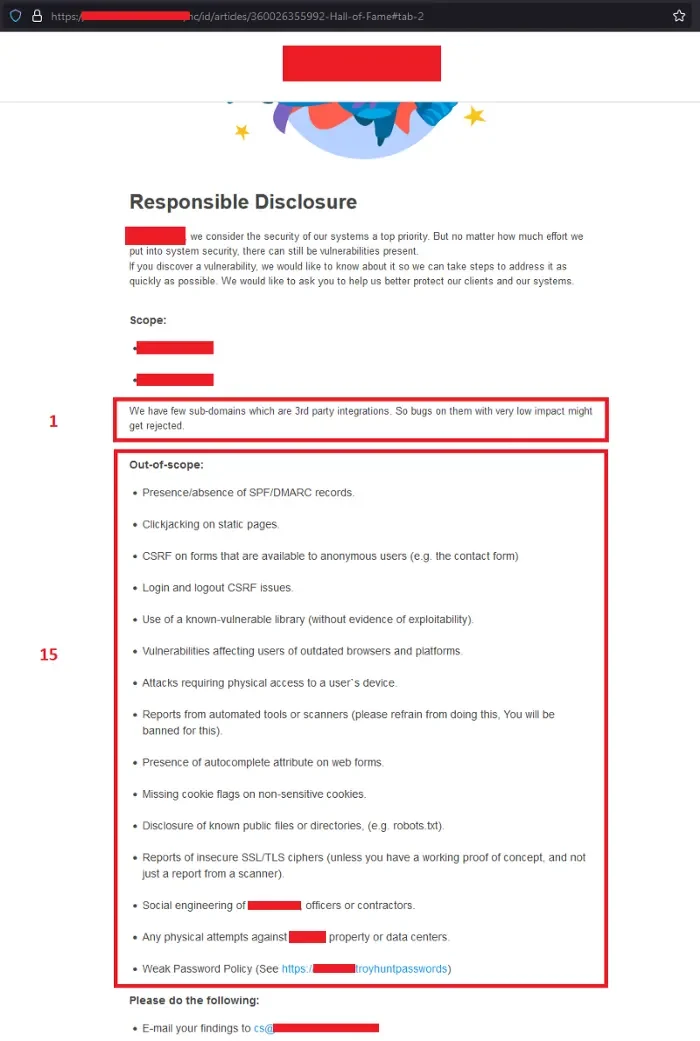
Responsible Disclosure Program
The feature at the centre of this story is account registration and its email OTP verification. In the normal flow, a user requests an OTP code and it is sent to the associated email address. The author found that this flow could be abused so that an account could be registered using someone else's email address, and that the victim's email could then be displayed publicly on the resulting profile.
Setup
No accounts, roles, tools or versions are described beyond the target's public registration, login and forgot password pages. The important precondition is the program's own rule set: the author states that using automation tools or scanners was not allowed, and that this was one of the two reasons for working without reconnaissance.
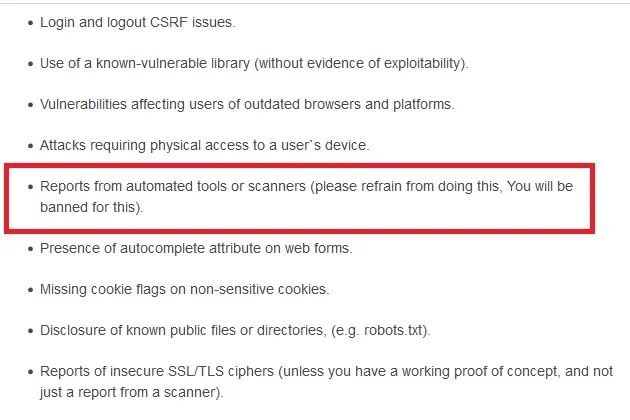
Using automation tools or scanners was not allowed.
The author challenged himself to find P1 vulnerabilities on the target without reconnaissance, for two reasons:
- To push his own boundaries.
- To meet the requirements of responsible disclosure.
Over a month he reported four vulnerabilities without reconnaissance: two P1s (one valid and fixed, the other not validated) and two that were not P1. This write-up covers the resolved P1, Broken Authentication.
Finding it
On visiting the target site, the first thing the author noticed was the responsible disclosure message. He then began analysing the main apps, starting with the "forgot password" and login pages. His observations were:
- The forgot password is protected by Captcha.
- The login page is not protected by Captcha.
- Register account is not protected by Captcha.
He therefore focused on the features that were not safeguarded by Captcha. At first glance he saw an "oAuth" feature (Facebook, Google and Twitter), which he believed had a small chance of being bypassed, so he moved past the login option and proceeded to the registration option.
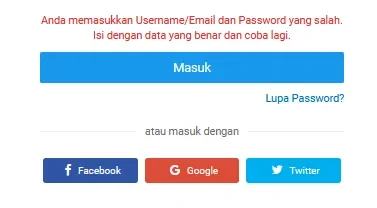
oAuth (Facebook, Google & Twitter)
After investing time, he found his first P1, which was not validated later on. He continued searching and found the second one, which he describes as:
"Broken Authentication via Race Condition".
The normal flow sends an OTP code to the associated email address when a user requests one. That behaviour seemed normal, which prompted him to dig deeper. What he found was that the OTP code in the previous email and in the new email was identical.
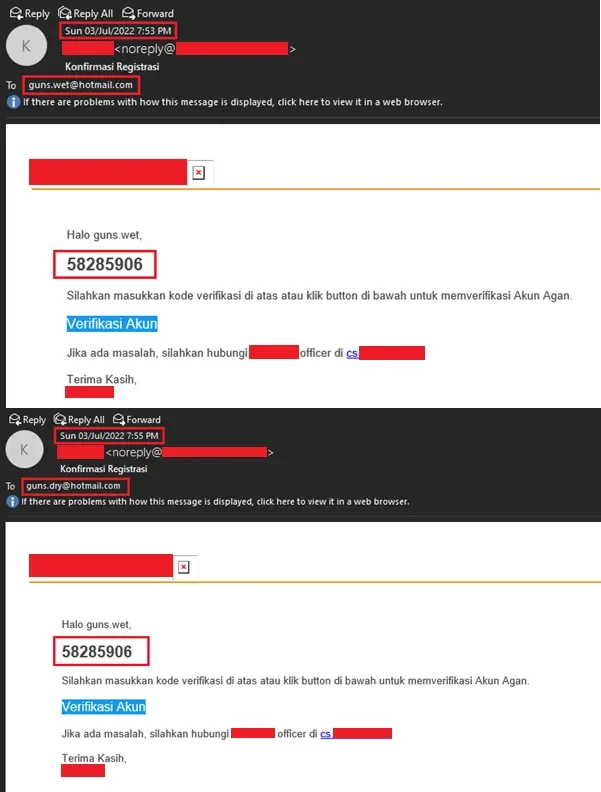
The OTP code in the previous and new email was identical.
This signalled a broken OTP authentication: despite using a new email, the OTP code remained the same.
Exploitation
Step 1: Request an OTP for the victim's email
The normal flow is that a user requests an OTP code and it is sent to the associated email address. The author does not reproduce the raw request or response for this step in the report.
Step 2: Request an OTP for a new email and compare
When the flow was repeated with a new email address, the OTP code delivered to the new address was identical to the one delivered to the previous address. The report shows the two emails side by side to make the point.
Step 3: Submit the OTP
The author then input the OTP code.
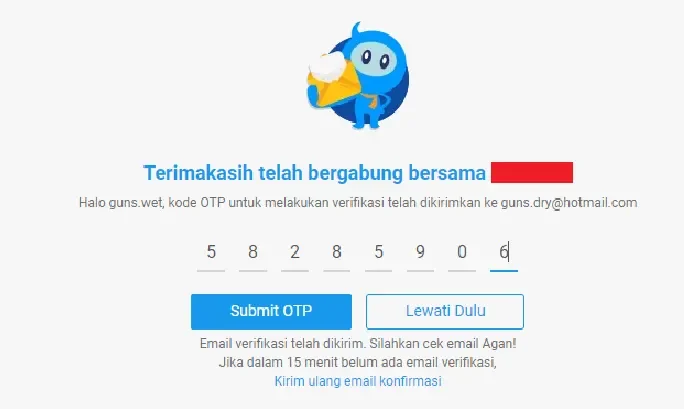
Input OTP Code
Step 4: Registration completes
After inputting the OTP code, he successfully registered an account.
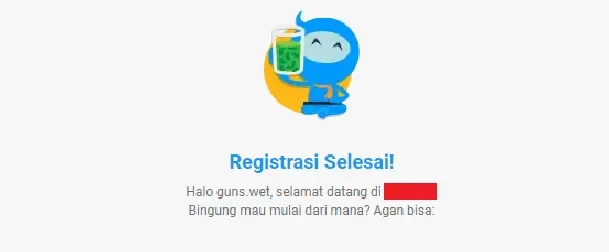
Registration Complete
At this point he had an account registered using the victim's email. He was not finished and kept looking for impact.
Step 5: Display the victim's email on the profile
He went to the settings menu "privasi profil" (privacy profile) in order to display the victim's email on the profile page.
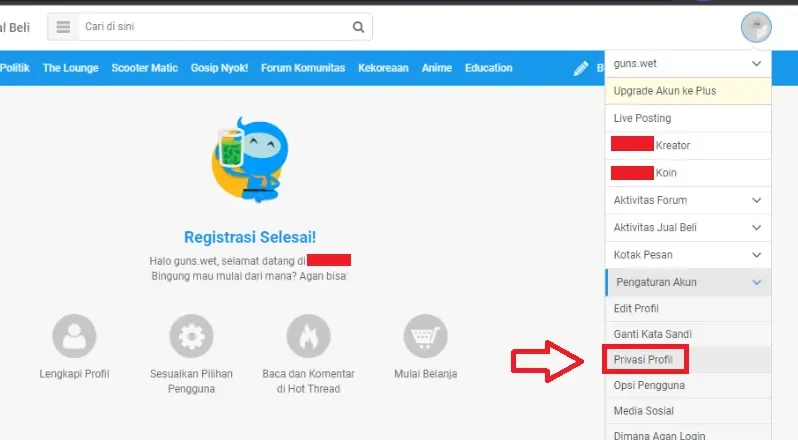
Settings menu "Privacy Profile"
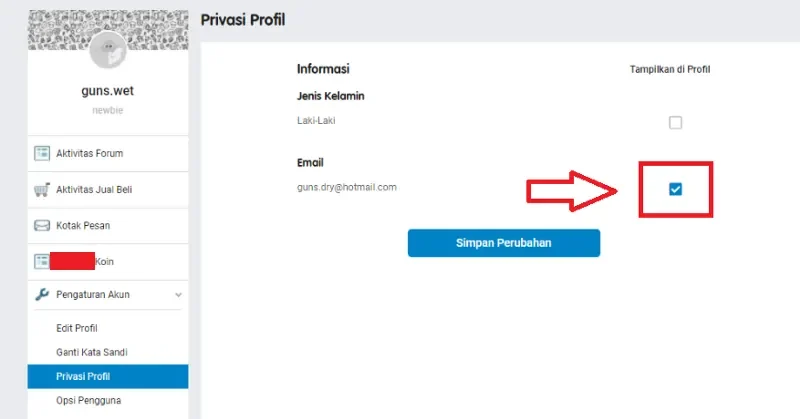
Display email on the profile
In that screen he ticked the checkbox on "Tampilkan di profil" ("Display in profile"), which would make the victim's email visible to the public.
Step 6: View the profile as the public
The public view of the profile account showed the displayed email.
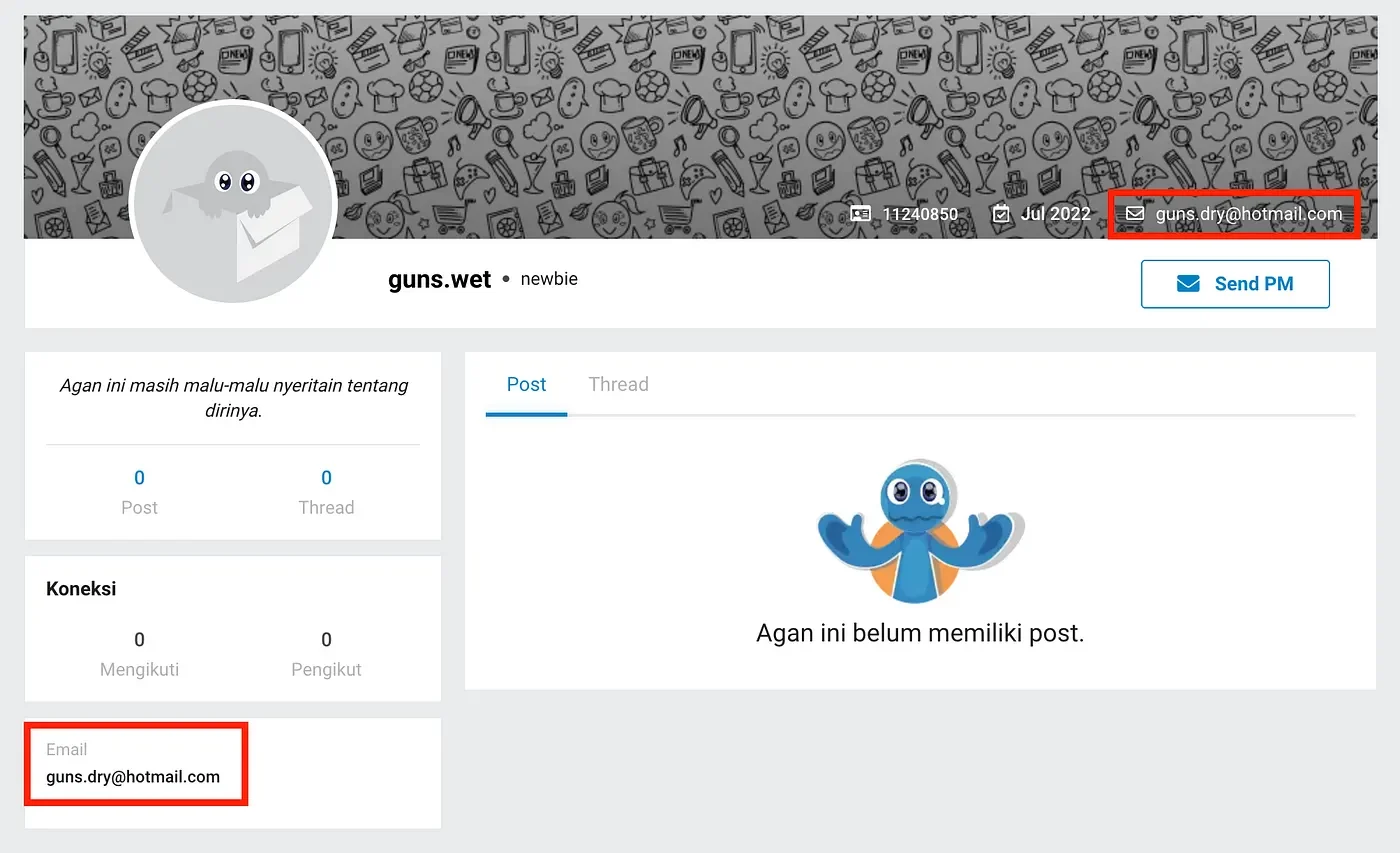
Profile account viewed as public
As shown in the picture, displaying the email publicly can indicate that the registered account appears genuine, as long as an attacker has information about the target email address.
Root cause
The author labels the issue "Broken Authentication via Race Condition". The observable defect is that the OTP code is not regenerated per request: the code sent to a new email address was the same as the code sent to the previous one. The code sent to a new email address was the same as the code sent to the previous one, and the author registered an account using the victim's email. The report does not show the server-side code, so the exact mechanism behind the reuse is not stated; the title's reference to a race condition suggests the code is generated or stored in a way that concurrent or repeated requests can share, but that is the author's framing rather than a demonstrated code path.
The existing defences did not stop it. The forgot password flow is protected by Captcha, but the login page and the register account flow are not, which is why the author concentrated on registration. The OTP itself was also long-lived: at 19:53 the OTP was sent to the mailbox, and the attacker input the OTP code at 22:08, meaning the code remained valid for almost 3 hours. The author notes that after his research he found OTP codes usually expire after 12 hours, and recommends limiting the usage window to 5 to 30 minutes.
Impact
The author lists the following impact:
- Theft of identity.
- The ability for an attacker to register an account using the victim's email.
- Impersonation of various individuals, including celebrities, popular figures, VIPs and organisations.
- Potential damage to the reputation of celebrities, public figures, VIPs and organisations by posting sensitive content, as the public would discover that the account has a legitimate email address.
The public display of the email matters because it makes the registered account appear genuine, provided the attacker has information about the target email address.
Fix
The author's remediation advice is:
- Generate a new OTP for each request.
- Limit the usage window of the OTP code to just 5 to 30 minutes, since the observed code stayed valid for almost 3 hours.
The report states that this P1 was valid and fixed. It does not describe the specific change the platform made.
Variants to test
- OTP reuse across email changes. Request an OTP for one address, then request one for a different address and compare the codes. A positive result is two identical codes delivered to two different mailboxes.
- OTP reuse across repeated requests. Request the same OTP twice in quick succession, ideally in parallel, and compare.
- Long OTP validity. Record the send time and submit the code much later. A positive result is a code that is still accepted hours after it was issued.
- Captcha coverage gaps. Compare which authentication flows enforce Captcha and which do not, as the author did between forgot password, login and registration. A positive result is an authentication flow that issues or verifies OTPs without Captcha.
- Public exposure of the verified address. After registering, enable the option that displays the email on the profile and view the profile as the public. A positive result is the address visible to the public, which strengthens the impersonation case.
References
- CWE-287: Improper Authentication
- CWE-301: Reflection Attack in an Authentication Protocol
- OWASP Top 10 (2017): Broken authentication
- OWASP Top 10 (2021): Insecure Design
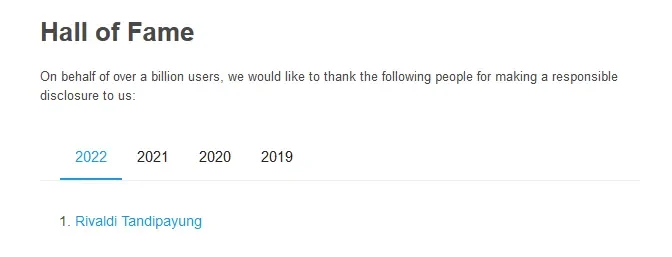
Eligible for Hall of Fame 2022
At the time of writing, the author stands alone in the Hall of Fame for 2022. The company granted permission to share the story, but certain details remain undisclosed.
What happened, in plain words
A security researcher found a way to create an account on a large Indonesian website using someone else's email address, without ever having access to that person's inbox. The trick was in the one-time code (OTP) the site sends by email to prove that the address belongs to you. The site kept sending the same code, even when the researcher asked for a code for a completely different email address. Once the account existed, the site let him switch on an option that shows the account's email address on the public profile, which made the fake account look genuine.
The researcher calls this class of problem Broken Authentication. Authentication is simply the process of proving who you are, the way a bouncer checks your ID before letting you into a club. When that check can be fooled, everything behind it is exposed.
This is a beginner-friendly retelling of his write-up. It follows the same order as his story, explains each idea from scratch, and keeps his screenshots where they belong.
Some words before we start
The researcher uses a few terms that are worth knowing before the story makes sense.
- P1 means "Priority One". Bug bounty platforms rank findings by how urgently they need fixing. P1 is the top of that scale: a problem with serious impact that should be dealt with immediately. The researcher points to Bugcrowd's public "vulnerability rating taxonomy" as the reference table for these ratings.
- Recon, short for reconnaissance, means gathering information about a target before attacking it: its IP address, open ports, file paths, subdomains, the software it runs, and so on. It often involves automated scanners that fuzz (send unexpected or malformed inputs to) a site to see what breaks. Think of it as casing a building before a burglary: learning the doors, the cameras and the guard shifts.
- Responsible Disclosure is a programme a company runs so that security researchers can report problems to it privately and, a programme a company runs so that security researchers can report problems to it privately. It is the formal, polite version of "please tell us before you tell the world".
- Captcha is the little puzzle (tick a box, pick the traffic lights) that websites use to tell humans from automated programs. It slows down anyone trying to do something thousands of times per second.
- oAuth is a way to log in to a site using another account, for example "Log in with Facebook" or "Log in with Google". You never give the site your Facebook password; Facebook vouches for you instead.
- OTP stands for One-Time Password. It is a short numeric code, usually sent by email or SMS, that you type in to prove you control that email address or phone number. The whole point is that it should be one time: fresh for each request, and useless afterwards.
- Race condition is a bug that appears when two actions happen at almost the same moment and the system handles them in an order it did not expect. Imagine two people grabbing the last seat on a train at the same instant: the booking system may sell it twice because it checked availability before either purchase was recorded.
The target and its rules
One of the largest platforms in Indonesia runs a Responsible Disclosure programme on its site. The programme lists 16 rules: 15 rules plus one additional one.
Responsible Disclosure Program
The platform was founded in 1999, and its history includes clashes with hackers. The researcher mentions the "Brontok" virus attack in 2006 and the platform's prominence in cyber warfare in 2008, though he notes he was a child at the time. His reasoning is that a company with that history has probably learned from past incidents, which makes finding a P1 on its site a genuinely hard challenge.
The feature at the centre of the story is account registration and the email OTP check that goes with it. In the normal flow, you ask the site to send you a code, the code arrives in your inbox, you type it in, and the site creates the account. The researcher found that this flow could be abused so that an account could be registered using someone else's email address, and that the victim's email could then be displayed publicly on the resulting profile.
The rules of engagement
No accounts, roles, tools or versions are described beyond the target's public registration, login and forgot password pages. The important precondition is the programme's own rule set: the researcher states that using automation tools or scanners was not allowed, and that this was one of the two reasons for working without reconnaissance.
Using automation tools or scanners was not allowed.
He challenged himself to find P1 vulnerabilities on the target without reconnaissance, for two reasons:
- To push his own boundaries.
- To meet the requirements of responsible disclosure.
Over a month he reported four vulnerabilities without reconnaissance: two P1s (one valid and fixed, the other not validated) and two that were not P1. This write-up covers the resolved P1, Broken Authentication.
Finding it
On visiting the target site, the first thing the researcher noticed was the responsible disclosure message. He then began analysing the main apps, starting with the "forgot password" and login pages. His observations were:
- The forgot password is protected by Captcha.
- The login page is not protected by Captcha.
- Register account is not protected by Captcha.
Why does this matter? Captcha is the site's speed bump against automated abuse. If one door has a speed bump and two doors do not, an attacker naturally walks through the doors without one. The researcher therefore focused on the features that were not safeguarded by Captcha. At first glance he saw an "oAuth" feature (Facebook, Google and Twitter), which he believed had a small chance of being bypassed, so he moved past the login option and proceeded to the registration option.
oAuth (Facebook, Google & Twitter)
After investing time, he found his first P1, which was not validated later on. He continued searching and found the second one, which he describes as:
"Broken Authentication via Race Condition".
The normal flow sends an OTP code to the associated email address when a user requests one. That behaviour seemed normal, which prompted him to dig deeper. What he found was that the OTP code in the previous email and in the new email was identical.
The OTP code in the previous and new email was identical.
This signalled a broken OTP authentication: despite using a new email, the OTP code remained the same. In everyday terms: the bouncer at the club checks your ID, but he is looking at the ID of the person who came in before you. If you can get in with a code that was issued for a different address, the check is meaningless.
Exploitation
Step 1: Request an OTP for the victim's email
The normal flow is that a user requests an OTP code and it is sent to the associated email address. The researcher does not reproduce the raw request or response for this step in the report.
Why start here? Because the whole attack depends on the site issuing a code for the victim's address. The attacker never sees that email; he only needs the site to generate the code.
Step 2: Request an OTP for a new email and compare
When the flow was repeated with a new email address, the OTP code delivered to the new address was identical to the one delivered to the previous address. The report shows the two emails side by side to make the point.
Why is this the key observation? A correct OTP system should produce a different code for every request. If the code is the same for two different addresses, then the code is not really tied to the address at all. It is the same value for two different addresses.
Step 3: Submit the OTP
The researcher then input the OTP code.
Input OTP Code
Why does this work? The code the researcher received for his own address is accepted for the victim's address.
Step 4: Registration completes
After inputting the OTP code, he successfully registered an account.
Registration Complete
At this point he had an account registered using the victim's email. He was not finished and kept looking for impact. Finding a bug is only half the job; showing what damage it can cause is what turns it into a serious report.
Step 5: Display the victim's email on the profile
He went to the settings menu "privasi profil" (privacy profile) in order to display the victim's email on the profile page.
Settings menu "Privacy Profile"
Display email on the profile
In that screen he ticked the checkbox on "Tampilkan di profil" ("Display in profile"), which would make the victim's email visible to the public.
Why does this matter? Because a profile that publicly shows a real email address looks legitimate to anyone browsing it. If a stranger sees an account claiming to be a celebrity, and the profile displays an email address, the account can appear genuine.
Step 6: View the profile as the public
The public view of the profile account showed the displayed email.
Profile account viewed as public
As shown in the picture, displaying the email publicly can indicate that the registered account appears genuine, as long as an attacker has information about the target email address.
Root cause
The researcher labels the issue "Broken Authentication via Race Condition". The observable defect is that the OTP code is not regenerated per request: the code sent to a new email address was the same as the code sent to the previous one. Because the code is not tied to a fresh request, an attacker who knows or obtains a valid code for one address can complete registration for a different address.
The report does not show the server-side code, so the exact mechanism behind the reuse is not stated. The title's reference to a race condition suggests the code is generated or stored in a way that concurrent or repeated requests can share, but that is the researcher's framing rather than a demonstrated code path.
The existing defences did not stop it. The forgot password flow is protected by Captcha, but the login page and the register account flow are not, which is why the researcher concentrated on registration. The OTP itself was also long-lived: at 19:53 the OTP was sent to the mailbox, and the attacker input the OTP code at 22:08, meaning the code remained valid for almost 3 hours. The researcher notes that after his research he found OTP codes usually expire after 12 hours, and recommends limiting the usage window to 5 to 30 minutes.
Why is a long validity window a problem? Because it gives an attacker a large window in which to use a code.
Impact
The researcher lists the following impact:
- Theft of identity.
- The ability for an attacker to register an account using the victim's email.
- Impersonation of various individuals, including celebrities, popular figures, VIPs and organisations.
- Potential damage to the reputation of celebrities, public figures, VIPs and organisations by posting sensitive content, as the public would discover that the account has a legitimate email address.
The public display of the email matters because it makes the registered account appear genuine, provided the attacker has information about the target email address.
Fix
The researcher's remediation advice is:
- Generate a new OTP for each request.
- Limit the usage window of the OTP code to just 5 to 30 minutes, since the observed code stayed valid for almost 3 hours.
The report states that this P1 was valid and fixed. It does not describe the specific change the platform made.
Variants to test
- OTP reuse across email changes. Request an OTP for one address, then request one for a different address and compare the codes. A positive result is two identical codes delivered to two different mailboxes.
- OTP reuse across repeated requests. Request the same OTP twice in quick succession, ideally in parallel, and compare.
- Long OTP validity. Record the send time and submit the code much later. A positive result is a code that is still accepted hours after it was issued.
- Captcha coverage gaps. Compare which authentication flows enforce Captcha and which do not, as the researcher did between forgot password, login and registration. A positive result is an authentication flow that issues or verifies OTPs without Captcha.
- Public exposure of the verified address. After registering, enable the option that displays the email on the profile and view the profile as the public. A positive result is the address visible to the public, which strengthens the impersonation case.
References
- CWE-287: Improper Authentication
- CWE-301: Reflection Attack in an Authentication Protocol
- OWASP Top 10 (2017): Broken authentication
- OWASP Top 10 (2021): Insecure Design
Eligible for Hall of Fame 2022
At the time of writing, the researcher stands alone in the Hall of Fame for 2022. The company granted permission to share the story, but certain details remain undisclosed.
Glossary
- Authentication: the process of proving who you are to a system, usually with a password, a code or a login provider.
- Broken Authentication: a class of vulnerability where that proof can be bypassed, reused or faked, letting someone act as another user.
- Bug bounty: a programme where a company pays or credits researchers for reporting security problems.
- Captcha: a puzzle designed to be easy for humans and hard for automated programs, used to slow down abuse.
- CWE: Common Weakness Enumeration, a public catalogue that gives each kind of software weakness a number and a name.
- Hall of Fame: a public list of researchers who have reported valid issues to a company.
- oAuth: a login method that lets you sign in to one site using an account from another, such as Facebook or Google.
- OTP (One-Time Password): a short code sent to your email or phone to prove you control it; it should be fresh for each request and expire quickly.
- P1 (Priority One): the highest urgency rating for a vulnerability on a bug bounty platform.
- Race condition: a bug that appears when two actions happen at almost the same moment and the system handles them in an unexpected order.
- Recon (reconnaissance): gathering information about a target before attacking it, such as its addresses, paths and software.
- Responsible Disclosure: a programme that lets researchers report problems privately to a company, usually with a promise of no legal action and a fix.
- Scanner: an automated tool that probes a site for known weaknesses.
- Vulnerability: a weakness in software that someone could use to cause harm.
- Vulnerability rating taxonomy: a public table, such as Bugcrowd's, that maps kinds of weakness to severity ratings like P1.



