Security Findings: GraphQL Introspection leading to a full API schema and employee data exposure
A GraphQL endpoint had introspection enabled and lacked authorization, allowing an unauthenticated user to map the full API schema and then query a bulk employee extraction type to retrieve PII for 6,526 employees. No software vulnerability was exploited; the server processed standard queries and returned the data.

Vulnerability
The full write-up lives on its author's site
It belongs to its author, so we link to it rather than copy it. The other two tabs are our own rewrites, checked against it.
Context
The target was a web application that used a GraphQL API served at /graphql. GraphQL platforms typically expose a single endpoint that handles complex data requests, and this one was no exception. The application also defined a query type named ExtractAllEmployees, which returned employee records from the organisation's directory.
The report describes the endpoint as a development environment endpoint that was never intended to be publicly accessible. After the discovery and a responsible disclosure, the endpoint was secured and placed behind a VPN.
Setup
The testing was done against the live endpoint with no account and no credentials. The report does not name any tools, versions or special preconditions: the two requests described were ordinary unauthenticated HTTP POST requests carrying JSON bodies. The only precondition that mattered was that the endpoint answered anonymous clients and had introspection enabled.
Finding it
A POST request to the GraphQL endpoint returned a 200 OK response that revealed the application's entire internal schema. Because introspection was enabled, an unauthenticated user could query the API to map out all available data types. Nothing about the request was malicious: the server processed a standard GraphQL query and returned the data.
Exploitation
Step 1: map the schema with introspection
A standard GraphQL introspection query was sent to the endpoint:
{"query":"query { __schema { types { name } } }"}
The __schema field is the introspection entry point, and types { name } asks for the name of every type the schema defines. The server responded with 200 OK and a large JSON payload listing every GraphQL type in the application, for example Tag, String, ImageAssetDimensions and Boolean. Because introspection had not been disabled, the server handed the blueprint of the entire API to the client.
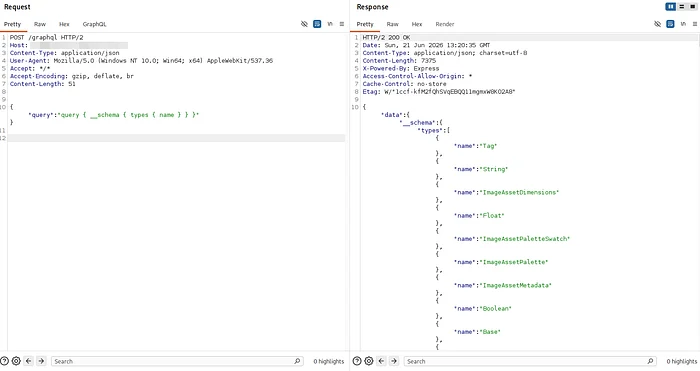
The screenshot captioned "Introspection enabled" shows the introspection response being returned by the endpoint.
Step 2: query the bulk employee type
Using that blueprint, a second POST request was crafted against a type named ExtractAllEmployees. The query included a pageSize parameter set to 99999, which bypassed the standard pagination limits. The server returned the entire dataset, completely unauthenticated.
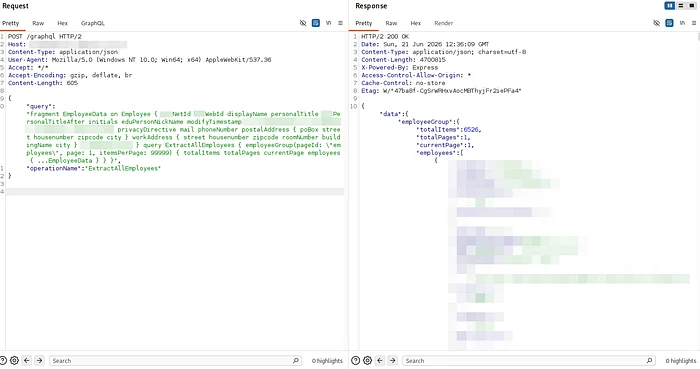
The screenshot captioned "Leaked PII of 6,526 employees" shows the returned records.
Exposed data
The combination of introspection and missing authorisation exposed both the schema and the underlying data. The following fields were returned in plaintext:
| Field | What it exposed |
|---|---|
| Introspection | The names and structures of all internal API types and queries |
totalItems |
The total count of employees in the database (6526) |
*NetId / *WebId |
Internal network and web identifiers |
displayName / sn / *na* |
Full names and searchable internal names of employees |
postalAddress |
Full physical office locations, including street, house number, zip code, city and room number |
Root cause
GraphQL APIs are designed to be flexible and self-documenting. Introspection is a built-in feature that lets clients ask the server which queries and types it supports. Left enabled in production, it lets an attacker map hidden or undocumented queries such as ExtractAllEmployees.
On top of that, the bulk-extraction query itself had no access control and no server-side limit on the pagination parameter. The report notes that developers often create such queries without implementing proper authorisation or enforcing limits on parameters like itemsPerPage: 99999. The report describes two weaknesses: open introspection and a missing authorisation check on the bulk query.
Impact
The exposed data amounts to a complete, downloadable directory of the organisation's workforce, obtained through a public API. No vulnerability in the application itself had to be exploited, and the data could be pulled from any external host. In the researcher's assessment, an attacker could:
- harvest valid usernames and email formats for targeted phishing campaigns;
- map the organisational structure and identify key personnel;
- gather physical addresses and room numbers for physical social engineering;
- scrape the entire employee database in a single request.
The report characterises this as a massive data breach achieved through two unauthenticated HTTP requests. The affected organisation is not named, and the host, names and identifiers in the original screenshots were deliberately omitted from the write-up.
Fix
The report gives five remediation steps. It does not say which of them the organisation actually applied; it only states that the endpoint was secured and placed behind a VPN after responsible disclosure.
- Disable introspection in production. This stops attackers from mapping the schema, discovering hidden queries and understanding the data structure.
- Implement authentication and authorisation. GraphQL endpoints should never be publicly accessible without strict authentication. Queries returning sensitive data should require a valid authentication token, and the requesting user should hold the appropriate role under role-based access control.
- Enforce query limits and pagination. Clients should never be allowed to set arbitrarily large page sizes; server-side limits (for example, a maximum of 100 items per page) prevent dumping data in a single request.
- Limit query depth and complexity. Tools that cap depth and complexity prevent crafted queries from overwhelming the server or extracting excessive nested data.
- Add GraphQL security checks to the deployment pipeline. A CI/CD step should scan the schema for open endpoints, introspection settings, overly broad queries and missing authorisation directives before deployment, so exposure is caught before it reaches production.
Variants to test
- Introspection on other GraphQL endpoints. Send the same
__schemaquery to any/graphql-style endpoint you find. A positive result is a200 OKwith a JSON payload listing type names; from there, look for bulk or administrative query names. - Bulk queries with oversized pagination. Once the schema is known, look for query types that return collections and try large
pageSizeoritemsPerPagevalues. A positive result is a response containing far more records than the UI would ever show, returned without credentials. - Unauthenticated access to sensitive types. Repeat the bulk query with no token at all. A positive result is the same dataset coming back to an anonymous client.
- Field-level over-fetching. Request fields the UI does not display, such as internal identifiers and postal addresses. A positive result is those fields appearing in plaintext in the response.
Key takeaways
- A single misconfigured GraphQL setting (introspection) can act as a roadmap for attackers to find sensitive data.
- A missing authorisation check on a GraphQL query can expose an entire database.
- GraphQL endpoints are a common and easily overlooked attack surface, especially regarding data over-fetching.
- Disabling introspection and enforcing strict pagination are basic but essential hardening steps.
What happened, in plain words
A company had a web application with a programming interface behind it, called a GraphQL API. That interface was reachable at the address /graphql. Anyone on the internet could send it questions, and it would answer with data from the company's systems. One of the questions it was willing to answer returned the company's entire employee directory: names, internal usernames and full office addresses, including street, house number, zip code, city and room number.
The researcher who found this did not break anything, guess a password or exploit a bug in the software. They sent two ordinary requests, the same kind a browser sends when you load a page or submit a form, and the server answered both without asking who they were. The first request asked the server to describe itself, and it did. The second request asked for all the employee records at once, and it handed them over.
The report describes the endpoint as a development environment endpoint that was never meant to be publicly accessible. After the discovery and a responsible disclosure, the endpoint was secured and placed behind a VPN.
This article walks through the same steps the researcher took, explaining each idea from scratch along the way.
The pieces you need to know first
Before the steps make sense, a few everyday ideas need to be clear.
What an API is. Think of a restaurant. You do not walk into the kitchen and cook; you tell the waiter what you want, and the waiter brings it from the kitchen. An API (Application Programming Interface) is the waiter between a program and the data or services behind it. Your browser or a script asks the API for something, and the API fetches it from the database and brings it back. You never touch the kitchen directly.
What GraphQL is. Most APIs work like a fixed menu: you ask for "the employee list page" and you get exactly the fields the kitchen decided to put on that plate. GraphQL works more like a buffet where you write down precisely which dishes you want. You send one request describing the shape of the answer you want, field by field, and the server returns exactly that shape. This flexibility is why GraphQL is popular, and it is also why it needs care: a client can ask for a lot.
What an endpoint is. An endpoint is a specific address on a server that accepts a particular kind of request. /graphql is the address here. It is like a single service counter in a building: whatever you need from the GraphQL system, you ask at that one counter.
What a POST request is. When your browser loads a page, it usually sends a GET request, meaning "give me this". A POST request means "here is some data, please process it". Forms use POST, and so do most API calls that carry a question in the body of the request. Both requests in this story are POST requests carrying a JSON body.
What JSON is. JSON is a plain text way of writing structured data, using curly braces for objects and square brackets for lists. It looks like this: {"name": "value"}. It is readable by humans and easy for programs to parse.
What a schema is. A schema is the blueprint of an API: the list of every type of data it knows about and every question it can answer. If the API were a library, the schema would be the card catalogue telling you which shelves exist and what is on them.
What introspection is. GraphQL has a built-in feature called introspection, which lets a client ask the server "what can you do?" and receive the schema as the answer. It is like a shop that, when asked, hands you its complete internal inventory list. It is useful during development, when programmers need to explore the API. In production, where real users and real data live, it is usually better switched off.
What authentication and authorisation are. Authentication is proving who you are, like showing your ID at the door. Authorisation is what you are allowed to do once inside, like a badge that opens only certain rooms. The requests in this report carried no authentication at all.
What a token or cookie is. After you log in somewhere, the server often gives your browser a small piece of text called a token or a cookie, which the browser sends back with every later request so the server recognises you. It is like a wristband at an event: you show it once at the entrance, and afterwards staff glance at your wrist instead of asking for your ID again. The requests here carried no wristband at all.
What PII is. PII stands for Personally Identifiable Information: data that can identify a specific person, such as a full name, a username, an address or a phone number. It is the kind of data that privacy laws care about.
What pagination is. When a list is long, APIs usually return it in chunks, called pages, so the answer does not become enormous. A parameter such as pageSize tells the server how many items to put on each page. It is like a website showing 20 search results per page instead of all of them at once.
What the vulnerability class is. No software vulnerability had to be exploited: introspection was open and the bulk query had no authorisation check. Security people call the second part a missing or broken authorisation check, and the overall result a sensitive data exposure.
Setup
The testing was done against the live endpoint with no account and no credentials. The report does not name any tools, versions or special preconditions: the two requests described were ordinary unauthenticated HTTP POST requests carrying JSON bodies. The only precondition that mattered was that the endpoint answered anonymous clients and had introspection enabled.
In plain terms: the researcher needed nothing more than the ability to send a request to an address and read the reply. No login, no special software, no insider knowledge.
Finding it
A POST request to the GraphQL endpoint returned a 200 OK response that revealed the application's entire internal schema. Because introspection was enabled, an unauthenticated user could query the API to map out all available data types. Nothing about the request was malicious: the server processed a standard GraphQL query and returned the data.
200 OK is the standard HTTP status code meaning "the request succeeded". It is the same code your browser receives when a page loads normally. Seeing it here means the server was not refusing or blocking the request; it was happily answering.
Exploitation
Step 1: map the schema with introspection
A standard GraphQL introspection query was sent to the endpoint:
{"query":"query { __schema { types { name } } }"}
Line by line, in plain words:
- The outer curly braces are a JSON object, the envelope that carries the request.
"query"is the field name. GraphQL expects the question to be sent under this key.- The value of
"query"is a string containing the actual GraphQL question:query { __schema { types { name } } }. queryat the start of that string says "this is a read request".__schemais the special introspection entry point. The double underscore marks it as a built-in GraphQL field rather than something the application defined. Asking for it is asking the server to describe itself.typesasks for the list of all data types the schema defines.nameasks, for each type, for its name only. The query asks, for each type, for its name only.
Why this step: before you can ask for data, you need to know what the server is willing to talk about. The schema is the map. Without it, you would be guessing query names; with it, you can see every type the application defines, including ones the user interface never shows.
The server responded with 200 OK and a large JSON payload listing every GraphQL type in the application, for example Tag, String, ImageAssetDimensions and Boolean. Because introspection had not been disabled, the server handed the blueprint of the entire API to the client.
The screenshot captioned "Introspection enabled" shows the introspection response being returned by the endpoint.
Some of those type names are ordinary building blocks (String, Boolean), and some are specific to the application (Tag, ImageAssetDimensions). The list is complete: it names every GraphQL type the application defines.
Step 2: query the bulk employee type
Using that blueprint, a second POST request was crafted against a type named ExtractAllEmployees. The query included a pageSize parameter set to 99999, which bypassed the standard pagination limits. The server returned the entire dataset, completely unauthenticated.
The screenshot captioned "Leaked PII of 6,526 employees" shows the returned records.
Why this step: the schema from step 1 named a query whose very name, ExtractAllEmployees, says it returns every employee. That is exactly the kind of query a normal interface would never expose to a visitor, and exactly the kind an attacker looks for. The pageSize value of 99999 bypassed the standard pagination limits, so the server returned the entire dataset in one go. The server complied, and it did so without asking for a token, a cookie or any proof of identity.
Exposed data
The combination of introspection and missing authorisation exposed both the schema and the underlying data. The following fields were returned in plaintext:
| Field | What it exposed |
|---|---|
| Introspection | The names and structures of all internal API types and queries |
totalItems |
The total count of employees in the database (6526) |
*NetId / *WebId |
Internal network and web identifiers |
displayName / sn / *na* |
Full names and searchable internal names of employees |
postalAddress |
Full physical office locations, including street, house number, zip code, city and room number |
"In plaintext" means the values came back readable, not hashed or masked. totalItems is a count field: it told the researcher how many records existed in total, which is how the figure of 6526 employees is known. The identifiers and names are the kind of data that lets someone single out a real person, and postalAddress adds where that person physically sits.
Root cause
GraphQL APIs are designed to be flexible and self-documenting. Introspection is a built-in feature that lets clients ask the server which queries and types it supports. Left enabled in production, it lets an attacker map hidden or undocumented queries such as ExtractAllEmployees.
On top of that, the bulk-extraction query itself had no access control and no server-side limit on the pagination parameter. The report notes that developers often create such queries without implementing proper authorisation or enforcing limits on parameters like itemsPerPage: 99999. The report describes two weaknesses: open introspection and a missing authorisation check on the bulk query.
A useful comparison: introspection is the shop handing out its inventory list to anyone who asks, and the missing authorisation check is the storeroom door standing open behind the counter. Either one alone is a problem; together they turn a curiosity into a full data breach.
Impact
The exposed data amounts to a complete, downloadable directory of the organisation's workforce, obtained through a public API. No vulnerability in the application itself had to be exploited, and the data could be pulled from any external host. In the researcher's assessment, an attacker could:
- harvest valid usernames and email formats for targeted phishing campaigns;
- map the organisational structure and identify key personnel;
- gather physical addresses and room numbers for physical social engineering;
- scrape the entire employee database in a single request.
Phishing is a fake message designed to trick someone into handing over credentials or clicking something harmful; knowing real usernames and the company's email format makes such a message far more convincing. Social engineering is the same idea applied to people rather than systems, and physical addresses and room numbers make it possible in person.
The report characterises this as a massive data breach achieved through two unauthenticated HTTP requests. The affected organisation is not named, and the host, names and identifiers in the original screenshots were deliberately omitted from the write-up.
Fix
The report gives five remediation steps. It does not say which of them the organisation actually applied; it only states that the endpoint was secured and placed behind a VPN after responsible disclosure. A VPN is a private tunnel into a network: only people with the right access can reach the endpoint at all, which is a strong barrier but not the same as fixing the application itself.
- Disable introspection in production. This stops attackers from mapping the schema, discovering hidden queries and understanding the data structure. In the shop comparison, the shop stops handing out its inventory list to strangers.
- Implement authentication and authorisation. GraphQL endpoints should never be publicly accessible without strict authentication. Queries returning sensitive data should require a valid authentication token, and the requesting user should hold the appropriate role under role-based access control. Role-based access control means each person is assigned a role, and each role is allowed only certain things.
- Enforce query limits and pagination. Clients should never be allowed to set arbitrarily large page sizes; server-side limits (for example, a maximum of 100 items per page) prevent dumping data in a single request. The limit must be enforced by the server, because a client can always ask for more.
- Limit query depth and complexity. Tools that cap depth and complexity prevent crafted queries from overwhelming the server or extracting excessive nested data. Depth means how many layers deep a single query reaches; complexity is a rough measure of how much work the query asks the server to do.
- Add GraphQL security checks to the deployment pipeline. A CI/CD step should scan the schema for open endpoints, introspection settings, overly broad queries and missing authorisation directives before deployment, so exposure is caught before it reaches production. CI/CD is the automated process that builds and releases software; adding a check there means every future release is inspected automatically.
Variants to test
These are the same ideas applied more widely, useful if you want to understand how such findings are repeated elsewhere.
- Introspection on other GraphQL endpoints. Send the same
__schemaquery to any/graphql-style endpoint you find. A positive result is a200 OKwith a JSON payload listing type names; from there, look for bulk or administrative query names. - Bulk queries with oversized pagination. Once the schema is known, look for query types that return collections and try large
pageSizeoritemsPerPagevalues. A positive result is a response containing far more records than the UI would ever show, returned without credentials. - Unauthenticated access to sensitive types. Repeat the bulk query with no token at all. A positive result is the same dataset coming back to an anonymous client.
- Field-level over-fetching. Request fields the UI does not display, such as internal identifiers and postal addresses. A positive result is those fields appearing in plaintext in the response.
Key takeaways
- A single misconfigured GraphQL setting (introspection) can act as a roadmap for attackers to find sensitive data.
- A missing authorisation check on a GraphQL query can expose an entire database.
- GraphQL endpoints are a common and easily overlooked attack surface, especially regarding data over-fetching.
- Disabling introspection and enforcing strict pagination are basic but essential hardening steps.
Glossary
- API: the interface a program uses to ask another system for data or actions, like a waiter between you and the kitchen.
- Authentication: proving who you are, for example with a login or a token.
- Authorisation: what an authenticated (or anonymous) user is allowed to do.
- CI/CD: the automated process that builds, tests and releases software.
- Cookie: a small piece of text a server gives your browser so it can recognise you on later requests.
- Endpoint: a specific address on a server that accepts a particular kind of request, such as
/graphql. - GraphQL: a way of building APIs where the client describes exactly which fields it wants in the answer.
- HTTP: the protocol browsers and servers use to exchange requests and responses.
- Introspection: a built-in GraphQL feature that lets a client ask the server to describe its schema.
- JSON: a plain text format for structured data, using curly braces and square brackets.
- Pagination: splitting a long list into pages, controlled by a parameter such as
pageSize. - PII: Personally Identifiable Information, data that can identify a specific person.
- POST request: an HTTP request that carries data for the server to process, rather than just asking for a page.
- Role-based access control: giving each user a role and allowing each role only certain actions.
- Schema: the blueprint of an API, listing its data types and the questions it can answer.
- Social engineering: manipulating people, rather than systems, to obtain information or access.
- Token: a piece of text issued after login that a client sends with later requests to prove its identity.
- VPN: a private tunnel into a network, reachable only by people with the right access.
- 200 OK: the HTTP status code meaning the request succeeded.