Bypassing a login page and getting full admin access on an internal training platform
An unauthenticated attacker could access an internal SQL Server Reporting Services endpoint and then use exposed JavaScript files to discover administrative pages. By adding a trailing slash to URLs and manipulating a client-side response, the attacker gained the ability to view and edit user profiles across multiple regions.

In this write up i’ll go over how I went from a login page of a training platform which I didn’t have credentials for to getting full administrative access as well as limited SSN leak on some users. It’s a bit of lengthy post primarily because the aim is to highlight my entire thought process as I was going through…
The full write-up lives on its author's site
It belongs to its author, so we link to it rather than copy it. The other two tabs are our own rewrites, checked against it.
This is the story of how I went from a bare login page on a training platform, with no credentials at all, to full administrative access, and to a limited SSN leak on some users. It is a long post on purpose: the aim is to show the whole thought process as I moved through the target, because experienced hackers do not always spell out how two and two get put together, and that leaves beginners puzzled. It is a story of perseverance, patience, bypasses and escalations.
Context
The target was a training platform, which I will call platform.com. It is a large scope with many assets, and I had virtually no credentials to any of them. The platform runs on ASP.NET, which the login page itself discloses. Behind it sits an MS SQL Server Reporting Services (SSRS) endpoint that serves internal reports, and the application front end is built on the Backbone.js framework.
Setup
No accounts, no roles, no credentials of any kind. The tools were:
- Shodan, to find reachable assets in scope.
- dirsearch, to brute force directories.
- Burp Suite, to inspect and later intercept traffic.
- The browser, plus the public Backbone.js documentation.
The Shodan query I used was a basic one:
ssl:target.com 200
It returns devices with an SSL certificate matching the target domain, and the 200 restricts results to devices indexed with a 200 status code, meaning they are reachable. That is how I landed on the host I eventually compromised.
Finding it
Navigating to platform.com gave a very basic login page that disclosed ASP.NET. From there I launched a basic dirsearch run against the domain and immediately got a hit on /ReportServer. Browsing to platform.com/ReportServer put me on a page with directory listing enabled, so I could see all the available reports. That page also told me I was dealing with an SSRS endpoint.
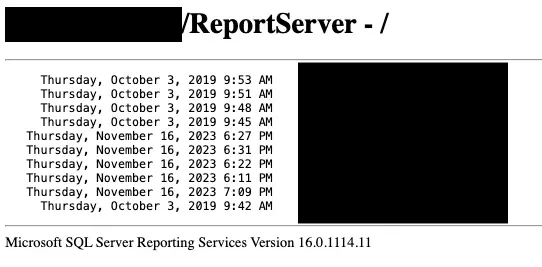
Clicking into the reports redirected the page to what looked like an internal endpoint not accessible over the internet, something like:
internal.platform/ReportServer/?%2fRegion&rs:Command=ListChildren
That looked wrong for a simple reason: this report server should never have been picked up by Shodan in the first place, since it is not meant to be exposed on the internet. I figured there was some sort of routing issue.
Exploitation
Step 1: bypass the internal hostname
I replaced internal.platform/ReportServer back with platform.com/ReportServer and the report loaded. That was bypass #1, and it was nothing more than swapping the hostname back to the public one.
With a pile of internal reports available, the natural next step was to find one holding information that should not be available outside the organisation. This was harder than it sounds: it was a training platform, so there were a huge number of reports about user metrics on courses, course statistics and similar material.
I eventually found a report disclosing users' full names and unique user IDs. After a lot of searching I reported it, against my better judgement, and it was marked informative because that was not considered sensitive information. That was a blow, but I left the program for a while and came back because my gut kept telling me the site was vulnerable.

calma calma
Step 2: mine the reports for endpoints
I went back through the available reports one by one. A lot of the internal jargon meant nothing to me, so identifying the juicy ones was not easy. Eventually I landed on a report named "Content Usage", which was huge: it contained information on the most visited endpoints within the platform.
On that report I noticed a pattern in the endpoint structure:
platform.com/app/region/courses.aspx
platform.com/app/region/calendar.aspx
Navigating directly to these gave a 401 error, but the directory structure gave me the chance to brute force further, which led me to a new path:
platform.com/app/scripts/views/courses/
I was still getting errors on these directories, but one of the parent folders is scripts/, so I started brute forcing for JavaScript files under courses/ and got a hit on index.js, which turned out to be a treasure trove. In that file I could see how the page was constructed without ever seeing the page, and I learned it was using Backbone.js.
point noted
Since Backbone.js is open source, I read some documentation to get a basic understanding of the application. The architecture looked like this:
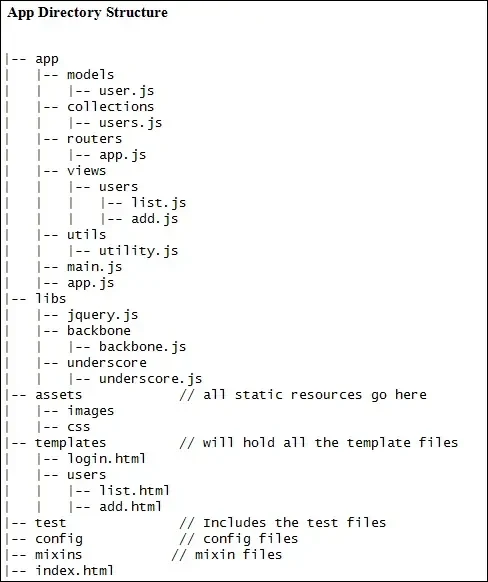
That gave me better directory names to brute force. Since views/courses/ had an accessible index.js, and the directory names under views/ matched the aspx files listed in the Content Usage report, there should logically be a views/calendar/index.js as well. I browsed to it and it was available too. I did not spend long there, because course or calendar information would not be considered sensitive.
Step 3: reach the admin user page
Back to the Content Usage report, where I found a reference to a users.aspx file. Naturally I tried views/users/index.js and the file loaded. This script was clearly used on an administrative panel for managing users. Skimming it, I found a function like this:
function addNewUser() { window.location = Platform.Paths.ControllerData + "/Users.aspx/manageUserProfile?userId=&searchValues=&actionType=A"; }
The value of Platform.Paths.ControllerData in the same script was platform.com/app/region/, so I navigated to:
platform.com/app/region/Users.aspx/manageUserProfile?userId=&searchValues=&actionType=A
For the first time, a portion of this admin page fully rendered in my browser.

This was exhilarating: I was a completely unauthenticated user and should definitely not have been able to see that page. The main barrier was that creating a user required an internal email address, which I did not have, so I did not focus on that part. Knowing I had access to this, I was confident I could reach the main Users.aspx page.
So I worked backwards. I removed the userId=&searchValues=&actionType=A parameters, but that did not do much: it just broke the page and it would not load. I then removed manageUserProfile, leaving:
platform.com/app/region/Users.aspx/
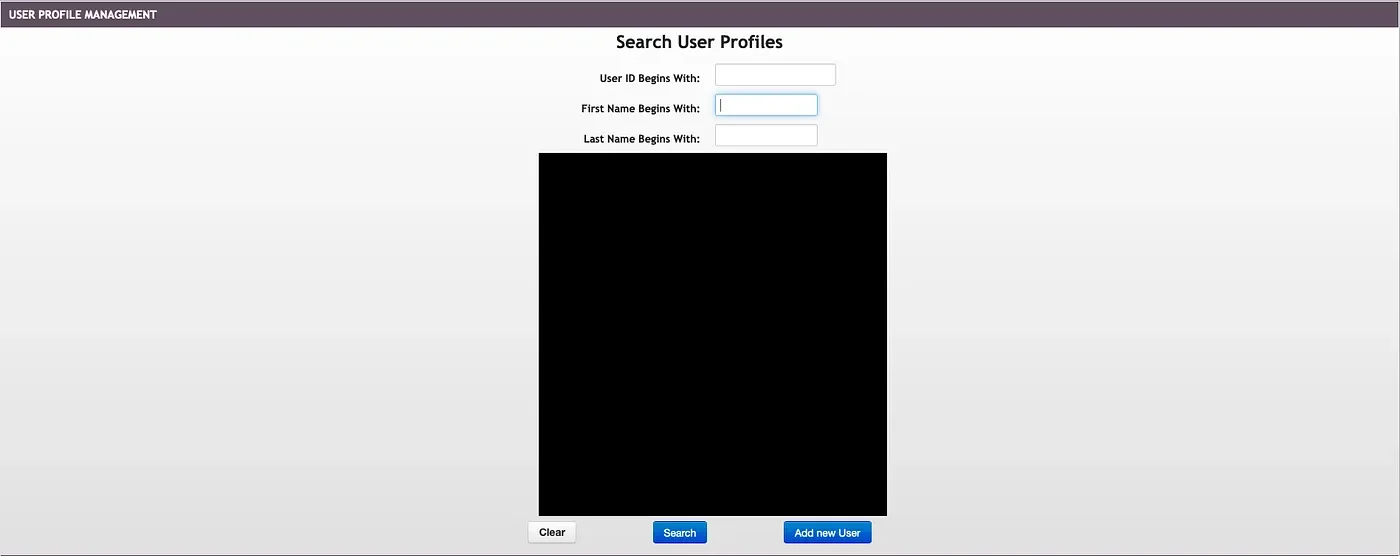
And boom, the main user search page fully rendered in the browser.
Step 4: the trailing slash
Earlier I said that navigating to platform.com/app/region/calendar.aspx or platform.com/app/region/courses.aspx would not load, so platform.com/app/region/users.aspx should not either, right?
Enter bypass #2. The URL that actually loaded was platform.com/app/location/Users.aspx/; the one that did not was platform.com/app/location/Users.aspx. The difference is a single forward slash at the end of the URL. I have no idea why this happened; someone who knows IIS and Akamai can explain the misconfiguration. I am in the business of breaking things, not making them, and I could not tell you what was happening in the backend. The fact was that simply adding a slash at the end of the URLs would load the pages. Using this technique I could access a lot of different admin functions and pages within the platform. At that moment I could hear Nintendo's 1986 NES "Now you are playing with power" catchphrase ringing in my head.

Pictured: Power
Step 5: search users and fix the doubled path
Back on the users page, I clicked the shiny blue search button and it dumped a ton of user profiles. The next step was to see whether I could modify them. I clicked a random user and hit another road block: a generic page not found.
Generic is only partly true. The URL was:
platform.com/app/PageNotFound.aspx?aspxerrorpath=/app/region/Users.aspx/Users.aspx/manageUserProfile
There is a clear misconfiguration here: Users.aspx was being appended twice. Looking at the network traffic in Burp Suite, the request sent when I hit search went to:
platform.com/app/location/Users.aspx/Users.aspx/manageUserProfile?userId={}&searchValues=&actionType=E
I removed one of the Users.aspx segments and the edit profile page for the arbitrary user loaded.
Step 6: response manipulation
As usual in this line of work, another road block: the rendered form was not clickable or editable. I had a pile of fields I could not change. The restriction was clearly client side, because the server sent all the data plus additional information telling the browser whether I could change it. In theory I could go back to the JS files and reverse engineer a request to send to the server, but I am still a JS noob, so that would have taken more time.
Back in Burp Suite I also noticed this request when the profile initially loaded:
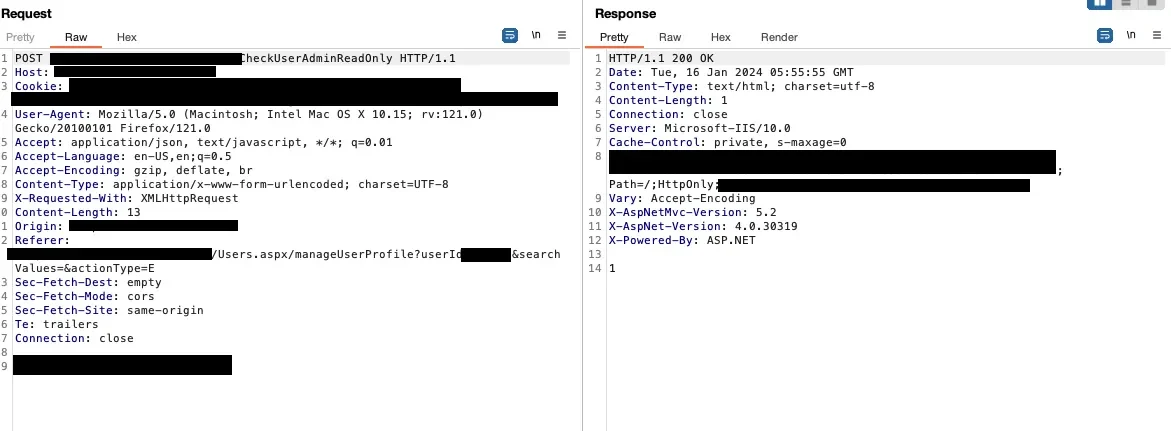
Very juicy. This is bypass #3, and my head went straight to a technique called response manipulation. The way it works is that you intercept an HTTP response from the server and change its values before it reaches the browser. Pages constantly send requests to check your permission level or account type, the server answers with certain values, and those values are passed to the page's JS, which renders based on them.
In this context, the page asked the server whether this profile should be read only, and the server answered YES (the number 1 in the screenshot above), which disabled all the fields. Intercepting that response and changing it to 0 made all the buttons editable and clickable.
Step 7: save the change
Final stretch: I edited an arbitrary comment field and hit save, and for once there was no mountain to climb. My changes were saved, which meant I had write access to any user profile.

Remember the URL had a /region/ directory? All of this worked for multiple regions if you changed it to the respective region. I had access to 5 of the 7 available ones, which in theory gave me the ability to modify or delete upwards of 50,000 accounts, completely unauthenticated.
Root cause
Several mistakes stack up here, and the report only shows the behaviour, so the underlying causes are likely rather than confirmed:
- An SSRS report server meant for internal use was reachable from the internet and indexed by Shodan, with directory listing enabled. The internal hostname in the report links could be swapped for the public hostname, which he put down to some sort of routing issue.
- The Content Usage report exposed internal endpoint paths, and the
scripts/views/directories served theirindex.jsfiles, which disclosed the admin URL structure and thePlatform.Paths.ControllerDatavalue. - The admin
.aspxpages were reachable without authentication when the URL ended in a trailing slash, while the courses and calendar pages without it returned 401. That is likely an IIS or Akamai routing and authorisation mismatch. - The application appended
Users.aspxtwice when building the edit-profile URL, which broke the page until the duplicate was removed by hand. - The read-only state of the profile form was enforced only client side: the server sent a flag (1 for read only) and the JS disabled the fields, so changing the response to 0 re-enabled them. The save request was accepted by the server.
Impact
As an unauthenticated user I could reach admin functions and pages, search and dump user profiles, and modify any user profile, including writing to arbitrary comment fields. By changing the region in the URL I reached 5 of the 7 regions, which in theory allowed modifying or deleting upwards of 50,000 accounts. The report also says a part two covers a limited SSN leak on some users.
Fix
- Take the SSRS report server off the public internet, or put it behind authentication and remove directory listing.
- Remove internal endpoint paths from reports that ordinary users can reach.
- Fix the routing so that a trailing slash does not change the authorisation decision, and enforce authentication and authorisation on the server for every admin page and action.
- Fix the URL construction that duplicates
Users.aspx. - Enforce the read-only rule on the server when saving, not only in the browser.
Variants to test
- Append a trailing slash to protected
.aspxpaths that return 401, and compare the response. A positive result is a fully rendered page instead of an error. - Swap internal hostnames found in links or reports for the public hostname. A positive result is content that loads from the public host.
- Brute force
scripts/views/<name>/index.jsfor every.aspxname you can find in reports or error pages. A positive result is a JS file that reveals controller paths or admin URLs. - Look for duplicated path segments in error pages such as
PageNotFound.aspx?aspxerrorpath=.... A positive result is a working URL once the duplicate is removed. - Intercept responses carrying permission or read-only flags and flip them (for example 1 to 0). A positive result is an editable form, followed by a save that the server accepts.
- Change the region segment in an admin URL to other values. A positive result is the same admin functionality in another region.
What happened, in plain words
A security researcher found a login page for an online training platform. He had no username or password. Over several steps he got full administrator access to the platform, could search and edit any user profile, and could reach 5 of the 7 regional sections, which in theory meant control over more than 50,000 accounts. He also found a report that leaked full names and user IDs, and a part two covers a limited SSN leak on some users.
The path was not a single trick. It was a chain: a report server that should have been internal was reachable from the internet; its reports listed internal web addresses; those addresses led to JavaScript files that showed how the admin pages were built; the admin pages loaded without login if you added a slash at the end; a duplicated piece of the address broke the edit page until it was removed; and a read-only flag sent by the server could be flipped in the browser to make the form editable. Each step is explained below from zero.
Context
The target is a training platform, called platform.com here. It is a large scope with many assets, and the researcher had no credentials for any of them. The login page itself reveals that the site runs on ASP.NET, a framework from Microsoft for building web applications. Behind the login sits an MS SQL Server Reporting Services (SSRS) endpoint, which is a Microsoft tool for publishing reports; it serves internal reports. The front end of the application is built with Backbone.js, a JavaScript library for structuring web pages.
Setup
No accounts, no roles, no credentials. The tools were:
- Shodan, a search engine for internet-connected devices. It indexes things like web servers, cameras and routers, and lets you search them by attributes such as the SSL certificate they present.
- dirsearch, a tool that tries a long list of common directory and file names against a website to discover hidden paths. This is called brute forcing directories.
- Burp Suite, a tool that sits between your browser and the server so you can see, and later change, every request and response. It is a proxy.
- A normal browser, plus the public Backbone.js documentation.
The Shodan query was:
ssl:target.com 200
Line by line: ssl:target.com asks Shodan for devices whose SSL certificate matches the target domain. An SSL certificate is the digital ID a site presents to prove it is who it claims to be, and it is what enables the padlock and HTTPS. 200 restricts the results to devices that Shodan indexed with HTTP status code 200, meaning the device answered successfully and is reachable. The space separates the two filters. That is how the researcher found the host he eventually compromised.
Finding it
Navigating to platform.com gave a very basic login page that disclosed ASP.NET. From there he ran dirsearch against the domain and immediately got a hit on /ReportServer. Browsing to platform.com/ReportServer put him on a page with directory listing enabled, so he could see all the available reports. That page also told him it was an SSRS endpoint.
Clicking into the reports redirected the page to what looked like an internal endpoint not accessible over the internet, something like:
internal.platform/ReportServer/?%2fRegion&rs:Command=ListChildren
Line by line: internal.platform is a hostname that looks like it belongs to the organisation's private network, not the public internet. /ReportServer/ is the path of the reporting service. ? starts the query string, the part of a URL that carries parameters. %2fRegion is the URL-encoded form of /Region (the two characters %2f stand for a forward slash), so it names a folder or item called Region. & separates parameters. rs:Command=ListChildren is an SSRS instruction that asks the server to list the items inside that folder. In short, the link was telling the browser to ask an internal machine to list a folder of reports.
That looked wrong for a simple reason: this report server should never have been picked up by Shodan in the first place, since it is not meant to be exposed on the internet. The researcher figured there was some sort of routing issue.
Exploitation
Step 1: bypass the internal hostname
He replaced internal.platform/ReportServer back with platform.com/ReportServer and the report loaded. That was bypass #1, and it was nothing more than swapping the hostname back to the public one. The server was reachable from the outside under its public name, even though its links pointed at an internal name.
With a pile of internal reports available, the natural next step was to find one holding information that should not be available outside the organisation. This was harder than it sounds: it was a training platform, so there were a huge number of reports about user metrics on courses, course statistics and similar material.
He eventually found a report disclosing users' full names and unique user IDs. After a lot of searching he reported it, against his better judgement, and it was marked informative because that was not considered sensitive information. That was a blow, but he left the program for a while and came back because his gut kept telling him the site was vulnerable.
calma calma
Step 2: mine the reports for endpoints
He went back through the available reports one by one. A lot of the internal jargon meant nothing to him, so identifying the juicy ones was not easy. Eventually he landed on a report named "Content Usage", which was huge: it contained information on the most visited endpoints within the platform. An endpoint is simply a specific address on a server that does something, like a page or a service you can call.
On that report he noticed a pattern in the endpoint structure:
platform.com/app/region/courses.aspx
platform.com/app/region/calendar.aspx
Line by line: platform.com is the site. /app/ is a folder. /region/ is a folder that likely stands for a regional section. courses.aspx and calendar.aspx are ASP.NET pages (the .aspx extension marks a page that the server builds dynamically). These are the addresses of the course list and the calendar.
Navigating directly to these gave a 401 error. HTTP status code 401 means "Unauthorized": the server is refusing because you have not logged in. But the directory structure gave him the chance to brute force further, which led to a new path:
platform.com/app/scripts/views/courses/
Line by line: this is a folder under /app/. scripts suggests JavaScript files. views is a common folder name in web applications for the parts that build what you see. courses matches the course page. He was still getting errors on these directories, but one of the parent folders is scripts/, so he started brute forcing for JavaScript files under courses/ and got a hit on index.js, which turned out to be a treasure trove. In that file he could see how the page was constructed without ever seeing the page, and he learned it was using Backbone.js.
point noted
Since Backbone.js is open source, he read some documentation to get a basic understanding of the application. The architecture looked like this:
That gave him better directory names to brute force. Since views/courses/ had an accessible index.js, and the directory names under views/ matched the aspx files listed in the Content Usage report, there should logically be a views/calendar/index.js as well. He browsed to it and it was available too. He did not spend long there, because course or calendar information would not be considered sensitive.
Step 3: reach the admin user page
Back to the Content Usage report, where he found a reference to a users.aspx file. Naturally he tried views/users/index.js and the file loaded. This script was clearly used on an administrative panel for managing users. Skimming it, he found a function like this:
function addNewUser() { window.location = Platform.Paths.ControllerData + "/Users.aspx/manageUserProfile?userId=&searchValues=&actionType=A"; }
Line by line: function addNewUser() defines a function named addNewUser, which runs when someone triggers it (for example by clicking a button). window.location is the browser's current address; assigning to it makes the browser navigate. Platform.Paths.ControllerData is a variable holding a base address, defined elsewhere in the same script. + joins strings together. The string "/Users.aspx/manageUserProfile?userId=&searchValues=&actionType=A" is the rest of the address: the page Users.aspx, then a sub-path manageUserProfile, then a query string with three parameters: userId (empty), searchValues (empty) and actionType=A. So the function sends the browser to the manage-user-profile page with an empty user ID and action type A.
The value of Platform.Paths.ControllerData in the same script was platform.com/app/region/, so he navigated to:
platform.com/app/region/Users.aspx/manageUserProfile?userId=&searchValues=&actionType=A
Line by line: this is the base address platform.com/app/region/ followed by the rest from the function. Users.aspx is the user management page. /manageUserProfile is a sub-path that shows the profile management screen. The query string sets userId to empty, searchValues to empty and actionType to A.
For the first time, a portion of this admin page fully rendered in his browser.
This was exhilarating: he was a completely unauthenticated user and should definitely not have been able to see that page. The main barrier was that creating a user required an internal email address, which he did not have, so he did not focus on that part. Knowing he had access to this, he was confident he could reach the main Users.aspx page.
So he worked backwards. He removed the userId=&searchValues=&actionType=A parameters, but that did not do much: it just broke the page and it would not load. He then removed manageUserProfile, leaving:
platform.com/app/region/Users.aspx/
Line by line: this is the base address plus Users.aspx plus a trailing slash. No sub-path, no query string. And boom, the main user search page fully rendered in the browser.
Step 4: the trailing slash
Earlier he said that navigating to platform.com/app/region/calendar.aspx or platform.com/app/region/courses.aspx would not load, so platform.com/app/region/users.aspx should not either, right?
Enter bypass #2. The URL that actually loaded was platform.com/app/location/Users.aspx/; the one that did not was platform.com/app/location/Users.aspx. The difference is a single forward slash at the end of the URL. He had no idea why this happened; someone who knows IIS and Akamai can explain the misconfiguration. IIS is Microsoft's web server; Akamai is a content delivery network that sits in front of many sites. He is in the business of breaking things, not making them, and could not tell you what was happening in the backend. The fact was that simply adding a slash at the end of the URLs would load the pages. Using this technique he could access a lot of different admin functions and pages within the platform. At that moment he could hear Nintendo's 1986 NES "Now you are playing with power" catchphrase ringing in his head.
Pictured: Power
Step 5: search users and fix the doubled path
Back on the users page, he clicked the shiny blue search button and it dumped a ton of user profiles. The next step was to see whether he could modify them. He clicked a random user and hit another road block: a generic page not found.
Generic is only partly true. The URL was:
platform.com/app/PageNotFound.aspx?aspxerrorpath=/app/region/Users.aspx/Users.aspx/manageUserProfile
Line by line: PageNotFound.aspx is the error page. The query string has one parameter, aspxerrorpath, whose value is the path that caused the error: /app/region/Users.aspx/Users.aspx/manageUserProfile. Notice Users.aspx appears twice in a row. There is a clear misconfiguration here: Users.aspx was being appended twice. Looking at the network traffic in Burp Suite, the request sent when he hit search went to:
platform.com/app/location/Users.aspx/Users.aspx/manageUserProfile?userId={}&searchValues=&actionType=E
Line by line: same doubled Users.aspx, then /manageUserProfile, then a query string with userId={} (the {} is a placeholder for the actual user ID), searchValues empty, and actionType=E. He removed one of the Users.aspx segments and the edit profile page for the arbitrary user loaded.
Step 6: response manipulation
As usual in this line of work, another road block: the rendered form was not clickable or editable. He had a pile of fields he could not change. The restriction was clearly client side, because the server sent all the data plus additional information telling the browser whether he could change it. In theory he could go back to the JS files and reverse engineer a request to send to the server, but he is still a JS noob, so that would have taken more time.
Back in Burp Suite he also noticed this request when the profile initially loaded:
Very juicy. This is bypass #3, and his head went straight to a technique called response manipulation. The way it works is that you intercept an HTTP response from the server and change its values before it reaches the browser. Pages constantly send requests to check your permission level or account type, the server answers with certain values, and those values are passed to the page's JS, which renders based on them.
In this context, the page asked the server whether this profile should be read only, and the server answered YES (the number 1 in the screenshot above), which disabled all the fields. Intercepting that response and changing it to 0 made all the buttons editable and clickable.
Step 7: save the change
Final stretch: he edited an arbitrary comment field and hit save, and for once there was no mountain to climb. His changes were saved, which meant he had write access to any user profile.
Remember the URL had a /region/ directory? All of this worked for multiple regions if you changed it to the respective region. He had access to 5 of the 7 available ones, which in theory gave him the ability to modify or delete upwards of 50,000 accounts, completely unauthenticated.
Root cause
Several mistakes stack up here, and the report only shows the behaviour, so the underlying causes are likely rather than confirmed:
- An SSRS report server meant for internal use was reachable from the internet and indexed by Shodan, with directory listing enabled. The internal hostname in the report links could be swapped for the public hostname, which he put down to some sort of routing issue.
- The Content Usage report exposed internal endpoint paths, and the
scripts/views/directories served theirindex.jsfiles, which disclosed the admin URL structure and thePlatform.Paths.ControllerDatavalue. - The admin
.aspxpages were reachable without authentication when the URL ended in a trailing slash, while the courses and calendar pages without it returned 401. That is likely an IIS or Akamai routing and authorisation mismatch. - The application appended
Users.aspxtwice when building the edit-profile URL, which broke the page until the duplicate was removed by hand. - The read-only state of the profile form was enforced only client side: the server sent a flag (1 for read only) and the JS disabled the fields, so changing the response to 0 re-enabled them. The save request was accepted by the server.
Impact
As an unauthenticated user he could reach admin functions and pages, search and dump user profiles, and modify any user profile, including writing to arbitrary comment fields. By changing the region in the URL he reached 5 of the 7 regions, which in theory allowed modifying or deleting upwards of 50,000 accounts. The report also mentions a limited SSN leak on some users, covered in a part two of the engagement.
Fix
- Take the SSRS report server off the public internet, or put it behind authentication and remove directory listing.
- Remove internal endpoint paths from reports that ordinary users can reach.
- Fix the routing so that a trailing slash does not change the authorisation decision, and enforce authentication and authorisation on the server for every admin page and action.
- Fix the URL construction that duplicates
Users.aspx. - Enforce the read-only rule on the server when saving, not only in the browser.
Variants to test
- Append a trailing slash to protected
.aspxpaths that return 401, and compare the response. A positive result is a fully rendered page instead of an error. - Swap internal hostnames found in links or reports for the public hostname. A positive result is content that loads from the public host.
- Brute force
scripts/views/<name>/index.jsfor every.aspxname you can find in reports or error pages. A positive result is a JS file that reveals controller paths or admin URLs. - Look for duplicated path segments in error pages such as
PageNotFound.aspx?aspxerrorpath=.... A positive result is a working URL once the duplicate is removed. - Intercept responses carrying permission or read-only flags and flip them (for example 1 to 0). A positive result is an editable form, followed by a save that the server accepts.
- Change the region segment in an admin URL to other values. A positive result is the same admin functionality in another region.
Glossary
- ASP.NET: a Microsoft framework for building web applications and pages that end in
.aspx. - SSRS (MS SQL Server Reporting Services): a Microsoft tool for creating and publishing reports from databases.
- Backbone.js: an open-source JavaScript library for structuring web applications.
- Shodan: a search engine that indexes internet-connected devices and services.
- SSL certificate: a digital ID that proves a site's identity and enables HTTPS.
- dirsearch: a tool that brute forces directory and file names on a website.
- Brute forcing: trying many possible names or values automatically until one works.
- Burp Suite: a proxy tool for inspecting and modifying HTTP traffic between browser and server.
- Proxy: an intermediary that sits between two parties and can observe or change their traffic.
- Endpoint: a specific address on a server that performs an action or returns data.
- Directory listing: a web server feature that shows the files in a folder instead of a page.
- Hostname: the name of a machine on a network, such as
platform.comorinternal.platform. - Query string: the part of a URL after
?, carrying parameters inname=valuepairs. - URL encoding: representing special characters in a URL, for example
%2ffor/. - HTTP status code: a number the server returns to say what happened, such as 200 (OK) or 401 (Unauthorized).
- 401 Unauthorized: the server refuses because you are not authenticated.
- Authentication: proving who you are, usually with a username and password.
- Authorisation: what an authenticated (or unauthenticated) user is allowed to do.
- Unauthenticated: not logged in.
- JavaScript (JS): the programming language that runs in the browser and makes pages interactive.
- Client side: happening in the browser, on the user's machine.
- Server side: happening on the server, which the user does not control.
- Response manipulation: intercepting a server's response and changing its values before the browser uses them.
- IIS: Microsoft's web server software.
- Akamai: a content delivery network that sits in front of websites.
- SSN: Social Security Number, a sensitive personal identifier in the United States.
- Informative: a bug report status meaning the issue was noted but not considered a security vulnerability worth a reward.

