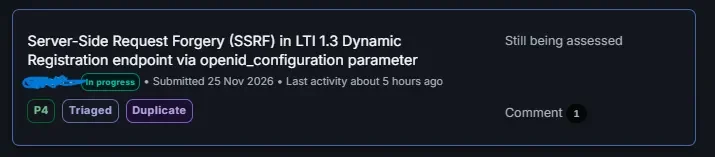
Server-Side Request Forgery (SSRF) in LTI 1.3 Dynamic Registration Endpoint
 Published on medium.com
The LTI 1.3 Dynamic Registration endpoint accepts a URL via the openidconfiguration parameter and makes a server-side HTTP request to that URL to retrieve the LMS's OpenID configuration. The server does not validate or restrict the destination host, allowing an attacker to supply an arbitrary URL and force the server…
The full write-up lives on its author's site
It belongs to its author, so we link to it rather than copy it. The other two tabs are our own rewrites, checked against it.
Context
The target exposes an LTI 1.3 Dynamic Registration endpoint. In normal use, a learning platform (the LMS) registers itself with the tool by handing over a URL through the openid_configuration parameter. The tool then fetches that URL server-side to read the LMS's OpenID configuration. The endpoint lives at /lti/v1/dynamic_registration and also takes a registration_token parameter.
The security question is simple: the server takes a URL from the request and fetches it. If the destination host is not validated or restricted, the caller decides where the server connects, which is server-side request forgery (SSRF).
Setup
No accounts or roles are described. The only tooling the researcher needs is a domain they control, wired to an out-of-band (OOB) interaction service such as Interactsh, so that any DNS or HTTP traffic reaching that domain is logged. Because the response body does not echo the fetched content, the OOB listener is what makes the outbound request observable.
Finding it
The endpoint accepts a URL in openid_configuration and makes a server-side HTTP request to it to retrieve the LMS's OpenID configuration. The server does not validate or restrict the destination host, so an attacker can supply an arbitrary URL and force the server to make outbound requests to a location of the attacker's choosing. That is a classic SSRF.
Exploitation
Step 1: Prepare an OOB listener
Set up a domain you control connected to an out-of-band interaction tool (for example Interactsh) to detect any DNS or HTTP traffic sent to it. The listener records both DNS lookups and HTTP requests.
Step 2: Send the request with the OOB domain
Send a request to the vulnerable endpoint, passing the OOB domain as the value of openid_configuration:
curl -sS -m 25 "https://<target>/lti/v1/dynamic_registration?openid_configuration=http://<your-oob-domain>/probe®istration_token=abc123"
openid_configuration carries the attacker-chosen URL, here pointing at the OOB domain on path /probe over plain HTTP. registration_token is supplied with a placeholder value, abc123, and the request is capped at 25 seconds with -m 25.
Step 3: Observe the error response
The server responds with:
HTTP 500{"error":"Error getting LMS openid_configuration"}
The request fails from the application's point of view: it could not obtain a valid OpenID configuration from the supplied URL. On its own this tells you nothing about whether the server actually connected anywhere.
Step 4: Check the OOB listener
Check the OOB listener log. A DNS lookup and an HTTP request hit the domain, confirming the server made the outbound request.
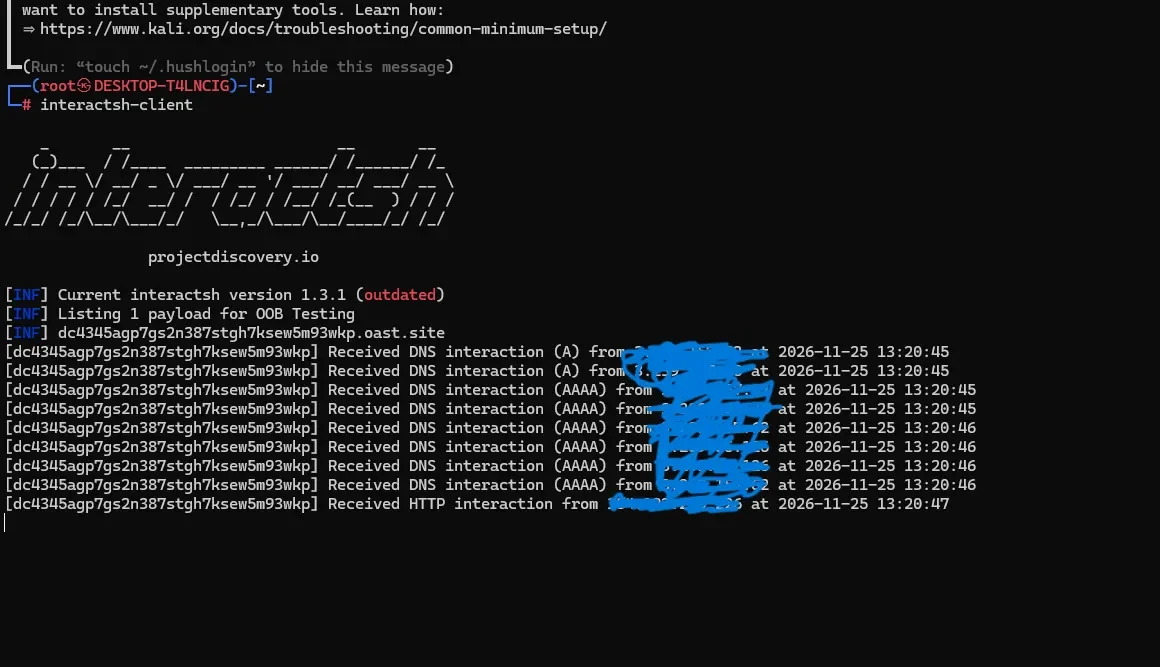
The listener log records the inbound interaction.
Root cause
The endpoint takes the URL from the openid_configuration parameter and makes a server-side HTTP request to it without validating or restricting the destination host. The failed fetch surfaces as a generic 500 error rather than a rejection of the URL. Nothing in the flow, as described, stops the request from going to an arbitrary host, so the caller controls the destination of a request made from the server's network position.
Impact
This confirms blind SSRF: the attacker sees no response body from the fetched URL, only the side effect of the server connecting out. Depending on the hosting environment, it could potentially be used to:
- Reach internal services not exposed publicly
- Access cloud metadata endpoints (for example
[redacted]on AWS, GCP or Azure) - Probe internal ports via timing or error differences
Each of these depends on what the server can reach from its network position and on how much the attacker can infer from timing and error behaviour, since the content of the response is not returned.
Fix
The report does not describe a fix or a change made by the vendor. What the design needs is validation and restriction of the destination host for openid_configuration, so that the server only fetches from locations it is meant to reach rather than any URL supplied by the caller.
Variants to test
- Point
openid_configurationat an internal address and watch for timing differences or distinct errors. A positive result is a response that differs measurably from an unreachable host. - Point it at a cloud metadata address such as
[redacted]. A positive result is a change in response timing or error behaviour. - Try other schemes and redirects on your own domain. A positive result is the server following the redirect or accepting the scheme and still making the outbound request.
- Apply the same pattern to other registration or discovery parameters that take a URL. A positive result is an OOB interaction from the target's infrastructure.
Hunting notes
This kind of bug hides in features that fetch configuration from a URL supplied by the client: dynamic registration, discovery, webhook setup and import-by-URL flows. During recon, look for parameters named after configuration documents (openid_configuration here) and endpoints under paths like /lti/v1/. The signal is a parameter whose value is clearly meant to be fetched by the server.
Because the response is blind, the OOB listener is what turns a 500 into evidence: the DNS lookup and HTTP request to the researcher's domain show the server made the outbound call. That is the impact demonstration the report relies on, together with the list of what blind SSRF could reach depending on the hosting environment.
What happened, in plain words
A website had a feature that lets one piece of software tell another piece of software where to find its settings. You give the site a web address (a URL), and the site's own computer goes off and fetches that address to read the settings. The problem: the site never checked which address it was being told to fetch. Anyone could hand it any address at all, and the site's server would make an outbound request to it. This is called server-side request forgery, or SSRF for short.
The researcher proved it by pointing the site at a web address they controlled and watching their OOB listener log a DNS lookup and an HTTP request. That connection is the proof: the target's server made an outbound request on the researcher's behalf.
The background you need first
A few ideas come up again and again below, so here they are from zero.
A server is the computer that runs a website. When you visit a page, your browser asks the server for it, and the server sends it back. Servers usually sit inside a private network, behind firewalls, and can reach other machines that you, sitting at home, cannot reach.
A URL is a web address, like https://example.com/page. It has a few parts: the scheme (https), the host (example.com), and the path (/page).
An API is a way for one piece of software to talk to another, rather than for a human to click around. Think of it as a service counter: you hand over a request in a fixed format, and you get an answer back in a fixed format. Websites often have API endpoints, which are specific addresses that accept requests.
A parameter is a named value you attach to a request, usually after a ? in the URL. In https://example.com/search?q=cats, the parameter is q and its value is cats. Parameters are how you tell an endpoint what you want.
A token is a short string of characters that acts like a pass or a ticket. Software hands it over to prove it is allowed to do something. It is not necessarily a password, but it plays a similar role: whoever holds it can use it.
An LMS stands for Learning Management System. It is the software a school or company uses to run online courses: it holds the lessons, the quizzes, the student list and so on.
LTI stands for Learning Tools Interoperability. It is a standard that lets an LMS plug in outside tools (say, a quiz app or a video tool) and have them work together. Part of that standard is registration: the LMS and the tool have to introduce themselves to each other and exchange settings.
OpenID configuration is a settings document, usually written in a format called JSON, that describes how a service handles logins. Tools that need to talk to each other often fetch each other's configuration document first, so they know where to send users and how to verify them.
Dynamic registration is the automated version of that introduction. Instead of a human copying settings from one system into the other, one system hands the other a URL, and the other fetches it to read the settings automatically.
Out-of-band (OOB) means "through a separate channel". In security testing, an OOB interaction tool is a service that gives you a domain name you control and records every connection made to it. If the target's server connects to that domain, the tool logs it. This matters when the target's reply to you does not contain the fetched content: you cannot see the answer directly, but you can see the knock on your own door.
Interactsh is one such OOB tool, named in the report as an example.
SSRF (server-side request forgery) is the vulnerability class where an attacker makes the server send a request to a destination the attacker chooses. The attacker is not connecting to the destination themselves; the server is, from the server's own network position. That is why it is dangerous: the server can often reach machines the attacker cannot.
Blind SSRF is SSRF where the attacker never sees the response from the fetched URL. They only see side effects, such as a connection appearing in their OOB log, or a difference in how long the server takes to reply.
The target and the feature
The target exposes an LTI 1.3 Dynamic Registration endpoint. In normal use, a learning platform (the LMS) registers itself with the tool by handing over a URL through the openid_configuration parameter. The tool then fetches that URL server-side to read the LMS's OpenID configuration. The endpoint lives at /lti/v1/dynamic_registration and also takes a registration_token parameter.
In plain terms: the tool has a web address, /lti/v1/dynamic_registration, that is meant to be called by an LMS during setup. The LMS says "here is where my settings live" by putting a URL in the openid_configuration parameter. The tool's server then goes and fetches that URL. A second parameter, registration_token, is also part of the request.
The security question is simple: the server takes a URL from the request and fetches it. If the destination host is not validated or restricted, the caller decides where the server connects, which is server-side request forgery (SSRF).
Think of it like a hotel concierge who will fetch anything from any address you write on a slip of paper. Normally that is helpful. But if the concierge has keys to every room and will walk into any of them on your say-so, then the slip of paper is a way for you to get into rooms you were never given a key for. The concierge is the server; the slip of paper is the openid_configuration parameter.
Setting up
No accounts or roles are described. The only tooling the researcher needs is a domain they control, wired to an out-of-band (OOB) interaction service such as Interactsh, so that any DNS or HTTP traffic reaching that domain is logged. Because the response body does not echo the fetched content, the OOB listener is what makes the outbound request observable.
Two things are worth unpacking here.
First, DNS. Every time a computer connects to a domain name like example.com, it first has to look up which numeric address that name corresponds to. That lookup is called a DNS lookup, and it happens before the actual connection. If the target's server tries to fetch your domain, it will usually do a DNS lookup for it first. So even if the connection itself is blocked or fails, the DNS lookup alone can show up in your log. That is why the listener must record both DNS lookups and HTTP requests.
Second, why you need a listener at all. The report notes that the response body does not echo the fetched content. In other words, when the target fetches your URL, it does not send you back what it found there. You are blind. The only way to know the fetch happened is to watch your own domain for the knock.
Finding it
The endpoint accepts a URL in openid_configuration and makes a server-side HTTP request to it to retrieve the LMS's OpenID configuration. The server does not validate or restrict the destination host, so an attacker can supply an arbitrary URL and force the server to make outbound requests to a location of the attacker's choosing. That is a classic SSRF.
In other words: the feature is designed to fetch a URL, and there is no sign that it checks where that URL points. If it did check, you would expect it to reject anything that is not a legitimate LMS. The researcher's reasoning is that if no such check exists, the caller controls the destination.
Exploitation
Step 1: Prepare an OOB listener
Set up a domain you control connected to an out-of-band interaction tool (for example Interactsh) to detect any DNS or HTTP traffic sent to it. The listener records both DNS lookups and HTTP requests.
Why this step comes first: you need somewhere for the target to knock before you ask it to knock. If you send the request first and set up the listener afterwards, you may miss the interaction. The listener is your evidence recorder.
Step 2: Send the request with the OOB domain
Send a request to the vulnerable endpoint, passing the OOB domain as the value of openid_configuration:
curl -sS -m 25 "https://<target>/lti/v1/dynamic_registration?openid_configuration=http://<your-oob-domain>/probe®istration_token=abc123"
Line by line:
curlis a command-line tool for making web requests. It is the software equivalent of typing an address into your browser and pressing Enter, except it prints the raw reply instead of drawing a page.-sStells curl to stay quiet about progress (-s) but still show errors (-S). It keeps the output clean without hiding failures.-m 25sets a maximum of 25 seconds for the whole request. If the server hangs, curl gives up rather than waiting forever. This matters for SSRF testing because a slow reply can itself be a clue."https://<target>/lti/v1/dynamic_registration?..."is the address being called.<target>is a placeholder for the real site's hostname./lti/v1/dynamic_registrationis the endpoint described above.openid_configuration=http://<your-oob-domain>/probeis the parameter that carries the attacker-chosen URL. Here it points at the OOB domain on the path/probe, over plain HTTP. This is the slip of paper handed to the concierge.®istration_token=abc123is the second parameter.abc123is a placeholder value, not a real token. The researcher supplies something rather than nothing, presumably because the endpoint expects the parameter to be present.- The whole URL is wrapped in double quotes so the shell treats it as one piece rather than splitting it at the
&.
Step 3: Observe the error response
The server responds with:
HTTP 500{"error":"Error getting LMS openid_configuration"}
Line by line:
HTTP 500is the status code. Status codes are three-digit numbers a server sends back to say how things went. Codes starting with 2 (like 200) mean success; codes starting with 4 mean the request was wrong; codes starting with 5 mean the server itself hit a problem. 500 means "internal server error".{"error":"Error getting LMS openid_configuration"}is the body of the reply, written in JSON. It says, in effect, "I tried to get the LMS's OpenID configuration and it did not work."
The request fails from the application's point of view: it could not obtain a valid OpenID configuration from the supplied URL. On its own this tells you nothing about whether the server actually connected anywhere.
This is the crucial subtlety. A 500 error looks like a failure, and in a sense it is: the tool did not get usable settings. But "I could not read valid settings from that URL" is not the same as "I never tried to reach that URL". The server may well have reached out, found nothing useful, and then reported an error. The error message alone cannot tell you which happened. That is why the next step exists.
Step 4: Check the OOB listener
Check the OOB listener log. A DNS lookup and an HTTP request hit the domain, confirming the server made the outbound request.
The listener log records the inbound interaction.
What to look for in the log: an entry showing that your domain was looked up (the DNS step) and an entry showing an actual HTTP request arriving (the connection step). Together they say the target's server did the work. If the log were empty, you would conclude the server either refused to fetch your URL or could not reach it, and you would have no SSRF.
Why this is a real vulnerability and not just a quirk
The endpoint takes the URL from the openid_configuration parameter and makes a server-side HTTP request to it without validating or restricting the destination host. The failed fetch surfaces as a generic 500 error rather than a rejection of the URL. Nothing in the flow, as described, stops the request from going to an arbitrary host, so the caller controls the destination of a request made from the server's network position.
Put simply: the tool's only question is "did I get valid settings back?" It never asks "should I have gone to this address at all?" The first question is about the content; the second is about the destination. Only the second one protects against SSRF, and it is missing.
What an attacker could do with it
This confirms blind SSRF: the attacker sees no response body from the fetched URL, only the side effect of the server connecting out. Depending on the hosting environment, it could potentially be used to:
- Reach internal services not exposed publicly
- Access cloud metadata endpoints (for example
[redacted]on AWS, GCP or Azure) - Probe internal ports via timing or error differences
Each of these depends on what the server can reach from its network position and on how much the attacker can infer from timing and error behaviour, since the content of the response is not returned.
A few of those terms need explaining.
Internal services are machines or programs on the same private network as the target that are not meant to be reachable from the public internet. Think of the staff-only corridors behind a shop front. The server can walk those corridors; you cannot. SSRF lets you send the server down them on your behalf.
Cloud metadata endpoints are special addresses that cloud providers make available from inside their servers. They hand out information about the server itself, and sometimes credentials. [redacted] is the address the report names for AWS, GCP and Azure. It is not reachable from your home computer; it only answers machines inside the cloud. If the target's server can be made to fetch it, that is a serious step up.
Ports are numbered channels on a machine, like numbered doors in a building. Different services listen on different ports. Probing means trying them one by one to see which are open. Because the attacker cannot see the response, they have to infer from indirect signals: how long the server takes to reply, or whether the error message differs. A slow reply might mean the server reached something that took time to answer; a fast refusal might mean nothing was there.
Was it fixed?
The report does not describe a fix or a change made by the vendor. What the design needs is validation and restriction of the destination host for openid_configuration, so that the server only fetches from locations it is meant to reach rather than any URL supplied by the caller.
In everyday terms: the concierge needs a list of approved addresses and a rule to refuse anything else. The check has to be on the destination, not on whether the fetched content looks right.
Other things to try
These are variations on the same idea, useful if you want to test further.
- Point
openid_configurationat an internal address and watch for timing differences or distinct errors. A positive result is a response that differs measurably from an unreachable host. - Point it at a cloud metadata address such as
[redacted]. A positive result is a change in response timing or error behaviour. - Try other schemes and redirects on your own domain. A positive result is the server following the redirect or accepting the scheme and still making the outbound request.
- Apply the same pattern to other registration or discovery parameters that take a URL. A positive result is an OOB interaction from the target's infrastructure.
A note on schemes: the scheme is the first part of a URL, like http or https. Some servers accept more than these, and some follow redirects, which are instructions that say "the thing you want is actually over there, go look". Both widen what the server can be made to do.
Where to look for this kind of bug
This kind of bug hides in features that fetch configuration from a URL supplied by the client: dynamic registration, discovery, webhook setup and import-by-URL flows. During recon, look for parameters named after configuration documents (openid_configuration here) and endpoints under paths like /lti/v1/. The signal is a parameter whose value is clearly meant to be fetched by the server.
Recon means the early, exploratory phase of testing: looking around, reading pages, watching requests, and noting what features exist before trying anything. A webhook is a setting where one system says "when something happens, send a message to this URL". Import by URL is a feature where you give a site a link and it pulls the content in. All of these involve the server fetching a URL you supply, which is exactly the shape of the bug.
Because the response is blind, the OOB listener is what turns a 500 into evidence: the DNS lookup and HTTP request to the researcher's domain show the server made the outbound call. That is the impact demonstration the report relies on, together with the list of what blind SSRF could reach depending on the hosting environment.
Glossary
- API: a way for one piece of software to talk to another using fixed requests and replies, rather than a human clicking around.
- Blind SSRF: SSRF where the attacker never sees the response from the fetched URL, only side effects such as a connection in their log or a change in timing.
- Cloud metadata endpoint: a special address available from inside a cloud server that returns information about that server, and sometimes credentials. The report names
[redacted]for AWS, GCP and Azure. - curl: a command-line tool for making web requests and printing the raw reply.
- DNS lookup: the step where a computer translates a domain name into a numeric address before connecting.
- Dynamic registration: the automated version of setting up two systems to work together, where one hands the other a URL to fetch its settings from.
- Endpoint: a specific web address that accepts requests, usually as part of an API.
- Host: the part of a URL that names the machine, such as
example.com. - HTTP: the protocol browsers and servers use to exchange requests and replies.
- HTTP status code: a three-digit number in a reply saying how things went; 2xx means success, 4xx means a bad request, 5xx means a server-side problem.
- Interactsh: an out-of-band interaction tool named in the report as an example.
- Internal service: a machine or program on a private network that is not meant to be reachable from the public internet.
- JSON: a text format for structured data, made of names and values in curly braces.
- Listener: in this context, the OOB service that records connections made to your domain.
- LMS: Learning Management System, software for running online courses.
- LTI: Learning Tools Interoperability, a standard that lets an LMS plug in outside tools and share settings with them.
- OOB (out-of-band): through a separate channel; here, a domain you control that records any connection made to it.
- OpenID configuration: a settings document describing how a service handles logins, usually in JSON.
- Parameter: a named value attached to a request, usually after a
?in the URL. - Port: a numbered channel on a machine that a particular service listens on.
- Recon: the early exploratory phase of security testing, looking around and noting what features exist.
- Redirect: an instruction from a server saying the thing you want is at a different address, go there instead.
- Scheme: the first part of a URL, such as
httporhttps. - Server: the computer that runs a website and answers requests.
- SSRF (server-side request forgery): a vulnerability where an attacker makes the server send a request to a destination the attacker chooses.
- Token: a short string that acts like a pass or ticket, handed over to prove permission to do something.
- URL: a web address, made of a scheme, a host and a path.
- Webhook: a setting where one system sends a message to a URL you supply when something happens.




