The latest Tweets from Deepak Holani (@whatboy). #appsec 🤗...#security
A job posting feature accepted a URL and fetched it server-side, allowing the tester to make the server send requests to internal addresses. By observing different responses, they could infer which internal ports were open or closed.
 Published on medium.com
twitter.com](https://twitter.com/whatboy?lang=en&source=postpage-----f4e67bd8cc86------------------------------------------)
The full write-up lives on its author's site
It belongs to its author, so we link to it rather than copy it. The other two tabs are our own rewrites, checked against it.
Context
This is a write-up of a server-side request forgery (SSRF) finding on a private program. The domain was in limited scope and belonged to a social networking site, referred to in the report as www.abc.com. The feature involved was a box for adding an external URL to a job advertisement: a user could supply a link to an external job posting, and the server would fetch or process that URL.
The researcher's starting point was the general set of things SSRF can be used for, which the report lists as:
- Abuse the trust relationship between the vulnerable server and others.
- Bypass IP whitelisting.
- Bypass host-based authentication services.
- Read resources which are not accessible to the public.
- Scan the internal network to which the server is connected.
- Read files from the web server.
- View status pages and interact with APIs as the web server.
- Retrieve sensitive information such as the IP address of a web server behind a reverse proxy.
Setup
The testing was done against a private program with a limited-scope domain. The main tool was Burp Suite, used both for intercepting and replaying requests and for its Collaborator feature, which provides an external host that records DNS lookups and other interactions. The report notes that if you do not have a VPS, Collaborator can be used for this kind of testing.
No account details, roles or software versions are given.
Finding it
The job posting form had a field for an external job link. Because the server would take a URL supplied by the user, the researcher suspected SSRF and began by trying to make the server connect to localhost on various ports.
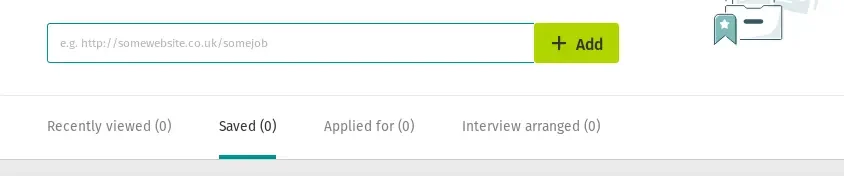
The image shows the job posting URL box used to add an external job link.
The first attempts used [redacted] with different ports. The web page itself showed no error, so the response had to be inspected in Burp. Through the page alone it was not possible to tell whether a port was open or closed.
Exploitation
Step 1: try alternative URL schemes
Besides http://, the researcher tried other schemes to read data and make the server perform actions: file:///, dict://, ftp://, ldap:// and gopher://. Only http:// worked, so testing moved into Burp.
Step 2: confirm the server makes the request with Collaborator
The first check was an out-of-band one using Burp Collaborator. The request was sent with a Collaborator payload as the URL, and the Collaborator server recorded a DNS lookup coming from the target, confirming that the server-side component was resolving the supplied URL.
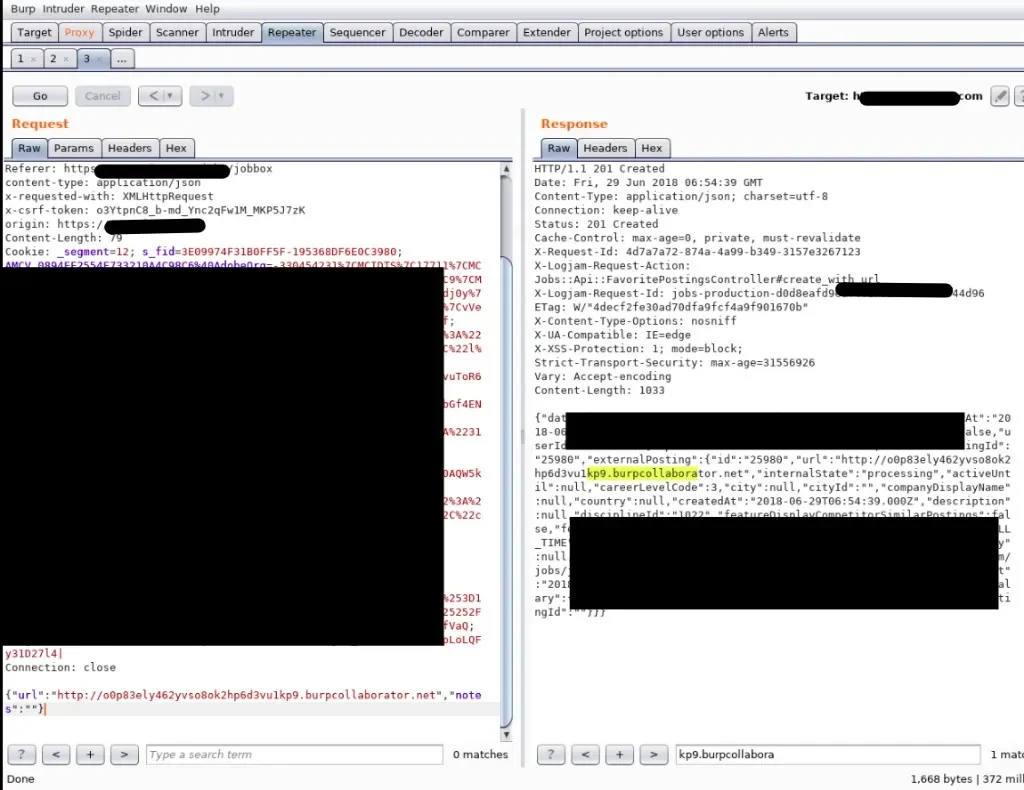
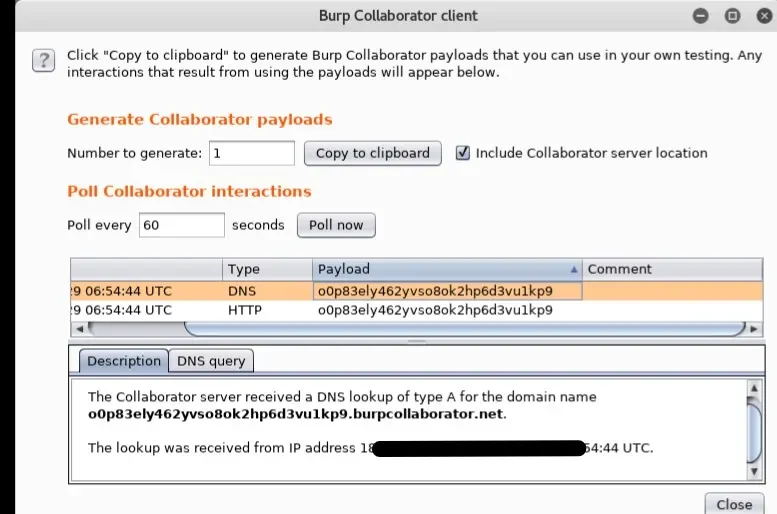
The second image shows the received DNS lookup in Collaborator.
Step 3: probe localhost ports
The researcher then checked whether individual ports on localhost were open or closed. The report notes that HTTPS:// was allowed. Requesting [redacted]:443 returned a 400 Bad Request.
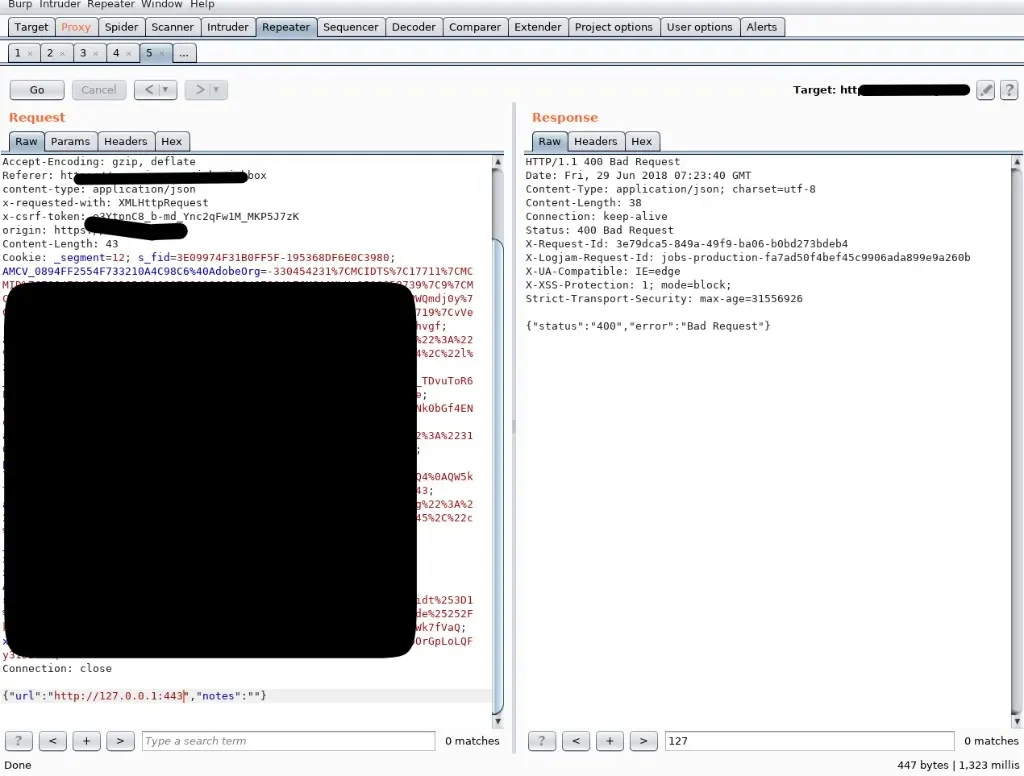
The image shows the 400 response for port 443.
Port 22 was probed next with [redacted]:22.
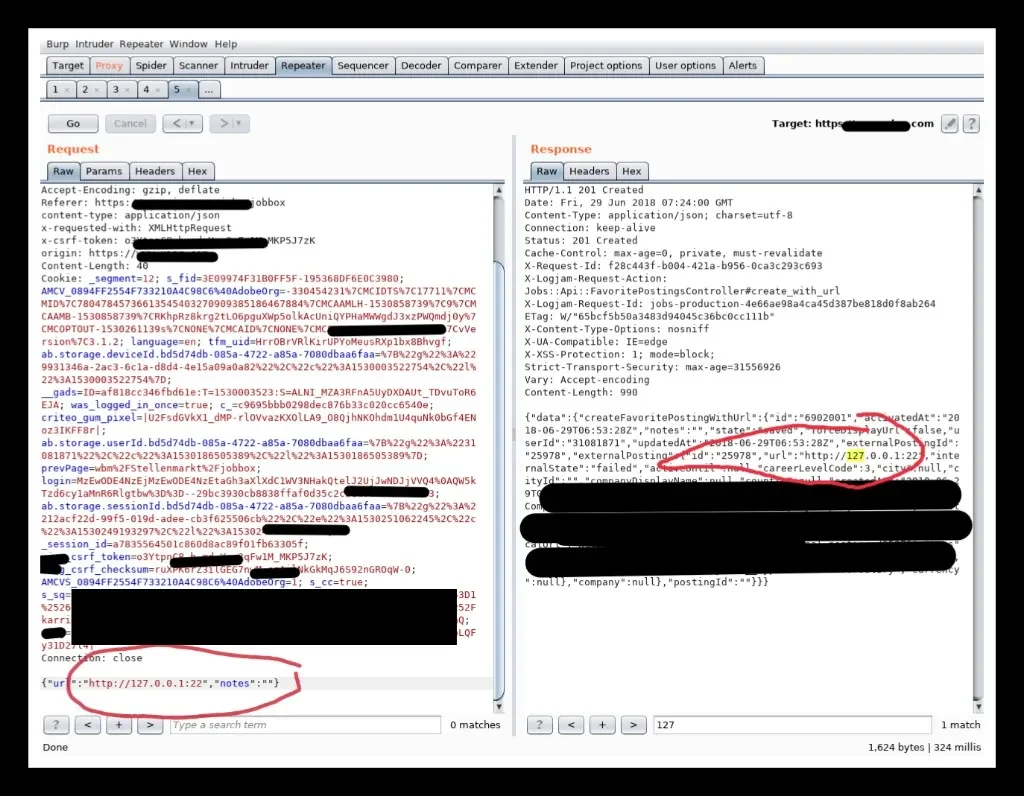
The image shows the result for port 22.
By repeating this across ports, the researcher distinguished open from closed ports and scanned all ports, using the 201 and 400 responses as the signal.
Root cause
The application accepted a user-supplied URL in the job posting feature and made a server-side request to it. The server could be pointed at [redacted] and at different ports. The report does not describe the validation code, so the exact check that was missing is not stated; the behaviour is consistent with a missing or insufficient allowlist of destinations and schemes.
Impact
An attacker who can submit a job posting URL can make the server issue requests to hosts and ports of their choosing, including localhost. In this report the practical result demonstrated was port scanning of the internal interface, inferred from differences between 201 and 400 responses. The general consequences listed at the start (reading internal resources, bypassing IP whitelisting or host-based authentication, interacting with internal APIs as the server) are the classes of impact SSRF can have; the report does not show any of them being exploited here beyond the port scan and the out-of-band DNS confirmation.
Fix
The timeline lists the bug as fixed on 29 June 2018, the same day it was reported and triaged. A robust fix would be to validate the supplied URL against an allowlist of permitted schemes and destinations, resolve the hostname and reject private, loopback and link-local addresses, and re-check after any redirects.
Variants to test
- Alternative schemes. Submit
file:///,dict://,ftp://,ldap://andgopher://URLs where a URL is accepted. A positive result is any of them being fetched or producing a response that differs from the rejectedhttp://baseline. - Out-of-band confirmation. Use a Collaborator or your own listener as the URL. A DNS lookup or HTTP hit from the target confirms server-side fetching even when the response body is not reflected.
- Localhost port probing. Request
[redacted]on a range of ports and compare status codes. A positive result is a consistent difference between open and closed ports, as seen here with201and400. - Scheme and case handling. Try
HTTPS://and mixed-case schemes, since the report notes onlyHTTPS://was allowed in its context. A positive result is a request being made where it should be rejected, or vice versa. - Redirects. Point the URL at a host you control that redirects to an internal address. A positive result is the server following the redirect to the internal destination.
Timeline
- 29 June 2018: bug reported to the company.
- 29 June 2018: bug triaged by the team.
- 29 June 2018: bug fixed.
- 2 July 2018: bounty awarded and a program launched on HackerOne soon after.
What happened, in plain words
A security researcher was testing a social networking website (called www.abc.com in the report) as part of a private bug bounty program. A bug bounty program is an arrangement where a company invites independent testers to look for security problems in its systems and pays them for reporting what they find. "Private" means only invited testers can take part, and the domain they may touch is limited in scope, so the tester must stay within the agreed boundaries.
The website had a feature for posting job advertisements. One of its fields let a user paste a link to an external job posting. The researcher realised that if the server fetches any address a user gives it, a user might be able to make the server fetch addresses that are not meant to be reachable from the outside, such as the server's own internal services. This class of bug is called server-side request forgery, or SSRF.
To understand SSRF, imagine a hotel receptionist who will, on request, phone any number a guest writes on a form. Normally guests ask to be connected to outside businesses. But a guest could write the receptionist's own internal extension, or the number of the staff room, and the receptionist would dial it without questioning why. The guest cannot reach those internal numbers directly, but the receptionist can, and the guest learns something from how the call goes. In SSRF the receptionist is the web server, and the guest is the attacker submitting a URL.
The researcher used a tool called Burp Suite to watch and change the requests the browser sends to the website. Burp Suite is a program that sits between your browser and a website so you can see and edit the traffic. One of its features, Burp Collaborator, gives you a unique external address that records when something contacts it, which is useful for proving that a server really did make a request.
By pointing the job link field at the server's own loopback address ([redacted], which always means "this same machine") on different ports, and inspecting the responses in Burp, the researcher could tell which internal ports were open and which were closed. A port is a numbered channel on a computer; different services listen on different numbers, like different doors into the same building. The report says the researcher scanned all ports and used the difference between 201 and 400 responses as the signal.
The bug was reported on 29 June 2018, triaged (confirmed and prioritised) the same day, and fixed the same day. On 2 July 2018 the researcher received a bounty, and a program was launched on HackerOne soon after.
Background: what SSRF can do
Before testing, the researcher listed the general things SSRF can be used for. These are not all things that happened in this report; they are the reasons the bug class is worth looking for. Each one is worth explaining from scratch:
- Abuse the trust relationship between the vulnerable server and others. Many internal systems trust each other because they assume only other internal systems can reach them. If the web server can be made to send requests, it can borrow that trust.
- Bypass IP whitelisting. A whitelist is a list of addresses that are allowed in. If an internal service only accepts connections from a known address, and the vulnerable server has that address, making the server send the request gets around the restriction.
- Bypass host-based authentication services. Some services decide whether to let you in based on which machine the request comes from, rather than on a password. The same trick defeats that.
- Read resources which are not accessible to the public. Internal pages, dashboards and files that are not exposed to the internet may be reachable from the server itself.
- Scan the internal network to which the server is connected. By trying different addresses and ports and watching how the server responds, an attacker can map out what is running inside.
- Read files from the web server. Some URL schemes (ways of writing an address, like
http://orfile://) can refer to files on disk rather than to network services. - View status pages and interact with APIs as the web server. An API (application programming interface) is a way for one program to talk to another, usually over the network, often without a human clicking anything. If the server can reach an internal API, it can call it on the attacker's behalf.
- Retrieve sensitive information such as the IP address of a web server behind a reverse proxy. A reverse proxy is a front-facing server that passes requests on to servers behind it. Details leaked in responses can reveal the internal layout.
The feature that was tested
The site was a kind of social networking site. It had a job posting form with a box for an external job link, so that a user could point to a job advertisement hosted elsewhere.
The image shows the job posting URL box used to add an external job link.
Because the server would take a URL supplied by the user and go and fetch it, the researcher suspected SSRF straight away. The reasoning is simple: any time a website asks the server to visit an address you provide, you should ask whether the server checks where it is being sent.
Step 1: try to make the server talk to itself
The first attempt was to submit [redacted] with different ports. [redacted] is the loopback address: every computer uses it to refer to itself, so a request to it never leaves the machine. If the server fetches that address, it is talking to itself, not to the internet.
The problem was that the web page itself showed no error. From the page alone the researcher could not tell whether a port was open or closed. This is a common situation: the visible page hides what actually happened, so you need to look at the raw request and response. That is what Burp Suite is for.
Step 2: try other URL schemes
A URL scheme is the part before :// that says how to interpret the address. http:// means a normal web request; file:/// means a file on disk; ftp:// is an old file transfer protocol; dict://, ldap:// and gopher:// are other protocols that servers sometimes speak.
Besides http://, the researcher tried file:///, dict://, ftp://, ldap:// and gopher:// to see whether the server would read data or perform actions through them. Only http:// worked, so testing moved into Burp.
Why try the others? Because different schemes can reach different things. If file:/// works, the server might hand back files from its own disk. If gopher:// works, the server can be made to send almost arbitrary bytes to another service, which is a powerful primitive. Here they were rejected, which narrowed the attack surface to plain web requests.
Step 3: confirm the server really makes the request
The researcher used Burp Collaborator to check the target. The tool for this is Burp Collaborator, which gives you a unique external hostname that logs any contact it receives.
The idea: put the Collaborator address into the job link field. If the server fetches it, the Collaborator records a DNS lookup (a request to translate a hostname into an IP address) coming from the target's network. If only the browser fetched it, the Collaborator would see the browser's address instead, or nothing at all if the browser was blocked.
The report notes that if you do not have a VPS (a virtual private server, a rented machine on the internet you control), Collaborator can be used for this kind of testing.
The second image shows the received DNS lookup in Collaborator.
A DNS lookup arriving from the target is strong evidence: it means the server resolved the hostname you supplied. That is the out-of-band confirmation, so called because the proof comes back through a separate channel rather than in the response body.
Step 4: probe localhost ports
With server-side fetching confirmed, the next question was which ports on the server's own machine were open. The report notes that HTTPS:// was allowed in this context. Requesting [redacted]:443 returned a 400 Bad Request.
The image shows the 400 response for port 443.
Port 443 is the standard port for HTTPS, the encrypted version of the web. A 400 Bad Request is the server saying the request it received was malformed or unacceptable. In this context, the difference between a 400 and a 201 (created) is the signal: one kind of response means the server reached something, the other means it did not.
Port 22 was probed next with [redacted]:22.
The image shows the result for port 22.
Port 22 is the standard port for SSH, the protocol used to log into a machine remotely. By repeating this across ports, the researcher distinguished open from closed ports and scanned all ports, using the 201 and 400 responses as the signal. This is port scanning through the vulnerable server: the attacker never connects to the internal ports directly, but the server does it on their behalf and the responses leak back.
Why this is a bug
The application accepted a user-supplied URL in the job posting feature and made a server-side request to it. The server could be pointed at [redacted] and at different ports. The report does not describe the validation code, so the exact check that was missing is not stated; the behaviour is consistent with a missing or insufficient allowlist of destinations and schemes.
An allowlist is the opposite of a blocklist: instead of listing what is forbidden, you list exactly what is permitted and reject everything else. For a feature like this, an allowlist might say "only https:// URLs to public hosts are accepted".
What an attacker could do with it
An attacker who can submit a job posting URL can make the server issue requests to hosts and ports of their choosing, including localhost. In this report the practical result demonstrated was port scanning of the internal interface, inferred from differences between 201 and 400 responses. The general consequences listed at the start (reading internal resources, bypassing IP whitelisting or host-based authentication, interacting with internal APIs as the server) are the classes of impact SSRF can have; the report does not show any of them being exploited here beyond the port scan and the out-of-band DNS confirmation.
How it was fixed
The timeline lists the bug as fixed on 29 June 2018, the same day it was reported and triaged. A robust fix would be to validate the supplied URL against an allowlist of permitted schemes and destinations, resolve the hostname and reject private, loopback and link-local addresses, and re-check after any redirects. A redirect is when a server answers a request by telling the client to go somewhere else; if you only check the first address, a redirect can send the server to an internal one afterwards.
Variants to test
If you are learning this, these are the variations worth trying on a feature that accepts a URL. Each one is a small experiment with a clear expected result.
- Alternative schemes. Submit
file:///,dict://,ftp://,ldap://andgopher://URLs where a URL is accepted. A positive result is any of them being fetched or producing a response that differs from the rejectedhttp://baseline. - Out-of-band confirmation. Use a Collaborator or your own listener as the URL. A DNS lookup or HTTP hit from the target confirms server-side fetching even when the response body is not reflected.
- Localhost port probing. Request
[redacted]on a range of ports and compare status codes. A positive result is a consistent difference between open and closed ports, as seen here with201and400. - Scheme and case handling. Try
HTTPS://and mixed-case schemes, since the report notes onlyHTTPS://was allowed in its context. A positive result is a request being made where it should be rejected, or vice versa. - Redirects. Point the URL at a host you control that redirects to an internal address. A positive result is the server following the redirect to the internal destination.
Timeline
- 29 June 2018: bug reported to the company.
- 29 June 2018: bug triaged by the team.
- 29 June 2018: bug fixed.
- 2 July 2018: bounty awarded and a program launched on HackerOne soon after.
Glossary
- API: application programming interface; a way for one program to talk to another over the network, often without a human involved.
- Allowlist: a list of things that are permitted, with everything else rejected.
- Blocklist: a list of things that are forbidden, with everything else allowed.
- Bug bounty program: an arrangement where a company pays independent testers for reporting security problems.
- Burp Collaborator: a Burp Suite feature that provides an external host which records DNS lookups and other contacts, used to prove a server made a request.
- Burp Suite: a tool that sits between your browser and a website so you can see and edit the traffic.
- DNS lookup: a request to translate a hostname into an IP address.
- HTTPS: the encrypted version of HTTP, the protocol used for web pages.
- IP address: a number that identifies a machine on a network.
- Loopback address:
[redacted], which always means "this same machine". - Out-of-band: proof that comes back through a separate channel rather than in the response body.
- Port: a numbered channel on a computer; different services listen on different numbers.
- Private program: a bug bounty program open only to invited testers.
- Redirect: a server answer that tells the client to go to a different address.
- Reverse proxy: a front-facing server that passes requests on to servers behind it.
- Scope: the set of systems a tester is allowed to touch.
- SSH: a protocol for logging into a machine remotely, usually on port 22.
- SSRF: server-side request forgery; making a server send a request to an address the attacker chooses.
- Status code: the number a server returns to say how a request went, such as
201or400. - URL scheme: the part before
://that says how to interpret an address, such ashttp://orfile:///. - VPS: a virtual private server; a rented machine on the internet you control.
- Whitelist: see allowlist.




