Sign Out Everywhere Bypass: How I Found a Session Revocation Vulnerability in OAuth & Password…
The 'Sign Out Everywhere' feature failed to revoke a session created through a different authentication method (email/password) when triggered from an OAuth session, even after the documented 10-minute propagation window. An attacker holding such a surviving session could keep making authenticated requests, including administrative operations, without re-authentication.

Bug Bounty
The full write-up lives on its author's site
It belongs to its author, so we link to it rather than copy it. The other two tabs are our own rewrites, checked against it.
Context
The target was a web application tested during a bug bounty assessment. The feature under scrutiny was Sign Out Everywhere, a global logout action that is supposed to terminate all active sessions belonging to an account, not just the one in the current browser. The application supported more than one way to authenticate to the same account: email/password authentication and OAuth authentication.
The researcher's interest was in session management and authentication flows, specifically whether the security guarantee implied by the name of the feature held at the level of the server-side session rather than only in the browser UI.
Setup
The setup required a single account with two authentication methods linked to it, and two browsers:
- Browser A: a session created with email/password authentication.
- Browser B: a session created through OAuth after linking an OAuth identity to the same account.
Both sessions belonged to the same account. No specific tools, versions or endpoints are named in the report.
Finding it
While testing the account and authentication functionality, the researcher found that Sign Out Everywhere did not immediately invalidate all active sessions. The program's initial response explained that this was intentional:
"Complete sign-out from other browsers will take up to 10 minutes."
Rather than accepting that explanation, the researcher waited beyond the documented 10-minute propagation period and tested the sessions again. The sessions that were supposed to be terminated were still active. That is what turned a possible timing quirk into something worth pursuing.
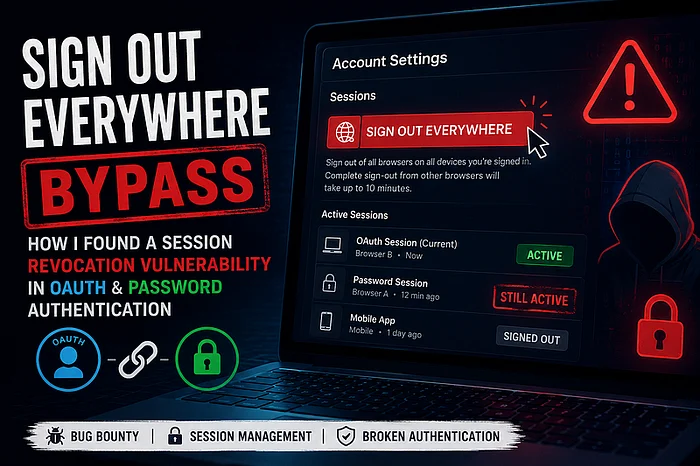
The next question was whether the behaviour depended on how the session was created. Since the application supported both email/password and OAuth authentication, the researcher set up an account with both methods associated with it and triggered the global logout from the OAuth session, then checked whether the email/password session in the other browser was actually revoked at the server, not just in the UI.
Exploitation
Step 1: Create an email/password session
A test account was created using email/password authentication, and that session was kept active in Browser A.
Step 2: Link an OAuth identity and create a second session
An OAuth identity was linked to the same account, and a second session was established through OAuth in Browser B. The resulting state was:
- Browser A: email/password session
- Browser B: OAuth session
Step 3: Trigger Sign Out Everywhere from the OAuth session
The global logout was triggered from the OAuth session in Browser B. The point of interest was not whether the browser UI changed, but whether the underlying session was actually revoked.
Step 4: Wait past the documented propagation window
Because the program had stated that complete sign-out could take up to 10 minutes, the researcher waited longer than that period before returning to Browser A.
Step 5: Verify the surviving session against the API
The email/password session in Browser A was still authenticated. More importantly, it was not merely displaying cached content: authenticated API requests using the existing session still succeeded, and privileged administrative operations continued to work. No re-authentication was required, which confirmed that the server was still trusting the session.
The administrative operations that continued to work included:
- Creating API keys
- Updating project settings
- Managing users
- Performing other authenticated CRUD operations
Root cause
The two sessions were not being revoked together. The account had an email/password identity with an active session and an OAuth identity with an active session, and after Sign Out Everywhere was triggered from the OAuth session, the email/password session remained valid.
The global logout action therefore did not achieve the security property its name implies. The distinction that matters is that this was not simply "logout takes a few minutes": the documented propagation window had already passed. A session associated with a different authentication method could remain valid even after the global logout operation had been performed.
The report does not describe the implementation, so the exact mechanism is not stated. The documented 10-minute propagation window had already passed, yet the surviving session was still valid.
Impact
The surviving session continued to be trusted by the server and could perform authenticated requests, including administrative operations such as creating API keys, updating project settings, managing users and other authenticated CRUD operations, without re-authentication.
In practice, a user who relies on Sign Out Everywhere to cut off access, for example after losing a device or suspecting compromise, may leave a session created through a different authentication method alive. The report does not quantify how long such a session survives beyond the tested window.
Fix
The report does not state what was changed.
Variants to test
A positive result is any session that still performs authenticated API requests. A positive result is the OAuth session surviving past the propagation window. 3. Privileged operations on the survivor. Once a session survives, exercise administrative endpoints such as key creation, settings changes and user management. A positive result is any state-changing operation succeeding without re-authentication. A positive result is a session that remains valid when a credential change would normally invalidate it. A positive result is a session still accepted by the API after the stated window.
What happened, in plain words
A security researcher was testing a website that lets people create accounts and log in. Like many sites, it had a button called Sign Out Everywhere. The idea of that button is simple: when you click it, every device and browser where you are logged in should be logged out, not just the one you are using right now. Think of it like cancelling a bank card: you expect every copy of that card to stop working, not only the one in your wallet.
The researcher found that signing out everywhere from an OAuth session left an email/password session on the same account still logged in, even after the documented delay. The program explained that complete sign-out from other browsers can take up to 10 minutes. The researcher waited longer than 10 minutes, and the other session was still alive. It could still do real things on the account, including administrative actions. The team later confirmed it was a real vulnerability.
This article walks through the same story step by step, explaining every term along the way. You only need to know how to use a browser.
The basics you need first
Before the story makes sense, here are a few ideas that come up constantly.
A session. When you log in to a website, the website needs a way to remember that you are you on the next page you open. It does this by giving your browser a small piece of data, often called a session cookie or a session token. Your browser sends it back with every request, like a wristband at a festival: the staff at each door check the wristband instead of asking for your ID again. If the wristband is cancelled, you can no longer get into the venues.
A server and a browser. The browser is the program on your computer (Chrome, Firefox, Safari). The server is the computer far away that runs the website. When people say a session was "revoked at the server", they mean the server itself stopped accepting that wristband, not just that the page in your browser changed colour.
An API. An API is the way programs talk to a website's server without a human clicking buttons. When you load a page, your browser asks the server for it. An API request is a similar ask, but made by a program (or by a tool) to get or change data. If a session is still valid, API requests made with it succeed. If it was revoked, they are refused. This matters because a page can look logged out while the session behind it still works.
OAuth. OAuth is a way to log in to a website using an account you already have somewhere else, for example "Sign in with Google". The website never sees that other account's password. Instead, the other service confirms who you are. Many sites let you link an OAuth login to an existing email/password account, so both ways lead to the same account.
A bug bounty program. A company invites independent researchers to test its systems and report security problems. In return, the company may pay a reward (a bounty) and fix the issue. The researcher here was taking part in such an assessment.
Session revocation. Revoking a session means telling the server to stop trusting that session token from now on. "Sign Out Everywhere" is supposed to revoke all sessions for the account at once.
The feature under test
The target was a web application tested during a bug bounty assessment. The feature in question was Sign Out Everywhere, a global logout action meant to end every active session belonging to an account, not only the one in the current browser. The application supported more than one way to log in to the same account: email/password authentication and OAuth authentication.
The researcher's interest was in session management and login flows, and specifically in one question: does the promise in the feature's name hold at the level of the server-side session, or only in what the browser shows?
That question is worth asking because a website can easily make a page look logged out while the session token behind it is still accepted by the server. The visible part and the real part are two different things.
Setting up the test
The setup needed one account with two login methods linked to it, and two browsers:
- Browser A: a session created with email/password authentication.
- Browser B: a session created through OAuth after linking an OAuth identity to the same account.
Both sessions belonged to the same account. No specific tools, versions or endpoints are named in the report.
Why two browsers? Because each browser holds its own session token. Using two separate browsers keeps the two sessions clearly apart, so you can watch one while acting on the other. Using two private windows in one browser would work on the same principle.
Finding it
While testing the account and authentication functionality, the researcher found that Sign Out Everywhere did not immediately invalidate all active sessions. The program's initial response explained that this was intentional:
"Complete sign-out from other browsers will take up to 10 minutes."
The program explained the delay as a propagation period for complete sign-out. The researcher did not simply accept the explanation. Instead, the next step was to test the boundary of it: wait longer than the documented 10-minute propagation period, then check the sessions again. The sessions that were supposed to be terminated were still active.
That is what turned a possible timing quirk into something worth pursuing. If the delay were the whole story, waiting past it would have ended the session. It did not.
The next question was whether the behaviour depended on how the session was created. Since the application supported both email/password and OAuth authentication, the researcher set up an account with both methods associated with it, triggered the global logout from the OAuth session, and then checked whether the email/password session in the other browser was actually revoked at the server, not just in the UI.
Walking through the exploitation
Step 1: Create an email/password session
A test account was created using email/password authentication, and that session was kept active in Browser A.
This is the ordinary login everyone knows: type an email address and a password, and the server hands your browser a session token. Keeping it open in Browser A gives you one live session to watch later.
Step 2: Link an OAuth identity and create a second session
An OAuth identity was linked to the same account, and a second session was established through OAuth in Browser B. The resulting state was:
- Browser A: email/password session
- Browser B: OAuth session
Linking means telling the site "this other account is also me". After linking, both login routes lead to the same account, but each login creates its own separate session token. The two browsers now hold two different wristbands for the same person.
Step 3: Trigger Sign Out Everywhere from the OAuth session
The global logout was triggered from the OAuth session in Browser B. The point of interest was not whether the browser UI changed, but whether the underlying session was actually revoked.
This is the heart of the test. Clicking a button and seeing a login screen proves very little: the page could simply be showing you a different view. What matters is whether the server still accepts the old session token. So the researcher deliberately pressed the button from the OAuth side, to see what happened to the email/password side.
Step 4: Wait past the documented propagation window
Because the program had stated that complete sign-out could take up to 10 minutes, the researcher waited longer than that period before returning to Browser A.
This step removes the obvious excuse. If the session had died after, say, two minutes, the answer would have been "that is just the propagation delay". Waiting beyond the stated window means any surviving session cannot be explained by the delay.
Step 5: Verify the surviving session against the API
The email/password session in Browser A was still authenticated. More importantly, it was not merely displaying cached content: authenticated API requests using the existing session still succeeded, and privileged administrative operations continued to work. No re-authentication was required, which confirmed that the server was still trusting the session.
"Cached content" means the browser showing you an old copy of a page it saved earlier, which can look like you are still logged in even when you are not. Testing through the API avoids that trap: an API request goes to the server and gets a real answer. If the server answers as if you are logged in, the session is genuinely alive.
The administrative operations that continued to work included:
- Creating API keys
- Updating project settings
- Managing users
- Performing other authenticated CRUD operations
API keys are long secret strings that let programs access an account without a password, so creating one is a sensitive action. CRUD stands for Create, Read, Update, Delete: the four basic things you can do to data. "Other authenticated CRUD operations" means the session could still change real data on the account, not just read it.
Why it happened
The two sessions were not being revoked together. The account had an email/password identity with an active session and an OAuth identity with an active session, and after Sign Out Everywhere was triggered from the OAuth session, the email/password session remained valid.
The global logout action therefore did not achieve the security property its name implies. The distinction that matters is that this was not simply "logout takes a few minutes": the documented propagation window had already passed. A session associated with a different authentication method could remain valid even after the global logout operation had been performed.
The report does not describe the implementation, so the exact mechanism is not stated. The documented 10-minute propagation window had already passed, yet the surviving session was still valid.
A useful comparison: imagine a building with two reception desks, one for staff and one for visitors, both issuing passes for the same person. "Cancel all my passes" spoken at the visitors' desk cancels the visitor pass, but the staff desk never hears about it. The person still walks in with the staff pass.
What the impact is
The surviving session continued to be trusted by the server and could perform authenticated requests, including administrative operations such as creating API keys, updating project settings, managing users and other authenticated CRUD operations, without re-authentication.
In practice, a user who relies on Sign Out Everywhere to cut off access, for example after losing a device or suspecting compromise, may leave a session created through a different authentication method alive. That is the real-world risk: the button is often used precisely in a hurry, when someone believes their account may be in the wrong hands, and it gives a false sense of safety.
The report does not quantify how long such a session survives beyond the tested window.
How it should be fixed
The report does not state what was changed.
In plain terms: the button should cancel every pass for the account, whichever desk issued it, and the check should be done by asking the server, not by looking at the screen.
Other variations worth testing
Each one changes a single thing and checks whether the problem appears again.
A positive result is any session that still performs authenticated API requests. A positive result is the OAuth session surviving past the propagation window. 3. Privileged operations on the survivor. Once a session survives, exercise administrative endpoints such as key creation, settings changes and user management. A positive result is any state-changing operation succeeding without re-authentication. A positive result is a session that remains valid when a credential change would normally invalidate it. A positive result is a session still accepted by the API after the stated window.
The common thread is to test the gaps between flows. A single login method, tested alone, would never have shown this problem. It only appeared when two ways of logging in met on the same account.
Glossary
- API: the way programs talk to a website's server to read or change data, without a human clicking through pages.
- API key: a long secret string that lets a program access an account, used instead of a password.
- Authentication: proving who you are, usually by logging in.
- Browser: the program on your computer used to visit websites, such as Chrome, Firefox or Safari.
- Bug bounty program: a scheme where a company invites independent researchers to test its systems and report security problems, often for a reward.
- Cached content: an old copy of a page the browser saved earlier, which can look current even when it is not.
- Cookie: a small piece of data a website stores in your browser, often used to remember that you are logged in.
- CRUD: Create, Read, Update, Delete, the four basic operations on data.
- Email/password authentication: logging in with an email address and a password.
- Endpoint: a specific address on a server that a request can be sent to.
- Global logout: a logout action meant to end every session for an account, not just the current one.
- Identity: the record of who a person is on a site, which can be reached through more than one login method.
- OAuth: a way to log in to a site using an account you already have elsewhere, such as "Sign in with Google", without sharing that account's password.
- Propagation: the time it takes for a change, such as a logout, to reach every server and device.
- Request: a message a browser or program sends to a server asking for something.
- Revocation: cancelling a session so the server stops accepting it.
- Server: the remote computer that runs a website and answers requests.
- Session: the state of being logged in, represented by a token the browser sends with each request.
- Session management: how a site creates, tracks and ends sessions.
- Session token: the piece of data that stands in for your login, like a wristband checked at every door.
- Sign Out Everywhere: the feature under test, intended to end all sessions for an account at once.
- UI: the user interface, the part of a site you see and click.
- Vulnerability: a weakness in a system that can be used to break a security promise.



