Simple Remote Code Execution Vulnerability Examples for Beginners

Especially when I talk with newbie security researchers/bug bounty hunters, they always make me feel as not thinking theirselves capable of finding Remote Code Execution vulnerabilities because they are super-complex. Because of this misconception, these people are actually not trying to find any of them or stop…
The full write-up lives on its author's site
It belongs to its author, so we link to it rather than copy it. The other two tabs are our own rewrites, checked against it.
Context
This is a collection of four real-world remote code execution findings from Synack targets, written for researchers who assume RCE has to be a complex chain. The point of the piece is the opposite: each of these was a low-hanging fruit, found and exploited with a small number of tricks. The targets are a support login portal, an application web form, a SugarCRM installation and an authenticated Java web application. The payouts mentioned are around 3k for the first two, around 3k for the third and around 6k in total for the fourth.
Setup
The tools used are Burp Suite (including its Fuzzing-Path Traversal payload list and Payload Processing rules), Google Dorks, Metasploit and the public exploit source for SugarCRM. No special accounts are described for the first three examples; the fourth was tested on an authenticated web application. The 24-hour rule comes up in two of the examples, where the author notes when the target was activated.
Finding it
Example 1: an admin upload page behind a login
On a host, directory fuzzing turned up a login page under /support/. The JavaScript files loaded on that login page revealed some after-login endpoints. Accessing those endpoints directly showed that some administrator pages were reachable without logging in. One of them was an upload page that accepted asp file extensions.
Example 2: a form that is not in the site map
On another web system, a Google Dork such as site:domain.com ext:aspx surfaced a web form that did not exist in the application's site map or UI at all. That form had a file upload section which allowed asp extensions.
Example 3: a known vulnerable SugarCRM
On an in-scope IP address, a SugarCRM installation was running. Gathering the version and searching for it showed the version was vulnerable to a PHP Code Execution issue, and there was even a Metasploit module for it.
Example 4: custom expressions in a Java application
On an authenticated application there was a feature for adding custom expressions to cases created by users. For example, if a case is about a payment, the expression can return firstAmount — lastAmount on the output of the case. The expressions use custom functions such as addDate and diffDate.
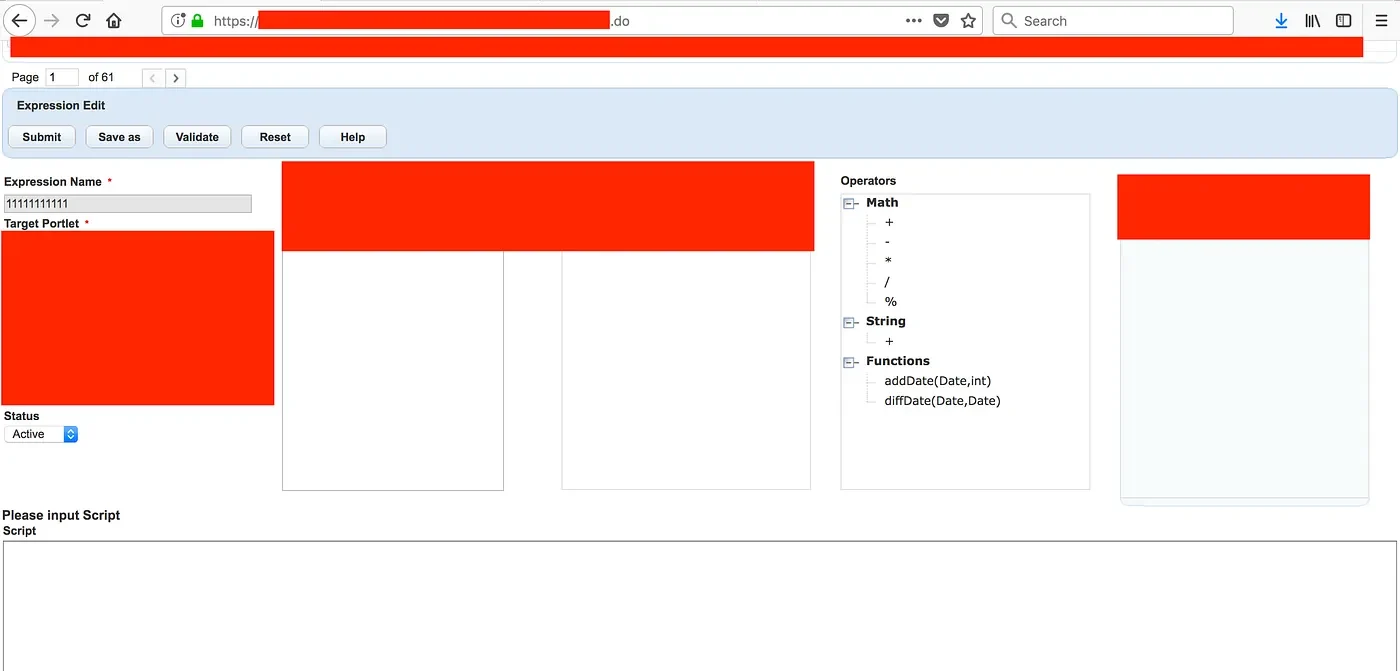
The expression creation page.
The extension was .do, so the underlying technology was Java. That raised the question of whether the input script stage allowed Java functionality alongside the custom functions.
Exploitation
Step 1: upload a webshell through the unauthenticated admin page
The upload page accepted asp, so a webshell was uploaded. The upload directory could not be enumerated, neither by fuzzing nor from the JavaScript files. The next attempt was to write the file into upper directories by putting directory traversal in the file name, and that worked.
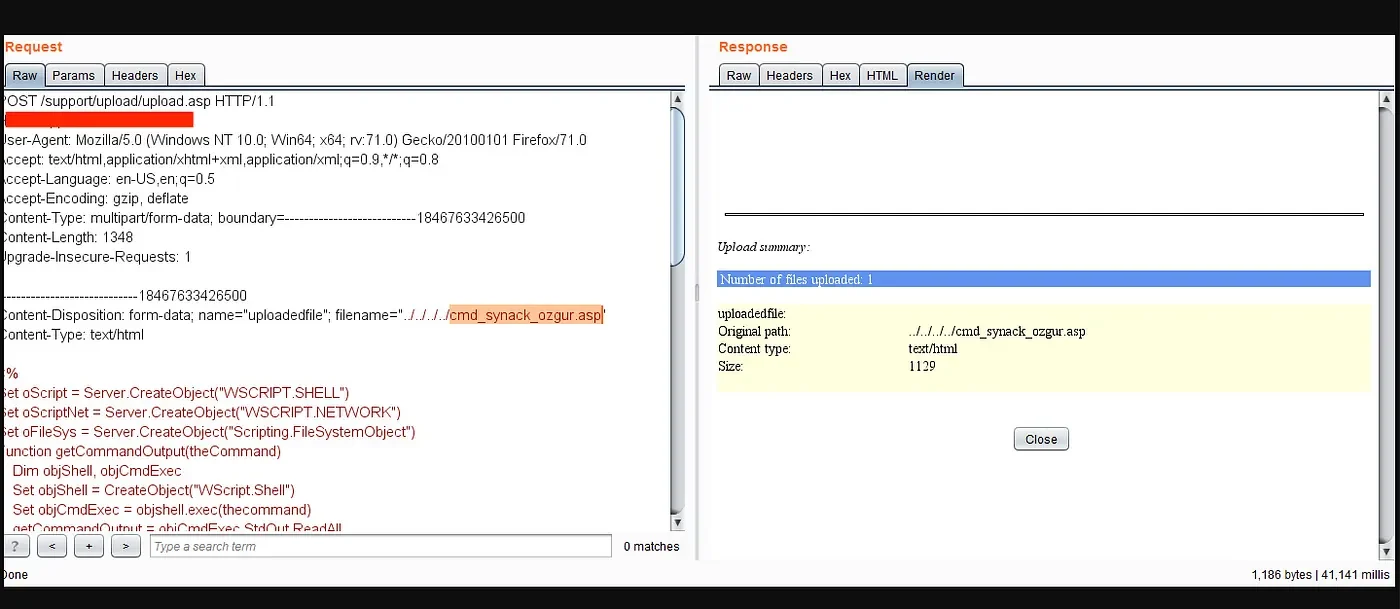
Uploading the webshell file with a ../ attack.
To automate the search, the Burp Suite "Fuzzing-Path Traversal" dictionary was used. The author warns that this is harmless for file gathering but can be a problem for file creation, update or deletion functionality, because every working payload creates a new file on the server.
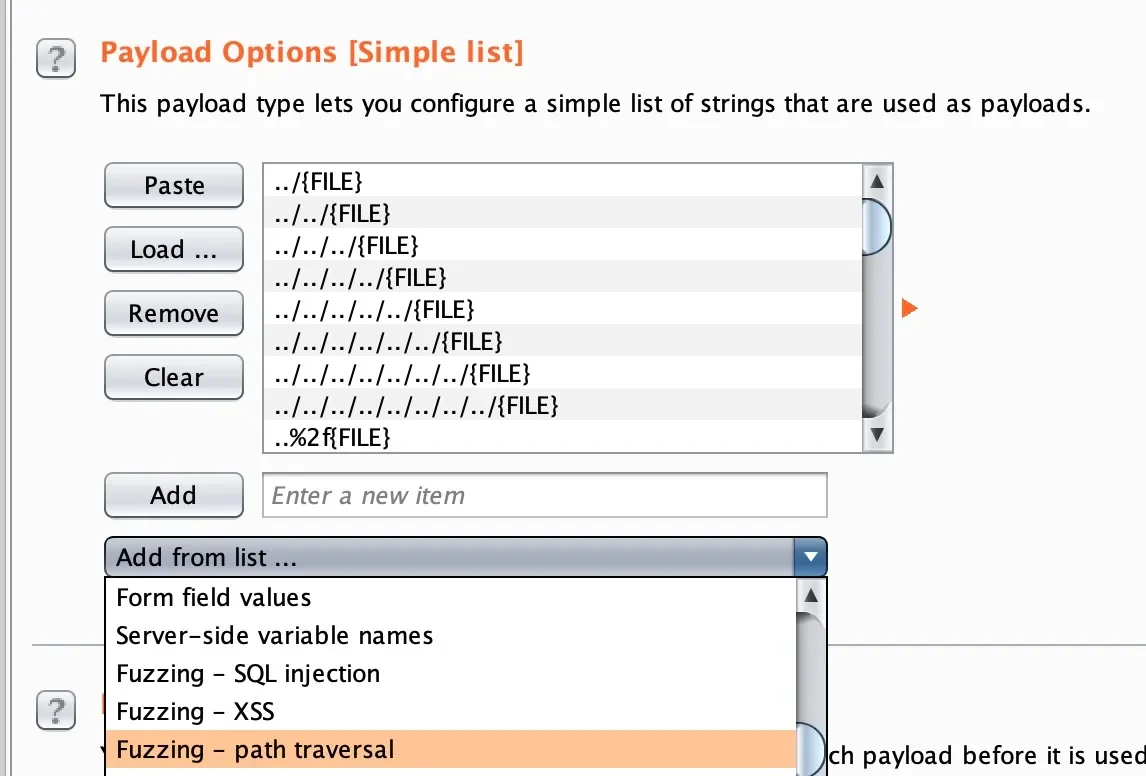
Path traversal fuzz list from Burp Payloads.
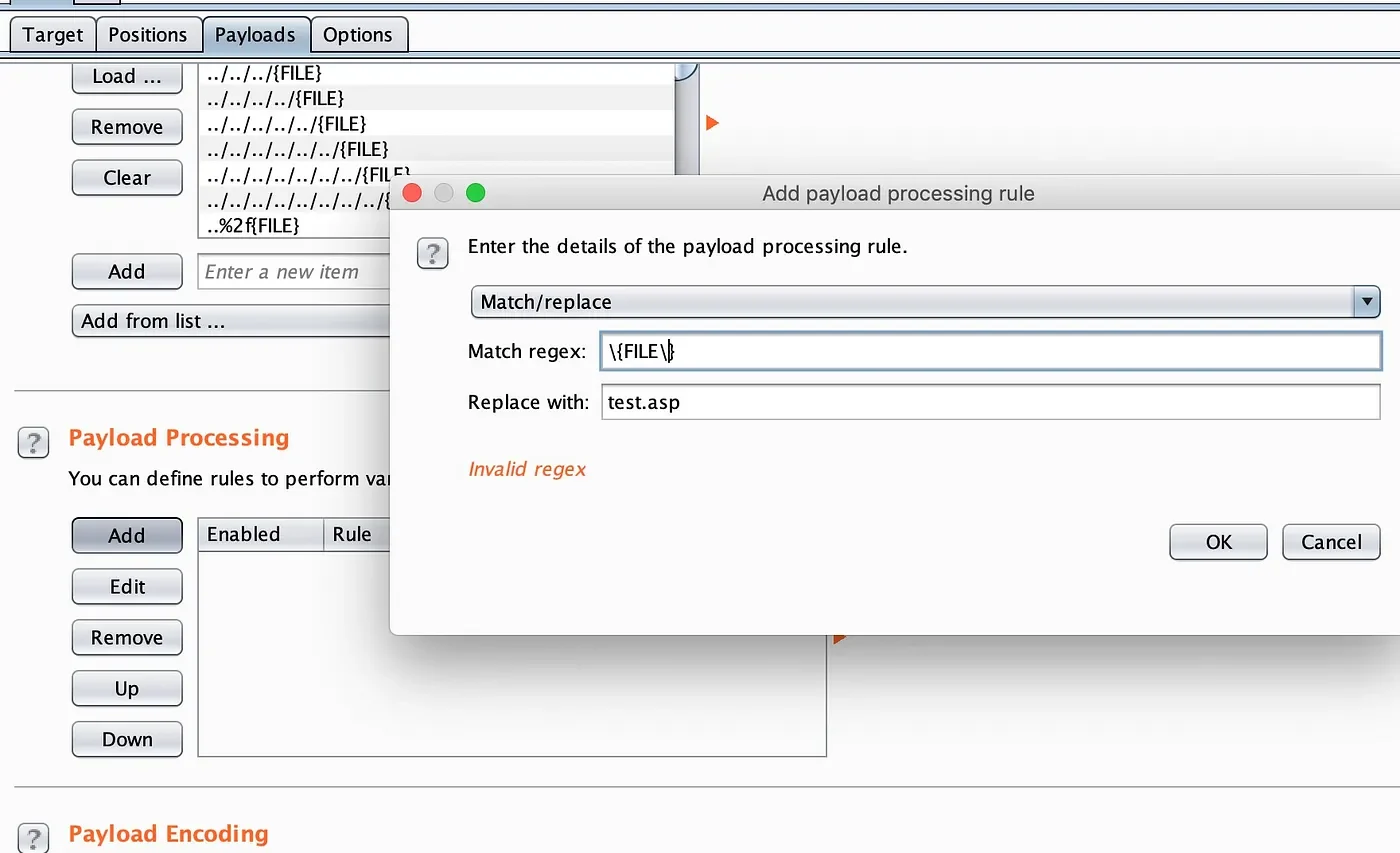
Configuring the file name from Payload Processing -> Match/Replace rule.
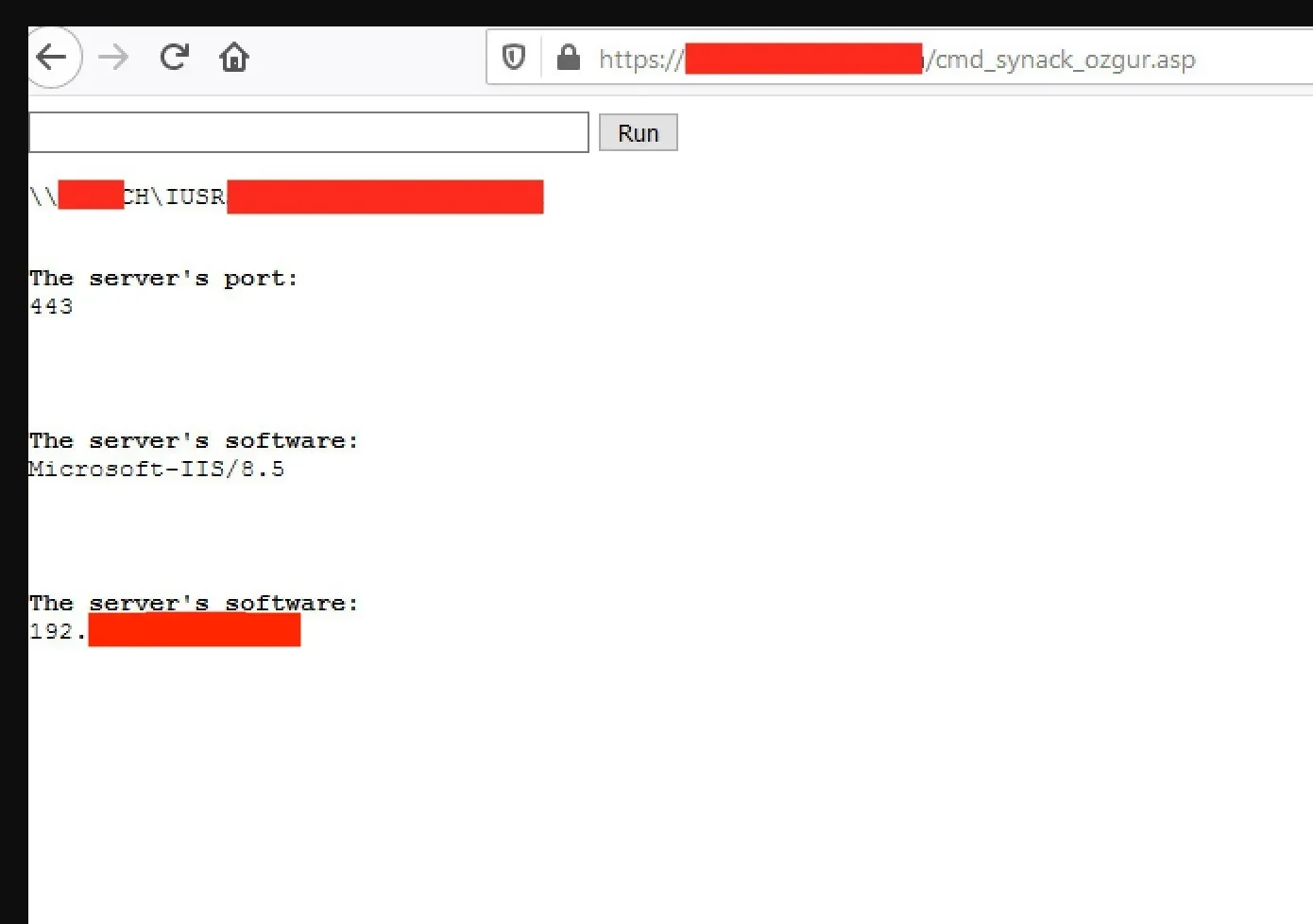
Accessing the shell from the root directory afterwards.
The target had been active for at least two weeks when this was found, and the payout was around 3k.
Step 2: upload a webshell and find it through the application's own e-mail
The form accepted asp, so an asp shell was uploaded.
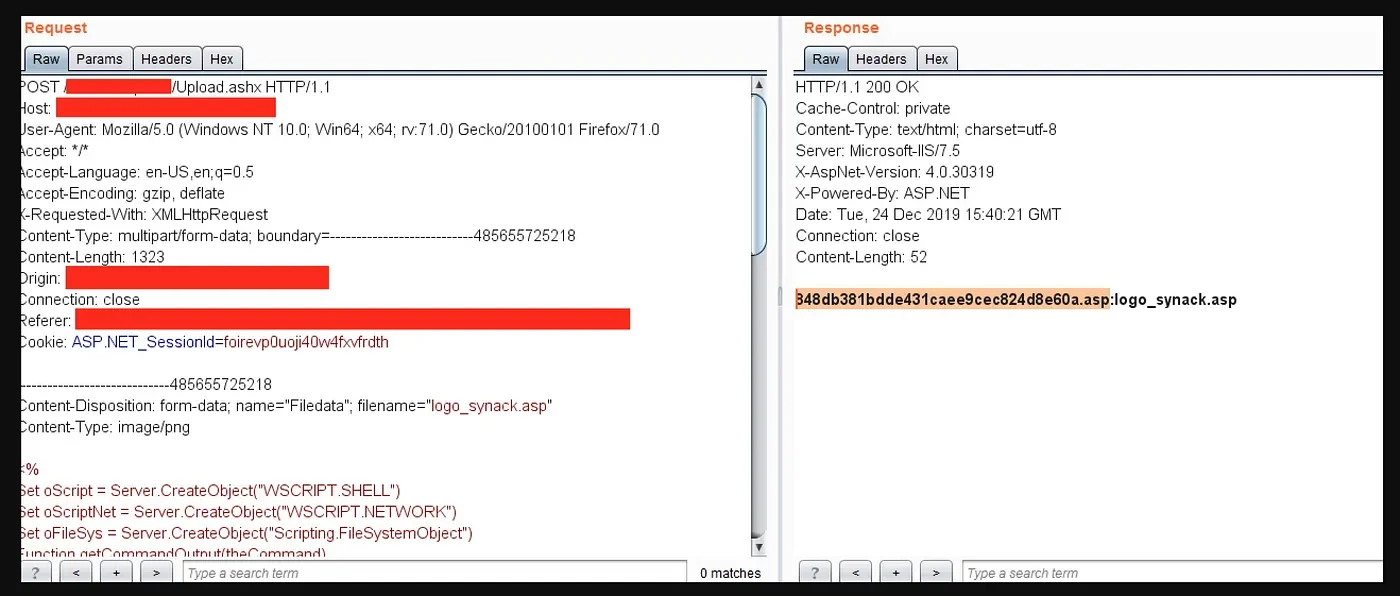
Uploading the asp shell to the server.
This time the upload directory could not be enumerated either, and no chaining vulnerability such as directory traversal was found. The form itself was an application form. It was filled in completely and submitted. A few minutes later an e-mail arrived from the application about the application, containing all the submitted information, including a link to the uploaded document on the same in-scope application. Clicking the link returned the same webshell as in the first example. The payout was approximately 3k.
The target had been alive for two days when the vulnerability was submitted, so the 24-hour rule had already passed and nobody had reported it yet.
Step 3: run the Metasploit module, then finish the exploit by hand
The Metasploit module for the SugarCRM PHP Code Execution vulnerability was run against the host.
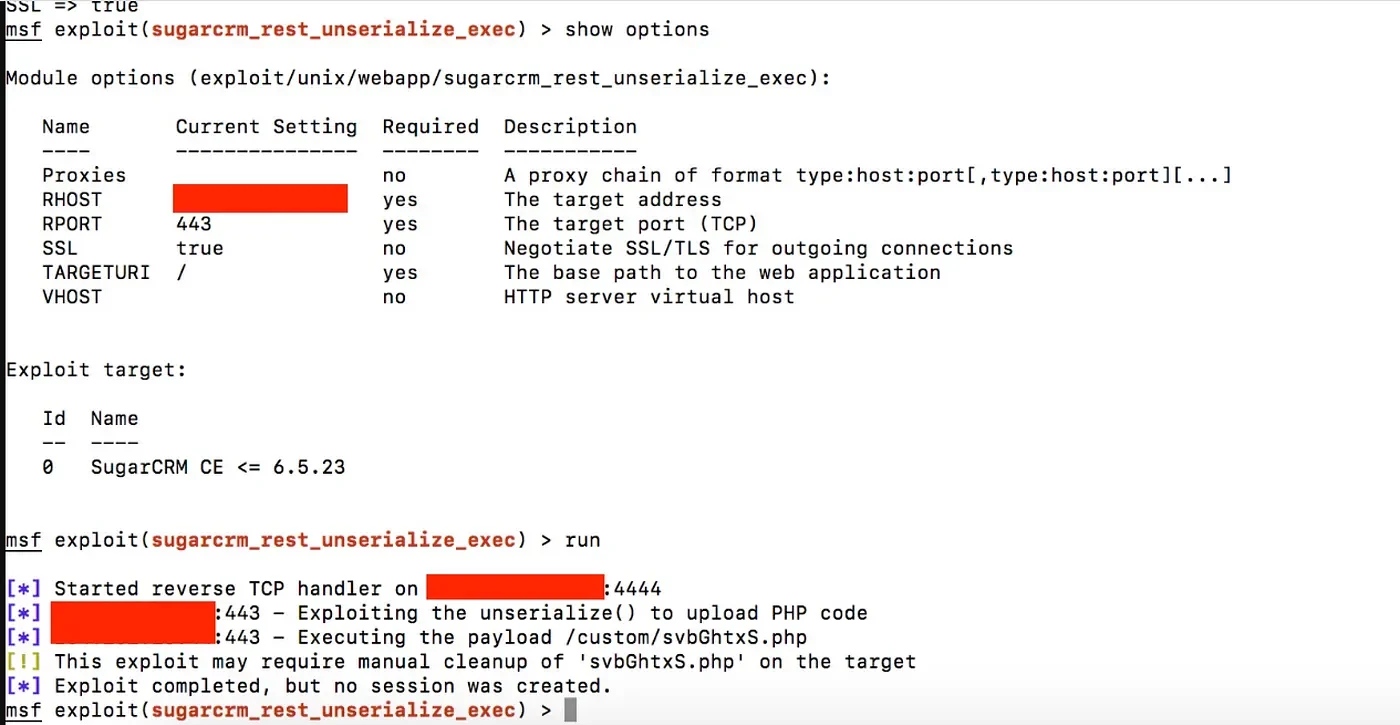
Running the msf module for the vulnerable host.
The exploit completed but no session was created. Different msf payloads were tried and none worked, probably because a firewall was blocking both incoming and outgoing requests for bind and reverse shells. Reading the exploit code showed that it creates a randomly named file under /custom/ and then creates a reverse shell to the supplied IP address from that PHP file. Accessing the file created during the attempts directly (shown in the picture as /custom/svbGhtxS.php) returned an empty response, which meant the file was actually created and the exploit had worked.
The exploit code showed that a special payload header is sent to the server from this file for full exploitation, base64 encoded:
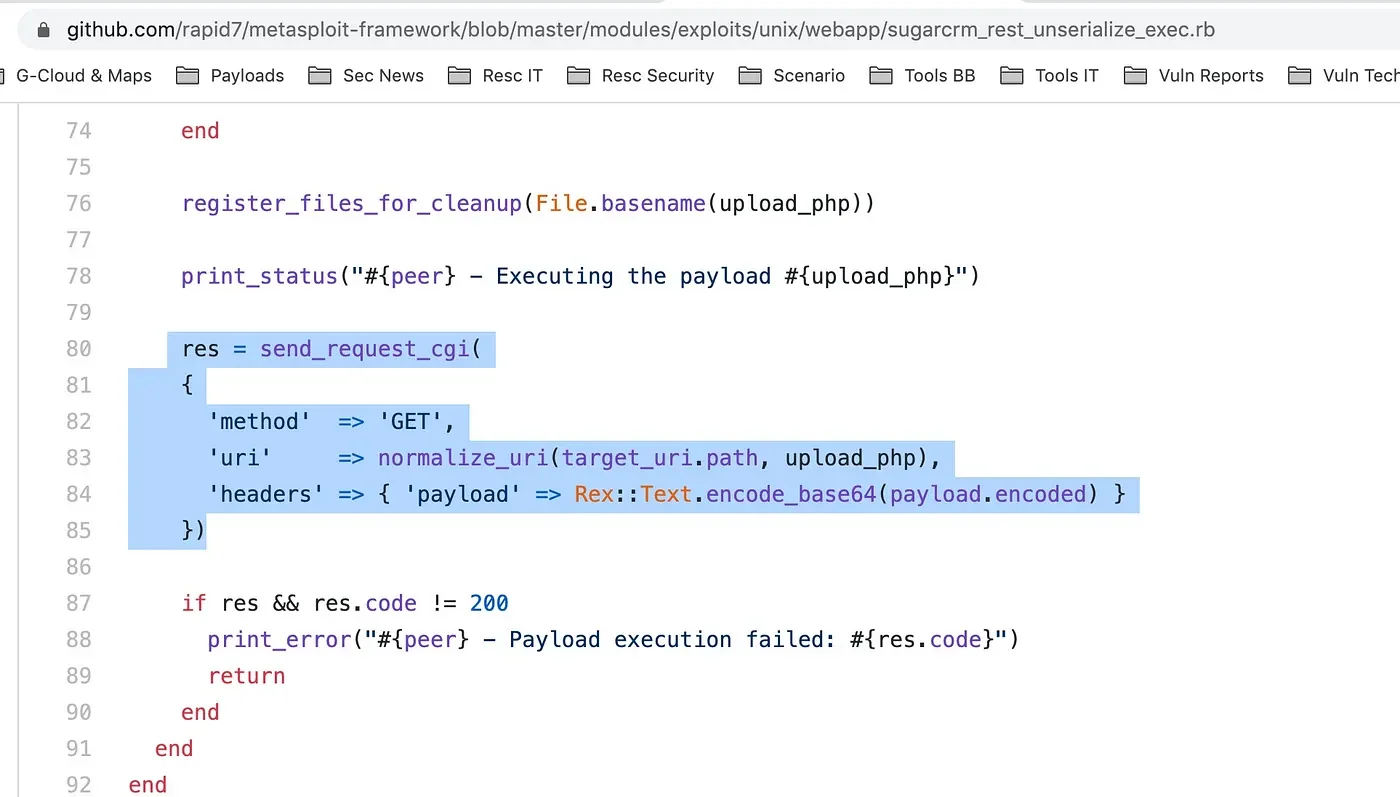
The second step of exploitation in the exploit code.
The payload was therefore encoded by hand as @system(whoami);, combining:
system, the PHP function for running an OS command.whoami, the OS command that returns the current user.
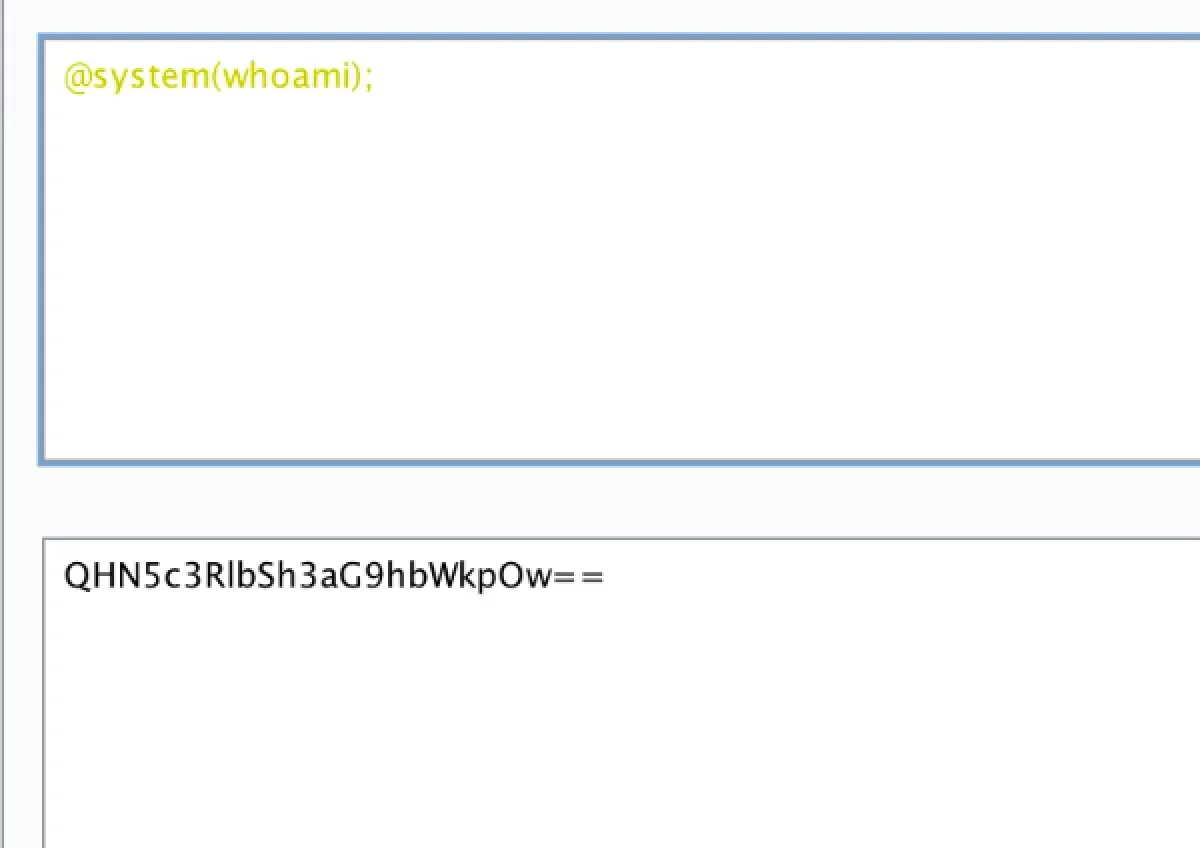
Manual base64 decode of the payload.
Requesting the file created by Metasploit with the payload header returned the output of the whoami command, along with another payout of around 3k.
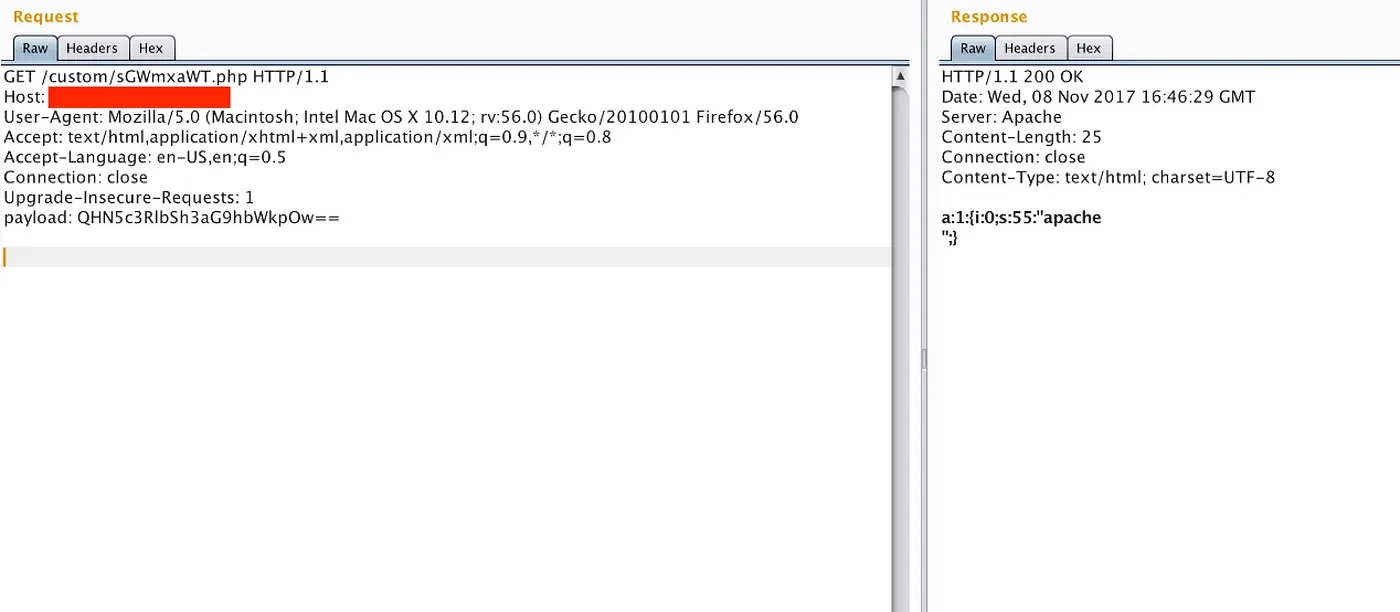
whoami command output.
During clean-up, when deleting the created webshells, other webshells were found that had been created before, by other people (judged from the file names and creation date-times). Other researchers had found the vulnerability too, but had not exploited it because the Metasploit module did not work completely and they had not read the exploit source. The vulnerability was found a day after target activation, outside the 24-hour rule, so it was not a duplicate.
Step 4: inject Java into a custom expression
A Java one-liner was appended under the custom addMessage function so that the output of the code would be returned, and the expression was saved:
new java.io.DataInputStream(java.lang.Runtime.getRuntime().exec("whoami").getInputStream()).readLine()
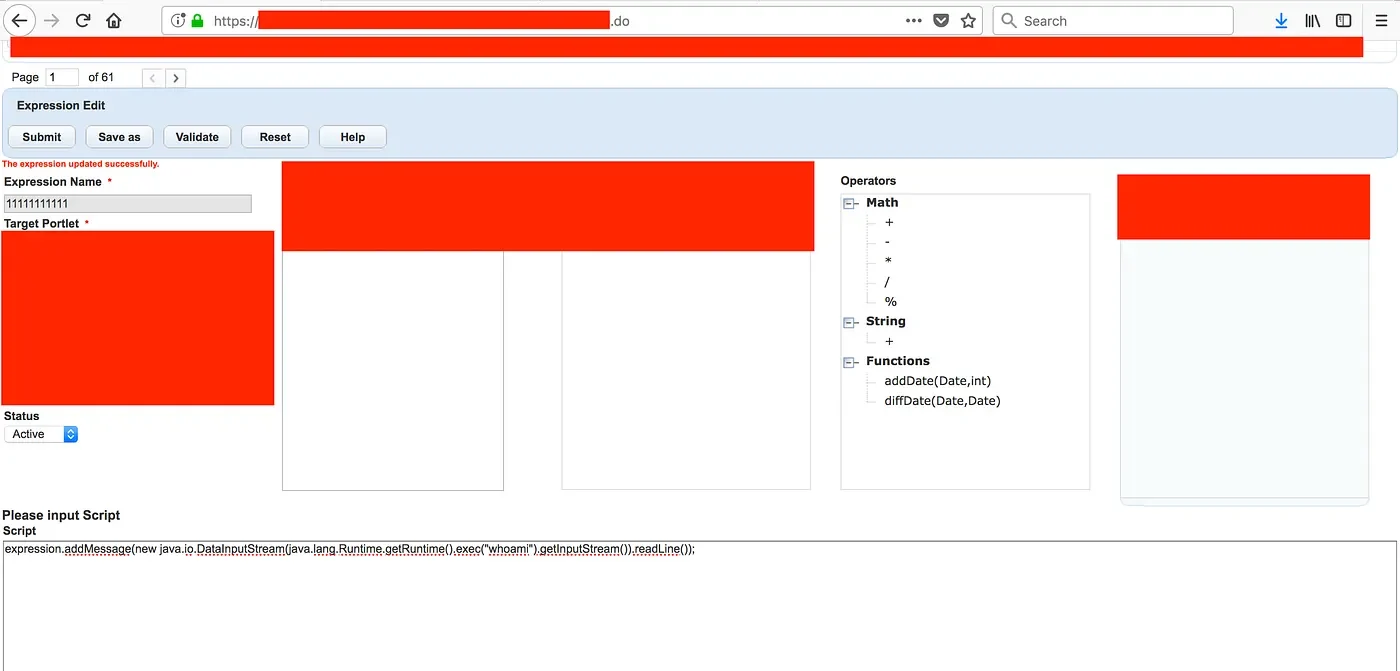
Injecting Java code into the custom expressions.
The expression was then triggered from another page, and the output came back as:
nt authority/system
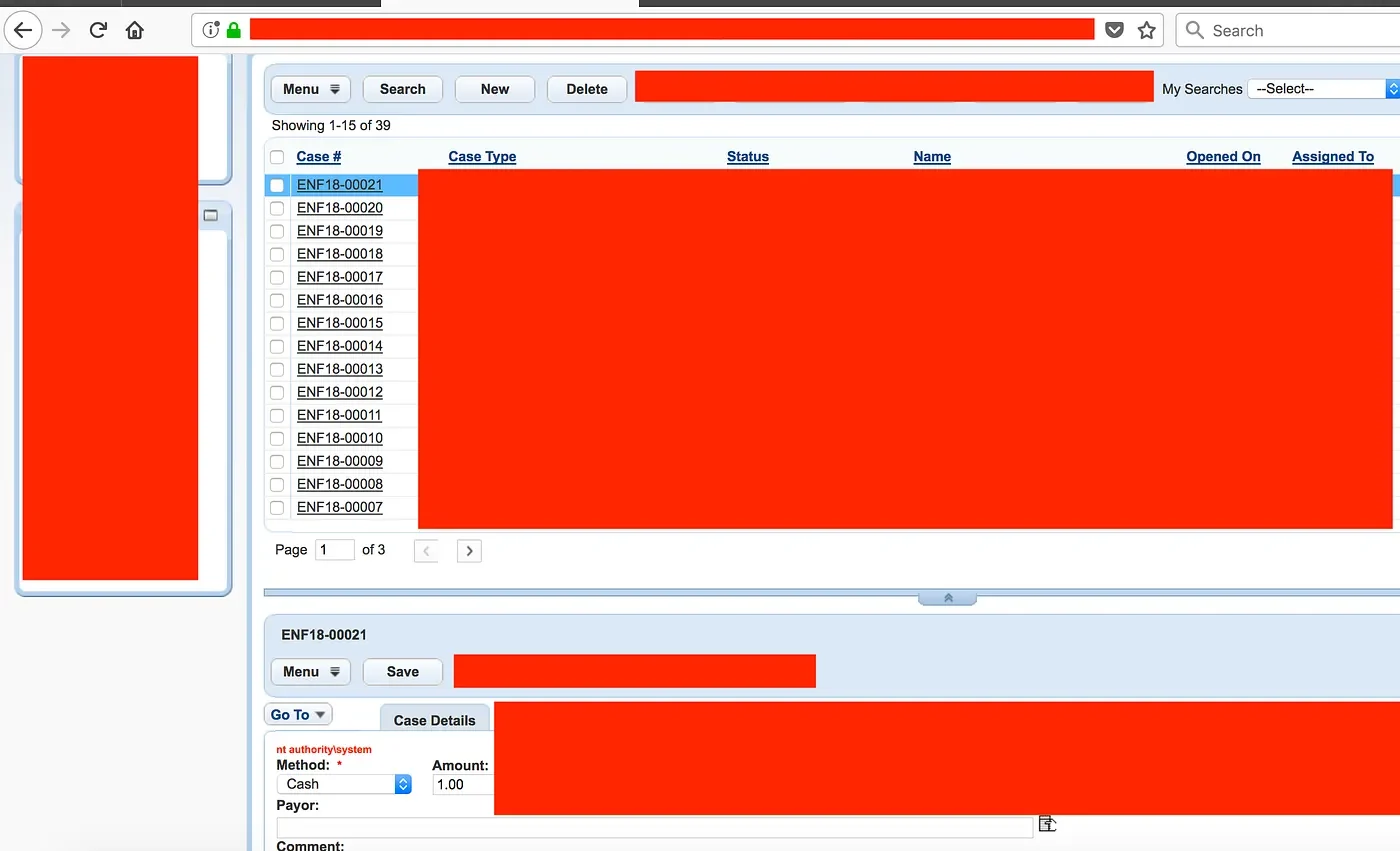
A case created with the malicious expression returned "nt authority/system" from the Java code.
This was a successful, pure Java code injection. Further research found a similar vulnerability in another functionality of the application, which brought around 6k in payouts in total.
Root cause
The first two examples are unrestricted file upload: the upload pages accepted asp extensions, and in the first case the page was an administrator page that could be reached without authentication because the after-login endpoints were not protected. In the first case the upload directory was not enumerable, so the traversal in the file name was what made the uploaded file reachable. In the second case the application itself disclosed the location of the uploaded file by e-mailing a link to it.
The third example is a known vulnerable SugarCRM version with a public Metasploit module. The module writes a PHP file under /custom/ and then relies on a base64-encoded payload header to execute code, so the file alone does not give a session when outbound or inbound shell traffic is blocked.
The fourth example is application-level command injection: the expression language accepted Java constructs in the input script stage, so a Java one-liner could be placed under a custom function and executed on the server.
Impact
In each case the author obtained command execution on the server. In the first two examples the uploaded webshell was reachable over HTTP. In the third example the created PHP file could be requested with the payload header to run OS commands, even when a firewall blocked reverse and bind shells. In the fourth example the injected Java code returned nt authority/system. The first target had been active for at least two weeks, the second for two days, and the third was found a day after activation.
Fix
The unauthenticated admin page also needs its endpoints protected.
Variants to test
- Fuzz for login pages and read the JavaScript they load for after-login endpoints, then request those endpoints directly. A positive result is an administrator page, such as an upload page, that responds without a session.
- Try
aspand other executable extensions on every upload form you find, including forms discovered with Google Dorks such assite:domain.com ext:aspx. A positive result is a successful upload of an executable extension. - When the upload directory cannot be enumerated, put traversal sequences in the file name and use the Burp Fuzzing-Path Traversal list. A positive result is a file written to an upper directory that you can then request. Remember that every working payload creates a new file on the server.
- Submit a form with an uploaded document and check any e-mail the application sends back. A positive result is a link to the uploaded file on the same in-scope application.
- When a Metasploit module completes without a session, read the exploit source. A positive result is a created file that returns an empty response, which you can then drive with the header the module uses, such as a base64-encoded
payloadheader. - On Java applications (
.doextensions), try Java constructs inside expression or scripting inputs, such asnew java.io.DataInputStream(java.lang.Runtime.getRuntime().exec("whoami").getInputStream()).readLine()under a custom function. A positive result is command output returned in the expression result.
What happened, in plain words
This is a story about four bugs that let an attacker run their own commands on someone else's server. That kind of bug is called remote code execution, or RCE. Many people think RCE only happens through long, complicated chains of tricks, and that only experts can find one. The author disagrees: all four of these were simple, and each was found with a small number of basic moves. They were found on Synack, a platform where companies invite vetted researchers to test their systems and pay for real problems. The payouts were around 3k for the first two examples, around 3k for the third, and around 6k in total after further research on the fourth.
A useful everyday comparison: think of a web server as a restaurant kitchen. Normally you order from the menu and the kitchen decides what to cook. RCE is when you manage to shout an instruction into the kitchen and a cook follows it, for example "open the back door". The four examples below are four different ways of getting that shout heard.
Before the examples, a few words that come up constantly.
- A web server is the computer that answers when your browser asks for a page.
- A URL is the address you type, like
https://example.com/support/. The part after the domain, here/support/, is the path. - An endpoint is a specific address on a server that does one job, for example a page that accepts a file. You can think of it as a counter in a large office: each counter handles one kind of request.
- Fuzzing means trying a long list of guesses automatically and watching which ones get an interesting answer. Like trying every key on a big keyring on a door, quickly.
- A webshell is a small file you upload to a server that, once it is reachable in the browser, lets you run commands on that server. It is a remote control disguised as an ordinary file.
- Directory traversal (also called path traversal) means putting
../in a file name or path. In file systems,..means "the folder above this one". So../images/x.aspmeans "go up one folder, then into images". If a program accepts that without cleaning it, you can make it write or read outside the folder it intended. - Burp Suite is a tool that sits between your browser and a website so you can see and change every request. It also ships with lists of ready-made test values, called payloads.
- Metasploit is a free framework full of ready-made exploits. An exploit is the actual technique that abuses a bug.
- Base64 is a way of writing any data using only letters, digits and a couple of symbols. It is not encryption; anyone can decode it. Think of it as writing a message in a different alphabet so it survives being copied around.
- The 24-hour rule is a convention on some bug bounty platforms: if a target has been live for less than 24 hours, a finding may be treated as a duplicate of other researchers' work. After that window, a report is more likely to count as yours.
Example 1: an upload page that should have needed a login
Finding it
The author was looking at one host and used directory fuzzing, which means trying many common folder names to see which exist. That turned up a login page under /support/.
Why look at the JavaScript? Modern pages load small programs called JavaScript files into your browser. Those files often contain the addresses the page will call later, for example after you log in. Reading them is like reading the staff-only notice board: it tells you which doors exist even if you cannot open them yet.
From those JavaScript files the author listed some after-login endpoints, meaning addresses meant to be used only once you are logged in. Then came the key step: requesting those addresses directly, without logging in. Some administrator pages answered anyway. One of them was an upload page, and it accepted files with the asp extension.
An extension is the part after the last dot in a file name, like .jpg or .pdf. It tells the server what kind of file it is. asp is a Microsoft technology for pages that the server itself executes. So a file ending in .asp is not just stored: when someone requests it, the server runs it as a program. That is exactly what a webshell needs.
Exploiting it
The upload worked, but the author could not find where the file had landed. The upload folder could not be guessed by fuzzing, and the JavaScript files did not reveal it either. A file you cannot reach in the browser is useless as a webshell.
The fix for that was directory traversal in the file name. Instead of naming the file plainly, the name contains ../ sequences, so the server, when it builds the destination path, walks up out of the upload folder and writes the file somewhere predictable, such as the web root, the top folder the website is served from.
The screenshot shows the upload request with the webshell file and the ../ attack in the file name.
To make this repeatable, the author used Burp Suite's built-in "Fuzzing-Path Traversal" dictionary, a list of ready-made traversal strings. Burp can automatically substitute each entry into the file name field of the request, one after another, which is much faster than typing them by hand.
The Burp payload list of path traversal strings used for the fuzzing.
The Burp Payload Processing rule, under Match/Replace, that puts the chosen payload into the file name.
There is a warning attached to this technique, and it is worth understanding. When you fuzz a read action, like fetching a file, a working payload is harmless: you just read something. When you fuzz a write action, like creating, updating or deleting a file, every payload that works actually creates a new file on the server. So a careless fuzz run can litter the target with files. That is why the author flags it.
After the traversal worked, the shell was reachable from the root directory.
This target had been active on the platform for at least two weeks, so the 24-hour rule was long past. The payout was around 3k.
Example 2: a form nobody knew about, and an e-mail that gave the game away
Finding it
On another web system, the author used Google Dorks. A dork is a search query that uses Google's advanced operators to find pages that are not linked from anywhere. The one used here was:
site:domain.com ext:aspx
Line by line: site:domain.com restricts results to one domain; ext:aspx asks for pages whose address ends in .aspx. The result was a web form that did not appear in the application's site map or user interface at all, in other words a page that exists but that normal users never see.
That form had a file upload section, and it accepted asp extensions.
The screenshot shows the asp shell being uploaded to the server through that form.
Exploiting it
This time the hard part was again finding the uploaded file. No amount of fuzzing revealed the upload folder, and unlike the first example there was no directory traversal to chain with. So the author went back to the form itself.
It was an application form, the kind you fill in to request something. The author filled in the whole, long form and submitted it. A few minutes later an e-mail arrived from the application about the application. That e-mail contained everything that had been typed into the form, and among it a link to the uploaded document, hosted on the same in-scope application.
That link is the whole trick. The application itself told the author where the file was. Clicking it returned the same webshell as in the first example. The payout was approximately 3k.
The target had been live for two days when the vulnerability was submitted. The 24-hour rule had already passed, and nobody had reported it yet.
Example 3: a known bug, a broken tool, and a header
Finding it
On an in-scope IP address, the author found a SugarCRM installation. SugarCRM is a customer relationship management product: software companies use to track customers, sales and support. The author gathered the version number and searched Google for vulnerabilities in that version. The version was vulnerable to a PHP Code Execution issue, and there was even a Metasploit module for it.
A module in Metasploit is a packaged exploit: you point it at a target, choose a payload, and it does the work. A payload here means the small piece of code the exploit delivers, usually a shell that connects back to you.
The Metasploit module being run against the vulnerable host.
Exploiting it
The module ran to completion, but no session appeared. A session is the live connection to the target that Metasploit gives you when the payload runs. The author tried different payloads from the framework, and none worked. The likely reason is a firewall blocking both incoming and outgoing traffic for bind and reverse shells. A bind shell is when the target opens a port and waits for you to connect; a reverse shell is when the target connects back to you. A firewall that blocks both directions kills both ideas.
So the author read the exploit source code. That is the program that Metasploit actually runs. Reading it showed two things: the exploit creates a file with a random name under /custom/, and then it tries to start a reverse shell to the supplied IP address from that PHP file.
A PHP file is a file the server executes, like the asp files earlier but for the PHP language. The author then requested the file that had been created during the earlier attempts, shown in the picture as /custom/svbGhtxS.php. The response was empty. An empty response sounds like a failure, but here it meant the opposite: the file existed and was being executed, it just had nothing to say. The exploit had worked; only the shell part had failed.
The second step of the exploit code, where the special header is sent.
The code showed that, for full exploitation, a special payload header is sent to the server from this file, and that its value is base64 encoded. A header is extra information attached to every HTTP request, alongside the address. Your browser sends headers all the time, for example to say which language you prefer. Here the file expects a header named payload carrying code to run.
So the author encoded a payload by hand:
@system(whoami);
Line by line: system is a PHP function that runs an operating system command; whoami is the operating system command that prints the name of the user the server is running as; the @ in front suppresses error messages; the semicolon ends the statement. The whole thing is then base64 encoded so it can travel in the header.
The manual base64 decoding of the payload.
Requesting the file created by Metasploit, with the payload header set to that encoded value, returned the output of the whoami command. The payout was around 3k again.
The output of the whoami command.
The clean-up surprise
When deleting the webshells afterwards, the author found other webshells that had been created earlier by other people, judged from the file names and creation date-times. So other researchers had found the same vulnerability, but had not exploited it, because the Metasploit module did not work completely and they had not read the exploit source. The vulnerability was found a day after the target was activated, outside the 24-hour rule, so it was not a duplicate.
Example 4: putting Java code inside a custom expression
Finding it
This one is a little more involved than the others, but the technique is different, which is why it is included. The author was testing an authenticated web application, meaning one where you log in first.
There was a feature for adding custom expressions to cases created by users. A case here is a record in the application, for example a payment case. An expression is a small formula the application evaluates, a bit like a spreadsheet formula. If the case is about a payment, you can return firstAmount — lastAmount on the output of the case. The expressions use custom functions such as addDate and diffDate.
The expression creation page.
The extension was .do, which told the author the underlying technology was Java. That raised a question: at the stage where the input script is processed, does the application allow Java functionality as well as the custom functions?
Exploiting it
The author appended a Java one-liner under the custom addMessage function, so that the output of the code would be returned, and saved the expression:
new java.io.DataInputStream(java.lang.Runtime.getRuntime().exec("whoami").getInputStream()).readLine()
Line by line: java.lang.Runtime.getRuntime() gets the object that represents the running Java program; .exec("whoami") asks the operating system to run the whoami command; .getInputStream() captures what that command prints; new java.io.DataInputStream(...) wraps that output so it can be read; .readLine() reads the first line of it. In short: run whoami, take its output, hand it back as the expression's result.
Injecting Java code into the custom expressions.
The expression was then triggered from another page, and the output came back as:
nt authority/system
That string is the name of the most privileged account on a Windows system, and it was the output of the injected code.
A case created with the malicious expression returned "nt authority/system" from the Java code.
This was a successful, pure Java code injection. Further research found a similar vulnerability in another functionality of the application, which brought around 6k in payouts in total.
Why these bugs existed
Looking at the four together makes the causes clear.
- In the first two examples the upload pages accepted
aspextensions. That is unrestricted file upload: the server stores a file that it will later execute. In the first example there was a second problem: the administrator page could be reached without logging in, because the after-login endpoints were not protected. And because the upload folder could not be guessed, the traversal in the file name was what made the file reachable at all. - In the second example the application itself disclosed the location of the uploaded file, by e-mailing a link to it.
- The third example was a known vulnerable SugarCRM version with a public Metasploit module. The module writes a PHP file under
/custom/and then relies on a base64-encodedpayloadheader to execute code. So the file alone does not give you a session when shell traffic is blocked. - The fourth example is application-level command injection: the expression language accepted Java constructs in the input script stage, so a Java one-liner placed under a custom function ran on the server.
What the impact was
In each case the author obtained command execution on the server.
- In the first two examples the uploaded webshell was reachable over HTTP.
- In the third example the created PHP file could be requested with the
payloadheader to run operating system commands, even when a firewall blocked reverse and bind shells. - In the fourth example the injected Java code returned
nt authority/system.
The first target had been active for at least two weeks, the second for two days, and the third was found a day after activation.
How to fix it
Things you can try, in the same spirit
- Fuzz for login pages, read the JavaScript they load for after-login endpoints, then request those endpoints directly. A positive result is an administrator page, such as an upload page, that answers without a session.
- Try
aspand other executable extensions on every upload form you find, including forms discovered with Google Dorks such assite:domain.com ext:aspx. A positive result is a successful upload of an executable extension. - When the upload folder cannot be guessed, put traversal sequences in the file name and use the Burp Fuzzing-Path Traversal list. A positive result is a file written to an upper folder that you can then request. Remember that every working payload creates a new file on the server.
- Submit a form with an uploaded document and check any e-mail the application sends back. A positive result is a link to the uploaded file on the same in-scope application.
- When a Metasploit module completes without a session, read the exploit source. A positive result is a created file that returns an empty response, which you can then drive with the header the module uses, such as a base64-encoded
payloadheader. - On Java applications (
.doextensions), try Java constructs inside expression or scripting inputs, such asnew java.io.DataInputStream(java.lang.Runtime.getRuntime().exec("whoami").getInputStream()).readLine()under a custom function. A positive result is command output returned in the expression result.
Glossary
- RCE (remote code execution): a bug that lets an attacker run their own commands on someone else's server.
- Synack: a platform where companies invite vetted researchers to test their systems and pay for real problems.
- Web server: the computer that answers when your browser asks for a page.
- URL: the address you type in the browser.
- Path: the part of a URL after the domain, such as
/support/. - Endpoint: a specific address on a server that does one job.
- Fuzzing: automatically trying a long list of guesses and watching which ones get an interesting answer.
- Directory fuzzing: fuzzing folder names to discover which folders exist on a server.
- JavaScript file: a small program a web page loads into your browser; it often reveals addresses the page will call later.
- After-login endpoint: an address meant to be used only once you are logged in.
- Extension: the part of a file name after the last dot, like
.jpgor.asp. - ASP: a Microsoft technology for pages that the server itself executes.
- Webshell: a small file uploaded to a server that, once reachable in the browser, lets you run commands on that server.
- Directory traversal (path traversal): putting
../in a file name or path so the program walks up out of the folder it intended. - Web root: the top folder the website is served from.
- Burp Suite: a tool that sits between your browser and a website so you can see and change every request.
- Payload: in fuzzing, a test value from a list; in exploitation, the small piece of code the exploit delivers.
- Payload Processing rule: a Burp feature that transforms a payload before it is inserted into a request.
- Google Dork: a Google search query using advanced operators to find pages that are not linked from anywhere.
- Site map: the list of pages an application knows about.
- SugarCRM: a customer relationship management product used to track customers, sales and support.
- Metasploit: a free framework full of ready-made exploits.
- Module: a packaged exploit inside Metasploit.
- Exploit: the actual technique that abuses a bug.
- Session: the live connection to the target that Metasploit gives you when the payload runs.
- Bind shell: the target opens a port and waits for you to connect.
- Reverse shell: the target connects back to you.
- Firewall: a filter that blocks network traffic according to rules.
- PHP file: a file the server executes, written in the PHP language.
- Header: extra information attached to every HTTP request, alongside the address.
- Base64: a way of writing any data using only letters, digits and a couple of symbols; not encryption, anyone can decode it.
system: a PHP function that runs an operating system command.whoami: an operating system command that prints the name of the user the server is running as.- Custom expression: a small formula the application evaluates, a bit like a spreadsheet formula.
- Case: a record in the application, for example a payment case.
- Java: a programming language; applications with
.doextensions are often built on it. - Java one-liner: a single line of Java code that does something useful.
nt authority/system: the name of the most privileged account on a Windows system.- Application-level command injection: a bug where an application's own input language accepts code that then runs on the server.
- 24-hour rule: a convention on some bug bounty platforms where a finding on a target live for less than 24 hours may be treated as a duplicate.
- Duplicate: a report of a bug that someone else already reported.
- In-scope: officially included in the programme you are allowed to test.




