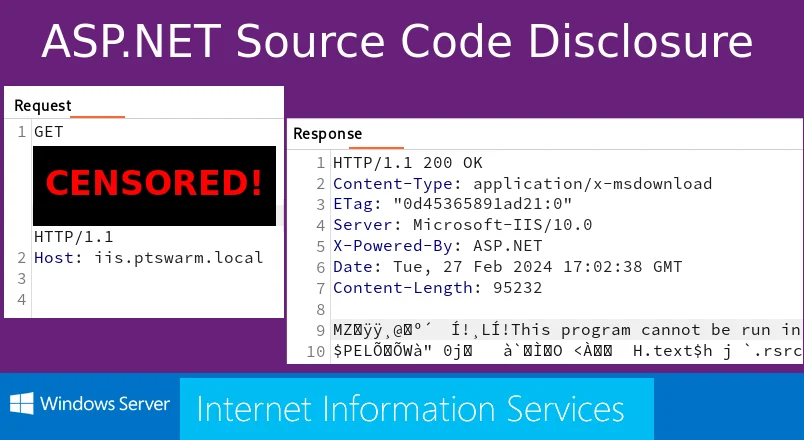
Source Code Disclosure in ASP.NET apps
An ASP.NET application with cookieless sessions enabled and the runAllManagedModulesForAllRequests setting allowed an attacker to bypass a WAF and download compiled DLL files from the /bin directory. The attacker could then decompile these DLLs to find and exploit a remote code execution vulnerability.
 Published on swarm.ptsecurity.com
Recently, I came across an interesting ASP.NET application. It appeared to be secure, but it accidentally revealed its source code.
The full write-up lives on its author's site
It belongs to its author, so we link to it rather than copy it. The other two tabs are our own rewrites, checked against it.
Context
During an external penetration test, Arseniy Sharoglazov (@_mohemiv) found an ASP.NET web application that appeared to be secure but accidentally revealed its source code. The method he used turned out to be applicable to many other .NET web applications, so the write-up is as much about a general IIS/.NET weakness as about this one target.
The application consisted of two pages on different ports. From the HTTP headers it looked like the application was written in C# on the ASP.NET platform, was running under IIS, and was protected by a WAF based on nginx.
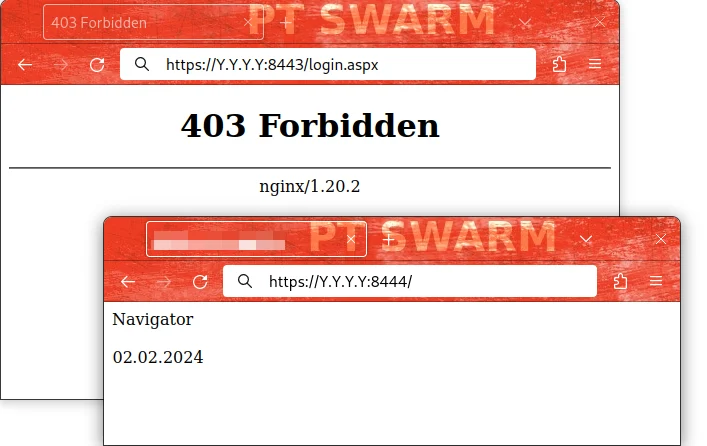
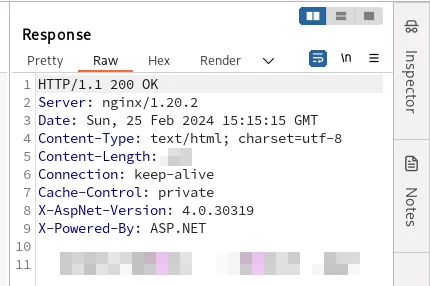
HTTP headers of the 8444/tcp application
Setup
The only tooling the report names explicitly is Burp (used for the screenshots of requests and responses), IIS-ShortName-Scanner (a Java tool, run as a jar), and a Suricata rule prepared by Kirill Shipulin of the blue team for detection. No account, role or credential is involved: the researcher had no username and no password for the application, and the whole point of the exercise was that brute forcing every possible username, password, path and parameter produced nothing.
The precondition for the disclosure is a server-side setting, runAllManagedModulesForAllRequests, which the researcher confirmed after obtaining code execution on the target. The report does not give the exact IIS or .NET Framework version of the tested application; it only mentions Windows Server 2019 with .NET Framework 4.7 in the mitigation section, where KB5034619 is said to fix the source disclosure.
Finding it
The first obstacle was a 403 error from the nginx-based WAF. Knowing that the application was ASP.NET under IIS was enough to bypass it, using a cookieless session:
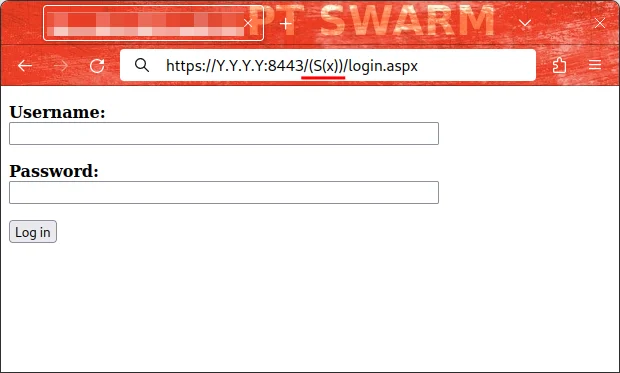
The content of the "/login.aspx" page after bypassing the WAF (via a cookieless session)
After the bypass the researcher got nothing useful: there were not even any stylesheets present. Brute forcing usernames, passwords, paths and parameters was unsuccessful. The application looked like another boring target.
The relevant background is the ASP.NET cookieless session feature. When it is enabled in IIS, any page of the server starts accepting cookieless sessions. These sessions, along with PHP's and Java's analogues, have long been used for WAF bypass, session fixation, XSS and other attacks. The report lists the different formats of these cookieless sessions, citing Microsoft documentation:
It also points to Soroush Dalili's (@irsdl) recent work in this area, Cookieless DuoDrop: IIS Auth Bypass & App Pool Privesc in ASP.NET Framework (CVE-2023-36899 and CVE-2023-36560). Two security issues in .NET Framework were found and reported, both associated with repeating a cookieless pattern in the URI twice, potentially leading to a restriction bypass and privilege escalation. The report points to the POCs in that article and notes that at the time the researcher could not imagine any way to apply them to his one-page applications.
He kept playing with the sites once every two or three days, with no result, until one day this happened:
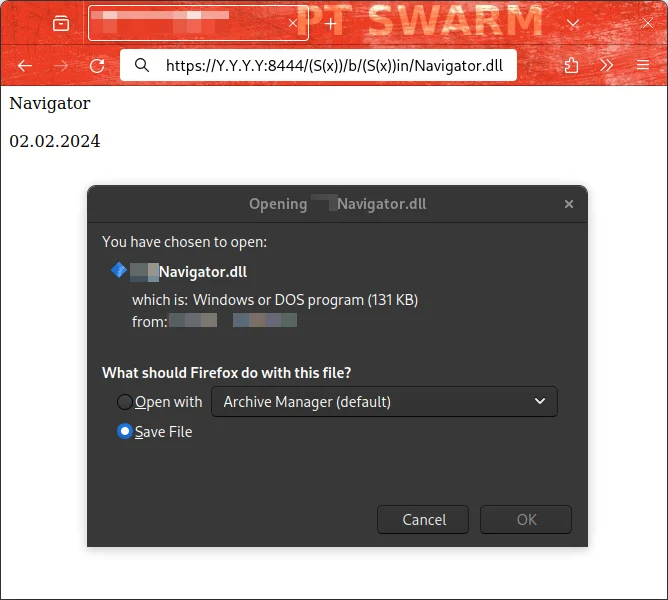
In just one second the DLL had appeared on his computer. It was not corrupt, and it contained a Remote Code Execution vulnerability.
Exploitation
Step 1: Bypass the WAF with a cookieless session
The 403 from the nginx-based WAF was bypassed by putting a cookieless session pattern into the request, which let the researcher reach /login.aspx. The report shows the resulting page in the screenshot above but does not reproduce the exact request. The bypass itself yielded no credentials or hidden functionality.
Step 2: Confirm the server-side setting
After obtaining RCE through the downloaded DLL, the researcher could read the target's web.config and reduced it to the minimum configuration that still reproduced the behaviour:
<?xml version="1.0" encoding="utf-8"?>
<configuration>
  <system.webServer>
    <modules runAllManagedModulesForAllRequests="true" />
  </system.webServer>
</configuration>
That was it: runAllManagedModulesForAllRequests was the cause of the success.
Step 3: Check whether /bin can be reached directly
The technique worked on other servers as well. The setting is not rare, and the researcher downloaded a few DLLs from different websites the same day. The one thing he noticed is that it is impossible to check the existence of the /bin directory with ordinary requests:
http://Y.Y.Y.Y/ - 200
http://Y.Y.Y.Y/bin - 404
http://Y.Y.Y.Y/bin/ - 404
http://Y.Y.Y.Y/bin/Navigator.dll - 404
http://Y.Y.Y.Y/(S(x))/b/(S(x))in  - 404
http://Y.Y.Y.Y/(S(x))/b/(S(x))in/ - 404
http://Y.Y.Y.Y/(S(x))/b/(S(x))in/Navigator.dll - 200
Every direct request to /bin or to a DLL inside it returns 404, including the cookieless variants without the file name. Only the request that splits the directory name with a repeated cookieless pattern and appends the DLL returns 200.
Step 4: Enumerate the directory with IIS-ShortName-Scanner
By applying IIS-ShortName-Scanner, it is possible not only to check the existence of the /bin directory but also to discover its content:
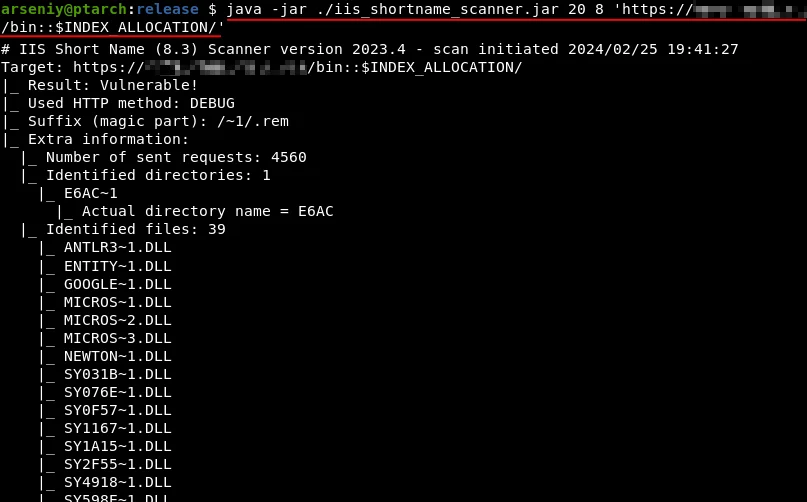
Executing java -jar ./iis_shortname_scanner.jar 20 8 'https://X.X.X.X/bin::$INDEX_ALLOCATION/'
java -jar ./iis_shortname_scanner.jar 20 8 'https://X.X.X.X/bin::$INDEX_ALLOCATION/'
Both IIS-ShortName-Scanner and the ::$INDEX_ALLOCATION trick are attributed to Soroush Dalili.
Step 5: Full exploitation algorithm
The report gives a brief guide for checking a server.
- Check if cookieless sessions are allowed.
# If your application is in the main folder
/(S(X))/
/(Y(Z))/
/(G(AAA-BBB)D(CCC=DDD)E(0-1))/

# If your application is in a subfolder
/MyApp/(S(X))/
...
- Optionally, use IIS-ShortName-Scanner. Its functionality does not depend on whether cookieless sessions are enabled or not.
java -jar ./iis_shortname_scanner.jar 20 8 'https://X.X.X.X/bin::$INDEX_ALLOCATION/'
java -jar ./iis_shortname_scanner.jar 20 8 'https://X.X.X.X/MyApp/bin::$INDEX_ALLOCATION/'
In addition to /bin, the researcher recommends checking other special .NET folders:
/App_Code
/App_WebReferences
/App_GlobalResources
/App_LocalResources
/App_Data
/App_Themes
/App_Browsers
/Themes
/Views
/Models
/Controllers
-
Explore the 404 page. For
/(S(x))/b/(S(x))in/App.dllit should write something like/bin/App.dllor none in the output. If it shows.../b/(S(x))in/...on the 404, the patches are installed. -
Try to read DLLs. It is necessary to reconstruct complete filenames from shortened 8.3 format filenames.
http://Y.Y.Y.Y/(S(x))/b/(S(x))in/MyApplicationFile.dll
http://Y.Y.Y.Y/MyApp/(S(x))/b/(S(x))in/MyApplicationFile.dll
PDB files, if such exist, will not be accessible.
Root cause
The disclosure is caused by the runAllManagedModulesForAllRequests setting in web.config. The report identifies this setting as the cause but does not explain the internal mechanism. Splitting the /bin directory name with a repeated cookieless pattern, as in /(S(x))/b/(S(x))in/, lets a request reach a DLL inside /bin.
The same cookieless session feature was already used to get past the 403 on /login.aspx. The direct-path checks (/bin, /bin/, /bin/Navigator.dll) all return 404, so the directory is not normally exposed; the bypass depends on the combination of the setting and the cookieless pattern. The report does not explain the internal mechanism beyond identifying the setting as the cause.
Impact
An attacker who can reach such a server can download compiled DLLs from the application's /bin directory. In this case the downloaded DLL was not corrupt and contained a Remote Code Execution vulnerability, which the researcher used to read web.config and then to reduce it to the minimal configuration. The technique worked against several other servers the same day, so the impact is not limited to one application.
The report identifies runAllManagedModulesForAllRequests as the cause and notes the setting is not rare. PDB files are not accessible through this technique.
Fix
For security teams, the recommendation is to update Microsoft IIS and .NET Framework to the latest versions. For Windows Server 2019 and .NET Framework 4.7, KB5034619 currently fixes the source disclosure.
To mitigate short name enumeration, run:
fsutil behavior set disable8dot3 1
to disable 8.3 name creation, then reboot the system and run:
fsutil 8dot3name strip /s /v [PATH-TO-WEB-DIRETORY]
to remove all existing 8.3 file names.
Variants to test
- Try the cookieless session formats
/(S(X))/,/(Y(Z))/and/(G(AAA-BBB)D(CCC=DDD)E(0-1))/on any ASP.NET application, including under a subfolder such as/MyApp/(S(X))/. A positive result is that the server accepts the pattern instead of rejecting it, which is the precondition for everything else. - Run IIS-ShortName-Scanner against
/bin::$INDEX_ALLOCATION/and against/MyApp/bin::$INDEX_ALLOCATION/. A positive result is that the tool reports the existence of the directory and its content, independently of whether cookieless sessions are enabled. - Check the other special .NET folders listed above (
/App_Code,/App_WebReferences,/App_GlobalResources,/App_LocalResources,/App_Data,/App_Themes,/App_Browsers,/Themes,/Views,/Models,/Controllers) with the same short-name approach. A positive result is enumeration or retrieval of files that should not be served. - Request
/(S(x))/b/(S(x))in/App.dlland inspect the 404 body. If it shows/bin/App.dllor none, the server is likely vulnerable; if it shows.../b/(S(x))in/..., the patches are installed. - Try to read DLLs with
http://Y.Y.Y.Y/(S(x))/b/(S(x))in/MyApplicationFile.dlland the subfolder variant, reconstructing full names from 8.3 short names. A positive result is a 200 response containing a valid DLL. - On a different project, the researcher's friend was able to download DLL files from the
/bindirectory directly, even though the researcher had never seen this technique succeed. It is worth trying the direct path as well. - For defenders, deploy the Suricata rule from the report to detect cookieless strings in ASP.NET URIs:
alert http any any -> any any (msg: "ATTACK [PTsecurity] Cookieless string in ASP.NET"; flow: established, to_server; http.uri; content: "/("; fast_pattern; content: "))"; distance: 0; pcre: "/\/\([A-Z]\(.*?\)\)/"; classtype: attempted-admin; sid: 10009357; rev: 1;)
The report's closing advice for pentesters and bug hunters is to check for obvious things and tricks, including ones that should not work.
What happened, in plain words
A security researcher was hired to test a company's website, the way a locksmith is hired to try the doors of a building and report which ones open too easily. The website looked well defended. It had a login page, it refused to show anything useful, and a protective filter in front of it blocked the researcher's first attempts. Then, one day, a file from the server appeared on his own computer. That file was a compiled program from the website itself, and inside it was a serious flaw that let him run his own code on the server.
The interesting part is not that one website. The same trick worked on several other servers the same day, because it depends on a common setting in Microsoft's web server software, IIS, and in the .NET programming platform that many business websites are built on. This article walks through what he found, in the order he found it, and explains every term along the way.
The author

The research is by Arseniy Sharoglazov, who works as a penetration testing expert and goes by the handle @_mohemiv. A penetration test is an authorised attack: the client gives written permission to try to break in, so that problems are found by friendly people before criminals find them.
Looking at the application
During an external penetration test (testing from the internet, as an outsider would), he found a web application. It consisted of two pages on different ports:
A port is a numbered channel on a server. One physical server can run many services, and each listens on its own number: ordinary websites usually answer on port 443 for encrypted traffic, but an application can also be published on other numbers such as 8444. Seeing two pages on two ports told him there was more than one service to look at.
Here is a Burp screenshot with relevant HTTP headers:
HTTP headers of the 8444/tcp application
Burp is a tool that sits between your browser and a website, letting you read and edit every request and response. HTTP headers are the small labelled lines a browser and a server exchange before the actual page: things like the server's name, the type of content, and instructions about caching. They are like the address and handling notes on an envelope, separate from the letter inside.
From those headers it looked like the application was written in C# on the ASP.NET platform, was functioning under IIS, and was protected by a WAF based on nginx. Three terms there:
- C# is a programming language from Microsoft.
- ASP.NET is the framework that turns C# code into web pages. A framework is a ready-made set of building blocks, like a kitchen that already has the oven and plumbing installed.
- IIS (Internet Information Services) is Microsoft's web server: the program that receives requests and hands back pages.
- A WAF (Web Application Firewall) is a filter placed in front of a website that inspects incoming requests and blocks ones that look malicious. nginx is a common web server often used to build such filters.
Knowing this was enough to bypass the 403 error:
The content of the "/login.aspx" page after bypassing the WAF (via a cookieless session)
A 403 error is the standard code a server returns for "forbidden": I understood your request, but I will not serve it. Bypassing it means getting the page anyway, without the filter noticing. The screenshot shows the login page finally loading. The report does not reproduce the exact request that achieved this, only the result.
After the bypass, he got nothing. There weren't even any stylesheets present. A stylesheet is the file that tells a browser how a page should look; a real, finished site almost always has one. Its absence suggested the page was a bare shell. He attempted to brute force every possible username and password, every possible path and parameter. Brute forcing means trying a long list of guesses automatically. A path is the part of a web address after the domain, such as /login.aspx; a parameter is a named value attached to a request, such as ?id=5. All efforts were unsuccessful.
Another boring web application? Not today!
Cookieless sessions in ASP.NET
To follow the rest, you need to know what a session and a cookie are.
When you log in to a website, the server needs to remember who you are from one page to the next. Normally it gives your browser a small piece of data called a cookie, which the browser sends back with every request, like a cloakroom ticket that proves which coat is yours. A session is the server-side memory of your visit; the cookie is just the ticket that points to it.
Some systems support cookieless sessions: instead of a cookie, the ticket is written directly into the web address. When you enable the ASP.NET feature in IIS, any page of the server starts accepting cookieless sessions.
The ASP.NET cookieless sessions, along with PHP's and Java's analogs, have always been used for WAF bypass, as we did, session fixation, XSS, and all kinds of other attacks. Briefly:
- Session fixation is an attack where someone forces a victim to use a session ticket the attacker already knows, so the attacker can later ride on that session.
- XSS (cross-site scripting) is an attack where malicious script is made to run inside another user's browser.
Here are different formats of these "cookieless sessions":
Source: https://learn.microsoft.com/en-us/previous-versions/dotnet/articles/aa479315(v=msdn.10)
The image is taken from Microsoft's documentation and shows the shapes these tickets can take inside a URL. The point for a beginner is simply that a chunk of text in brackets, placed in the address, is a legitimate part of an ASP.NET URL, not an attack string. That is exactly why a filter can be fooled by it.
Furthermore, Soroush Dalili (a.k.a. @irsdl) recently discovered something new in this area: Cookieless DuoDrop: IIS Auth Bypass & App Pool Privesc in ASP.NET Framework (CVE-2023-36899 & CVE-2023-36560).
A CVE is a public catalogue number for a known security flaw, so that everyone can refer to the same issue unambiguously. Auth bypass means getting past a login or permission check without valid credentials. Privesc (privilege escalation) means gaining more power on a system than you were given.
Namely, two security issues in .NET Framework were found and reported. Both were associated with the repetition of a cookieless pattern in the URI twice, potentially leading to a restriction bypass and privilege escalation. The URI is the full address of a resource, essentially what you type in the browser's address bar.
Here are the POCs from Soroush Dalili's article:
A POC (proof of concept) is a minimal demonstration that a flaw is real, usually a short request that triggers it. The report points to the POCs from that other article.
Keep in mind these POCs. At that moment, he wasn't able to imagine any way to apply these POCs for his one-page applications. In other words, he filed the idea away: repeating a pattern twice in a URL can confuse a server's handling of paths. That idea comes back later.
Discovering source code disclosure
He was playing with his websites once every two or three days. It all came to nothing. Just two pages, no username, and no password.
However, one day, this happened:
In just one second, the DLL had appeared on his computer! It wasn't corrupt, and there was a Remote Code Execution discovered inside!
A DLL is a compiled library: a file of ready-to-run program code that an application loads and uses. "Source code disclosure" means the server hands out files that reveal how the application was built. Normally a web server will happily send you a picture or a page, but never the program files themselves, for the same reason a restaurant will serve you a meal but not let you walk into the kitchen and take the recipe book. Here the kitchen door was open.
Remote Code Execution (RCE) means an attacker can make the server run code of their choosing, from a distance. It is about as serious as a web flaw gets, because the attacker is no longer limited to reading data: they can act as the server.
Investigation
After obtaining the RCE, he was able to access the target's web.config file. web.config is the settings file for an ASP.NET application: it holds configuration such as which modules are switched on. Then, he reduced it to the minimum possible configuration:
<?xml version="1.0" encoding="utf-8"?>
<configuration>
  <system.webServer>
    <modules runAllManagedModulesForAllRequests="true" />
  </system.webServer>
</configuration>
Line by line:
<?xml version="1.0" encoding="utf-8"?>declares that this is an XML file (a structured text format built from tags) and that the text is encoded in UTF-8, a standard way of representing characters.<configuration>opens the root element: everything inside is configuration for the application.<system.webServer>opens the section that concerns the web server itself, IIS.<modules runAllManagedModulesForAllRequests="true" />is the single setting that matters. A module in IIS is a piece of code that runs on requests. "Managed" means written for .NET. The report identifies this setting as the cause of the disclosure.</system.webServer>and</configuration>close the two elements opened above.
That was it. The runAllManagedModulesForAllRequests setting was the cause of our success. He reached this conclusion by stripping the real file down until only the behaviour-relevant line was left, the way you remove ingredients from a recipe one at a time until the cake stops rising.
Scaling the POC
It quickly became clear that the technique works on other servers. The setting runAllManagedModulesForAllRequests isn't rare, and he was able to download a few DLLs from different websites the same day.
The only thing he noticed is that it's impossible to check the existence of the "/bin" directory:
http://Y.Y.Y.Y/ - 200
http://Y.Y.Y.Y/bin - 404
http://Y.Y.Y.Y/bin/ - 404
http://Y.Y.Y.Y/bin/Navigator.dll - 404
http://Y.Y.Y.Y/(S(x))/b/(S(x))in  - 404
http://Y.Y.Y.Y/(S(x))/b/(S(x))in/ - 404
http://Y.Y.Y.Y/(S(x))/b/(S(x))in/Navigator.dll - 200
Line by line:
http://Y.Y.Y.Y/ - 200: the home page answers with 200, the standard code for "OK, here is the page". So the site is up.http://Y.Y.Y.Y/bin - 404: asking for the/binfolder gives 404, "not found"./binis the folder where ASP.NET keeps its compiled DLLs.http://Y.Y.Y.Y/bin/ - 404: adding a trailing slash changes nothing.http://Y.Y.Y.Y/bin/Navigator.dll - 404: asking for a specific DLL inside it also gives 404. So the folder is not simply browsable.http://Y.Y.Y.Y/(S(x))/b/(S(x))in - 404: here the cookieless pattern(S(x))is inserted, and the folder namebinis split intobandin. Still 404, because no file is named.http://Y.Y.Y.Y/(S(x))/b/(S(x))in/ - 404: same, with a trailing slash. Still 404.http://Y.Y.Y.Y/(S(x))/b/(S(x))in/Navigator.dll - 200: the same split folder name, now with a file after it, returns 200. The server has served a DLL.
The lesson from the list: the folder is not exposed in any ordinary way, and the trick only works when the split pattern and a real file name are combined. The trick only works when the split pattern and a real file name are combined.
However, by applying IIS-ShortName-Scanner, you can not only check the existence of the "/bin" directory, but also discover its content:
Executing java -jar ./iis_shortname_scanner.jar 20 8 'https://X.X.X.X/bin::$INDEX_ALLOCATION/'
java -jar ./iis_shortname_scanner.jar 20 8 'https://X.X.X.X/bin::$INDEX_ALLOCATION/'
Line by line:
javaruns a Java program. Java is a programming language that runs on many systems; a jar file is a packaged Java program.-jar ./iis_shortname_scanner.jartells Java which package to run: IIS-ShortName-Scanner, a tool that discovers short file names on IIS.20 8are the tool's arguments controlling how it searches; the report gives them without further explanation.'https://X.X.X.X/bin::$INDEX_ALLOCATION/'is the target.::$INDEX_ALLOCATIONis a special Windows suffix used by the scanner to discover the folder's content.
Why this step: the direct requests above could not even confirm that /bin exists. The scanner uses Windows' habit of keeping a shortened version of every file name (the "8.3" format, explained below) to list what is inside a folder it should not be able to list.
Both IIS-ShortName-Scanner and the "::$INDEX_ALLOCATION" trick are attributed to Soroush Dalili.
Full exploitation algorithm
Here's a brief guide on how to check the server on the vulnerability.
1. Check if cookieless sessions are allowed.
# If your application is in the main folder
/(S(X))/
/(Y(Z))/
/(G(AAA-BBB)D(CCC=DDD)E(0-1))/

# If your application is in a subfolder
/MyApp/(S(X))/
...
Line by line:
# If your application is in the main folderis a comment, a note for the reader that the computer ignores./(S(X))/is the simplest cookieless session pattern: a bracketed ticket placed in the path./(Y(Z))/is the same shape with different letters, showing that the letters are placeholders, not fixed values./(G(AAA-BBB)D(CCC=DDD)E(0-1))/is a longer, more complex form, showing that the ticket can contain several bracketed parts.# If your application is in a subfoldermarks the second case./MyApp/(S(X))/shows the pattern placed after the application's own folder name....means "and so on".
Why this step: if the server accepts these patterns instead of rejecting them, cookieless sessions are switched on, which is the precondition for everything that follows. It is like checking whether a door has a letterbox before trying to post something through it.
2. Optionally, use IIS-ShortName-Scanner. Note, its functionality doesn't depend on whether cookieless sessions are enabled or not.
java -jar ./iis_shortname_scanner.jar 20 8 'https://X.X.X.X/bin::$INDEX_ALLOCATION/'
java -jar ./iis_shortname_scanner.jar 20 8 'https://X.X.X.X/MyApp/bin::$INDEX_ALLOCATION/'
Line by line:
- The first command scans the
/binfolder of the site at the root. - The second does the same for a site installed in a subfolder called
MyApp.
Why this step: it tells you whether the folder exists and what is inside it, even when ordinary requests return 404. It works whether or not cookieless sessions are enabled, so it is a useful independent check.
In addition to "/bin", he recommends you check other special .NET folders:
/App_Code
/App_WebReferences
/App_GlobalResources
/App_LocalResources
/App_Data
/App_Themes
/App_Browsers
/Themes
/Views
/Models
/Controllers
Line by line, these are folder names that ASP.NET projects commonly use:
/App_Codeholds shared code files./App_WebReferencesholds references to external web services./App_GlobalResourcesholds resources shared across the whole application, such as text and images./App_LocalResourcesholds resources for individual pages./App_Dataholds data files such as databases./App_Themesholds visual themes./App_Browsersholds browser-specific settings./Themesholds themes in newer project layouts./Viewsholds the page templates of the application./Modelsholds the code that represents data./Controllersholds the code that handles requests.
Why this step: /bin is not the only place where program files live. Any of these folders can reveal how the application works, so each is worth the same short-name check.
3. Explore 404 page.
For /(S(x))/b/(S(x))in/App.dll it should write something like /bin/App.dll or none in the output. If it's .../b/(S(x))in/... on 404, this means the patches are installed.
Why this step: the text of a 404 page is a clue. If the server writes /bin/App.dll or none, the patches are not installed. If the 404 echoes the strange path back unchanged, the fix is in place. It is like testing a lock by listening to whether the key turns at all.
4. Try to read DLLs. It's necessary to reconstruct complete filenames from shortened 8.3 format filenames.
http://Y.Y.Y.Y/(S(x))/b/(S(x))in/MyApplicationFile.dll
http://Y.Y.Y.Y/MyApp/(S(x))/b/(S(x))in/MyApplicationFile.dll
Line by line:
- The first request asks for a DLL in the root application's
/bin, using the split folder name. - The second does the same for an application installed in the
MyAppsubfolder.
Why this step: the scanner reveals only shortened names, in the old 8.3 format where a long name is squeezed into eight characters plus a three-character extension, such as MYAPPL~1.DLL. To download the file you need its real name, so you reconstruct it from the short one and request it.
The PDB files, if such exists, will not be accessible.
Attack detection
A big thank you to Kirill Shipulin of our blue team for preparing the Suricata rule:
alert http any any -> any any (msg: "ATTACK [PTsecurity] Cookieless string in ASP.NET"; flow: established, to_server; http.uri; content: "/("; fast_pattern; content: "))"; distance: 0; pcre: "/\/\([A-Z]\(.*?\)\)/"; classtype: attempted-admin; sid: 10009357; rev: 1;)
A blue team is the defensive side of security, as opposed to the red team that attacks. Suricata is an open-source network monitoring tool that watches traffic and raises alerts when it matches a rule.
Line by line:
alert http any any -> any anysays: raise an alert for HTTP traffic from any address to any address.msg: "ATTACK [PTsecurity] Cookieless string in ASP.NET"is the message shown when the rule fires.flow: established, to_serverlimits it to traffic going towards the server on an established connection.http.urisays the rule inspects the URI part of the request.content: "/("; fast_patternlooks for the two characters/followed by(, and marks this as the fast pre-filter.content: "))"; distance: 0looks for))starting from the same position.pcre: "/\/\([A-Z]\(.*?\)\)/"is a regular expression (a pattern language for text) matching a slash, an opening bracket, a capital letter, another opening bracket, some characters, and two closing brackets: the cookieless pattern shape.classtype: attempted-adminclassifies the alert as an attempted administrative action.sid: 10009357; rev: 1give the rule a unique identifier and a revision number.
Why this matters: defenders can deploy this rule to spot the pattern in their own traffic, so the same trick does not go unnoticed.
Conclusion and mitigations
For security teams
Update your Microsoft IIS and .NET Framework to the latest versions. For Windows Server 2019 and .NET Framework 4.7, KB5034619 currently fixes the source disclosure. A KB number identifies a Microsoft update package.
For mitigating short name enumerations, run "fsutil behavior set disable8dot3 1" to disable 8.3 name creation. Next, reboot your system and run "fsutil 8dot3name strip /s /v [PATH-TO-WEB-DIRETORY]" to remove all existing 8.3 file names.
Line by line:
fsutil behavior set disable8dot3 1usesfsutil, a Windows command-line tool for file system settings.behavior setchanges a system behaviour,disable8dot3names the behaviour (the automatic creation of shortened 8.3 names), and1means on, i.e. disable it.fsutil 8dot3name strip /s /v [PATH-TO-WEB-DIRETORY]removes existing short names.stripis the action,/smeans include subfolders,/vmeans verbose (print what is being done), and[PATH-TO-WEB-DIRETORY]is a placeholder for the folder to clean.
Why this matters: the scanner works by guessing short names. If no short names exist, there is nothing to guess, and the folder listing trick loses its footing.
For pentesters and bughunters
He recommends checking for obvious things and tricks, including ones that should not work. As an example, on a different project, his friend was able to download DLL files from the "/bin" directory directly, even though he has never seen this technique succeed. In other words: do not assume a door is locked just because it looks locked.
References
This article was based on the following materials:
- Microsoft Short File Name Disclosure, 2010-2012, Soroush Dalili
- Microsoft Short File Name Disclosure in Microsoft IIS 10.0, July 2023, Soroush Dalili
- IIS Short Name Scanner, 2012-2023, Soroush Dalili
- Cookieless DuoDrop: IIS Auth Bypass & App Pool Privesc, August 2023, Soroush Dalili
- CVE-2023-36560, 2023, Markus Wulftange (@mwulftange)
- CVE-2023-36899, 2023, Soroush Dalili
Glossary
- 8.3 name: an old Windows convention that stores a shortened version of every file name, eight characters plus a three-character extension, such as
MYAPPL~1.DLL. - 403: the HTTP status code for "forbidden": the server understood the request but refuses to serve it.
- 404: the HTTP status code for "not found": the server has nothing at that address.
- 200: the HTTP status code for "OK": the request succeeded and content follows.
- ASP.NET: Microsoft's framework for building web applications, usually in C#.
- Auth bypass: getting past a login or permission check without valid credentials.
- Blue team: the defensive side of security, as opposed to the attacking red team.
- Brute force: trying a long list of guesses automatically until one works.
- Burp: a tool that sits between browser and server so you can read and edit every request and response.
- C#: a programming language from Microsoft.
- Cookie: a small piece of data a site stores in your browser so it can recognise you on later requests.
- Cookieless session: a session whose ticket is written into the web address instead of being kept in a cookie.
- CVE: a public catalogue number for a known security flaw.
- DLL: a compiled library of program code that an application loads and uses.
- Framework: a ready-made set of building blocks for writing software.
- fsutil: a Windows command-line tool for file system settings.
- HTTP headers: the labelled lines exchanged before a page, carrying metadata such as server name and content type.
- IIS: Microsoft's web server software.
- jar: a packaged Java program.
- KB: a number identifying a Microsoft update package.
- Module: in IIS, a piece of code that runs on requests; "managed" means written for .NET.
- nginx: a common web server, often used to build filters in front of sites.
- Parameter: a named value attached to a request, such as
?id=5. - Path: the part of a web address after the domain, such as
/login.aspx. - PDB: a debugging file that maps compiled code back to its original source.
- Penetration test: an authorised attempt to break into a system, done to find problems before criminals do.
- POC: proof of concept, a minimal demonstration that a flaw is real.
- Port: a numbered channel on a server on which a service listens.
- Privesc: privilege escalation, gaining more power on a system than you were given.
- RCE: remote code execution, making a server run code of your choosing from a distance.
- Regular expression: a pattern language for matching text.
- Session: the server-side memory of your visit, pointed to by a ticket such as a cookie.
- Session fixation: forcing a victim to use a session ticket the attacker already knows.
- Source code disclosure: a server handing out files that reveal how the application was built.
- Stylesheet: a file that tells a browser how a page should look.
- Suricata: an open-source network monitoring tool that raises alerts when traffic matches a rule.
- URI: the full address of a resource, essentially what you type in the address bar.
- WAF: web application firewall, a filter in front of a site that blocks requests that look malicious.
- web.config: the settings file of an ASP.NET application.
- XSS: cross-site scripting, making malicious script run inside another user's browser.