SQL Injection on PostgreSQL
 Published on medium.com
Hi folks, today I will share a scenario that I faced while doing penetration testing on a popular payment system. The company will be called redacted.com for the rest of the write-up.
The full write-up lives on its author's site
It belongs to its author, so we link to it rather than copy it. The other two tabs are our own rewrites, checked against it.
Context
The target was a popular payment system, referred to throughout the write-up as redacted.com. The researcher was performing penetration testing against it and found the issue while discovering endpoints. The vulnerable feature is an API endpoint, GetMerchantDropdown, that the portal calls with a JSON body containing paging parameters (Take, Skip) and an Id value; the request looked like it was sending parameters that define the values for the query. The captured request goes to redacted.com:20001, and its Origin and Referer headers point to https://redacted.com:10903.
Setup
No accounts, roles or special tooling are described. The only precondition visible in the report is access to the portal that issues the GetMerchantDropdown request, since the captured request carries an Authorization header (value not shown).
Finding it
While enumerating endpoints, the researcher noticed a request that looked like it was sending JSON with parameters that define the values for the query. The first test was to put a single quote on the Id parameter.
POST /api/ppg/Portal/GetMerchantDropdown HTTP/1.1Host: redacted.com:20001Content-Length: 102Sec-Ch-Ua: Accept: application/json, text/plain, */*Content-Type: application/jsonSec-Ch-Ua-Mobile: ?0Authorization: User-Agent: Mozilla/5.0 (Windows NT 10.0; Win64; x64) AppleWebKit/537.36 (KHTML, like Gecko) Chrome/116.0.5845.97 Safari/537.36Sec-Ch-Ua-Platform: ""Origin: https://redacted.com:10903Sec-Fetch-Site: same-siteSec-Fetch-Mode: corsSec-Fetch-Dest: emptyReferer: https://redacted.com:10903/Accept-Encoding: gzip, deflateAccept-Language: en-US,en;q=0.9Connection: close{"Take":1,"Skip":0,"Id":"1-2651'"}
The body is a normal paging request, except that the Id value ends with a single quote. The server returned an error.
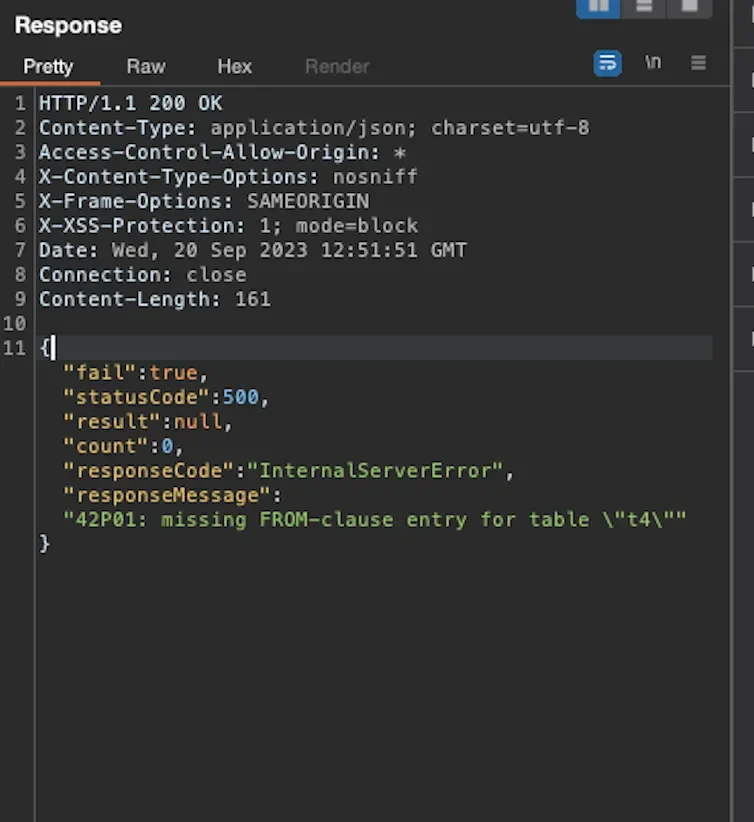
Searching for the error message showed that it was caused by the query, and the researcher also verified from it that the backend is PostgreSQL. That confirmed the first step of a SQL injection.
Exploitation
Step 1: determine the column count
Because the endpoint retrieves data, the plan was to glue the original query to an injected query and pull extra data out with a UNION. The first requirement is knowing how many columns the original query returns. The researcher used the null payload method: union the original query with null selects, adding nulls until the injected query stops producing errors. The final payload that did not return an error was:
The Id value closes the original string with the quote, appends union select with five null columns, and comments out the rest of the original statement with --. Five nulls matching the original column count is what made the error disappear.
Step 2: confirm data can be retrieved
To test whether the query returns data that can be injected, the researcher queried information_schema.tables to retrieve table information from the database. The result is shown below.
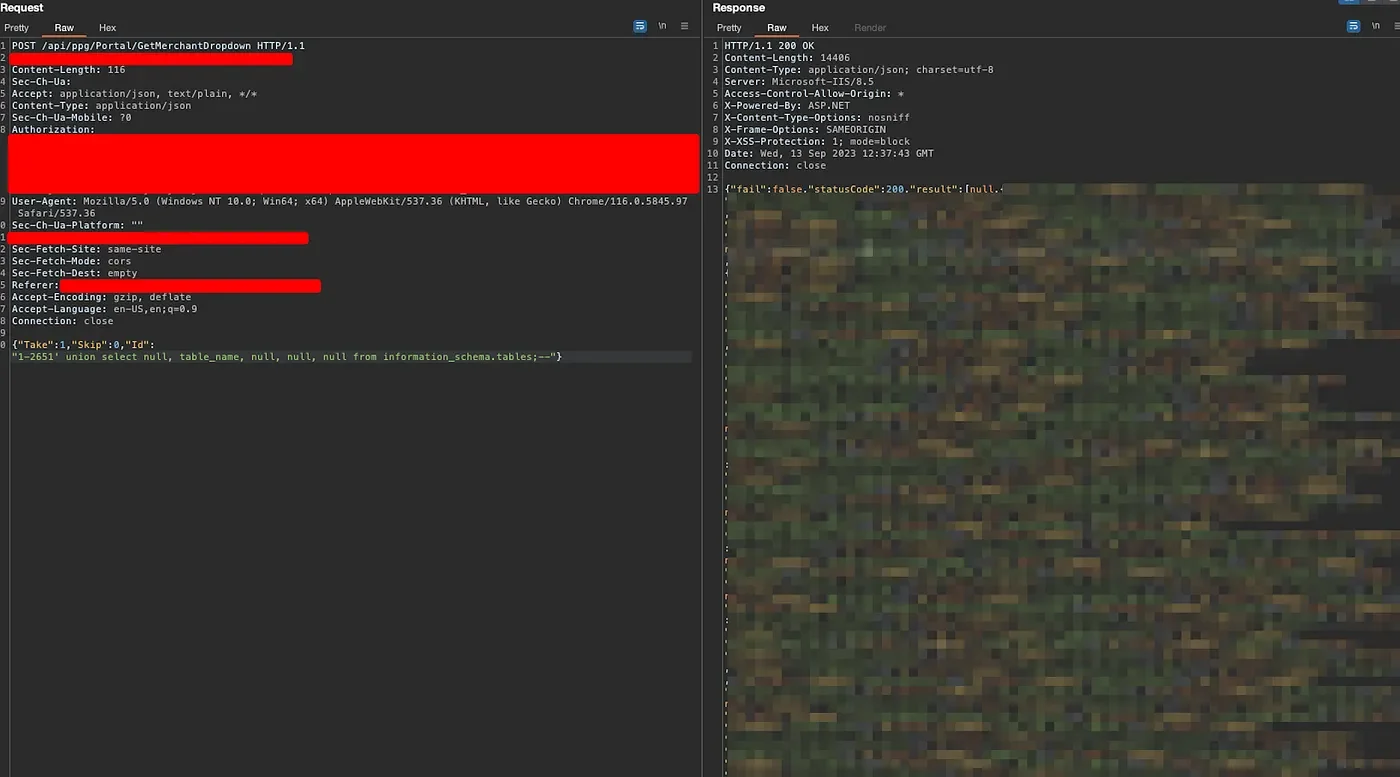
The conclusion was that results came back.
Step 3: read a file from the instance
With the column count known, the researcher ran further payloads against the vulnerable endpoint. Reading a file from the instance:
{"Take":1,"Skip":0,"Id":"1-2651' union select null, pg_read_file('/etc/passwd'), null, null, null;--"}
This places PostgreSQL's pg_read_file in the second column of the union, so the contents of /etc/passwd are returned in the position where the original query would have returned its second column.
Step 4: write to a file
Writing to files:
{"Take":100,"Skip":0,"Id":"1-2651'; COPY (SELECT 'hello') TO '/tmp/pentestlab';--"}
Here the quote terminates the original statement, a second statement is stacked with ;, and COPY (SELECT 'hello') TO '/tmp/pentestlab' writes a file on the database server. The trailing -- comments out whatever remains of the original query. The Take value is raised to 100 in this request, but the report does not explain why.
Root cause
The Id value from the JSON body is placed into the SQL query without parameterisation, so a single quote breaks out of the string literal and the rest of the input is parsed as SQL. The error returned on the first quote test shows that database errors reach the client, which made the injection easy to confirm and made the PostgreSQL backend identifiable. The report shows a UNION payload and a stacked COPY payload that it says were run against the endpoint. The report does not describe any input validation, WAF or other defence that was in place.
Impact
The report shows table information retrieved through a UNION, a file read with pg_read_file and a write with COPY ... TO.
Fix
The appropriate fix is to use parameterised queries or prepared statements for the Id value instead of concatenating it into SQL, and to stop returning raw database errors to clients. Restricting the database user's file system privileges and disabling stacked statements where they are not needed would remove the file read and write paths shown here.
Variants to test
- Send a single quote in any JSON parameter that looks like it feeds a query, such as an identifier or a filter value. A positive result is a database error in the response that names the query or the database engine.
- Use the null payload method with
union select null, ...and increase the number of nulls until the error disappears. A positive result is a response with no error, which gives the column count. - Query
information_schema.tablesthrough the union. A positive result is table names appearing in the response body. - On PostgreSQL, try
pg_read_filein a union column. A positive result is file contents in the response. - Try a stacked statement such as
COPY (SELECT 'hello') TO '/tmp/pentestlab'. A positive result is a successful write, which can be confirmed by reading the file back ifpg_read_fileworks.
What happened, in plain words
A security researcher was testing a payment system (called redacted.com in the write-up) to see how well it holds up against attackers. While looking around the site, they found a request that the website sends to its own server to fill a dropdown menu with a list of merchants. That request carries a value called Id, and the request looked like it was sending parameters that define the values for the query. By putting a single quote character into Id, the researcher made the database complain with an error message. That error message told them the database is PostgreSQL, and it also proved that whatever they type into Id is being treated as part of the database's instructions. From there they were able to retrieve table information and read a file from the server, and they also ran a payload intended to write a file. This kind of bug is called SQL injection, and it is one of the oldest and most damaging classes of web vulnerability.
This article walks through the same steps the researcher took, in the same order, with the same requests. Every technical term is explained the first time it appears, so you only need to know how to use a browser and a computer to follow along.
Background: the pieces involved
Before we look at the requests, here are the concepts you need.
- API (Application Programming Interface): a way for one piece of software to talk to another. When you use a website, your browser often sends small requests behind the scenes to fetch data (a list of items, a user profile, a search result) without reloading the whole page. Those requests go to an API. Think of it as a waiter: you tell the waiter what you want, the waiter goes to the kitchen, and the kitchen sends back a plate. You never walk into the kitchen yourself.
- Endpoint: one specific address on an API that does one specific job. If the API is the restaurant, an endpoint is one dish on the menu, reachable at one URL. In this report the endpoint is
/api/ppg/Portal/GetMerchantDropdown, and its job is to return the list of merchants for a dropdown. - HTTP request: the message your browser sends to a server. It has a method (like
GETorPOST), a path (the endpoint), headers (extra information like what format you want back), and sometimes a body (the actual data you are sending). - JSON: a simple text format for structured data, made of curly braces, names in quotes, and values.
{"Take":1,"Skip":0,"Id":"1-2651"}is JSON: three named values. It is the format most modern APIs use to send and receive data. - Header: a line in an HTTP request that carries metadata. Examples in the captured request include
Content-Type: application/json(telling the server the body is JSON),Authorization(proving who you are), andReferer(which page you came from). - Authorization header / token: a value the browser sends to prove you are logged in. Think of it as a wristband at a festival: you show it once at the gate, and after that you can walk into any tent. The report shows the header name but not its value.
- Database: software that stores and organises data. When you see a list of merchants on a page, that list almost certainly came out of a database.
- SQL: the language used to ask a database questions. A typical query looks like
SELECT name FROM merchants WHERE id = '1-2651'. The database reads it and returns matching rows. - If the text contains SQL syntax (like a quote, or the word
union), the database treats it as part of the query instead of as a value. It is like a form where you write your name, and the clerk reads your name out loud to the whole office: if you write "John, and also please open the safe", the clerk might actually open the safe. - PostgreSQL: a popular open-source database. Its error messages have a recognisable style, which is how the researcher identified it.
- Penetration testing: hiring someone to attack your own system on purpose, so you find the holes before real attackers do.
The setup
The report does not describe any special tools, accounts or roles. The only precondition visible in the report is that you need to be able to reach the portal that sends the GetMerchantDropdown request, because the captured request carries an Authorization header.
Two ports appear in the report: the captured request goes to port 20001, and its Origin and Referer headers point to port 10903. A port is like an apartment number in a building: the same server (the building) can host many services (apartments), and each one answers on its own number.
Finding it: put the quote, get the error
While discovering endpoints (browsing the site and watching the requests it makes), the researcher noticed a request that looked like it was sending JSON with parameters that define the values for the query. In other words, the body of the request contained values that the server was probably going to plug into an SQL query. The first test was to put a single quote on the Id parameter.
POST /api/ppg/Portal/GetMerchantDropdown HTTP/1.1Host: redacted.com:20001Content-Length: 102Sec-Ch-Ua: Accept: application/json, text/plain, */*Content-Type: application/jsonSec-Ch-Ua-Mobile: ?0Authorization: User-Agent: Mozilla/5.0 (Windows NT 10.0; Win64; x64) AppleWebKit/537.36 (KHTML, like Gecko) Chrome/116.0.5845.97 Safari/537.36Sec-Ch-Ua-Platform: ""Origin: https://redacted.com:10903Sec-Fetch-Site: same-siteSec-Fetch-Mode: corsSec-Fetch-Dest: emptyReferer: https://redacted.com:10903/Accept-Encoding: gzip, deflateAccept-Language: en-US,en;q=0.9Connection: close{"Take":1,"Skip":0,"Id":"1-2651'"}
Line by line, in plain words:
POST /api/ppg/Portal/GetMerchantDropdown HTTP/1.1is the request line.POSTmeans "I am sending data to you". The path is the endpoint that fills the merchant dropdown.HTTP/1.1is the version of the protocol.Host: redacted.com:20001says which server and port to talk to. This is the API on port20001.Content-Length: 102says how many bytes the body has. The server uses it to know when the body ends.Sec-Ch-Ua,Sec-Ch-Ua-Mobile,Sec-Ch-Ua-Platformare browser fingerprint headers that tell the server what kind of browser is calling. They are not relevant to the bug.Accept: application/json, text/plain, */*says "I would like JSON back, or plain text, or anything".Content-Type: application/jsonsays "the body I am sending is JSON".Authorization:is the header that proves the caller is logged in. The value is not shown in the report.User-Agentidentifies the browser (Chrome 116 on Windows).Origin: https://redacted.com:10903andReferer: https://redacted.com:10903say which page the request came from. This is the portal front end on port10903.Sec-Fetch-Site,Sec-Fetch-Mode,Sec-Fetch-Destare browser security headers that describe the kind of request. Not relevant to the bug.Accept-Encoding,Accept-Language,Connection: closeare standard preferences: what compression you accept, what language you prefer, and whether to keep the connection open.- The body
{"Take":1,"Skip":0,"Id":"1-2651'"}is the interesting part.TakeandSkipare paging parameters:Take:1means "give me one result",Skip:0means "start from the first".Idis the merchant identifier. Notice the trailing single quote after1-2651: that is the test.
Why a single quote? In SQL, text values are wrapped in single quotes: WHERE id = '1-2651'. If the server builds the query by pasting your input between those quotes, then a quote in your input closes the string early, and anything after it is read as SQL code. If the server instead treats your input as plain data (the safe way), the quote is just a character and nothing breaks. So a quote is the cheapest possible test: it either does nothing (safe) or it breaks the query (vulnerable).
The server returned an error.
Searching for the error message showed that it was caused by the query, and the researcher also verified from it that the backend is PostgreSQL. That confirmed the first step of a SQL injection: the input is being pasted into SQL, and the database is telling us so.
Exploitation
Step 1: determine the column count
Because the endpoint retrieves data, the plan was to glue the original query to an injected query and pull extra data out with a UNION. A UNION in SQL combines the results of two queries into one result set. Think of it as asking the waiter for your usual order and adding "and also bring me the dessert menu": the kitchen sends both back on the same tray. For the tray to fit, both orders must have the same number of plates, so the first requirement is knowing how many columns the original query returns.
The researcher used the null payload method: union the original query with null selects, adding nulls until the injected query stops producing errors. null in SQL means "no value". If the original query returns five columns and you union it with four nulls, the database complains about the mismatch. Add one more null and the error disappears, which tells you the count. The final payload that did not return an error was:
Line by line:
- The request line, headers and most of the body are the same as before. The only change is the
Idvalue. 1-2651'closes the original string with the quote, so the database stops reading1-2651as a value.union select null, null, null, null, nullappends a second query that returns five empty columns.unionglues it to the original query.;ends the injected statement.--starts an SQL comment, which comments out the rest of the original statement (the part the server appended after your input). Without it, the leftover SQL would cause a syntax error.
Five nulls matching the original column count is what made the error disappear. That is the confirmation: the original query returns five columns.
Step 2: confirm data can be retrieved
To test whether the query returns data that can be injected, the researcher queried information_schema.tables to retrieve table information from the database. information_schema is a standard catalogue that lists the tables, columns and other structure of the database. Asking it for tables is like asking the library for its index of shelves. The conclusion was that results came back.
The conclusion was that results came back, so the injection is not blind.
Step 3: read a file from the instance
With the column count known, the researcher ran further payloads against the vulnerable endpoint. Reading a file from the instance:
{"Take":1,"Skip":0,"Id":"1-2651' union select null, pg_read_file('/etc/passwd'), null, null, null;--"}
Line by line:
1-2651'closes the original string.union select null, pg_read_file('/etc/passwd'), null, null, nullis the injected query. It returns five columns, matching the original. The second column ispg_read_file('/etc/passwd'), a PostgreSQL function that reads a file from the database server's filesystem and returns its contents as text./etc/passwdis a standard Unix file that lists user accounts; it is a common proof-of-concept target because it is readable by everyone on the system.;--ends the injected statement and comments out the rest.
Because the second column of the union is the file contents, the response shows the file contents in the position where the original query would have returned its second column. That is the whole trick: you do not need a new endpoint, you just borrow a column of the existing one.
Step 4: write to a file
Writing to files:
{"Take":100,"Skip":0,"Id":"1-2651'; COPY (SELECT 'hello') TO '/tmp/pentestlab';--"}
Line by line:
1-2651'closes the original string.;ends the original statement. This is called a stacked statement: the database is asked to run more than one statement in a single call.COPY (SELECT 'hello') TO '/tmp/pentestlab'is a second statement.COPY ... TOwrites the result of a query to a file on the database server. Here it writes the texthelloto/tmp/pentestlab.;--ends the second statement and comments out whatever remains of the original query.
The Take value is raised to 100 in this request, but the report does not explain why.
Root cause
The Id value from the JSON body is placed into the SQL query without parameterisation, so a single quote breaks out of the string literal and the rest of the input is parsed as SQL. Parameterisation (also called prepared statements) is the safe way to build a query: you send the query template and the values separately, and the database treats the values as data no matter what characters they contain. Without it, the database cannot tell your data from its own instructions.
The error returned on the first quote test shows that database errors reach the client, which made the injection easy to confirm and made the PostgreSQL backend identifiable. The report shows a UNION payload and a stacked COPY payload that it says were run against the endpoint.
Impact
The report shows table information retrieved through a UNION, a file read with pg_read_file and a write with COPY ... TO.
Fix
The appropriate fix is to use parameterised queries or prepared statements for the Id value instead of concatenating it into SQL, and to stop returning raw database errors to clients. Restricting the database user's file system privileges and disabling stacked statements where they are not needed would remove the file read and write paths shown here.
Variants to test
- Send a single quote in any JSON parameter that looks like it feeds a query, such as an identifier or a filter value. A positive result is a database error in the response that names the query or the database engine.
- Use the null payload method with
union select null, ...and increase the number of nulls until the error disappears. A positive result is a response with no error, which gives the column count. - Query
information_schema.tablesthrough the union. A positive result is table names appearing in the response body. - On PostgreSQL, try
pg_read_filein a union column. A positive result is file contents in the response. - Try a stacked statement such as
COPY (SELECT 'hello') TO '/tmp/pentestlab'. A positive result is a successful write, which can be confirmed by reading the file back ifpg_read_fileworks.
Glossary
- API: a way for one piece of software to talk to another; the waiter between your browser and the server's kitchen.
- HTTP request: the message your browser sends to a server, made of a method, a path, headers and sometimes a body.
- Header: a line in an HTTP request that carries metadata, such as
Content-TypeorAuthorization. - JSON: a text format for structured data, made of curly braces, quoted names and values.
- Authorization header: a header that proves the caller is logged in. Its value is not shown in the report.
- SQL injection: a bug where user input is pasted into an SQL query without being treated as plain data, so the database executes it as code.
- PostgreSQL: a popular open-source database; its error messages have a recognisable style.
- Penetration testing: hiring someone to attack your own system on purpose, to find holes before real attackers do.
- Port: a numbered channel on a server; the same server can host many services, each on its own port. The API here is on
20001, the portal on10903. - Intercepting proxy: a tool that sits between your browser and the server and lets you read and edit every request.
- Parameterisation / prepared statements: the safe way to build a query, sending the query template and the values separately so the database treats the values as data.
- Concatenation: gluing strings together, which is how the vulnerable query was built.
- UNION: an SQL keyword that combines the results of two queries into one result set.
- Column: one field in a row of a database result. A query returns a fixed number of columns.
- Null payload method: a technique for finding the column count by unioning the original query with
nullselects until the error disappears. null: an SQL value meaning "no value".- Comment (
--): SQL syntax that tells the database to ignore the rest of the line. - Stacked statement: running more than one SQL statement in a single call, separated by
;. information_schema: a standard catalogue that lists the tables, columns and structure of the database.- Blind injection: an injection where the response does not reflect the injected data, so you have to infer results from timing or errors. The injection here is not blind.
pg_read_file: a PostgreSQL function that reads a file from the database server's filesystem and returns its contents.COPY ... TO: a PostgreSQL statement that writes the result of a query to a file on the database server./etc/passwd: a standard Unix file that lists user accounts; a common proof-of-concept target.- WAF (Web Application Firewall): a filter that inspects requests and blocks ones that look malicious.
- Privilege: the set of things a database user is allowed to do, such as reading files or running multiple statements.



