SQL Injection & Remote Code Execution - Double P1
A SQL injection on a second-level subdomain allowed the attacker to extract database metadata and admin credentials, which were then reused on a phpMyAdmin page on a third-level subdomain to write a PHP file and achieve remote code execution.
 Published on medium.com
Hello everyone I thought of sharing my recent finding of Double P1which recently got solved and they are sending me Goodie Pack for it. It was a Responsible Disclosure program on which I found this.
The full write-up lives on its author's site
It belongs to its author, so we link to it rather than copy it. The other two tabs are our own rewrites, checked against it.
Context
This is a responsible disclosure finding on a program whose name the write-up does not give. The researcher describes it as a Double P1: two separate high-severity issues, an SQL injection and a remote code execution, reported together. The SQL injection sat on a second-level subdomain and the RCE on a third-level subdomain, and the two were chained through credentials recovered from the database. The write-up does not name the target, the application or the affected parameter.
The feature involved is an ordinary web parameter that the researcher first suspected of server-side request forgery and then tested for SQL injection. Nothing in the report describes what the parameter normally does.
Setup
The researcher relied on public references and the phpMyAdmin interface. The references cited in the write-up are:
- the MySQL
SELECTdocumentation, used to understand query structure; - the MySQL
information_schemadocumentation, used to read schema metadata; - the pentestmonkey MySQL SQL injection cheat sheet;
- the pentestmonkey reverse shell scripts;
- CrackStation, used to crack the recovered password hash;
- a Security Idiots article on MSSQL error-based injection, used as a starting point for basic SQLi testing.
No accounts, roles or versions are stated. The only precondition visible in the report is that the researcher had to demonstrate more than a version disclosure before the program would accept the report.
Finding it
The researcher found a parameter and first tried SSRF on it, which did not work. He then moved to basic SQL injection testing, guided by the MSSQL error-based injection article. The parameter turned out to be vulnerable.
The first enumeration was deliberately shallow: version and database name, then the current user. At that point the program told him the report would only be accepted if he exploited further, so he continued into the schema and eventually into application tables.
Exploitation
Step 1: version and database name
With the injection confirmed, the first queries returned the database version and the database name, using the database() function and the @@version command.
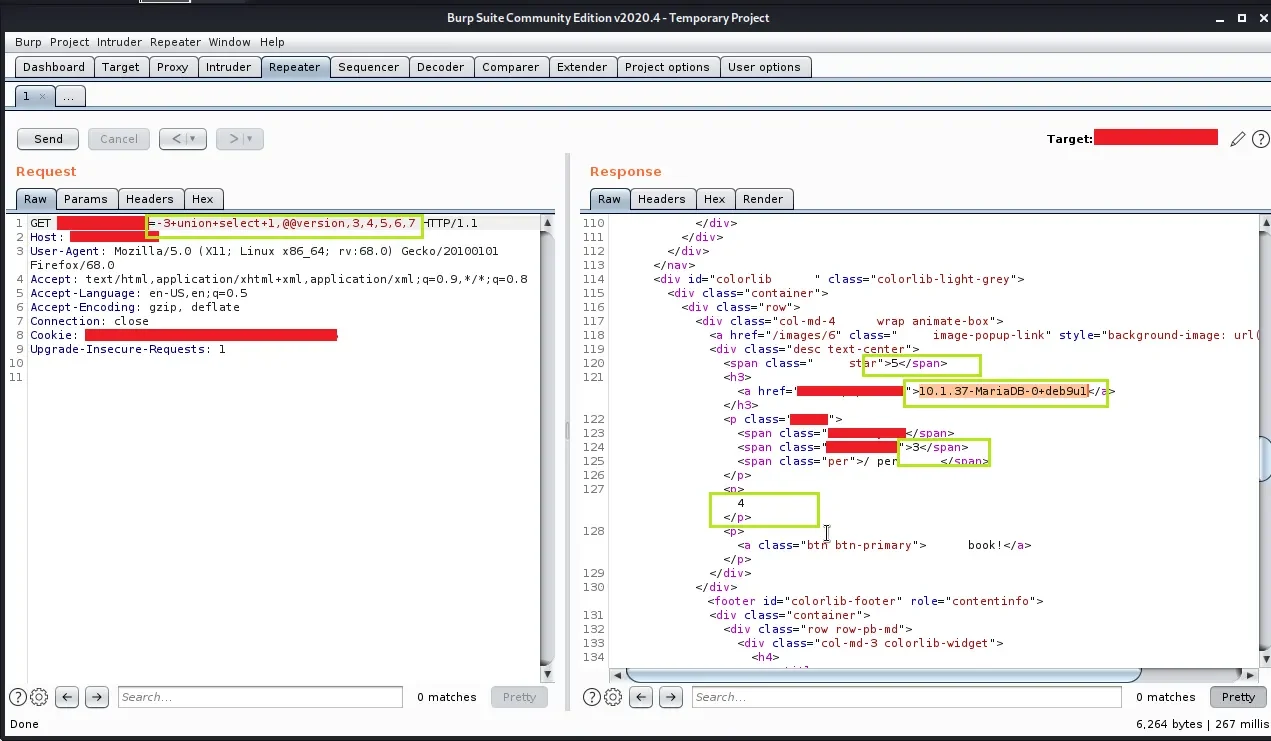
Database Version
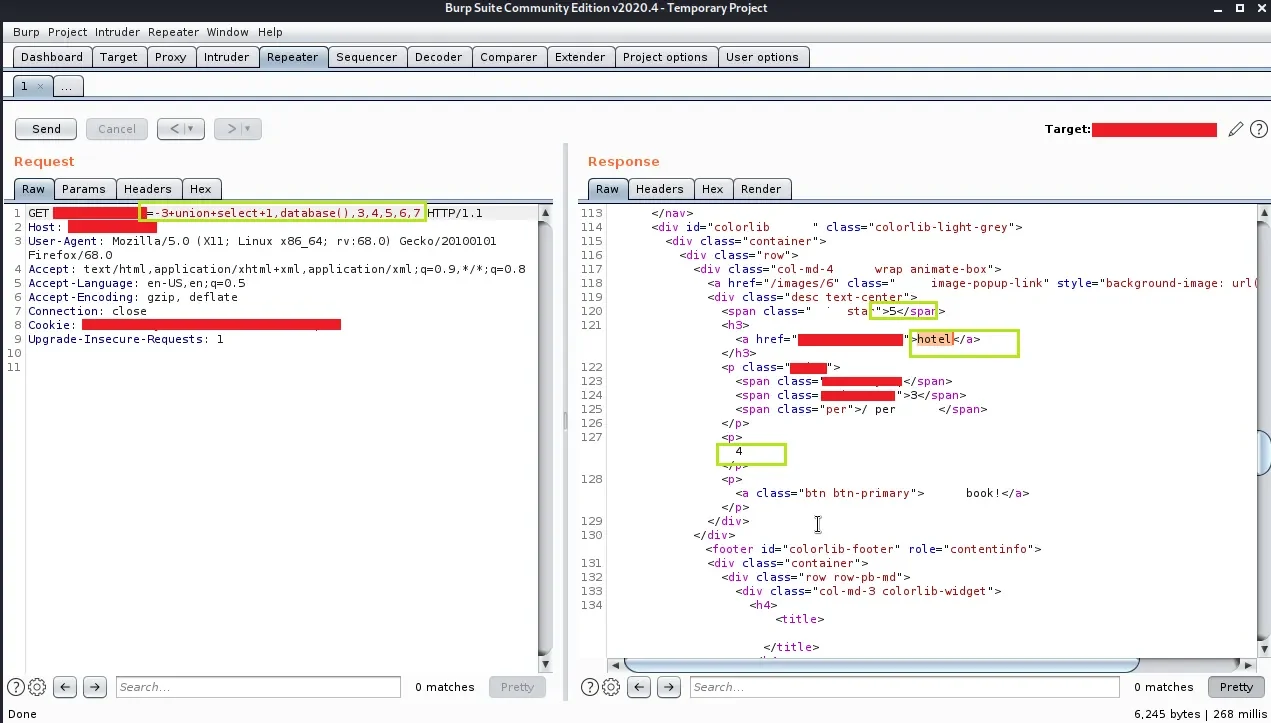
Database Name
database() returns the name of the schema the connection is using, and @@version returns the server version string. Both are cheap, low-noise checks that confirm the injection point and tell you which SQL dialect and documentation to work from.
Step 2: current user
Next he identified the database user with the user() function.
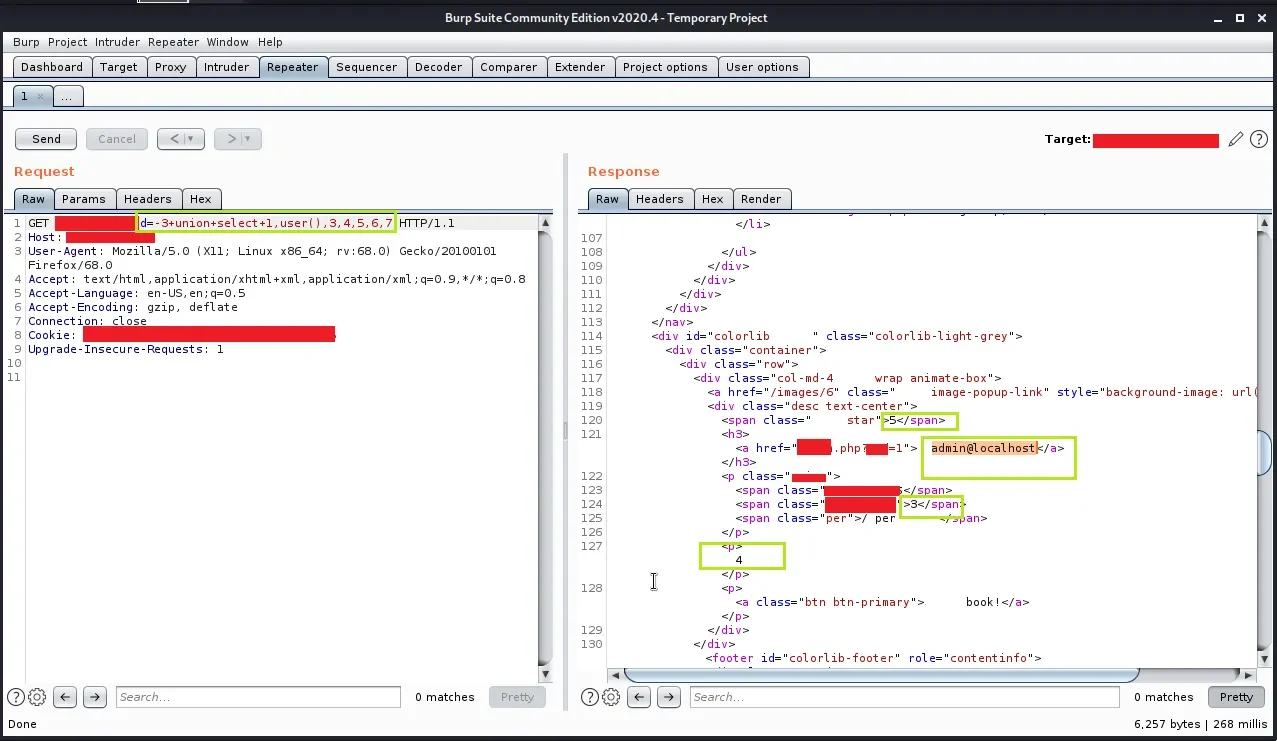
User name
Knowing the account the application connects as matters later: it determines whether file writes, such as INTO OUTFILE, are permitted and where they can land.
Step 3: table names from the schema
After the program asked for deeper exploitation, he queried the schema table and recovered a table name.
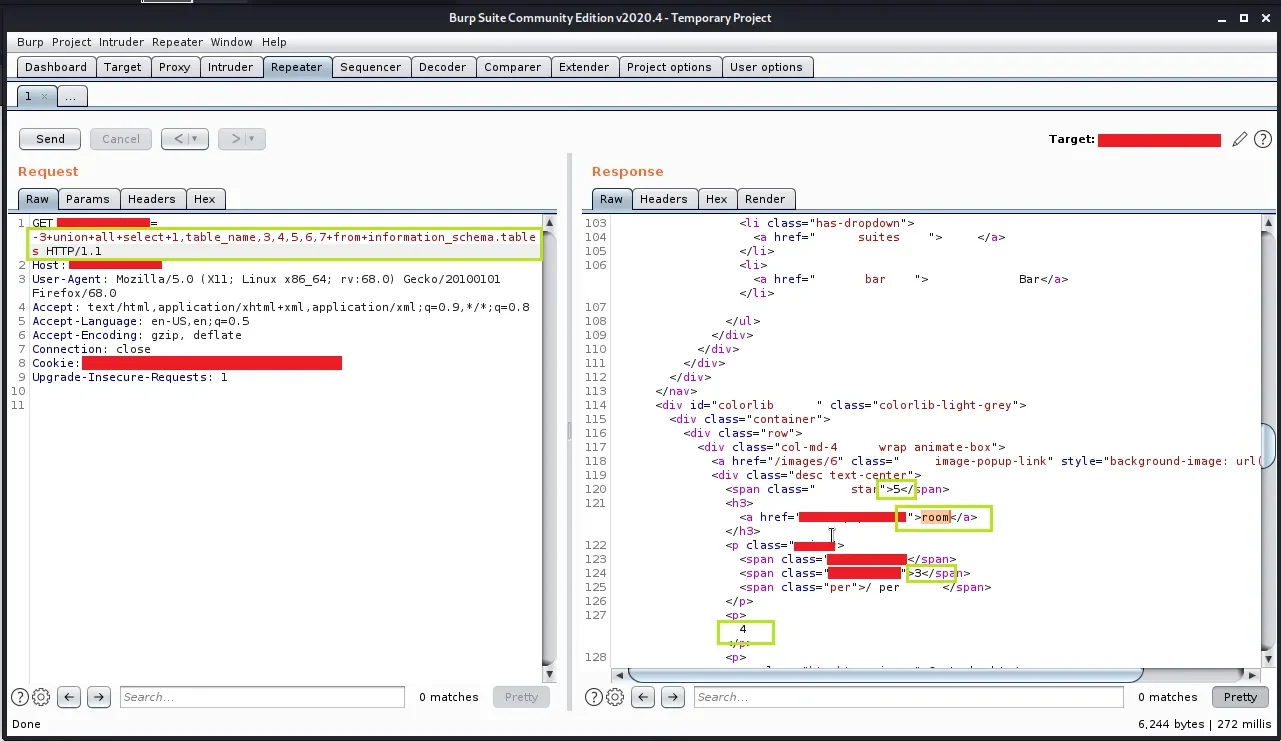
Table Name
Step 4: enumerating further tables with LIMIT
He then used a LIMIT statement to walk through more tables. This returned a table called hotel, which was the same table he had already found.
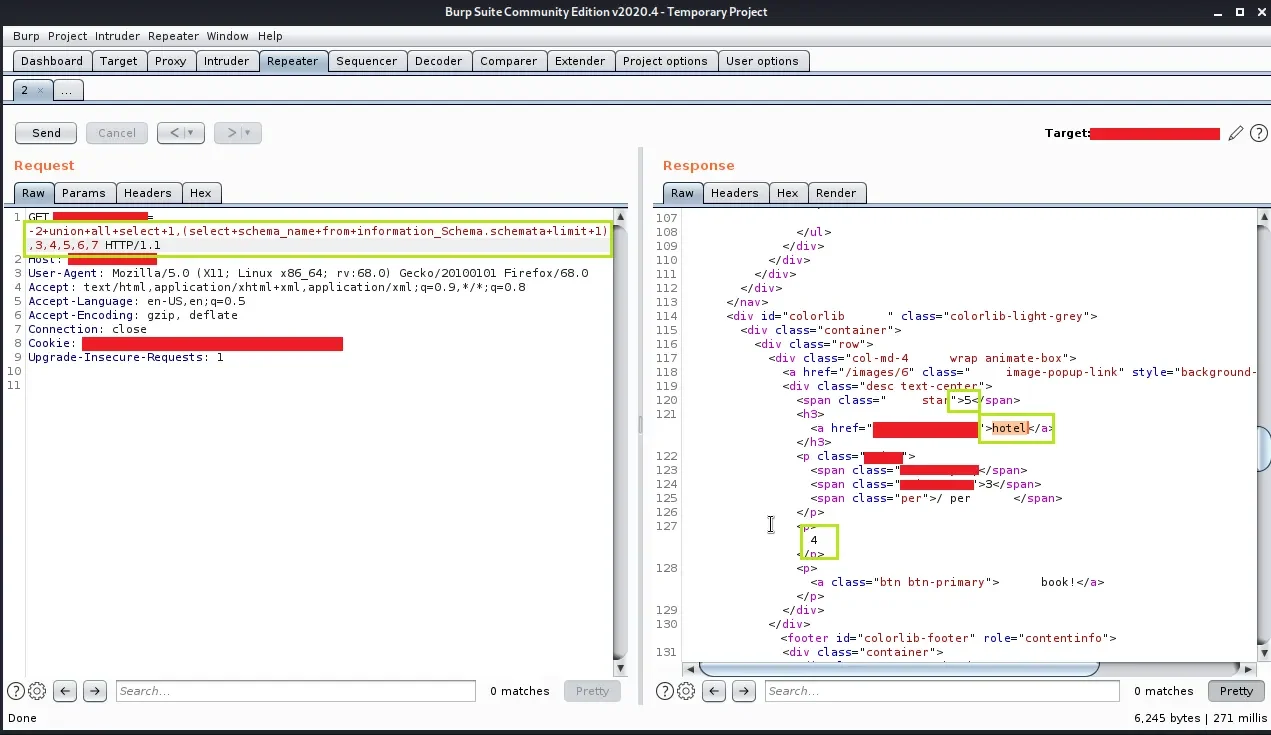
Table Name
His note on the technique: LIMIT retrieves records from one or more tables and caps how many records are returned based on a limit value, and it is not supported in all SQL databases.
Step 5: counting tables
To find out how many tables existed, he changed the LIMIT query. The screenshots show the query used.
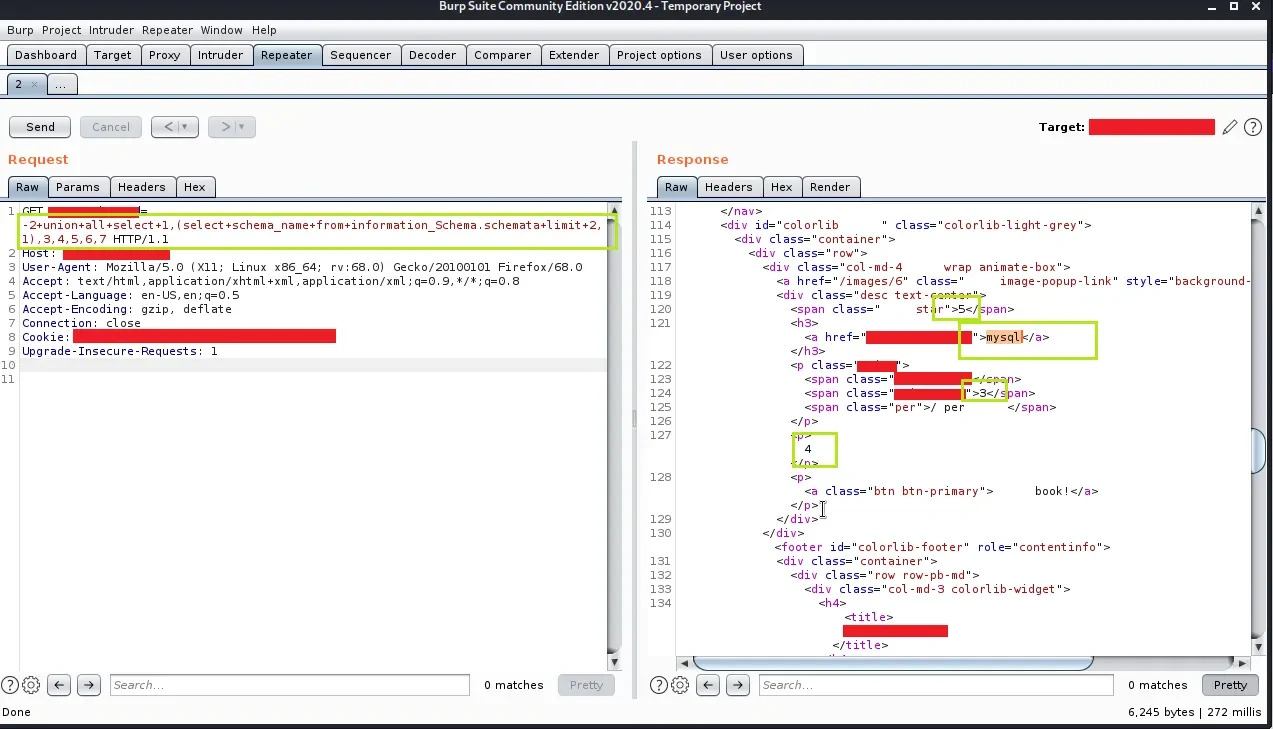
Table Name
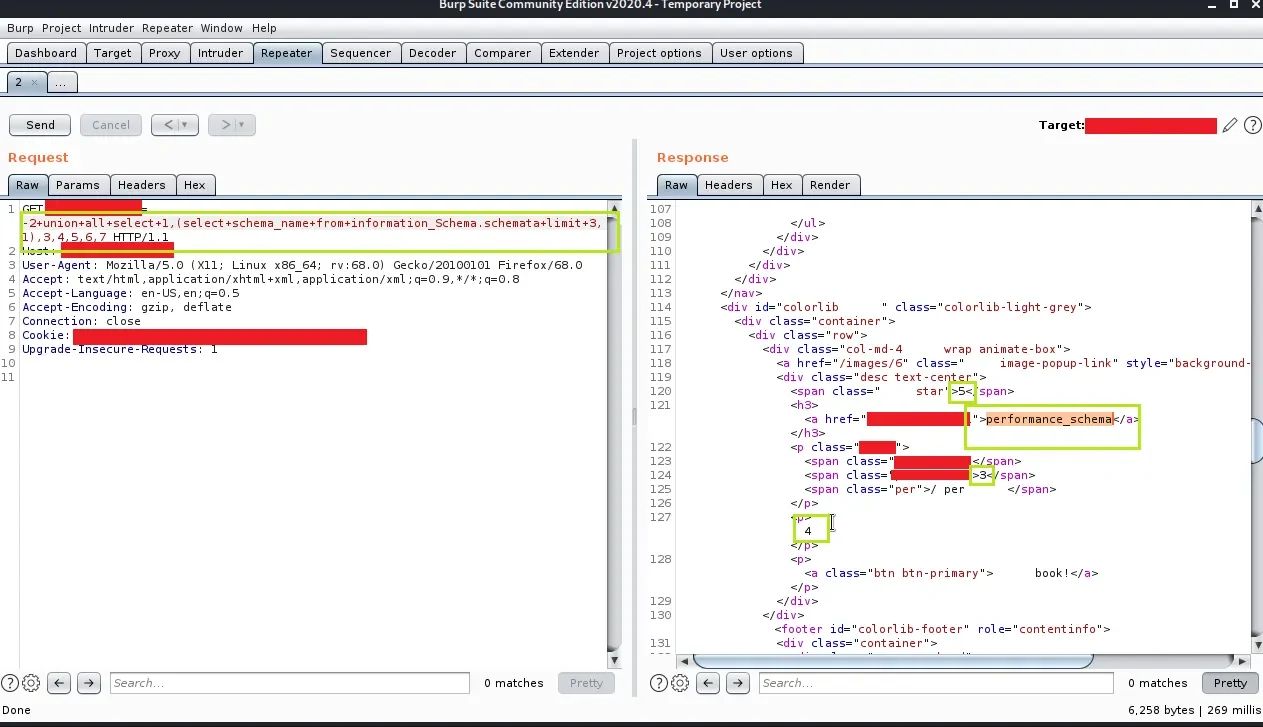
Table Name
Step 6: columns for the schema table
With three tables identified, he moved on to the columns of the schema table. Because there were three tables, he adjusted the query accordingly.
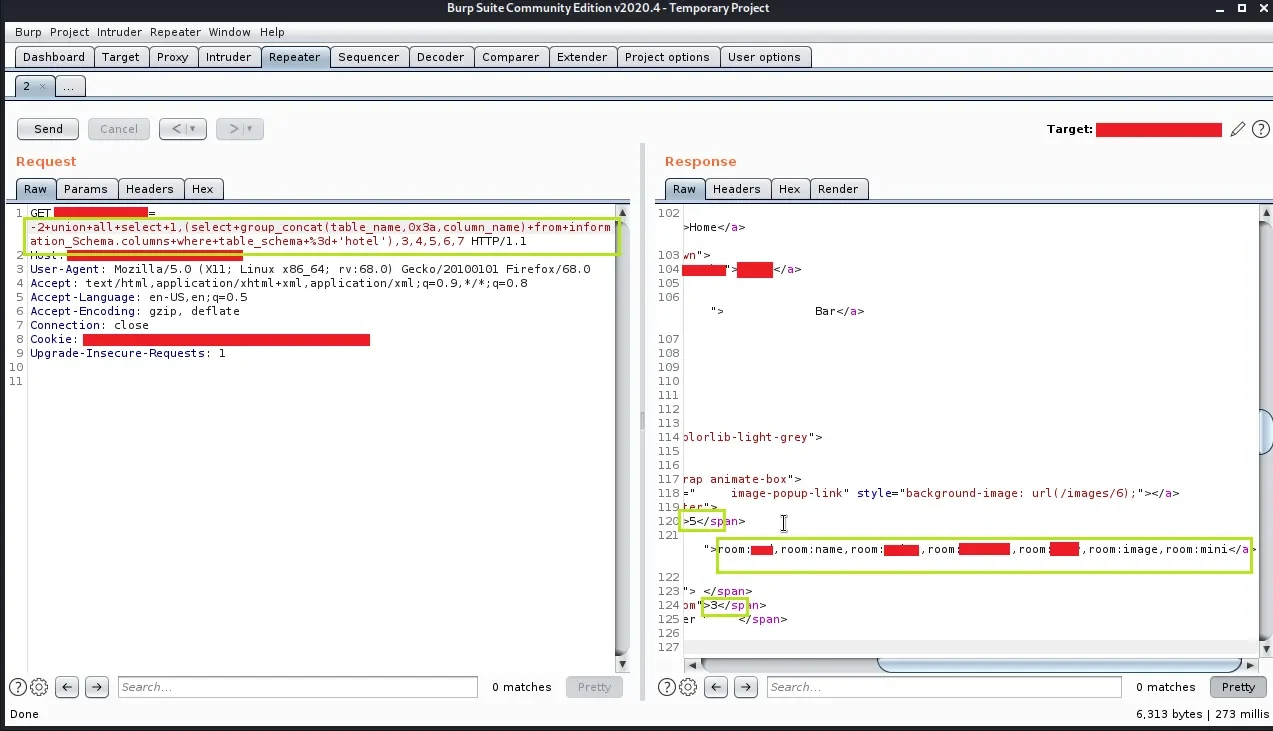
Column Names along with the table name
Step 7: the mysql schema
He changed table_schema to mysql and found many important tables and columns there.
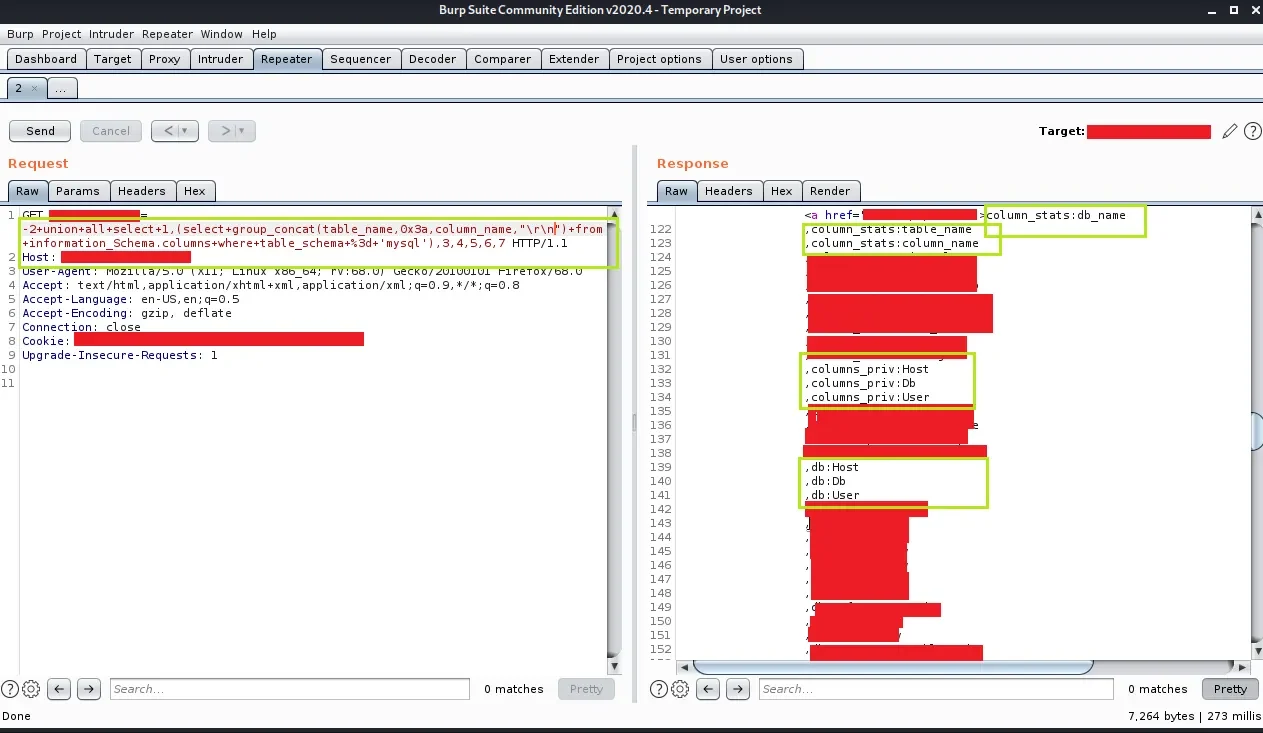
Column Names along with the table name
Step 8: admin credentials
The next step was the admin username and password. He recovered the credentials and reported them. The password was stored as a hash, so he cracked it with CrackStation.
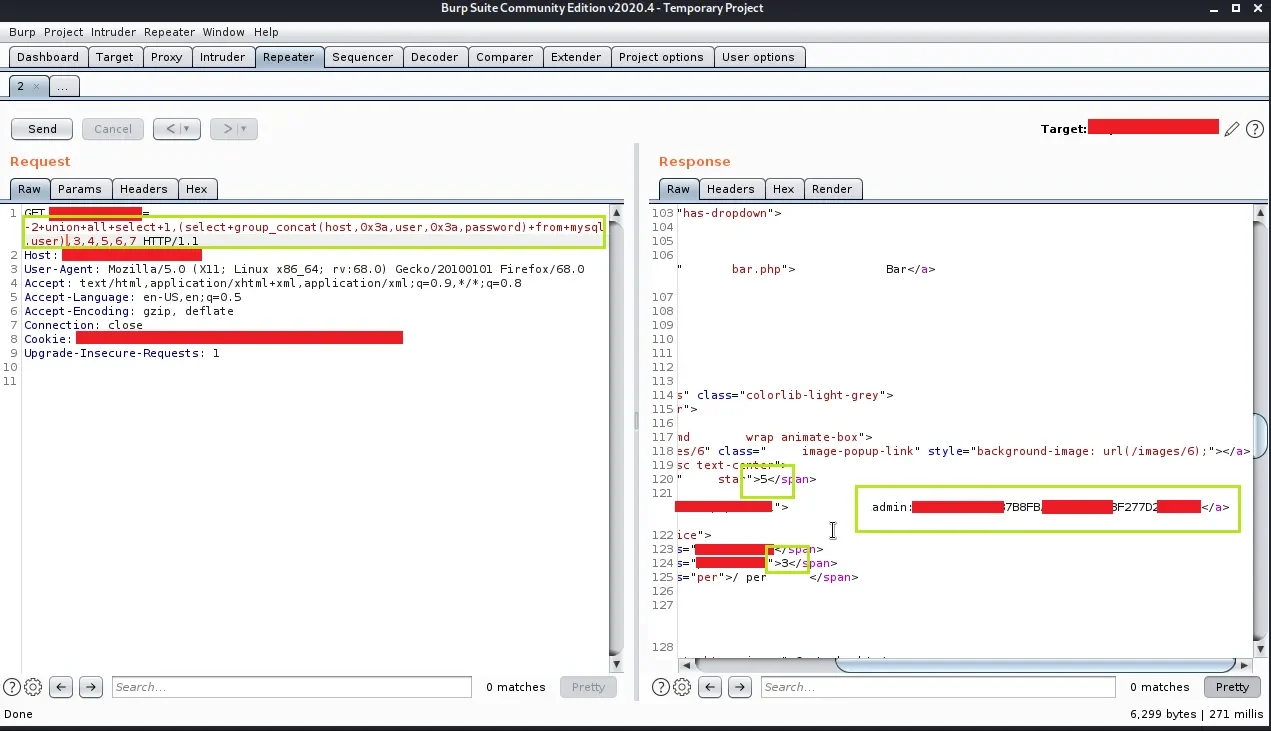
Admin Credentials
Step 9: phpMyAdmin on a deeper subdomain
Three days later he enumerated the subdomain of a subdomain and found a phpMyAdmin page. The credentials recovered through the SQL injection worked there.
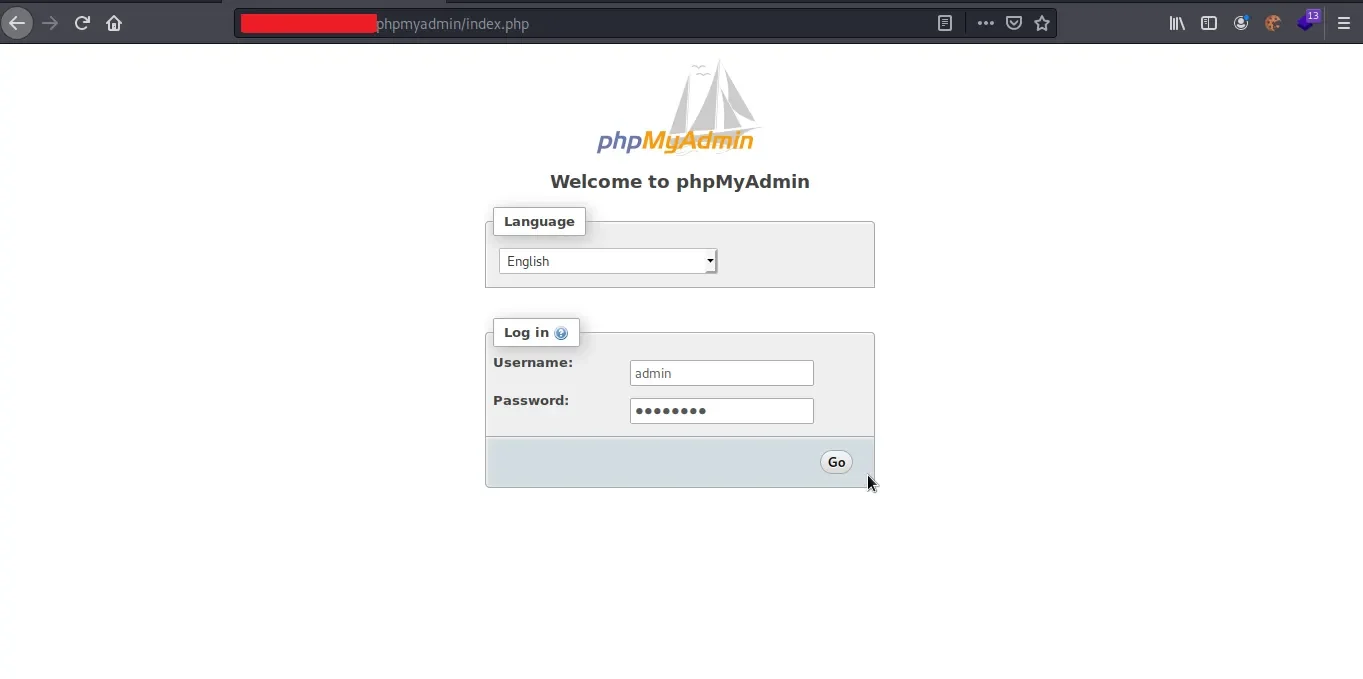
phpMyAdmin
This is the pivot that turns the SQL injection into RCE: the same database account is reachable through a web administration interface that can run arbitrary SQL, including statements that write files to disk.
Step 10: writing a PHP web shell
Inside phpMyAdmin he ran a query that writes a PHP file into the web root. The payload as published is:
SELECT "<?php system($_GET['<anyParameter>']); ?>" into outfile "/var/www/html/<filename>.php"
INTO OUTFILE writes the result of the SELECT to a file on the database server. The string being selected is a minimal PHP web shell that passes the value of a GET parameter to system(), so any command supplied in that parameter is executed by the web server user. The destination is the document root, which makes the file reachable over HTTP.
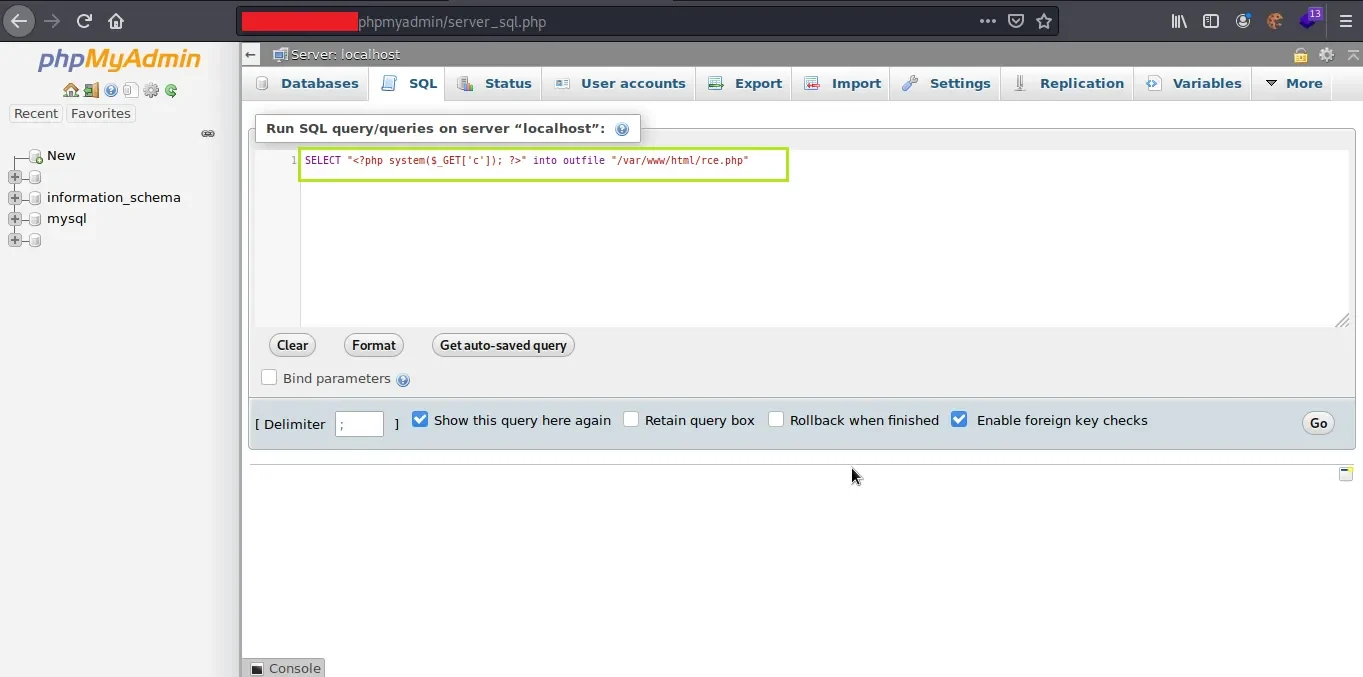
Putting my file for RCE
Step 11: confirming code execution
He confirmed RCE after writing the file.
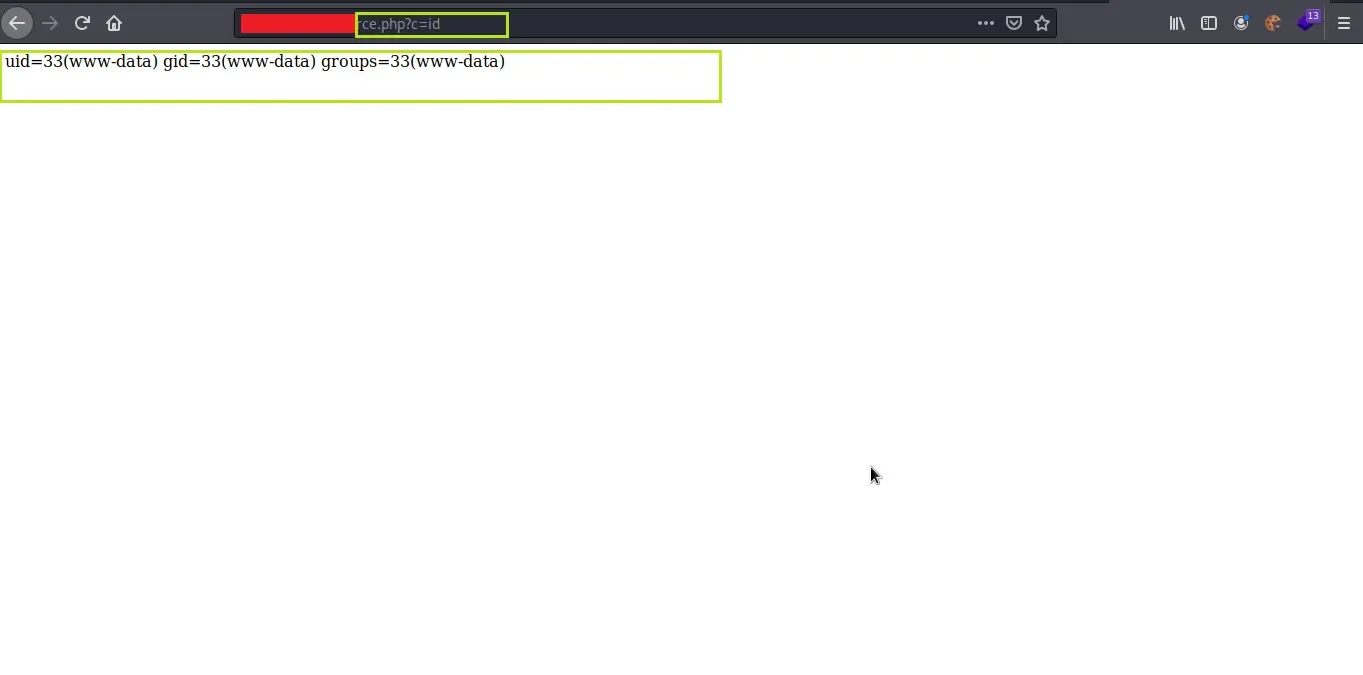
Remote Code Execution
Step 12: interactive shell
To go further he used a Python reverse shell script from pentestmonkey.net to obtain a system shell, which succeeded.
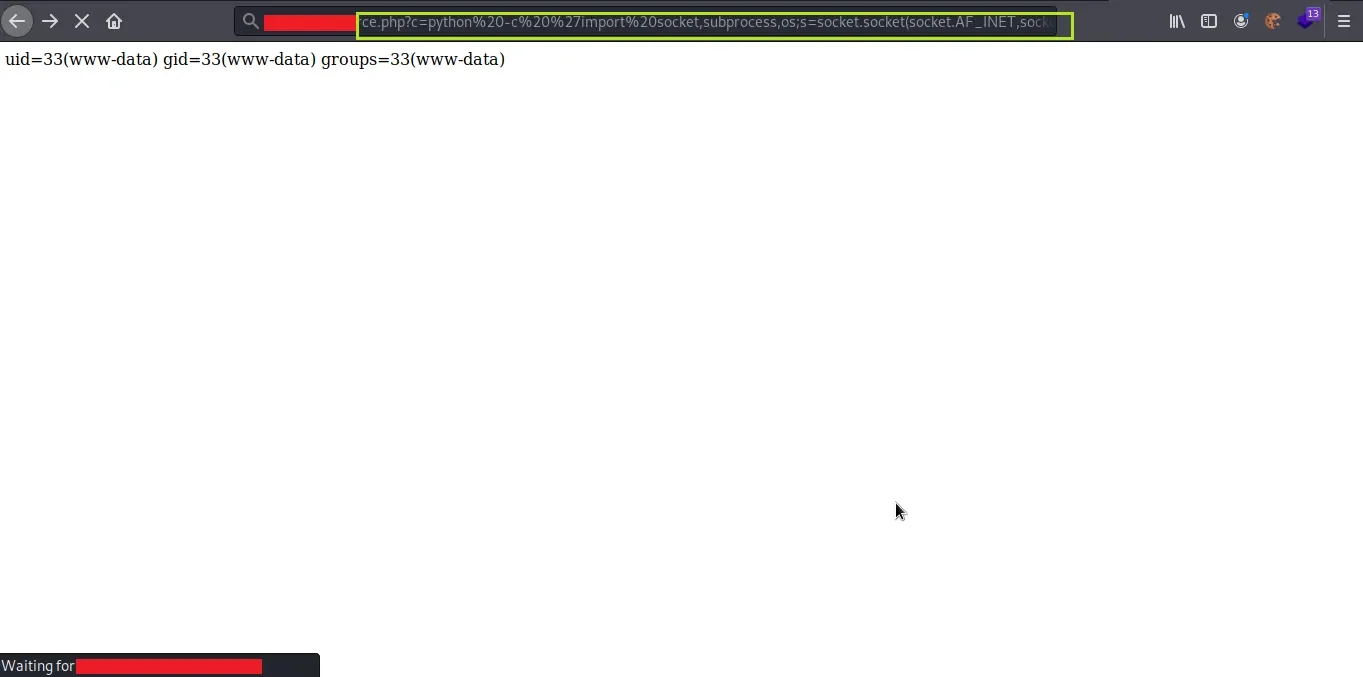
Python Script
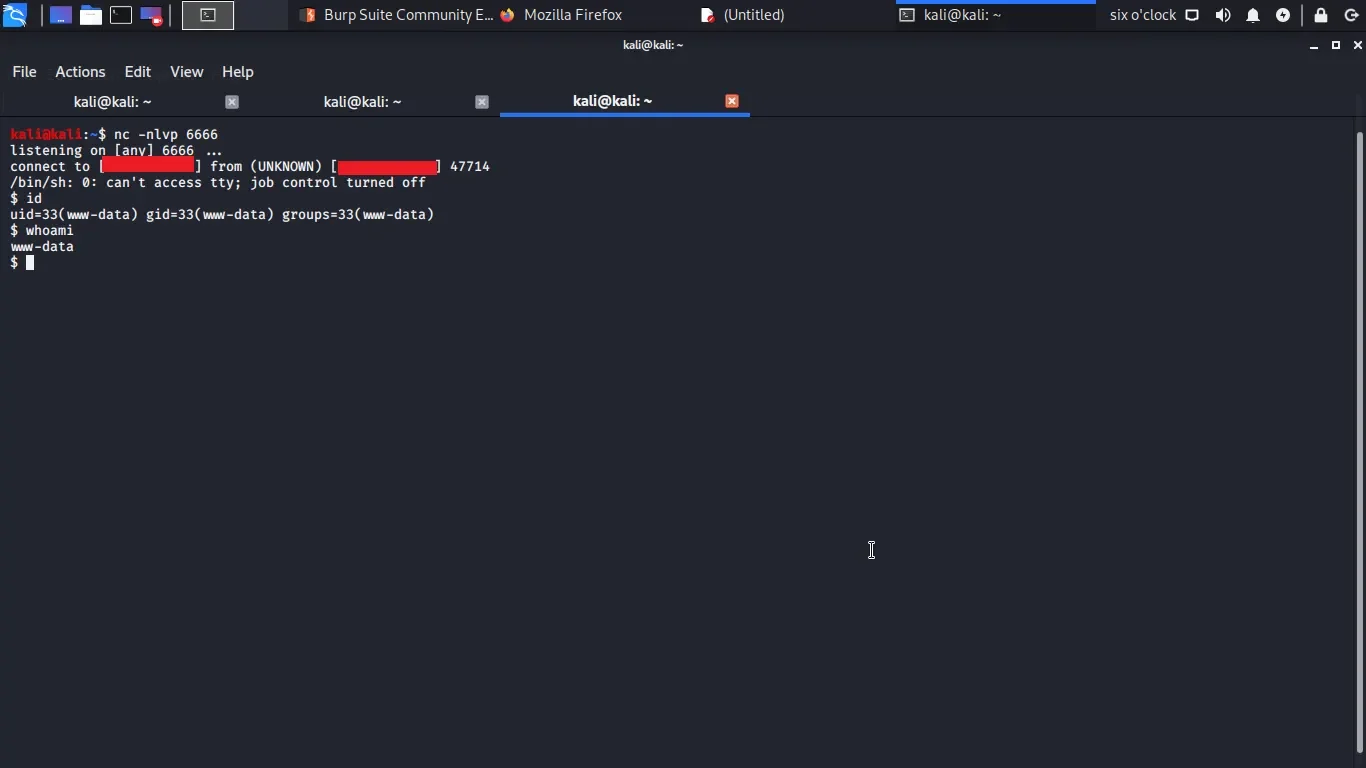
System Shell
Root cause
The report does not analyse the application code, so the underlying defect is only implied. The parameter was vulnerable to SQL injection, allowing expressions such as database(), @@version, user() and reads from information_schema to be evaluated and returned.
The escalation to RCE depends on two further conditions, both visible in the report: the database account had the privileges needed to run INTO OUTFILE and write into /var/www/html, and the same credentials were valid on a phpMyAdmin instance exposed on another subdomain. The same credentials were valid on a phpMyAdmin instance exposed on another subdomain, which led to code execution.
Impact
Through the SQL injection an attacker could read the database name, version, current user, table names, column names and the contents of the mysql schema, and could extract admin credentials, including a password hash that was cracked offline. With those credentials, an attacker could log in to phpMyAdmin on the deeper subdomain, write a PHP file into the web root, execute commands as the web server user and obtain an interactive system shell.
Fix
The changes that would address what is shown here are: parameterise the vulnerable query so user input is never concatenated into SQL; restrict the database account used by the application so it cannot read unrelated schemas or write files; and remove or network-restrict the phpMyAdmin instance, or at minimum stop reusing application database credentials for it.
Variants to test
- Same parameter, different dialect. If
@@versionanddatabase()behave unexpectedly, try the equivalent functions for the backend in use. A positive result is the version or schema name appearing in the response or in an error message. information_schemaenumeration withLIMIToffsets. Walktablesandcolumnswith increasing offsets. A positive result is a new table or column name that was not in the previous page.- Other schemas. Swap
table_schematomysql,performance_schemaorsys. A positive result is metadata for accounts or privileges that the application should not be able to see. - Credential reuse across subdomains. Take any credential recovered from a database and try it against administration panels on sibling and deeper subdomains. A positive result is a successful login to phpMyAdmin or a similar interface.
INTO OUTFILEreachability. From an SQL console, check whether the account can write to a web-served directory and whether the written file is reachable over HTTP. A positive result is command output returned by the file.- Privilege check before writing. Query the grants for the current user. A positive result is
FILEprivilege or broad grants that make file writes and cross-schema reads possible.
What happened, in plain words
A security researcher found two serious problems in the same company's website, one after the other, and reported them together. The write-up calls it a Double P1, meaning two separate high-severity issues. The researcher received a goodie pack for the work.
The first problem was an SQL injection. Websites store their information in databases, and they talk to those databases using a language called SQL. An SQL injection happens when a website takes something a visitor typed and drops it straight into an SQL sentence without checking it, so the visitor can sneak in extra SQL of their own. In this case the researcher could make the database reveal its own name, its version, the list of tables it holds, and eventually the administrator's username and password.
The second problem was remote code execution, usually shortened to RCE. That means the attacker can make the server run commands of their choosing, as if they were sitting at the machine. The researcher reached this by taking the admin password he had pulled out of the database and using it to log in to a phpMyAdmin page he found on a deeper subdomain. From there he wrote a small program file onto the server and used it to run commands.
The two problems were linked: the SQL injection gave him the password, and the password opened the door to the RCE. The write-up does not name the company, the website, or the exact parameter that was vulnerable.
A quick word on subdomains, since they come up constantly. A domain is the main address of a site, like example.com. A subdomain is a prefix in front of it, like shop.example.com or admin.example.com. A second-level subdomain means two prefixes deep, something like a.b.example.com, and a third-level means three, like x.a.b.example.com. Companies often run many subdomains, and older or forgotten ones are a common place to find weak spots. The SQL injection here was on a second-level subdomain and the RCE on a third-level one.

The starting point
The researcher found a parameter on the site and started poking at it. A parameter is the part of a web address or form that carries a value, the bit after the ? in a URL or a field you fill in. When you search a shop for "shoes", the word "shoes" travels to the server as a parameter. The server is supposed to treat it as plain text. If it instead treats it as part of an instruction, that is where trouble starts.
His first guess was a different bug called SSRF, short for server-side request forgery. In SSRF, you trick the server into making a request on your behalf, for example to fetch a page from inside the company's own network that you could not reach from outside. That attempt did not work, so he switched to testing for SQL injection instead. He used a public article on MSSQL error-based injection as his starting guide. MSSQL is Microsoft's database product; error-based means you learn things by making the database produce error messages that leak information.
He also leaned on several public references throughout, which are worth listing because they show how little special tooling was needed:
- the MySQL
SELECTdocumentation, to understand how a query is structured; - the MySQL
information_schemadocumentation, to understand where a database keeps its own catalogue of tables and columns; - the pentestmonkey MySQL SQL injection cheat sheet;
- the pentestmonkey reverse shell scripts;
- CrackStation, a website for cracking password hashes;
- the Security Idiots article on MSSQL error-based injection.
MySQL is another popular database product. A cheat sheet is just a page of ready-made snippets you can copy. A reverse shell is a program that makes the victim machine connect back to the attacker and hand over a command prompt. A hash is a scrambled form of a password: the server stores the scramble, not the password itself, so that a stolen database does not immediately hand over the real passwords. Cracking a hash means guessing passwords, scrambling each guess the same way, and checking whether the result matches.
No accounts, roles or software versions are mentioned in the report. The only precondition it makes clear is that the company would not accept a report that merely showed the database version. They wanted to see real exploitation.
Finding the vulnerability
- He found a parameter and first tried SSRF on it. That failed, so he moved to basic SQL injection testing, using the MSSQL error-based article as a guide. The parameter turned out to be vulnerable.
- His first queries were deliberately shallow: he asked for the database version and the database name, then the current database user. At that point the company told him the report would only be accepted if he went further, so he continued into the database's internal catalogue and then into the application's own tables.
That pattern is worth noticing. He did not start by trying to steal everything. He started with the cheapest, quietest questions, confirmed the door was open, and only then went deeper. Each answer also told him which database product he was dealing with, which decides which documentation and which syntax apply.
Step 1: version and database name
With the injection confirmed, the first queries returned the database version and the database name. He used the database() function and the @@version command.
Database Version
Database Name
In plain words: database() is a built-in function that answers the question "which database am I currently connected to?", and @@version is a built-in variable that answers "which version of the database software is running?". Both are cheap to ask and produce little noise in logs, and both confirm that your injected text is actually being executed rather than just echoed back as text. The version also tells you which product and which manual to read next.
Step 2: current user
Next he identified the database user with the user() function.
User name
user() answers "which account is the website using to talk to the database?". This matters later. Database accounts have permissions, much like user accounts on a computer. Some accounts are allowed to write files to disk and some are not. Knowing the account tells you whether tricks like writing a file out of the database are even possible, and where such a file might land.
At this point the company asked for more, so he kept going.
Step 3: table names from the schema
He queried the schema table and recovered a table name.
Table Name
A schema is the blueprint of a database: the list of tables and, for each table, the list of columns. A table is like a spreadsheet inside the database, with rows of records and named columns. Most databases keep a special set of tables that describe all the other tables, and that catalogue is what he was reading. It is the database's own index of itself.
Step 4: enumerating further tables with LIMIT
He then used a LIMIT statement to walk through more tables. This returned a table called hotel, which was the same table he had already found.
Table Name
His note on the technique: LIMIT retrieves records from one or more tables and caps how many records are returned based on a limit value, and it is not supported in all SQL databases. In everyday terms, LIMIT is like saying "show me only the first five results". By changing the starting point and the count, you can page through a long list one screen at a time, which is exactly how you enumerate a catalogue without dumping it all at once.
Step 5: counting tables
To find out how many tables existed, he changed the LIMIT query. The screenshots show the query used.
Table Name
Table Name
Knowing the total count tells you when to stop paging. If there are three tables, you only need three pages, and you know you have seen everything.
Step 6: columns for the schema table
With three tables identified, he moved on to the columns of the schema table. Because there were three tables, he adjusted the query accordingly.
Column Names along with the table name
Columns are the named fields inside a table, the headings of the spreadsheet. Finding the column names is the step that turns "there is a table called something" into "there is a table with a username column and a password column", which is what you actually need to pull data out.
Step 7: the mysql schema
He changed table_schema to mysql and found many important tables and columns there.
Column Names along with the table name
table_schema is simply the field that says which schema a table belongs to. mysql is the name of a built-in schema that the database software uses for its own housekeeping, including accounts and privileges. Reading it is like finding the building's key cabinet rather than a single office.
Step 8: admin credentials
The next step was the admin username and password. He recovered the credentials and reported them. The password was stored as a hash, so he cracked it with CrackStation.
Admin Credentials
Credentials just means a username and password pair. Because the password was stored as a hash, he could not read it directly. He pasted the hash into CrackStation, which tries huge lists of common passwords, scrambles each one the same way, and reports a match if it finds one. This works because people choose predictable passwords. A long random password would not fall to this.
Step 9: phpMyAdmin on a deeper subdomain
Three days later he enumerated the subdomain of a subdomain and found a phpMyAdmin page. The credentials recovered through the SQL injection worked there.
phpMyAdmin
phpMyAdmin is a web page for managing a MySQL database. Instead of typing commands on a terminal, you log in through a browser and click around, or paste SQL into a box and run it. It is convenient, which is exactly why leaving one reachable from the internet is dangerous: anyone who gets a working database password gets a full SQL console.
This is the pivot that turns the SQL injection into RCE. The same database account is reachable through a web interface that can run arbitrary SQL, including statements that write files to disk. In other words, the password he stole was not just for reading data; it was for a tool that could also write files onto the server.
Step 10: writing a PHP web shell
Inside phpMyAdmin he ran a query that writes a PHP file into the web root. The payload as published is:
SELECT "<?php system($_GET['<anyParameter>']); ?>" into outfile "/var/www/html/<filename>.php"
Line by line, in plain words:
SELECTasks the database to produce a value. Here the value is not from any table; it is a piece of text he supplies.- The text in double quotes is a tiny PHP program. PHP is a language that web servers commonly run. The
<?php ... ?>markers tell the server "the bit in between is code, run it". system(...)is a PHP function that runs a command on the operating system and prints the output.$_GET['<anyParameter>']means "take the value of the URL parameter named<anyParameter>". So whatever you put in the address bar after that name gets handed tosystem()and executed.into outfiletells the database to write the result of theSELECTinto a file on disk instead of returning it to the screen."/var/www/html/<filename>.php"is the destination path./var/www/htmlis a very common folder where a web server keeps the pages it serves, so a file written there becomes reachable in a browser.
Put together: the database writes a small program into the website's public folder. That program, when visited, runs whatever command you pass it. This kind of file is called a web shell.
Putting my file for RCE
Step 11: confirming code execution
He confirmed RCE after writing the file.
Remote Code Execution
In plain words: he opened the new file in a browser, added a command to the address, and saw the result of that command come back on the page. That is the proof. The server is now running commands on his behalf.
Step 12: interactive shell
To go further he used a Python reverse shell script from pentestmonkey.net to obtain a system shell, which succeeded.
Python Script
System Shell
A shell is a command prompt, the text interface where you type commands and read replies. A reverse shell is one where the victim machine reaches out to the attacker rather than the attacker reaching in, which often slips past network rules that block incoming connections. With a shell, the researcher was no longer limited to one command per web request; he had a live session.
Why it worked
The report does not analyse the application code, so the underlying defect is only implied. The parameter was vulnerable to SQL injection, which allowed expressions such as database(), @@version, user() and reads from information_schema to be evaluated and returned.
The jump to RCE depends on two further conditions, both visible in the report. First, the database account had the permissions needed to run INTO OUTFILE and write into /var/www/html. Second, the same credentials were valid on a phpMyAdmin instance exposed on another subdomain. The same credentials were valid on a phpMyAdmin instance exposed on another subdomain, which led to code execution.
A useful comparison: the SQL injection was like finding a key that opens a filing cabinet. The reused password was like discovering that the same key also opens the front door of the building.
What an attacker could do
Through the SQL injection an attacker could read the database name, version, current user, table names, column names and the contents of the mysql schema, and could extract admin credentials, including a password hash that was cracked offline. With those credentials, an attacker could log in to phpMyAdmin on the deeper subdomain, write a PHP file into the web root, execute commands as the web server user and obtain an interactive system shell.
The report does not state which data beyond the admin credentials was exposed, how many users were affected, or what privileges the shell ran with beyond what the screenshots show.
How to fix it
The changes that would address what is shown here are:
- Parameterise the vulnerable query so user input is never glued into SQL. In practice this means the database receives the query structure and the values separately, so a value can never be mistaken for an instruction.
- Restrict the database account used by the application so it cannot read unrelated schemas or write files. An account that only needs to read and write its own tables should not be able to write to disk.
- Remove or network-restrict the phpMyAdmin instance, or at minimum stop reusing application database credentials for it. An admin panel should not be reachable from the open internet, and it should not share a password with the application.
Things to try on your own targets
These are the same ideas, phrased as tests you can run and what a positive result looks like:
- Same parameter, different dialect. If
@@versionanddatabase()behave unexpectedly, try the equivalent functions for the backend in use. A positive result is the version or schema name appearing in the response or in an error message. information_schemaenumeration withLIMIToffsets. Walktablesandcolumnswith increasing offsets. A positive result is a new table or column name that was not in the previous page.- Other schemas. Swap
table_schematomysql,performance_schemaorsys. A positive result is metadata for accounts or privileges that the application should not be able to see. - Credential reuse across subdomains. Take any credential recovered from a database and try it against administration panels on sibling and deeper subdomains. A positive result is a successful login to phpMyAdmin or a similar interface.
INTO OUTFILEreachability. From an SQL console, check whether the account can write to a web-served directory and whether the written file is reachable over HTTP. A positive result is command output returned by the file.- Privilege check before writing. Query the grants for the current user. A positive result is
FILEprivilege or broad grants that make file writes and cross-schema reads possible.
Glossary
- SQL: the language websites use to ask a database for information and to change it.
- SQL injection (SQLi): a bug where a website puts user input straight into an SQL query, letting the user add their own SQL.
- Database: the organised store of information behind a website, made of tables.
- Table: a grid of records inside a database, with named columns.
- Column: a named field in a table, like "username" or "password".
- Schema: the blueprint of a database, the list of its tables and columns.
information_schema: the built-in catalogue where a database describes its own tables and columns.mysqlschema: a built-in schema holding the database's own account and privilege information.database(): a function that returns the name of the database currently in use.@@version: a variable that returns the database software's version.user(): a function that returns the database account currently connected.SELECT: the SQL command that asks for a value or a set of rows.LIMIT: a clause that caps how many rows a query returns, used to page through results.INTO OUTFILE: a clause that writes a query's result to a file on the database server.- Remote code execution (RCE): a bug that lets an attacker run commands on the server.
- Web shell: a small program placed on a web server that runs commands sent to it through a browser.
- PHP: a programming language commonly used to build web pages.
system(): a PHP function that runs an operating system command and prints its output.$_GET: the PHP way of reading values passed in the URL.- Parameter: a named value sent with a request, in a URL or a form.
- Subdomain: a prefix on a domain, like
admin.example.com; second-level and third-level mean two and three prefixes deep. - SSRF (server-side request forgery): a bug where you trick the server into making a request for you.
- MSSQL: Microsoft's database product.
- MySQL: a widely used open-source database product.
- Error-based injection: extracting information by making the database produce revealing error messages.
- Cheat sheet: a page of ready-made snippets to copy.
- Credentials: a username and password pair.
- Hash: a scrambled form of a password, stored instead of the password itself.
- Cracking: guessing passwords, scrambling each guess, and matching against a stolen hash.
- CrackStation: a public website for cracking password hashes.
- phpMyAdmin: a web page for managing a MySQL database through a browser.
- Web root: the folder on a server whose files are served to browsers, often
/var/www/html. - Shell: a command prompt where you type commands and read replies.
- Reverse shell: a shell where the victim machine connects back to the attacker.
- Privilege: a permission granted to an account, such as the right to write files.
FILEprivilege: a database permission that allows reading and writing files on the server.- Double P1: two separate issues both rated top priority.
- Responsible disclosure: reporting a bug privately to the owner and giving them time to fix it before it is made public.




