Exploiting a File Upload Vulnerability — A Directory Traversal Attack
The profile image upload saved files under a path built from the user's username, so a username containing directory traversal sequences let the attacker write the uploaded image into an arbitrary folder. The attacker could then overwrite the application's logo image with their own file.
 Published on systemweakness.com
File Upload Vulnerability
The full write-up lives on its author's site
It belongs to its author, so we link to it rather than copy it. The other two tabs are our own rewrites, checked against it.
Context
The target is a web application whose name and owner stay undisclosed under an NDA, so the write-up is deliberately light on identifying detail. The feature in scope is the profile image upload: a logged-in user picks an image for their profile picture and the application stores it and serves it back.
The researcher frames the stakes with a simple image: visiting a familiar site and seeing an armoured cable where the logo should be. That is roughly what happened here, except the site was not Twitter.
Setup
No tooling, versions or infrastructure are described. What the report does establish is the precondition: an authenticated account on the application, and access to the profile image upload functionality. The researcher also had reconnaissance notes on the application from earlier work, which become important later.
Finding it
A file upload form is one of those features that makes a tester stop and look. The researcher's first instinct was to attack the upload itself, and the initial attempts were:
- Uploading files other than the required image formats (jpg, png, SVG and so on).
- Inserting payloads into the images once the first attempt failed.
- The second attempt did not succeed either.
With the upload content angle exhausted, the researcher inspected the file name of the uploaded profile picture. The application renamed the file to the user's username. That is a design decision worth pulling on: if the stored name is derived from user-controlled data, the next question is what else that data influences.
The obvious follow-up was to register accounts whose username was itself a payload. That process was long, and it failed: the application sanitised the data reasonably well, at least to some extent.
Exploitation
Step 1: go back to the recon notes
The researcher returned to the reconnaissance notes on the application and found a directory listing vulnerability. That changes the shape of the attack. Instead of fighting the username sanitiser, the question becomes whether the username can point the upload at a directory that already exists and is listable.
Step 2: put a directory in the username
The researcher copied the directory from the recon notes and replaced the username (szUserName) with it, then uploaded again. The response was an HTTP 200 OK, and the image landed in the folder named in the username rather than wherever profile pictures normally go.

Figure 1 shows the request with the directory in place of szUserName and the successful response.
Step 3: aim at the logo
To demonstrate impact, the researcher changed the username to the directory plus the name of the application's logo, and uploaded again. The site's logo was replaced by the image of an armoured cable.
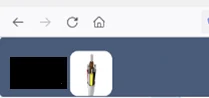
Figure 2 shows the logo after the swap. As the researcher notes, it could have been worse.
Root cause
The application uses the username as the stored file name, and a value containing a directory path redirects where the upload is written. The username is sanitised well enough to stop the payloads tried during registration, but the value is still trusted when it is concatenated into a filesystem path at upload time. Because the username is used as the file name, a value containing a directory path redirects the write.
The directory listing found during recon is what made the target directory known and reachable. The report does not describe the server-side code, so the exact concatenation and any checks around it are not shown.
Impact
An authenticated user could write an uploaded image into the directory found during recon, and overwrite the application's logo. In this case the application's logo was replaced, which is a defacement of the site as seen by every visitor. The researcher's own hedge is worth keeping: the payload was an image of an armoured cable, and it could have been worse. What else could be written, and where, depends on the filesystem layout and permissions, which the report does not describe.
Fix
No fix is described. The direction the finding points to is to stop deriving the stored path from the username: generate the file name server-side, keep uploads inside a dedicated directory, and reject or normalise path separators and traversal sequences before any filesystem call.
Variants to test
- Username used as a file name. Register or rename an account with a value containing path separators and upload a profile image. A positive result is the file appearing outside the expected upload directory, or an overwrite of a known file.
- A positive result is the same redirect of the stored file.
- Directory listing on upload paths. Request the upload directory directly. A positive result is an index of stored files, which tells you exactly which names are worth overwriting.
- A positive result is a stored file served with an executable or scriptable type.
What happened, in plain words
A security researcher found a way to make a website store an uploaded profile picture in a folder of his choosing, instead of the folder the site intended. He used that to replace the site's logo with a picture of an armoured cable. The site's name is not disclosed because of a non-disclosure agreement (NDA), so some details are left out.
The researcher's path was: try to upload unusual files, fail; notice that the site renames uploaded pictures to the username; try to use a malicious username, fail because the site cleans it up; then remember from earlier reconnaissance that the site had a directory listing (a page that shows the contents of a folder). He put a folder path into his username, uploaded again, and the picture landed in that folder. Finally he set his username to the folder path plus the logo's file name, and the site's logo changed.
This is a beginner-friendly explanation of the same events and the same steps. It assumes you can use a browser and a computer, but no security knowledge.
Context
The target is a web application. Its name and owner are not disclosed under an NDA, so the write-up avoids identifying details. The feature involved is the profile image upload: a logged-in user chooses an image for their profile picture, and the application stores it and shows it back.
The researcher compares the impact to visiting a familiar site, like Twitter, and seeing an armoured cable instead of the Twitter bird logo. That is roughly what happened here, except the site was not Twitter.
Setup
The report does not describe tools, versions or infrastructure. What it does establish is the precondition: an account on the application, and access to the profile image upload feature. The researcher also had reconnaissance notes on the application from earlier work, which become important later.
Finding it
A file upload form is a feature that makes a tester stop and look. The researcher's first instinct was to attack the upload itself. The initial attempts were:
- Uploading files other than the required image formats (jpg, png, SVG and so on).
- Inserting payloads into the images once the first attempt failed.
- The second attempt did not succeed either.
With the upload content angle exhausted, the researcher inspected the file name of the uploaded profile picture. The application renamed the file to the user's username. That is a design decision worth pulling on: if the stored name is derived from user-controlled data, the next question is what else that data influences.
The obvious follow-up was to register accounts whose username was itself a payload. That process was long, and it failed: the application sanitised the data reasonably well, at least to some extent.
Exploitation
Step 1: go back to the recon notes
The researcher returned to the reconnaissance notes on the application and found a directory listing vulnerability. That changes the shape of the attack. Instead of fighting the username sanitiser, the question becomes whether the username can point the upload at a directory that already exists and is listable.
Step 2: put a directory in the username
The researcher copied the directory from the recon notes and replaced the username (szUserName) with it, then uploaded again. The response was an HTTP 200 OK, and the image landed in the folder named in the username rather than wherever profile pictures normally go.
Figure 1 shows the request with the directory in place of szUserName and the successful response.
Step 3: aim at the logo
To demonstrate impact, the researcher changed the username to the directory plus the name of the application's logo, and uploaded again. The site's logo was replaced by the image of an armoured cable.
Figure 2 shows the logo after the swap. As the researcher notes, it could have been worse.
Root cause
The application uses the username as the stored file name, and a value containing a directory path redirects where the upload is written. The username is sanitised well enough to stop the payloads tried during registration, but the value is still trusted when it is concatenated into a filesystem path at upload time. Because the username is used as the file name, a value containing a directory path redirects the write.
The directory listing found during recon is what made the target directory known and reachable. The report does not describe the server-side code, so the exact concatenation and any checks around it are not shown.
Impact
An authenticated user could write an uploaded image into the directory found during recon, and overwrite the application's logo. In this case the application's logo was replaced, which is a defacement of the site as seen by every visitor. The researcher's own hedge is worth keeping: the payload was an image of an armoured cable, and it could have been worse.
Fix
No fix is described. The direction the finding points to is to stop deriving the stored path from the username: generate the file name server-side, keep uploads inside a dedicated directory, and reject or normalise path separators and traversal sequences before any filesystem call.
Variants to test
- Username used as a file name. Register or rename an account with a value containing path separators and upload a profile image. A positive result is the file appearing outside the expected upload directory, or an overwrite of a known file.
- A positive result is the same redirect of the stored file.
- Directory listing on upload paths. Request the upload directory directly. A positive result is an index of stored files, which tells you exactly which names are worth overwriting.
- A positive result is a stored file served with an executable or scriptable type.
Glossary
- API: Application Programming Interface; a set of rules that lets one program talk to another. In a web app, the browser sends requests to the server's API to fetch or send data.
- Cookie: a small piece of data a website stores in your browser and sends back with each request, often used to keep you logged in.
- Token: a string that proves who you are, similar to a temporary password, often used in APIs instead of cookies.
- Vulnerability: a weakness in software that can be exploited to cause harm.
- File upload: a feature that lets a user send a file from their computer to a website.
- Payload: the part of an attack that does the damage, such as a malicious file or a specially crafted input.
- Sanitise: to clean input by removing or escaping characters that could be dangerous.
- Directory listing: a web page that shows the files in a folder, like looking inside a directory on your computer.
- Path traversal: an attack that uses sequences like
../to move outside the intended folder and access other files or folders. - HTTP 200 OK: the standard response code meaning the request succeeded.
- NDA: Non-Disclosure Agreement; a legal contract that requires parties to keep certain information secret.
- Reconnaissance (recon): the information-gathering phase of a security test, where you learn about the target's structure and features.
- Defacement: changing a website's appearance without permission, often to show that it has been compromised.
- Filesystem: the way a computer organises and stores files and folders.
- Permissions: rules that control who can read, write or execute files and folders.
- Concatenation: joining two strings together, such as combining a folder path and a file name.
- Path separator: a character like
/or\that separates folders in a file path. - Extension: the part of a file name after the last dot, like
.jpg, which indicates the file type. - Executable or scriptable type: a file type that a server or browser can run as code, such as
.phpor.js.




