SQLi2RCE: my small research ️

medium.com
Published on medium.com
Hacking
The full write-up lives on its author's site
It belongs to its author, so we link to it rather than copy it. The other two tabs are our own rewrites, checked against it.
Context
This is a short research note about turning a SQL injection into remote code execution by writing query output to a file on the server. The author, Sevada797, describes it as a small discovery made while checking the syntax locally. The write-up does not name a specific product, program or endpoint; the technique is presented generically, with MySQL and MariaDB as the database systems where the author confirmed it.
The feature at the centre of it is the INTO OUTFILE clause of a SELECT statement. Normally a SELECT returns rows to the client. With INTO OUTFILE, the result set is instead written to a file on the database server's filesystem, which is what makes the jump from SQL injection to code execution possible when that file lands somewhere the web server will execute or serve it.
Setup
The author does not describe a lab environment, tooling, versions or accounts. The only stated precondition is a SQL injection inside a SELECT statement, plus a writable location on the server that the attacker can later reach over HTTP. The author also notes that the root document path may be known, or found by probing and getting lucky.
Finding it
The starting point is the well-known payload that most people reach for when they have SQL injection and want a shell:
SELECT '<?php $_GET["x"];' INTO OUTFILE '/var/www/html/myshell.php';
This writes a PHP file whose content is the string literal, so the attacker controls exactly what ends up on disk. The author points out the practical problem: during a real SQL injection you usually cannot control the string that is being selected, and the multi-query case, where you could append a second statement, is very rare. Appending a second query looks like this:
'; SELECT '<?php $_GET["x"];' INTO OUTFILE '/var/www/html/myshell.php';
That only works if the backend uses a method that permits multiple statements, such as multi_query(), rather than the typical query().
What the author found is that the INTO OUTFILE clause does not need a string literal at all. It can be appended to an ordinary SELECT:
SELECT * FROM `users` INTO OUTFILE '/var/www/html/myshell.php';
The same holds with a WHERE clause and a LIMIT:
SELECT * FROM `users` WHERE 1 LIMIT 1 INTO OUTFILE...
So any SELECT statement can be finished with INTO OUTFILE <file>, and the selected content is written to that file on the server. The author notes that this form appears to be deprecated but was never removed, and hopes it stays that way. The alternative syntax the author believes the database vendors would prefer, which would have prevented the chain, is:
SELECT * INTO OUTFILE ‘…..’ FROM users
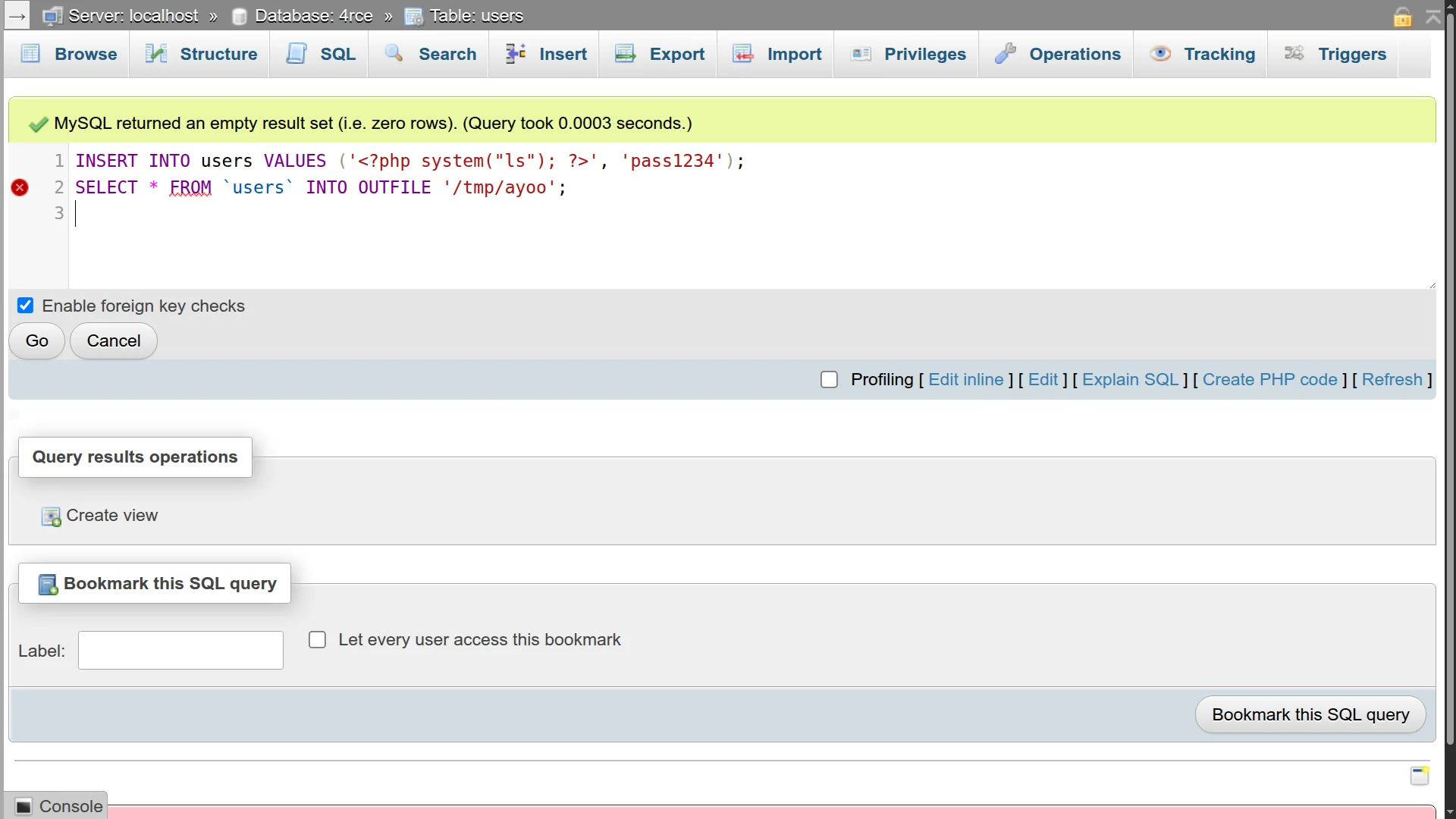
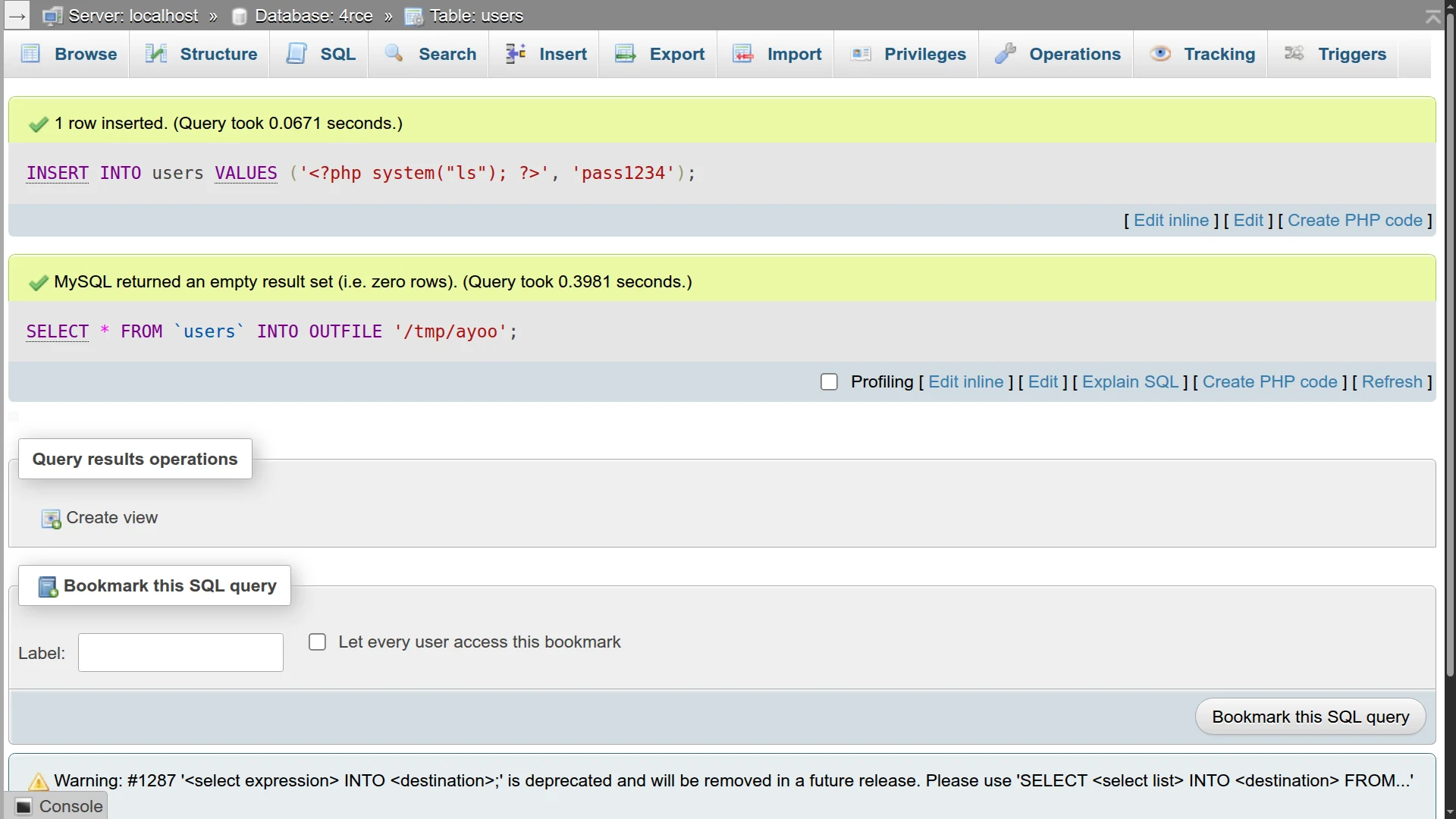
The screenshots show the author's local test of the syntax. The author notes that the interface marks the statement with a red "x" even though it actually works.
Exploitation
The chain has two halves: writing arbitrary content to a file through the injection, and getting that content into the table and column that the vulnerable SELECT reads from.
Step 1: confirm the syntax locally
The author confirmed locally that a SELECT ending in INTO OUTFILE writes the selected rows to the target file. This is the behaviour the rest of the chain depends on.
Step 2: poison the database with the payload
The author calls the second half "DB poisoning": find a request that naturally populates the exact table and column where the SQL injection sits. Applications have INSERT statements, for example a registration form that writes into a users table, and those can be used to place attacker-controlled content into the rows that the vulnerable SELECT will later return.
Step 3: redirect the output to a file
With the payload now stored in the table, the SQL injection in the SELECT statement is finished with INTO OUTFILE, so the selected rows, payload included, are written to a file on the server. The attacker then requests that file and gets execution.
Handling size limits and junk
If the write fails because the selected content is too large, the author suggests narrowing the result with LIMIT and OFFSET, or with a WHERE clause.
On the question of junk surrounding the payload, the author points out that PHP does not need the file to contain only PHP code. This command demonstrates it:
echo 'junk_kjlansdk<?php system("id");?>junk_8d3gj95' >test && php test
The PHP interpreter executes the code between the tags and ignores the surrounding text, so extra data written by the query does not prevent the payload from running.
Root cause
The underlying issue is that INTO OUTFILE accepts the result of any SELECT, not only a literal string, and that the database user behind the application is permitted to write files to a location the web server can reach. The author frames the missing restriction as a syntax-level one: if the database only allowed the SELECT * INTO OUTFILE '...' FROM users form, the chain described here would not work. The report does not describe any application-side defence that was bypassed; the weakness is in what the database permits and in the privileges granted to the application's database user.
Impact
Where a SQL injection exists in a SELECT statement, the database user can write files, and the written file is reachable and executable by the web server, an attacker can escalate from SQL injection to remote code execution. The author's local test shows that PHP code wrapped in junk text still runs, and the same mechanism would run any PHP the attacker can place in the table. The chain also requires a second request that writes attacker-controlled data into the table and column used by the vulnerable query. The author presents this as a chain that anyone could have missed unless they were thinking specifically about this goal.
Fix
No fix is described. The author's own suggestion is a restriction on the accepted syntax, allowing only the SELECT * INTO OUTFILE '...' FROM users form, which would prevent the technique. In practice this maps to limiting the privileges of the database user used by the application, in particular file write privileges, and ensuring the web root is not writable by that user.
Variants to test
- Append
INTO OUTFILEto an existingSELECTin an injection point and point it at a path inside the web root. A positive result is a file appearing at that path with the query's rows as its content. - Use
WHEREorLIMIT/OFFSETto shrink the result set when the full table is too large for the write to succeed. A positive result is the write completing where it previously failed. - Find an
INSERTpath, such as registration, that writes into the same table and column as the vulnerableSELECT, and store a PHP payload there. A positive result is the payload appearing in the output of the injected query. - Wrap the payload in junk text, as in the author's
echotest, and request the written file. A positive result is the PHP between the tags executing while the surrounding text is ignored. - Try the same
INTO OUTFILEsuffix on other database systems. The author only states that it works for MariaDB and MySQL, and explicitly says it may not work for all DBMS.
What happened, in plain words
Imagine a website as a restaurant. You sit at a table, look at the menu, and tell the waiter what you want. The waiter walks to the kitchen and tells the chef. The chef prepares the dish and the waiter brings it back to you. In a website, you are the visitor, the waiter is the web server, and the kitchen is the database: the place where all the information lives, such as user accounts, posts and settings.
When you type something into a website, for example a username in a login form, the web server takes what you typed and turns it into a question for the database. That question is written in a language called SQL. If the website is careless, it pastes your text directly into the question without checking it. Then you can type extra SQL of your own, and the database will treat it as part of the question. This trick is called SQL injection, often shortened to SQLi. It is like writing an extra line on the waiter's order pad, and the chef cooking it because nobody checked that the line was really on the menu.
Normally, SQL injection lets an attacker read data: usernames, password hashes, private messages. That is already bad. This write-up is about something worse. The author, Sevada797, describes a way to go from SQL injection to running commands on the server itself. That final step is called remote code execution, or RCE. It means the attacker is no longer just reading the database; they can make the server do things, such as run a command that prints the identity of the user the web server runs as.
The bridge between the two is a feature of the SQL language called INTO OUTFILE. Normally a database question returns its answer to the program that asked. With INTO OUTFILE, the answer is written into a file on the database server's disk instead. If that file lands in a folder the web server will later serve or execute, the attacker has turned a database question into a file on the server, and a file on the server can be a program.
The author's small discovery is about the shape of the SQL that makes this possible. The classic trick needs the attacker to control a piece of text inside the question. In a real injection, that is often not possible. The author found that the file-writing clause can be stuck onto an ordinary SELECT statement, the everyday kind of question that just says "give me the rows from this table". That means many more injection points can be turned into file writes than people assume.
The second half of the chain is what the author calls "DB poisoning": using a normal feature of the application, such as a registration form, to store the attacker's text in the same table and column that the vulnerable question reads from. Then the file write picks up that text and puts it on disk. The author tested the syntax locally, confirmed it works, and presents the whole thing as a chain that anyone could have missed unless they were specifically looking for it.
The write-up does not name a specific product, company, bug bounty program or endpoint. It is a general technique note, with MySQL and MariaDB named as the database systems where the author confirmed the behaviour.
The feature at the centre: INTO OUTFILE
To follow the rest, you need one idea from SQL. A SELECT statement asks the database for rows. For example, SELECT * FROM users means "give me every column of every row in the table called users". The result normally travels back to the application, which displays it or processes it.
INTO OUTFILE changes the destination. Instead of returning the rows to the application, the database writes them into a file on its own filesystem. The path is given by the attacker. That is the whole trick: the database is allowed to write files, and the attacker chooses the content and the location.
Why does that lead to code execution? Because web servers often serve files from a folder, commonly called the web root, and some file types are not just served but executed. A file ending in .php is handed to the PHP interpreter, which runs the code inside it. So if the attacker can write a .php file into the web root, and then request it in a browser, the server runs the attacker's code. The author notes that the root document path may be known in advance, or found by probing and getting lucky.
The classic payload and its problem
The starting point is the payload most people reach for when they have SQL injection and want a shell:
SELECT '<?php $_GET["x"];' INTO OUTFILE '/var/www/html/myshell.php';
Line by line:
SELECTstarts a query that produces a result.'<?php $_GET["x"];'is a string literal: text in single quotes. The database does not interpret it as SQL; it just treats it as data. The text happens to be PHP code, opening a PHP tag and reading a value from the query string into a variable calledx.INTO OUTFILE '/var/www/html/myshell.php'tells the database to write the result into that file path instead of returning it./var/www/htmlis a common web root on Linux servers.- The semicolon ends the statement.
So the file myshell.php ends up containing exactly the string the attacker chose. When the attacker later requests that file, the PHP interpreter runs the code inside it. The attacker controls the content completely, which is why this payload is so popular.
The problem, as the author explains, is that in a real SQL injection you usually cannot control the string that is being selected. The vulnerable query is written by the application, and it selects whatever columns it needs. You are injecting into part of that query, not writing a fresh one from scratch. You can add to the query, but you cannot easily replace the selected text with your own literal.
The other common approach is to append a second, separate query. That looks like this:
'; SELECT '<?php $_GET["x"];' INTO OUTFILE '/var/www/html/myshell.php';
Line by line:
'closes the string the application had opened, so the database stops treating what follows as data.;ends the application's original statement.SELECT '<?php $_GET["x"];' INTO OUTFILE '/var/www/html/myshell.php';is a brand new statement, the same file-writing query as before.
This only works if the backend uses a database function that permits multiple statements in one call, such as multi_query(), rather than the typical query(). Most applications use the single-statement form, so this path is very rare. The author calls it "very~ rare" and explains exactly why: the backend has to have been written to allow it.
The discovery: any SELECT can end in INTO OUTFILE
What the author found is that INTO OUTFILE does not need a string literal at all. It can be appended to an ordinary SELECT:
SELECT * FROM `users` INTO OUTFILE '/var/www/html/myshell.php';
Line by line:
SELECT *means "give me every column".FROMusers`` names the table. The backticks are just a way of quoting the table name; they are optional for simple names.INTO OUTFILE '/var/www/html/myshell.php'sends the result to that file instead of returning it.- The semicolon ends the statement.
So the file now contains whatever rows the users table holds, formatted as text. That is not PHP code by itself, but it is attacker-influenced content on disk, and the next section shows how to make it useful.
The same holds with a WHERE clause and a LIMIT:
SELECT * FROM `users` WHERE 1 LIMIT 1 INTO OUTFILE...
Line by line:
SELECT * FROMusers`` is the same as before.WHERE 1is a condition that is always true, so it does not filter anything out. It is there to show that aWHEREclause can sit before the file clause.LIMIT 1asks for only one row. This matters when the full table is too big to write.INTO OUTFILE...is the file clause, abbreviated here with...because the author is showing the shape rather than a full path.
The takeaway is that any SELECT statement can be finished with INTO OUTFILE <file>, and the selected content is written to that file on the server. The author notes that this form appears to be deprecated but was never removed, and hopes it stays that way. The alternative syntax the author believes the database vendors would prefer, which would have prevented the chain, is:
SELECT * INTO OUTFILE ‘…..’ FROM users
Line by line:
SELECT *asks for every column.INTO OUTFILE ‘…..’puts the file clause immediately after the selected columns, before the table is named. The quotes here are curly typographic quotes, not the straight quotes SQL normally uses, because the author is writing the shape informally rather than a runnable statement.FROM usersnames the table after the file clause.
The author's point is that if the database only accepted this second shape, where the file clause comes before FROM, then the trick of appending INTO OUTFILE to an existing SELECT would not work. Because the database accepts the clause at the end, the chain is possible.
The screenshots show the author's local test of the syntax. The author notes that the interface marks the statement with a red "x" even though it actually works. In other words, the tool used for testing flagged the statement as invalid, but the database still executed it and wrote the file. That is a useful reminder for beginners: a red error marker in a database tool does not always mean the database refused the statement.
Exploitation: the two halves of the chain
The chain has two halves: writing arbitrary content to a file through the injection, and getting that content into the table and column that the vulnerable SELECT reads from. Neither half is enough on its own. The first half gives you a file, but the file contains whatever the application's query selects. The second half gives you control of that content, but only inside the database. Together they give you a file on disk whose content you chose.
Step 1: confirm the syntax locally
The author confirmed locally that a SELECT ending in INTO OUTFILE writes the selected rows to the target file. This is the behaviour the rest of the chain depends on. Doing this on your own machine first is a sensible habit: you learn what the database does without touching anyone else's system, and you avoid wasting time on a target if the syntax does not behave as you expect.
Step 2: poison the database with the payload
The author calls the second half "DB poisoning": find a request that naturally populates the exact table and column where the SQL injection sits. Applications have INSERT statements, for example a registration form that writes into a users table, and those can be used to place attacker-controlled content into the rows that the vulnerable SELECT will later return.
In plain terms: if the vulnerable query reads the username column of the users table, then find a form that lets you write into that column. Registration is the obvious one, because it creates a new row with a username you choose. Put your PHP code in the username field, and the database now stores your code in the same place the vulnerable query will read from. The author calls this "poisoning" because you are contaminating the data that the application will later treat as its own.
Step 3: redirect the output to a file
With the payload now stored in the table, the SQL injection in the SELECT statement is finished with INTO OUTFILE, so the selected rows, payload included, are written to a file on the server. The attacker then requests that file and gets execution. The request is just a normal browser visit to the path that was written, for example /myshell.php under the web root.
Handling size limits and junk
If the write fails because the selected content is too large, the author suggests narrowing the result with LIMIT and OFFSET, or with a WHERE clause. LIMIT caps how many rows come back; OFFSET skips a number of rows first, so you can pick a single row from the middle of a table. WHERE filters rows by a condition. All three shrink the result set, which shrinks the file the database has to write.
On the question of junk surrounding the payload, the author points out that PHP does not need the file to contain only PHP code. This command demonstrates it:
echo 'junk_kjlansdk<?php system("id");?>junk_8d3gj95' >test && php test
Line by line:
echo '...'prints the text in quotes. The text isjunk_kjlansdk, then a PHP opening tag<?php, thensystem("id");, then a closing tag?>, then more junkjunk_8d3gj95.>testredirects that output into a file calledtestin the current directory.&&means "and then, only if the previous command succeeded".php testruns the file through the PHP interpreter.
The PHP interpreter executes the code between the tags and ignores the surrounding text, so extra data written by the query does not prevent the payload from running. system("id") runs the shell command id, which prints the identity of the user the process runs as. Run locally, it shows which account the PHP process runs as.
This is why the junk in the database rows does not matter. The file written by INTO OUTFILE will contain the whole row, including other columns and formatting, but as long as the PHP tags and the code between them are present somewhere in the file, the interpreter will find and run them.
Root cause
The underlying issue is that INTO OUTFILE accepts the result of any SELECT, not only a literal string, and that the database user behind the application is permitted to write files to a location the web server can reach. The author frames the missing restriction as a syntax-level one: if the database only allowed the SELECT * INTO OUTFILE '...' FROM users form, the chain described here would not work. The report does not describe any application-side defence that was bypassed; the weakness is in what the database permits and in the privileges granted to the application's database user.
In beginner terms: two permissions line up badly. The database account the website uses is allowed to write files, and the folder it can write to is one the web server will execute. Neither permission is unusual on its own. Together, they turn a data-reading bug into a code-running bug.
Impact
Where a SQL injection exists in a SELECT statement, the database user can write files, and the written file is reachable and executable by the web server, an attacker can escalate from SQL injection to remote code execution. The author's local test shows that PHP code wrapped in junk text still runs, and the same mechanism would run any PHP the attacker can place in the table. The chain also requires a second request that writes attacker-controlled data into the table and column used by the vulnerable query. The author presents this as a chain that anyone could have missed unless they were thinking specifically about this goal.
For a beginner, the practical meaning is this: a bug that looks like "someone can read the user list" can become "someone can run commands on the server". The difference between the two is a file write and a folder the web server trusts.
Fix
No fix is described. The author's own suggestion is a restriction on the accepted syntax, allowing only the SELECT * INTO OUTFILE '...' FROM users form, which would prevent the technique. In practice this maps to limiting the privileges of the database user used by the application, in particular file write privileges, and ensuring the web root is not writable by that user.
For someone new to this: the database account should have only the permissions the application actually needs. If the application never writes files, the account should not be allowed to write files. And the folder the web server serves from should not be writable by the database account, so even if a write is attempted, it cannot land somewhere that will be executed.
Variants to test
- Append
INTO OUTFILEto an existingSELECTin an injection point and point it at a path inside the web root. A positive result is a file appearing at that path with the query's rows as its content. - Use
WHEREorLIMIT/OFFSETto shrink the result set when the full table is too large for the write to succeed. A positive result is the write completing where it previously failed. - Find an
INSERTpath, such as registration, that writes into the same table and column as the vulnerableSELECT, and store a PHP payload there. A positive result is the payload appearing in the output of the injected query. - Wrap the payload in junk text, as in the author's
echotest, and request the written file. A positive result is the PHP between the tags executing while the surrounding text is ignored. - Try the same
INTO OUTFILEsuffix on other database systems. The author only states that it works for MariaDB and MySQL, and explicitly says it may not work for all DBMS.
Glossary
- SQL: the language used to ask questions of a database, such as "give me the rows in this table" or "add a new row".
- Database: the organised store of information behind a website, holding things like user accounts, posts and settings.
- SQL injection (SQLi): a bug where user input is pasted into a SQL question without proper checking, so the user can add SQL of their own.
- Remote code execution (RCE): a bug where an attacker can make a remote server run commands or code of their choosing.
SELECT: the SQL statement that asks for rows from a table.INSERT: the SQL statement that adds a new row to a table.INTO OUTFILE: a clause that makes aSELECTwrite its result into a file on the database server instead of returning it.- String literal: text written in quotes inside SQL, treated as data rather than as part of the query's instructions.
- Multi-query: sending more than one SQL statement in a single call; only works if the backend uses a function that allows it, such as
multi_query(). query(): the typical database function that sends a single statement and does not allow a second one to be appended.- DBMS: database management system, the software that runs the database, such as MySQL or MariaDB.
- MySQL / MariaDB: two closely related database systems; the author confirmed the behaviour on these.
- Deprecated: a feature that the vendor discourages and may remove in future, but which still works for now.
- Web root: the folder on a web server whose files are served to visitors, often
/var/www/htmlon Linux. - PHP: a programming language commonly used for websites; files ending in
.phpare executed by the PHP interpreter rather than shown as text. - PHP tag: the
<?phpand?>markers that tell the interpreter where code starts and ends; text outside them is ignored. system(): a PHP function that runs a shell command and prints its output.id: a shell command that prints the identity of the user running the process.- DB poisoning: the author's term for storing attacker-controlled content in the table and column that a vulnerable query reads from, using a normal application feature such as registration.
WHERE: a SQL clause that filters rows by a condition.LIMIT: a SQL clause that caps how many rows are returned.OFFSET: a SQL clause that skips a number of rows before returning results, often used withLIMIT.- Payload: the piece of attacker-controlled content that does the useful work, such as the PHP code stored in a username.
- Endpoint: a specific address on a website that accepts a request, such as a login form or a registration form.
- Privileges: the permissions granted to a database account, such as whether it may read, write or create files.
- Web server: the program that receives browser requests and sends back pages or files.
- Browser: the program you use to visit websites and request pages.



