SSRF: A Sneaky Way to Bypass URL Filters Using HTTP Redirects
The article describes a methodology where an application validates a user-supplied URL but then follows HTTP redirects without revalidating the destination, potentially allowing SSRF bypass. It also discusses a separate command injection scenario but does not demonstrate actual exploitation.

medium.com
Published on medium.com
Bug Bounty
The full write-up lives on its author's site
It belongs to its author, so we link to it rather than copy it. The other two tabs are our own rewrites, checked against it.
Context
While hunting on a vulnerability disclosure program, the author worked out a methodology for bypassing URL filters in SSRF scenarios. The write-up uses a generic application with a single feature: an endpoint that takes a URL from the user and fetches it server-side.
The endpoint is:
GET /fetch?url=https://example.com HTTP/1.1Host: vulnerable-app.com
The application fetches whatever URL is supplied in the url parameter. Internally the logic is described as follows:
import [redacted]("/fetch")def fetch(): url = request.args.get("url") response = requests.get(url) return response.text
The application makes an outbound HTTP request to the supplied URL. If the application also builds a shell command from that URL, the vulnerability could involve both SSRF and OS command injection. The author is explicit that these are separate issues: SSRF lets the server make requests to unintended destinations, while command injection happens when attacker-controlled input reaches a command interpreter unsafely.
Setup
The write-up does not describe a specific target, program, account or role. The demonstration is local and uses two Python HTTP servers on loopback addresses, plus curl.exe run from PowerShell. No versions are given.
Finding it
The starting point is a normal request flow in which the application has a firewall or input validation rule that blocks suspicious characters and command patterns. The author submits:
GET /fetch?url=https://example.com/?cmd=$(id)
The firewall detects the suspicious payload:
The request is blocked.
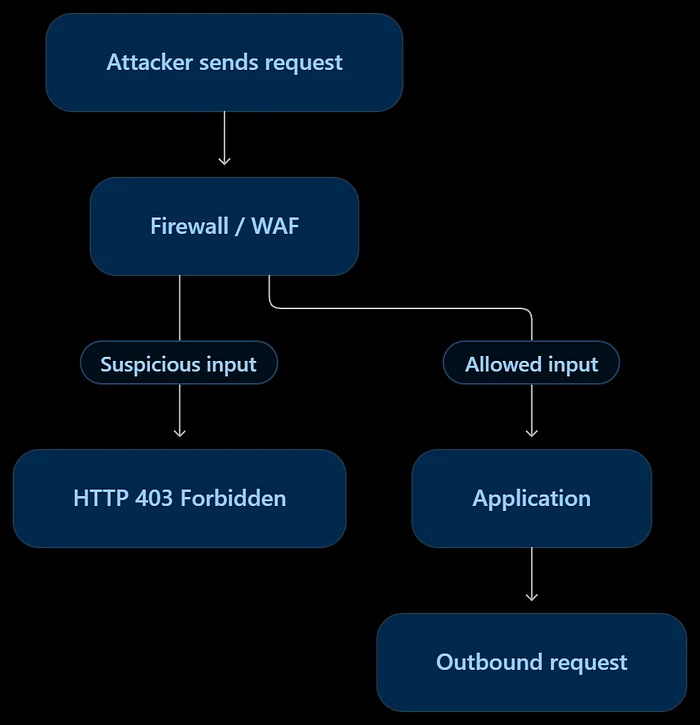
The image accompanies the blocked request. The observation that drives the rest of the write-up is that the firewall inspects the URL the user submits, not the URL the server's HTTP client eventually requests.
Exploitation
Step 1: Understand how redirects move the request
HTTP redirects use status codes such as 301 Moved Permanently, 302 Found, 307 Temporary Redirect and 308 Permanent Redirect. A server can answer with a 302 and a Location header telling the HTTP client where to send its next request:
HTTP/1.1 302 FoundLocation: https://example.org/next
If the client follows redirects, it makes another request to the URL in Location. The key distinction is that the URL submitted to the application is not necessarily the URL ultimately requested by its HTTP client.
Step 2: Control a redirect server
Suppose you control a test redirect server. It receives:
GET /redirect HTTP/1.1Host: redirect.example
and responds:
HTTP/1.1 302 FoundLocation: https://destination.example/resource
The application initially sees:
https://redirect.example/redirect
but the HTTP client may subsequently request:
https://destination.example/resource
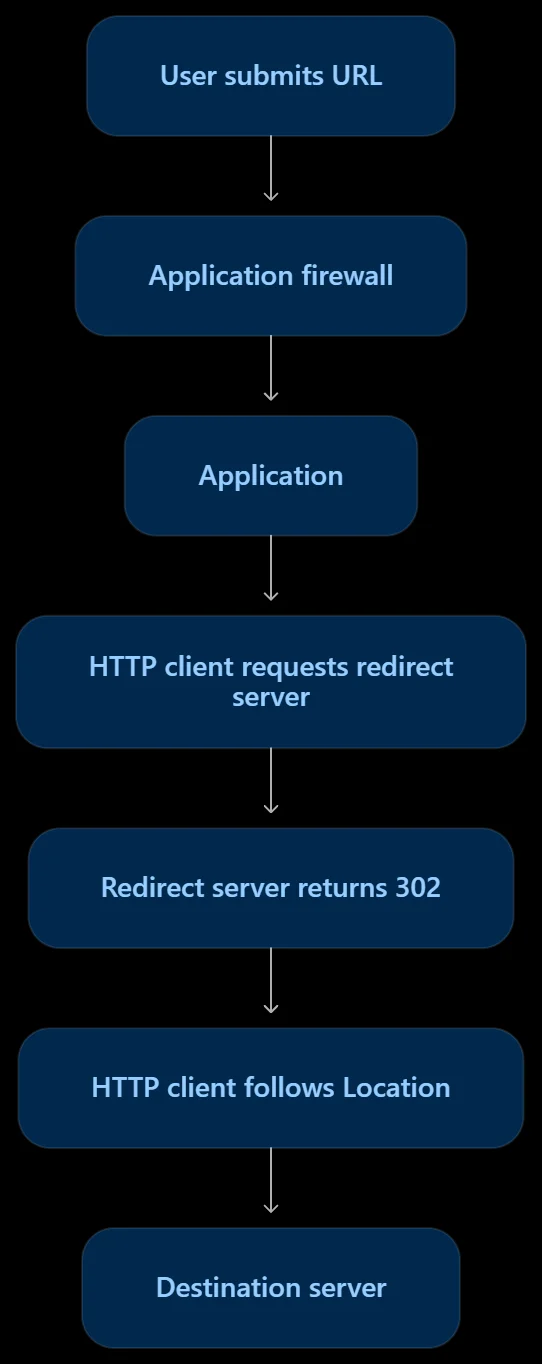
The diagram illustrates the complete flow.
Step 3: Exploit the validation gap
Consider an application that validates like this:
url = request.args.get("url")if "localhost" in url: return "Blocked", 403if "[redacted]" in url: return "Blocked", 403response = requests.get(url)
The validation only checks the original input. If the application accepts a URL pointing to a redirect server, it may validate:
https://redirect.example/redirect
Then the HTTP client follows the redirect to another destination, and the application may never validate that destination. The author calls this a redirect validation gap. The problem is not that redirects are malicious in themselves; it is that the application trusts a URL before redirect processing and does not revalidate the destination afterwards.
Step 4: Reproduce it safely with two local servers
The author reproduces the redirect behaviour without command injection or access to internal services, using Server A as the redirect server and Server B as the destination server.
Create destination.py:
from http.server import HTTPServer, BaseHTTPRequestHandlerclass DestinationHandler(BaseHTTPRequestHandler): def do_GET(self): print("Destination received:", self.path) self.send_response(200) self.end_headers() self.wfile.write( b"Hello from destination server" )server = HTTPServer( ("[redacted]", 9002), DestinationHandler)print("Destination server running on port 9002")server.serve_forever()
This server receives requests and returns a message.
Create redirect.py:
from http.server import HTTPServer, BaseHTTPRequestHandlerclass RedirectHandler(BaseHTTPRequestHandler): def do_GET(self): self.send_response(302) self.send_header( "Location", "http://[redacted]:9002/demo" ) self.end_headers()server = HTTPServer( ("[redacted]", 9001), RedirectHandler)print("Redirect server running on port 9001")server.serve_forever()
This server returns a redirect to the local destination.
Start both servers in two PowerShell terminals. Terminal 1:
python destination.py
Terminal 2:
python redirect.py
Both servers should start.
Step 5: Confirm the client follows the redirect
Run:
curl.exe -i http://[redacted]:9001/redirect
Expected response:
HTTP/1.0 302 FoundLocation: http://[redacted]:9002/demo
Now follow the redirect:
curl.exe -i -L http://[redacted]:9001/redirect
Expected result:
HTTP/1.0 302 FoundLocation: http://[redacted]:9002/demo
HTTP/1.0 200 OKHello from destination server
The destination server terminal should show:
Destination received: /demo
This confirms that the client followed the redirect.
Step 6: Relate the redirect to the command injection example
The original scenario has an extra component: the destination URL contains a command injection payload. The conceptual flow is:
| Stage | What happens |
|---|---|
| 1 | User supplies a URL to the vulnerable application |
| 2 | Firewall inspects the original URL |
| 3 | Application requests the supplied URL |
| 4 | Redirect server responds with a new destination |
| 5 | HTTP client follows the redirect |
| 6 | Application or downstream component processes the resulting request |
The critical question is where the command injection actually occurs. If the application uses a shell command to process the final URL, redirect handling could change which input reaches that command. But if the application only makes HTTP requests and never invokes a shell, a redirect alone cannot create OS command execution. Likewise, if the application validates the final destination and safely handles URL parameters, the redirect will not bypass those controls.
Root cause
The flaw is a trust-boundary mismatch. The firewall or validation layer inspects only the first URL, while the HTTP client processes a second URL that was never subjected to equivalent validation:
Input validation ↓Accepted URL ↓HTTP request ↓Redirect ↓New destination
The validation code checks the original input string for localhost and [redacted] and then passes the URL to requests.get. Because the check happens before redirect processing and is never repeated on the destination, a redirect server can point the client at a destination the filter would otherwise have blocked. The author describes this as an SSRF redirect validation bypass when the security control fails to validate the redirected destination. If command injection is also present, that is a separate issue requiring evidence that attacker-controlled data reaches a command interpreter.
Impact
Under the conditions described, an attacker can make the server's HTTP client reach a destination that the URL filter was meant to block, because only the submitted URL is validated. Whether this leads to anything beyond that depends on the application: if it only makes HTTP requests and never invokes a shell, a redirect alone cannot produce OS command execution, and if it validates the final destination and handles URL parameters safely, the redirect will not bypass those controls. The write-up does not report a specific bounty, severity or affected production system.
Fix
A secure implementation should:
- Validate the initial URL.
- Restrict allowed schemes, typically to HTTPS.
- Validate the hostname and resolved IP address.
- Reject loopback, private, link-local and other prohibited address ranges.
- Revalidate every redirect destination.
- Limit redirect count.
- Avoid shell invocation when processing URLs.
- Use parameterized process execution if external commands are genuinely required.
For SSRF prevention, validating only the hostname string is insufficient: DNS resolution and redirect handling must also be considered.
Variants to test
For a client-approved SSRF assessment, the author would test the following separately:
- Direct URL fetch: whether the application performs server-side requests.
- Redirect following: whether the HTTP client follows redirects.
- Redirect destination validation: whether each destination is validated.
- Redirect count: whether excessive redirects are restricted.
- Protocol restrictions: whether only approved schemes are accepted.
- DNS resolution: whether resolved addresses are checked against internal ranges.
- Command execution evidence: whether input actually reaches a shell or command interpreter.
What happened, in plain words
A security researcher was looking for bugs in a vulnerability disclosure program. That is a scheme where an organisation invites people to report security problems in its systems, usually under agreed rules. While doing that, the researcher worked out a repeatable method for getting past the filters that are supposed to stop a particular kind of attack called SSRF.
SSRF stands for Server-Side Request Forgery. To understand it, imagine a hotel concierge. You are a guest and you ask the concierge to fetch something for you. Normally the concierge goes out and comes back with what you asked for. But what if you ask the concierge to go into the staff-only room and read out what is written on the whiteboard there? The concierge has keys you do not have, so it can go places you cannot. SSRF is the same idea: a website has a feature that fetches a web address on your behalf, and the server running the website can reach machines that you, sitting at home, cannot reach. Those might be internal servers, admin panels, or the machine's own local services.
The trick in this write-up is about how such a filter can be fooled. The filter looks at the address you typed in. It does not look at where that address ends up sending the server. A redirect is the gap between those two things.
1. Understand the vulnerable application
A web application is a program you use through your browser. Many applications have a feature where you give them a link and they go and fetch it. A common example is a "preview" feature: you paste a link into a chat app and it shows a little card with the page title and an image. To do that, the app's server has to visit the link itself.
The write-up imagines an application with an endpoint. An endpoint is simply a particular address on a website that does one job, like a counter in a shop. This one is called /fetch and it takes a parameter called url. A parameter is the part of a web address after the question mark that carries a value, like the search term in a search engine URL.
The request looks like this:
GET /fetch?url=https://example.com HTTP/1.1Host: vulnerable-app.com
Line by line:
GET /fetch?url=https://example.com HTTP/1.1is the request line.GETmeans "please give me this"./fetchis the endpoint being asked for.?url=https://example.comis the parameter: the value being handed over ishttps://example.com.HTTP/1.1is the version of the language the browser and server use to talk.Host: vulnerable-app.comtells the server which website name the request is for. One server can host many websites, so it needs to know which one you meant.
The application fetches whatever address is in the url parameter. Inside the application, the code that does this is described like this:
import [redacted]("/fetch")def fetch(): url = request.args.get("url") response = requests.get(url) return response.text
Line by line, in plain words:
import requestsbrings in a helper library calledrequests, which is a common way for Python programs to make web requests. Think of it as the application's hands for reaching out to other websites.@app.route("/fetch")says: when someone asks for the/fetchaddress, run the function below. The@line is a label that attaches the function to that address.def fetch():starts the function, namedfetch.url = request.args.get("url")takes the value of theurlparameter out of the incoming request and stores it in a variable calledurl. A variable is just a named box that holds a value.response = requests.get(url)tells the helper library to go and fetch that address, and stores whatever comes back inresponse.return response.textsends the fetched content back to whoever made the original request.
So the application makes an outbound HTTP request to the address you supplied. HTTP is the protocol, the set of rules, that browsers and servers use to exchange pages and data.
If the application also builds a shell command out of that address, the problem could involve two separate vulnerabilities:
- SSRF, as described above: the server makes requests to places it should not.
- OS command injection. The operating system (OS) is the underlying software, such as Windows or Linux, that runs programs. A shell is the program that takes typed commands and runs them. Command injection means sneaking extra commands into input that later gets run by a shell, so your commands run on the server as if an administrator had typed them.
The write-up is careful to say these are separate issues. SSRF is about where the server sends requests. Command injection is about input reaching a command interpreter, the program that reads and runs commands, in an unsafe way. One does not automatically mean the other.
2. Normal request flow
Now imagine the application has a firewall or input validation rule. A firewall is a guard that inspects traffic and blocks what looks dangerous. Input validation is the application checking what you typed before using it, like a bouncer checking IDs at a door. Here the rule blocks suspicious characters and command patterns.
For example, you submit:
GET /fetch?url=https://example.com/?cmd=$(id)
Line by line:
GET /fetch?url=is the same endpoint and parameter as before.https://example.com/?cmd=$(id)is the value being supplied. It looks like a normal address with something extra on the end:?cmd=$(id).$(id)is the interesting part. In many shells,$(...)means "run the command inside the brackets and put its output here".idis a standard command that reports which user the shell is running as. So$(id)is an attempt to make the server run theidcommand.
The firewall detects the suspicious payload:
A payload is the part of your input that actually does the damage, as opposed to the harmless wrapping around it. The request is blocked.
The image accompanies the blocked request. This is the observation that drives everything else: the firewall inspects the address you submitted, not the address the server's HTTP client eventually requests. An HTTP client is the part of a program that makes web requests, the same role your browser plays when you click a link.
3. How the redirect technique works
A redirect is what happens when you ask a website for a page and it replies "not here, go there instead". You have seen this in a browser: you click a link and the address bar changes to a different address. The browser was redirected.
HTTP redirects use status codes. A status code is a three-digit number a server sends back to say how the request went. The redirect ones are:
301 Moved Permanently302 Found307 Temporary Redirect308 Permanent Redirect
A server can respond with a 302 and a Location header. A header is an extra piece of information attached to a request or response, like the label on a parcel. Location is the header that says where to go next.
For example:
HTTP/1.1 302 FoundLocation: https://example.org/next
Line by line:
HTTP/1.1 302 Foundis the response line.HTTP/1.1is the protocol version,302is the status code meaning "found, but it is somewhere else", andFoundis the human-readable name for that code.Location: https://example.org/nextis the header telling the client the new address to request.
If the client follows redirects, it makes another request to the address in the Location header. Browsers follow redirects automatically, which is why the web feels seamless when a page moves.
This introduces an important distinction: the address submitted to the application is not necessarily the address ultimately requested by its HTTP client. That gap is the whole trick.
Example request flow
Suppose you control a test redirect server. A server is a computer program that answers requests. "You control" means you set it up yourself, so you decide what it replies. The server receives a request to:
GET /redirect HTTP/1.1Host: redirect.example
Line by line:
GET /redirect HTTP/1.1asks for the/redirectpath on that server.Host: redirect.examplesays which site name the request is for.redirect.exampleis a placeholder name, not a real site.
It responds:
HTTP/1.1 302 FoundLocation: https://destination.example/resource
Line by line:
HTTP/1.1 302 Foundsays "the thing you want is elsewhere".Location: https://destination.example/resourcesays where to go next. Again,destination.exampleis a placeholder.
The application initially sees:
https://redirect.example/redirect
But the HTTP client may subsequently request:
https://destination.example/resource
The complete flow is:
The diagram illustrates the complete flow. The application's filter only ever saw the first address.
4. Why this can bypass URL validation
Consider an application that validates like this:
url = request.args.get("url")if "localhost" in url: return "Blocked", 403if "[redacted]" in url: return "Blocked", 403response = requests.get(url)
Line by line:
url = request.args.get("url")takes the address from the request, as before.if "localhost" in url:checks whether the textlocalhostappears anywhere in the address.localhostis a name computers use to mean "this same machine". If it does appear, the next line runs.return "Blocked", 403sends back the wordBlockedand status code403, which means "forbidden". The function stops there.if "[redacted]" in url:does the same check for[redacted]. That is the numeric address for the local machine, the same idea aslocalhostbut written as numbers. An IP address is the numeric label of a machine on a network, like a postal address for computers.return "Blocked", 403blocks that case too.response = requests.get(url)is reached only if neither check matched, and then the address is fetched.
The validation only checks the original input. If the application accepts an address pointing to a redirect server, it may validate:
https://redirect.example/redirect
Then the HTTP client follows the redirect to another destination, and the application may never validate that destination. The write-up calls this a redirect validation gap.
The security issue is not that redirects are inherently malicious. Redirects are a normal, useful part of the web. The issue is that the application trusts an address before redirect processing and does not revalidate the destination afterwards. It is like a security guard who checks your invitation at the front door and then lets the taxi take you anywhere, without checking where the taxi goes.
5. A safe, local demonstration
The write-up then reproduces the redirect behaviour without command injection and without touching any internal services. That matters: you can learn the technique on your own machine, with no risk to anyone else. "Local" means everything runs on your own computer, and the servers talk to each other over loopback, a special network path that never leaves the machine.
Two local HTTP servers are used:
- Server A: the redirect server, which answers with "go there instead".
- Server B: the destination server, which answers with a normal page.
Step 1: Create the destination server
Create a file called destination.py:
from http.server import HTTPServer, BaseHTTPRequestHandlerclass DestinationHandler(BaseHTTPRequestHandler): def do_GET(self): print("Destination received:", self.path) self.send_response(200) self.end_headers() self.wfile.write( b"Hello from destination server" )server = HTTPServer( ("[redacted]", 9002), DestinationHandler)print("Destination server running on port 9002")server.serve_forever()
Line by line:
from http.server import HTTPServer, BaseHTTPRequestHandlerborrows two ready-made pieces from Python's standard library.HTTPServeris a basic web server.BaseHTTPRequestHandleris a starting point for writing what the server does when a request arrives.class DestinationHandler(BaseHTTPRequestHandler):defines a new kind of handler, based on the ready-made one. A class is a template for something that does a job.def do_GET(self):is the function that runs when aGETrequest arrives. The namedo_GETis what the library looks for.print("Destination received:", self.path)prints a line in the terminal showing which path was requested.self.pathis the part of the address after the site name, such as/demo.self.send_response(200)sends status code200, which means "OK, here is your answer".self.end_headers()marks the end of the headers, the extra information attached to the response.self.wfile.write(b"Hello from destination server")writes the body of the response, the actual content. Thebbefore the quotes means the text is stored as raw bytes, which is what the network expects.server = HTTPServer(("[redacted]", 9002), DestinationHandler)creates the server, listening on the local machine at[redacted]on port9002. A port is a numbered door on a machine; different programs listen on different doors so they do not collide.print("Destination server running on port 9002")tells you in the terminal that it started.server.serve_forever()keeps the server running and answering requests until you stop it.
This server simply receives requests and returns a message.
Step 2: Create the redirect server
Create a file called redirect.py:
from http.server import HTTPServer, BaseHTTPRequestHandlerclass RedirectHandler(BaseHTTPRequestHandler): def do_GET(self): self.send_response(302) self.send_header( "Location", "http://[redacted]:9002/demo" ) self.end_headers()server = HTTPServer( ("[redacted]", 9001), RedirectHandler)print("Redirect server running on port 9001")server.serve_forever()
Line by line:
from http.server import HTTPServer, BaseHTTPRequestHandleris the same import as before.class RedirectHandler(BaseHTTPRequestHandler):defines the handler for this server.def do_GET(self):runs when aGETrequest arrives.self.send_response(302)sends status code302, the redirect code.self.send_header("Location", "http://[redacted]:9002/demo")adds theLocationheader, pointing at the destination server on port9002and the path/demo.self.end_headers()finishes the headers. There is no body, because a redirect only needs to say where to go.server = HTTPServer(("[redacted]", 9001), RedirectHandler)starts this server on port9001, a different door from the destination server.print("Redirect server running on port 9001")announces that it started.server.serve_forever()keeps it running.
This server returns a redirect to the local destination.
Step 3: Start both servers
Open two PowerShell terminals. PowerShell is the command-line program built into Windows, where you type commands instead of clicking. Two terminals are needed because each server keeps running and occupying its window.
Terminal 1:
python destination.py
This runs the destination server script. python is the program that reads and runs Python files, and destination.py is the file you created.
Terminal 2:
python redirect.py
This runs the redirect server script the same way.
Both servers should start. You should see the two "running on port" messages, one in each window.
Step 4: Test the redirect
Run:
curl.exe -i http://[redacted]:9001/redirect
Line by line:
curl.exeis a command-line tool for making web requests. It is included with Windows. Think of it as a browser without a window.-itells it to show the response headers as well as the body, so you can see the status code and theLocationheader.http://[redacted]:9001/redirectis the address being requested: the local machine, port9001(the redirect server), path/redirect.
Expected response:
HTTP/1.0 302 FoundLocation: http://[redacted]:9002/demo
Line by line:
HTTP/1.0 302 Foundis the redirect status. The version here is1.0because that is what Python's basic server speaks.Location: http://[redacted]:9002/demois where the redirect points: the destination server on port9002, path/demo.
Now follow the redirect:
curl.exe -i -L http://[redacted]:9001/redirect
Line by line:
curl.exeis the same tool.-ishows the headers.-Lmeans "follow redirects". Without it,curlstops at the first answer and shows you the redirect. With it,curldoes what a browser does: it goes to the new address automatically.http://[redacted]:9001/redirectis the same starting address.
Expected result:
HTTP/1.0 302 FoundLocation: http://[redacted]:9002/demo
HTTP/1.0 200 OKHello from destination server
Line by line:
- The first block is the redirect answer from the redirect server: status
302and theLocationheader. HTTP/1.0 200 OKis the answer from the destination server: status200, meaning success.Hello from destination serveris the body the destination server sent back.
The destination server terminal should show:
Destination received: /demo
That line is the print statement from destination.py firing. It proves the destination server actually received a request for /demo, which means the client followed the redirect. This confirms that the client followed the redirect.
6. How this relates to the command injection example
The original scenario has an additional component: the destination address contains a command injection payload. The conceptual flow is:
| Stage | What happens |
|---|---|
| 1 | User supplies a URL to the vulnerable application |
| 2 | Firewall inspects the original URL |
| 3 | Application requests the supplied URL |
| 4 | Redirect server responds with a new destination |
| 5 | HTTP client follows the redirect |
| 6 | Application or downstream component processes the resulting request |
The critical question is where the command injection actually occurs. If the application uses a shell command to process the final address, redirect handling could change which input reaches that command. But if the application only makes HTTP requests and never invokes a shell, a redirect alone cannot create OS command execution. Likewise, if the application validates the final destination and safely handles URL parameters, the redirect will not bypass those controls.
In other words: the redirect is a way of moving the request to a different address. Whether that is dangerous depends entirely on what the application does with the address afterwards. A redirect is not a magic key; it is a gap in checking.
Things to test during an authorised assessment
For a client-approved SSRF assessment, the write-up says to test the following separately. "Authorised" means the owner of the system has given permission in writing. Testing without permission is not security research; it is unauthorised access.
- Direct URL fetch: whether the application performs server-side requests.
- Redirect following: whether the HTTP client follows redirects.
- Redirect destination validation: whether each destination is validated.
- Redirect count: whether excessive redirects are restricted.
- Protocol restrictions: whether only approved schemes are accepted. A scheme is the first part of an address, such as
httporhttps, before the://. - DNS resolution: whether resolved addresses are checked against internal ranges. DNS is the phone book of the internet: it turns names like
example.cominto numeric IP addresses. A name can look harmless and still resolve to an internal address. - Command execution evidence: whether input actually reaches a shell or command interpreter.
Important security checks
A secure implementation should:
- Validate the initial URL.
- Restrict allowed schemes, typically to HTTPS.
- Validate the hostname and resolved IP address. The hostname is the name part of an address, such as
example.com. - Reject loopback, private, link-local, and other prohibited address ranges. Loopback is the machine talking to itself. Private ranges are address blocks reserved for internal networks. Link-local addresses are a special range used for local network setup.
- Revalidate every redirect destination.
- Limit redirect count.
- Avoid shell invocation when processing URLs.
- Use parameterized process execution if external commands are genuinely required. Parameterised means passing values as separate, clearly marked arguments rather than gluing them into one command string, so they cannot be reinterpreted as commands.
For SSRF prevention, validating only the hostname string is insufficient. DNS resolution and redirect handling must also be considered. Checking the name is like checking the label on a parcel; you also need to open it and see where it really goes.
8. The main takeaway
The technique exploits a trust-boundary mismatch. A trust boundary is a line where data moves from a less trusted place to a more trusted one, and where checks should happen. Here the check happens on one side of the line and the request happens on the other:
Input validation ↓Accepted URL ↓HTTP request ↓Redirect ↓New destination
Line by line:
Input validationis the filter checking what you typed.Accepted URLis the address that passed the check.HTTP requestis the application fetching that address.Redirectis the answer saying "go somewhere else".New destinationis the address that was never checked.
The firewall may inspect only the first address, while the HTTP client processes a second address that was never subjected to equivalent validation. This is best described as SSRF redirect validation bypass when the security control fails to validate the redirected destination.
If command injection is also present, that is a separate issue that needs evidence showing attacker-controlled data reaches a command interpreter. A redirect on its own does not prove command execution.
Glossary
- API: a defined way for one program to ask another program to do something, like a service counter with a fixed menu of requests.
- Authorised assessment: security testing done with the written permission of the system's owner.
- Command injection: sneaking extra commands into input that is later run by a shell, so they execute on the server.
- Command interpreter: a program that reads commands and runs them, such as a shell.
- curl: a command-line tool for making web requests and showing the responses.
- DNS: the system that turns names like
example.cominto numeric IP addresses. - DNS resolution: the act of looking up the numeric address for a name.
- Endpoint: a particular address on a website that performs one job.
- Firewall: a guard that inspects network traffic and blocks what looks dangerous.
- GET: the HTTP method meaning "please give me this".
- Header: extra information attached to a request or response, like a label on a parcel.
- Hostname: the name part of an address, such as
example.com. - HTTP: the set of rules browsers and servers use to exchange pages and data.
- HTTP client: the part of a program that makes web requests.
- HTTPS: HTTP with encryption, so the traffic cannot be read or changed in transit.
- Input validation: checking what a user typed before using it.
- IP address: the numeric label of a machine on a network.
- Link-local address: a special address range used for local network setup.
- Localhost: the name computers use to mean "this same machine".
- Loopback: the network path a machine uses to talk to itself; traffic never leaves the computer.
- OS (operating system): the underlying software, such as Windows or Linux, that runs programs.
- OS command injection: command injection that reaches the operating system's shell.
- Parameter: the part of a web address after the question mark that carries a value.
- Parameterised process execution: passing values as separate, clearly marked arguments rather than gluing them into one command string.
- Payload: the part of an input that actually does the damage.
- Port: a numbered door on a machine that a program listens on.
- PowerShell: the command-line program built into Windows.
- Private address range: address blocks reserved for internal networks, not the public internet.
- Protocol: a set of rules for communication, such as HTTP.
- Redirect: a server's answer saying "the thing you want is at another address, go there".
- Redirect validation gap: a flaw where the first address is checked but the redirect destination is not.
- Scheme: the first part of an address, such as
httporhttps, before the://. - Server: a computer program that answers requests from clients.
- Shell: the program that takes typed commands and runs them.
- SSRF (Server-Side Request Forgery): a flaw where a server can be made to send requests to destinations the attacker could not reach directly.
- SSRF redirect validation bypass: an SSRF filter bypass that works by having the server follow a redirect to an unchecked destination.
- Status code: a three-digit number a server sends back to say how a request went, such as
200for OK or302for a redirect. - Trust boundary: a line where data moves from a less trusted place to a more trusted one, and where checks should happen.
- Variable: a named box in a program that holds a value.
- Vulnerability disclosure program: a scheme where an organisation invites people to report security problems under agreed rules.



