SSRF Exploitation in Libreoffice Spreadsheet File Converter
The file converter that turns uploaded spreadsheets into PDFs fetched remote content referenced inside the document, so an attacker could make the server request internal addresses. By pointing an embedded object at the EC2 metadata address, the author retrieved instance metadata, which they say could lead to remote code execution in further steps.

Z3d~
The full write-up lives on its author's site
It belongs to its author, so we link to it rather than copy it. The other two tabs are our own rewrites, checked against it.
Context
The target was a private bug bounty program, which the researcher refers to as penetsting.redacted.com. The feature of interest was an HTML editor sitting under a file upload functionality. When a user creates content inside the editor, the backend converts the text to PDF and uploads the result to an S3 bucket, in order to produce a resume. The uploader also accepted xlsx files, and those were converted to PDF as well.
The write-up is about turning that conversion pipeline into a server-side request forgery (SSRF) against the application's AWS EC2 instance.
Setup
The researcher worked against the private program with no special role described. The tools used were:
- A VPS with Netcat, used as a listener to observe outbound requests from the server.
- A local LibreOffice installation, used to craft a malicious document.
- 7zip, to open the resulting
.odtarchive and edit its contents. - A text editor, to modify
content.xml.
No versions are given in the report.
Finding it
After exploring the application, the researcher found the HTML editor under the file upload functionality and tried to bypass the upload protection. The files were uploaded to an S3 bucket, so there was no chance to shell the server or get a stored XSS. The next step was to understand exactly how the text editor worked.
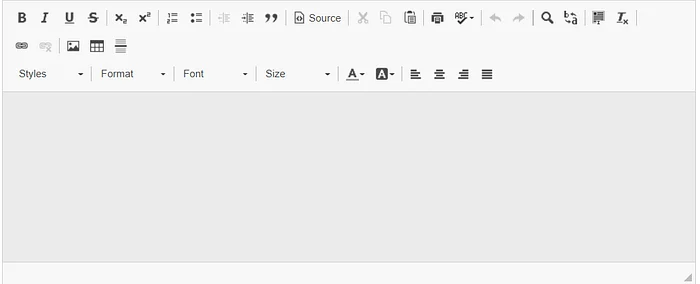
The key observation was that when content is created inside the editor, the backend converts the text to PDF and uploads it to the S3 bucket. That conversion step is what made the feature interesting: it means the server processes attacker-influenced markup.
Exploitation
Step 1: Send HTML to the converter
The first attempt was to send HTML syntax to the converter to try to get SSRF.
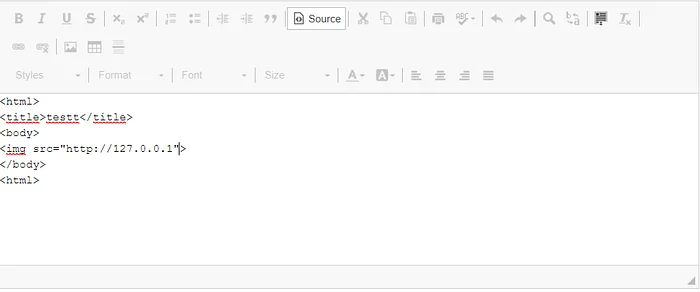
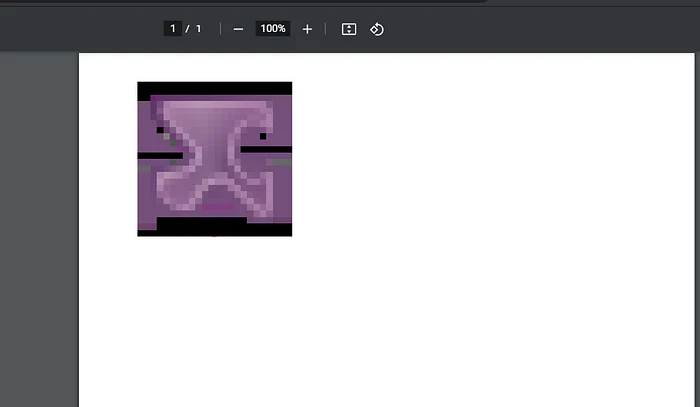
A security mechanism converted the <img> tag output to an X image, which the researcher took to mean that the internal network could not be reached this way.
Many encoding mechanisms were tried, and none worked.
Step 2: Identify the conversion software
To find out which software was responsible for converting editor code to PDF, the researcher opened a listener with Netcat on the VPS and put the VPS IP and port inside an img tag:
<img src=”http://myvps:1337”>
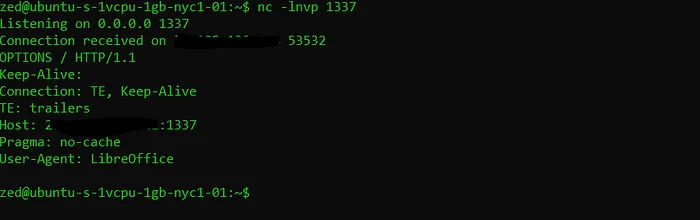
The server sent a request to the listener, and the User-Agent header leaked the name of the software: LibreOffice. Using the server IP, the researcher determined that the application was hosted on an AWS EC2 instance.
Step 3: Abuse LibreOffice OLE objects
Digging into how LibreOffice works, the researcher recalled that the upload functionality allowed xlsx uploads, and that uploaded files are converted to PDF too. The idea was to abuse a LibreOffice file to get internal network access.
The text content of a LibreOffice document is located in content.xml inside the file. LibreOffice documents can also embed OLE objects, and these support remote objects. OLE objects work by fetching the contents of the remote URL and displaying them inside a frame through x-href. The OLE objects are embedded in content.xml.
The document was built as follows:
- Download and install LibreOffice.
- Click Insert -> object -> ole object -> create from file -> check the "link to file" checkbox -> enter a URL -> save the file as
odt. - Open the
odtfile using 7zip and open thecontent.xmlfile using a text editor. - Modify the file by replacing the URL inside
xlink:hrefwith an internal network IP. Since the application is inside an EC2 instance, the address used was[redacted], the EC2 instance local IP address, in order to fetch the metadata.

Step 4: Rename and upload
The edited file was saved and renamed to test.odt.xlsx, then uploaded.
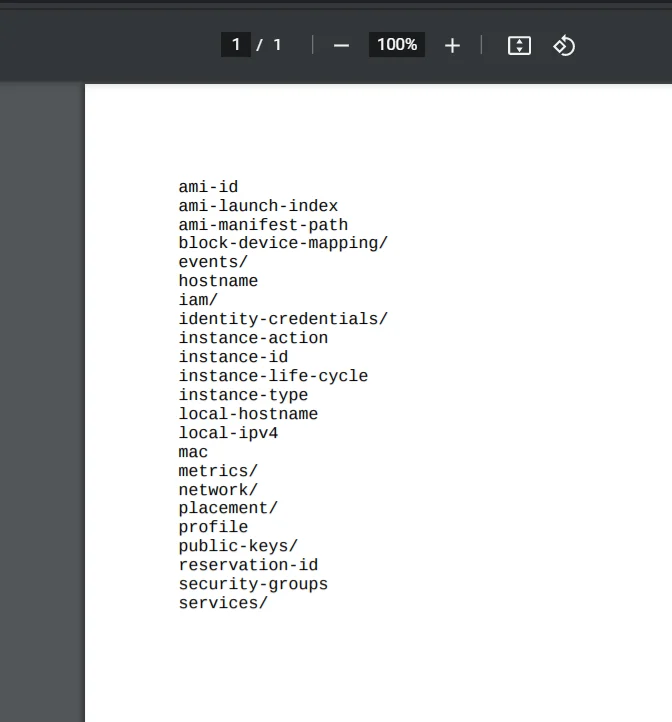
The security mechanism was bypassed and the internal metadata of the EC2 instance was retrieved. According to the researcher, this could lead to remote code execution in a few more steps.
Root cause
The converter accepted a LibreOffice document whose content.xml contained an OLE object pointing at a remote URL, and LibreOffice fetched that URL server-side when converting the file to PDF. The earlier HTML-based attempt was blocked because the <img> tag output was converted to an X image; the OLE object path through xlink:href succeeded. The uploader accepted xlsx files, and the edited file was renamed to test.odt.xlsx before upload. The report does not describe any network-level egress filtering on the conversion host.
Impact
An attacker who can upload a crafted LibreOffice document to the converter can make the server issue requests to internal addresses, including the EC2 metadata endpoint at [redacted]. In this case the internal metadata of the EC2 instance was retrieved. The researcher states this could lead to remote code execution in a few more steps, but the report does not show those steps. The impact depends on what the metadata endpoint exposes and on what the conversion host is permitted to reach.
Fix
Reasonable mitigations would be to block outbound requests from the conversion host to link-local and internal ranges, to disable remote OLE object fetching in the LibreOffice conversion profile, and to restrict the metadata endpoint with IMDSv2 and least-privilege instance roles.
Variants to test
- Upload an
xlsxorodtcontaining an OLE object withxlink:hrefpointing at an internal address, and watch for a callback on a listener. A positive result is an inbound request from the conversion server. - Try the same with other LibreOffice features that fetch remote content, such as linked images or external data sources. A positive result is a request to the listener or internal metadata returned in the PDF.
- Test the HTML editor path with alternative tags and encodings after the
<img>filter. A positive result is a request from the server that the filter did not block. - Check whether the metadata endpoint is reachable from the converter and whether IMDSv2 is enforced. A positive result is retrieval of instance credentials or other metadata.
What happened, in plain words
A security researcher was testing a private bug bounty program, which is a scheme where companies invite selected researchers to look for security holes in their systems and sometimes pay for what they find. The program is referred to here as penetsting.redacted.com. The researcher found a feature that let users upload files and edit text in an HTML editor. When a user creates content in that editor, the server turns the text into a PDF and stores it in an Amazon S3 bucket, which is cloud storage. The researcher wondered whether the server could be tricked into fetching a web address of the researcher's choosing while it did that conversion. That kind of trick is called server-side request forgery, or SSRF: the attacker makes the server send a request to a destination the attacker picks, often an internal address that outsiders cannot reach.
The first attempt was to put HTML, the language of web pages, into the editor and see if the converter would load an image from a server the researcher controlled. A filter turned the image tag into a broken image, so that path was blocked. The researcher then used a listening program on their own server to see what software was doing the conversion. The request that arrived revealed the software name in a header: LibreOffice, a free office suite. The researcher then crafted a LibreOffice document that contained a link to a remote object, edited the document's internal files to point that link at an internal cloud address, renamed the file so it would be accepted as a spreadsheet, and uploaded it. The server fetched the internal address and returned cloud instance metadata, which is information about the server itself. The researcher says this could lead to remote code execution, meaning running commands on the server, in a few more steps, but those steps are not shown.
This article walks through the same steps for someone who has never done security testing before. Each concept is explained when it first appears.
Context
The target was a private bug bounty program. The researcher calls it penetsting.redacted.com. The feature of interest was an HTML editor sitting under a file upload functionality. In plain terms, the site had a place where you could upload a file, and inside that area there was a text editor that let you write content with formatting, similar to a word processor in the browser. When a user creates content inside the editor, the backend converts the text to PDF and uploads the result to an S3 bucket, in order to produce a resume. The backend is the part of the application that runs on the server, invisible to the user. S3 is Amazon's cloud storage service; a bucket is a container for files. The uploader also accepted xlsx files, which are Microsoft Excel spreadsheets, and those were converted to PDF as well.
The write-up is about turning that conversion pipeline into a server-side request forgery (SSRF) against the application's AWS EC2 instance. AWS is Amazon Web Services, a cloud platform. EC2 is its service for renting virtual servers, which are computers that run in Amazon's data centres. SSRF means the attacker causes the server to make a request to a destination of the attacker's choosing. Normally a server only makes requests to places it needs to, but if an attacker can influence the address, the server can be made to reach internal systems that are not exposed to the internet.
Setup
The researcher worked against the private program with no special role described. The tools used were:
- A VPS with Netcat, used as a listener to observe outbound requests from the server. A VPS is a virtual private server, a rented computer on the internet that the researcher controls. Netcat is a small networking tool that can listen on a port and show anything that connects to it. A port is a numbered channel on a computer; a listener waits for incoming connections on a chosen port.
- A local LibreOffice installation, used to craft a malicious document. LibreOffice is a free office suite that can create and open documents, spreadsheets and presentations.
- 7zip, to open the resulting
.odtarchive and edit its contents. 7zip is a file archiver, a program that can open compressed archives. An.odtfile is actually a zip archive containing several files. - A text editor, to modify
content.xml.content.xmlis one of the files inside an.odtarchive; it holds the document's text content.
No versions are given in the report.
Finding it
After exploring the application, the researcher found the HTML editor under the file upload functionality and tried to bypass the upload protection. The files were uploaded to an S3 bucket, so there was no chance to shell the server or get a stored XSS. To shell the server means to get a command shell on it, i.e. to run commands. Stored XSS (cross-site scripting) is a vulnerability where an attacker stores malicious JavaScript in a site and it runs in other users' browsers. The next step was to understand exactly how the text editor worked.
The key observation was that when content is created inside the editor, the backend converts the text to PDF and uploads it to the S3 bucket. That conversion step is what made the feature interesting: it means the server processes attacker-influenced markup. Markup is text with tags that describe structure or formatting, such as HTML. If the server processes markup that the attacker can control, the attacker may be able to make the server do things, like fetch a URL.
Exploitation
Step 1: Send HTML to the converter
The first attempt was to send HTML syntax to the converter to try to get SSRF. HTML syntax means HTML tags and attributes. The idea is to include a tag that causes the server to load a remote resource, such as an image, and see if the server makes a request to a server the researcher controls.
A security mechanism converted the <img> tag output to an X image, which the researcher took to mean that the internal network could not be reached this way. An <img> tag is HTML for embedding an image; the browser (or in this case the converter) fetches the image from the URL in the src attribute. The filter turned the image tag output into an X image, so the internal network could not be reached this way.
Many encoding mechanisms were tried, and none worked. Encoding means representing characters in a different form, for example using percent-encoding or HTML entities, to try to slip past a filter. None of the encoding attempts worked.
Step 2: Identify the conversion software
To find out which software was responsible for converting editor code to PDF, the researcher opened a listener with Netcat on the VPS and put the VPS IP and port inside an img tag:
<img src=”http://myvps:1337”>
This line is an HTML image tag. src is the attribute that tells the browser or converter where to get the image. The value http://myvps:1337 is a URL: http is the protocol, myvps is a placeholder for the researcher's server address, and 1337 is the port number. If the converter processes this tag, it will try to fetch that URL, and the researcher's Netcat listener will see the connection.
The server sent a request to the listener, and the User-Agent header leaked the name of the software: LibreOffice. A header is extra information sent with an HTTP request or response. The User-Agent header normally identifies the client software making the request, such as a browser. Here it identified LibreOffice, which told the researcher what software was doing the conversion. Using the server IP, the researcher determined that the application was hosted on an AWS EC2 instance.
Step 3: Abuse LibreOffice OLE objects
Digging into how LibreOffice works, the researcher recalled that the upload functionality allowed xlsx uploads, and that uploaded files are converted to PDF too. The idea was to abuse a LibreOffice file to get internal network access. Internal network access means reaching addresses that are not reachable from the public internet, such as the cloud instance's own metadata service.
The text content of a LibreOffice document is located in content.xml inside the file. LibreOffice documents can also embed OLE objects, and these support remote objects. OLE stands for Object Linking and Embedding; it is a way to embed content from another program into a document. A remote object is one whose content is fetched from a URL rather than stored in the file. OLE objects work by fetching the contents of the remote URL and displaying them inside a frame through x-href. The attribute is written xlink:href in the file. The OLE objects are embedded in content.xml.
The document was built as follows:
- Download and install LibreOffice.
- Click Insert -> object -> ole object -> create from file -> check the "link to file" checkbox -> enter a URL -> save the file as
odt. This creates an OLE object that links to a remote file instead of embedding it. The.odtformat is an OpenDocument Text file, a zip archive containing XML files. - Open the
odtfile using 7zip and open thecontent.xmlfile using a text editor. Because the.odtis a zip archive, 7zip can extract its parts. - Modify the file by replacing the URL inside
xlink:hrefwith an internal network IP. Since the application is inside an EC2 instance, the address used was[redacted], the EC2 instance local IP address, in order to fetch the metadata.[redacted]is a special link-local address used by cloud instances to reach a metadata service that provides information about the instance, sometimes including credentials. The researcher changed the link to point there.
Step 4: Rename and upload
The edited file was saved and renamed to test.odt.xlsx, then uploaded.
The security mechanism was bypassed and the internal metadata of the EC2 instance was retrieved. According to the researcher, this could lead to remote code execution in a few more steps. Remote code execution means running arbitrary commands on the server. The report does not show those steps.
Root cause
The converter accepted a LibreOffice document whose content.xml contained an OLE object pointing at a remote URL, and LibreOffice fetched that URL server-side when converting the file to PDF. The earlier HTML-based attempt was blocked because the <img> tag output was converted to an X image; the OLE object path through xlink:href succeeded. The uploader accepted xlsx files, and the edited file was renamed to test.odt.xlsx before upload. The report does not describe any network-level egress filtering on the conversion host. Egress filtering means blocking outbound connections to certain addresses.
Impact
An attacker who can upload a crafted LibreOffice document to the converter can make the server issue requests to internal addresses, including the EC2 metadata endpoint at [redacted]. In this case the internal metadata of the EC2 instance was retrieved. The impact depends on what the metadata endpoint exposes and on what the conversion host is permitted to reach.
Fix
Reasonable mitigations would be to block outbound requests from the conversion host to link-local and internal ranges, to disable remote OLE object fetching in the LibreOffice conversion profile, and to restrict the metadata endpoint with IMDSv2 and least-privilege instance roles. IMDSv2 is a session-oriented version of the EC2 metadata service that requires a token, making SSRF harder. Least-privilege instance roles means giving the instance only the permissions it needs.
Variants to test
- Upload an
xlsxorodtcontaining an OLE object withxlink:hrefpointing at an internal address, and watch for a callback on a listener. A positive result is an inbound request from the conversion server. - Try the same with other LibreOffice features that fetch remote content, such as linked images or external data sources. A positive result is a request to the listener or internal metadata returned in the PDF.
- Test the HTML editor path with alternative tags and encodings after the
<img>filter. A positive result is a request from the server that the filter did not block. - Check whether the metadata endpoint is reachable from the converter and whether IMDSv2 is enforced. A positive result is retrieval of instance credentials or other metadata.
Glossary
- SSRF (Server-Side Request Forgery): A vulnerability where an attacker makes a server send a request to a destination the attacker chooses, often to reach internal systems.
- Bug bounty program: A scheme where organisations invite researchers to find and report security vulnerabilities, often with a reward.
- Private program: A bug bounty program that is not open to the public; only invited researchers can participate.
- HTML editor: A web-based tool for writing and formatting text, producing HTML markup.
- Backend: The server-side part of an application that users do not see directly.
- S3 bucket: A container for files in Amazon Simple Storage Service (S3), a cloud storage service.
- PDF: Portable Document Format, a file format for documents that look the same on any device.
- XSS (Cross-Site Scripting): A vulnerability where an attacker injects malicious scripts into content that other users view in their browsers.
- Stored XSS: A type of XSS where the malicious script is stored on the server and served to other users.
- Shell: A command-line interface on a computer; to "shell the server" means to get command execution on it.
- Markup: Text with tags that describe structure or formatting, such as HTML or XML.
- Encoding: Representing characters in an alternative form, such as percent-encoding, often used to bypass filters.
- Netcat: A networking utility that can read and write data across network connections, often used as a listener.
- VPS (Virtual Private Server): A virtual machine rented from a hosting provider, giving the user control over a computer on the internet.
- Listener: A program that waits for incoming network connections on a port.
- Port: A numbered endpoint on a computer for network communication.
- User-Agent header: An HTTP header that identifies the client software making a request.
- HTTP header: Extra information sent with an HTTP request or response, such as content type or user agent.
- AWS (Amazon Web Services): A cloud computing platform provided by Amazon.
- EC2 instance: A virtual server in Amazon Elastic Compute Cloud (EC2).
- OLE (Object Linking and Embedding): A technology for embedding content from one program into another.
- Remote object: An OLE object whose content is fetched from a URL rather than stored locally.
content.xml: The file inside an OpenDocument file that contains the document's text content.xlink:href: An XML attribute that specifies a hyperlink reference, used in OLE objects to point to a remote URL.- ODT (OpenDocument Text): A file format for text documents, used by LibreOffice and others; it is a zip archive containing XML files.
- XLSX: A file format for spreadsheets, used by Microsoft Excel and others.
- 7zip: A file archiver that can create and extract compressed archives, including zip files.
- Metadata service: A service available at a link-local address (such as
[redacted]) that provides information about a cloud instance, sometimes including credentials. - Link-local address: An IP address in the range [redacted]/16, used for communication on a local network segment.
- IMDSv2: A version of the EC2 instance metadata service that requires a session token, making SSRF attacks harder.
- Least privilege: The principle of giving an entity only the permissions it needs to perform its function.
- Remote code execution (RCE): A vulnerability that allows an attacker to run arbitrary commands on a server.
- Egress filtering: Controlling and restricting outbound network traffic from a host.



