SSRF(g/vrp) for 5000$
A proxy endpoint on a Google Cloud API Gateway accepted a destination parameter without validation, allowing server-side request forgery. The attacker used it to reach Google Cloud metadata and obtain an access token, then listed storage buckets and accessed application files.

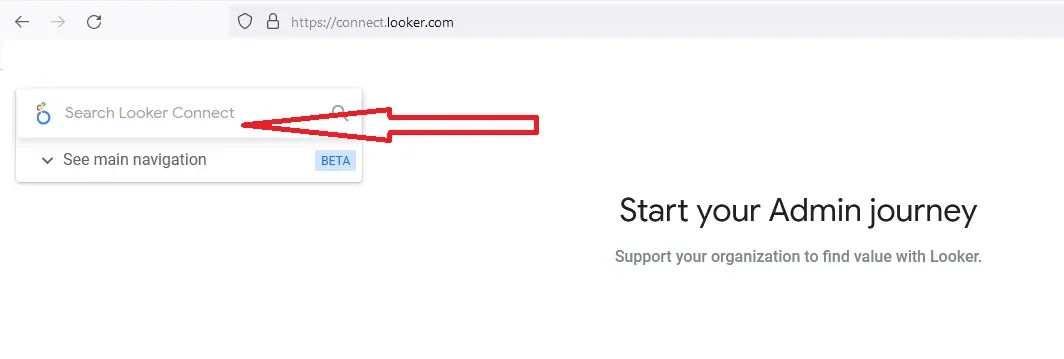
After initial payload probe in search form on connect.looker.com caught a request to an interesting host that I had not seen before:
The full write-up lives on its author's site
It belongs to its author, so we link to it rather than copy it. The other two tabs are our own rewrites, checked against it.
Context
This is a short write-up of a finding made in Google's vulnerability reward programme (g/vrp). The researcher's initial scope of interest was Google's acquisitions, specifically hosts under *.looker.com. The entry point was the search form on https://connect.looker.com, a Looker-related application. While probing that form with an initial payload, the researcher noticed a request going to a host that had not appeared during reconnaissance, and that request is where the story starts.
Setup
Reconnaissance was done with the following tools:
- Amass
- subfinder
- gau
- github-subdomains.py from https://github.com/gwen001/github-search
- httpx
For visualisation the researcher used Webscreenshot from https://github.com/maaaaz/webscreenshot.
No accounts, roles or versions are described beyond this. The only precondition stated is that the search form on connect.looker.com accepted input that triggered a request to the host described below.
Finding it
After an initial payload probe in the search form on connect.looker.com, a request was caught going to a host the researcher had not seen before. The captured request looked like this:
OPTIONS /proxy?key={key}&destination={destination} HTTP/2
Host: lms-api-cz6r7c0o.uc.gateway.dev
User-Agent: Mozilla/5.0 (Windows NT 10.0; Win64; x64; rv:98.0) Gecko/20100101 Firefox/98.0
Accept: */*
Metadata-Flavor: Google
Accept-Language: ru-RU,ru;q=0.8,en-US;q=0.5,en;q=0.3
Accept-Encoding: gzip, deflate
Access-Control-Request-Method: POST
Access-Control-Request-Headers: x-algolia-api-key,x-algolia-application-id
Referer: https://connect.looker.com/
Origin: https://connect.looker.com
Sec-Fetch-Dest: empty
Sec-Fetch-Mode: cors
Sec-Fetch-Site: cross-site
Te: trailers
The image shows the captured request to the previously unseen host.
Two things stood out. The host is under *.gateway.dev, which the researcher identified as Google Cloud API Gateway. And the path carries two parameters, key and destination, with destination being the obvious candidate for a server-side fetch target. The destination parameter turned out to be vulnerable to what the researcher calls the purest SSRF.
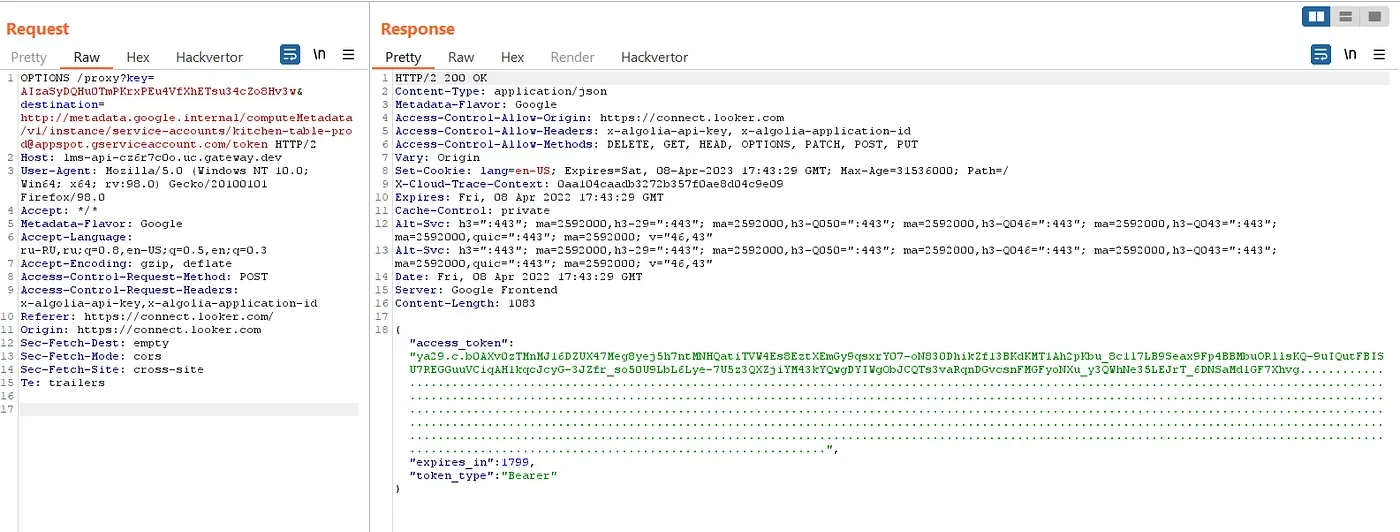
The image shows the SSRF confirmation against the destination parameter.
Exploitation
Step 1: confirm the SSRF and obtain an access token
With destination under attacker control, the proxy endpoint on lms-api-cz6r7c0o.uc.gateway.dev could be pointed at an arbitrary destination. The next question the researcher asked was what could be done with an access_token. For that, the write-up points to research by David Schütz (https://www.youtube.com/watch?v=UyemBjyQ4qA), which the researcher strongly recommends watching.
The embedded video is the David Schütz research referenced for the access token technique.
Step 2: enumerate buckets in the project
Using the token, the researcher went after application files stored somewhere in a bucket. The request used the Cloud Storage JSON API with alt=json and the project name kitchen-table-prod:
GET /storage/v1/b?alt=json&project=kitchen-table-prod HTTP/2
Host: storage.googleapis.com
User-Agent: Mozilla/5.0 (Windows NT 10.0; Win64; x64) AppleWebKit/537.36 (KHTML, like Gecko) Chrome/99.0.4844.74 Safari/537.36
Accept-Encoding: gzip, deflate
Accept: */*
Accept-Language: en
Authorization: Bearer OUR_ACCESS_TOKEN
Content-Length: 0
The Authorization: Bearer OUR_ACCESS_TOKEN header carries the access token used for the request. and project=kitchen-table-prod scopes the bucket listing to that project. The response came back as HTTP/2 200 OK with Content-Type: application/json; charset=UTF-8, a Content-Length of 6158 and Server: UploadServer. The body contained bucket metadata, including this entry:
{
 "kind": "storage#bucket",
 "selfLink": "https://www.googleapis.com/storage/v1/b/looker-lms-prod-tf-backend",
 "id": "looker-lms-prod-tf-backend",
 "name": "looker-lms-prod-tf-backend",
 "projectNumber": "1016965839768",
 "metageneration": "1",
 "location": "US",
 "storageClass": "STANDARD",
 "etag": "CAE=",
 "defaultEventBasedHold": false,
 "timeCreated": "2021-02-08T01:22:20.140Z",
 "updated": "2021-02-08T01:22:20.140Z",
 "iamConfiguration": {
 "bucketPolicyOnly": {
 "enabled": true,
 "lockedTime": "2021-05-09T01:22:20.140Z"
 },
 "uniformBucketLevelAccess": {
 "enabled": true,
 "lockedTime": "2021-05-09T01:22:20.140Z"
 },
 "publicAccessPrevention": "inherited"
 },
 "locationType": "multi-region",
 "satisfiesPZS": false,
 "rpo": "DEFAULT"
}
The response body contained bucket metadata, including an entry for looker-lms-prod-tf-backend. The researcher stops the technical description at this point: further detail is not interesting, and since this was previously unknown territory, permission was requested before going further. The stated principle was "primum non nocere".
Root cause
The write-up does not describe the server-side implementation. What it shows is a proxy endpoint on a Google Cloud API Gateway host whose destination parameter turned out to be vulnerable to what the researcher calls the purest SSRF. The key parameter is present in the request but its role is not explained. Why the gateway did not restrict destinations is not stated.
Impact
The write-up asks what could be done with an access token and points to David Schütz's research for the technique; it does not describe how the token was obtained. then use that token against the Cloud Storage API to list buckets in the kitchen-table-prod project. The listing returned bucket metadata, including a bucket named looker-lms-prod-tf-backend. The write-up does not enumerate what was stored in the buckets or what could be read from them; it says only that the next step was to get to application files stored somewhere in the bucket, and that further work was not interesting. The impact should therefore be read as: input to the search form led to a proxy that fetched arbitrary destinations, and a token was used to enumerate storage metadata in the project, with the extent of data access left unexplored by choice.
Fix
The report was accepted and triaged, and the researcher requested and received permission to publish the write-up. No remediation detail is given.
Variants to test
- Look for proxy-style endpoints on
*.gateway.devhosts with a parameter that names a destination, such asdestination,url,targetorhost. A positive result is a request to your own listener arriving from the gateway's infrastructure. - Probe search and other input forms on acquisition-related hosts and watch for requests to hosts that never appeared in subdomain enumeration. A positive result is a new host in the browser's network log after submitting a payload.
- When you find such a proxy, try pointing it at the cloud metadata service and see whether a token comes back. A positive result is a token you can then replay against the cloud provider's APIs.
- With a token in hand, try listing resources scoped to the project, for example the Cloud Storage JSON API with
alt=jsonand aprojectparameter. A positive result is a200 OKwith resource metadata in the body. - Check the bucket metadata you get back for names that hint at sensitive content, such as Terraform state backends, and note the IAM configuration fields. A positive result is a bucket whose name or configuration suggests it holds deployment secrets.

The image shows the payment notifications: first $500, then an additional $4,500.
Timeline
- Reported Mar 31, 2022
- Triaged Apr 1, 2022
- Nice catch! Apr 25, 2022
- 500$ Apr 26, 2022
- +4500$ May 17, 2022
- Get permission to publish writeup Sep 6, 2022
What happened, in plain words
A security researcher was looking for bugs in Google's bug bounty programme, a scheme where companies pay people for finding and reporting security problems in their systems. The researcher focused on websites that Google owns through companies it has bought, in this case everything under *.looker.com (Looker is a company Google acquired).
The researcher poked at the search box on https://connect.looker.com. When you type something into a search box, your browser sends it to a server, and the server does something with it. Here, the researcher noticed that the search box caused the browser to send a request to a different server, one that had not shown up during earlier scanning. That server was a Google Cloud API Gateway, a piece of infrastructure that sits in front of other services and forwards requests to them.
The request contained a parameter called destination. A parameter is a named value in a URL, like the q in ?q=hello. The request contained a parameter called destination, which turned out to be vulnerable to what the researcher calls the purest SSRF. The researcher found that the destination parameter was vulnerable to what the researcher calls the purest SSRF. This kind of flaw is called SSRF, Server-Side Request Forgery: the server is tricked into making a request on the attacker's behalf.
The write-up then asks what could be done with an access token and points to David Schütz's research for the technique; it does not describe how the token was obtained. With that token, the researcher listed storage buckets in a Google Cloud project called kitchen-table-prod. A bucket is a container for files in cloud storage. The response body contained bucket metadata, including an entry for a bucket named looker-lms-prod-tf-backend.
The researcher stopped there, asked permission before going further, and reported the issue. Google accepted it, paid $500 first, then an additional $4,500, for a total of $5,000.
The setup
Before finding anything, the researcher mapped out which hosts exist under *.looker.com. A host is a single machine or service name on the internet, like connect.looker.com. Finding hosts is called reconnaissance, or recon: it is like walking around a building and writing down every door before trying any of them.
The tools used for finding subdomains (names that sit under a main domain, such as connect under looker.com) were:
- Amass
- subfinder
- gau
- github-subdomains.py from https://github.com/gwen001/github-search
- httpx
These tools collect hostnames from public sources such as certificate records, search engines and code repositories. httpx then checks which of those hostnames actually respond.
To see what each host looked like, the researcher used Webscreenshot from https://github.com/maaaaz/webscreenshot, which opens each host in a browser and saves a picture of the page. That makes it easy to spot which hosts run a real application worth testing.
The entry point chosen was https://connect.looker.com. An entry point is simply the page where testing starts. The only precondition described is that the search form on that page accepted input which caused a request to the gateway host described below.
Finding it
After sending an initial payload into the search form on connect.looker.com, the researcher caught a request going to a host that had not appeared during recon. A payload here means the test input the researcher typed into the form. The captured request looked like this:
OPTIONS /proxy?key={key}&destination={destination} HTTP/2
Host: lms-api-cz6r7c0o.uc.gateway.dev
User-Agent: Mozilla/5.0 (Windows NT 10.0; Win64; x64; rv:98.0) Gecko/20100101 Firefox/98.0
Accept: */*
Metadata-Flavor: Google
Accept-Language: ru-RU,ru;q=0.8,en-US;q=0.5,en;q=0.3
Accept-Encoding: gzip, deflate
Access-Control-Request-Method: POST
Access-Control-Request-Headers: x-algolia-api-key,x-algolia-application-id
Referer: https://connect.looker.com/
Origin: https://connect.looker.com
Sec-Fetch-Dest: empty
Sec-Fetch-Mode: cors
Sec-Fetch-Site: cross-site
Te: trailers
The image shows the captured request to the previously unseen host.
Line by line, in plain words:
OPTIONS /proxy?key={key}&destination={destination} HTTP/2: the browser is asking the server what it is allowed to do with the/proxypath.OPTIONSis a question, not a fetch. The path carries two parameters,keyanddestination.HTTP/2is the version of the web protocol being used.Host: lms-api-cz6r7c0o.uc.gateway.dev: the address of the server being contacted. This is the host that had not been seen before.User-Agent: ...: tells the server which browser and operating system sent the request.Accept: */*: the browser will accept any kind of response.Metadata-Flavor: Google: a header that Google services use to mark requests to their metadata service.Accept-Language: ...: the languages the browser prefers.Accept-Encoding: gzip, deflate: the browser can accept compressed responses.Access-Control-Request-Method: POST: part of a CORS preflight, a browser check made before a cross-origin request. It says the real request would usePOST.Access-Control-Request-Headers: x-algolia-api-key,x-algolia-application-id: the extra headers the real request would carry. Algolia is a search service, so this hints that the page uses Algolia for search.Referer: https://connect.looker.com/: the page that caused this request.Origin: https://connect.looker.com: the site the request comes from, used in cross-origin checks.Sec-Fetch-*headers: the browser describing the context of the request.cross-sitemeans it goes to a different site than the page.Te: trailers: the browser can accept trailing headers after the body.
Two things stood out. The host is under *.gateway.dev, which the researcher identified as Google Cloud API Gateway. An API is a way for one program to talk to another, like a service counter where you hand over a request and get an answer; an API Gateway is the front desk that receives those requests and passes them on. And the path carries key and destination, with destination the obvious candidate for a server-side fetch target: a value that tells the server where to go next.
The destination parameter turned out to be vulnerable to what the researcher calls the purest SSRF. In plain terms: the gateway took whatever address was placed in destination and fetched it from the server side, without checking whether that address was allowed. That is like a hotel concierge who will fetch anything from any room you name, including rooms you are not staying in.
The image shows the SSRF confirmation against the destination parameter.
Exploitation
Step 1: confirm the SSRF and obtain an access token
With destination under the researcher's control, the proxy endpoint on lms-api-cz6r7c0o.uc.gateway.dev could be pointed at any address. The next question was what could be done with an access_token. An access token is a string that proves who you are to an API, like a wristband at an event: show it and the door opens without asking your name again.
For that technique the write-up points to research by David Schütz (https://www.youtube.com/watch?v=UyemBjyQ4qA), which the researcher strongly recommends watching.
The embedded video is the David Schütz research referenced for the access token technique.
Step 2: list buckets in the project
Using the token, the researcher went after application files stored somewhere in a bucket. The request used the Cloud Storage JSON API, a Google interface for managing storage, with alt=json (return the answer in JSON, a common text format for data) and the project name kitchen-table-prod:
GET /storage/v1/b?alt=json&project=kitchen-table-prod HTTP/2
Host: storage.googleapis.com
User-Agent: Mozilla/5.0 (Windows NT 10.0; Win64; x64) AppleWebKit/537.36 (KHTML, like Gecko) Chrome/99.0.4844.74 Safari/537.36
Accept-Encoding: gzip, deflate
Accept: */*
Accept-Language: en
Authorization: Bearer OUR_ACCESS_TOKEN
Content-Length: 0
Line by line:
GET /storage/v1/b?alt=json&project=kitchen-table-prod HTTP/2: aGETrequest, meaning "give me this". The path/storage/v1/bis the bucket listing endpoint.alt=jsonasks for JSON output.project=kitchen-table-prodlimits the listing to that project.Host: storage.googleapis.com: the Cloud Storage API server.User-Agent: ...: the browser identification string.Accept-Encoding,Accept,Accept-Language: what the client can accept and in which language.Authorization: Bearer OUR_ACCESS_TOKEN: the token obtained through the SSRF.Bearermeans "the holder of this token is authorised".Content-Length: 0: there is no request body.
The response came back as HTTP/2 200 OK, meaning success, with Content-Type: application/json; charset=UTF-8, a Content-Length of 6158 and Server: UploadServer. The body contained bucket metadata, including this entry:
{
 "kind": "storage#bucket",
 "selfLink": "https://www.googleapis.com/storage/v1/b/looker-lms-prod-tf-backend",
 "id": "looker-lms-prod-tf-backend",
 "name": "looker-lms-prod-tf-backend",
 "projectNumber": "1016965839768",
 "metageneration": "1",
 "location": "US",
 "storageClass": "STANDARD",
 "etag": "CAE=",
 "defaultEventBasedHold": false,
 "timeCreated": "2021-02-08T01:22:20.140Z",
 "updated": "2021-02-08T01:22:20.140Z",
 "iamConfiguration": {
 "bucketPolicyOnly": {
 "enabled": true,
 "lockedTime": "2021-05-09T01:22:20.140Z"
 },
 "uniformBucketLevelAccess": {
 "enabled": true,
 "lockedTime": "2021-05-09T01:22:20.140Z"
 },
 "publicAccessPrevention": "inherited"
 },
 "locationType": "multi-region",
 "satisfiesPZS": false,
 "rpo": "DEFAULT"
}
What the fields mean:
kindandidandname: what type of object this is and its identifier. The namelooker-lms-prod-tf-backendsuggests a production backend for Terraform state, where Terraform keeps its record of deployed infrastructure.selfLink: the API address for this bucket.projectNumber: the numeric identifier of the Google Cloud project that owns the bucket.metageneration: a version counter for the bucket's metadata.locationandlocationType: where the data is stored, here the US, across multiple regions.storageClass: the storage tier, hereSTANDARD.etag: a short value used to detect changes.timeCreatedandupdated: when the bucket was created and last changed.iamConfiguration: access control settings.bucketPolicyOnlyanduniformBucketLevelAccessboth enabled means permissions are managed at the bucket level rather than per file.publicAccessPrevention: inheritedmeans public access is blocked according to the project setting.lockedTimeis when those settings became locked.satisfiesPZS: whether the bucket meets a certain data residency requirement.rpo: the recovery point objective, how much data loss is tolerated in a disaster.
The listing exposed bucket names and configuration. The researcher stops the description here: further detail is not interesting, and because this was previously unknown territory, permission was requested before going further. The stated principle was "primum non nocere", Latin for "first, do no harm".
Why it worked
The write-up does not describe how the server was built. What it shows is a proxy endpoint on a Google Cloud API Gateway host that takes a destination parameter and fetches it server-side without restricting where it may point. That is what made it vulnerable to the purest SSRF. The key parameter is present in the request but its role is not explained, and why the gateway did not restrict destinations is not stated.
What the impact was
The listing returned bucket metadata, including a bucket named looker-lms-prod-tf-backend. So the impact is: input to the search form led to a proxy that fetched arbitrary destinations, and a token was used to list storage metadata in the project, with the extent of data access left unexplored by choice.
How it was fixed
The report was accepted and triaged, and the researcher requested and received permission to publish the write-up. No remediation detail is given.
Things worth trying elsewhere
- Look for proxy-style endpoints on
*.gateway.devhosts with a parameter that names a destination, such asdestination,url,targetorhost. A positive result is a request to your own listener arriving from the gateway's infrastructure. - Probe search and other input forms on acquisition-related hosts and watch for requests to hosts that never appeared in subdomain enumeration. A positive result is a new host in the browser's network log after submitting a payload.
- When you find such a proxy, try pointing it at the cloud metadata service and see whether a token comes back. A positive result is a token you can then replay against the cloud provider's APIs.
- With a token in hand, try listing resources scoped to the project, for example the Cloud Storage JSON API with
alt=jsonand aprojectparameter. A positive result is a200 OKwith resource metadata in the body. - Check the bucket metadata you get back for names that hint at sensitive content, such as Terraform state backends, and note the IAM configuration fields. A positive result is a bucket whose name or configuration suggests it holds deployment secrets.
The image shows the payment notifications: first $500, then an additional $4,500.
Timeline
- Reported Mar 31, 2022
- Triaged Apr 1, 2022
- Nice catch! Apr 25, 2022
- 500$ Apr 26, 2022
- +4500$ May 17, 2022
- Get permission to publish writeup Sep 6, 2022
Glossary
- Bug bounty programme: a scheme where a company pays people for reporting security problems in its systems.
- g/vrp: Google's Vulnerability Reward Program, the name of Google's bug bounty scheme.
- Reconnaissance (recon): the information-gathering phase before testing, such as finding hostnames.
- Subdomain: a name that sits under a main domain, like
connectunderlooker.com. - Host: a single machine or service name on the internet.
- Amass, subfinder, gau, httpx: tools that collect and check hostnames from public sources.
- Webscreenshot: a tool that opens each host in a browser and saves a picture of the page.
- Entry point: the page or feature where testing starts.
- Payload: the test input sent to an application to see how it reacts.
- Parameter: a named value in a URL, like
qin?q=hello. - API: a way for one program to talk to another, like a service counter where you hand over a request and get an answer.
- API Gateway: the front desk that receives API requests and passes them on to the right service.
- Header: an extra piece of information sent with a web request, such as the browser name or an authorisation token.
- CORS preflight: a browser check made before a cross-origin request, using the
OPTIONSmethod. - SSRF (Server-Side Request Forgery): a flaw where the server is tricked into making a request on the attacker's behalf, often to internal addresses.
- Metadata service: a special internal address in cloud environments that hands out credentials to whatever is running on the machine.
- Access token: a string that proves identity to an API, like a wristband at an event.
- Bearer token: a token where the holder is authorised simply by presenting it.
- Bucket: a container for files in cloud storage.
- Cloud Storage JSON API: Google's interface for managing storage, returning answers in JSON.
- JSON: a common text format for structured data.
- Project: a container in Google Cloud that groups resources and permissions.
- Terraform state: files that record what infrastructure Terraform has deployed, which can contain secrets.
- IAM: Identity and Access Management, the system that controls who can do what with cloud resources.
- Triaged: reviewed and confirmed as a valid issue by the programme.
- primum non nocere: Latin for "first, do no harm", a principle of not causing damage while testing.



