SSRF That Allowed Us to Access Whole Infra Web Services and Many More
A server-side request forgery flaw in an API endpoint let the researchers make the server fetch arbitrary URLs, including the AWS metadata service. By encoding the metadata IP address in decimal they bypassed a Cloudflare WAF and obtained IAM credentials, then used them to enumerate EC2 instances and reach over 200 internal web services.
 Published on basu-banakar.medium.com
Hi this is Basavaraj back again with another writeup on SSRF.
The full write-up lives on its author's site
It belongs to its author, so we link to it rather than copy it. The other two tabs are our own rewrites, checked against it.
Context
This write-up covers a server-side request forgery (SSRF) bug found in a private program. The application is one that, according to the authors, most people in India have used and that has a 50M user base. The target is referred to only as redacted.com. The authors are Basavaraj Banakar and Lohith Gowda M, and the report was published on 12 February 2023.
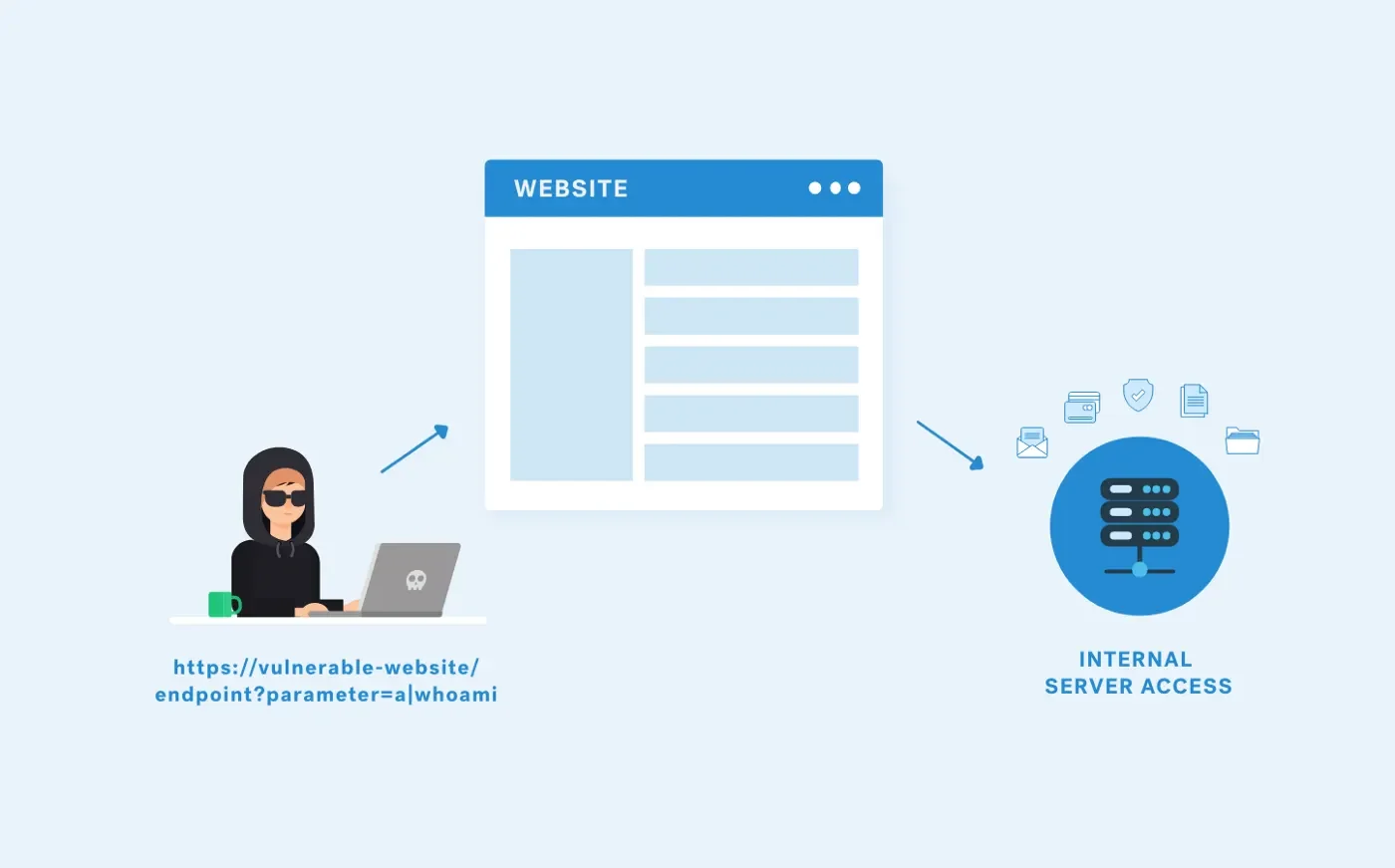
SSRF, as the authors define it, is a vulnerability that lets an attacker send unauthorised requests from a vulnerable server to other internal systems, potentially exposing sensitive information or executing malicious actions. The vulnerable feature here is an API endpoint that accepts a URL in a request body parameter and fetches it server-side. While browsing the application as a normal user, the authors noticed that one of the POST requests was being made to an endpoint of the form /api/v1/json, with a request body parameter named path whose value was a JSON URL.
Setup
No accounts, roles or tool versions are described beyond browsing the application as a normal user. The tools used were Burp Suite (Intruder, plus a Burp Collaborator listener), the AWS CLI, and a bash script written by the authors. The precondition for the attack is that the endpoint accepts an attacker-controlled URL in the path parameter and fetches it from the server.
Finding it
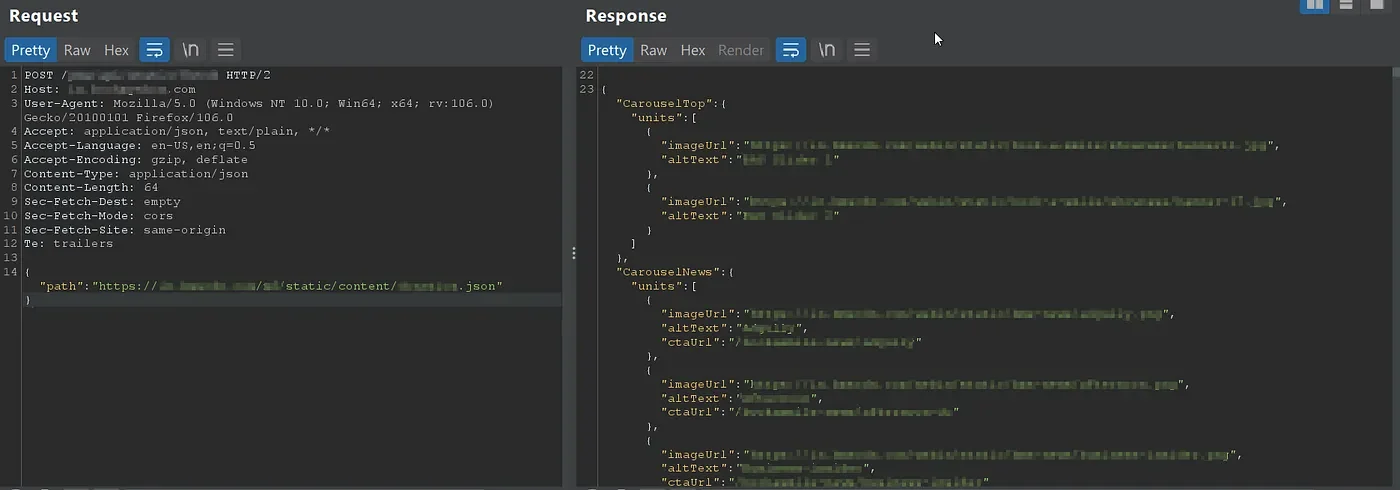
The initial request observed in Burp showed the POST to /api/v1/json with the path body parameter carrying a JSON URL as its value.
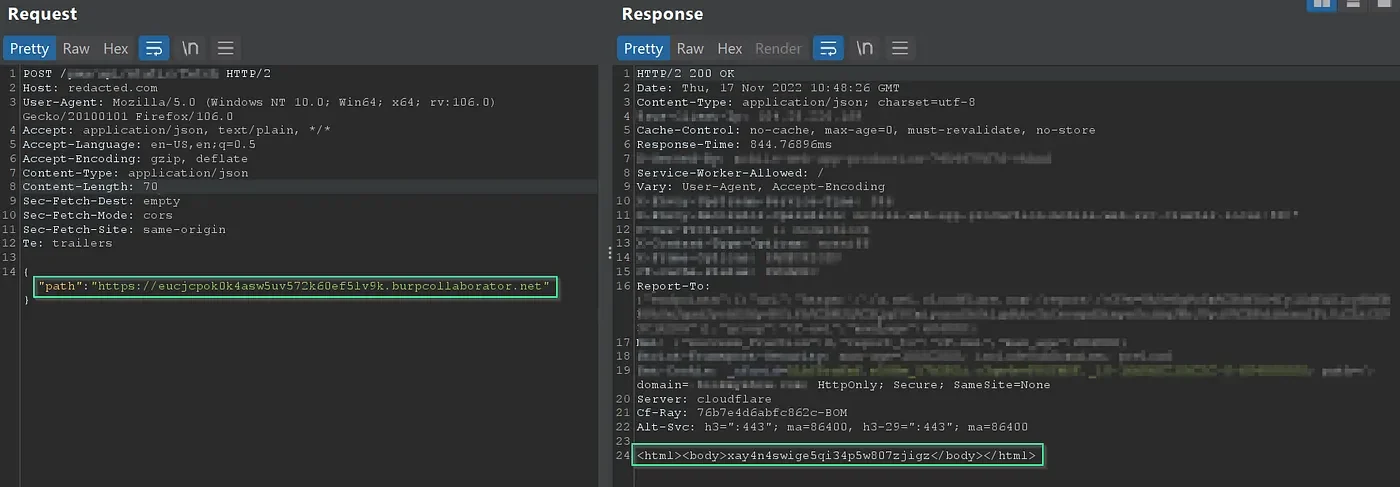
To test whether the server would fetch an arbitrary URL, the authors removed the whole path value and replaced it with their Burp Collaborator URL. They received a callback on the Collaborator listener, which confirmed a full read SSRF.
Exploitation
Step 1: Confirm the SSRF with a Collaborator callback
The path parameter value was replaced with the Collaborator URL. The callback on the listener proved that the server made the request on the attacker's behalf; the authors call this a full read SSRF.
Step 2: Reach the AWS metadata service and hit the WAF
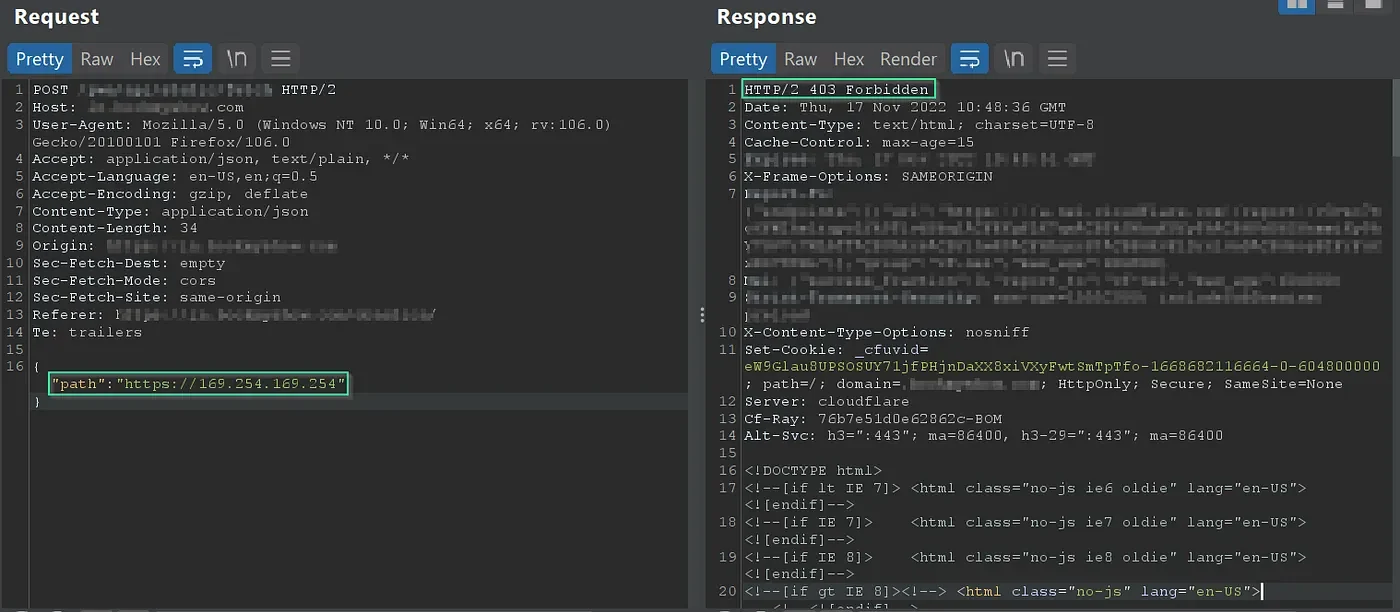
The authors determined that the web server was running on AWS. They replaced the value with the AWS metadata address [redacted] and received a 403 response. The response came from Cloudflare's WAF rather than from the server side, which gave them confidence that a bypass was possible.
Step 3: Bypass the WAF with decimal encoding
They explored several bypass techniques and many of them worked. The one they chose was converting [redacted] to its decimal value, giving the final URL:
http://2852039166
Using this URL, they successfully bypassed the WAF.
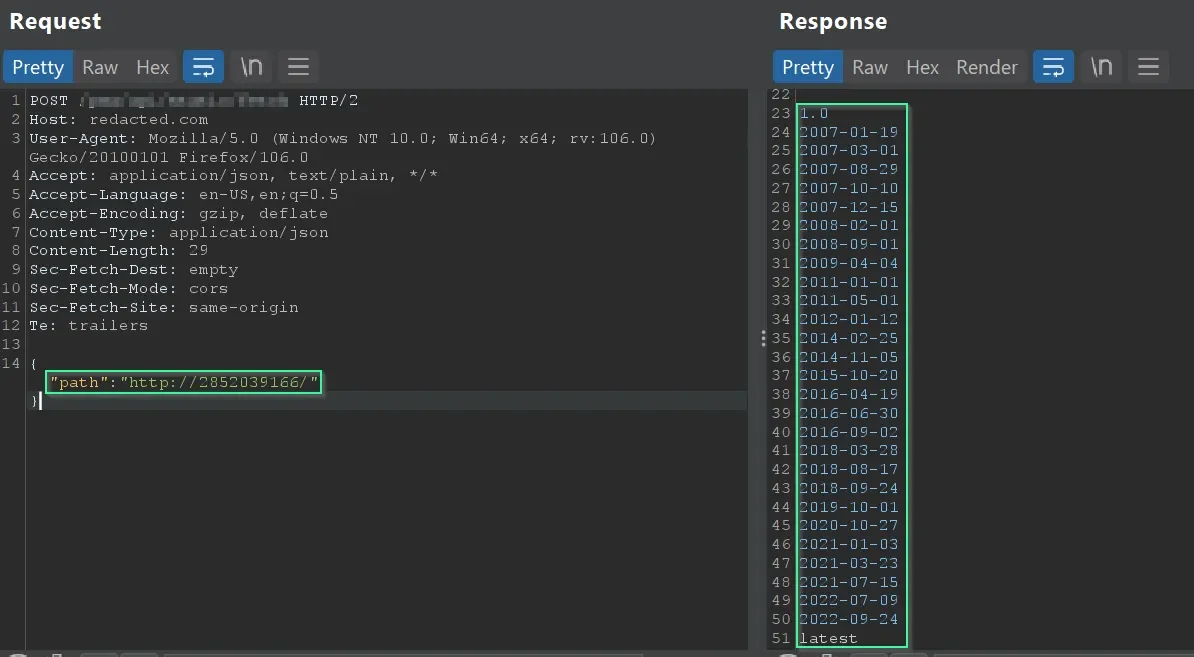
Step 4: Read instance user data
With the WAF bypassed, they accessed user data by hitting the metadata path:
/latest/user-data
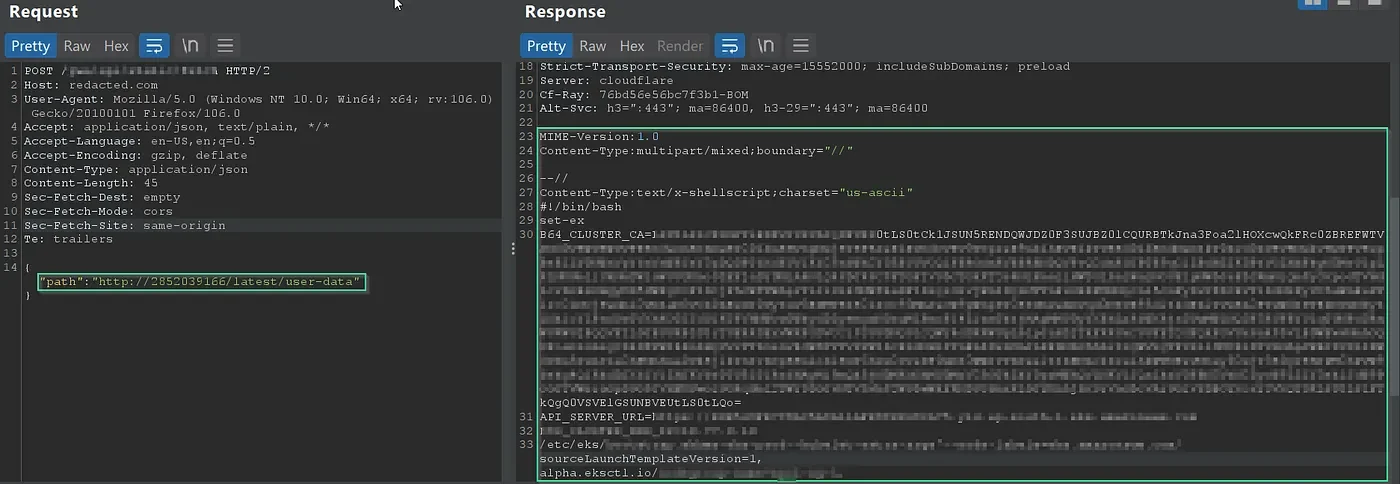
Step 5: Read IAM credentials
They then accessed the IAM credentials by appending metadata paths to the metadata address.
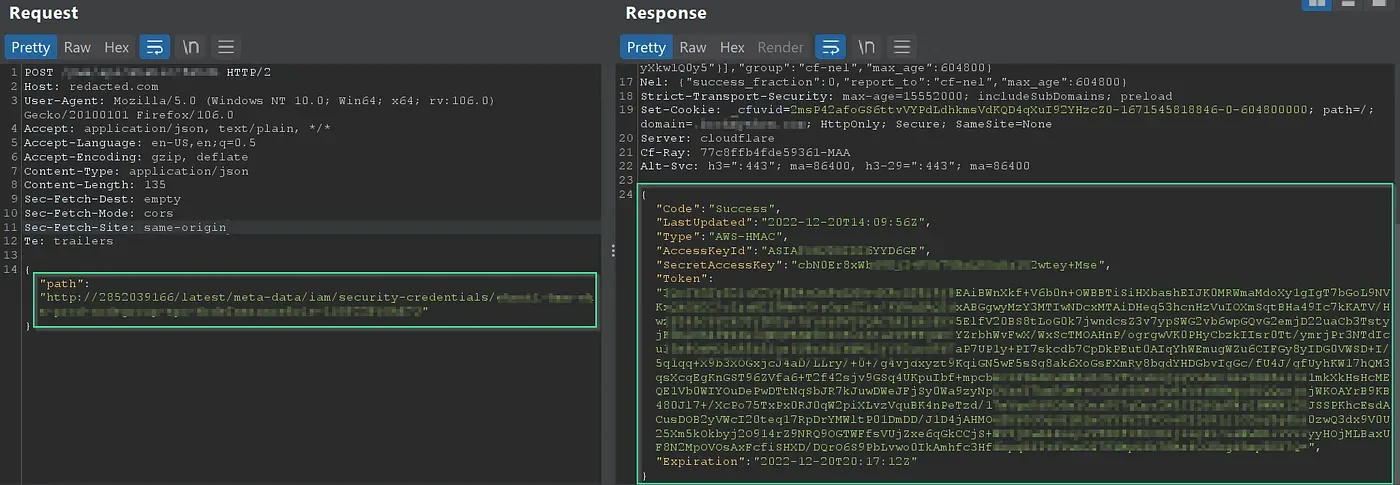
Step 6: Enumerate EC2 instances with the AWS CLI
The IAM credentials were imported into the AWS CLI and the following command was executed:
aws ec2 describe-instances
The authors explain that this command sends a request to the AWS EC2 service to retrieve information about the instances, including details such as the instance ID, state, public IP address, instance type and more. The output was saved to out.txt.
Step 7: Extract and deduplicate IPv4 addresses
They wrote a bash script that takes out.txt, extracts the IPv4 addresses from it, removes duplicate IPv4s and displays the output.
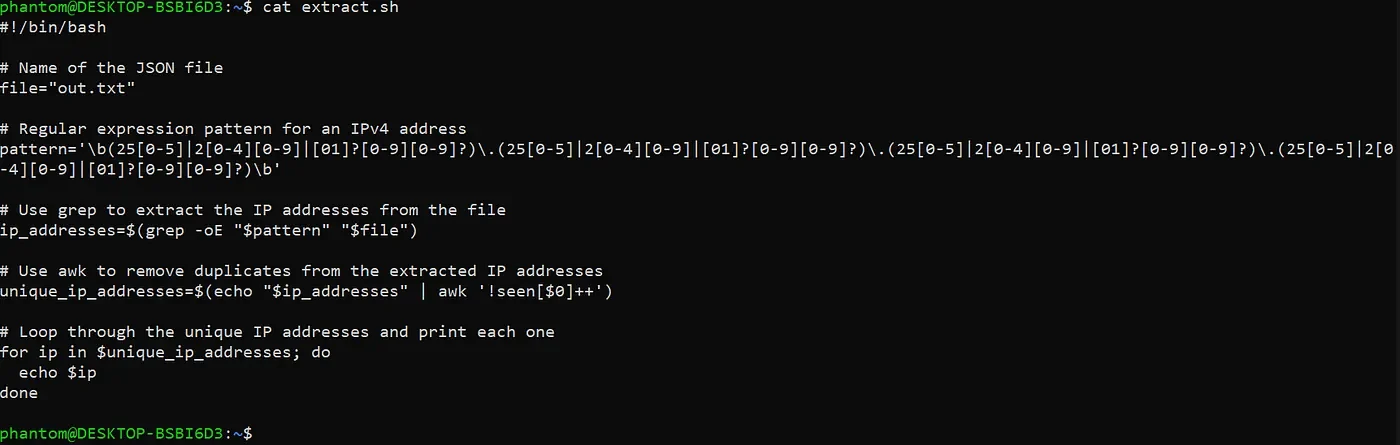
Running the script produced a count of the extracted IPs.

The total was 3774 internal and public facing IPv4 addresses.
Step 8: Brute force the IPs through the vulnerable endpoint
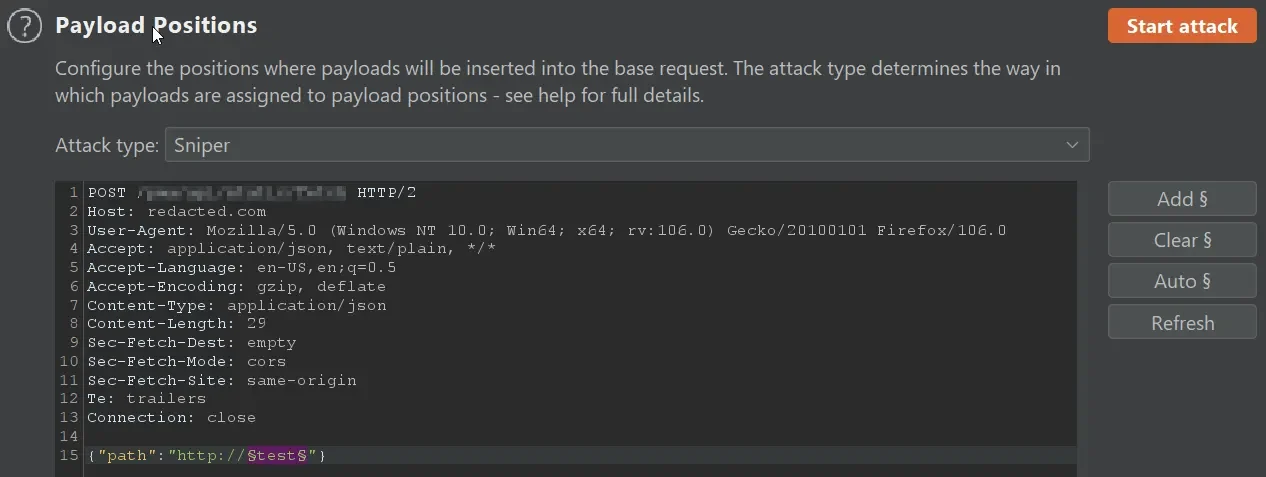
They used Burp Intruder to brute force all of the internal IPs through the vulnerable endpoint and host, with the payload position set in the request.
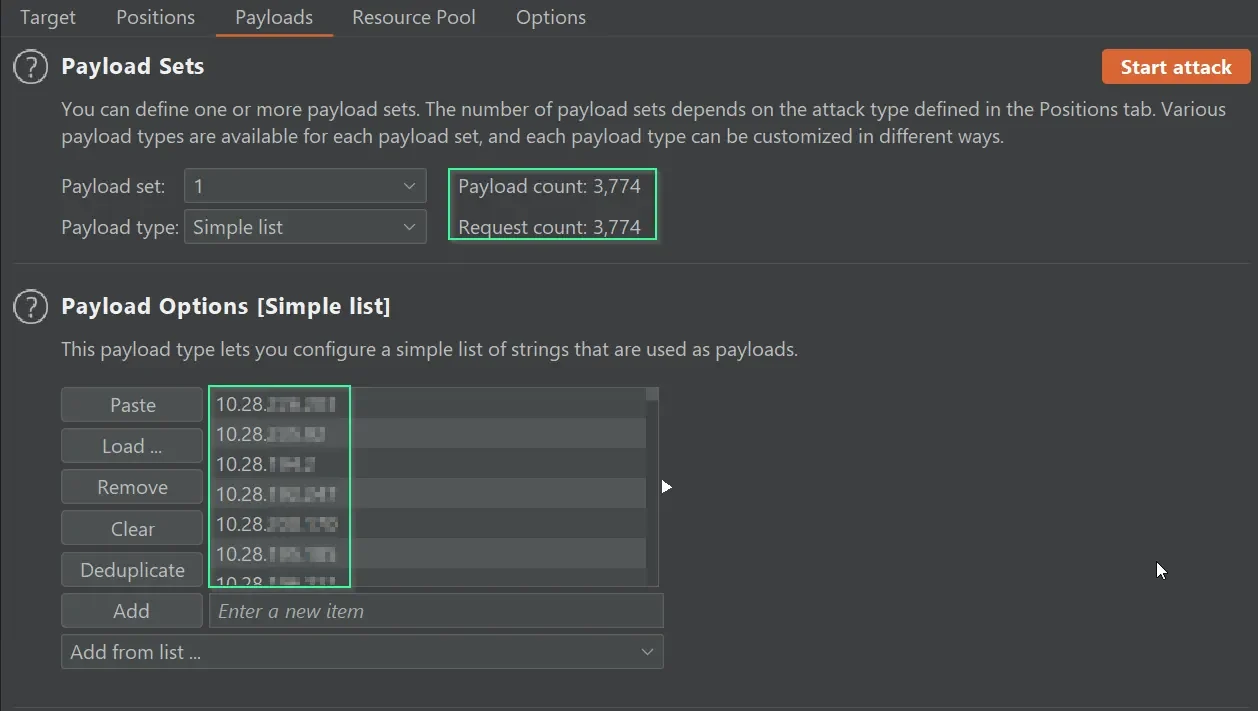
They pasted the list of 3774 IPs as payloads and started the attack.
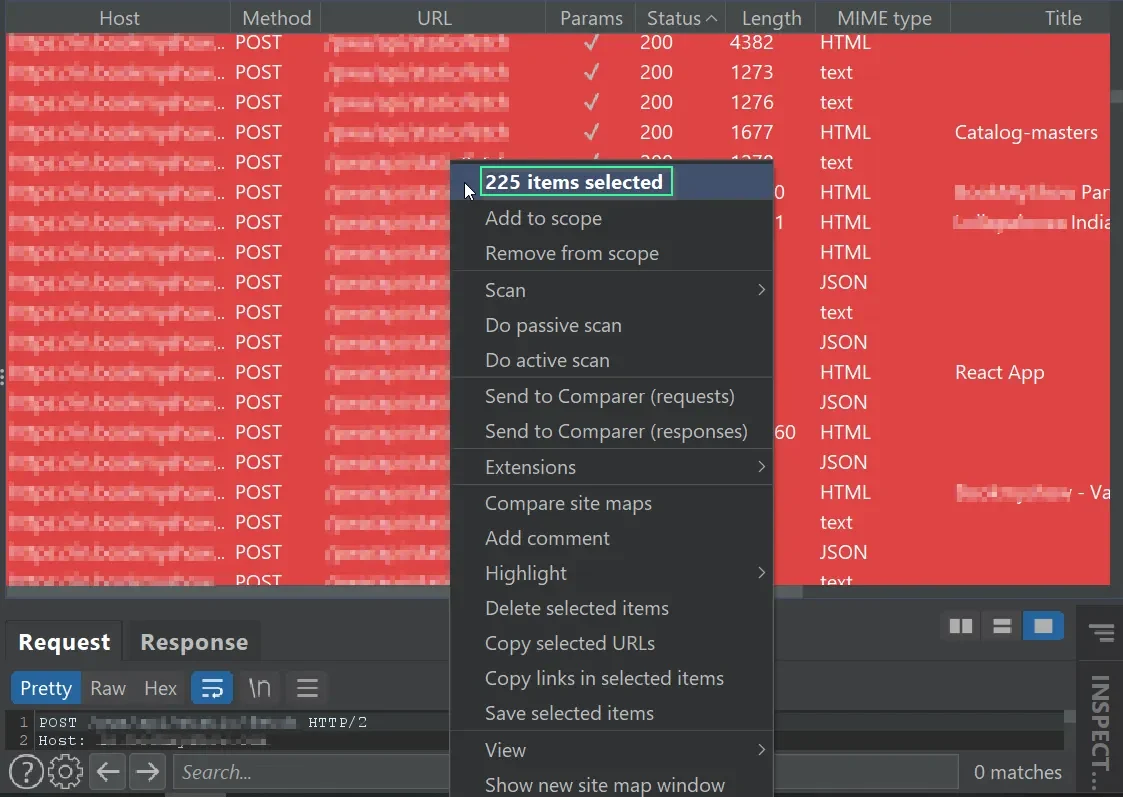
By brute forcing the IPs they gained access to 200+ internal web services.
Step 9: What the internal services exposed
The authors note that they could have taken over the whole company by brute forcing the internal IPs with ports, which they calculate as 225 internal hosts multiplied by 65535 ports, equal to 14745375 requests, but they did not perform that. They provide sample screenshots of what they did access.
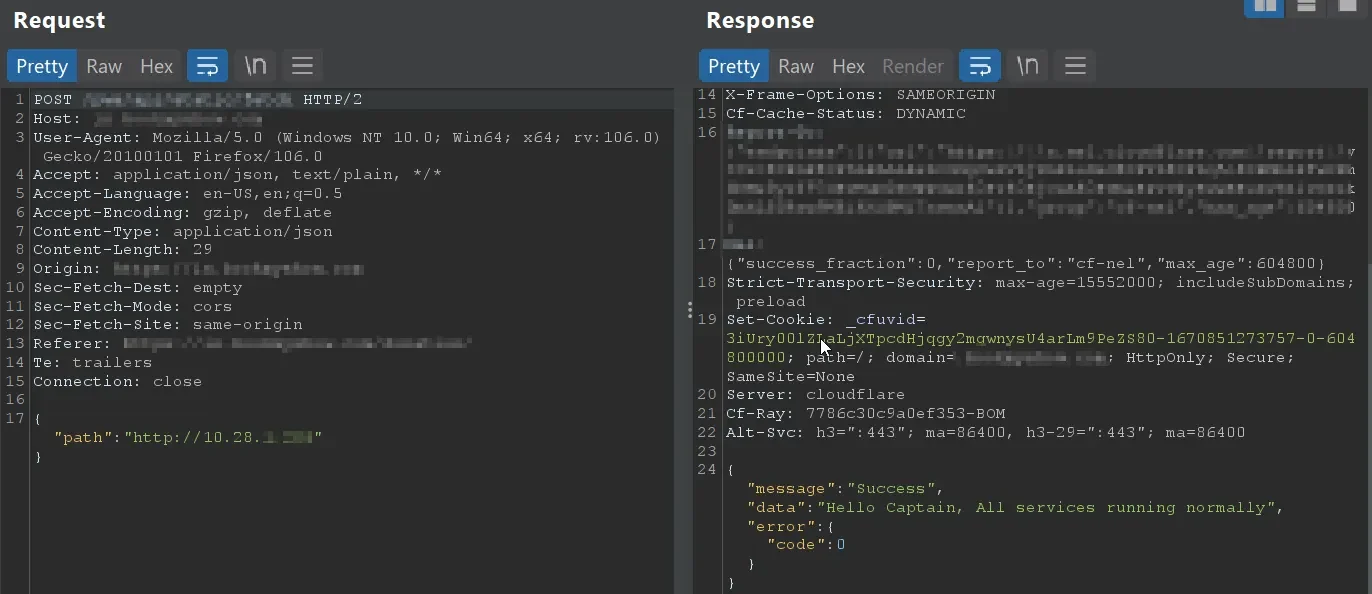
Some employee PII appeared in internal host HTML responses, including name, phone, email and auth tokens.
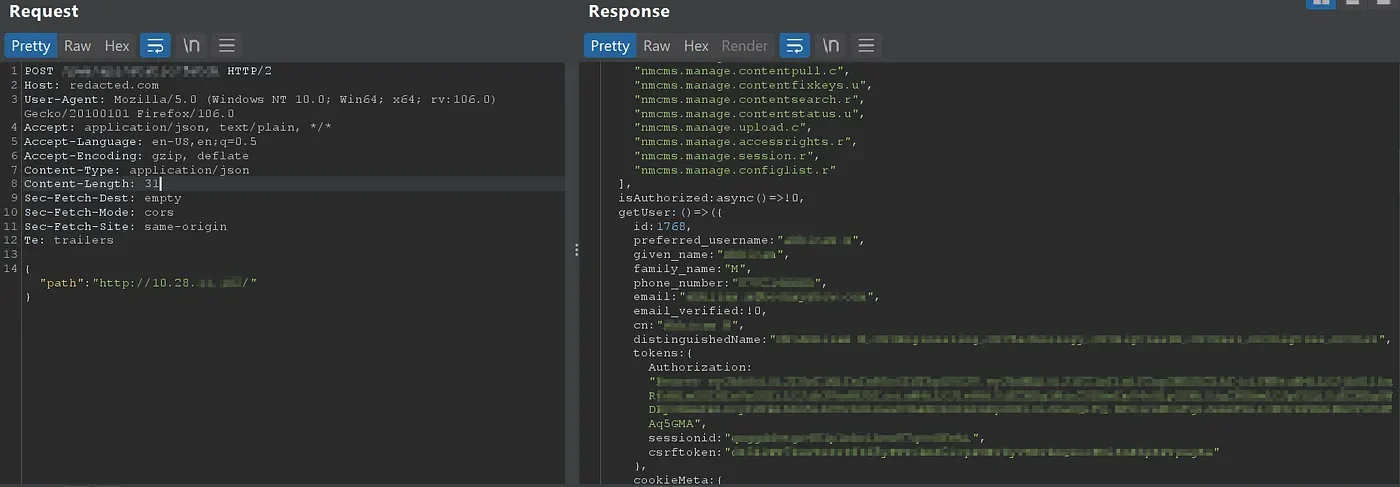
They also reached internal login panels and dashboards.
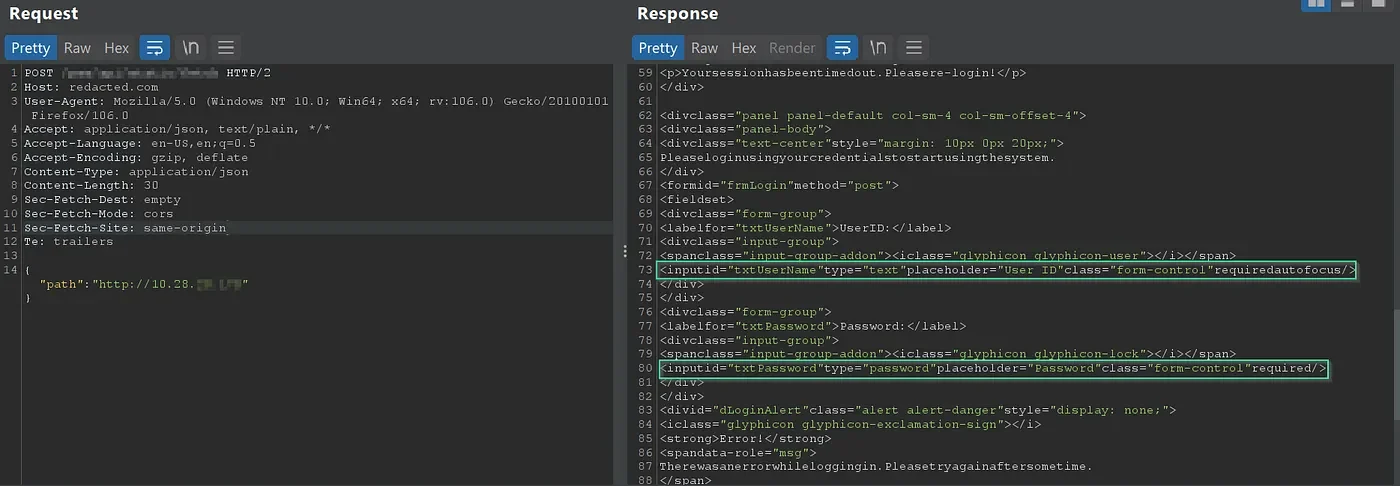
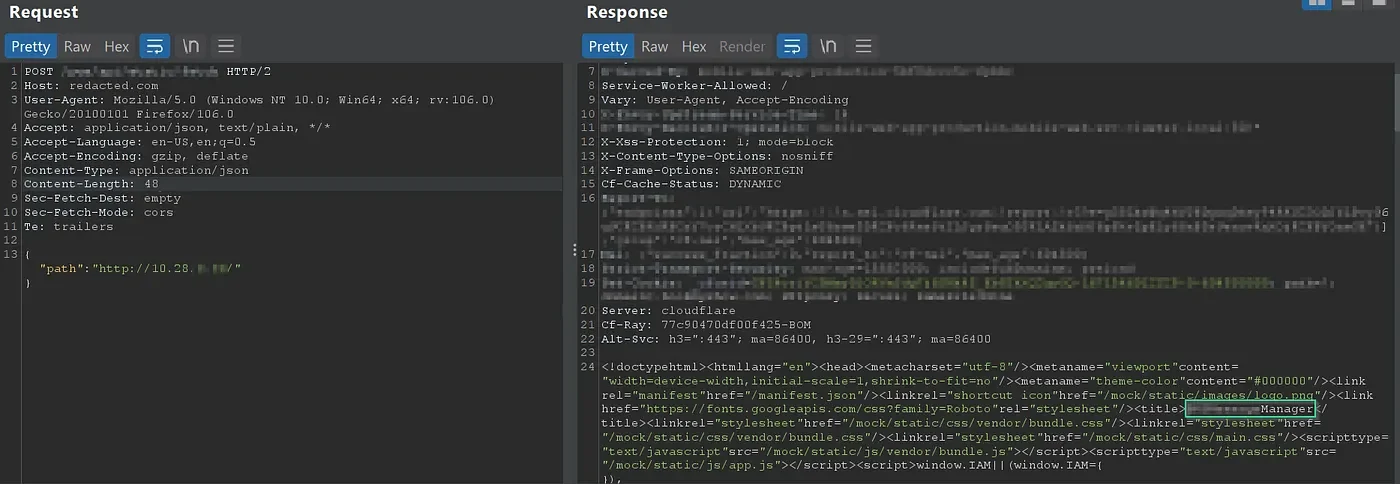
Root cause
The endpoint at /api/v1/json takes a user-supplied URL in the path body parameter and fetches it server-side without restricting where the request can go. Because the server sits inside the AWS network, the attacker can point it at the instance metadata service and at internal hosts. The Cloudflare WAF blocked the literal [redacted], but the decimal form http://2852039166 reached the metadata service. The report does not describe any application-level allowlist or egress filtering.
Impact
An attacker who can reach the endpoint can read the instance's user data and IAM credentials, then use those credentials with the AWS CLI to enumerate EC2 instances and obtain their IP addresses. Using the same SSRF, the attacker can reach internal web services: the authors accessed 200+ of them, including employee PII (names, phone numbers, emails and auth tokens), internal login panels and dashboards. The authors state that a full port sweep of the 225 internal hosts could have led to taking over the whole company, but they did not perform it. The bounty was still pending and under discussion at the time of writing.
Fix
The report does not say what was changed. Relying on a WAF alone is insufficient, as the decimal encoding bypass shows.
Variants to test
- Replace a URL parameter with a Collaborator URL and watch for a callback. A callback confirms the server fetches attacker-controlled URLs.
- Point the parameter at
[redacted]and at alternative encodings of the same address, such as the decimal formhttp://2852039166. A response containing metadata rather than a WAF block indicates a bypass. - Request
/latest/user-dataand metadata paths for IAM credentials through the SSRF. Returned credentials confirm access to the instance role. - Use any credentials obtained with
aws ec2 describe-instancesand inspect the output for internal IP addresses. A populated instance list confirms the credentials are live. - Feed the extracted IPs into Intruder against the vulnerable endpoint. Responses from hosts that should not be reachable externally confirm internal access.
What happened, in plain words
Two security researchers, Basavaraj Banakar and Lohith Gowda M, found a bug in a private bug bounty program. The application is one that, according to the authors, most people in India have used and that has a 50M user base. They call the target redacted.com throughout. The report was published on 12 February 2023.
The bug is called SSRF, short for Server-Side Request Forgery. In everyday terms: imagine a hotel receptionist who will fetch anything you ask for from anywhere in the building. You are a guest, you are only supposed to ask for things in your own room, but the receptionist does not check. So you ask them to go into the manager's office and read out the safe combination. The receptionist has keys you do not have, and they use those keys on your behalf. That is SSRF: a server makes a request for you, using its own network position, to somewhere you could never reach yourself.
In this case the application had a feature that took a web address (a URL) from the user and fetched it from the server. The researchers pointed that feature at their own server first, to prove the server really was fetching whatever they asked. Then they pointed it at a special internal address that only machines inside Amazon's cloud can reach, and from there they read the server's credentials. With those credentials they listed the company's cloud machines, collected thousands of internal IP addresses, and used the same vulnerable feature to knock on all of them. They reached more than 200 internal web services, including pages with employee personal data and internal login panels.
Below is the same story, step by step, with every concept explained from scratch.
The concepts you need first
Before the steps, here are the ideas the rest of the article relies on. Each one is explained as if you have never met it.
What a server and a client are
When you open a website, your computer (the client) asks another computer somewhere (the server) for a page, and the server sends it back. Your browser is the client. The server is the machine that holds the website's code and data.
What a request is
A request is the message your browser sends to a server. It says what you want: "give me the page at this address", or "here is a form I filled in, please process it". The server replies with a response: the page, or a status code, or an error.
What an API is
An API (Application Programming Interface) is a way for one piece of software to talk to another, without a human clicking anything. A useful comparison: a restaurant menu. You do not walk into the kitchen; you pick an item from the menu and the kitchen prepares it. An API is the menu of things a server will do for you. Websites often use APIs behind the scenes: your browser sends a request to an API address, and the API returns data (often in a format called JSON) rather than a full web page.
What JSON is
JSON is a simple text format for structured data. It looks like {"name": "value"}. It is just a way of writing down labelled pieces of information so a program can read them easily.
What a POST request is
HTTP (the language browsers and servers speak) has several methods. GET means "give me something". POST means "here is some data, please do something with it". A POST request usually carries a body: the data being sent.
What a parameter is
A parameter is a named slot in a request. In a POST body, a parameter looks like name=value. The name is the label, the value is the content. In this story the parameter is called path, and its value is a URL.
What a URL is
A URL is a web address, like https://example.com/page. It has a scheme (https), a host (example.com) and a path (/page).
What SSRF is
SSRF stands for Server-Side Request Forgery. As the authors put it, it is a vulnerability that allows an attacker to send unauthorised requests from a vulnerable server to other internal systems, potentially exposing sensitive information or executing malicious actions. The key word is server-side: the request is made by the server, not by you. The server is inside the company's network, so it can reach things you cannot.
What Burp Suite is
Burp Suite is a tool that sits between your browser and the server. It lets you watch every request and response, and change requests before they are sent. Two parts matter here:
- Repeater: lets you take one request and send it again and again with edits, seeing each response.
- Intruder: lets you take one request, mark a spot in it, and send it many times with a different value in that spot each time (a list of values you supply). This is called brute forcing or fuzzing.
What Burp Collaborator is
Burp Collaborator gives you a unique web address that is controlled by Burp. If anything on the internet contacts that address, Burp records it. It is like leaving a trap: if the server fetches your Collaborator URL, you get a callback, which proves the server made the request. This is the standard way to confirm SSRF.
What a WAF is
A WAF (Web Application Firewall) is a filter that sits in front of a website and blocks requests that look malicious. Cloudflare is a well-known provider of one. A WAF can block a request before it ever reaches the real server.
What the AWS metadata service is
Amazon Web Services (AWS) is a cloud provider: companies rent computers (called instances) from Amazon instead of buying their own. Every AWS instance has a special internal address, [redacted], that only the instance itself can reach. Asking that address returns information about the instance, including temporary credentials. This is called the instance metadata service. It exists so the instance can learn about itself, but if an attacker can make the server fetch that address, the attacker gets the same information.
What IAM credentials are
IAM (Identity and Access Management) is AWS's system for permissions. An IAM credential is a key that proves who you are to AWS and says what you are allowed to do. If you steal one, you can act as that identity.
What the AWS CLI is
The AWS CLI (Command Line Interface) is a program you run in a terminal to talk to AWS. You give it your credentials, then type commands like aws ec2 describe-instances to ask AWS questions.
What an IP address is
An IP address is the numeric address of a computer on a network, like [redacted]. Every machine that talks on a network has one. Internal IP addresses are only reachable from inside the company's network.
What a port is
A single computer can run many services at once. A port is a numbered door on that computer; each service listens on its own port. Port 80 is usually a web server, port 443 is encrypted web traffic, and so on. There are 65535 possible ports.
What brute forcing is
Brute forcing means trying many possibilities automatically instead of guessing cleverly. Here it means sending the same request thousands of times, each time with a different IP address in it, to see which ones respond.
The setup
The authors do not describe any accounts, roles or tool versions beyond browsing the application as a normal user. The tools they used were Burp Suite (Intruder, plus a Collaborator listener), the AWS CLI, and a bash script they wrote themselves. The one precondition for the attack is that the endpoint accepts a URL supplied by the attacker in the path parameter and fetches it from the server.
Finding it
While browsing the whole application as a normal user, the authors noticed that one of the POST requests was being made to an endpoint of the form /api/v1/json, with a request body parameter named path whose value was a JSON URL.
Why does this matter? Because the value of path is a URL, and the server is going to fetch it. If the server fetches whatever URL it is given, without checking where that URL points, then the person sending the request controls where the server goes. That is the shape of an SSRF bug.
Initial Request
The screenshot shows the request as it appeared in Burp: a POST to /api/v1/json with the path body parameter carrying a JSON URL as its value.
Exploitation
Step 1: Confirm the SSRF with a Collaborator callback
To test whether the server would fetch an arbitrary URL, the authors removed the whole path value and replaced it with their Burp Collaborator URL. They received a callback on the Collaborator listener.
Why this step? Because noticing that a parameter holds a URL is only a suspicion. The callback turns the suspicion into proof: the server really did make a request to an address the attacker chose. The authors call this a full read SSRF, meaning not only does the server make the request, but the attacker can also read the response that comes back.
Full read SSRF is present (but want to confirm by exploiting)
The screenshot is captioned as the full read SSRF being present.
Step 2: Reach the AWS metadata service and hit the WAF
The authors determined that the web server was running on AWS. They replaced the value with the AWS metadata address [redacted] and received a 403 response.
A 403 means "forbidden": the request was understood but refused. The important detail is where the refusal came from. The response came from Cloudflare's WAF rather than from the server side. That distinction gave the authors confidence that a bypass was possible: the server itself had not said no, a filter in front of it had. Filters can often be fooled; the server's own logic is a different matter.
403 from Cloudflare
The screenshot shows the 403 response, which the authors identify as coming from the Cloudflare WAF.
Step 3: Bypass the WAF with decimal encoding
They explored several bypass techniques and many of them worked. The one they chose was converting [redacted] to its decimal value, giving the final URL:
http://2852039166
Using this URL, they successfully bypassed the WAF.
Why does this work? An IP address is normally written as four numbers separated by dots, each between 0 and 255. But a computer can also accept the same address written as one single large number. Both forms mean the same machine. The WAF was checking for the dotted form, so it blocked [redacted]. It did not recognise the single-number form, so http://2852039166 passed through and reached the metadata service. This is a general lesson: a filter that matches one spelling of a value can be defeated by another spelling of the same value.
WAF bypass via decimal encoding
The screenshot is captioned as the WAF bypass via decimal encoding.
Step 4: Read instance user data
With the WAF bypassed, they accessed user data by hitting the metadata path:
/latest/user-data
What is user data? When a company starts an AWS instance, it can give it a startup script or configuration text. That text is stored by the metadata service and can be read at /latest/user-data. It often contains setup details that were never meant to be public. The authors requested that path through the SSRF and read the response.
accessed user-data
The screenshot is captioned as the accessed user data.
Step 5: Read IAM credentials
They then accessed the IAM credentials by appending metadata paths to the metadata address.
The metadata service exposes several paths, and one of them returns temporary credentials for the instance's IAM role. Because the SSRF let them read any path on that address, they could read the credentials too. This is the moment the bug stops being "the server can be made to fetch a page" and becomes "the attacker now holds the keys to the company's cloud account".
IAM Credentials
The screenshot is captioned as the IAM credentials.
Step 6: Enumerate EC2 instances with the AWS CLI
The IAM credentials were imported into the AWS CLI and the following command was executed:
aws ec2 describe-instances
Line by line: aws is the AWS CLI program. ec2 is the AWS service for virtual machines. describe-instances is the command that asks AWS to list the machines and describe them.
The authors explain that this command sends a request to the AWS EC2 service to retrieve information about the instances, including details such as the instance ID, state, public IP address, instance type and more. The output was saved to out.txt.
Why this step? Because credentials are only useful if they actually work. Running a harmless read command proves the credentials are live and tells the authors how much of the company's cloud they can see. Saving the output to a file sets up the next step.
Step 7: Extract and deduplicate IPv4 addresses
They wrote a bash script that takes out.txt, extracts the IPv4 addresses from it, removes duplicate IPv4s and displays the output.
Why a script? The output of describe-instances is long and repetitive. The same address can appear many times. A script does the boring work: pull out every address, drop the repeats, and print a clean list. That clean list is what they will attack with next.
extracting IPs and remove duplicate IPs (i.e. repeated)
The screenshot is captioned as extracting IPs and removing duplicate IPs.
Running the script produced a count of the extracted IPs.
Totally 3774 internal+public facing IPv4's
The screenshot shows the count: 3774 internal and public facing IPv4 addresses.
Step 8: Brute force the IPs through the vulnerable endpoint
They used Burp Intruder to brute force all of the internal IPs through the vulnerable endpoint and host, with the payload position set in the request.
What is a payload position? In Intruder you mark the part of the request that should change each time. Here, the marked spot is the path value, which will be replaced by each IP address in turn. Intruder then sends one request per IP.
Payload position
The screenshot is captioned as the payload position.
They pasted the list of 3774 IPs as payloads and started the attack.
Payloads
The screenshot is captioned as the payloads.
By brute forcing the IPs they gained access to 200+ internal web services.
Why does this work? Because the vulnerable server sits inside the network. When it fetches http://<internal-ip>, it is talking to a machine on its own network, which the researchers could never reach from outside. The server acts as their entry point.
Successfully Accessed 200+ internal hosts
The screenshot is captioned as successfully accessed 200+ internal hosts.
Step 9: What the internal services exposed
The authors note that they could have taken over the whole company by brute forcing the internal IPs with ports, which they calculate as 225 internal hosts multiplied by 65535 ports, equal to 14745375 requests, but they did not perform that.
Why mention it? To show the scale of what was reachable. Each host has many ports, and each port could be a different service. Trying every combination would be 14745375 requests. The authors stopped at the host level and did not sweep ports, which is a responsible choice: they demonstrated the risk without causing unnecessary load.
They provide sample screenshots of what they did access.
Some status manager
The screenshot is captioned as some status manager.
Some employee PII appeared in internal host HTML responses, including name, phone, email and auth tokens.
PII means personally identifiable information: data that identifies a real person. An auth token is a short string that proves a user is logged in, like a temporary key. If an attacker sees one, they may be able to act as that user.
Employee PII
The screenshot is captioned as employee PII.
They also reached internal login panels and dashboards.
internal login panel
The screenshot is captioned as an internal login panel.
Internal dashboard
The screenshot is captioned as an internal dashboard.
Why the bug existed
The endpoint at /api/v1/json takes a user-supplied URL in the path body parameter and fetches it server-side without restricting where the request can go. Because the server sits inside the AWS network, the attacker can point it at the instance metadata service and at internal hosts. The Cloudflare WAF blocked the literal [redacted], but the decimal form http://2852039166 reached the metadata service. The report does not describe any application-level allowlist or egress filtering.
In plain terms: the application trusted the URL it was given. The report does not say what was changed or what fix was applied. A WAF alone is not enough, as the decimal encoding bypass shows.
What an attacker could do with this
An attacker who can reach the endpoint can read the instance's user data and IAM credentials, then use those credentials with the AWS CLI to enumerate EC2 instances and obtain their IP addresses. Using the same SSRF, the attacker can reach internal web services: the authors accessed 200+ of them, including employee PII (names, phone numbers, emails and auth tokens), internal login panels and dashboards. The authors state that a full port sweep of the 225 internal hosts could have led to taking over the whole company, but they did not perform it. The bounty was still pending and under discussion at the time of writing.
How to test for this yourself
These are the same checks the authors performed, in the same order. Only test systems you are authorised to test.
- Replace a URL parameter with a Collaborator URL and watch for a callback. A callback confirms the server fetches attacker-controlled URLs.
- Point the parameter at
[redacted]and at alternative encodings of the same address, such as the decimal formhttp://2852039166. A response containing metadata rather than a WAF block indicates a bypass. - Request
/latest/user-dataand metadata paths for IAM credentials through the SSRF. Returned credentials confirm access to the instance role. - Use any credentials obtained with
aws ec2 describe-instancesand inspect the output for internal IP addresses. A populated instance list confirms the credentials are live. - Feed the extracted IPs into Intruder against the vulnerable endpoint. Responses from hosts that should not be reachable externally confirm internal access.
Glossary
- API: a defined way for one program to ask another program to do something, like a menu of available actions.
- Auth token: a short string that proves a user is logged in, used instead of a password on each request.
- AWS: Amazon Web Services, a cloud provider that rents out computers and services.
- AWS CLI: a command-line program for talking to AWS.
- Bash script: a small program written for the Unix command line, used here to process text.
- Brute forcing: trying many possibilities automatically rather than guessing cleverly.
- Burp Collaborator: a Burp Suite feature that gives you a unique address and records any contact made to it, used to prove a server fetched your URL.
- Burp Intruder: the part of Burp Suite that sends one request many times with different values in a marked position.
- Burp Repeater: the part of Burp Suite that lets you resend and edit a single request.
- Burp Suite: a tool that sits between your browser and a server so you can inspect and modify requests.
- Callback: an incoming contact to an address you control, proving something on the other side made a request.
- Client: the program asking for something, usually your browser.
- Cloudflare: a company that provides a web application firewall and other network services.
- Credentials: a key or password that proves an identity and carries permissions.
- EC2: the AWS service for virtual machines (instances).
- Egress filtering: controlling what a server is allowed to connect out to.
- Endpoint: a specific address on a server that accepts requests, such as
/api/v1/json. - Full read SSRF: SSRF where the attacker can also read the response the server receives.
- GET: an HTTP method meaning "give me something".
- Host: the machine part of a URL, or a single computer on a network.
- HTTP: the language browsers and servers use to exchange requests and responses.
- IAM: AWS's system for identities and permissions.
- Instance: a single virtual machine rented from a cloud provider.
- Instance metadata service: a special internal address on an AWS instance that returns information about that instance, including temporary credentials.
- IP address: the numeric address of a computer on a network.
- IPv4: the common four-number form of an IP address, such as
[redacted]. - JSON: a simple text format for structured data, written as labelled values.
- Link-local address: an address only reachable on the local network segment, such as
[redacted]. - Parameter: a named slot in a request, made of a name and a value.
- Payload: in Intruder, the value inserted into the marked position on each request.
- Payload position: the marked spot in a request that Intruder replaces on each attempt.
- PII: personally identifiable information, data that identifies a real person.
- Port: a numbered door on a computer, where a particular service listens.
- POST: an HTTP method meaning "here is data, please process it".
- Request: the message a client sends to a server asking for something.
- Response: the message a server sends back.
- Server: the computer that holds a website's code and data and answers requests.
- SSRF: Server-Side Request Forgery, a bug where a server can be made to send requests to places the attacker chooses.
- Status code: a number in a response saying what happened, such as 200 (OK) or 403 (forbidden).
- URL: a web address, such as
https://example.com/page. - User data: startup text given to a cloud instance, readable from the metadata service.
- WAF: Web Application Firewall, a filter in front of a website that blocks requests that look malicious.



