Stealing Cookies to Login in any Account
A JavaScript file on the main domain sent the logged-in user's cookie to a subdomain via a URL parameter, and the author modified that file to log the cookie to their own server. An attacker could send a victim a link to the modified script and steal their session cookie to log in as them.
 Published on medium.com
So this is my first write up, This write up is about how I was able to get into other users account, by stealing their cookies. It was a private program on bugcrowd, let’s just say the program was named Redact.
The full write-up lives on its author's site
It belongs to its author, so we link to it rather than copy it. The other two tabs are our own rewrites, checked against it.
Context
This is a write-up of a cookie theft issue found on a private Bugcrowd program, referred to here as Redact. The program ran across several domains. The authentication domain was https://passport.redact.com, and a second domain, https://redact.com.cn, relied on that passport account to authenticate users. In other words, a user could either create an account directly on https://redact.com.cn or sign in with an existing https://passport.redact.com account.
The feature at the centre of the bug is a JavaScript file loaded by https://redact.com.cn. That file contained a function that requested the logged-in user's cookie from the server and sent it to a subdomain, https://reg.redact.com.cn, in order to retrieve the user Id and email. The report does not name the file or the function.
Setup
- Create an account on
https://passport.redact.com. - Open
https://redact.com.cn. Because the passport account is used to authenticate users, the researcher was logged in automatically without creating a separate account on that domain. - Use the browser console and a server controlled by the researcher to host a modified copy of the JavaScript file.
No specific browser, tool version or additional role is mentioned.
Finding it
While exploring https://redact.com.cn, the researcher typed the program name, Redact, into the browser console. This returned an object called RedactId, a JavaScript object containing user information such as user Id and email.
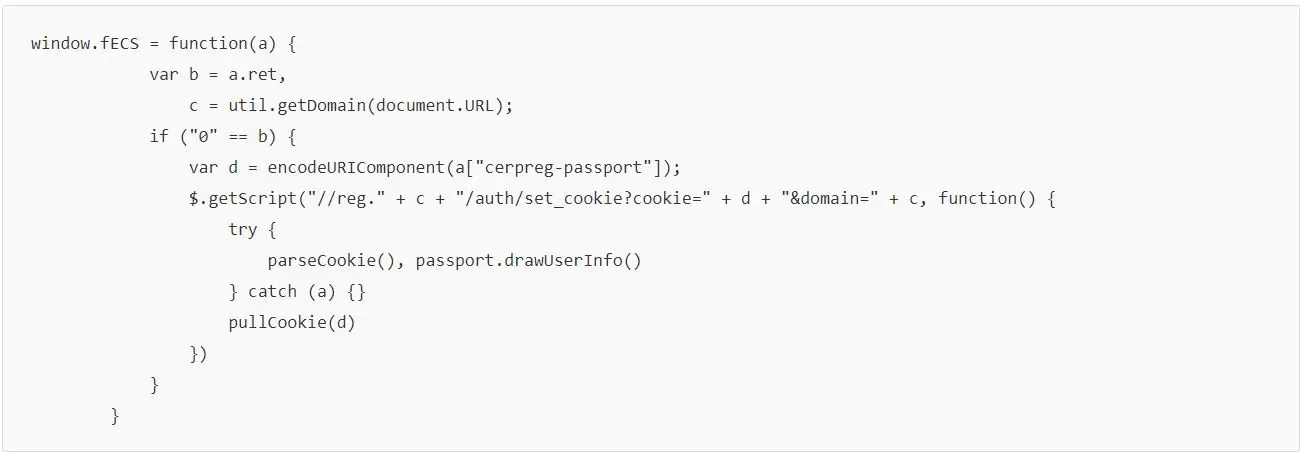
The next step was to find the JavaScript file that created this object. The researcher located that file and read its source code. In it, one function stood out: it requested the logged-in user cookies from the server and sent that cookie to the subdomain https://reg.redact.com.cn to obtain the user Id and email. The complete URL used by that function was:
https://reg.redact.com.cn/auth/setcookie?cookie=usercookie&domain=redact.com.cn
Exploitation
Step 1: Modify the JavaScript file
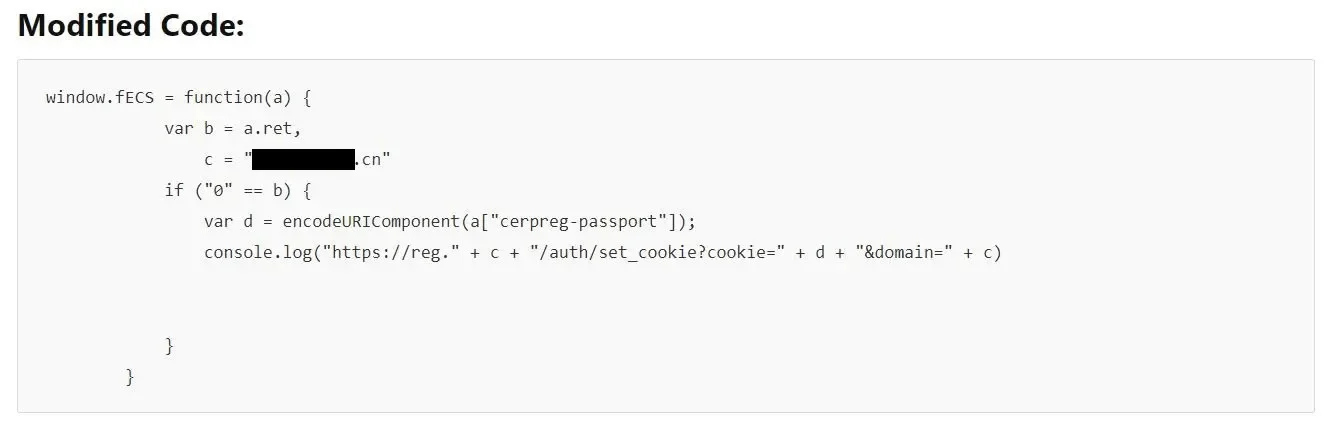
The researcher downloaded the file and changed the source so that, instead of sending the user cookie to https://reg.redact.com.cn, it logged the cookie in the console. The modified file was uploaded to the researcher's own server.
Step 2: Confirm the cookie is captured
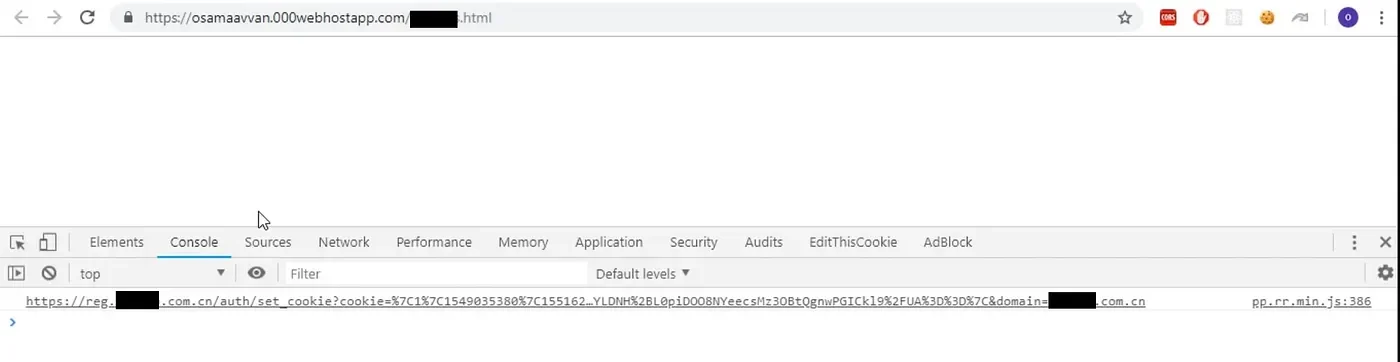
The modified file worked: the whole URL, including the cookie, was logged in the server console.
Step 3: Test whether the cookie grants access
With a cookie captured, the researcher opened the URL in an incognito window. The response was:
sum=sum+1
To confirm whether this meant a successful login, the researcher opened https://redact.com.cn and was logged in to the account. The researcher opened https://redact.com.cn and was logged in to the account.
Step 4: Deliver the modified file to a victim
To log into another user's account, the researcher only had to send that user the URL of the modified js file hosted on the researcher's server. When the victim loaded it, their cookie would be stored on the researcher's server.
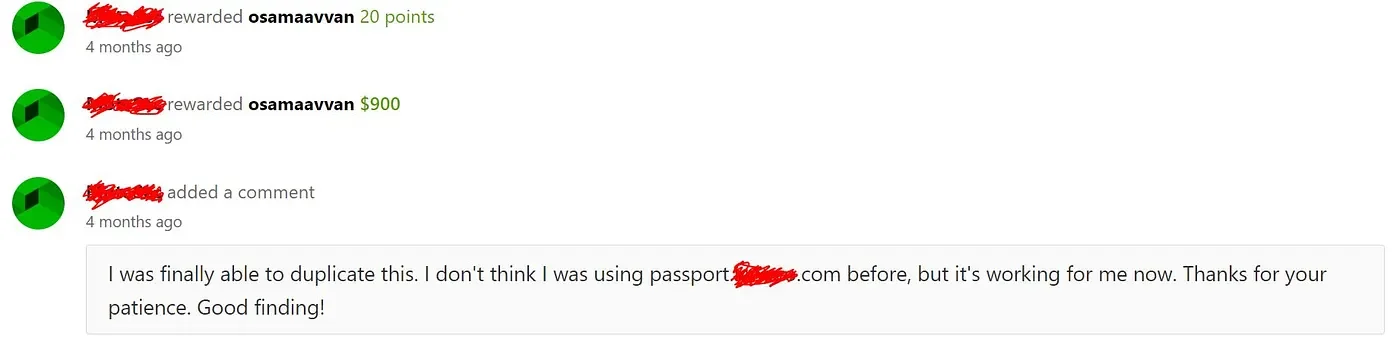
The researcher notes that the bug was hard to explain to the program and that it was a weird bug, but the wait was worth it.
Root cause
The design flaw is that the client-side JavaScript is responsible for collecting the user's cookie and transmitting it to a subdomain as a query parameter. Because the cookie is handled in JavaScript and sent in a URL, anyone who can cause the browser to load a different copy of that JavaScript file can receive the cookie instead. The report does not describe any server-side validation, origin check, integrity check or other defence that would have prevented this.
Impact
An attacker who can get a victim to load a modified copy of the JavaScript file can capture that victim's cookie and use it to log in to the victim's account. In the researcher's test, the captured cookie was enough to authenticate to https://redact.com.cn in an incognito window. The attack requires the victim to load the attacker-controlled file, for example by sending them its URL.
Fix
Based on the root cause, the cookie should not be readable by JavaScript or sent to a subdomain as a query parameter. Session cookies should be set with HttpOnly and Secure, and the user Id and email should be retrieved through an authenticated server-side call rather than by shipping the cookie to the client and back.
Variants to test
- Cookies in client-side requests. Search JavaScript bundles for cookies being read and placed into URLs or request bodies. A positive result is a request that contains a session cookie as a parameter.
- Third-party or subdomain script hosting. Look for scripts loaded from subdomains or external hosts that handle authentication data. A positive result is a script whose replacement or interception would expose a session cookie.
- Cookie scope across sibling domains. Check whether a cookie set on one domain is sent to subdomains such as
reg.example.com. A positive result is a cookie visible to a host that does not need it. - Authentication by cookie replay. Capture a session cookie and replay it in a fresh browser profile. A positive result is being logged in without any other credential.
What happened, in plain words
A security researcher found a way to log into other people's accounts on a website. The trick did not involve guessing passwords. Instead, the website's own code was quietly handing out a small piece of data called a cookie that proves who you are, and the researcher found a way to make other users' browsers hand that cookie over to a server the researcher controlled.
Here is the story in a nutshell. The website ran across several domains (think of domains as different buildings belonging to the same company). One building, https://passport.redact.com, handled logins. Another building, https://redact.com.cn, trusted the passport building to say who you are. When you logged in at the passport building, the second building let you in automatically.
The second building loaded a JavaScript file. JavaScript is the programming language that runs inside your browser and makes web pages interactive: it can react to clicks, load new content, and read data the page has access to. That particular file contained a function (a small block of code that does one job) which took the logged-in user's cookie and sent it to a subdomain, https://reg.redact.com.cn, so that the site could look up the user's Id and email.
A subdomain is a smaller address inside a main domain: in reg.redact.com.cn, the reg part makes it a subdomain of redact.com.cn. Sending data to a subdomain is normal in itself. The cookie was sent as part of the web address (the URL).
The researcher downloaded that JavaScript file, changed it so that the cookie would be logged on a server the researcher owned instead of being sent to the real subdomain, and hosted the modified copy. When a victim's browser loaded the modified file, the victim's cookie ended up on the researcher's server. The researcher then used that cookie to log in as the victim, without ever knowing the victim's password.
This kind of issue is called cookie theft: stealing the credential that a website uses to remember that you are already logged in. The report does not name the JavaScript file or the function inside it.
Background you need
Before walking through the steps, here are the ideas the report relies on, explained from scratch.
Cookies
When you log in to a website, the server needs a way to recognise you on your next request. Otherwise you would have to type your password on every single page. The usual solution is a cookie: a small piece of text that the server gives your browser, which the browser stores and sends back automatically with every request to that site. One common kind is a session cookie, which acts like a temporary wristband at an event: show it at the door and you get in without showing your ticket again.
Because a cookie is effectively a proof of identity, anyone who copies it can often pretend to be you. That is why protecting cookies matters so much.
JavaScript and the browser console
JavaScript is the code that runs in your browser. It can read some data from the page, make requests to servers, and print messages for developers. The browser console is a built-in panel (usually opened with the developer tools) where you can type JavaScript and see its output. It is a bit like a scratchpad for poking at a page: developers use it to inspect what the page is doing.
APIs and query parameters
An API (Application Programming Interface) is a way for one piece of software to ask another for something, like a waiter taking your order to the kitchen. On the web, an API is often just a URL that returns data when you call it.
A query parameter is the part of a URL after the ? sign. In https://example.com/page?name=alice, the parameter is name with the value alice. Parameters are visible in the address bar, in browser history, and in server logs, so they are a poor place for secrets.
Authentication across domains
Many companies run several websites that share one login system. You sign in once at a central authentication domain (here, https://passport.redact.com), and other sites trust that login. This is convenient, but it means a weakness on any of those sites can affect the account everywhere.
What the vulnerability class means
The bug is a form of cookie theft caused by trusting client-side code. The website's JavaScript was responsible for collecting the user's cookie and sending it onward. If an attacker can make the browser load a different copy of that JavaScript, the attacker receives the cookie instead. The report does not describe any server-side check, origin check or integrity check that would have stopped this.
Setting up
The researcher worked on a private program on Bugcrowd, a platform where companies invite researchers to test their systems. The report refers to the company as Redact to keep it anonymous.
The setup was simple:
- Create an account on
https://passport.redact.com. - Open
https://redact.com.cn. Because the passport account is used to authenticate users, the researcher was logged in automatically, without creating a separate account on that domain. - Have a browser console available, and a server controlled by the researcher to host a modified copy of the JavaScript file.
Finding it
While exploring https://redact.com.cn, the researcher typed the program name, Redact, into the browser console. This returned an object called RedactId. An object in JavaScript is a bundle of related values stored under one name, like a labelled box with several compartments. This one contained user information such as user Id and email.
Seeing that object raised an obvious question: where did it come from? The next step was to find the JavaScript file that created it. The researcher located that file and read its source code. Source code is the human-readable text that makes up a program; for a website, it is the JavaScript the browser downloads and runs.
Inside the file, one function stood out. It requested the logged-in user cookies from the server and sent that cookie to the subdomain https://reg.redact.com.cn in order to obtain the user Id and email. The complete URL used by that function was:
https://reg.redact.com.cn/auth/setcookie?cookie=usercookie&domain=redact.com.cn
Reading this URL from left to right:
https://reg.redact.com.cnis the subdomain being contacted./auth/setcookieis the path, the specific endpoint (a URL that performs a particular action) on that server.?cookie=usercookieis the first query parameter. The name iscookieand the value isusercookie, which is where the real cookie would be placed.&domain=redact.com.cnis the second query parameter, telling the endpoint which domain the cookie belongs to.
Why was this interesting? Because the cookie was being passed as a query parameter to a subdomain. Anyone who could control the JavaScript file, or the URL it was loaded from, could receive that cookie.
Exploitation
The exploitation came in four steps.
Step 1: Modify the JavaScript file
The researcher downloaded the file and changed the source so that, instead of sending the user cookie to https://reg.redact.com.cn, it logged the cookie in the console. The modified file was uploaded to the researcher's own server.
The reasoning behind this step: if the cookie is handled by code that the browser downloads, then whoever serves that code decides what happens to the cookie. By hosting a modified copy, the researcher could make the browser send the cookie somewhere else, in this case to a console on the researcher's server.
Step 2: Confirm the cookie is captured
The modified file worked: the whole URL, including the cookie, was logged in the server console.
This step was a check. Before trying to use a stolen cookie, the researcher needed proof that the modified file actually captured it. Seeing the full URL with the cookie in the server console confirmed that the mechanism worked.
Step 3: Test whether the cookie grants access
With a cookie captured, the researcher opened the URL in an incognito window. Incognito (or private) mode is a browser window that starts without your existing cookies and history, so it behaves like a fresh visitor. That makes it a fair test: if the site lets you in there, it is because of the cookie you supplied, not because you were already logged in.
The response was:
sum=sum+1
This is a short piece of text returned by the server. On its own it does not look like a login page or a dashboard, so the researcher did not assume anything from it. Instead, to confirm whether this meant a successful login, the researcher opened https://redact.com.cn and was logged in to the account. The researcher opened https://redact.com.cn and was logged in to the account.
Step 4: Deliver the modified file to a victim
To log into another user's account, the researcher only had to send that user the URL of the modified js file hosted on the researcher's server. When the victim loaded it, their cookie would be stored on the researcher's server.
The researcher only had to send the user the URL of the modified js file hosted on the researcher's server. Their browser then runs the modified code and hands over the cookie.
The researcher notes that the bug was hard to explain to the program and that it was a weird bug, but the wait was worth it.
Why it worked
The design flaw is that the client-side JavaScript is responsible for collecting the user's cookie and transmitting it to a subdomain as a query parameter. Client-side means the code runs in the user's browser, where the user (or an attacker who can influence what the browser loads) has control. Because the cookie is handled in JavaScript and sent in a URL, anyone who can cause the browser to load a different copy of that JavaScript file can receive the cookie instead.
What an attacker could do
An attacker who can get a victim to load a modified copy of the JavaScript file can capture that victim's cookie and use it to log in to the victim's account. In the researcher's test, the captured cookie was enough to authenticate to https://redact.com.cn in an incognito window. The attack requires the victim to load the attacker-controlled file, for example by sending them its URL.
How it should be fixed
Based on the root cause, the cookie should not be readable by JavaScript or sent to a subdomain as a query parameter. Session cookies should be set with HttpOnly and Secure. HttpOnly is a cookie setting that stops JavaScript from reading the cookie, so a modified script cannot grab it. Secure is a setting that makes the browser send the cookie only over encrypted HTTPS connections. The user Id and email should be retrieved through an authenticated server-side call rather than by shipping the cookie to the client and back.
Similar things to test
If you are learning to look for this kind of issue, these are the patterns worth checking:
- Cookies in client-side requests. Search JavaScript bundles for cookies being read and placed into URLs or request bodies. A positive result is a request that contains a session cookie as a parameter.
- Third-party or subdomain script hosting. Look for scripts loaded from subdomains or external hosts that handle authentication data. A positive result is a script whose replacement or interception would expose a session cookie.
- Cookie scope across sibling domains. Check whether a cookie set on one domain is sent to subdomains such as
reg.example.com. A positive result is a cookie visible to a host that does not need it. - Authentication by cookie replay. Capture a session cookie and replay it in a fresh browser profile. A positive result is being logged in without any other credential.
Glossary
- API: a way for one piece of software to ask another for data or an action, often over the web via a URL.
- Authentication domain: the website that handles logging users in, which other sites trust.
- Browser console: a panel in the browser's developer tools where you can type JavaScript and see output.
- Bugcrowd: a platform where companies invite security researchers to test their systems.
- Client-side: code that runs in the user's browser rather than on the server.
- Cookie: a small piece of text a website stores in your browser and that your browser sends back with requests, often used to remember that you are logged in.
- Cookie theft: stealing a cookie so that an attacker can impersonate the user it belongs to.
- Endpoint: a specific URL on a server that performs a particular action.
- Function: a named block of code that performs one job and can be called from elsewhere.
- HttpOnly: a cookie setting that prevents JavaScript from reading the cookie.
- Incognito window: a private browser window that starts without your existing cookies and history.
- JavaScript: the programming language that runs in web browsers and makes pages interactive.
- Object: a JavaScript value that bundles related data under one name.
- Query parameter: the part of a URL after the
?, made of a name and a value, such ascookie=usercookie. - Secure: a cookie setting that makes the browser send the cookie only over HTTPS.
- Session cookie: a cookie that represents a logged-in session, acting like a temporary pass.
- Source code: the human-readable text that makes up a program.
- Subdomain: a smaller address inside a main domain, such as
reginreg.redact.com.cn. - URL: the address of a resource on the web, such as
https://redact.com.cn. - Vulnerability: a weakness in software that an attacker can use to do something the owner did not intend.



